

Product Overview and Classification
1. Equipment type and size
Equipment type, size specifications, representative model (part number example), operating method
KP (button type) 4 “6AV2124-1DC01-0AX0 only has physical buttons
KP (button type) 7 “/9″/12 “/15” 6AV2124-1GC01-0AX0 (7 “) only has physical buttons
TP (Touch sensitive) 7 “/9″/12 “/15″/19 “/22” 6AV2124-0GC01-0AX0 (7 “) Touch screen only
KTP (composite) 4 “6AV2124-2DC01-0AX0 button+touch screen
2. Differences in hardware versions
Version size range, operating system core differences
Comfort V1 4 “-22” Windows CE 6 with dual audio sockets and Mini-B USB interface
Comfort V1.1 7 “-12” Windows CE 6 with audio output only, Mini-B USB interface
Comfort V2 15 “-22” Windows Embedded Compact 2013 without Mini-B USB interface, performance improvement
3. Core hardware features
Display screen: 16 million color TFT widescreen, resolution 480 × 272 (4 “) -1920 × 1080 (22”), backlight life 30000-80000 hours
Communication interface:
PROFINET:10/100Mbps(4″-12″)、10/100/1000Mbps(15″-22″), Support circular topology
PROFIBUS DP: Maximum transmission rate of 12Mbps, RS422/485 interface
USB: Type A (peripheral devices), Mini-B (debugging, V2 not available)
Protection level: IP65 on the front (after installation), IP20 on the back
Safety regulations and usage restrictions
1. Warning level and meaning
Example scenario of warning sign meaning
Danger (DANGER) Failure to take measures may result in death/serious personal injury. When the cabinet is electrified, it may open and come into contact with lethal voltage
Warning: Failure to take measures may result in death/serious personal injury. In explosion-proof areas, live plug and unplug connectors may cause explosions
Caution (CAUTION) Failure to take measures may result in minor personal injury, sharp objects scratching the touch screen
Caution: Failure to take measures may result in property damage, failure to follow the connection sequence, and equipment damage
2. Key safety requirements
Electrical safety: Only supports 24VDC power supply (voltage range 19.2V-28.8V) and must comply with SELV/PELV circuit requirements (IEC/EN 61131)
Use in explosion-proof areas:
Only Ex certified models are available for Zone 2/22 zones
Do not plug or unplug connectors or memory cards with power on
Ensure that the plug is secure against loosening (such as fixing the USB interface with a cable tie)
Environmental restrictions:
Only for indoor industrial use, prohibited for use in residential areas
Avoid high radio frequency interference (such as mobile phones), corrosive gases, and strong electromagnetic radiation
Equipment installation and connection
1. Key parameters for installation preparation
Prepare project requirements remarks
Installation opening size 4 “(KTP400): 122 × 98mm; 7” (TP700): 197 × 141mm, etc. Vertical installation requires exchanging width and height
Material thickness of 2mm-6mm ensures protection level of IP65
The heat dissipation gap should be ≥ 15mm on both sides, ≥ 50mm on the top and bottom, and ≥ 10mm on the back to avoid equipment overheating
Installation tilt angle: horizontal ± 35 °, vertical ± 35 ° (touch only). The 7 “-15” model can be extended to 40 ° under specific conditions
2. Connection sequence and specifications
Equipotential bonding: Use copper/galvanized steel wires with a cross-sectional area of ≥ 16mm ², and the wire between the grounding bar and the equipment should be ≥ 4mm ²
Power connection:
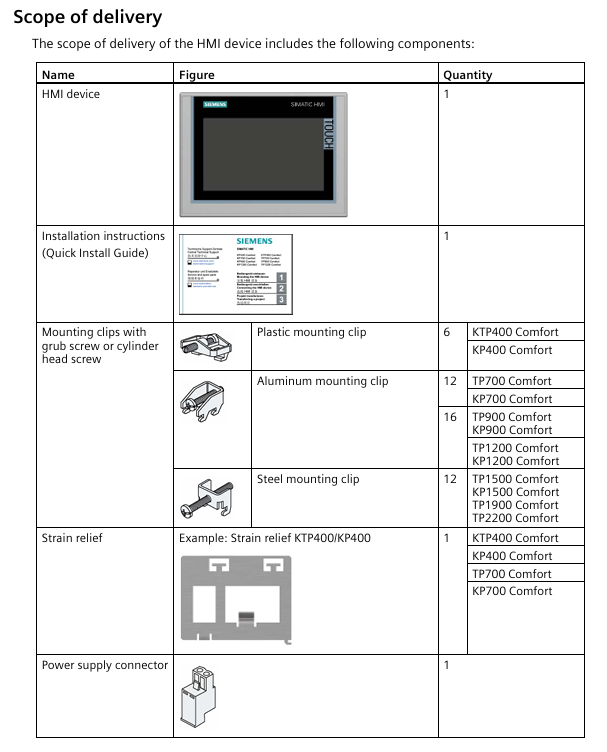
The power plug supports a maximum of 1.5mm ² wire and a torque of 0.5-0.6Nm
Equipped with reverse polarity protection to prevent damage to equipment caused by reverse connection
Controller connection:
Support SIMATIC S7-200/300/400/1200/1500 and third-party controllers (such as Allen Bradley)
PROFINET requires a unique device name to be configured, and PROFIBUS requires a bus address (1-126) to be set
Peripheral device connection:
USB devices (mouse/keyboard/printer): wire length ≤ 1.5m, USB 2.0 or above certification
Audio equipment: Connected through Line Out interface, production environment requires shielded cables
Equipment debugging and configuration
1. Core debugging function
Memory management:
Memory: stores OS, project files, licenses, prohibits circular write access
SD/MMC card: Recommended SIMATIC HMI storage card (≥ 2GB) for data archiving and backup
System memory card: only SIMATIC HMI card (≥ 2GB), supports automatic backup, quick fault recovery
Control panel settings:
Display settings: brightness (25% -100%), screen orientation (horizontal/vertical), touch screen calibration
Network settings: IP address (static/DHCP), PROFINET device name, NTP time synchronization
Security mode: Password protected control panel to prevent unauthorized modifications
2. Service and maintenance functions
Key points of functional operation
Backup/restore supports WinCC or ProSave tools, backup file format *. psb, including project, recipe, license
OS updates require external storage media or configuration PC, and automatic backup must be disabled before updating to avoid data loss
Automatic backup activated after inserting the system storage card, real-time synchronization of device data, and can be restored by inserting a replacement device in case of failure
Touch screen calibration uses a touch pen to calibrate 5 points, confirm and save within 30 seconds to ensure precise operation
Project commissioning and operation
1. Project transmission and testing
Transmission method:
Manual transmission: Select “Download to device” through WinCC and configure PROFINET/Ethernet channels
Automatic transmission: Used during debugging phase, it is recommended to disable it after commissioning to avoid accidental triggering
Test type:
Offline testing: Communication without controller, verifying interface layout and operational logic
Online testing: Connect the controller to verify measurement value updates, alarm triggering, and communication stability
2. Core operational functions
Numerical input:
Touch sensitive: Pop up on-screen keyboard (alphanumeric/pure numeric), supports range verification
Key press: System key press the phone keyboard logic input, long press to enter numbers
Function key operation:
Global function key: Effective for all projects (such as alarm confirmation)
Local function keys: only effective for the current screen (such as switching between sub screens)
Language switching: Supports up to 32 languages, requires configuration of corresponding operating components, and takes effect immediately after switching
Maintenance and Technical Specifications
1. Daily maintenance requirements
Cleaning: Turn off the power or lock the touch screen, wipe with a cloth dipped in neutral cleaner, and avoid solvents such as compressed air and alcohol
Spare parts replacement: Only use Siemens certified spare parts (such as assembly clips, memory cards), and contact official technical support for any malfunctions
Recycling and disposal: processed by compliant electronic waste recycling enterprises, in compliance with local environmental regulations
2. Key technical parameters (taking TP1500 Comfort V2 as an example)
Project specifications
Display screen with 15 “TFT, 1280 × 800 resolution, 16 million colors, backlight life of 50000 hours
Communication interface 2 x PROFINET (1 x 10/100Mbps, 1 x 10/100/1000Mbps), 1 x PROFIBUS DP
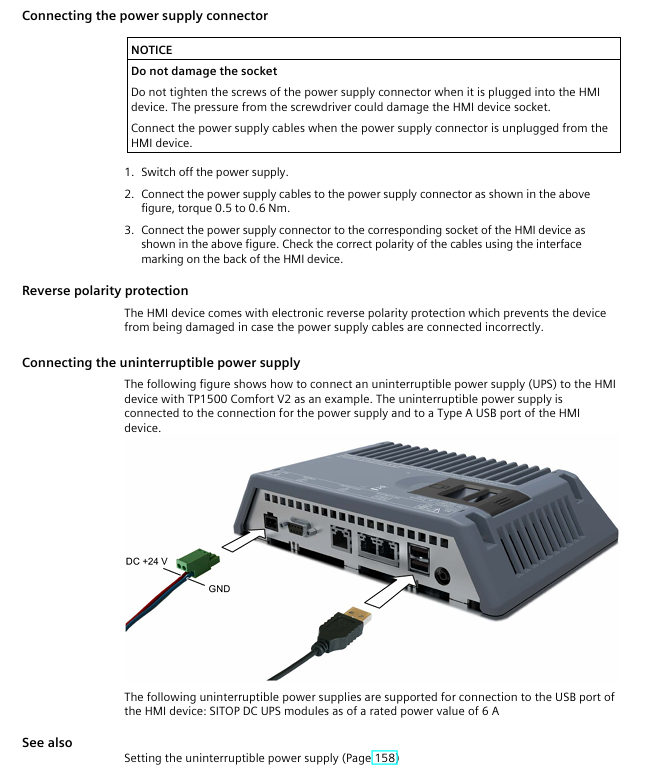
Power supply 24VDC, current 1.7A (load related 1.45-2.1A), power 41W
Working temperature 0-50 ℃ (horizontal), 0-40 ℃ (inclined at 35 ° C)
Protection level: IP65 on the front and IP20 on the back
Leave a comment
Your email address will not be published. Required fields are marked *