

The operation manual for Siemens SIMATIC NET series CP 5613 A2/CP 5614 A2 communication processors introduces the hardware features, software installation, hardware installation, configuration methods, and technical parameters of two products. Both products support PROFIBUS bus (transmission rate 9.6 kbps-12 Mbps) and PCI interface (3.3V/5V adaptation), which can be used as DP master/slave to connect PC and PROFIBUS network. CP 5614 A2 adds an additional PROFIBUS interface to support dual network connection, which can be configured through SIMATIC NET PC software or STEP 7 and is suitable for industrial automation communication scenarios. It has multiple certifications such as EMC Class B and UL/CSA.
Product basic information
Project CP 5613 A2 CP 5614 A2 Common Features
Core positioning: Single interface PROFIBUS communication processor, dual interface PROFIBUS communication processor, connecting PC and PROFIBUS network
Order number 6GK1 561-3AA01 6GK1 561-4AA01 complies with PCI V2.2 standard
Number of interfaces: 1 PROFIBUS interface (RS-485), 2 PROFIBUS interfaces (master and slave), 9-pin D-sub female connector
Unique feature – supports dual network connection, master-slave simultaneous operation, supports DP master/slave mode switching
Weight 105g 120g Size 107 × 18 × 168mm (Short PCI format)
Core hardware features
1. Interface and network capabilities
PROFIBUS interface: using RS-485 floating interface, supporting SEL restricted operation, non floating design of shielding layer
Network nodes: Up to 32 devices per network segment, and up to 64 nodes per multiple network segments (including repeaters)
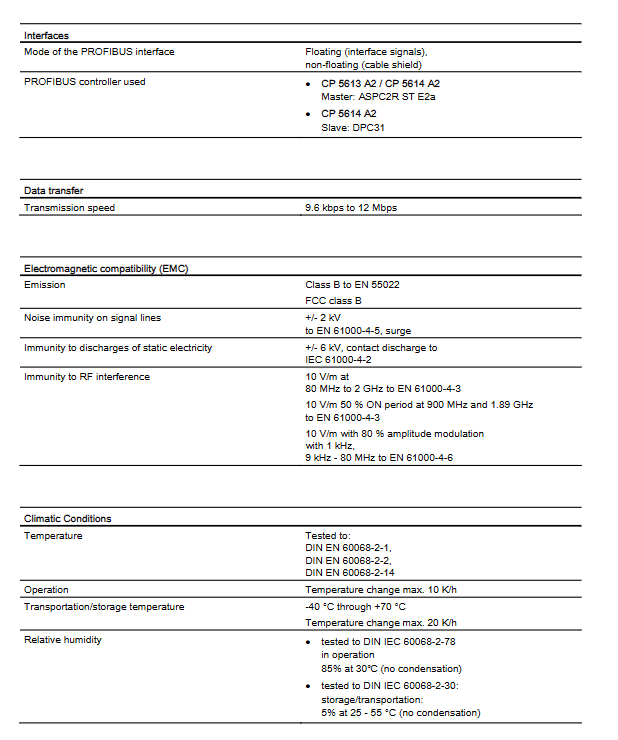
Transmission rate: 9.6 kbps-12 Mbps, automatically adapted to bus speed
Pin definition: Pin 3 (LTG_B) and Pin 8 (LTG_A) are signal lines, Pin 6 (P5EXT) provides+5V power supply (maximum 90mA load)
2. LED indicator light status
LED status function meaning applicable mode
Green light always on, token cycle normal, DP master station
Green light off, bus parameter error/bus fault/module not running DP master station
Green light flashing for 1 second, database error DP master station
The yellow light is constantly on, and it is queried by the superior DP master station and DP slave station
The yellow light has turned off and DP slave has not been assigned an address
Red yellow synchronous flashing firmware error (abnormal state) universal
Red yellow alternating flashing diagnostic tool addressing (installation check) universal
Red light rapid flashing module not started (normal state after reset) Universal
3. Bus and power supply
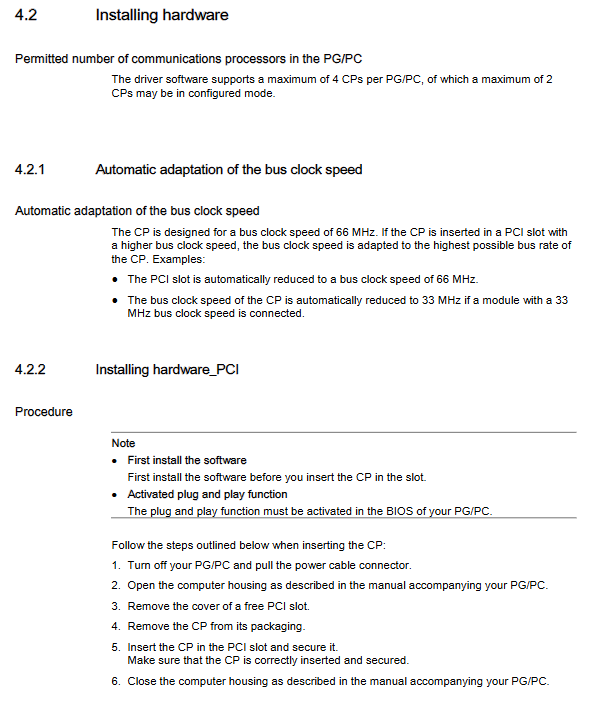
Bus adaptation: Supports PCI/PCI-X slots, compatible with 3.3V/5V voltage, 33/66 MHz bus clock, 32/64 bit width
Power supply specifications: 5VDC (4.75-5.25V), current consumption of 0.8A (5613 A2) and 0.9A (5614 A2) respectively
Bus clock adaptation: When a higher clock rate slot is inserted, it automatically drops to the highest speed supported by the module (such as 66 MHz)
Software installation and uninstallation
1. Software requirements
Essential software: SIMATIC NET PC software (version 11/2003 and above) or Developer Kit V3.1
Alternative software: STEP 7 V5.5, STEP 7 Professional V11
Configuration tool: STEP 7, NCM PC (requires cooperation with the “Commissioning PC Stations” manual)
2. Installation process
Prerequisite: Enable the BIOS Plug and Play function of PG/PC
Software installation: Install the software according to the SIMATIC NET PC Software manual (Entry ID: 61630923)
Hardware installation:
Turn off the PG/PC power and unplug the power cord to release static electricity
Open the chassis and remove the cover plate of the idle PCI slot
Insert the module and secure it, ensuring a secure installation
Close the chassis, power on and start the device
Driver recognition: Windows Hardware Wizard automatically searches for drivers, network search is prohibited
3. Uninstalling process
Software uninstallation: Remove the entire program (including drivers) through SIMATIC NET PC software uninstallation
Attention: Uninstalling will delete all SIMATIC NET PC software, not individual drivers
Configuration and compatibility
1. Configuration points
Configuration tool: Use STEP 7 or NCM PC to create a configuration. For detailed steps, refer to Entry ID: 13542666
Mode setting: Can be configured as a DP master station (supporting 124 DP slaves with completely consistent data) or a DP slave station
Configuration restriction: DP slave configuration of CP 5613 A2 cannot be downloaded to CP 5614 A2 for use
2. Compatibility Description
Alternative compatibility: Can directly replace the old CP 5613/5614 without modifying the configuration (old modules need to be removed first)
Multi module support: A single PG/PC can support up to 4 CPs, of which up to 2 can be in configuration mode
Hardware compatibility: Supports tilted installation, which is allowed in some PG/PC designs
Technical parameters and certification
1. Key technical parameters
Category parameter values
Electromagnetic compatibility (EMC) emissions: Class B (EN 55022), FCC Class B; Immunity: Signal ± 2kV surge (EN 61000-4-5), static ± 6kV contact discharge (IEC 61000-4-2)
Working temperature under environmental conditions: 0-60 ℃ (temperature variation ≤ 10K/h); Storage/transportation temperature: -40-70 ℃ (temperature change ≤ 20K/h); Working humidity: 85% (30 ℃ without condensation)
Mechanical characteristic vibration: 58-500Hz, 4.9m/s ² (3-axis, EN 60068-2-6); Impact: 50m/s ² (5g), 30ms (3-axis, EN 60068-2-27)
2. Certification standards
International certifications: EMC Directive 2004/108/EEC, UL 60950-1, CSA C22.2 No. 60950-1, FCC Class B, ICES-003
Regional certification: Australian AS/NZS 3548, C-TICK certification
Compliance document: EC declaration of conformity can be queried through Entry ID: 63367995
Leave a comment
Your email address will not be published. Required fields are marked *