

Product Overview
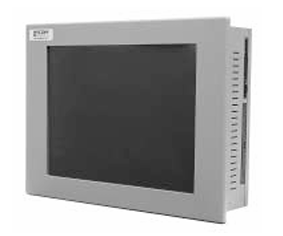
Xycom Automation PL3115T Industrial Touch Monitor is a high-performance touch display designed specifically for industrial environments. In the current era of accelerating industrial automation, the requirements for human-machine interaction interfaces in industrial equipment are becoming increasingly stringent, requiring display devices that can operate stably and accurately under complex working conditions.
The PL3115T, with its 15 inch high-definition touch screen, stable data transmission performance, and excellent environmental adaptability, has become a bridge for efficient communication between industrial field operators and equipment. It can be widely used in industrial production line monitoring, mechanical manufacturing equipment operation, energy management systems and other scenarios, helping users to obtain real-time equipment operation information, conveniently set parameters and issue instructions, effectively improving the efficiency and safety of industrial production.
Xycom Automation industrial computers (IPCs) are designed to provide processing power and versatility.
The 3115T IPC offers a powerful processor with a wide range of features and an expansion slot.
The 3115T also meets the rigorous require ments of the plant floor with a high-resolution
flat panel display in a rugged housing ideal for today’s manufacturing environment.
Higher Performance
The 850 MHz Intel Pentium III CPU drives the fastest and most de manding applications.
Preloaded Operating Systems
All 3115T systems come standard with either Windows NT or Windows 2000.
Windows 98 and MS-DOS are also avail able.
Sharp, Easy-to-Read Displays
A bright 15″ TFT screen can display complex op erations with clarity.
Full Complement of I/O Ports
The 3115T comes standard with an extensive array of I/O ports (see above), including three high-speed RS-232 ports, one configurable RS-232/422/485 port, two SPP/EPP/ECP parallel ports, two USB ports(one using DOS), one PS/2 mouse/keyboard port,one 10/100 Mbps Ethernet port (not available with DOS), one VGA port, and audio I/O (input, output,and mic). The PS/2 port can be connected to a mouse or a keyboard, or it can be connected to both using the supplied Y-cable.
The VGA port can be used to connect a VGA monitor, with or without using the built-in display (which
can be turned off). The built-in display and an external monitor can be used together in mirror mode
(both show the same image) or multi-monitor mode (both show different images).
Mounting Options
The 3115T is designed to be mounted directly into an equipment panel without requiring special
mounting plates or brackets. It can also be mounted on a wall with the wall-mount adapter included in the mounting kit or it can be mounted on a standard 75/100 mm VESA swing or pendent arm.
The 3115T is not NEMA rated if mounted outside of a panel.
FEATURES 15” flat panel TFT XGA (1024×768) color display
Analog resistive touchscreen
850 MHz Intel ® Pentium ® III CPU with 100 MHz Front System Bus and 256 KB
cache 256 MB SDRAM (512 MB optional)
Video RAM configurable to 64 MB (uses system SDRAM)
VGA port for remote monitor
Dual view option to use remote monitor and built-in display simultaneously
Preloaded with MS-DOS ®, Windows ® 98, Windows NT ®, or Windows 2000
One half-length PCI expansion slot 20 GB 2.5″ hard drive, floppy drive
CD-ROM drive
Type II CompactFlash card slot (can accommodate IBM Microdrive )
Two RS-232 ports
One configurable RS-232/422/485 port
Two SPP/EPP/ECP parallel ports
Two USB (v.1.1) ports (one using DOS)10Base-T/100Base-TX Ethernet (not
available with DOS)Audio input/output/mic
PS/2 keyboard/mouse port (Y-cable included)
Software programmable watchdog timer
Mounted with mounting clips or stan dard 75/100 mm VESA arm
Power cable and drivers included
Key advantages
(1) Convenient and efficient operation
Accurate touch operation and intuitive interface design enable operators to quickly get started and proficiently use without complex training. In industrial production, it can significantly reduce operating time and improve production efficiency. For example, in emergency situations, operators can quickly issue commands by touching the screen, promptly handle equipment failures or abnormal situations, and avoid losses caused by production interruptions.
(2) Strong compatibility and scalability
Multiple industrial standard communication interfaces and extensive protocol support endow the PL3115T with excellent compatibility. It can seamlessly integrate with mainstream industrial equipment and control systems in the market, making it easy to adapt to both new equipment integration and old system upgrades. At the same time, its open architecture also supports users to conduct secondary development according to their actual needs, add personalized functional modules, meet the diverse needs of different industrial scenarios, and save system integration costs and time for enterprises.
(3) High reliability and long lifespan
Strictly follow industrial standards for design and manufacturing, select high-quality electronic components and sturdy and durable housing materials, and undergo multiple rigorous tests such as high temperature, low temperature, vibration, electromagnetic interference, etc. In industrial production environments that operate continuously for a long time, the failure rate is low, which can effectively reduce equipment downtime and lower maintenance costs for enterprises. In addition, Xycom’s comprehensive after-sales service system can provide users with timely technical support and maintenance services, ensuring stable product operation and extending service life.
Precautions
(1) Installation requirements
Before installation, all power sources must be disconnected and anti-static equipment such as a wristband must be worn to prevent static electricity from damaging the internal components of the monitor. According to the instructions in the product installation manual, fix the monitor in the appropriate position to ensure a secure installation and prevent equipment loosening or damage caused by vibration or collision. The installation environment should be kept dry, well ventilated, and away from high temperatures, humidity, strong magnetic fields, and corrosive gas environments. When connecting communication cables and power cords, ensure that the interface is tightly connected and oriented correctly to avoid abnormal data transmission or equipment failure caused by poor contact or reverse connection.
(2) Usage standards
Non professionals are strictly prohibited from arbitrarily changing the hardware settings and software parameters of the monitor. If parameters need to be adjusted, professional technicians must follow the instructions in the product manual while the power is off. During device operation, avoid frequent plugging and unplugging of communication cables or other external devices to prevent instantaneous current surges from damaging internal circuits. Regularly use a clean, soft dry cloth to wipe the screen and housing, remove dust and stains, and do not use corrosive cleaning agents to avoid damaging the screen surface coating or housing material.
(3) Maintenance and troubleshooting
Regularly check the operation status of the monitor, including whether the screen display is normal, whether the touch operation is sensitive, and whether the communication is stable. If there are faults such as black screen, blurred screen, and unresponsive touch, first check whether the power connection and communication cable are loose or damaged, and try unplugging the cable again to solve the problem. If the fault persists, refer to the troubleshooting guide in the product manual for further inspection, such as checking device parameter settings, updating driver programs, etc. For complex faults, it is necessary to promptly contact Xycom’s official technical support personnel or professional maintenance personnel. Do not disassemble the equipment yourself to avoid expanding the scope of the fault or losing warranty eligibility. At the same time, it is recommended to regularly backup important data and set parameters in the monitor to prevent data loss due to equipment failure.
Leave a comment
Your email address will not be published. Required fields are marked *