Call us 24/7uaedcs@163.com
Welcome to the official website of CNIACS Automation Technology Co., Ltd!
Call us 24/7uaedcs@163.com

Installation Guide for GE Hydran M2 Transformer Gas

Product Overview

Hydran M2 is a transformer gas monitoring system launched by GE Energy, which is used to monitor the gas content (such as hydrogen) and humidity level in transformer oil in real time. By analyzing changes in gas concentration, the operating status of transformers can be determined, and potential faults (such as insulation aging, partial discharge, etc.) can be warned in a timely manner. The system supports network communication and can be connected to the monitoring center, suitable for online monitoring of various types of power transformers.

Safety Warning and Precautions

General safety requirements

Installation and maintenance must be carried out by qualified professionals, and the power station operator must be notified before operation to avoid triggering false alarms due to parameter modifications, power outages, etc.

The power cable needs to use a 2.08 mm ² (14-AWG) specification, with a maximum distance of 15 meters (50 feet) from the power source, and equipped with overcurrent protection.

Do not touch the sensor membrane, block the breathing hole, or puncture the breathing hole membrane to avoid damage to the sensor.

When installing, it should be placed horizontally, and tilting, vertical installation, or using bends are prohibited. Avoid installing on the inlet side of the radiator pump, bends, or accessory boxes.

Do not use high-pressure water flow to rinse equipment, spray paint, or clean sensors with solvents to avoid affecting monitoring accuracy or damaging equipment.
Multi language security warning

The manual is annotated with safety warnings in six languages: English, French, Spanish, German, Italian, and Swedish, emphasizing that unauthorized operations may result in equipment damage, property damage, or personal injury.

Installation process

1. Installation preparation

Tool preparation: GE provides tools including 3/16 inch hex wrenches, 1/16 inch and 5-32 inch hex L-shaped wrenches, wrenches, PTFE tape, etc; The installer needs to bring their own screwdriver, adjustable wrench, wire stripping pliers, water bucket, and cloth, etc.

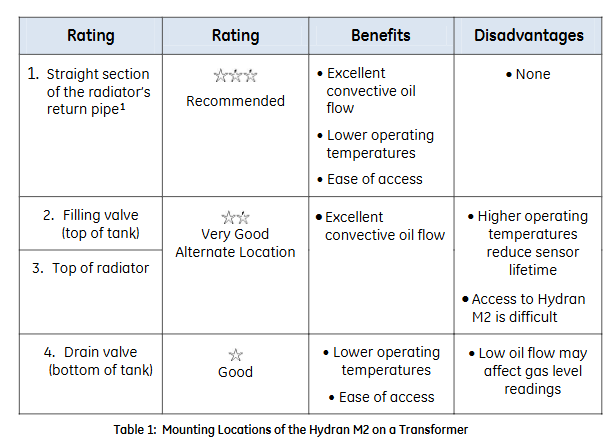
Installation location selection: It is recommended to install on the straight section of the radiator return pipe (with good convective oil flow, low temperature, and easy maintenance). Alternative locations include the top oil injection valve, radiator top, and bottom drain valve (note the impact of oil flow on readings). During installation, it is necessary to ensure that the bottom clearance meets the requirements (84 mm space, see Figure 11).

2. Sensor installation

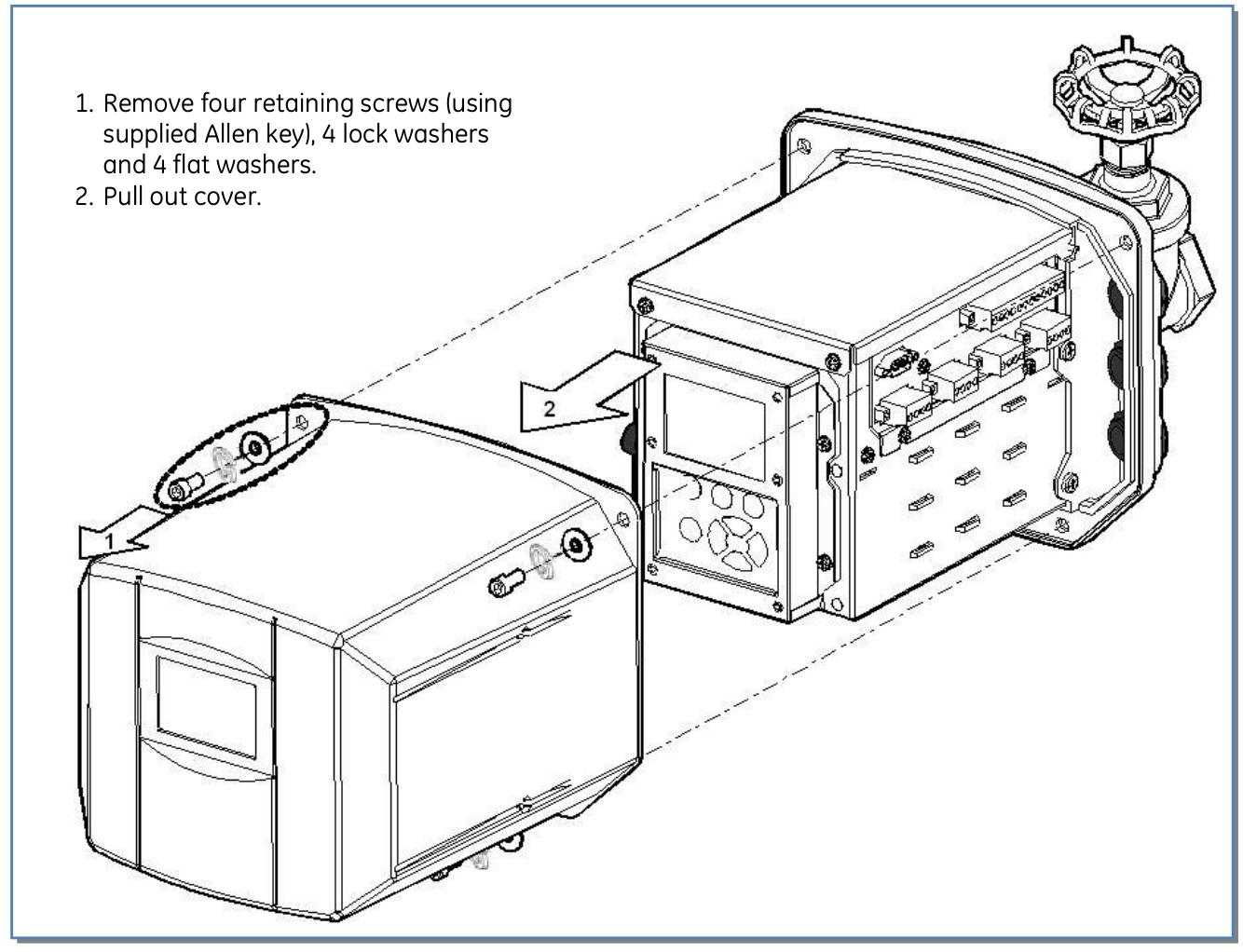
Separate the sensor from the housing: Remove the fixing screws and clips, carefully pull out the sensor, and disconnect the sensor cable (rotate the connector 1/8 turn and pull out).

Sensor sealing: Wrap PTFE tape around the sensor thread, manually install the sensor onto the valve, and tighten it with an adjustable wrench.

Exhaust operation: Ensure that the air release screw is located at the 12 o’clock position, slowly open the valve, exhaust the air inside the sensor (collect the oil into the water bucket), then tighten the air release screw and clean the residual oil.

Connecting the casing: Insert the sensor cable connector into the sensor, rotate and fix it, push the casing onto the sensor (to avoid squeezing the cable), install the clip and tighten the fixing screw.

Grounding treatment: Use 10-6 AWG copper wire to connect the housing grounding terminal to the grounding electrode.

3. Cable installation and wiring

Cable conduit: Install waterproof conduit fittings (1/2 inch NPT, PG-13, or M20), metal conduit must be grounded, and unused openings must be sealed.

Wiring terminals:

Analog input: Supports self powered, two-wire/three wire loop power supply sensors, connected according to terminal identification (see Figure 23-26).

Analog output: 4-20 mA or 0-1 mA output, connected to SCADA system (see Figure 27-29).

Alarm relays: 5 SPDT relays configured with software, corresponding to normally open, normally closed, and common terminals (see Figure 30).

Power supply: The AC power supply needs to be connected to the live wire (L), neutral wire (N), and ground wire (ground terminal), and equipped with a fuse holder (see Figure 31).

4、 Software configuration

User interface operation

Configure through the LCD display screen and buttons (Esc, Enter, directional keys, function keys), with menus including alarm settings, reading viewing, system settings, testing, service, etc. (see Figure 32-33).

Key parameter settings

Date and Time: Set in “Setup → Date&Time” to ensure time synchronization.

Sensor test: Execute in “Service → Gas Sensor Test” and there is no reading within 2 minutes after the test.

Shutdown process: It is recommended to exit all programs first, run “Backup” to save settings, and then restart or disconnect the power to avoid data loss.
Hardware and Interface

1. Core hardware configuration

Processor: Intel XScale PXA255 300 MHz.

Memory: 32 MB DRAM (divided into system, program, and storage memory), 32 MB Flash storage (including operating system and user program areas), 512 KB battery backup SRAM (data power off reserved).

Display:

10 “monochrome model: 640 × 480 resolution, 256 levels of grayscale, passive display.

12 “model: 800 × 600 resolution, color model supports 32768 colors, monochrome model supports 256 levels of grayscale, both are TFT active displays.

Touch screen: resistive, 12 bit resolution, supports stylus or finger operation, requires calibration to ensure accuracy.

2. Interfaces and extensions

Communication interface:

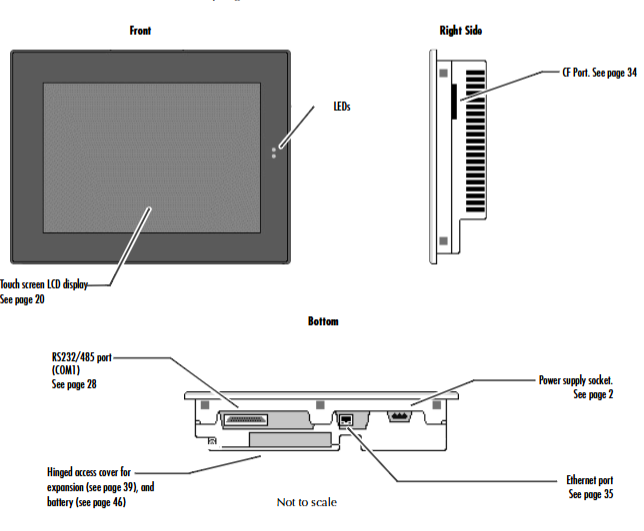
COM1: DB25 female interface, supporting EIA232 C/EIA485 standard, with a maximum speed of 115200 bps, can be used for serial communication or terminal simulation.

Ethernet: RJ45 interface, supports 10/100BaseT adaptation, includes 2 status LEDs, supports TCP/IP protocol and network connection.

CF card slot: Supports Type II Compact Flash cards, expandable storage or adding functional modules (such as wireless network cards).

Expansion bus: Built in expansion slot, supports optional expansion modules (requires opening the back cover for installation).

Other interfaces: 4 external USB 2.0 ports, 1 internal USB port, VGA display interface (12 “model including Display Port).

Software and Operations

1. Operating system and core functions

Operating System: Windows CE. NET 4.1, supports 32-bit applications, compatible with Windows series operating logic, simplifies development and operation.

Key tools:

Backup: Save the registry and desktop settings to Flash to ensure that the configuration is not lost after power failure.

Storage Manager: Manage storage devices (CF cards SRAM), Support repair or formatting.

System Information: Display device hardware, system version, and other information to assist in troubleshooting.

Pocket Internet Explorer: Browse web pages, supports JavaScript, can configure proxy servers and dial-up connections.

2. Network and Communication Configuration

IP address setting: Supports DHCP automatic acquisition or manual configuration, which needs to be set through “Network and Dial up Connections”.

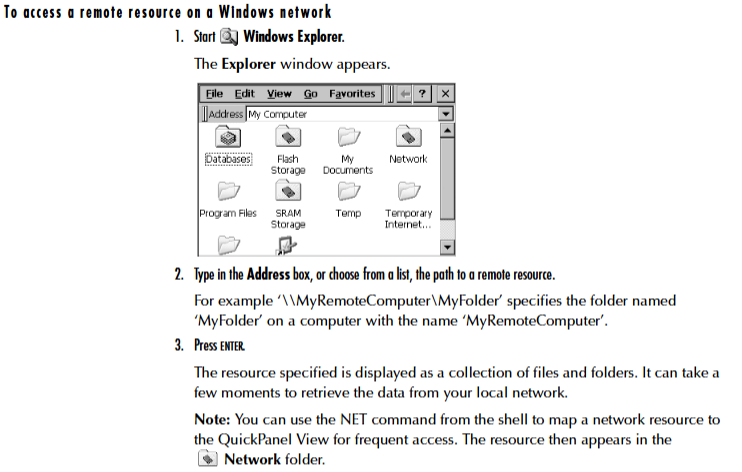
Windows network access: Device name, user information, and domain need to be configured to access network shared resources through Windows CE Explorer.
GE 10 “/12” QuickPanel View

Product Overview

10 “/12” QuickPanel View is a compact industrial grade human-machine interface (HMI) computer based on Microsoft Windows CE. NET operating system, suitable for real-time monitoring and operation in factory workshops. It integrates a high-resolution touch screen, multiple communication interfaces, and expansion functions, supporting HMI application operation, data storage, and network communication. It has a sturdy and durable design that can adapt to harsh conditions such as dust and vibration in industrial environments.

Basic setup and installation

1. Hardware installation

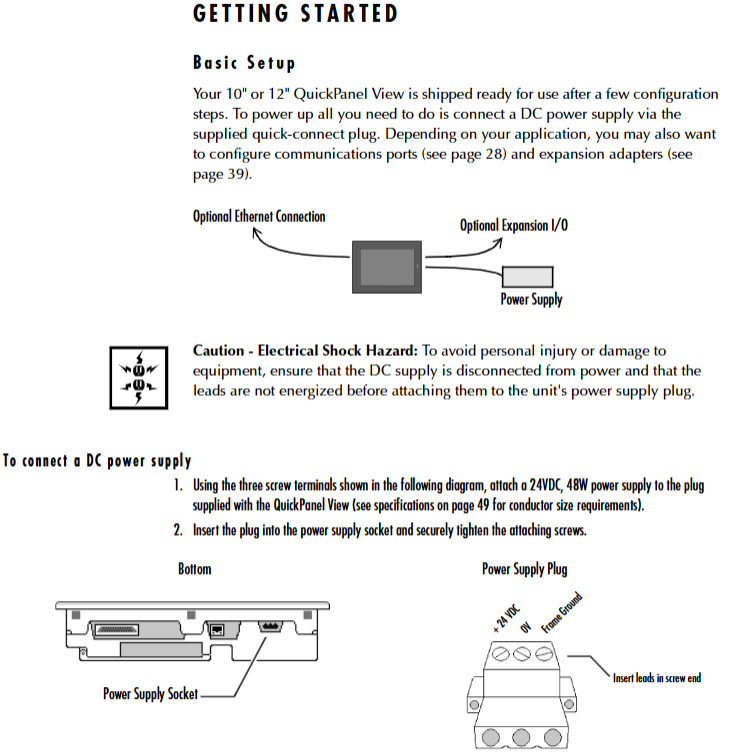
Power connection: A 24VDC power supply (48W) needs to be connected and wired through the three screw terminals of a dedicated plug to ensure that the power supply has been disconnected before wiring.

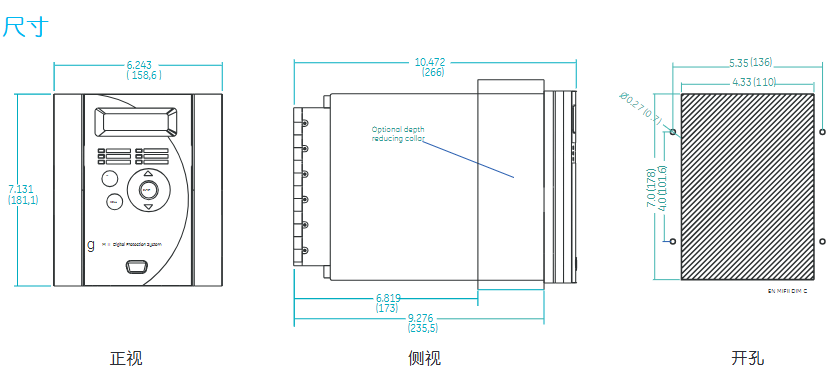
Panel installation: It is necessary to cut openings on the installation panel that meet the size requirements (10 “model: 8.96” × 11.88 “; 12” model: corresponding size), and use the attached 10 mounting clips to fix them. The torque range is 2.6-4.4 inches/pound (0.3-0.5 Nm).

Protection requirements: After installation, it is necessary to ensure that the front panel sealing ring is intact to meet NEMA 4, 4X, and 12 protection levels (corresponding levels of panels or enclosures need to be matched).

2. Startup and shutdown

Startup process: After the first power on, the startup interface will be displayed, and after 5 seconds, it will automatically enter the Windows CE desktop. Basic parameters such as display, touch screen, clock, and network need to be configured, and “Backup” should be run to save the settings.

Shutdown process: It is recommended to exit all programs first, run “Backup” to save settings, and then restart or disconnect the power to avoid data loss.

Hardware and Interface

1. Core hardware configuration

Processor: Intel XScale PXA255 300 MHz.

Memory: 32 MB DRAM (divided into system, program, and storage memory), 32 MB Flash storage (including operating system and user program areas), 512 KB battery backup SRAM (data power off reserved).

Display:

10 “monochrome model: 640 × 480 resolution, 256 levels of grayscale, passive display.

12 “model: 800 × 600 resolution, color model supports 32768 colors, monochrome model supports 256 levels of grayscale, both are TFT active displays.

Touch screen: resistive, 12 bit resolution, supports stylus or finger operation, requires calibration to ensure accuracy.

2. Interfaces and extensions

Communication interface:

COM1: DB25 female interface, supporting EIA232 C/EIA485 standard, with a maximum speed of 115200 bps, can be used for serial communication or terminal simulation.

Ethernet: RJ45 interface, supports 10/100BaseT adaptation, includes 2 status LEDs, supports TCP/IP protocol and network connection.

CF card slot: Supports Type II Compact Flash cards, expandable storage or adding functional modules (such as wireless network cards).

Expansion bus: Built in expansion slot, supports optional expansion modules (requires opening the back cover for installation).

Other interfaces: 4 external USB 2.0 ports, 1 internal USB port, VGA display interface (12 “model including Display Port).

Software and Operations

1. Operating system and core functions

Operating System: Windows CE. NET 4.1, supports 32-bit applications, compatible with Windows series operating logic, simplifies development and operation.

Key tools:

Backup: Save the registry and desktop settings to Flash to ensure that the configuration is not lost after power failure.

Storage Manager: Manage storage devices (CF cards SRAM), Support repair or formatting.

System Information: Display device hardware, system version, and other information to assist in troubleshooting.

Pocket Internet Explorer: Browse web pages, supports JavaScript, can configure proxy servers and dial-up connections.

2. Network and Communication Configuration

IP address setting: Supports DHCP automatic acquisition or manual configuration, which needs to be set through “Network and Dial up Connections”.

Windows network access: Device name, user information, and domain need to be configured to access network shared resources through Windows CE Explorer.
GE PACSystems RXi EP Box type Industrial Computer (IPC)

Product Overview

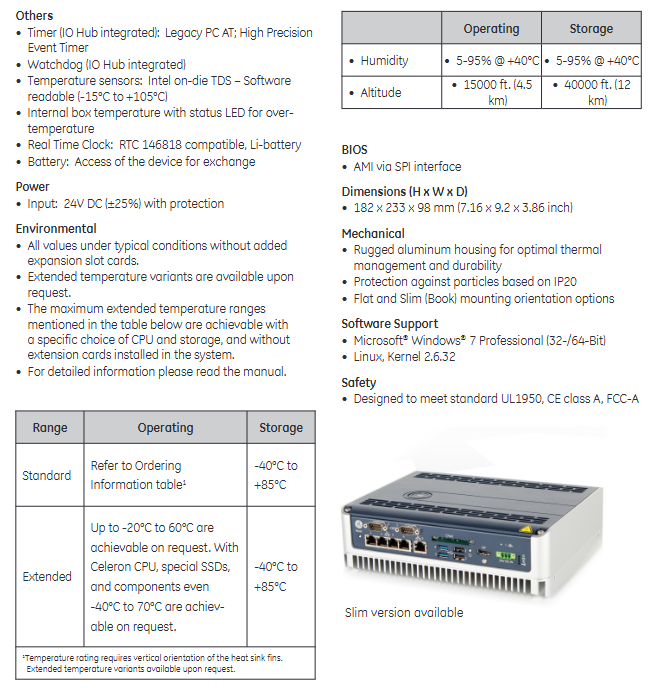
The GE PACSystems RXi EP Box type Industrial Computer (IPC) is a high-performance, ruggedized industrial computing platform designed for harsh industrial environments. It can run HMI, historical data recording, and analysis applications, achieving device level real-time control and plant wide system integration. As a mid-range product of the RXi series, its core features include high-performance computing, flexible scalability, high reliability, and low total cost of ownership (TCO).

Core Features and Advantages

Characteristic specific parameter advantages

High performance processors can be selected from Intel Celeron (1.4 GHz) and Intel Core i7 (1.7 GHz) to meet high-performance requirements such as big data processing and real-time operation of multiple communication ports, supporting industrial applications such as GE Proficy.

The fanless design adopts passive cooling technology, with no moving parts to reduce dust pollution, improve reliability in harsh environments, and reduce maintenance requirements.

Three Gigabit Ethernet ports for network and communication (two of which support IEEE 1588 and 802.1AS time synchronization); Optional WLAN (via Mini PCIe slot) provides flexible network deployment capabilities, supports deterministic data transmission, and meets industrial communication intensive applications.

Expansion capability: 1 low profile PCI Express slot, internal Mini PCIe slot; The Slim version includes one PCI Express x4 slot for on-demand addition of features such as wireless modules and dedicated interface cards, suitable for diverse industrial scenarios.

Storage options include 2.5-inch SATA hard drive/SSD (user replaceable), CFast card slot (supports booting and runs in parallel with built-in storage), SSD enhances shock and vibration resistance, and adapts to wide temperature environments; CFast cards facilitate quick deployment and data backup.

Reinforced design aluminum alloy shell, IP20 dustproof rating, supports wide temperature operation to optimize heat dissipation and durability, suitable for harsh conditions such as dust and vibration in industrial sites.

Technical specifications

1. Hardware configuration

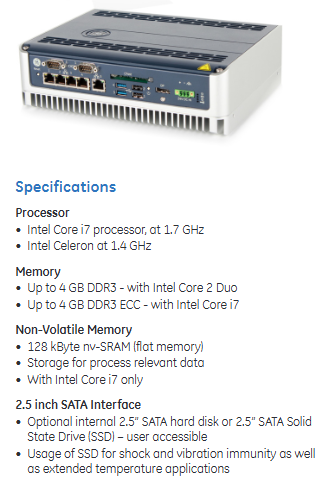
Processor: Intel Celeron 1.4 GHz or Intel Core i7 1.7 GHz

Memory: up to 4 GB DDR3 (Celeron processor); Up to 4 GB DDR3 ECC (Core i7 processor, supports error checking)

Non volatile storage: 128 KB nv SRAM (Core i7 version only, used for storing procedure data)

Interface:

4 external USB 2.0 ports+1 internal USB 2.0 port

Display interface: VGA port; Core i7 version additionally includes Display Port

Indicator lights: power, SATA status, Ethernet link/activity, battery status, overheating alarm

Real time clock: compatible with RTC 146818, equipped with replaceable lithium battery

2. Environment and Power Supply

Working temperature:

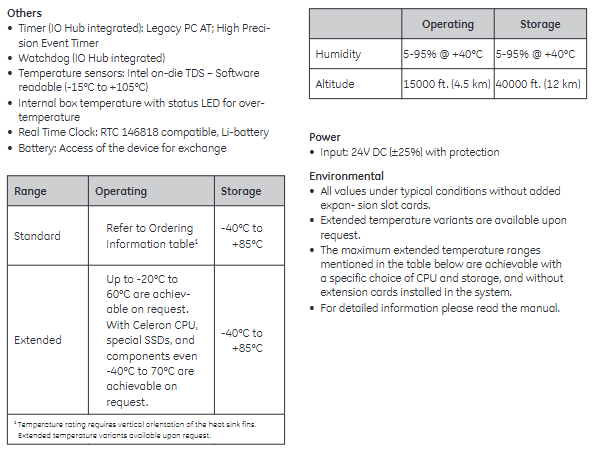
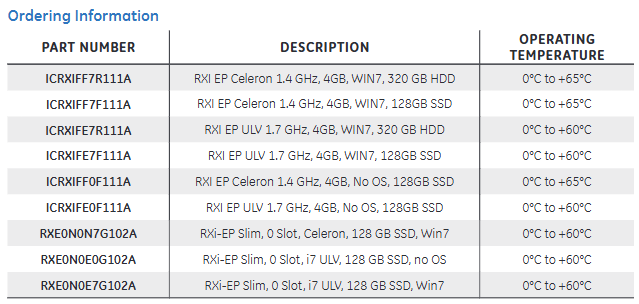
Standard model: 0 ° C to+60 ° C (some models have 0 ° C to+65 ° C)

Expansion type: optional -20 ° C to+60 ° C, specific configuration (Celeron CPU+dedicated SSD) can support -40 ° C to+70 ° C

Storage temperature: -40 ° C to+85 ° C

Humidity: 5-95% @+40 ° C (no condensation)

Altitude: 15000 feet (4.5 km) during operation, 40000 feet (12 km) during storage

Power supply: 24V DC input (± 25% fluctuation), with overcurrent protection

3. Machinery and Safety

Size: 182 × 233 × 98 mm (height × width × depth)

Installation method: Supports flat installation and DIN rail installation (Slim version supports 70 ° tilt installation)

Safety certification: compliant with UL1950, CE Class A, FCC-A standards

image.png

GE AT868 AquaTrans ™  Ultrasonic water flowmeter

Product Overview

Core functions

AT868 is an ultrasonic water flow meter (supporting 1 or 2 channels) that measures water flow velocity, volumetric flow rate, and mass flow rate based on the principle of time difference. It is suitable for flow monitoring of single-phase fluids such as clean water and sewage. It emits and receives signals through ultrasonic sensors, calculates fluid flow velocity, and converts it into flow data, supporting real-time display, data recording, and multiple output methods (analog, pulse/frequency).

Main features 

Multi channel configuration: Standard 1 channel, optional 2 channels, improve accuracy by measuring average, difference, or sum through dual channels.

Flexible sensor types: Supports wet and clamp on sensors to meet different pipeline installation requirements.

Rich output and communication: equipped with 0/4-20mA analog output, pulse/frequency output (for total count), supports RS232/RS485 serial communication, compatible with PanaView ™ Software remote operation.

High adaptability: Suitable for pipe diameters ranging from 0.04 inches to 200 inches (1mm to 5m), with flow rates ranging from -40 to 40 feet per second (-12.2 to 12.2m/s), meeting the needs of industrial pipeline flow monitoring.

Installation and wiring

1. Installation points

Sensor location: It needs to be installed in a straight pipe section, with at least 10 times the upstream pipe diameter and at least 5 times the downstream pipe diameter without turbulence interference (such as valves, elbows); Prioritize installation on the side of the pipeline (to avoid gas accumulation at the top or slag accumulation at the bottom).

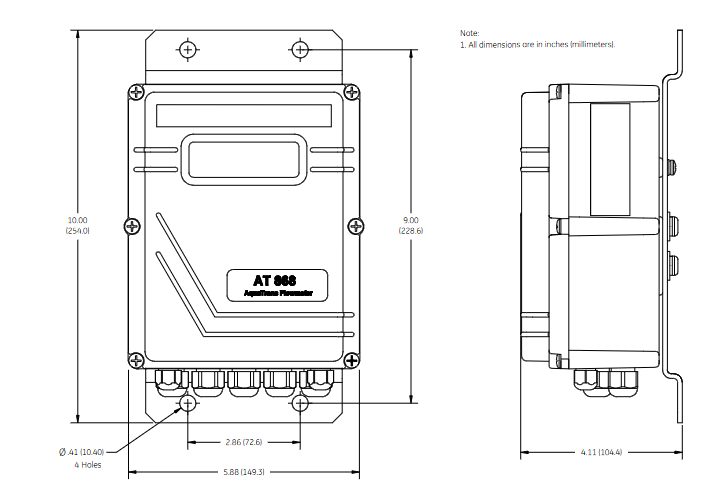
Electronic enclosure: Adopting NEMA 4X/IP66 protection level, suitable for indoor and outdoor installation, should be close to the sensor to shorten the cable length (supporting up to 1000 feet/300 meters).

Pipeline requirements: It is necessary to measure the outer diameter, wall thickness, material and other parameters of the pipeline and program them to ensure the accuracy of flow calculation.

2. Wiring specifications

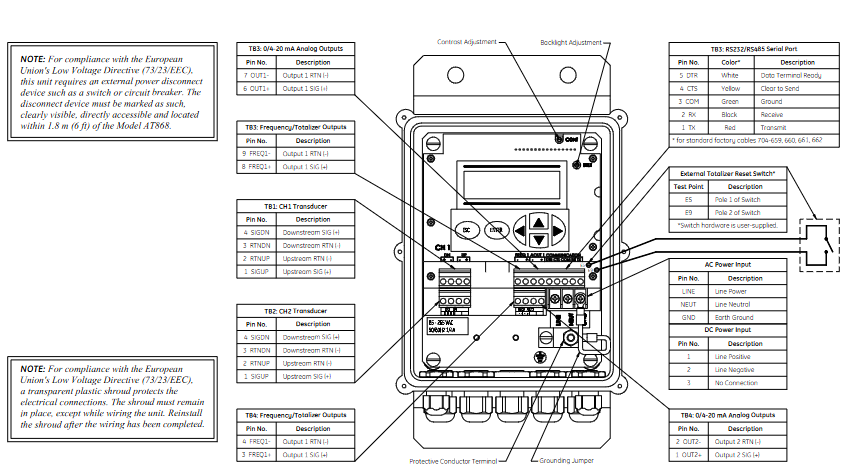
Power supply: Supports 85-265VAC or 12-28VDC, requires an external power-off device (such as a switch) that complies with the EU Low Voltage Directive, installed within a range of 6 feet.

Sensor wiring: Plug in or clip on sensors are connected through coaxial cables, and the cable length needs to be matched (with an error of ≤ 4 inches for frequencies ≤ 2MHz and ≤ 0.5 inches for frequencies>2MHz).

Output wiring:

Analog output (0/4-20mA): Load resistance ≤ 600 Ω, used for transmitting flow signals.

Pulse/frequency output: used for total count or frequency proportional to flow, maximum load 3A@100VDC .

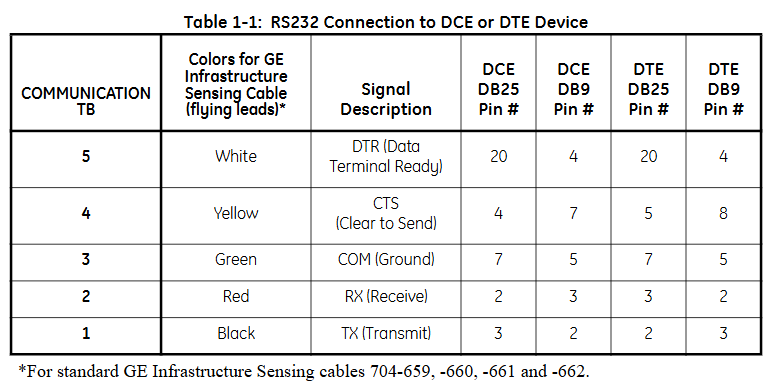
Communication wiring: RS232 is used to connect to PCs or printers, RS485 supports multi device networking, and must follow shielding grounding specifications to resist interference.

Programming and Settings

1. Basic parameter configuration

Channel activation: Activate the channel through the CHx ACTIV menu and select the sensor type (standard or special).

System parameters: Set the flow unit (such as gallon/minute, cubic meter/hour), total unit, and decimal places in CHx SYSTM, and optional mass flow rate (fluid density needs to be entered).

Pipeline and sensor parameters: Enter pipeline material, outer diameter, wall thickness, sensor frequency, path length (P), and axial length (L) in CHx PIPE. For clamp on sensors, lining parameters (material, thickness) also need to be set.

2. Advanced feature settings

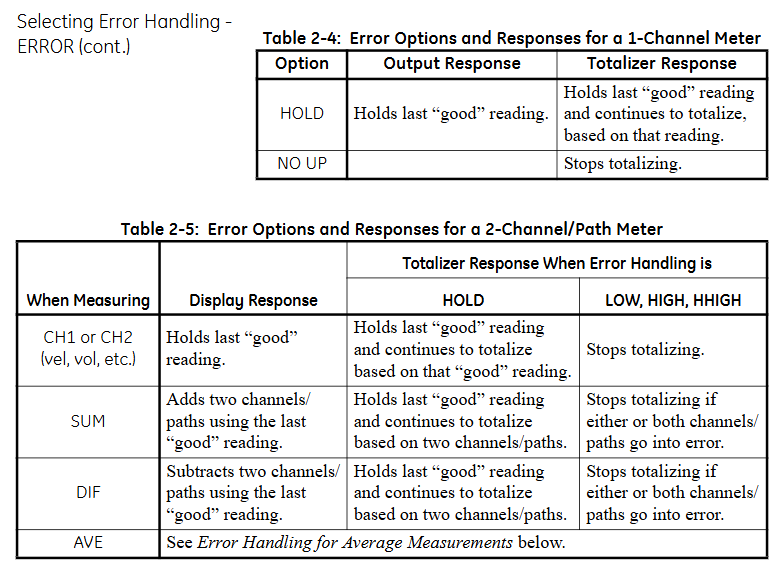
Response time: Set the average measurement response time through the AVRG menu. It is recommended to select the “STATS” mode (fast response in steady state, fast tracking when flow changes).

Zero flow cutoff: Set a zero flow threshold (0-1 feet/second) in CHx I/O to avoid reading deviations caused by small fluctuations.

Tracking window: When the fluid sound velocity is unknown or fluctuates greatly, enable Tracing WINDOW to automatically track the sound velocity to ensure measurement accuracy.

Display function

1. Display screen and indicator lights

LCD display screen: A 2-line x 16 character LCD display screen that supports backlight adjustment and can display real-time measurement data, set parameters, and error codes.

Display content: It can be configured to display up to 4 parameters, including:

Flow rate (feet/second, meters/second)

Volume flow rate (such as gallons per minute, cubic meters per hour)

Accumulated total amount (such as total cubic feet, total cubic meters)

Diagnostic parameters (such as signal strength, sound speed, time difference, etc.)

Wheel display function: If multiple parameters are configured, the display screen will cycle at set intervals, with each parameter staying for a few seconds.

2. Display settings

Enter the settings menu:

Press [ESC]+[ENTER]+[ESC] to enter the user program.

Navigate to PROG → GLOBL → I/O → LCD, set the number of display parameters and specific parameters.

Parameter selection: Select the content to be displayed from the measured values (flow rate, flow rate) and diagnostic values (signal strength, sound velocity), supporting custom units (imperial/metric).

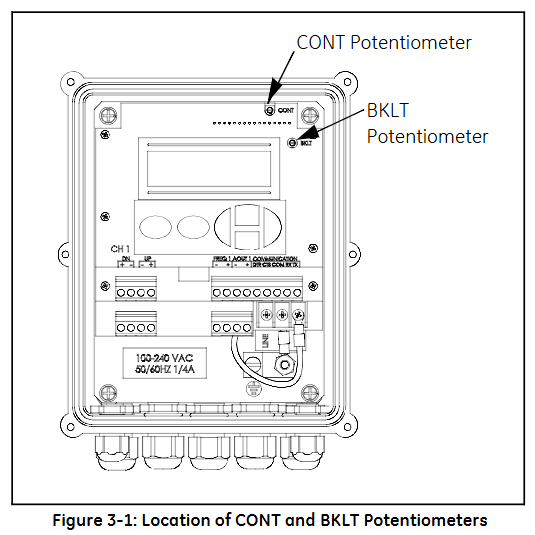
Contrast and brightness adjustment: Manually adjust through the potentiometer (CONT contrast, BKLT backlight) behind the panel to ensure clear visibility in different lighting environments.

Operation function

1. Totalizer Reset

Used to reset the accumulated traffic value to zero, supporting three methods:

Panel operation:

Enter the RESET menu and select YES to confirm the reset.

After resetting, the total amount of all channels will be reset to zero and accumulation will resume.

External switch reset:

Wiring should be done in advance (refer to the installation section) and configured as RESET in GLOBL-SYSTM → GATE OPTION.

Press and hold the external switch for 1 second, and the total amount will automatically reset to zero.

Software reset: via PanaView ™  The Clear Instrument Totalizers function of the software can be remotely operated.

2. Measurement pause and restart

Only supported through PanaView ™  Software operation:

Pause: Select Stop Measurement in Edit Functions → PAUSE MEASURMENT to pause the flow meter measurement and maintain the output signal at its final value.

Restart: Select Measure Flow to restore the measurement and update the output signal synchronously.

3. Diagnosis and Error Viewing

Diagnostic parameter display: Configure and display diagnostic parameters in GLOBL → I/O → LCD, including:

Upstream and downstream signal strength (SS up/SS dn, normal range 50-75)

Speed of Sound (SNDSP)

Time difference (DELTA T, normal ≤ 1 μ s)

Signal quality (Qup/Qdown, normal ≥ 1200)

Error code: The display screen directly shows error codes (such as E1 indicating weak signal, E3 indicating flow rate exceeding limit). You can refer to Chapter 5 of the manual to investigate the cause (such as sensor alignment deviation, bubbles in the pipeline, etc.).

Key operation and menu navigation

1. Button functions

ESC: Exit the current menu or cancel the operation.

ENTER: Confirm the selection or enter the submenu.

↑/↓: Up and down navigation menu options or adjust parameter values.

←/→: Move the cursor (used to locate the digit when modifying parameters).

2. Common menu paths

View real-time data: default display interface, press ENTER to cycle through preset parameters.

Enter programming mode: ESC → ENTER → ESC → PROG, configurable channel parameters, units, outputs, etc.

Calibration output: ESC → ENTER → ESC → CALIB, used for calibrating 4-20mA analog output or pulse frequency output.

4、 Precautions

Display refresh rate: By default, it updates with the measurement cycle (response time can be set through the AVRG menu, ranging from 0.1-99 seconds).

Total overflow: When the cumulative value exceeds the maximum range, E9: Totalizer Overflow is displayed, and the total amount needs to be reset or the unit needs to be expanded (such as changing from “gallon” to “million gallon”).

GE MLJ synchronous inspection relay

Product Overview

Core functions

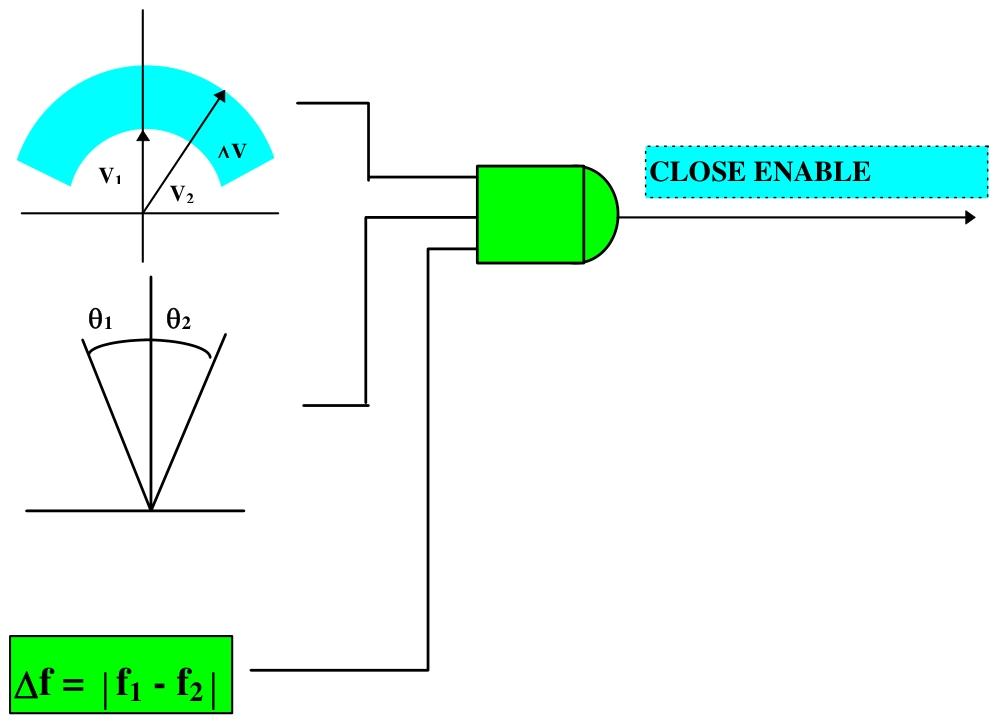
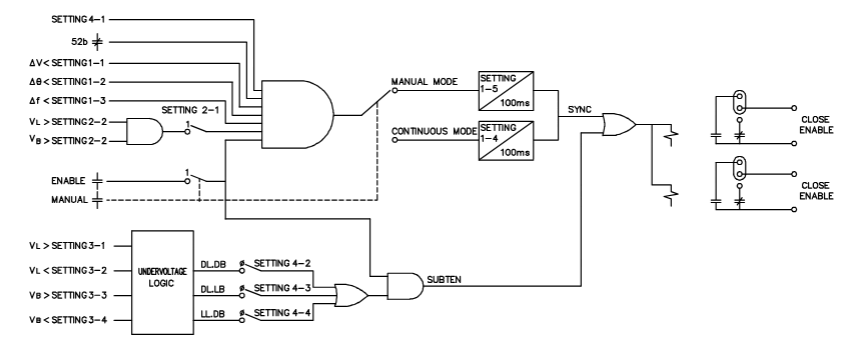
MLJ is a digital synchronous inspection relay mainly used to detect the synchronization conditions of two electrical systems (such as the generator and the power grid, and the two sections of the power grid). By measuring the voltage difference (Δ V), frequency slip (Δ f), and phase angle difference (Δθ) between the bus voltage (VB) and the line voltage (VL), it determines whether the circuit breaker closing conditions are met and outputs a closing permission signal.

Typical application scenarios

Generator and system grid connection

Reconnect the two regions of the system

Manual closing or automatic reclosing of circuit breakers

Verify synchronization conditions to avoid equipment damage caused by asynchronous closing

Core functions and working principles

1. Synchronous inspection unit

Measurement parameters:

Voltage difference (Δ V): The absolute difference in voltage between the bus and the line, ranging from 2-90V (default 15V).

Phase angle difference (Δ θ): The phase difference between two voltages, ranging from 2-60 ° (default 10 °).

Frequency slip (Δ f): The frequency difference between two voltages, ranging from 10-500MHz (default 20mHz).

Working mode:

Continuous mode: Continuous monitoring of synchronization conditions, with a delay of 0.1-99.0s (default of 0.1s) before allowing the output to close.

Manual mode: Monitoring is triggered by external signals, and after a delay of 0.1-99.0s (default 10.0s), the output allows for closing.

Allowable conditions for closing: Δ V, Δ θ, and Δ f are all less than the set values and continuously meet the set delay.

2. Undervoltage unit

Independently monitor the voltage status (live/dead) of lines and busbars, supporting three combination modes:

DLDB (Loss of Line – Loss of Power Bus)

DLLB (Lost Line – Live Bus)

LLDB (Live Line – Dead Bus)

Voltage thresholds can be set: line/bus live threshold (VL ↑/VB ↑, 40-245V), and power-off threshold (VL ↓/VB ↓, 10-180V).

3. Input/output unit

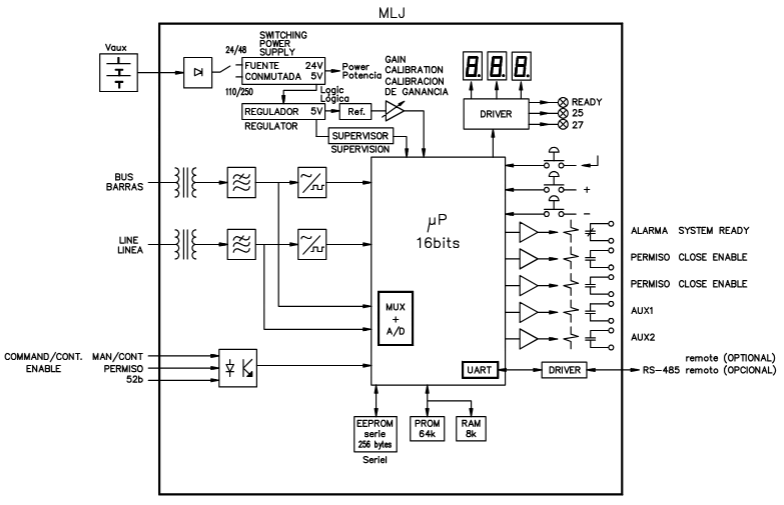
Digital input: 3-channel DC input, including circuit breaker status (allowing synchronous check when open), manual mode trigger, and enable signal.

Output contacts: 5-way relay contacts, including 2-channel closing permission (default normally open), 1-channel alarm (default normally closed), and 2-channel configurable auxiliary contacts (supporting signal outputs such as synchronization, undervoltage, and power loss).

4. Self check and Communication

Continuously monitor memory (ROM/RAM/EEPROM), analog circuits, etc., output alarms and display error codes when faults occur (e.g. 8.0 indicates ROM failure).

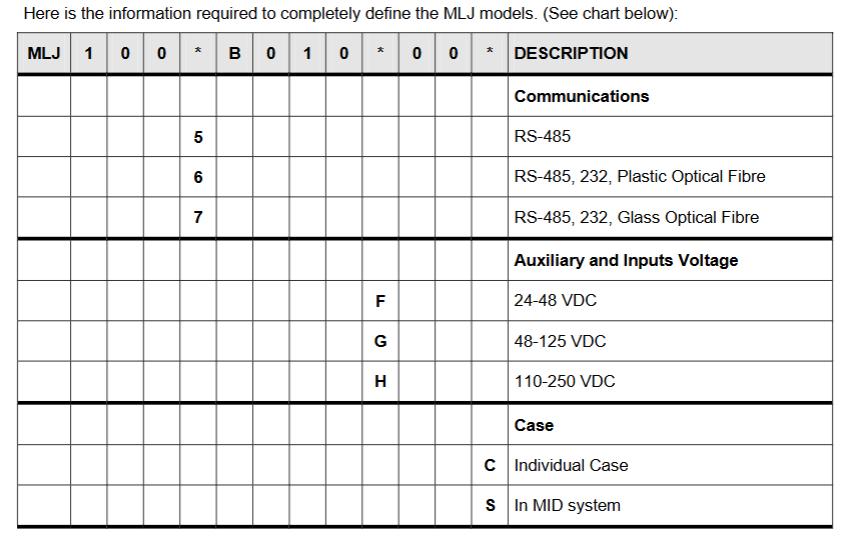
Supports RS-485 communication (optional fiber optic interface), baud rate 0.3-38.4kbaud (default 9.6kbaud), and supports Modbus protocol.

Technical specifications

Electrical parameters

Rated voltage: 63-220Vac (continuous withstand 440Vac).

Auxiliary power supply: 24-48Vdc, 48-125VDC, 110-250Vdc (± 20% fluctuation).

Measurement accuracy: Voltage ± 2% or 0.5V; Angle ± 1 ° (at 20-220Vac); Frequency slip ± 5mHz.

Contact capacity: Closing allows contact 4000VA (maximum 440Vac/300Vdc), auxiliary contact 1760VA.

Environmental and Physical Characteristics

Working temperature: -25 ° C to+55 ° C, storage temperature: -40 ° C to+70 ° C.

Humidity: ≤ 95% (no condensation).

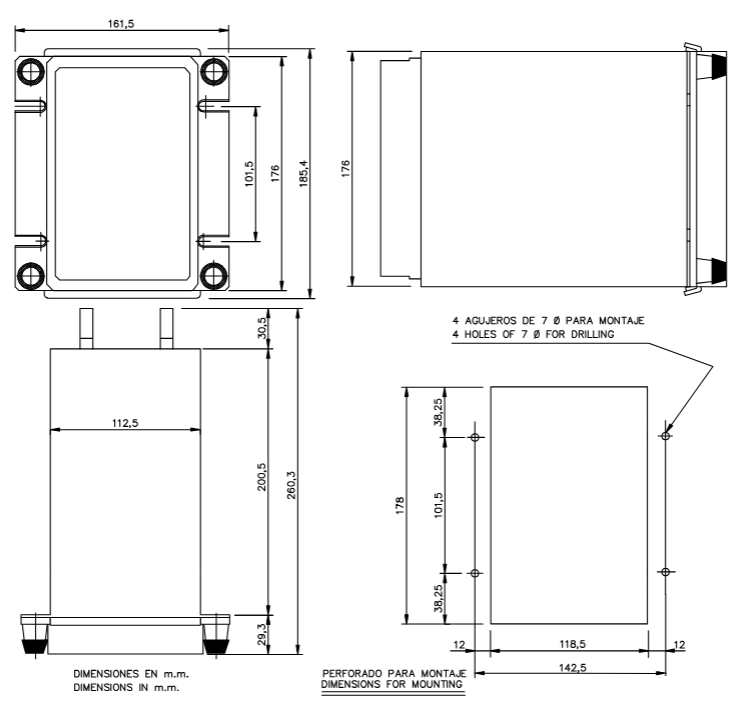
Shell: Made of steel plate material, supporting panel installation or MID system integration, weighing approximately 3kg.

Operation interface and navigation

1. Front end devices

Button: Three vertically arranged buttons, from top to bottom, are ENTER (confirm/enter),+(add/next), and – (decrease/previous).

Display: A 3-digit 7-segment LED display screen used to show parameter values, status codes, and settings.

Indicator lights: 3 LED indicator lights, namely:

READY (green): The relay is ready and the protection function is enabled.

52 (red): The conditions for closing are met.

27 (red): The undervoltage condition is met.

2. Switching between working modes

Reading mode: default power on mode, displaying real-time data and status. Press ENTER to cycle through the various functional items (F0-F12).

Setting mode: In read mode, press ENTER and – simultaneously to enter and modify parameters. After setting up, press+and – simultaneously to return to read mode; If there is no operation for 2 minutes, it will automatically return.

Calibration mode: In reading mode, press ENTER and+simultaneously to enter and display the average values of line voltage and bus voltage for calibration.

Read mode function (F0-F12)

The main functions of cycling through the ENTER key include:

Functional code description

The F0 relay status displays a two digit error code (such as 0.0 indicating normal, 8.0 indicating ROM fault), with the decimal point constantly lit to distinguish the status from the numerical value.

Real time display of RMS voltage value in V for F1-F2 line voltage (VL)/bus voltage (VB).

F3 voltage difference (Δ V) displays the absolute difference between VL and VB, measured in V.

F4 phase angle difference (Δ θ) displays the phase difference between two voltages (0-180 °), and overflow (three horizontal lines) is displayed when the voltage is less than 9V.

F5 frequency slip (Δ f) displays the frequency difference in mHz, and overflow is displayed when the voltage is less than 9V.

Record and store the VL, VB, Δ V, Δ θ, and Δ f values when the last closing condition is met for F6-F10.

The F11 test function display screen is fully lit and flashing, and the LED lights up simultaneously to verify the hardware’s normal operation; When the digital input is activated, the corresponding LED flashes.

The F12 line/bus status is indicated by the upper and lower segments of the display screen: the upper segment is lit up to indicate “live”, the lower segment is lit up to indicate “power-off”, and the middle segment is lit up to indicate that the voltage is between the threshold values.

Set mode parameter configuration

After entering the setting mode, switch the setting items with the+/- keys, press ENTER to enter the modification, and press ENTER again to confirm after adjustment. The main settings are as follows:

1. Basic configuration (0-1, 6-1, 6-2)

0-1 frequency: Choose 50Hz or 60Hz (default 50Hz).

6-1 Communication Address: Set Modbus address (1-255, default 1).

6-2 baud rate: Select the communication rate (0.3-38.4kbaud, default 9.6kbaud).

2. Synchronize check parameters (1-1 to 2-2)

1-1 voltage difference (Δ V): 2-90V (step size 0.5V, default 15V).

1-2 phase angle difference (Δ θ): 2-60 ° (step size 1 °, default 10 °).

1-3 frequency slip (Δ f): 10-500MHz (step size 10mHz, default 20mHz).

1-4 continuous mode delay: 0.1-99.0s (step size 0.1s, default 0.1s).

GE MII series modular microcomputer relay

Product Overview

Core positioning

The MII series is a modular microcomputer relay designed specifically for digital relay protection applications, characterized by economy and practicality, suitable for the protection and control of various power system equipment, such as feeders, small generators, motors, transformers, etc.

Main advantages

Usability: Unified front panel programming interface and standard hole size, easy to install and operate; Support configuration through the front panel keypad or EnerVista software.

Flexibility: Function configuration can be selected according to actual needs (such as event reporting, waveform capture, circuit breaker failure protection, etc.), equipped with programmable logic and I/O interfaces.

Scalability: Adopting flash technology, supporting on-site firmware upgrades, keeping up with technological developments.

Convenient maintenance: Equipped with event recording and waveform capture functions, it shortens troubleshooting time and reduces maintenance costs.

Core functions and features

1. Protection function

Covering various protective components, different models (MIF II, MIG II, MIN II, MIV II, MIW II, MIB II) support different functions with emphasis, mainly including:

Current protection: phase/ground instantaneous overcurrent (50PH/50PL, 50NH/50NL), phase/ground delayed overcurrent (51P, 51N), current imbalance (46), etc.

Voltage protection: phase undervoltage (27P), phase/ground overvoltage (59N, 59N), voltage imbalance (47), etc.

Power and frequency protection: reverse power (32RP), forward low power (32LF), demagnetization (40), over/under frequency (81O, 81U), etc.

Special protection: differential protection (87), restrictive grounding fault (87R), circuit breaker failure protection, fuse failure (VTFF), etc.

Support multiple fixed value setting groups (2 independent fixed values that can be switched in multiple ways) to meet the needs of different operating scenarios.

2. Monitoring and measurement

Measurement parameters: phase/ground current, voltage, frequency, thermal imaging, etc., measurement error ≤ ± 3%.

Event recording: Store up to 32 events (with millisecond level time tags), including changes in status such as actions, trips, alarms, etc.

Waveform capture: optional function, sampling 8 times per cycle, storing up to 32 cycles of waveform, can be triggered by internal or external signals for fault diagnosis.

Self check diagnosis: Continuously running after power on, triggering an alarm and recording events when abnormalities are detected.

3. Control and Configuration

Programmable logic: Implement four programmable schemes through four logic gates and timers, and output controllable contacts or panel LEDs.

I/O configuration: 2 configurable contact inputs, 4 configurable contact outputs (lockable), and fixed trip and operation contacts.

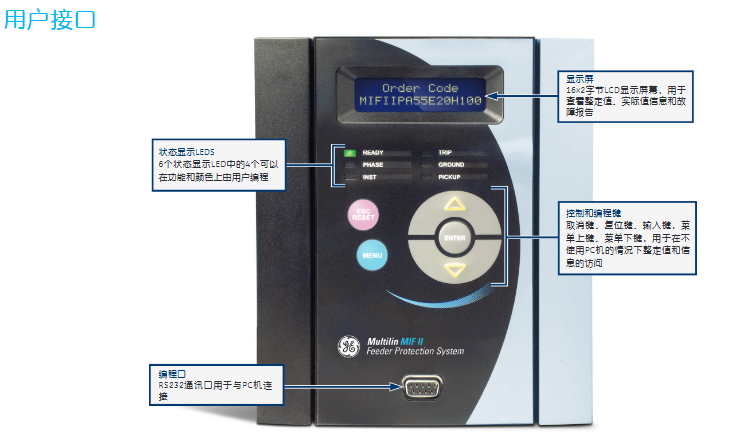
Human machine interface: 2 × 16 character LCD display screen (for viewing fixed values, measured values, and fault reports), 6 LED indicator lights (4 customizable functions and colors), and a 5-key keypad (for local operation).

4. Communication function

Interface: Front panel RS232 interface (local communication), rear RS485 interface (remote communication), supports ModBus ®  RTU protocol, with a maximum baud rate of 19200 bps.

Extended Communication: Compatible with MultiNet modules, capable of converting serial communication to Ethernet ModBus TCP/IP, enabling connection to local/wide area networks, supporting up to 32 devices.

Protection function parameters

1. Current protection

Phase delay overcurrent (51P): Within the time limit of 10-240% of the CT rated value (0-99.99s, with a step difference of 10ms), the inverse time limit and other levels are ± 3%, and the time error is>± 3% or ± 25ms

Grounding delay overcurrent (51N): 10-240% of CT rated value in-phase delay overcurrent in-phase delay overcurrent

Instantaneous overcurrent (50PH/PL): 10-3000% of CT rated value, timed limit (0-99.99s, step difference 10ms), horizontal ± 3%, time error>± 3% or ± 25ms

Grounding instantaneous overcurrent (50NH/NL): 10-3000% of CT rated value, same phase instantaneous overcurrent, same phase instantaneous overcurrent

Current imbalance (46): 5-99% I ² t curve (K=1-100) of CT rated value, with a maximum time limit of 99.99 seconds and a horizontal ± 3% error, and a time error of>± 3% or ± 25ms

2. Voltage protection

Undervoltage (27P): 2.0-60V or 10-250V (with a difference of 0.1V), timed limit (0-600s, with a difference of 0.01s), horizontal ± 3%, time error>± 3% or ± 25ms

Phase overvoltage (59): 2.0-60V or 10-250V (with a difference of 0.1V), in-phase undervoltage, in-phase undervoltage

Grounding overvoltage (59N): 2.0-60V or 10-250V (with a difference of 0.1V)/in-phase undervoltage, in-phase undervoltage

Voltage imbalance (47): 2.0-60V or 10-250V (with a difference of 0.1V), timed limit (0-600s, with a difference of 0.01s), horizontal ± 3%, time error>± 3% or ± 25ms

3. Power and frequency protection

Reverse power (32RP): 0.01-0.99 × rated MW, delay 0.2-120s (with a step difference of 0.1s), supports online locking (0-5000s)

Demagnetization (40): Circle 1 with a diameter of 2.5-300 Ω, offset of 2.5-150 Ω, trip delay of 0.1-10s, double circle characteristics

Overfrequency (81O): 42.0-67.5Hz (level difference 0.01Hz), delay 0.0-600s (level difference 0.01s), voltage braking threshold 30-250V

Underfrequency (81U): 42.0-67.5Hz (level difference 0.01Hz), same over frequency, same over frequency

Bently 3500/15 AC/DC power module

Product Overview

Core functions and applications

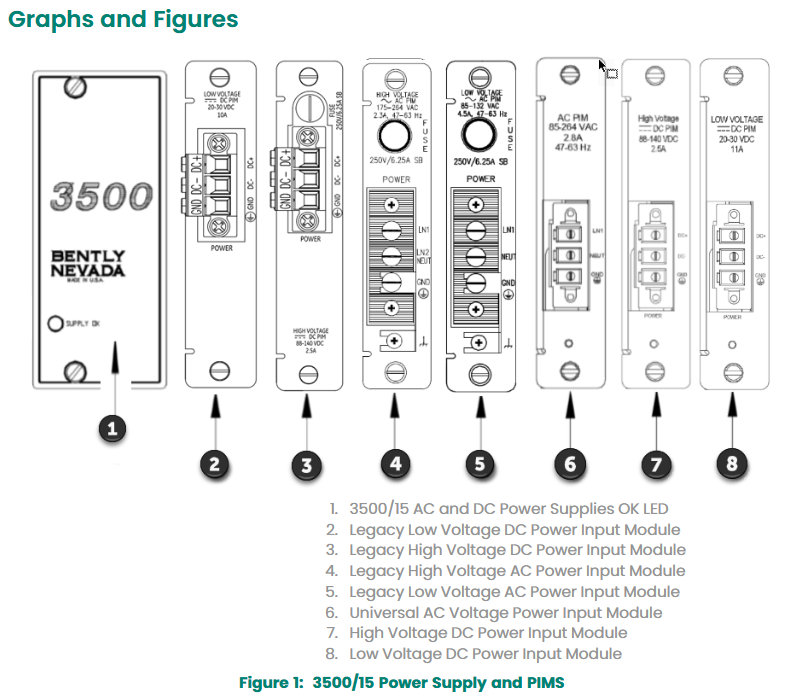
The 3500/15 AC/DC power module is a half height module that must be installed in the designated slot on the left side of the rack to provide power to other modules of the 3500 series mechanical protection system. The rack can accommodate one or two power modules (any combination of AC and DC), and a single power supply can power the entire rack.

In the dual power supply configuration, the lower slot is the primary power supply and the upper slot is the standby power supply. It supports hot plugging (removing or inserting any module will not affect the rack operation).

Supports a wide range of input voltages and converts them into voltages that can be used by other 3500 modules, including three types: universal AC power supply, high-voltage DC power supply, and low-voltage DC power supply.

Technical specifications

1. Input parameters

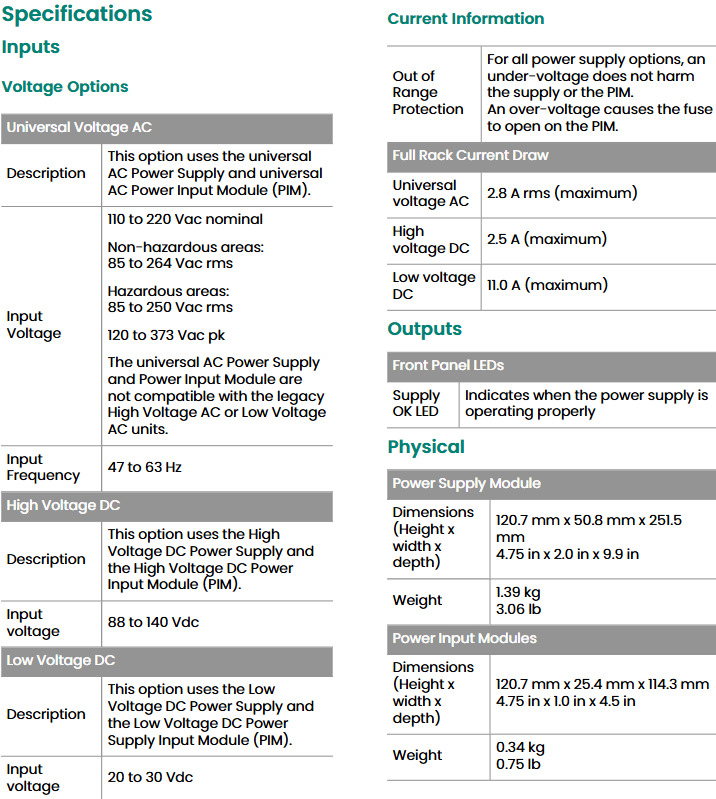
Universal AC power supply: Non hazardous area: 85-264 Vac rms;

Dangerous area: 85-250 Vac rms (peak 120-373 Vac) 47-63 Hz 2.8 A rms

High voltage DC power supply: 88-140 Vdc -2.5 A

Low voltage DC power supply: 20-30 Vdc -11.0 A

Protection function: Under voltage will not damage the power supply or PIM (power input module); Overvoltage can cause the fuse on PIM to melt.

2. Physical and installation parameters

Power module:

Dimensions: 120.7 mm x 50.8 mm x 251.5 mm (height x width x depth), weight 1.39 kg.

Power Input Module (PIM):

Dimensions: 120.7 mm x 25.4 mm x 114.3 mm (height x width x depth), weight 0.34 kg.

Rack space requirements:

Power module: occupying two half height slots on the left side of the rack, supporting redundant configuration.

PIM: A dedicated half height module located directly behind the corresponding power module.

3. Environmental parameters

Working temperature: -30 ° C to+65 ° C (-22 ° F to+150 ° F).

Storage temperature: -40 ° C to+85 ° C (-40 ° F to+185 ° F).

Humidity: 95% non condensing.

Compliance and Certification

FCC: Complies with Part 15 of FCC regulations, does not cause harmful interference, and is tolerant of external interference.

EMC: Compliant with EMC Directive 2014/30/EU and EN 61000-6-2 (industrial immunity), EN 61000-6-4 (industrial emission limits) standards.

Electrical safety: complies with the Low Voltage Directive 2014/35/EU and EN 61010-1 standards.

RoHS: Compliant with RoHS Directive 2011/65/EU, restricting the use of hazardous substances.

Maritime certification: Complies with DNV GL ship, offshore platform, and high-speed light vessel specifications, ABS steel ship and marine structure classification rules.

Hazardous Area Certification:

cNRTLus:Class I, Zone 2/Division 2,Groups A-D, T4@Ta -Install according to drawing 149243/149244 for temperatures between 20 ° C and+65 ° C.

ATEX/IECEx:II 3 G Ex nA nC ic IIC T4 Gc/Ex ec nC ic IIC T4 Gc, T4@Ta -20 ° C to+65 ° C.

Order Information

1. Rules for power module model

The complete model of the 3500/15 power module is 3500/15-AA-BB-CC, and the meanings of each parameter are as follows:

AA (Top Slot Power Type)

03: Traditional High Voltage DC Power Supply (88-140 Vdc)

04: Traditional low-voltage DC power supply (20-30 Vdc)

05: Universal AC power supply (85-264 Vac rms)

06: High voltage DC power supply (new specification)

07: Low voltage DC power supply (new specification)

BB (bottom slot power type)

00: No power supply (choose when bottom slot power supply is not required)

03/04/05/06/07: Same as the top slot, corresponding to traditional/new specifications of high and low voltage DC, universal AC power supply

CC (authentication option)

00: No authentication

01: CSA/NRTL/C certification (applicable to Class I, Division 2 hazardous areas)

02: ATEX/IECEx/CSA certification (applicable to Class I, Zone 2 hazardous areas)

Spare parts list

1. Power module and input module (PIM)

106M1079-01: Universal AC power module

106M1081-01: Universal AC Power Input Module (PIM)

129486-01: Traditional High Voltage DC Power Supply Module (88-140 Vdc)

129478-01: Traditional High Voltage DC Power Input Module (PIM)

133292-01: Traditional Low Voltage DC Power Supply Module (20-30 Vdc)

133300-01: Traditional Low Voltage DC Power Input Module (PIM)

114M5329-01: New specification high-voltage DC power module

115M7750-01: New Specification High Voltage DC Power Input Module (PIM)

114M5330-01: New specification low-voltage DC power module

114M5335-01: New Specification Low Voltage DC Power Input Module (PIM)

2. Fuses and connectors

01720025: Replace fuses (applicable to AC PIM and traditional high-voltage DC PIM)

01720045: Replace fuse (applicable to low voltage DC PIM and traditional low voltage DC PIM)

120M3877: Quick melting fuse (5A/500 Vac, 6.3 × 32 mm, universal AC PIM specific)

129M0198: New specification of high-voltage DC PIM dedicated replacement fuse

118M0915-01: Replacement connector for universal AC power input module

118M0915-02: Replacement connector for DC power input module

3. Panel and installation accessories

131150-01: Blank front panel of power module (including screws, 1 piece)

128085-01: Power input connector back cover (1 piece)

04310251: Power input back cover fixing screws (2 pieces)

284726: DIN rail mounting kit (for power module rack installation)

Bently 990 vibration transmitter

Product Overview

Core functions and applications

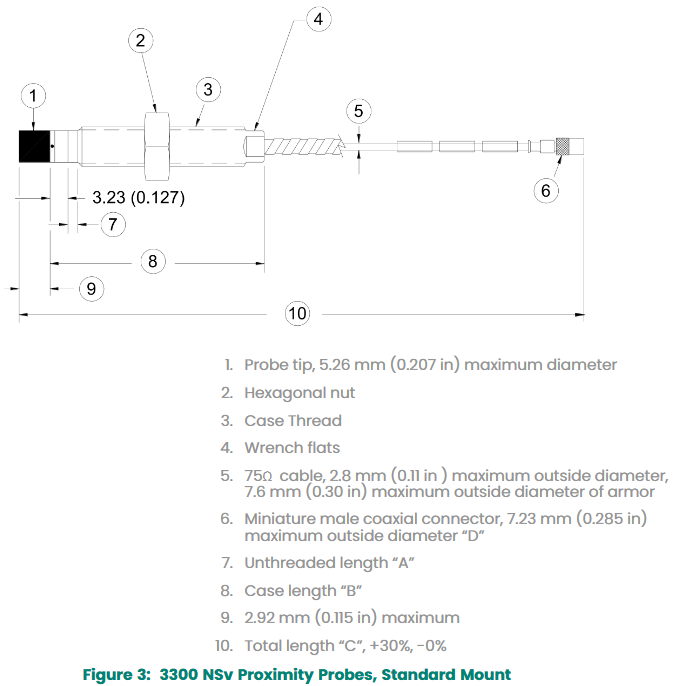
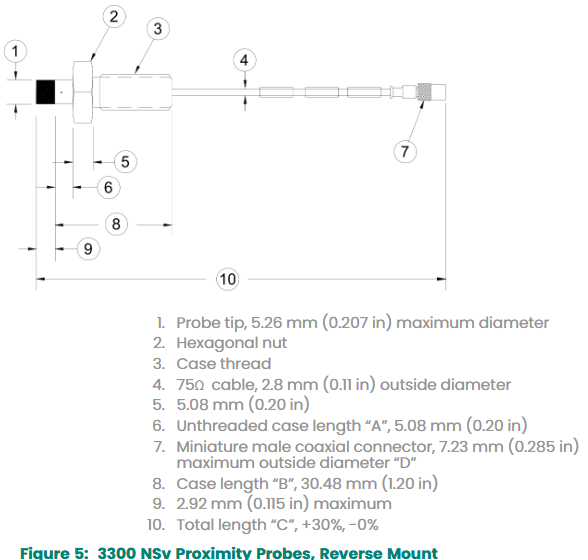
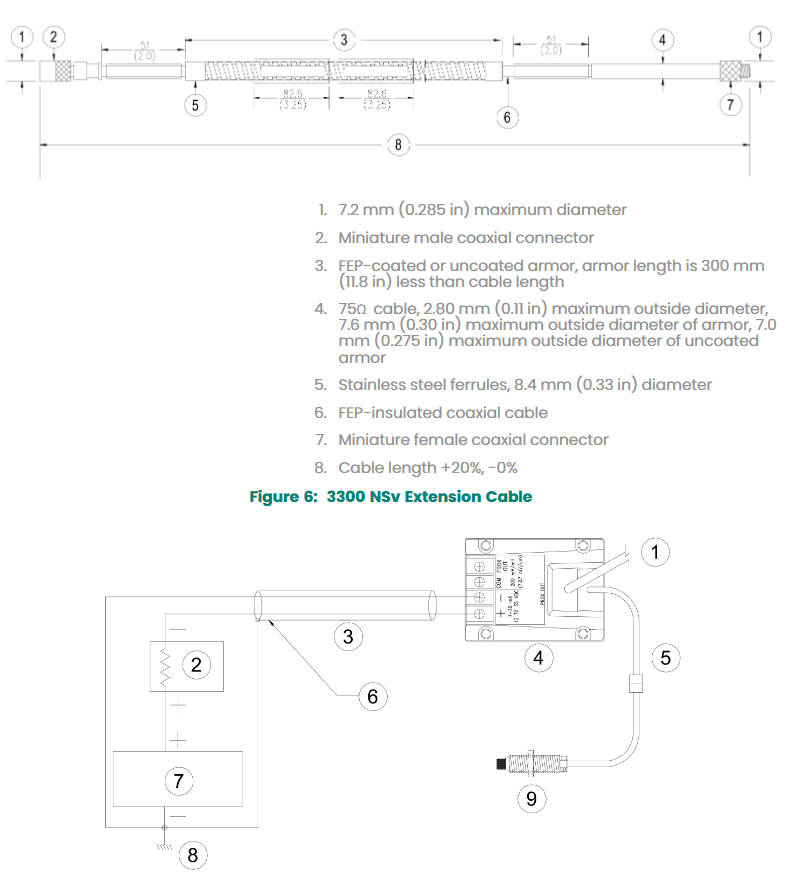
The 990 vibration transmitter is mainly aimed at original equipment manufacturers (OEMs) of centrifugal air compressors, small pumps, motors, or fans. It is used to convert vibration signals into 4-20 mA standard signals and input them into mechanical control systems. It receives input from 3300 NSv proximity probes and supporting extension cables (supporting 5-meter and 7-meter system lengths), processes the signal into engineering units of peak to peak vibration amplitude, and outputs a proportional 4-20 mA signal for mechanical protection alarm and logic control.

Main features 

Integrated Proximitor sensor, no external unit required.

Provide non isolated “PROX OUT” and “COM” terminals and coaxial connectors to output dynamic vibration and gap voltage signals for diagnosis (requiring signal isolation with 990/991 test adapters).

Equipped with non interactive zero and range potentiometers, supporting circuit adjustment; The test input pin can quickly verify the circuit signal output through a function generator.

Equipped with a “Not OK/Signal Defeat” circuit to prevent high output or false alarms caused by probe failure or loose connections.

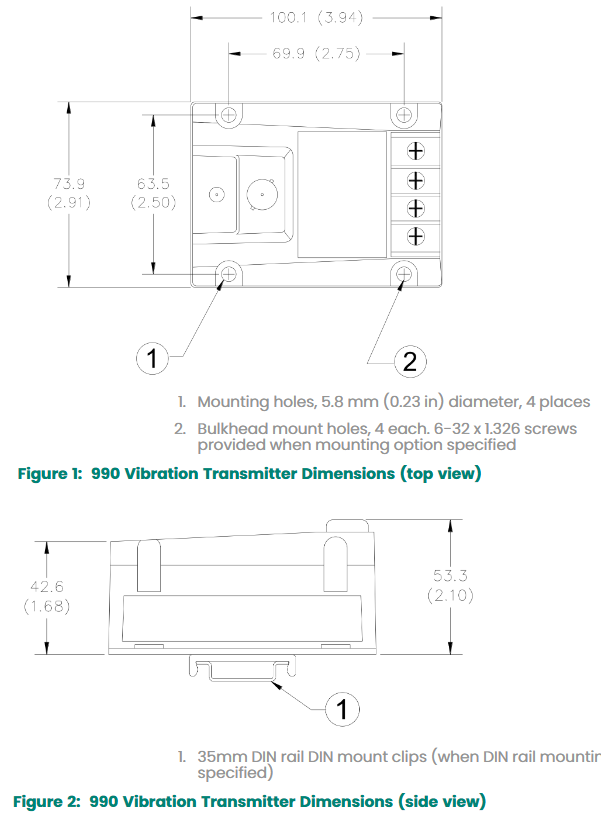
Supports DIN rail installation or through board installation (including standard accessories), suitable for high humidity (up to 100% condensation) environments.

Technical specifications

1. Electrical parameters

Startup suppression: After the power is turned on, the signal output remains in the<3.6 mA (NOT OK) state for 2-3 seconds, indicating that the device is not ready.

Proximitor sensor output: compatible with non grounded portable testing equipment; When using grounded AC power supply equipment, signal isolation must be achieved through the 122115-01 test adapter.

Output impedance: Prox Out is 10 k Ω, calibrated load is 10 M Ω.

Prox Out linear range: 1.4 mm (55 miles), starting at a distance of approximately 0.25 mm (10 miles) from the target surface.

Prox Out incremental scaling factor: 7.87 mV/µ m (200 mV/mil) ± 6.5% (typical value, including interchangeability error), worst-case scenario ± 10%; Typical noise level is 50 mV/pp.

Temperature stability: Within the range of 0 ° C to+70 ° C (+32 ° F to+158 ° F), the incremental scaling factor remains within ± 10% of 7.87 mV/µ m.

Frequency response: 5 Hz to 6000 Hz+0/-3 dB.

Minimum target size: 9.5 mm (0.375 inches) diameter.

Lead length: The maximum cable distance for the Proximitor sensor output (BNC connector) is 3 meters (10 feet).

Power supply: 28 V for hazardous areas (Zone 2 or Div 2).

2. Environmental and mechanical parameters

Temperature range:

Transmitter operating temperature: -35 ° C to+85 ° C (-31 ° F to+185 ° F); Storage temperature: -52 ° C to+100 ° C (-62 ° F to+212 ° F).

Probe operating and storage temperature: -52 ° C to+177 ° C (-62 ° F to+351 ° F).

Relative humidity: 100% condensing (non submerged, coaxial connectors need to be protected).

Mechanical characteristics:

Probe tip material: Polyphenylene sulfide (PPS); Shell material: AISI 303 or 304 stainless steel.

Probe cable: 75 Ω coaxial cable, FEP insulated; Optional armor (AISI 302 stainless steel with FEP outer sheath).

Tensile strength: The maximum tensile strength from the probe housing to the lead is 222 N (50 lbf).

Transmitter weight: 0.43 kg (0.9 lbm); Total system weight: Typical value 0.82 kg (1.8 lbm).

Compliance and Certification

1、 Basic compliance certification

FCC certification

The device complies with Part 15 of FCC regulations and must meet two conditions for operation:

Shall not cause harmful interference;

We must accept any interference received, including interference that may cause unexpected operations.

Electromagnetic Compatibility (EMC)

Compliant with EMC Directive 2014/30/EU;

Following standards:

EN 61000-6-2 (Immunity to industrial environments);

EN 61000-6-4 (Emission limits for industrial environments).

RoHS Directive

Compliant with RoHS Directive 2011/65/EU, restricting the use of specific hazardous substances (such as lead, mercury, etc.) in electronic and electrical equipment to meet environmental requirements.

Maritime certification

Compliant with ABS 2009 Steel Ship Rules (1-1-4/7.7, 4-8-3/1.11.1, 4-9-7/13), suitable for ship and offshore platform scenarios.

EPR label for Indian batteries

Certified by GE Oil&Gas India Private Limited, EPR certificate number: 1.1595372902047E+20, in compliance with relevant regulations on electronic waste management in India.

Hazardous Area Certification

1. ATEX certification

Compliant with ATEX Directive 2014/34/EU, the specific levels are as follows:

II 1 G Ex ia IIC T4 Ga: Suitable for Zone 0/1 hazardous areas, with an ambient temperature range of -35 ° C to+85 ° C.

II 3 G Ex nA IIC T4 Gc: Suitable for Zone 2 hazardous areas with an ambient temperature range of -35 ° C to+85 ° C.

2. IECEx certification

Consistent with ATEX certification level, suitable for international explosive environments, certification mark is:

Ex ia IIC T4 Ga(Zone 0/1);

Ex nA IIC T4 Gc(Zone 2)。

3. cNRTLus certification

Suitable for hazardous areas in North America, specific level:

Class I, Div 2, Groups A、B、C、D, Temperature rating T5@Ta +85 ° C (Type 4), to be installed according to drawing 128838.

Key parameters and precautions for certification

Entity parameters (hazardous area)

Terminal/connector Ui (voltage) Ii/Io (current) Pi/Po (power) Ci/Co (capacitor) Li/Lo (inductor)

Power terminal (E1-E2) 28 V 120 mA 0.84 W 20 nF 10 μ H

Proximitor terminals (E3-E4, J2) 28 V 6 mA 0.17 W 80 nF 1 H

Probe connector (J3) 28 V 100 mA 0.8 W 27.3 nF 5.3 mH

INSTALLATION REQUIREMENTS

When used in hazardous areas, cables (type A or B) that comply with EN 60079-25 standards must be used to ensure electrical connections meet explosion-proof requirements.

Grounding and shielding must strictly follow the manual specifications to avoid interference or safety hazards.

Bently 2300 series vibration monitor

Product Overview

Core functions and application scenarios

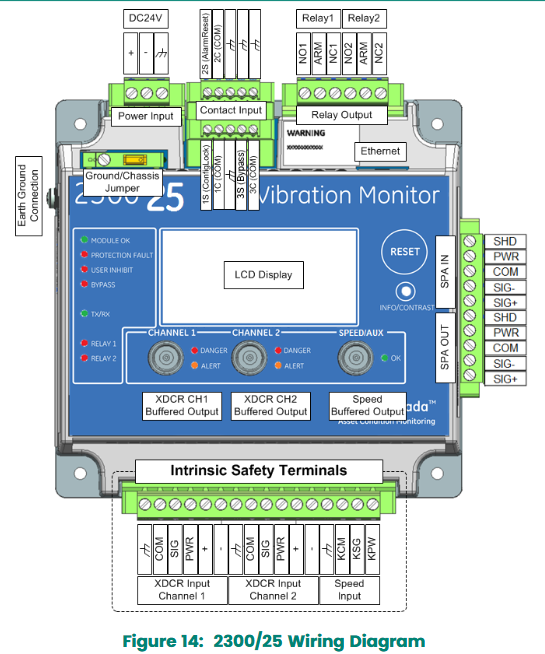
The 2300 series vibration monitors (2300/20 and 2300/25) are cost-effective continuous vibration monitoring and protection equipment designed specifically for medium to low critical machinery, suitable for industries such as oil and gas, power generation, water treatment, papermaking, manufacturing, and mining. Its main functions include:

Real time monitoring of vibration and speed, providing high vibration level alarms.

Supports multiple sensor inputs (accelerometer, velocity sensor, proximity sensor, etc.), with flexible signal processing and diagnostic capabilities.

Model difference

2300/20: Equipped with 2 configurable 4-20 mA outputs, compatible with DCS systems, suitable for scenarios requiring data integration.

2300/25: Supports System 1 Classic connection and Trendmaster SPA interface, can utilize existing DSM SPA infrastructure, suitable for scenarios requiring trend analysis.

Technical specifications

1. Input parameters

Vibration input channel: 2 channels, supporting acceleration, velocity, and radial vibration measurement, with specific parameters as follows:

Accelerometer (ICP): bandwidth 0.2 Hz-20 kHz, range 2-80 g peak, sensitivity 5-1000 mV/g.

Speed sensor: bandwidth 0.2 Hz-20 kHz, range 0-50 in/s peak, sensitivity 5-1000 mV/in/s.

Radial vibration (proximity sensor): bandwidth 0.2 Hz-20 kHz, range 0-160 mil peak to peak, sensitivity 5-1000 mV/mil.

Speed/Keyphase Channel: 1 channel, supporting proximity probes, magneto electric pickups, and proximity switches, with a speed range of 1-120000 RPM for proximity probes and 200-120000 RPM for magneto electric pickups.

Process variable channel: supports temperature and other parameter monitoring, with an input voltage range of -0.25 to -22 V and an accuracy of ± 1% of full scale.

2. Output parameters

Buffer output: 3 channels (2 vibration+1 speed), with short circuit and EMI protection through BNC interface.

Relay output: 2-channel dry contacts, single pole double throw (SPDT), epoxy resin sealed, maximum switching voltage of 250 VAC/VDC, maximum current of 6 A (AC)/4 A (DC).

4-20 mA output (only 2300/20): 2 channels, internal power supply, load resistance 0-600 Ω, accuracy ± 1%, update rate of 100 ms.

SPA output (only 2300/25): Supports high-frequency signal transmission, with a frequency response of 10 Hz-3000 Hz ± 5% and an accuracy of ± 1% of full scale.

3. Communication and Display

Communication interface: 10/100 Base-T Ethernet, supporting Modbus protocol, configuring software to communicate through RSA encryption.

Display and indicator lights: The LCD screen displays real-time measurement values, set points, and configuration information; The LED indicator lights include operating status (OK), protection fault, alert/ranger, etc.

Environmental and physical parameters

Work environment:

Temperature: -30 ° C to+65 ° C (working), -40 ° C to+85 ° C (storage).

Humidity: 95% non condensing.

Vibration tolerance: 3 g.

Physical characteristics:

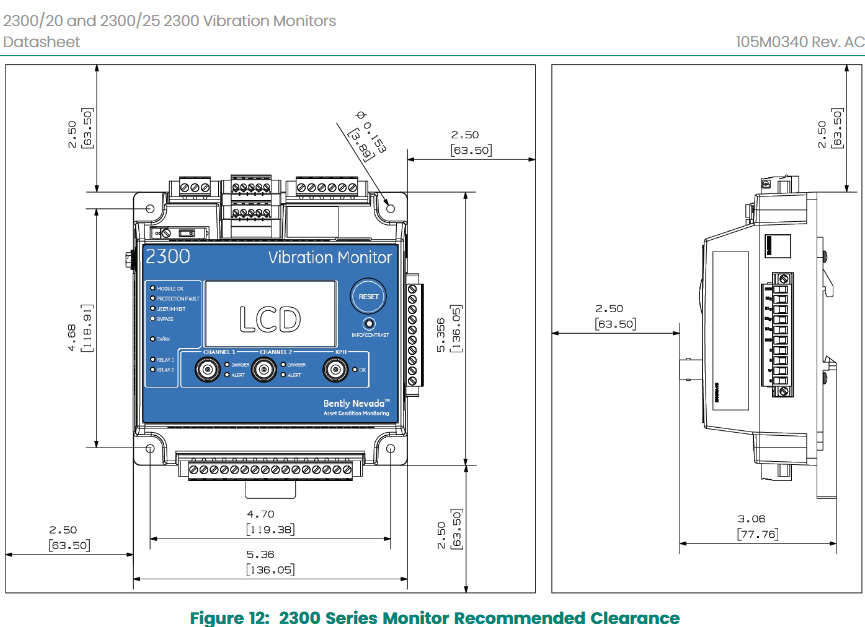
Dimensions: 127 mm x 127 mm x 76.2 mm (width x depth x height).

Weight: 1.03 kg (2.26 lbs).

Installation method: panel installation or DIN rail installation (including adapter).

Compliance and Certification Summary

1、 Basic compliance certification

FCC certification

The device complies with Part 15 of FCC regulations and must meet two conditions for operation:

Shall not cause harmful interference;

We must accept any interference received, including interference that may cause unexpected operations.

Electromagnetic Compatibility (EMC)

Compliant with EMC Directive 2014/30/EU;

Following standards:

EN 61000-6-2:2005 (Immunity to industrial environments);

EN 61000-6-4:2007+A1 (Emission limits for industrial environments);

EN 61326-1:2013 (Electromagnetic compatibility of measurement, control and laboratory equipment);

EN 61326-2-3:2013 (Electromagnetic compatibility requirements for specific equipment).

Electrical safety

Compliant with the Low Voltage Directive (LV Directive) 2014/35/EU;

Follow the standard EN 61010-1:2010 (Safety requirements for electrical equipment for measurement, control, and laboratory use).

RoHS Directive

Compliant with RoHS Directive 2011/65/EU, restricting the use of specific hazardous substances (such as lead, mercury, etc.) in electronic and electrical equipment to meet environmental requirements.

EPR label for Indian batteries

Certified by GE Oil&Gas India Private Limited, EPR certificate number: 1.1595372902047E+20, in compliance with relevant regulations on electronic waste management in India.

Hazardous Area Certification

1. ATEX certification

Compliant with ATEX Directive 2014/34/EU, following the standard:

EN 60079-0:2012/A1:2013 (General requirements for explosive atmospheres);

EN 60079-11:2012 (Intrinsically Safe Equipment);

EN 60079-15:2010 (non intrusive devices);

EN 60079-7:2015 (Increased Safety Equipment).

Specific certification level:

2300/20:II 3 G Ex na nC [ic] IIC T4 Gc; Ex ec nC [ic] IIC T4 Gc, The ambient temperature range is -30 ° C to+65 ° C.

2300/25:II 3 G Ex na nC ic [ic] IIC T4 Gc; Ex ec nC ic [ic] IIC T4 Gc, The ambient temperature range is -30 ° C to+65 ° C.

2. IECEx certification

Consistent with ATEX certification level, suitable for international explosive environment scenarios, certification mark is:

2300/20:Ex na nC [ic] IIC T4 Gc; Ex ec nC [ic] IIC T4 Gc。

2300/25:Ex na nC ic [ic] IIC T4 Gc; Ex ec nC ic [ic] IIC T4 Gc。

3. cNRTLus certification

Suitable for hazardous areas in North America, specific level:

Class I, Division 2/Zone 2:AEx nA nC [ic] IIC T4 Gc, Suitable for explosive gas environments in Group A, B, C, and D, with ambient temperatures ranging from -30 ° C to+65 ° C.

Certification precautions

Environmental temperature limit

When used in hazardous areas, the ambient temperature must be strictly controlled between * * -30 ° C and+65 ° C * *, as exceeding this range may result in certification failure.

INSTALLATION REQUIREMENTS

Installation must follow the wiring and grounding specifications specified in the equipment manual, especially in hazardous areas where cables (type A or B) that comply with EN 60079-25 standards must be used to ensure electrical connections meet explosion-proof requirements.

Bently 330400 and 330425 acceleration sensors

Product Overview

1. Core purpose and design objectives

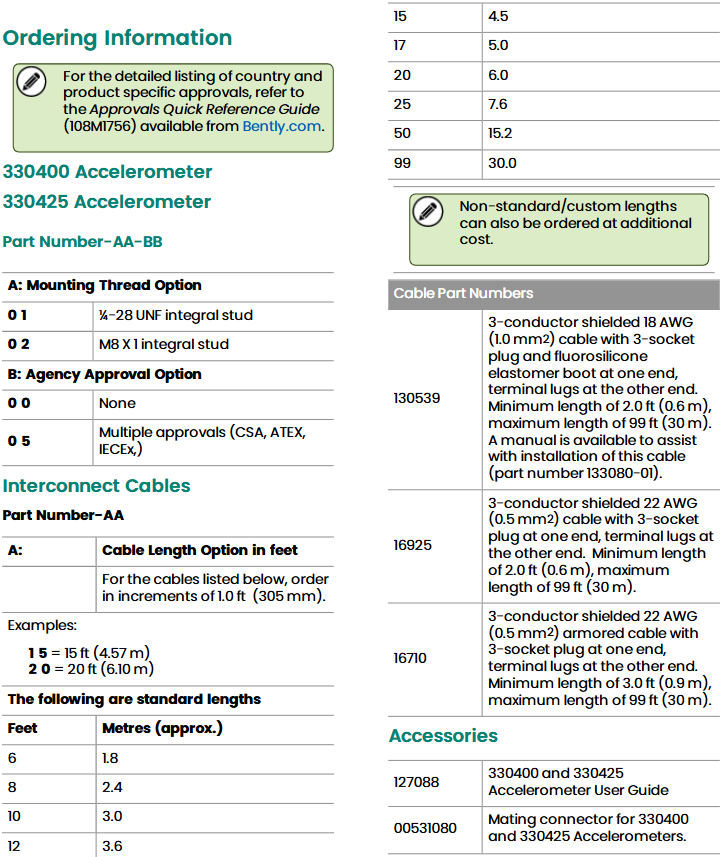
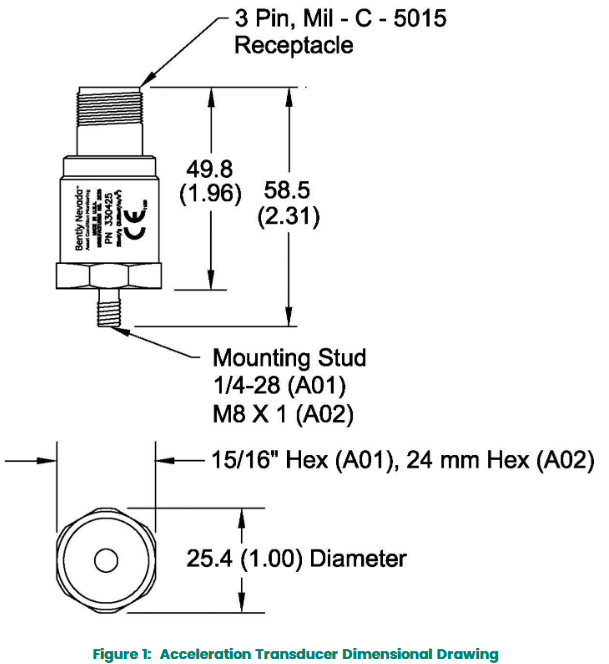
The 330400 and 330425 acceleration sensors are designed specifically for measuring the acceleration of critical machinery casings, especially suitable for scenarios such as gear meshing monitoring. Both comply with the American Petroleum Institute API 670 standard, with the main differences being range and sensitivity:

330400: Range of 50 g peak, sensitivity of 100 mV/g, suitable for monitoring moderate vibration intensity.

330425: Larger range (75 g peak), sensitivity of 25 mV/g, suitable for high vibration intensity scenarios.

2. Application precautions

The sensor needs to be installed on the bearing seat or casing to ensure that the rotor vibration can be effectively transmitted to the installation position, otherwise it may cause measurement signal attenuation or distortion.

Improper installation can affect amplitude and frequency response. It is recommended to refer to the accompanying manual and application guide, and if necessary, apply for Bently Nevada’s engineering services to determine the best installation solution.

Detailed explanation of technical specifications

Electrical performance parameters

Parameters: 330400 detailed specifications/330425 detailed specifications

Sensitivity: 10.2 mV/m/s ² (100 mV/g), with an error of ± 5%, calibrated at 20-30 ° C and 100Hz/2.5 mV/m/s ² (25 mV/g), with an error of ± 5%, under the same calibration conditions

Acceleration range: 490 m/s ² (50 g) peak, only valid within the frequency range of 10 Hz-15 kHz; A frequency above 15 kHz (especially the resonance point) will significantly reduce the range/735 m/s ² (75 g) peak, and the range limit is consistent with 330400

Amplitude linearity: ± 1% (when acceleration ≤ 490 m/s ² peak)/± 1% (when acceleration ≤ 735 m/s ² peak)

Broadband noise base: 0.039 m/s ² (0.004 g) rms, frequency range 10 Hz-15 kHz/unspecified, performance consistent with 330400 within the same frequency band

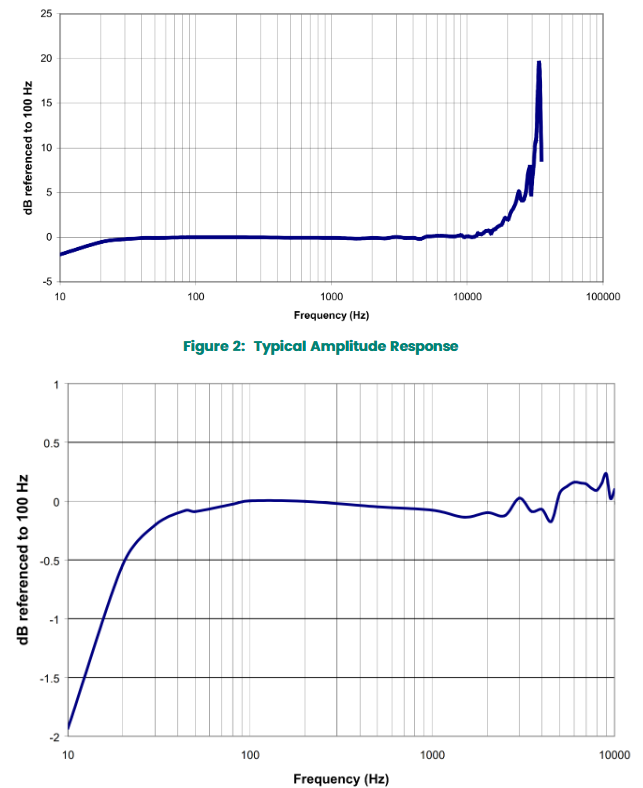
Frequency response: -10 Hz-15 kHz: ± 3 dB/-30 Hz-10 kHz: ± 10%

(Ensure accurate capture of vibration signals within a wide frequency range)/Completely consistent with 330400

Temperature sensitivity: typical value -11% to+3% (the rate of change of sensitivity with temperature within the operating temperature range)/completely consistent with 330400

Lateral sensitivity:<5% (relative to axial sensitivity, reducing the impact of installation angle errors on measurement)/completely consistent with 330400

Installation resonance frequency:>30 kHz (to avoid interference from resonance on high-frequency vibration measurement)/completely consistent with 330400

Power requirements: – Input voltage: -24 ± 0.5 Vdc

-Bias current: 2 mA (nominal)/exactly consistent with 330400

Output bias voltage: -8.5 ± 0.5 Vdc (reference voltage relative to ground)/completely consistent with 330400

Grounding design: shell isolation (to avoid interference with measurement signals caused by grounding loops)/completely consistent with 330400

Maximum cable length: 305 meters (1000 feet), with no signal attenuation when using the specified cable, identical to 330400.

Environmental adaptability parameters

1、 Temperature range

Working and storage temperature

Range: -55 ° C to+121 ° C (-67 ° F to+250 ° F)

Explanation: The sensor can work stably in extreme high and low temperature environments, suitable for high temperature equipment such as industrial furnaces and steam turbines, or cold outdoor scenes. It can also withstand this temperature range during storage without the need for additional temperature control protection.

2、 Impact bearing capacity

Impact limit

Peak value: 49050 m/s ² (5000 g)

Description: It can withstand severe mechanical impacts (such as accidental collisions during installation, instantaneous impacts during equipment start-up/shutdown), ensure that internal components are not damaged, and is suitable for heavy industrial environments with severe vibrations (such as mining machinery and stamping equipment).

3、 Humidity and protective performance

relative humidity

Tolerance range: 100% condensation (non submerged state)

Protection design: The sensor housing is sealed tightly and made of 316L stainless steel material, which can prevent water vapor and dust from entering the internal circuit. It is suitable for humid workshops, outdoor rainy and snowy environments, or high humidity process flows (such as papermaking and food processing).

IP rating

Equivalent protection: IP68 (dustproof and waterproof)

Note: This level is only applicable to the sensor body, and the cable part needs to be separately protected to avoid water ingress or wear.

4、 Magnetic field anti-interference ability

Magnetic field sensitivity

Limit value:<2.21 mm/s ²/Gauss (225 mg/Gauss), test conditions are 50 Gauss, 50-60Hz magnetic field

Explanation: In strong electromagnetic environments (such as near motors and transformers), it is less affected by magnetic field interference, ensuring the accuracy of vibration measurement data and reducing false signals.

5、 Base strain sensitivity

Regarding the differences in different serial numbers

The serial number starts with “G” (produced after April 2004): 49 mm/s ²/mstrain (0.005 g/mtrain), and the influence of substrate strain on measurement is minimal, so there is no need to install an additional base.

Serial number without “G” (produced before April 2004):

When there is no installation base: 980 mm/s ²/mstrain (0.100 g/mtrain), with high strain sensitivity, it needs to be used in conjunction with a dedicated installation base.

When equipped with a mounting base: 4.9 mm/s ²/mstrain (0.0005 g/mtrain), it can effectively reduce substrate strain interference.

Search for products

Back to Top
Product has been added to your cart