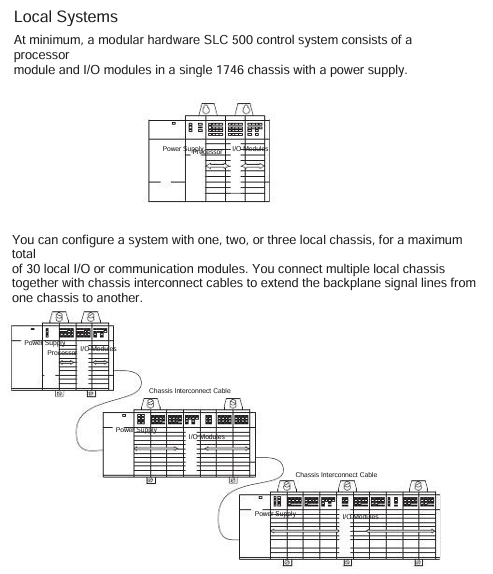
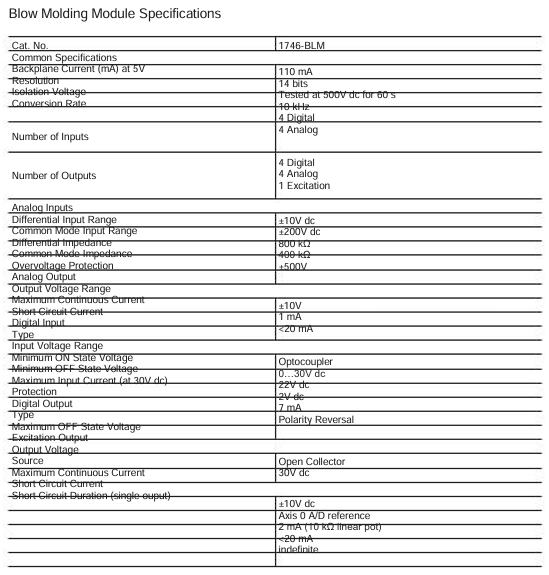
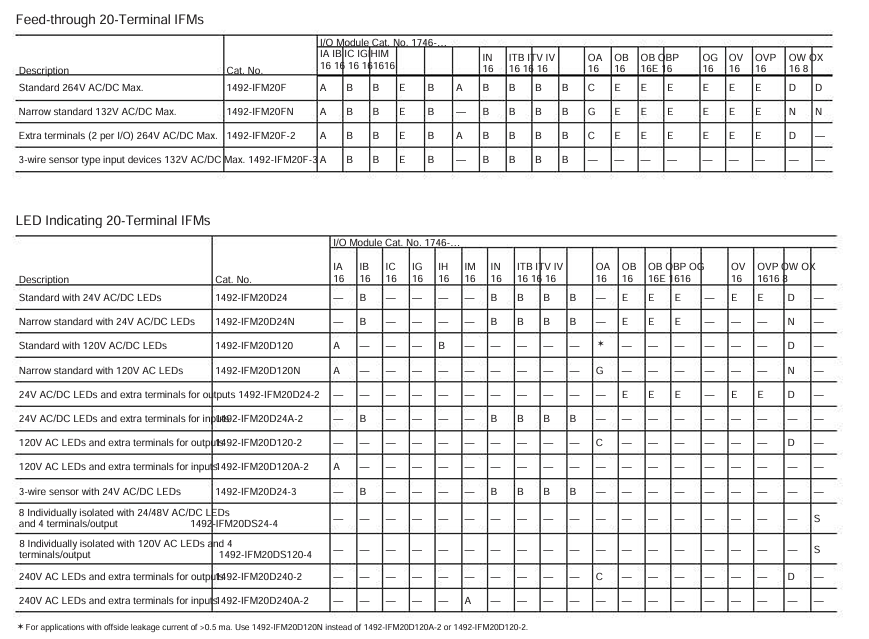
Model attribution: 1746-IB32 is a digital input module of Rockwell Automation SLC 500 series programmable logic controller (PLC), mainly used for collecting discrete switch signals (such as on/off signals output by sensors, buttons, limit switches, etc.) in industrial sites, and converting them into digital signals recognizable by PLC to achieve real-time monitoring of equipment status.
Typical application scenarios: Widely used in manufacturing production lines, mechanical equipment control, process automation and other fields, such as assembly line workstation status detection, motor start stop signal acquisition, safety door switch status monitoring, etc.
The single module supports 32 independent digital input channels and can simultaneously collect 32 switch signals. The channels are electrically isolated to avoid signal interference
The input signal type is direct current (DC), which usually supports two common industrial DC voltages: 24V DC or 120V DC (please refer to the official document for details), and is compatible with NPN or PNP sensor outputs
Input response time ≤ 1ms (typical value) to quickly respond to on-site signal changes, ensuring real-time control logic, suitable for scenarios with high response speed requirements
Low power design with input current of 7mA~10mA (per channel), reducing overall system energy consumption, and compatible with the output current range of most industrial sensors
(2) Electrical and Protection
Isolation method: Adopt channel to channel optoelectronic isolation or group isolation (such as isolation every 8/16 channels), with isolation voltage usually ≥ 250V AC (1 minute), effectively suppressing electromagnetic interference (EMI) and grounding loop problems in industrial sites.
Overvoltage/Overcurrent Protection: Some models have built-in overvoltage protection circuits (such as transient voltage suppressors TVS) and overcurrent protection (such as self recovery fuses) to prevent module damage from abnormal voltage/current on site.
(3) Physics and Installation
Dimensions: Suitable for SLC 500 series standard racks (such as 1746-A7/A10, etc.), usually designed as a “thin module”, with a width of about 32mm, a height matching the rack (about 100mm), and a depth of about 160mm (subject to official data), saving rack installation space.
Installation method: It is installed using DIN rails or directly fixed on the SLC 500 rack backplane. During installation, it is necessary to ensure that the module is reliably connected to the rack bus to ensure stable data transmission and power supply.
(4) Environmental adaptability
Working temperature: -20 ℃~60 ℃ (industrial standard), can operate stably in high and low temperature industrial environments, such as workshops, warehouses, outdoor control cabinets, and other scenarios.
Humidity range: 5%~95% RH (non condensing), suitable for humid environments, no additional moisture-proof measures required (requires overall protection of the control cabinet).
Protection level: The protection level of the module itself is usually IP20 (for panel installation), and it needs to be installed in a closed control cabinet to avoid direct contact with dust and liquids.
Functional characteristics (based on the commonality of SLC 500 series modules)
Diagnostic function: Supports channel level fault diagnosis, such as open circuit and short circuit detection. Diagnostic information can be read through PLC programming software (such as RSLogix 500) to quickly locate the faulty channel and reduce troubleshooting time.
Compatibility: Fully compatible with all SLC 500 series CPU modules (such as 1747-L511/L532, etc.), can be mixed with digital output modules (such as 1746-OB16) and analog modules (such as 1746-NI8) of the same series for installation, and build a complete control system.
Wiring method: Adopting a detachable terminal block (such as 1746-TB32 terminal board), supporting “front wiring” or “rear wiring”, the wiring operation is convenient, and the terminal block can be directly disassembled for later maintenance without dismantling the entire module.
Precautions for use
Power supply requirements: The module is powered by the SLC 500 rack backplane (usually a 5V DC logic power supply+24V DC input power supply). It is necessary to ensure that the rack power module (such as 1746-P2) outputs stably to avoid voltage fluctuations that may cause module failures.
Signal wiring: Input signal lines should be routed separately from power lines (such as motor cables) to reduce electromagnetic interference; When wiring for long distances (over 100m), shielded twisted pair cables should be selected and properly grounded.
Module address setting: If multiple modules of the same type are installed in the rack, a unique address needs to be set through the address dip switch on the module to ensure that the PLC can correctly identify each module channel.
Software configuration: In RSLogix 500, it is necessary to correctly configure the module type (select “1746-IB32”) and input filtering time (which can be set according to the on-site interference situation, such as 0.1ms~10ms) to avoid false triggering caused by high-frequency interference.
SLM082 is a powerful management industrial switch suitable for harsh industrial environments such as wide temperature, high dust, and humidity. It supports web, console (CLI), third-party SNMP software, and exclusive “PACSystems Ethernet Switch Configuration Tool” for management, and can configure multiple switches simultaneously and monitor their status.
(2) Software core functions
Specific description of functional categories
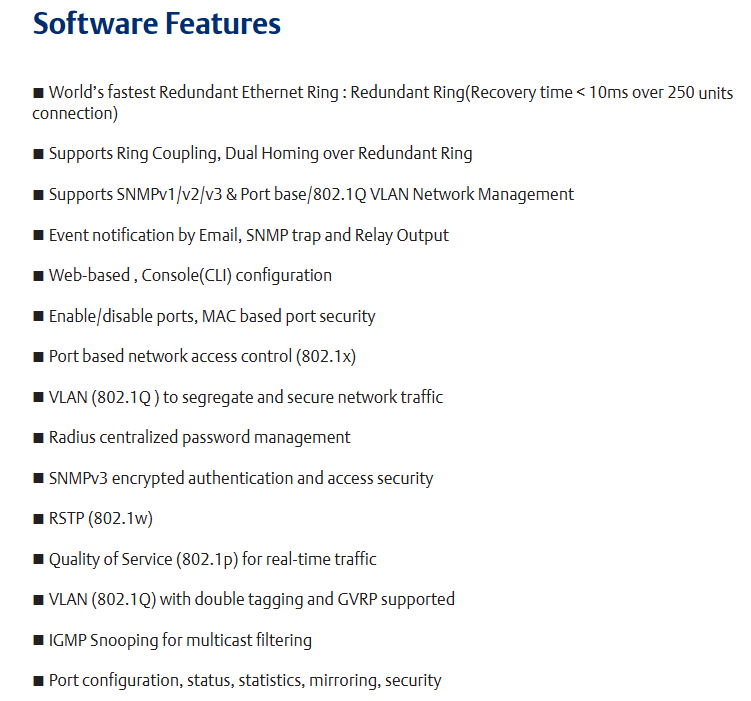
Network redundancy supports the world’s fastest redundant Ethernet ring (with a recovery time of less than 10ms when 250 devices are cascaded), enabling ring coupling and dual home topology; Compatible with RSTP (802.1w) Fast Spanning Tree Protocol
Network management supports the SNMP v1/v2/v3 protocol; Support VLAN partitioning based on port/802.1Q standards; Support LLDP (Link Layer Discovery Protocol) to automatically discover network node information
Event notifications can generate event alerts through email (SMTP), SNMP Trap, and relay output
Traffic control supports 802.1p Quality of Service (QoS) to ensure real-time traffic; Support IGMP Snooping multicast filtering to reduce network bandwidth usage
Security protection supports port enable/disable, MAC address based port security, 802.1x port authentication, and Radius centralized password management; SNPv3 encryption authentication
(3) Hardware core features
Power supply: Three redundant DC inputs.
Environmental adaptability: working temperature -40~70 ℃, storage temperature -40~85 ℃, working humidity 5%~95% (no condensation), protection level IP30.
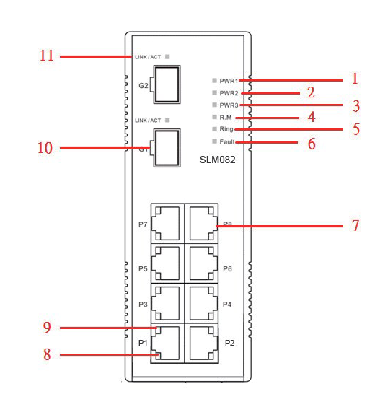
Port configuration: 8 10/100Base-T (X) Ethernet ports (RJ45 interface), 2 100/1000Base-X SFP optical ports, and 1 Console port.
Physical dimensions: 52mm (width) x 106mm (depth) x 144mm (height).
Hardware Installation
SLM082 supports two installation methods to meet the needs of different industrial scenarios:
(1) DIN rail installation
The switch backplane comes with a DIN rail kit, which can be directly fastened to the standard DIN rail for fixation. The installation steps are simple and do not require additional drilling.
(2) Wall mounted installation
The packaging contains a wall mounted panel, which needs to be punched on the wall according to the dimensions indicated in the manual (such as aperture, hole spacing, etc.). After fixing the wall mounted panel with screws, the switch can be installed.
Hardware interface and indicator lights
(1) Front panel interface (Table 3.1)
Interface Type Quantity Function Description
10/100Base-T (X) ports with 8 RJ45 interfaces, supporting automatic negotiation (rate/duplex mode), default rate “automatic”, duplex “automatic”, flow control “disabled”
100/1000Base-X SFP ports with 2 optical ports, used to connect fiber optic modules and support high-speed data transmission
Console port with one RJ45 interface, connected to the computer via an RS-232 adapter cable for CLI management
Press the Reset button for 5 seconds to restore the switch to factory settings
(2) Meaning of front panel indicator lights (Table 3.2)
LED identification color status description
The green constant light of PW1/PW2/PW3 corresponds to the activated power supply module (PW1/PW2) or power interface (PW3)
R. The M (Ring Master) green constant light switch is the master node (Ring Master) of the redundant ring
The redundant ring with green constant brightness has been enabled;
Slow flashing: Redundant ring topology abnormality;
Flash: Redundant ring is working normally
Fault: The yellow light is constantly on, indicating a power failure or port interruption/malfunction
10/100Base-T (X) port LNK/ACT green constant light: port link established;
Flashing: The port is transmitting data and the link and activity status of the corresponding Ethernet port
10/100Base-T (X) port Full Duplex yellow constant light port works in full duplex mode
SFP port LNK/ACT green/yellow constant light: optical port link established;
Blinking: The optical port is transmitting data, and the corresponding link and activity status of the optical port are flashing
(3) Top panel component
Terminal block: includes PW1/PW2 (12-48V DC power input) and relay output interfaces( 1A@24VDC ).
Power interface (PW3): 12-45V DC power input socket.
Reset button: Press for 3 seconds to reset the device, press for 5 seconds to restore factory settings.
Console port: RJ45 interface, used for CLI management connection.
Maximum transmission distance: Both are 100m (328 feet), with RJ45 connectors.
Pin definition: In 100BASE-TX/10BASE-T cables, pins 1/2 are used for sending data and pins 3/6 are used for receiving data; Supports automatic MDI/MDI-X functionality, allowing for direct connection between computers and switches (without the need for crossovers).
(2) SFP optical module and fiber optic
Optical module type: Supports multi-mode (transmission distance 0-550m, wavelength 850nm, fiber specifications 50/125 μ m or 62.5/125 μ m) and single-mode SFP modules, with LC connectors.
Connection rule: The TX port of switch A needs to be connected to the RX port of switch B to ensure the correct transmission of optical signals.
(3) Console cable
Cable specifications: The package contains a DB-9 (female) to RJ45 cable, which is used to connect the computer COM port to the switch Console port.
Pin correspondence: Pin 2 (RD, receive data) of the computer end (DB-9 male head) corresponds to Pin 2 (TD, send data) of the DB-9 female head, Pin 3 (TD, send data) corresponds to Pin 3 (RD, receive data) of the female head, and Pin 5 (GD, ground) corresponds to Pin 5 (GD, ground) of the female head.
Web Management Configuration
Web management is based on the built-in HTML web pages (Flash storage) of the switch, supporting IE5.0 and above browsers (with Java Applets network port permissions enabled), and compatible with both HTTP and HTTPS modes.
Login steps: Open the browser and enter “http:///device IP” or “https://device IP”. Enter the username and password to enter the management interface.
(2) Core configuration function
1. Basic Settings (5.1.5)
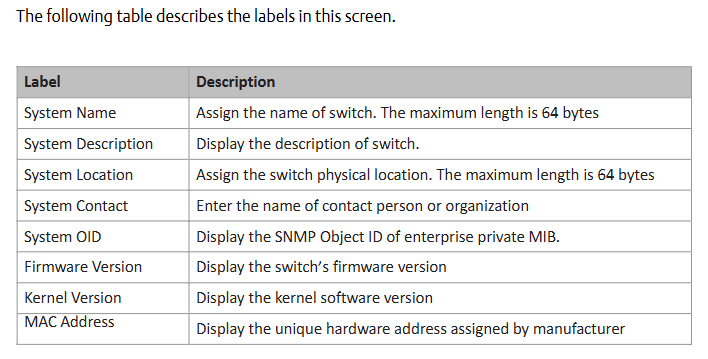
Switch information: System name (maximum 64 bytes), physical location, contacts, firmware version (default 1.03), kernel version (default v2.49), device MAC address, etc. can be modified.
Administrator password: Old username/password verification is required, and the new password must be at least 8 characters long, containing 1 uppercase letter, 1 number, and 1 special character (such as @ # $).
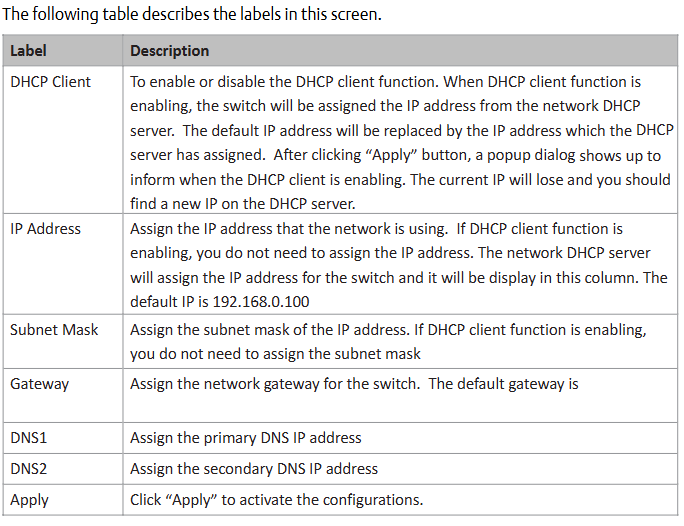
IP configuration: You can manually set IP/subnet mask/gateway/DNS, or enable DHCP clients to automatically obtain IP (if there is a DHCP server in the network).
SNTP time synchronization: After enabling the SNTP client, you can set the time zone (such as GMT Greenwich Mean Time), SNTP server IP, and support daylight saving time configuration (setting start and end times and offsets).
2. Backup and Upgrade (5.1.6)
Configure backup/restore: Back up the current configuration file (such as data.bin) through the TFTP server, or restore the configuration from the TFTP server.
Firmware upgrade: Prepare a TFTP server and store firmware files (such as image. bin). Enter the server IP and file name in the interface, click “Upgrade” to complete the upgrade (power off is prohibited during the upgrade, and the physical loop must be removed first).
3. DHCP Server (5.1.7)
Function switch: When enabled, the switch acts as a DHCP server and can assign dynamic IP addresses to LAN devices.
Parameter configuration: Set IP allocation range (such as 192.168.0.2-192.168.0.200), subnet mask, gateway DNS, And the IP lease duration (default 168 hours).
Port IP binding: A fixed IP can be assigned to a specified port to ensure that the device obtains the same IP every time it connects.
4. Port settings (5.1.8)
Port control: Set port enable/disable, rate/duplex mode (such as auto negotiation, 100 full), flow control mode (symmetric/asymmetric), and port security (only allow MAC addresses in the security list to forward data when enabled).
Rate limit: It can limit the inbound/outbound traffic of ports and support classification restrictions based on “broadcast frames”, “broadcast+multicast frames”, and “broadcast+multicast+flood unicast frames”.
Trunk port aggregation: supports static aggregation or 802.3ad LACP dynamic aggregation, merging multiple physical ports into logical links to improve bandwidth; The number of active ports in the aggregation group can be set, and the backup port will be automatically activated in case of failure.
5. Network redundancy (5.1.9)
Redundant Ring: Supports three topologies: ring, ring coupling, and dual homing. It requires specifying the “Ring Master”, “First Ring Port”, and “Second Ring Port”; Ring coupling is used to split a large ring into two small rings, reducing the impact of topological changes; Dual attribution is used to connect redundant rings and backbone switches through RSTP links.
RSTP configuration: After enabling RSTP, the bridge priority (0-61440, a multiple of 4096, with higher priority for smaller values), maximum aging time (6-40 seconds), Hello time (1-10 seconds), and forwarding delay (4-30 seconds) can be set, satisfying the formula “2 × (forwarding delay -1) ≥ maximum aging time ≥ 2 × (Hello time+1)”.
6. VLAN configuration (5.1.10)
802.1Q Tag VLAN: Based on the IEEE 802.1Q standard, cross vendor switch VLAN partitioning is achieved by inserting VLAN tags (VID) into Ethernet frames, supporting GVRP protocol automatic synchronization of VLAN configuration; By default, all ports belong to the default VLAN with VID=1 (which cannot be deleted). Ports can be set to Access (only carrying untagged frames), Trunk (only carrying tagged frames), or Hybrid (simultaneously carrying two types of frames) modes.
Port based VLAN: Logical networks are divided by ports, and only members of the same VLAN can exchange data. Ports that are not selected are automatically assigned to another VLAN; Ignore VLAN tags when enabled.
7. Traffic priority (5.1.12)
QoS strategy: Supports “strict priority” (high priority queue data is transmitted first until empty) or “8:4:2:1 weighted fair queue” (proportionally transmitting high/medium/low/lowest priority queue data).
Priority classification:
Port based: Assign a priority level of “high/medium/low/lowest” to each port.
Based on COS/802.1p: Map to level 4 queue according to the 802.1p field values (0-7) in the frame.
Based on TOS/DSCP: Map to level 4 queue according to the TOS/DSCP field values (0-63) in the IP header.
8. Security Configuration (5.1.14)
IP Security: Only allow IPs in the ‘Secure IP List’ to manage switches through Web/SNMP.
Port security: After enabling, the port is prohibited from learning new MAC addresses and only forwards MAC frames from the security list.
MAC blacklist: Discard frames with target MAC addresses in the blacklist to prevent specific devices from receiving data.
802.1x authentication: Radius server IP, authentication port (default 1812), billing port (default 1813), shared key, etc. need to be configured, supporting four authorization modes: port “Accept”, “Reject”, “Authorize”, and “Disable”.
9. Alarm and Monitoring (5.1.15-5.1.17)
System alarms: Supports SYSLOG (local/remote server logs), SMTP email alarms, and can be triggered by events such as “system cold start”, “power status”, “SNMP authentication failure”, “redundant ring topology change”, etc; The fault relay is triggered synchronously when an alarm is triggered, and the Fault LED is constantly on.
Status monitoring: View MAC address table (dynamic/static entries, support aging time setting), port statistics (data volume, error frames, etc.), system event logs (can be refreshed/cleared), port mirroring (copy source port TX/RX data to target port monitoring).
Product Name: Redundant Control Unit, belonging to GE Fanuc RX3i series programmable logic controllers (PLCs). Its core function is to provide dual machine redundant backup for PLC systems, ensuring seamless switching of backup controllers in case of main controller failure and avoiding system shutdown.
Document source: Product specifications and application manual published by NEX Instrument, focusing on hardware parameters, redundant logic, installation configuration, and compatibility instructions.
Core functions and redundancy principles
(1) Core functions
Dual machine redundant backup
Support two RX3i controllers (such as IC695CPU315/330, etc.) to form a primary and backup architecture, and achieve hardware level redundant control through IC695CPU320.
When the main controller is running normally, the backup controller synchronizes the program, data, and I/O status of the main controller in real time; When the main controller fails (such as power outage or hardware failure), the backup controller switches to the main control mode without disturbance, with a switching time of ≤ 100ms, to ensure continuous production process.
Status monitoring and diagnosis
Built in redundant status indicator lights (such as primary and backup status, synchronization status, fault alarm), visually display the operating status of the redundant system.
Support reading redundant system diagnostic information through RX3i programming software (such as Proficy Machine Edition), including switching reasons, synchronization anomalies, hardware failures, etc., for easy fault location and troubleshooting.
Flexible redundant configuration
Support the “Hot Standby” mode, where both the primary and backup controllers are powered on and running, and the backup devices are in a “ready” state instead of standby mode, improving switching speed.
Can be used with RX3i series I/O modules and communication modules, compatible with redundant I/O architectures (such as IC695RIO remote I/O modules), achieving full system redundancy coverage.
Technical specifications
(1) Hardware parameters
Specification category specific parameters
Power supply requirement input voltage:+5V DC (powered by the RX3i rack backplane, no external independent power supply required); Power consumption: ≤ 5W
Physical dimension width: 40mm (1.57 inches); Height: 100mm (3.94 inches); Depth: 160mm (6.30 inches), compatible with RX3i standard rack (such as IC695CHS012/024)
Working temperature: 0 ° C~60 ° C (operating state); -40 ° C~85 ° C (storage state)
Humidity range 5%~95% RH (non condensing, compliant with IEC 61131-2 environmental standards)
Protection level IP20 (panel installation, to be used in conjunction with control cabinet to prevent dust and liquid intrusion)
(2) Redundancy performance indicators
Performance category indicator requirements
Switching time between primary and backup: ≤ 100ms (from main controller fault detection to backup controller taking over control)
Real time data synchronization in synchronization mode (including program memory, data memory, I/O image area), with a synchronization rate of ≥ 100Mbps
Fault detection range: main controller power failure, CPU hardware failure, memory error, communication link interruption (synchronous link between main and backup)
Redundant links with built-in 2-channel high-speed synchronization interfaces (for data exchange between primary and backup controllers), supporting fiber optic or shielded twisted pair connections
Hardware composition and interfaces
(1) Hardware composition
IC695CRU320 is an independent module structure, with core components including:
Redundant control chip: responsible for determining the primary and backup status, synchronizing logic control, and triggering switching;
Synchronous communication interface: 2 RJ45 or optical ports (depending on configuration), used for data synchronization between the primary and backup controllers;
Status indicator panel: 4 LED indicator lights, meaning as follows:
RUN (green): The redundant unit is running normally;
MASTER (red): The currently connected controller is in main control mode;
STANDBY (yellow): The currently connected controller is in standby mode;
Fault (red): Redundant system failure (such as synchronization failure, module hardware error).
(2) Key interfaces
Interface Type Quantity Function Description
One rack backplane interface is inserted into the RX3i standard rack (such as IC695CHS012) and connected to the rack backplane bus to obtain power and exchange data
Two synchronous communication interfaces are connected to the main and backup controllers to achieve real-time data synchronization (supporting maximum transmission distance: 100m twisted pair cable, 2km fiber optic cable)
One reserved RS232 or Ethernet interface (some versions) for diagnostic equipment to read redundant logs
Installation and configuration requirements
(1) Installation conditions
Rack compatibility
Only compatible with RX3i series standard racks, such as IC695CHS012 (12 slots) and IC695CHS024 (24 slots), which need to be installed in the “redundant control unit dedicated slot” of the rack (usually slots 1-2 on the left side of the rack, refer to the rack manual for details).
Controller compatibility
The primary and backup controllers must be RX3i CPU modules of the same model, supporting models including IC695CPU315, IC695CPU330, IC695CPU340, and the CPU firmware version must be consistent (recommended V3.0 and above).
Environmental Requirements
The installation environment should be kept away from strong electromagnetic interference (such as frequency converters, high-power motors), and avoid sudden temperature changes or dusty/humid environments;
Reserve a heat dissipation space of ≥ 50mm around the module to ensure good heat dissipation (without forced air cooling, the ambient temperature does not exceed 55 ° C).
(2) Configuration steps
Hardware Installation
Insert IC695CRU320 into the dedicated slot of RX3i rack and tighten the panel screws;
Connect the synchronization interface between IC695CRU320 and the main and backup controllers using a synchronous cable (twisted pair or fiber optic);
Connect the power supply, I/O module, and communication module separately for the primary and backup controllers (ensuring consistent configuration of primary and backup I/O).
Create a new RX3i redundancy project, select the “dual machine redundancy” architecture, specify the primary and backup CPU models and IC695CRU320 as redundant control units;
Configure synchronization parameters (such as synchronization rate, timeout) to enable the “automatic switching” function;
Download the program to the main controller, and the software will automatically trigger the synchronization of primary and backup data. After the synchronization is completed, the redundant system will enter the “normal operation” state.
Communication modules IC695ETM001 (Ethernet module), IC695COM001 (RS485 module)
(2) Selection suggestions
Applicable scenarios
Industrial scenarios that require continuous operation, such as chemical production lines, power dispatch systems, water treatment equipment, etc., require a system availability requirement of ≥ 99.99%.
Selection precautions
The primary and backup controllers need to be completely consistent (model, firmware version, memory configuration) to avoid synchronization failure due to hardware differences;
If the system includes remote I/O, redundant I/O modules (such as IC695RIO002) should be used to ensure that the I/O layer also has redundancy capability;
It is recommended to use shielded twisted pair cables (short distance, ≤ 100m) or multimode optical fibers (long distance, ≤ 2km) for synchronous cables to reduce synchronization anomalies caused by interference.
Troubleshooting and Maintenance
(1) Common faults and solutions
Possible causes and solutions for the fault phenomenon
The redundant status light “FAULT” is always on. 1. The synchronization link between the primary and backup controllers is interrupted; 2. The firmware versions of the primary and backup CPUs are inconsistent; 3. CRU module hardware failure: 1. Check the synchronization cable connection and replace the faulty cable; 2. Upgrade the primary and backup CPUs to the same firmware version; 3. Replace the IC695CRU320 module
Primary/backup switching failure: 1. Backup controller data synchronization is not completed; 2. The switch enable is not turned on; 3. Inconsistent I/O configuration: 1. Wait for synchronization to complete (the synchronization light is always on to indicate completion); 2. Enable “automatic switching” in the software; 3. Verify the primary and backup I/O configurations to ensure consistency
The backup controller cannot synchronize. 1. Poor contact of the synchronization interface; 2. Memory error in the main controller; 3. CRU synchronization logic fault 1. Re plug and unplug the synchronization cable, clean the interface; 2. Restart the main controller and check the memory status; 3. Reset CRU module (via software or power off restart)
(2) Daily maintenance suggestions
Regularly (every 3 months) check the redundancy status indicator lights to confirm that the primary and backup are running normally and the synchronization link is normal;
Export redundant system diagnostic logs through Proficy Machine Edition every 6 months to analyze potential risks such as frequent synchronization failures and switching records;
Avoid plugging and unplugging CRU modules or synchronous cables while they are live to prevent hardware damage; When replacing modules, power off first to ensure that the primary and backup controllers are in a “stop” state.
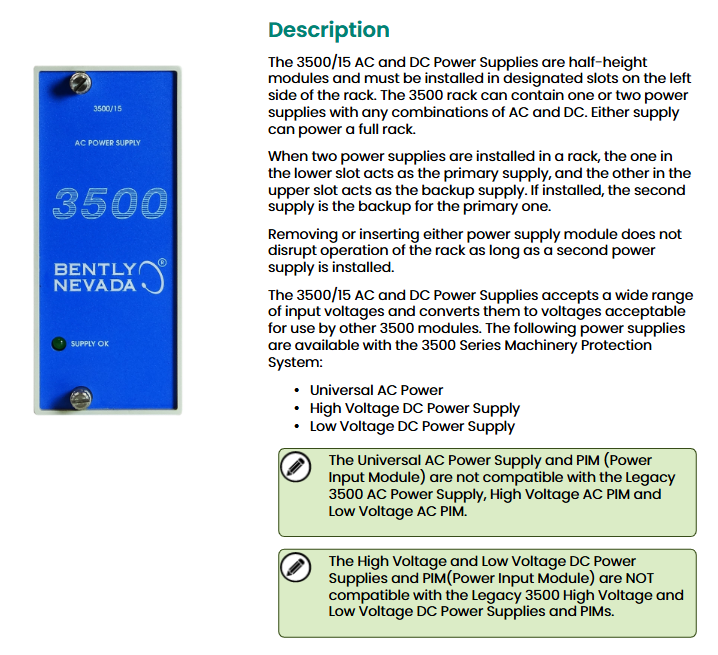
Brand: Bently Nevada, under Baker Hughes, used for mechanical equipment condition monitoring systems
Document Information: Technical Data Sheet for Model 141530 Rev. N
Core functions and installation features of the product
(1) Module positioning and redundancy design
Physical specifications: It is a half height module and must be installed in the designated slot on the left side of the rack.
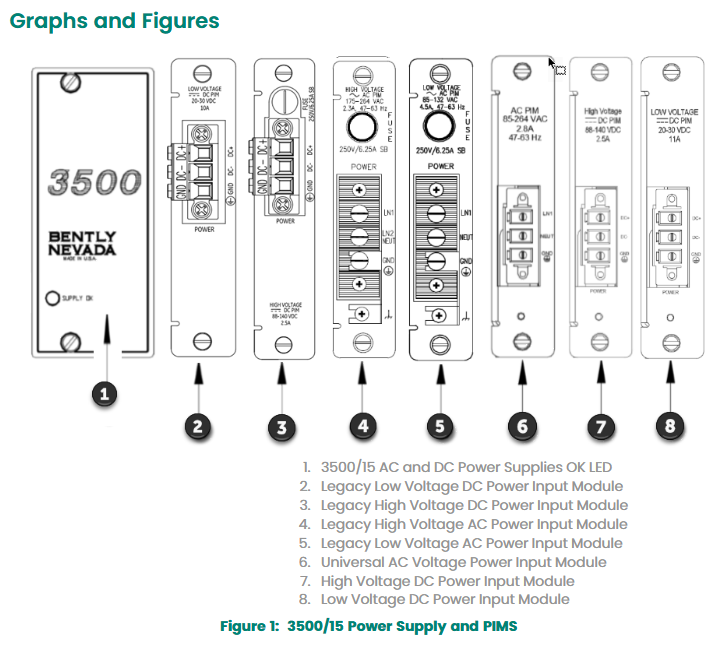
Redundant configuration: The 3500 rack can install one or two power modules (AC and DC can be combined arbitrarily), and a single power module can supply power to the entire rack; If two are installed, the main power supply in the lower slot and the backup power supply in the upper slot can be seamlessly switched in case of a main power failure.
Hot swappable feature: As long as two power modules are installed in the rack, plugging or unplugging either module will not interrupt the rack operation.
(2) Power type and compatibility
Available power types: The 3500 series mechanical protection system supports three power options, as follows:
Universal AC Power
High Voltage DC Power Supply
Low Voltage DC Power Supply
Compatibility limitations:
Universal AC power supply and power input module (PIM) are not compatible with traditional 3500 AC power supply, high-voltage AC PIM, and low-voltage AC PIM.
High voltage DC and low-voltage DC power supplies and their corresponding PIMs are not compatible with traditional 3500 high-voltage/low-voltage DC power supplies and PIMs.
Technical specifications
(1) Input parameters
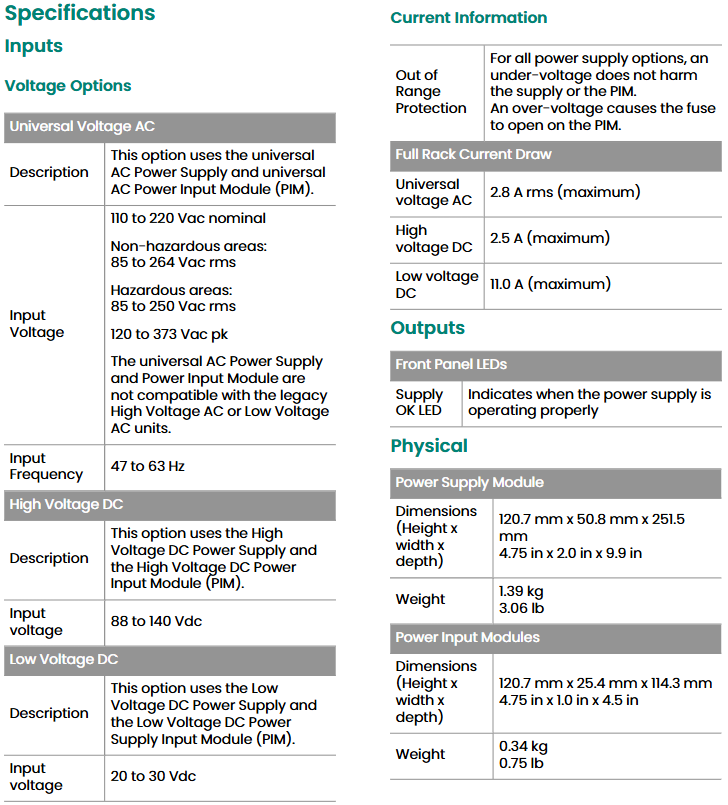
There are differences in input voltage, frequency, and other parameters among the three types of power supplies, as shown in the table below:
Power type Input voltage range Input frequency Other instructions
Universal AC power supply rated at 110-220 Vac;
Non hazardous area: 85-264 Vac rms;
Dangerous area: 85-250 Vac rms;
Peak value of 120-373 Vac pk 47-63 Hz needs to be used with universal AC PIM
High voltage DC power supply 88-140 Vdc – needs to be used with high voltage DC PIM
Low voltage DC power supply 20-30 Vdc – needs to be used with low voltage DC PIM
Additional notes
Voltage protection: Among all power options, undervoltage will not damage the power supply or PIM; Overvoltage can cause the fuse on PIM to melt.
Full rack current: Universal AC maximum 2.8 A rms; High voltage DC maximum 2.5 A; low voltage DC maximum 11.0 A.
(2) Output and indicator lights
Output function: Convert the input wide range voltage into a voltage that can be used by other 3500 modules.
Front panel indicator light (Supply OK LED): When the power module is working properly, the indicator light is on.
(3) Physical dimensions and weight
Module type, size (width x height x depth), weight
Power module 120.7 mm × 50.8 mm × 251.5 mm (4.75 in × 2.0 in × 9.9 in) 1.39 kg (3.06 lb)
Power Input Module (PIM) 120.7 mm × 25.4 mm × 114.3 mm (4.75 in × 1.0 in × 4.5 in) 0.34 kg (0.75 lb)
(4) Rack space requirements
Power module: It needs to occupy two half height slots on the left side of the rack, each slot can accommodate one power module, and supports the installation of two at the same time to achieve redundant power supply.
Power input module: It is a special half height module that is directly installed behind the corresponding power module.
Environmental and Compliance Certification
(1) Environmental restrictions
Range of environmental parameters
Working temperature -30 ° C to+65 ° C (-22 ° F to+150 ° F)
Storage temperature -40 ° C to+85 ° C (-40 ° F to+185 ° F)
Humidity 95%, no condensation
(2) Compliance and Certification
FCC certification: Complies with Part 15 of the FCC rules and meets two conditions: does not cause harmful interference; Any received interference (including interference that may cause unexpected operation) must be accepted.
EMC (Electromagnetic Compatibility):
Compliant with the EU EMC Directive 2014/30/EU.
Following standards: EN 61000-6-2 (industrial environment immunity), EN 61000-6-4 (industrial environment emission).
Electrical safety:
Compliant with the EU Low Voltage Directive 2014/35/EU.
Follow standard: EN 61010-1.
RoHS certification: Compliant with the EU RoHS Directive 2011/65/EU.
Maritime certification:
DNV GL: Classification rules for ships, offshore installations, and high-speed light vessels.
American Bureau of Shipping (ABS): Classification Criteria Rules Part 1 (Rules for Steel Ships, Rules for Offshore Installations and Structures).
Hazardous Area Certification:
CNRTLus: Class I Zone 2, AEx/Ex nA nC ic IIC T4 Gc; Class I, Zone 2, AEx/Ex ec nC ic IIC T4 Gc; Class I, Zone 2, Groups A, B, C, and D; The ambient temperature Ta is from -20 ° C to+65 ° C (-4 ° F to+149 ° F), and it needs to be installed according to drawing 149243 or 149244.
ATEX/IECEx:II 3 G,Ex nA nC ic IIC T4 Gc; Ex ec nC ic IIC T4 Gc; The ambient temperature Ta is from -20 ° C to+65 ° C (-4 ° F to+149 ° F), and it needs to be installed according to drawing 149243 or 149244.
Ordering and spare parts information
(1) Order coding rules
The ordering code format for the 3500/15 power module is “3500/15-AA-BB-CC”, and the meanings of each field are as follows:
AA (Top Slot Power Type): Includes traditional high voltage DC (88-140 Vdc), traditional low voltage DC (20-30 Vdc), universal AC (85-264 Vac rms), high voltage DC power supply, low voltage DC power supply, None.
BB (bottom slot power type): The options are the same as AA.
CC (Institutional Certification): 00 (No Certification), 01 (CSA/NRTL/C, Class I, Zone 2).
(2) Main spare parts list
Spare part number, spare part description
04310251, Universal AC Power Input Module; Power input cover screws (2 pieces/set)
129767, traditional high-voltage DC power input module; 3500/15 Power Module User Guide
118M0915-01、 Traditional high-voltage direct current power module; Replace the connector of the universal AC power input module
118M0915-02、 Traditional low-voltage DC power input module; Traditional low-voltage DC power module; Replace the connector of the DC power input module
129M0198、 High voltage direct current PIM; Low voltage DC PIM; High voltage DC power PIM (power input module) fuse replacement
-(unspecified number) Universal replacement of fuses for AC power input module and traditional high-voltage DC power input module; Universal replacement fuse for low-voltage DC power input module and traditional low-voltage DC power module (6.3 × 32 mm, fast melting type, 5A/500 Vac); Blank front panel of power module (including screws, 1 piece/set); Rear input connector cover of power module (1 piece/set, requires separate order of 04310251 screws)
Horner APG HE693CALKIT calibration software is a computer program designed to support on-site and factory calibration of specific Horner APG simulation modules.
(2) Package composition
Each set includes: a floppy disk with calibration software, an RS-232 9-pin serial cable, a TTL to RS-232 converter, and an RS-232 ribbon cable with a 10 pin plug.
(3) Software operation requirements
Operating environment: Requires running on an IBM or compatible computer using DOS 3.1 or higher.
Hardware requirements: A text display is required and a serial port (COM1 or COM2) is used. The program defaults to using COM1.
(4) Module connection and preparation
The simulation module needs to be connected to the selected serial port on the computer through an RS-232 cable, combined with a TTL-to-RS-232 converter or an RS-232 ribbon cable with a 10 pin plug (depending on the simulation module to be calibrated).
The module does not need to be configured in the PLC, but appropriate power must be provided for the bus pins of the module.
Set conditions
(1) General Requirements (2.1)
Module installation: The module to be calibrated must be inserted into the PLC it will be used in the application; When inserting, the PLC must be powered off. After the module is correctly inserted into the PLC rack, the rack should be installed vertically (see Figure 1) to ensure good ventilation of the module; The PLC must be in ‘stop’ mode.
Stabilization time: After inserting the module into the PLC and completing the calibration connection, it needs to stabilize for at least 15 minutes after power on to ensure appropriate temperature balance.
Environmental requirements: Do not expose any equipment involved in the module or calibration process to extreme temperature changes; Calibration can be performed using an expansion rack.
(2) Set up process (2.2)
No additional special steps are required, and it should be carried out in conjunction with equipment preparation and module specific conditions.
(3) Equipment Requirements (2.3)
Calibrator: High quality calibrators (such as Omega CL511) must be used, and their accuracy must be more than twice that of the module (for example, THM884 has an accuracy of ± 1 degree Celsius, and the calibrator accuracy must be at least ± 0.5 degrees Celsius); It is recommended that all Horner Electric simulation modules use battery powered calibrators. When calibrating any thermocouple module, a battery powered calibrator must be used.
Wire requirements: The wire used for calibration must be the same as the wire used in the application, and must be of high quality with the shortest possible length; Avoid exposing wires to excessive radio frequency (RF) or electromagnetic interference (EMI) during the calibration process to prevent introducing errors.
(4) Module specific conditions (2.4)
1. Analog input module (2.4.1)
Covering HE693ADC406, HE693ADC405, HE693ADC415, HE693ADC410, HE693ADC420, the general requirements are as follows:
Calibrator: More than twice the accuracy of the module and powered by batteries.
Wire: Use high-quality wire that is the same as the wire used in the application and has the shortest length.
Environment: Avoid exposing the module to excessive EMI or RF, extreme temperature changes.
Installation and status: The module needs to be inserted into the PLC slot used in the application, and after being powered on and connected, it should be stable for at least 15 minutes. It should be installed vertically (in the panel installation position), and the PLC should be in “stop” mode; The unused channels during the calibration process of HE693ADC406 need to be short circuited and grounded.
2. Analog output module (2.4.2)
Regarding HE693DAC410 and HE693DAC420, it is required to be consistent with the analog input module (except for the channel short-circuit grounding of HE693ADC406).
3. Resistance Temperature Detector (RTD) module (2.4.3)
Including HE693RTD600, HE693RTD601, HE693RTD660, HE693RTD665, HE693RTD666, in addition to meeting the general requirements of the analog input module, there are additional requirements: unused channels during calibration must be short circuited and grounded; Modules with a suffix of -20 need to use the a=d switch (PT100D) in the calibration software.
4. Strain gauge module (2.4.4)
Including HE693STG883 and HE693STG884, it is required to be consistent with the RTD module (without using channel short-circuit grounding).
5. Thermocouple module (2.4.5)
Covering multiple models such as HE697THM160 and HE693THM166, in addition to meeting the general requirements for analog input modules, there are additional requirements: modules with a suffix of -21 need to use external ISOBLK for cold end compensation; During the calibration process, the last channel needs to be short circuited and grounded to optimize cold end compensation; Modules with suffix -02 need to use the “=k” switch in the executable file (refer to section 4.1).
Calibration process
(1) General Instructions (3.1)
The general calibration process is only a basic framework, with slight differences in the calibration process of each module, but the core logic is consistent. The simulation module needs to be calibrated according to the specific process described in the subsequent sections; Table 3.1 lists the simulation modules and their corresponding calibration files, with some corresponding relationships as follows:
Product model calibration software Product model calibration software
Select the corresponding executable file from the floppy disk list (for example, calibrate HE693THM884 and select Thm884. exe).
Enter the corresponding command at the DOS prompt to run the calibration program: when using the COM1 port by default, enter “Thm884” and press “ENTER”; When using the COM2 port, enter “Thm884=C2” and press “ENTER”.
To view command line switches and their instructions, enter “Thm884=?” at the DOS prompt and press “ENTER”.
2. Screen Example (3.2.1)
After the program starts, the top of the screen will display the program name and version. Taking the THM884 thermocouple module calibrator (V2.04) as an example, the screen will display channel values, types, scales, zero points, and other information, as well as module models, channel quantities, hardware alarms, versions, and other parameters. At the same time, it will prompt the functions of each function key (F1-F9, Esc) (such as F1 calibration of J-type thermocouples, Esc exit, etc.).
3. Windows version software installation and operation (3.2.2, 3.2.3)
Installation: Load the floppy disk containing the THM884cal.exe (Windows version) installation file, locate and select the setup. exe file, follow the prompts to select the application file storage directory, and after installation is complete, you can use it.
Run: Find THM884cal.exe in the directory specified during installation, double-click the file to open the application; This version operates similarly to the DOS version. If you have any questions about the functionality, press the F12 key to access the help file.
(3) Process Overview (3.3)
Disable non-volatile random access memory (NVRAM): If the “disable” option is not provided, it will be automatically disabled. This step closes the old calibration constant and uses the default value for new calibration. The module needs to be reset to use the default value.
Disable PLC configuration: Make the module use default values (the module defaults to PLC configuration mode when powered on).
Initialization module: Execute after disabling PLC configuration.
Perform calibration: If it is a thermocouple module, you need to first select the calibration type. The software will prompt you for each step in the calibration process, and you need to follow the prompts.
Update NVRAM: Update the new default values to NVRAM.
Activate NVRAM: Enable the module to use the stored calibration constants the next time it is powered on.
Re initialize the module: Let the module re read the calibration and filtering constants from the NVRAM.
(4) Module specific calibration process (3.4)
The calibration steps and corresponding function keys for each module are as follows (some module examples):
1. Analog input module (3.4.1)
Taking HE693ADC406, HE693ADC405/415, and HE693ADC410/420 as examples:
Step Process Function Key
1. Disable NVRAM F5
Initialization module F6
3. Disable PLC configuration F8
Perform calibration (follow software prompts) F1
5 Update NVRAM (store new constants, select “Yes”) F3
Activate NVRAM F4
7 Initialization module F6
2. Analog output module (3.4.2)
The calibration steps for HE693DAC410 and HE693DAC420 are the same as those for the analog input module. It should be noted that when calibrating the analog output module, the PLC must be in non operating mode.
5. Update NVRAM (store new constants, select “Yes”) F5
Activate NVRAM F7
7 Initialization module F6
4. Strain gauge module (3.4.4)
The calibration steps for HE693STG883 and HE693STG884 are the same as those for the analog input module.
5. Thermocouple module (3.4.5-3.4.7)
HE697THM160, HE697THM260: Follow the same steps as the RTD module.
HE693THM166: The steps are consistent with the analog input module.
HE693THM406 and other models: The steps are consistent with the RTD module.
HE693THM884 (K-type+channel offset calibration): Use THM884_K.bat batch file, consisting of 15 steps, including module installation, power on, NVRAM disable/activate, PLC configuration disable/enable, calibration execution, offset setting and transmission, NVRAM update, module initialization, etc. Some steps require the use of function keys such as F1, F4, F5, F6, F7, F8, and finally remove the module after power off.
HE693THM894 (K-type calibration): Use the THM894_K.bat batch file, following the same steps as HE693THM884 (K-type+channel offset calibration).
Switch settings
(1) Switch Description (4.1)
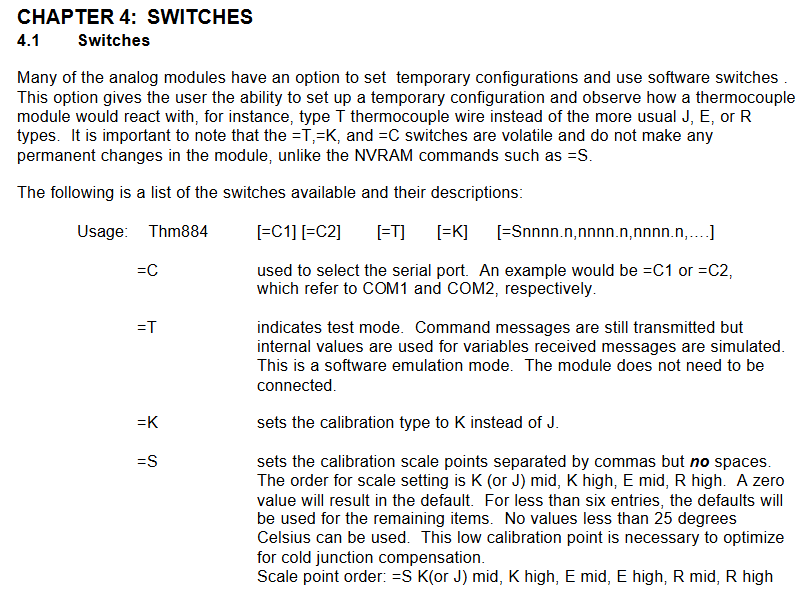
Many simulation modules can be temporarily configured and software switches can be used, such as observing the reaction of thermocouple modules using T-shaped thermocouple wires (rather than the commonly used J, E, R types); Please note that the=T,=K, and=C switches are volatile and will not cause permanent changes to the module, while commands such as=NVRAM (such as=S) will cause permanent changes. The switch format is “Thm884 [=C1] [=C2] [=T] [=K] [=Snnnn. n, nnnn. n, nnnn. n,…]”, and the functions of each switch are as follows:
Switch Function Description
=C is used to select serial ports, for example=C1 (COM1),=C2 (COM2)
=T represents test mode, still transmitting command messages, but variables use internal values, receiving messages generated by simulation (software simulation mode), without the need to connect modules
=K sets the calibration type to K instead of the default J type
=Set calibration scale points for S, separated by commas (without spaces), in the order of K (or J) median, K high value, E median, E high value, R median, and R high value; When the value is 0, use the default value; If there are less than 6 entries, the remaining entries will use default values; The scale point must not be lower than 25 degrees Celsius (this low-temperature calibration point is crucial for optimizing cold end compensation)
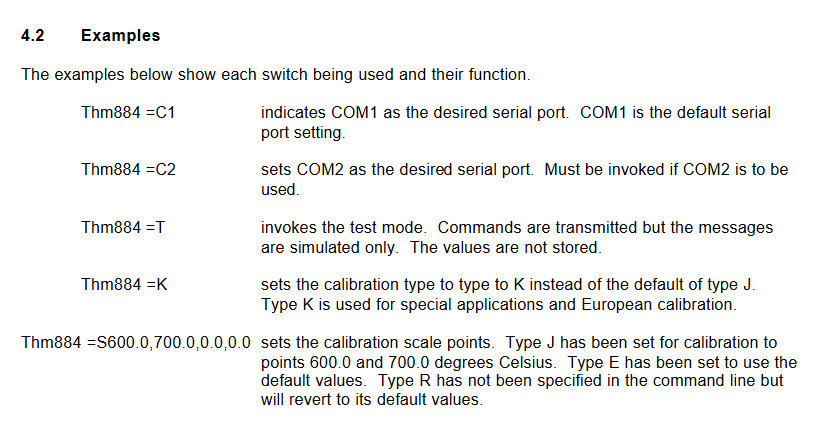
(2) Example (4.2)
Command function
Thm884=C1 specifies COM1 as the serial port (default port)
Thm884=C2 specifies COM2 as the serial port (this command needs to be called to use COM2)
Thm884=T Enable test mode, transmit commands but only simulate messages, do not store values
Thm884=K sets the calibration type to K type (default J type), suitable for special applications and European calibration
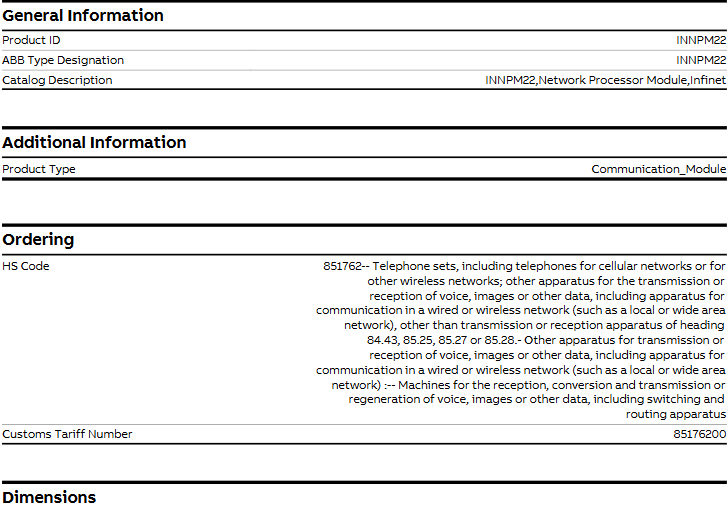
Product catalog description: INNPM22, Network Processor Module, suitable for Infinet systems
Product type: Communication-Module
Procurement and Customs Information
HS code: 851762 (classification description: telephone, including telephone for cellular or other wireless networks; other devices used for transmitting or receiving voice, image or other data, including wired or wireless network (such as local area network or wide area network) communication devices, but excluding transmission or reception devices of heading 84.43, 85.25, 85.27 or 85.28; Among them, machines used for receiving, converting, transmitting or reproducing voice, image or other data, including switching and routing devices, belong to the category of “other devices used for transmitting or receiving voice, image or other data, including wired or wireless network communication devices”
The overall classification path is: Control Systems → Symphony Plus series → Controllers → HR series (Harmony Rack) hardware → SPNPM22
Precautions
Safety specifications are generally applicable to control system handling. Instructions and warnings related to a specific subject or operation of the product.
The following norms must be strictly observed:
must strictly comply with the technical specifications and typical applications of the product system
Personnel training: Only trained personnel shall install, operate, maintain or repair the product system. must
Provide guidance and explanation of the situation in danger areas to these personnel.
Unauthorized changes: Changes or structural changes to the product system may not be made.
Maintenance responsibility: Must ensure that the product system is used only under appropriate conditions and in full fitness for use.
Working environment: The user must meet the specified environmental conditions:
Safety regulation
The following safety provisions of EN 50110-1 shall be fully complied with when handling product systems (maintenance) :
1 Disconnect completely.
2 Secure to prevent reconnection.
3 Verify that the installation is complete.
4 Ground and short-circuit the device.
Warning: Only qualified maintenance personnel can remove and insert the module. In order to ensure the personal safety of the operator, before each pulling out or inserting, you must
Disconnect the power supply and ensure that there is no voltage on all terminals at the back, and the product is effectively grounded with the ground screw at the back.
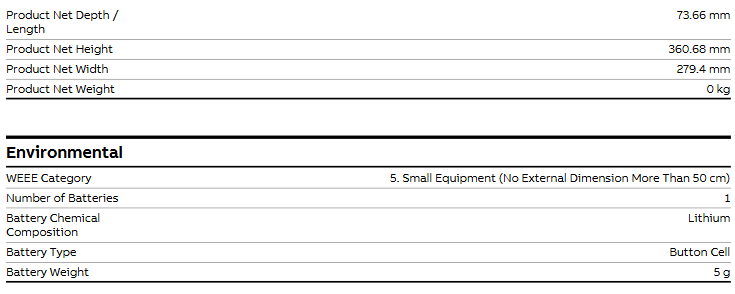
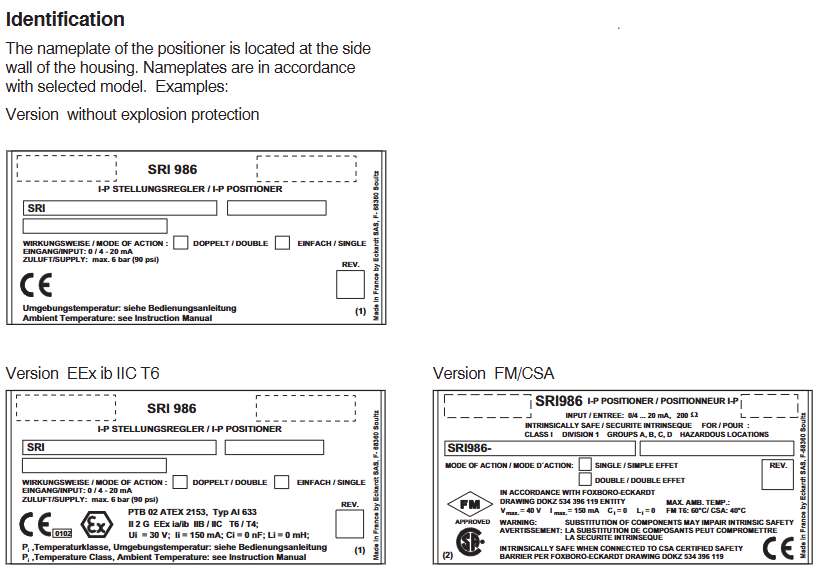
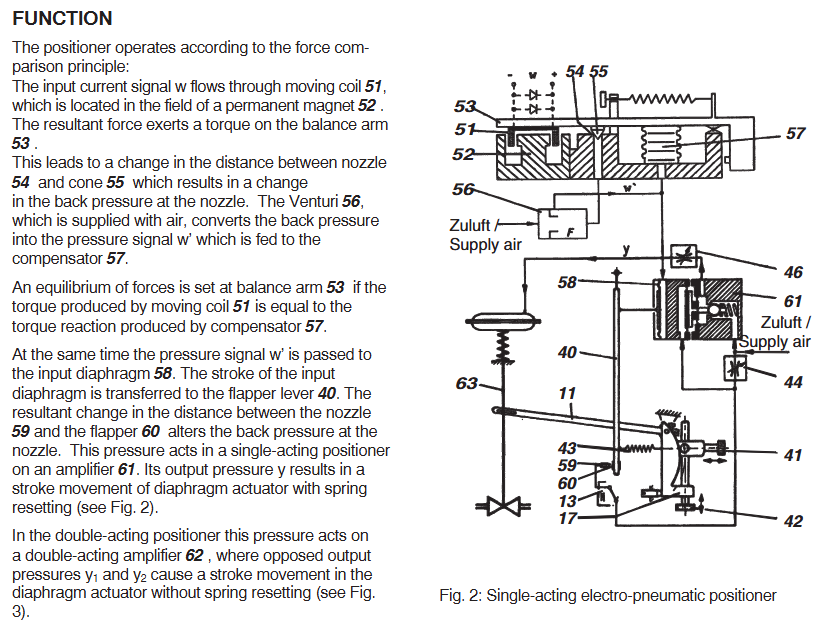
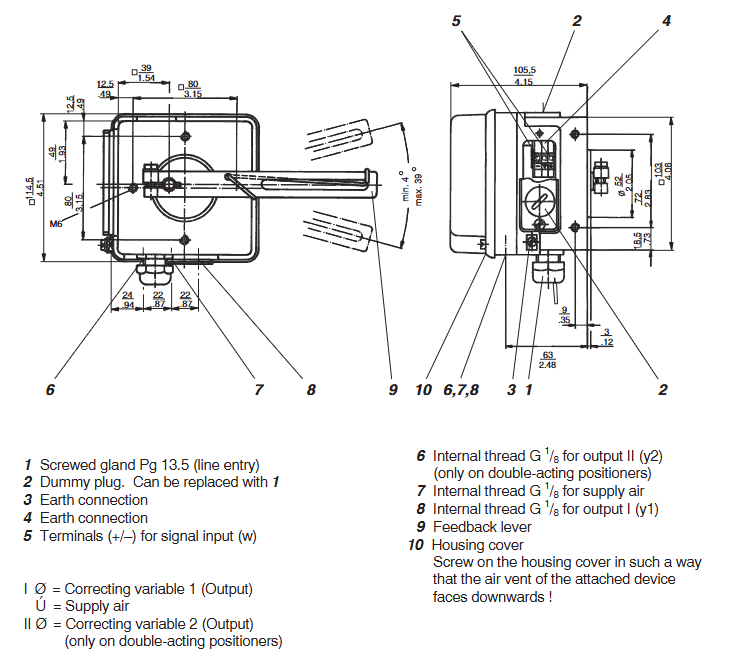
Eckardt SRI986 is an intelligent electrical valve positioner launched by the Eckardt brand under Emerson. It is designed specifically for pneumatic actuators in industrial process control and achieves high-precision adjustment of valve opening through precise electrical pneumatic signal conversion and closed-loop control. This product integrates non-contact position detection, modular structure, and intelligent diagnostic functions, and is compatible with industrial communication protocols such as HART and PROFIBUS PA. It is widely used in industries such as petrochemicals, power, water treatment, and pharmaceuticals, and is suitable for both linear and rotary pneumatic actuators. Its core advantages lie in high adjustment accuracy, low maintenance requirements, and strong environmental adaptability.
Core positioning and technological advantages of the product
1. Core functions and applicable scenarios
High precision positioning control: using non-contact Hall effect position sensors, the adjustment accuracy reaches ± 0.5% of the full range (Span), and the repeatability accuracy is ± 0.1%. It is suitable for scenarios that require strict flow/pressure control, such as chemical reactor feed valves and power plant steam control valves.
Intelligent diagnosis and communication: Supports HART 7.0 (standard) and PROFIBUS PA (optional) protocols, and can remotely read valve operation data (such as opening, gas supply pressure, fault codes) through a handheld device (such as Rosemount 475) or control system to achieve predictive maintenance.
Wide range adaptation: compatible with single acting (Spring Return) and double acting (Double Acting) pneumatic actuators, with a gas source pressure range of 0.2-1.0 MPa (2-10 bar), and output force/torque covering multiple actuator specifications (maximum linear thrust of 40 kN, maximum angular torque of 500 N · m).
Environmental tolerance: Protection level IP66/IP67 (standard), IP68 (optional), temperature range -40~+85 ℃ (conventional), -55~+100 ℃ (high temperature option), certified by ATEX, IECEx, CSA and other explosion-proof certifications, can be used in Zone 1/2 (Class I hazardous areas) and corrosive environments (optional corrosion-resistant coating).
2. Key technological highlights
Non contact position detection: Abandoning traditional mechanical linkage detection, adopting Hall sensor+magnetic ring structure, no mechanical wear, with a lifespan of over 1 million cycles, reducing maintenance frequency.
Adaptive control algorithm: Built in “Auto Tune” function, automatically recognizes the characteristics of the actuator (such as stroke and response speed) after power on, optimizes PID control parameters, eliminates the need for manual debugging, and shortens installation time.
Modular design: divided into control unit (electronic module), pneumatic module (solenoid valve+air circuit) and connecting components, each module is independently disassembled and can be replaced separately in case of failure, reducing maintenance costs and downtime.
Hardware structure and technical specifications
1. Core components and functions
Component Category Key Component Function Description
Electronic control unit Hall position sensor, microprocessor, communication chip 1. Receive 4-20mA/HART/PROFIBUS PA input signals;
2. Check the actual position of the valve (resolution 0.01% of full range);
3. Execute PID control algorithm and output control signal to pneumatic module;
4. Store operational data and diagnostic information, and support remote communication.
2. Single acting mechanism: controls the “on/off” side pressure (spring reset);
3. Double acting mechanism: independently controls the pressure on both sides of “on” and “off”;
4. Built in pressure sensor, real-time monitoring of gas supply and output pressure.
Connecting and installing component brackets, connecting shafts, explosion-proof enclosures. 1. The bracket is compatible with straight stroke (ISO 5211 standard flange) and angular stroke (shaft diameter 10-30mm) actuators;
3. The shell is made of aluminum alloy (conventional) or stainless steel (corrosion-resistant option), with an explosion-proof rating of Ex d IIC T6 (ATEX).
2. Key technical parameters
(1) Control performance
Parameter linear actuator angular actuator
Travel range 2-100 mm (standard), 100-300 mm (extended), 0-90 ° (standard), 0-180 °/0-360 ° (optional)
Adjustment accuracy ± 0.5% full range ± 0.5% full range
Response time ≤ 0.3 seconds (step signal 10% -90%) ≤ 0.5 seconds (step signal 10% -90%)
Dead zone ≤ 0.1% of full range (adjustable through software) ≤ 0.1% of full range
(2) Electrical and Pneumatic Parameters
Input signal:
Standard: 4-20 mA DC (load resistance 250-600 Ω)+HART 7.0;
Optional: PROFIBUS PA (IEC 61158-2, transmission rate 31.25 kbps).
Power requirements:
HART version: 12-30 V DC (typical power consumption 1.5 W);
PROFIBUS PA version: 9-32 V DC (compliant with IEC 61158-3 power supply standard).
Gas source requirements:
Pressure: 0.2-1.0 MPa (clean and dry compressed air, filtration accuracy ≤ 5 μ m, dew point 10 ℃ lower than ambient temperature);
Gas consumption: Double acting ≤ 0.3 Nm ³/h (steady state), single acting ≤ 0.2 Nm ³/h (steady state).
Temperature range: -40~+85 ℃ (conventional), -55~+100 ℃ (high temperature option), -20~+60 ℃ (intrinsic safety version);
Explosion proof certification:
ATEX:Ex d IIC T6 Ga(Zone 1)、Ex nA IIC T6 Gc(Zone 2);
IECEx:Ex d IIC T6 Ga、Ex nA IIC T6 Gc;
CSA:Class I Div 1/2,Groups A-D,T6。
Operation and configuration process
1. Installation and initialization
(1) Mechanical installation
Bracket fixation: Select the corresponding bracket according to the type of actuator (straight stroke/angular stroke), and fix the locator with ISO 5211 flange (straight stroke) or shaft sleeve (angular stroke) to ensure that the connecting shaft is coaxial with the actuator shaft (deviation ≤ 5 °).
Air source connection: Connect clean compressed air to the “Supply” port (G1/4 thread) of the locator. Single acting mechanisms need to distinguish between “Output” (working side) and “Exhaust” (exhaust side), while double acting mechanisms need to distinguish between “Open” and “Close” ports.
Electrical wiring: The HART version is connected to a 12-30 V DC power supply and a 4-20 mA signal (two-wire system); The PROFIBUS PA version is connected to the bus power and signal lines (two-wire system), and the wiring terminals must meet explosion-proof sealing requirements (such as using explosion-proof gland heads).
(2) Auto Tune
Starting conditions: Ensure that the air source pressure is normal (0.2-1.0 MPa), the actuator is not stuck, and the locator is powered on (power light is always on).
Trigger self-tuning:
Local: Long press the “Auto Tune” button on the locator (3 seconds), the indicator light will flash (red), and enter self-tuning mode;
Remote: Send the “Auto Tune” command through a HART controller or control system.
Process and completion: The locator automatically drives the actuator to run throughout the entire stroke (2-3 times), records parameters such as stroke time and response characteristics, and optimizes PID parameters; After the self-tuning is completed, the indicator light turns green and stays on, and the system enters normal control mode.
2. Daily operations and diagnosis
(1) Local operation
Status indication: Judging the operating status through 3 LED lights——
Green constantly on: normal operation; Green flashing: self-tuning in progress;
Yellow constantly on: warning (such as low gas supply pressure, slight jamming); Yellow flashing: communication failure;
Red constantly on: serious malfunction (such as position sensor failure, actuator jamming); Red flashing: Over range alarm.
Manual adjustment: Long press the “Manual” button (3 seconds) to enter manual mode, adjust the valve opening through the “Up”/”Down” buttons, and release the button for 5 seconds to automatically return to automatic mode (to prevent misoperation).
(2) Remote diagnosis (HART/PROFIBUS PA)
The following key data and diagnostic information can be read through a handheld device or control system:
Operating data: actual valve opening (%), set value (%), supply pressure (MPa), output pressure (MPa), working temperature (℃);
Diagnostic information:
Mild malfunction: low gas supply pressure (<0.2 MPa), slow response of the actuator (jamming warning);
Severe faults: position sensor failure, piezoelectric valve failure, communication interruption;
Maintenance tips: valve action frequency (cumulative), last maintenance time, recommended maintenance cycle (such as checking the air circuit every 100000 actions).
Configuration options and ordering information
1. Core configuration options
Applicable scenarios for configuring category options
Communication protocol HART 7.0 (standard), PROFIBUS PA (optional) HART: for small and medium-sized systems, low cost; PROFIBUS PA: A large-scale bus system that requires multiple devices to be networked
Type of actuator: Linear, Rotary. Linear: Globe valve, gate valve; Angular stroke: butterfly valve, ball valve
Explosion proof rating Ex d IIC T6 (standard), Ex ia IIC T4 (intrinsic safety, optional) Ex d: Zone 1/2, suitable for high-risk areas; Ex ia:Zone 0/1, Suitable for extremely high-risk areas
Protection level IP66/IP67 (standard), IP68 (optional, water depth 1m/24h) IP68: humid environment (such as sewage treatment plant, outdoor during rainy season)
Materials and coatings: Aluminum alloy shell (conventional), stainless steel shell (optional), corrosion-resistant coating (PTFE, optional) Stainless steel+PTFE: corrosive environment (such as chemical acid/alkali gas)
2. Typical ordering models
Eckardt SRI986 model coding rule: SRI986- [Protocol] – [Type of actuator] – [Explosion proof level] – [Protection level], example as follows:
SRI986-H-LD-67: HART protocol, linear actuator, Ex d explosion-proof, IP67 protection;
SRI986-P-R-IA-68: PROFIBUS PA protocol, angular actuator, Ex ia intrinsic safety, IP68 protection;
SRI986-H-R-D-66: HART protocol, angular travel actuator, Ex d explosion-proof, IP66 protection (standard selection).
3. Common accessories
Installation accessories: Straight stroke bracket (SRI986Mount-L), angular stroke shaft sleeve (SRI986-Shift-R-20mm), explosion-proof gland head (M20, Ex d certified);
Maintenance accessories: piezoelectric valve spare parts (SRI986-Piezo-01), air filter (precision 5 μ m, with drainage), HART handheld controller (Rosemount 475);
Petrochemical industry: The feed control valve of the catalytic cracking unit and the reflux valve of the fractionation tower are controlled with high precision (± 0.5%) to ensure stable reaction temperature and pressure, avoiding the risk of overheating and overpressure;
Power industry: steam regulating valves for steam turbines in thermal power plants, outlet valves for cooling water pumps in nuclear power plants, suitable for high temperature environments (+85 ℃) and explosion-proof requirements, supporting PROFIBUS PA bus integration into DCS systems;
Water treatment: Water treatment plant dosing valve, sewage treatment plant aeration valve, IP68 protection suitable for humid environments, self-tuning function simplifies on-site debugging;
Pharmaceutical industry: mixing speed control valve for drug reaction kettle, flow valve for sterile filling line, stainless steel shell+PTFE coating to meet corrosion resistance and hygiene requirements, intelligent diagnosis to reduce unplanned downtime.
2. Core user value
Improve control accuracy: ± 0.5% adjustment accuracy reduces process fluctuations and enhances product qualification rate (such as chemical product purity and drug dosage accuracy);
Reduce maintenance costs: Non contact sensors have no wear and tear, modular design simplifies maintenance, predictive diagnosis provides early warning of faults, and reduces downtime (MTBF increases by more than 30%);
Simplified integration and debugging: compatible with mainstream communication protocols, self-tuning function does not require professional personnel, shortening project deployment cycle (reducing debugging time by 50%);
Adapt to harsh environments: wide temperature range, high protection, explosion-proof design, covering the vast majority of harsh working conditions in industrial sites, without the need for additional protective measures.
Maintenance and Precautions
Regular maintenance:
Every 3 months: Check the air source pressure and filter (clean impurities, drain water);
Every 6 months: calibrate the accuracy of the locator (perform “accuracy calibration” through a HART handheld device), and check the looseness of the connecting shaft;
Every year: Replace the air filter element and check the response performance of the piezoelectric valve (through diagnostic function).
Fault handling:
Low gas supply pressure: Check the pressure of the air compressor and clean the filter;
Position sensor malfunction: Check if the magnetic ring has come off and replace the sensor module;
Communication interruption: Check the wiring terminals to confirm that there is no short circuit or grounding on the HART/PROFIBUS PA bus.
Safety regulations:
Power off is required for maintenance in explosion-proof areas, explosion-proof tools should be used, and live disassembly and assembly are strictly prohibited;
The intrinsic safety version (Ex ia) must ensure that the bus power supply complies with the IEC 61158-3 standard to avoid excessive power supply;
Calibration and maintenance must be carried out by Eckardt certified engineers, using original spare parts to avoid affecting explosion-proof and precision performance.
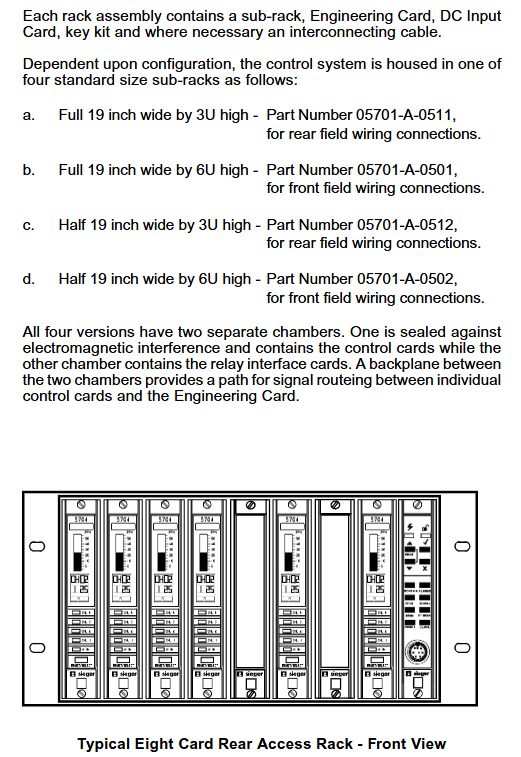
The Honeywell System 57 5704 control system is a modular control platform designed specifically for industrial gas detection under Honeywell. It is mainly used to monitor gas detectors installed on site, achieve multi-channel gas concentration monitoring, alarm triggering, and remote control functions. This system has the core advantages of high reliability, flexible scalability, and strict safety compliance, and is widely used in industrial scenarios such as petrochemicals, chemical engineering, pharmaceuticals, and power that require strict gas leak detection. It can be adapted to various types of gas sensors such as catalytic combustion and 4-20mA.
System core positioning and security standards
1. Core functions and scope of application
Multi channel monitoring capability: The standard 19 inch 3U rack can support up to 64 channels of gas detection (4 channels per card), and the half 19 inch 3U rack can support up to 32 channels, adapting to the distributed monitoring needs of large-scale industrial sites.
Sensor compatibility: Supports two types of core sensor inputs – catalytic combustion sensors (for combustible gas detection) and 4-20mA signal sensors (for toxic gas, oxygen, etc. detection), meeting the monitoring needs of different gas types.
Alarm and Control: Provides multi-level alarms (A1/A2/A3 three-level concentration alarm, STEL short-term exposure limit alarm, LTEL long-term exposure limit alarm), fault alarms (sensor faults, line faults), and suppression alarms, supports relay output, analog output (0-20mA/4-20mA), and can be linked to external devices (such as exhaust systems, sound and light alarms).
2. Safety and compliance requirements
Environmental restrictions: Non explosion proof design, only applicable to safe areas (non hazardous areas), and limited to indoor use only. Exposure to rainwater or humid environments is prohibited.
Operating standards: Installation, calibration, and maintenance must be carried out by professionals, and only Honeywell certified accessories are allowed to be used to avoid safety risks caused by unauthorized replacement of components.
Compliance standards: Compliant with the EU ATEX Directive (EC Type Examination Certificate BVS 04 ATEX G 001 X), EN 50073 (Specification for Selection and Maintenance of Gas Detection Equipment), EN 60079-14 (Standard for Electrical Installation in Hazardous Areas), etc. Electromagnetic compatibility (EMC) meets the EN 61000-6 series standards, and the ability to resist radio frequency interference (RFI) reaches 10V/m (27-1000MHz).
System hardware composition and module functions
The 5704 control system adopts a modular design, with core components including control cards, interface cards, engineering cards, power modules, and racks/cabinets. Each module has clear functions and can be flexibly combined
1. Core functional modules
Module Name Model Example Core Function Key Parameters
Four channel control card 05704-A-0144 (catalytic input)
05704-A-0145 (4-20mA input) sensor signal processing, concentration display, alarm logic judgment, 4 channels per card; The catalytic card supports constant current drive of 90-315mA; 4-20mA card supports 0-25mA signal measurement
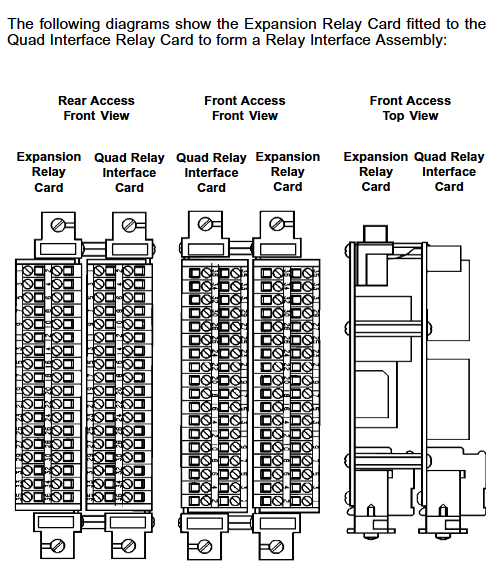
The four relay interface card 05704-A-0121 provides a wiring interface for sensors and control systems, providing four relay outputs (single pole double throw) with a rated current of 5A (110/250V AC or 32V DC) for relay contacts; Supports 2.5mm ² (14 AWG) wire connection
Relay expansion component 05704-A-0131 (interface card+expansion card) expands the number of relays to 16 (12 single pole double throw+4 single pole single throw), adapting to complex alarm linkage requirements and occupying 2 rack slots; Extra weight of 0.5kg, requires separate power supply
The core operating interface for system configuration, calibration, and diagnosis of engineering card 05701-A-0361 provides RS232 interface for connecting to PC or printer to support parameter adjustment (such as alarm threshold, sensor current), fault diagnosis, and maintenance record printing; Engineering key is required to unlock advanced features
DC input card 05701-A-0325 system power access and distribution, supports dual power input (main power+backup battery), provides overcurrent protection input voltage 18-32V DC; Built in 10A anti surge fuse; Support power diode isolation to avoid power conflicts
AC-DC power module 05701-A-0405 (16 channels)
05701-A-0406 (8-way) converts 85-264V AC to 24V DC system power supply, supports power upgrade (50W → 200W), 50W basic module can be expanded to 200W (16 way rack); Input frequency 47-440Hz, compatible with global power grid
2. Rack and cabinet configuration
Rack types: Four standard racks are available -19 inch 3U (rear wiring), 19 inch 6U (front wiring), half 19 inch 3U (rear wiring), half 19 inch 6U (front wiring), supporting both front and rear wiring methods to meet different on-site wiring requirements.
Cabinet accessories: Optional wall mounted cabinet (8/16 channels), made of cold-rolled steel plate material (RAL 7015 dark gray), providing multiple cable entry holes (M20/M25/PG11/PG16), with dust-proof and safety lock functions to protect internal modules from physical damage.
System operation and core functions
1. Basic operating procedures
(1) System startup and initialization
Power off inspection: Before starting, confirm that all control cards and interface cards have been correctly installed, the wiring is not loose, and the power supply voltage meets the requirements of 18-32V DC.
Step by step power on: First, connect the DC input card power supply and check that the green power light on the engineering card is always on (indicating that the power supply is normal); Insert the control cards one by one and observe that the “INHIBIT” light on each card lights up (the suppression period starts for about 30 seconds). After the suppression period ends, the light goes out and the system enters normal monitoring mode.
Sensor signal verification: Use the engineering card “BEAD mA” (catalytic card) or “SIGNAL” (4-20mA card) function to check if the sensor signal is normal (such as catalytic card bridge current of 200mA, 4-20mA card signal within normal range).
(2) Alarm and reset operations
Alarm recognition: Determine the alarm type through the control card LED light——
Red flashing: A1 (1 time/second), A2 (2 times/second), A3 (3 times/second) concentration alarm; STEL/LTEL alarm (1 second on/1 second off, slow flashing).
Normal reset: Short press the “RESET/SET” button on the control card to clear inactive lock alarms, fault prompts, and peak displays.
Extended reset: Long press the “RESET/SET” button for 5 seconds to clear the maximum/minimum concentration record, STEL/LTEL timer, and reset the delay relay.
2. Engineering calibration and maintenance
(1) Key calibration steps (unlocked with engineering key)
Zero point calibration (ZERO):
Place the sensor in a clean environment without target gas (such as fresh air) and wait for the signal to stabilize (the control card displays the “Stable” icon).
Select the target channel, press the “ZERO” button on the engineering card, and the system will automatically set the current signal to zero. After calibration, the channel suppression needs to be released.
Range Calibration (SPAN):
Introduce a standard gas of known concentration (recommended concentration ≥ 40% of full range) and wait for the sensor signal to stabilize.
Press the “SPAN” button on the engineering card to adjust the numerical display to the standard gas concentration. After confirmation, the system saves the range parameters and updates the calibration date.
First range calibration (1st SPAN): For new catalytic sensors, record the initial sensitivity for subsequent sensor life monitoring (triggering a “life expiration” alarm when the sensitivity drops to 50% of the initial value).
(2) Key points for regular maintenance
Monthly inspection: Clean the surface dust of the module, check the tightness of the wiring terminals, and verify whether the alarm relay operates normally.
Annual calibration: Perform zero and range calibration according to sensor type (catalytic/4-20mA), check the accuracy of the engineering card clock, and print maintenance records (via RS232 printer).
Sensor replacement: It is recommended to replace catalytic sensors every 1-2 years, and 4-20mA sensors should be replaced according to the manufacturer’s requirements. After replacement, the “1st SPAN” calibration needs to be performed again.
Independent alarm: Single channel alarm does not affect other channels;
Zoned alarm: Any channel alarm within the designated area triggers the overall alarm of the zone;
Voted alarm: Multiple channels alarm simultaneously (such as 2/3 channel alarm) to trigger the total alarm, avoiding single sensor false alarms;
Update alarm: Even if there are unreset alarms, new alarms can still trigger prompts to avoid omissions.
Output configuration:
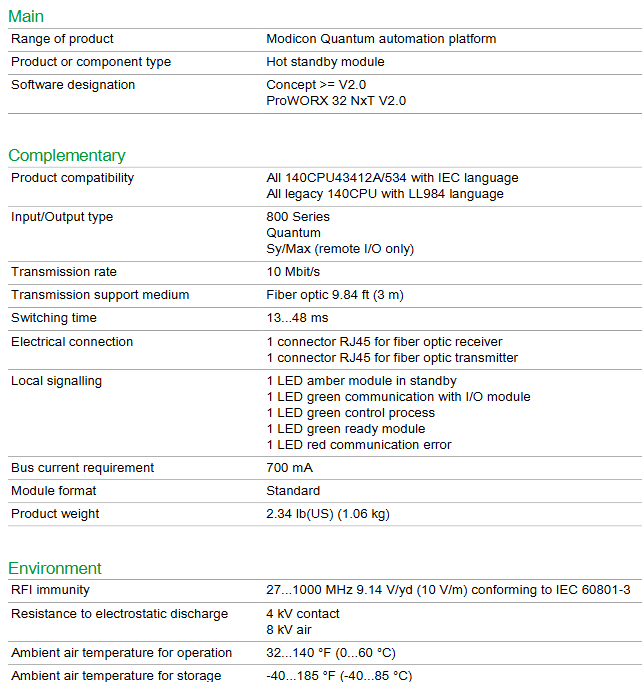
Relay output: can be configured as “normal power on” (power off trigger) or “normal power off” (power on trigger), supporting a switching time of 13-48ms;
Analog output: Each channel can choose 0-20mA or 4-20mA isolated output, used to connect PLC, DCS and other systems to transmit real-time concentration data.
2. Expansion and customization capabilities
Hardware expansion: Increase the number of relays by adding relay expansion cards (05704-A-0131); Upgrade the system power from 50W to 200W by stacking AC-DC power modules (05701-A-0440), supporting more channels.
Software and Communication Expansion:
Engineering software: Configure system parameters (such as alarm thresholds and sensor types) on PC through “Engineering Interface Software”, and support data log storage;
Communication module: optional Modbus interface module (RS232/RS422/485), realizing digital communication with the upper computer (such as SCADA system), only used for data visualization, prohibited for safety related control;
Event printing module: Record alarm, fault events, and timestamps for easy traceability and compliance auditing.
Fault diagnosis and common problems
1. Fault codes and troubleshooting
The system displays the “ERxx” fault code through the control card LCD, and the core fault types and handling methods are as follows:
Meaning of fault code, possible causes, handling suggestions
ER97 EEPROM malfunction (configuration data lost) Control card storage chip damaged Replace control card
ER87 signal out of range (above configuration limit), sensor short circuit, high gas concentration. Check the sensor circuit and confirm the gas concentration on site
ER88 signal under range (below the lower limit of configuration) sensor open circuit, wire breakage check sensor wiring, replace faulty sensor
ER83 catalytic sensor bridge current fault sensor aging, excessive line resistance check line resistance (≤ 40 Ω), replace sensor
Engineering card unresponsive: Check the DC input card power supply (18-32V DC) and fuse (10A). If the power supply is normal, try restarting the system;
Alarm not triggered: Confirm that the channel is not suppressed (INHIBIT light off), check if the alarm threshold configuration is correct, and verify the relay wiring;
Analog output abnormality: Check if the analog module (04200-A-0145/0146) is securely plugged in and confirm that the output type (current source/current sink) matches the external device.
Technical parameters and ordering information
1. Core technical parameters
Environmental adaptability: working temperature 0-55 ℃ (ATEX certification system starts at 0 ℃), storage temperature -25-85 ℃, relative humidity 0-90% (no condensation), altitude ≤ 5000m.
Electrical parameters: System power supply 18-32V DC; Control card power consumption 8.3-12.8W (depending on type); Relay contact capacity 5A (AC/DC).
Display and accuracy: Control card LCD display (4-character number+25 segment analog strip), concentration measurement accuracy ± 1% of full range, alarm threshold resolution 1% of full range.
2. Main ordering models
Example description of component type and model
Control card 05704-A-0144 four channel catalytic combustion sensor input card
Control card 05704-A-0145 four channel 4-20mA sensor input card
Relay Interface Card 05704-A-0121 Four Relay Interface Card (Basic Version)
Engineering Card 05701-A-0361 System Configuration and Diagnostic Card
AC-DC power supply 05701-A-0405 16 channel 50W power module (upgradable to 200W)
140CHS 1100 is the core communication module of Schneider Electric’s Modicon Quantum series PLC, mainly used to connect Quantum controllers with industrial Ethernet networks. It supports mainstream industrial communication protocols such as Modbus TCP/IP, has high stability, flexible expansion, and redundant communication capabilities, and is suitable for the needs of equipment networking, data exchange, and remote monitoring in industrial automation, process control, and other scenarios. It is a key component in building Ethernet communication architecture for Quantum systems.
Basic Information and Product Positioning
1. Core identification and ownership
Product model: 140CHS 1100 (unique ordering and hardware identification code)
Product series: Modicon Quantum (Schneider’s high-end PLC product line, aimed at large-scale industrial control scenarios)
Function positioning: Ethernet communication interface module, as the “network gateway” of Quantum controller, realizing the connection between the controller and the upper computer (such as SCADA system HMI)、 Ethernet data exchange for other PLCs or industrial equipment.
Substitution and Compatibility: There is no direct substitute model, compatible with the full range of Modicon Quantum controllers (such as 140CPU65150, 140CPU67160), and supports collaboration with other modules in the Quantum series (such as I/O modules, specialized functional modules).
2. Core values
Protocol standardization: Native support for Modbus TCP/IP protocol, compatible with industrial Ethernet universal standards, no additional protocol conversion required, reducing system integration complexity.
Communication stability: Adopting industrial grade hardware design, it can withstand electromagnetic interference and environmental fluctuations in industrial sites, ensuring long-term continuous communication without interruption.
Redundancy Support: Supports dual module redundancy configuration (in conjunction with Quantum system redundancy function), automatically switches in case of failure, improves communication link reliability, and is suitable for critical control scenarios such as petrochemicals and power dispatch.
Hardware specifications and electrical characteristics
1. Physical and interface specifications
Size and Installation:
Dimensions: Complies with the Quantum series standard module dimensions (height 130mm x width 36mm x depth 110mm, specific subject to physical object), adopts rail installation, compatible with Quantum standard rack (such as 140XTS00200 rack), occupies one module slot.
Weight: Approximately 0.3kg (excluding accessories), lightweight design does not increase rack load.
Communication interface:
Ethernet port: 1 RJ45 interface, supports 10/100Mbps adaptive speed, compatible with full duplex/half duplex modes, supports Auto MDI/MDI-X automatic line sequence adjustment (no need to distinguish between crossover and straight through lines), convenient for on-site wiring.
Status indicator lights: 2 LED indicator lights (Link/Activity light: green, constantly on indicates link connectivity, flashing indicates data transmission; Fault light: red, constantly on indicates module failure, off indicates normal), visually judging the communication and module status.
2. Electrical parameters
Power supply demand:
Power input: Powered from the Quantum rack backplane, supports DC 5V (typical current 1.2A, maximum current 1.5A), does not require external independent power supply, simplifies wiring.
Power consumption: Typical power consumption is 6W, maximum power consumption is 7.5W, low-power design reduces the overall power load of the rack.
Electromagnetic compatibility (EMC):
Compliant with EN 61000-6-2 (industrial environment immunity) and EN 61000-6-4 (industrial environment emission) standards, it can withstand electrostatic discharge (ESD) ± 8kV (contact discharge) and ± 15kV (air discharge), and has a radio frequency radiation immunity of 10V/m (80-1000MHz), suitable for strong industrial interference environments.
Environmental adaptability:
Working temperature: 0 ° C~60 ° C (non condensing), storage temperature: -40 ° C~85 ° C, suitable for high and low temperature fluctuations in industrial sites.
Humidity: 5%~95% relative humidity (no condensation), resistant to humid environments, no additional moisture-proof measures required.
Communication functions and protocol characteristics
1. Core communication protocol
Modbus TCP/IP:
Role support: Can serve as a Modbus TCP server or client. In server mode, it supports up to 32 concurrent client connections (such as 32 HMIs accessing simultaneously). In client mode, it can actively access other Modbus TCP servers (such as reading remote PLC data).
Data Interaction: Supports Modbus standard function codes (such as 03H read hold register, 06H write single register, 10H write multiple registers), with a maximum data length of 125 registers (16 bits per register), meeting the requirements of batch data transmission in industrial control.
Communication efficiency: At a speed of 100Mbps, the response time of a single Modbus command is ≤ 10ms (within the local area network), ensuring real-time control requirements (such as millisecond level data acquisition and command issuance).
2. Network and scalability
Network configuration:
Support static IP address configuration (set through Quantum programming software Unity Pro), or automatically obtain IP addresses through DHCP, adapting to different network management modes.
Support subnet mask and gateway settings, enable cross network communication (such as connecting enterprise level LAN and on-site control network), and meet the multi area networking needs of large factories.
Extended features:
Support “Peer to Peer” communication between Quantum controllers through Ethernet, without the need for a host computer to transfer data and directly exchange data (such as collaborative control of multiple controllers in a production line).
Compatible with Schneider SoMachine/Unity Pro programming software, module parameter configuration, communication diagnosis, and firmware upgrade can be achieved through software, simplifying operation and maintenance.
Configuration and Operations
1. Configuration tools and processes
Core tools: Schneider Unity Pro programming software (V11 and above, compatible with Windows 10/11 system) or SoMachine software (suitable for later system upgrades) is required.
Configuration steps:
Hardware configuration: Add Quantum controller and 140CHS 1100 module to the software, and specify the slot position of the module in the rack.
Network parameter settings: Configure module IP address, subnet mask, gateway, select Modbus TCP role (Server/Client), and set the upper limit of server connections.
Data Mapping: Map the internal registers of the controller (such as the% MW hold register) to Modbus TCP register addresses, clarifying the correspondence between the data accessed by the upper computer.
Download and Activation: Download the configuration file to the Quantum controller, and the module will automatically load the configuration and start communication. Confirm the status through the LED indicator light.
2. Diagnosis and maintenance
Fault diagnosis:
Software diagnosis: Through the “diagnosis” function of Unity Pro software, view module communication logs (such as connection establishment/disconnection records, instruction timeout records), error codes (such as IP address conflict codes, communication timeout codes), and quickly locate the cause of the fault.
Hardware diagnosis: When the Fault light is constantly on, the module fault information (such as power failure, port failure) can be read through the rack backplane diagnostic interface, or the module can be replaced for testing (compatible with hot plugging, “hot plugging enable” needs to be set in Unity Pro).
Firmware upgrade: Supports online firmware upgrade via Ethernet (requires downloading the latest firmware file from Schneider’s official website), without affecting the normal operation of the controller during the upgrade process (ensuring network stability during the upgrade process), improving module functionality and compatibility.
Application scenarios and compatibility
1. Typical application scenarios
Industrial automation production line: As the Ethernet interface of Quantum controller, it connects to HMI (such as Schneider Magelis HMI) to achieve production line status monitoring and parameter setting, and also connects to SCADA system (such as Schneider Citect SCADA) to achieve data acquisition and scheduling throughout the plant.
In the field of process control, in scenarios such as petrochemicals and water treatment, achieve Ethernet communication between Quantum controllers and remote I/O modules (such as Schneider EcoStruxure Control Expert compatible modules), intelligent instruments (such as flow meters and level gauges), and transmit process data and control commands.
Redundant communication architecture: In key scenarios such as power and metallurgy, two 140CHS 1100 modules are configured to achieve communication redundancy. When the main module fails, the backup module automatically takes over communication to ensure uninterrupted transmission of control instructions and data.
2. Compatibility Description
Hardware compatibility: Only compatible with Modbus Quantum series racks and controllers, not compatible with other series of PLCs such as Modbus M340, M580, etc. Please confirm the system hardware ownership before selecting.
Software compatibility: Requires Unity Pro V11 or above, or SoMachine V4 or above. Low version software may not support some configuration features (such as DHCP automatic IP acquisition).
Third party device compatibility: Supports communication with third-party devices that comply with the Modbus TCP/IP standard (such as Siemens S7-1200/1500 PLC, Rockwell ControlLogix controller). By configuring Modbus TCP client/server parameters in the third-party device, cross brand data exchange can be achieved.
Ordering and spare parts information
1. Order model and accessories
Core module: 140CHS 1100 (standard model, no derivative version, no additional parameters need to be specified when ordering).
Common accessories:
Ethernet cable: CAT5e or CAT6 shielded cable (shielded cable is recommended to reduce interference), the length is selected according to the on-site wiring requirements (maximum transmission distance of 100m).
Module dust cover: Schneider specific dust cover (model to be consulted with the manufacturer), used to protect interfaces and slots when the module is not installed.
Rack: Quantum standard rack (such as 140XTS00200, 2-slot rack; 140XTS00600, 6-slot rack), the number of rack slots should be selected based on the number of modules.
2. Warranty and Support
Warranty period: The original factory standard warranty is 18 months (calculated from the delivery date), and can be extended to 3 years through registration on Schneider’s official website (product serial number and purchase certificate are required).
Technical support: Configuration guides and troubleshooting manuals can be obtained through Schneider’s global technical support hotline (such as 400-810-1315 in China), the official website’s technical documentation center, or by contacting local agents for on-site technical services.
Core product positioning and technological advantages
1. Core features and applicable scenarios
High dynamic response: The rotor has a low moment of inertia (minimum 0.027 kg · cm ²), and the positioning time can be as low as within 30 ms, suitable for dynamic scenarios such as high-speed start stop and precision positioning (such as electronic component assembly robots and laser processing equipment).
Power density optimization: Compact body design (base size 40 mm-190 mm), combined with 8-12 pole electromagnetic structure, achieves high torque output in a small volume (such as the maximum continuous torque of 74.26 Nm for the G-6 model), saving equipment installation space.
Low cogging torque design: By using asymmetric stator slots, high pole layout, and proprietary magnetic circuit optimization, torque fluctuations during low-speed operation are reduced to ensure smooth operation (such as low-speed high-precision transmission for medical equipment and optical detection platforms).
Environmental adaptability: IP65 protection level (shaft seal optional IP67), working temperature -40 ℃~+125 ℃ (short-term reflow soldering withstand 240 ℃/15s), supporting industrial harsh environments such as high dust and humidity; Some models have passed explosion-proof certification and can be used in hazardous areas.
2. Key technological advantages
Dual voltage level adaptation: divided into low voltage version (G-X-M, DC 325 V, equipped with NTC temperature sensor) and high voltage version (G-X-V, DC 565 V, equipped with PTC temperature sensor), adapted to different servo drive power supply requirements, balancing low voltage safety and high voltage efficiency.
Flexible feedback options: Supports rotary transformers (Resolvers, 2-pole, strong anti-interference), incremental encoders (such as Heidenhain ERN series), and absolute encoders (single/multi turn, such as Stegmann SKS series) to meet different accuracy requirements from general positioning to precision closed-loop control.
Long life design: using lifetime lubricated sealed bearings, F-class insulated windings (temperature resistance of 155 ℃), coupled with rotor precision dynamic balancing (ISO 1940 G6.3 level), with a long mean time between failures (MTBF) and reduced maintenance costs.
Product series and technical parameters
1. Machine base size and performance range
The CD series is divided into 6 models (G-1 to G-6) according to the size of the machine base (flange diameter), and the core parameters of each model cover the following range:
Machine base model, flange size (mm), continuous torque range (Nm), maximum torque range (Nm), rated speed (r/min), rotor moment of inertia (kg · cm ²), weight (kg)
Torque constant (kT): 0.17 Nm/A~2.45 Nm/A (such as G-6-V9 model kT=2.27 Nm/A), high current control accuracy;
Voltage constant (ke): 11.1 Vrms/krpm~145.6 Vrms/krpm, adapted to the back electromotive force requirements at different speeds;
Insulation resistance ≥ 10 ¹² Ω, test voltage 1 kV~3.1 kV (higher for high voltage models), ensuring high voltage safety.
Mechanical properties:
Shaft diameter and keyway: adapted to the size of the machine base (such as G-1 shaft diameter of 6 mm, G-6 shaft diameter of 32 mm), supporting optical axis and keyway shaft (compliant with DIN 6885 standard);
Bearing load: Maximum radial load of 250 N (G-6), maximum axial load of 500 N (G-6), compatible with various transmission modes such as belts and gears;
Cooling methods: natural cooling (standard), forced air cooling (G-4~G-6 optional, increasing continuous torque by 30%).
Flexible configuration and customization options
1. Standard configuration options
The CD series motor supports multi-dimensional standard configurations to meet the needs of different application scenarios:
Braking device: Integrated permanent magnet holding brake (optional 2 torque levels), locks the shaft system after power failure, adapts to vertical axis loads (such as lifting platforms), braking voltage 24 VDC (power 10 W~40 W).
Shaft seal and protection: Standard IP65 (dustproof and waterproof), optional Teflon shaft seal (IP67), suitable for liquid splashing scenarios (such as food processing and cleaning equipment).
Connectors and Wiring: Supports right angle fixing, right angle rotation, and straight connectors, adapting to different installation space wiring requirements; The signal interface distinguishes between power (U/V/W) and feedback (Resolve/Encoder) for easy wiring maintenance.
Temperature monitoring: The low-voltage version is equipped with NTC thermistor (20.489 Ω at 25 ℃), and the high-voltage version is equipped with PTC thermistor (sudden change in resistance at 155 ℃) to monitor the winding temperature in real time and prevent overheating damage.
2. Customization capability
Moog provides deep customization services to meet the needs of special scenarios:
Winding customization: Customize winding parameters based on customer supply voltage (such as non-standard DC 400 V) and speed requirements (such as ultra high speed 15000 r/min), and optimize torque speed characteristics.
Mechanical customization: Customize shaft length, diameter (such as hollow shaft, spline shaft), flange size (such as adapting to customer equipment installation holes), and even frameless (no shell) design, integrated into customer motion mechanisms.
Environmental adaptation: High temperature coating (able to withstand temperatures above 200 ℃), explosion-proof design (ATEX II 3G), radiation resistant version, suitable for extreme environments such as aerospace and nuclear industries.
Feedback customization: Supports multi turn absolute encoders (such as Heidenhain EQN series), Hall sensors, or integrated speed generators to meet high-precision multi turn positioning requirements.
Selection and Application Guide
1. Core dimensions for selection
Load matching: Select the model based on the load inertia (recommended load inertia/motor inertia ≤ 5:1, high dynamic scenario ≤ 1:1), continuous torque, peak torque requirements, and motor torque speed curve (such as the G-4-M8 model with a continuous torque of 8.31 Nm at 3500 r/min).
Voltage and driver adaptation: The low voltage version (325 V) is suitable for small and medium power drivers, while the high voltage version (565 V) is suitable for high-power and high-speed scenarios, ensuring that the DC bus voltage of the driver matches.
Feedback accuracy: For general positioning, choose a Resolver (anti-interference), while for precise positioning, choose an absolute encoder (such as a 13 bit single loop+12 bit multi loop, with a resolution of 4096 × 4096).
Environmental parameters: IP67 shaft seal should be selected for humid/dusty environments, and the temperature resistance level of the winding should be confirmed for high temperature environments. Explosion proof certified models should be selected for hazardous areas.
2. Typical application scenarios
Industrial robots: G-2-G-4 models are used for robot joints, with low inertia supporting fast start stop and high torque density reducing joint volume;
Semiconductor equipment: G-1~G-3 models are used for wafer transfer robotic arms, with low cogging torque to ensure low-speed stability and IP67 protection suitable for clean room environments;
Precision machine tools: G-4~G-6 models are used for spindle or feed axis, combining high torque and high speed to meet high-precision cutting requirements;
Testing and simulation: The G-5~G-6 models are used for aerospace simulators, with high dynamic response and high reliability to support complex motion simulations.
Key points for installation and maintenance
1. Installation specifications
Mechanical installation: The flange needs to be fixed on a steel mounting plate of ≥ 300 × 300 × 25 mm (to ensure heat dissipation), and the axis alignment error should be ≤ 0.1 mm (to avoid excessive radial load);
Electrical connection: Separate the power line (U/V/W) from the signal line (feedback/braking) to avoid electromagnetic interference; The brake power cord needs to be supplied separately to prevent brake failure after the driver is powered off;
Heat dissipation design: Natural cooling motors require a reserved heat dissipation space of ≥ 50 mm, while forced air cooling motors must ensure that the fan inlet is unobstructed (fan voltage 24 VDC, current 1 A).
2. Maintenance suggestions
Regular inspection: Check the bearing noise and shaft seal sealing every 6 months, and shorten it to 3 months in high temperature environments;
Temperature monitoring: Monitor the winding temperature through the driver to avoid exceeding 110 ℃ for a long time (when the ambient temperature is 40 ℃);
Spare parts management: It is recommended to use spare brakes and bearings for key equipment, and Moog provides original factory maintenance services to ensure the shortest downtime.
Order Information
Model coding rules: For example, “G-4-V8” represents G-4 base, high-voltage version (565 V), and 8th stack length (corresponding to continuous torque of 8.31 Nm);
Standard accessories: including motor cables, installation screws, feedback interface manual. Customized models require information on load inertia, speed, environmental parameters, etc.