Question 1: What is the core difference between the 240V and 480V models of GA800 frequency converter? How to choose the corresponding model based on motor power and input power when selecting?
Answer:
Core difference:
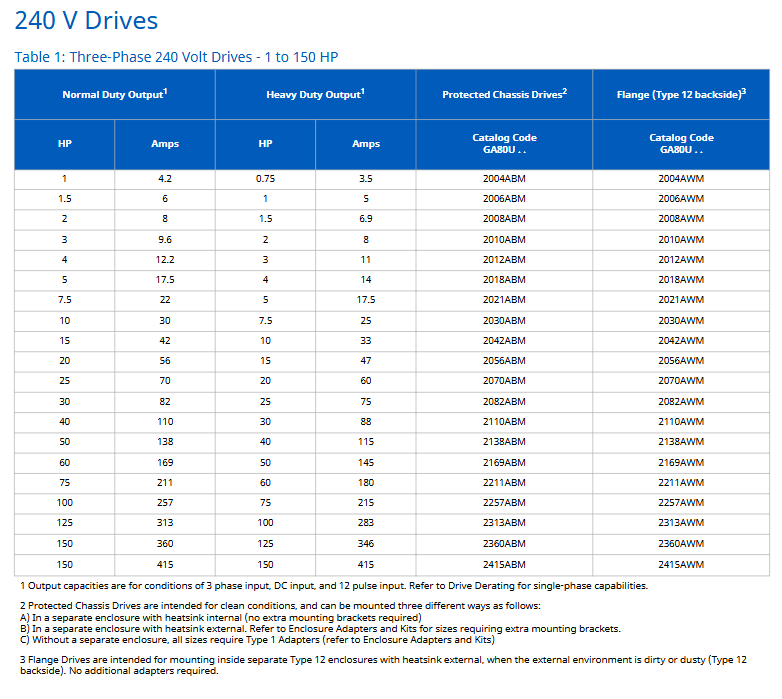
Power range: The maximum power of the 240V model is 150HP (such as 2360ABM, ND 150HP/360A), and the maximum power of the 480V model is 1000HP (such as 4H12AAM, ND 1000HP/1200A);
Output current: Under the same HP, the current of the 480V model is about half of 240V (such as 10HP ND, 240V is 30A, 480V is 17.5A);
Adaptation scenarios: 240V is suitable for low-power loads (such as small fans and pumps), and 480V is suitable for medium to high-power equipment (such as compressors and large machine tools).
Selection method:
Confirm input power supply: If it is 240V 3-phase, refer to the “240V Drives” table (Table 1); If it is 480V 3-phase, refer to the “480V Drives” table (Table 2);
Match motor power and performance requirements: If the motor requires strong torque (such as lifting equipment), choose the HD model; If you need to drive a larger motor (such as a regular conveyor belt), choose the ND model;
Example: 480V 30HP motor (requiring strong torque), corresponding to HD model 4044ABM (HD 25HP/39A, ND 30HP/44A), with protection code 4044BBM if IP20 is selected.
Question 2: What is the difference between dynamic braking of GA800 frequency converter and regenerative braking of R1000? Which industrial scenarios are they applicable to?
Answer:
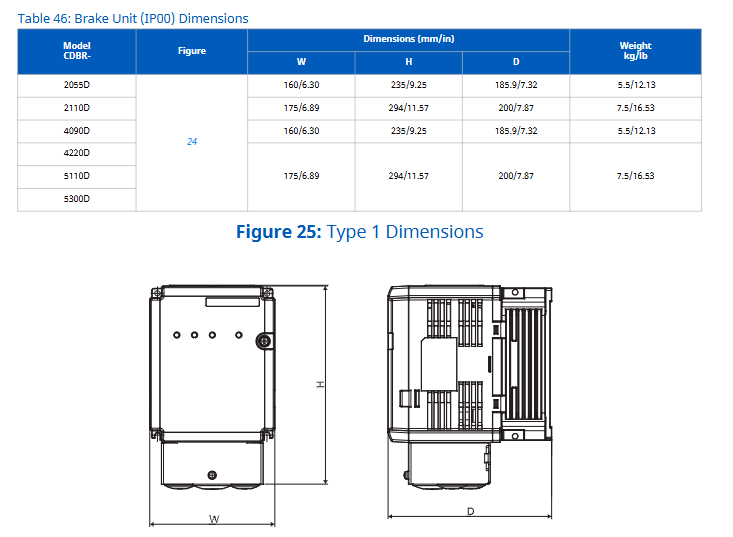
Core Differences: | Comparison Dimensions | Dynamic Braking | R1000 Regenerative Braking | | Energy Processing | Energy Consumption through Resistors (Heating) | Energy Feedback to the Grid (Energy Saving) | | Duty Cycle | 3% (3 seconds within 100 seconds) or 10% (10 seconds within 100 seconds) | 25% (25 seconds within 100 seconds, 100% rated current x 60 seconds) | Component Requirements | Braking Resistors+Transistor Modules (Some models have built-in) | R1000 Module+Current Suppression Reactor+Power Coordination Reactor+Fuse | Cost and Complexity | Low Cost, Simple Wiring | High Cost, Additional Kit Required|
Applicable scenarios:
Dynamic braking: suitable for scenarios with low braking frequency and low energy demand, such as ordinary machine tools (intermittent braking), small elevators (short-term deceleration), typical models such as 240V 10HP with R7510 resistor (3% duty cycle);
R1000 regenerative braking: suitable for scenarios with frequent braking and high energy recovery requirements, such as elevators (frequent start stop), centrifuges (continuous deceleration), and winding machines (constant tension control). Typical kits include R1000-480-50HP (compatible with 480V 50HP motors).
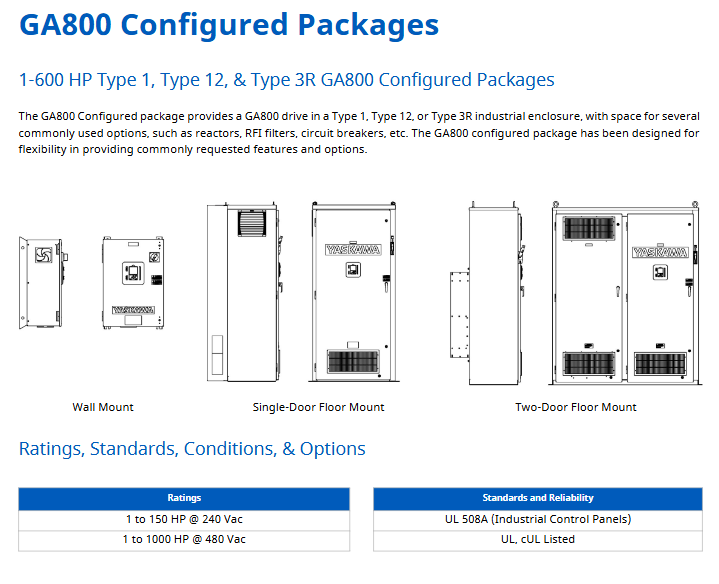
Question 3: What are the differences in protective features and installation requirements for Type 1, Type 12, and Type 3R enclosures in the GA800 configuration package? How to choose the appropriate configuration package for outdoor pump stations?
Answer:
Shell characteristics and installation requirements: | Shell type | Protection level | Core protection capability | Installation requirements | Environmental restrictions | | Type 1 | IP30 (after adaptation) | Anti solid foreign object (≥ 2.5mm), anti finger contact | Must be installed in a clean room, can be wall mounted/independently installed, heat sink optional internal/external | Temperature -10~+40 ℃, humidity ≤ 95% (no condensation) | | Type 12 | IP54 (heat sink external) | Anti dust intrusion, anti splashing liquid | Must be installed in a Type 12 independent shell, heat sink external (to avoid dust accumulation) | Temperature -10~+50 ℃, pollution level 2 (IEC 60721-3-3) | | Type 3R | IP54 (weatherproof) Waterproof, anti snowflake, anti solid foreign object (≥ 2.5mm)| Can be installed outdoors, optional 12/18/30 inch independent legs (to prevent ground moisture) | Temperature -10~+50 ℃ (optional 50 ℃ adaptation), avoid direct exposure to sunlight|
Selection plan for outdoor pump station:
Shell selection: Type 3R (weatherproof), model prefix G8C3 (ND) or G8C6 (HD);
Power options: Select 100kAIC circuit breaker (M)+input fuse (F) to meet the overload requirements of the pump station motor;
This document is the GA800 Industrial AC Inverter Selection Guide (document number SL. GA800.01) released by Yaskawa USA in 2021. It introduces the multi voltage levels (240V/480V/600V), dual duty ratings (Normal Duty/Heavy Duty), and corresponding model parameters of GA800 inverters, covering core data for inverter selection (such as output current, power range), supporting components (reactors, filters, braking units, etc.), configuration package solutions (Type 1/12/3R enclosure), technical parameters (overload capacity, protection level, etc.), as well as training services and sales terms, providing comprehensive selection support for Yaskawa salespeople, distributors, and partners.
GA800 inverter core selection parameters
1. Voltage and power range (key numbers)
Voltage level, phase number, power range (HP), core model example, applicable scenarios
240V Class 3-phase 1-150 2004ABM (1HP ND), 2360AWM (150HP ND) low-power motors, such as small pumps/fans
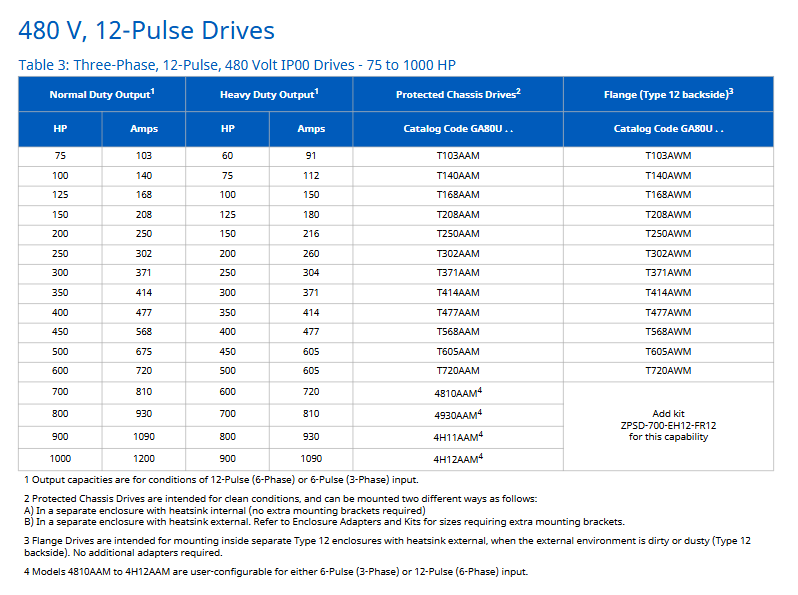
480V Class 3-phase 1-1000 4002ABM (1HP ND), 4H12AAM (1000HP ND) medium and high-power equipment, such as compressors/machine tools
600V Class 3-phase 125-500 5125ABM (125HP ND), 5472AWM (500HP ND) high-voltage industrial scenarios, such as large transmission systems
Scenarios where harmonic reduction is required for 480V 12 Pulse 3-phase 75-1000 T140AAM (100HP ND) and 4H12AAM (1000HP ND), such as medical equipment
2. Performance rating and overload capacity
Normal Duty (ND): Suitable for larger motors, overload capacity of 110% rated current x 60 seconds
Heavy Duty (HD): Stronger torque, overload capacity of 150% rated current x 60 seconds
Example: 240V model 2030ABM, ND 10HP (30A), HD 7.5HP (25A)
3. Model coding rules (taking “GA80U 2 004 ABM” as an example)
Encoding segment meaning optional values/description
GA80U series identification fixed prefix (Americas region)
2 voltage levels 2=240V, 4=480V, 5=600V, T=12 pulse 480V
004 output current corresponds to ND rated current (unit: A, here it is 4A)
A protection level A=IP00, B=IP20, W=Type 12 flange
B environmental specification B=humidity/dust protection (compliant with IEC 60721-3-3 Class 3C2/3S3)
M EMC filter M=Not used (A=Not used, some models in the document default to no filter)
Single/three-phase input adaptation and component selection
1. Single phase input configuration (requires reduced capacity, some require reactors)
Taking 240V single-phase input as an example, the core parameters are as follows (excerpt from Table 5):
Drive model (GA80U) without reactor (ND/HD) with reactor (ND/HD) Input reactor model (Open)
2004… 1/3HP(1.5A)/1/2HP(2.2A) -/- URX000303
2008… 3/4HP(3.2A)/1HP(4.2A) -/- URX000307
2030… 2HP(6.8A)/5HP(15.2A) -/- URX000323
2. Core supporting components
(1) Reactor and Filter
Component Type Impedance Options Installation Form Core Function Example Model (480V)
DC Bus Reactor 3%/5% Open/Enclosed Type 1 reduces DC side transients and decreases THD URX000033 (3% Open) and URX000215 (3% Enclosed)
AC Input Reactor 3%/5% Open/Enclosed Type 1 suppresses input side harmonics and protects the frequency converter URX000288(3% Open)、URX000551(3% Enclosed)
AC Output Reactor 3% Open/Enclosed Type 1 reduces motor side voltage spikes and is compatible with long cables 05P00620-0014(Open)、05P00620-0016(Enclosed)
EMC Input Filter – Integrated to EN 61800-3 C2 level, reduces electromagnetic interference B84743A00008R176 (8A), B84243A6180Z000 (180A)
(2) Braking unit
Dynamic braking:
3% duty cycle: operates for 3 seconds within a 100 second cycle, with resistance models such as R7504 (240V) and R7508 (480V)
10% duty cycle: operates for 10 seconds within a 100 second cycle, requiring the use of transistor modules (such as CDBR-21100D) and resistors (such as URS000275)
Regenerative braking (R1000):
Suitable voltage: 240V (5-150HP), 480V (5-500HP)
The kit includes: R1000 module, current suppression reactor, power coordination reactor, fuse
Example: R1000-480-50HP kit, including R1000 module model 4A0035AAA
(3) Control and Feedback Attachment
Attachment Type Function Description Model Example
I/O adapter AI-A3: 3 additional analog inputs (13 bits+symbol) AI-A3
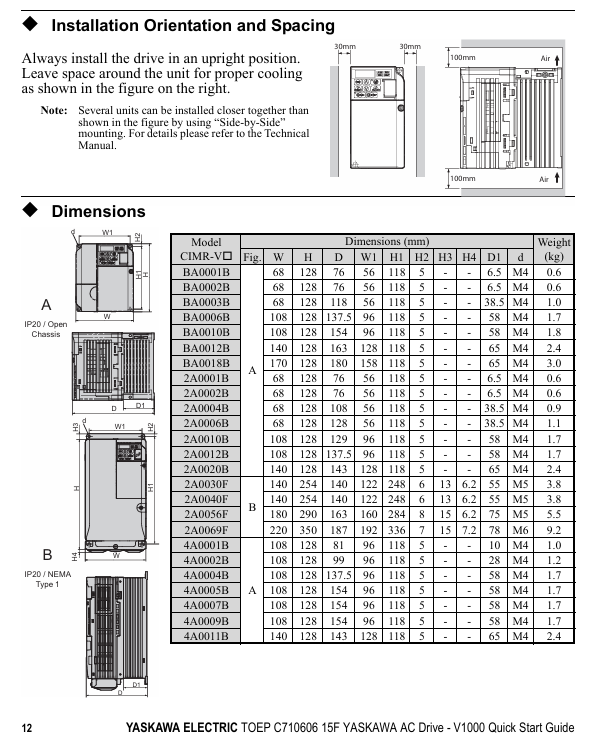
Applicable models: 200V level (single-phase input 0.1-4.0kW, three-phase input 0.1-18.5kW), 400V level (three-phase input 0.37-18.5kW) CIMR-V series frequency converters.
Core purpose: To guide users in correctly installing, operating, and debugging frequency converters, ensuring safe and stable operation of the equipment.
Copyright and Revision: First published in 2007, latest revised in December 2016, including updates to safety standards, functional supplements, and more.
Key content of core chapters
1. Safety instructions and warnings
Risk classification: Clearly define three types of warnings: Warning (fatal/serious injury), CAUTION (minor/moderate injury), and NOTICE (equipment damage).
Core taboos: Do not modify equipment, touch terminals before discharge, and operate by non professionals; Strict adherence to grounding regulations is required (leakage current exceeding 3.5mA, grounding conductor cross-section ≥ 10mm ² (copper)/16mm ² (aluminum)).
Special risk: During the rotation self-tuning period, the motor may suddenly start, and after power failure, it is necessary to wait for the capacitor to fully discharge (at least 5 minutes).
2. Mechanical installation
Environmental requirements: Indoor installation, temperature -10~+50 ℃ (adjusted according to protection level), humidity ≤ 95%, no condensation, no dust, oil pollution, vibration and other interference.
Installation specifications: Vertical installation is required to ensure heat dissipation, and 30mm (on both sides) and 100mm (up and down) heat dissipation space should be reserved around the equipment.
Acceptance and verification: After receiving the goods, check that the equipment is not damaged and verify the nameplate to confirm that the model is correct.
3. Electrical installation
Wiring specifications: The main circuit power supply is connected to R/L1, S/L2, T/L3 (only R/L1, S/L2 are used for single-phase), the motor is connected to U/T1, V/T2, W/T3, and it is forbidden to connect the power supply to the output terminal.
Cable requirements: The control circuit should use shielded twisted pair cables to avoid mixing with the main circuit cables; The specifications of the main circuit cables need to match the model (such as 2.5mm ², 6mm ², etc.).
EMC compliance: A designated EMC filter must be installed on the input side, and the grounding surface must be repainted to ensure low impedance.
4. Keyboard operation and startup debugging
Keyboard functions: including RUN/STOP start and stop keys, parameter setting keys, mode switching keys (LOCAL/REMOTE), LED indicator lights to display running status, faults, and other information.
Start up process: Install wiring → Power on → Select control mode (V/f, open-loop vector, etc.) → Set load type (standard/heavy load) → Motor self-tuning (or manually input motor parameters) → I/O configuration → Trial operation → Load operation.
Mode selection: V/f control is suitable for multi motor drive, open-loop vector control is suitable for high-precision speed regulation, and open-loop vector control of permanent magnet motor focuses on energy saving.
5. Key parameters and troubleshooting
Core parameters: including frequency reference (b1-01), acceleration and deceleration time (C1-01/C1-02), motor rated current (E2-01), overload protection (L1-01), etc.
Troubleshooting: List common faults (such as overcurrent, overvoltage, overload) and their corresponding causes and solutions, including troubleshooting methods for programming errors (oPE series) and self-tuning errors (Er series).
Safety disable function: Compliant with SIL2/PL safety standards, controlled through HC and H1 terminals, the motor torque is cut off within 1ms when disconnected, requiring professional personnel to wire and debug.
6. UL/cUL compliance requirements
Installation restrictions: Pollution level ≤ 2, ambient temperature -10~+50 ℃ (depending on protection level).
Wiring specification: Use UL certified copper wire, and the terminal tightening torque must comply with the standard (such as 0.8-1.0N · m for M3.5 terminals).
Protection configuration: The input side needs to be equipped with a specified type of fuse (such as Class J/T/CC), and the motor overload protection is set through parameters E2-01 and L1-01.
Precautions for use
Operators must possess professional qualifications and strictly adhere to the safety regulations outlined in the manual.
The equipment needs regular inspection and maintenance, with daily safety function checks. It is recommended to replace it after 10 years of use.
When the safety disable function is not used, the HC and H1 terminals must be kept short circuited; Modifying the equipment will result in the expiration of the warranty.
Adopting a 32-bit high-speed processor, the program processing speed is doubled compared to the previous generation, coupled with large capacity memory, to meet the computational needs of complex applications.
No cooling fan design, natural cooling is used to deal with the heat generated during high-speed operation, reducing mechanical failure points.
Equipped with a large capacity FPGA to enhance self diagnostic capabilities, and equipped with battery backup memory with ECC (error checking and correction) function to ensure data reliability.
2. Comprehensive compatibility
The software, size, and bus interface specifications are fully compatible with the previous generation CP-317, and all optional modules of the original CP-317 can be used directly.
Only a single operating module (CPU) needs to be replaced to upgrade the existing system, without the need to restructure the overall configuration, reducing upgrade costs.
3. Flexible scalability
Supports single CPU or dual CPU configuration (Changan installation base can accommodate 2 CPUs), dual CPUs can independently run different software, support synchronous/asynchronous scanning, and easily transfer up to 32K words of data through shared registers.
Up to 4 racks can be expanded, and various communication and I/O modules can be connected through expansion modules (EXIOIF). Some modules (such as LIO-01, AI-01, etc.) can be configured without restrictions.
Supports various open field networks such as PROFIBUS-DP, FL Net, DeviceNet, etc., to meet the communication needs of different industrial scenarios.
4. Convenient operability
Paired with CP-717 Engineering Workstation (EWS), it supports desktop (via CP-215 real-time network/Ethernet) and laptop (via RS-232C/Ethernet) connections, covering the entire process from system design to maintenance.
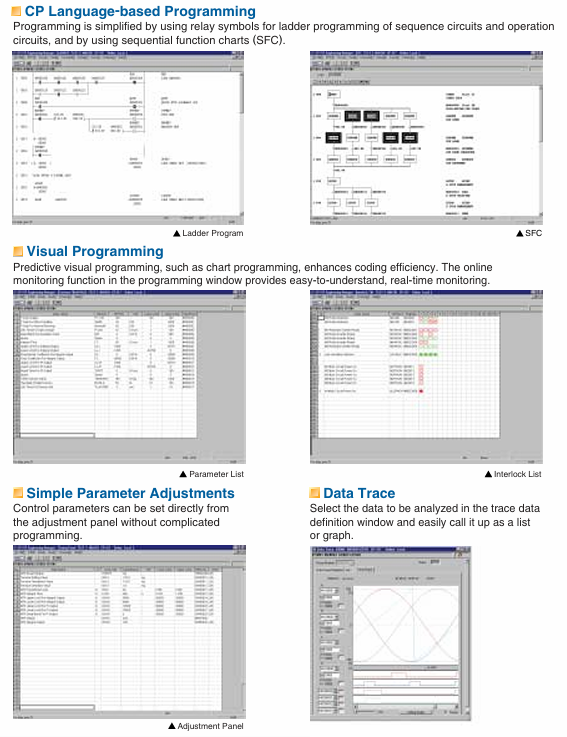
Support programming methods such as ladder diagrams and Sequential Function Diagrams (SFC), provide visual programming and online monitoring functions, simplify coding and debugging of complex configurations.
Equipped with functions such as direct parameter adjustment, data tracking (in list/chart format), and rapid fault location, it enhances operational efficiency.
Key specification parameters
1. Power supply and environment
Power module options: PS-01 (100VAC/100VDC), PS-02 (200VAC), PS-03 (24VDC), with voltage fluctuation range of ± 15%~± 20%, supporting instantaneous power outage within 10ms.
Working environment: temperature 0 ° C~55 ° C (24-hour average ≤ 50 ° C), humidity 5%~95% RH (non condensing), no corrosive gases, vibration and impact resistance in accordance with JIS B 3502 standards.
Memory configuration: The program memory is equivalent to 128K steps, and the data memory includes 32768 words of input/output registers, 1024 words of system registers, etc. The battery backup can retain data for more than 1 year.
Supports data types such as bits, integers, double precision integers, real numbers, etc., with 133 built-in instructions covering program control, numerical operations, I/O control, and other functions.
Main components and models
1. Core components
CPU module (87317-3500x-S060y): Supports single/multiple CPU configurations.
Power modules: PS-01 (100VAC/100VDC), PS-02 (200VAC), PS-03 (24VDC).
Communication module: covering CP-213/215/216/217/218 and other series, supporting Ethernet, RS-232C/485, PROFIBUS-DP and other protocols.
I/O module: including digital input (DI-01), digital output (DO-01), analog input (AI-01), analog output (AO-01), etc., supporting local I/O and extended I/O connections.
2. Installation and Cable
Installation base: MB-01 (long base, single/multi CPU configuration), MB-03 (short base, single CPU configuration).
Expansion cables: EXIO expansion cables, 2000 I/O expansion cables, etc. are available, with lengths ranging from 0.5m, 1.0m, 1.5m, and other specifications.
Applicable scenarios
Mainly used for centralized control in industrial scenarios such as steel plants, water supply and drainage plants, and sewage treatment plants, it can serve as the main control station for medium and large factories, achieving integrated control of equipment such as frequency converters, sensors, and actuators. It supports networking and linkage with HMI (such as CP-519, CP-5800), other PLCs, computers, and other equipment.
Document positioning: Yaskawa VARISPEED-626M5656MR5 series user manual, mainly used for vector control inverters/converters with power regeneration function for machine tools, guiding installation, maintenance, troubleshooting, and specification inquiry.
Product model and specifications:
Product Type Model Voltage Level Power Range (kW) Power Range (HP) Remarks
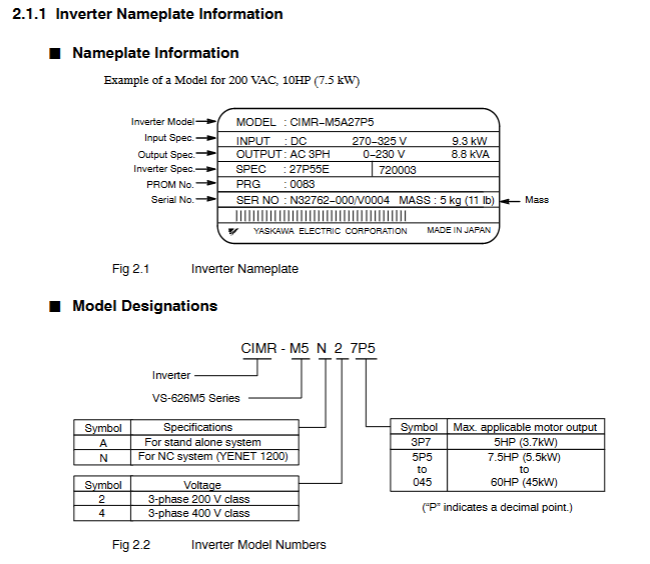
Variable frequency drive (VS-626M5) CIMR-M5 200V level 3.7/2.2-37/30 5/3-50/40 including M5A (independent drive), M5N (NC system)
Variable frequency drive (VS-626M5) CIMR-M5 400V level 5.5/3.7-45/37 7.5/5-60/50 including M5A (independent drive), M5N (NC system)
Converter (VS-656MR5) CIMR-MR5 200V class 3.7/2.2-37/30 5/3-50/40, including MR5A (without 24V control power supply) and MR5N (with 24V control power supply)
Converter (VS-656MR5) CIMR-MR5 400V class 5.5/3.7-45/37 7.5/5-60/50 including MR5A (without 24V control power supply), MR5N (with 24V control power supply)
Warranty information:
Warranty period: 12 months after delivery to the customer or 18 months from the date of shipment from the Yaskawa factory, whichever comes first.
Warranty scope: Only covers faults caused by defects in Yaskawa craftsmanship or materials, excluding improper maintenance, modification, and use beyond specifications.
Regional restrictions: Warranty services are only free within Japan and require payment overseas.
Safety regulations and operating taboos
Definition of Security Level:
Warning: Potential hazardous situation that, if not avoided, may result in death or serious personal injury (such as opening the cover with electricity, not grounded).
CAUTION: Potential hazardous situation that, if not avoided, may result in minor/moderate personal injury or equipment damage (such as grabbing the front cover during transportation or installing on flammable materials).
Core security precautions:
Power off operation: Before wiring or disassembling the digital operator (JVOP-132), the power must be turned off and the capacitor must be discharged (refer to the warning label time, usually 5 minutes).
Grounding requirements: 200V level grounding resistance ≤ 100 Ω, 400V level grounding resistance ≤ 10 Ω. It is strictly prohibited to share the ground with welding machines and high current equipment.
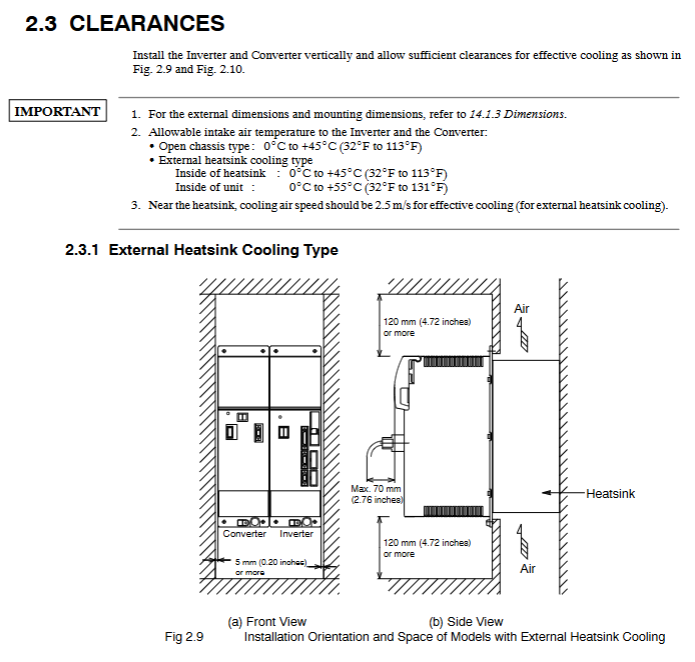
Temperature control: The ambient temperature of the frequency converter/inverter should be ≤ 55 ℃ (131 ° F), and the inlet temperature of the heat sink should be ≤ 45 ℃ (113 ° F). A fan or cooling device should be installed.
Operation taboos:
Do not connect the power supply to the output terminals of the frequency converter (U/T1, V/T2, W/T3), otherwise it will damage the internal components.
Do not connect phase-shifting capacitors, LC/RC noise filters, or electromagnetic switches in the output circuit, as it may cause damage or overcurrent to the frequency converter.
Do not modify the product, otherwise the warranty will expire and may cause electric shock/injury.
Equipment installation and wiring
Delivery Confirmation (CAUTION):
Check if the model is consistent with the order (verify the nameplate), if there is no transportation damage to the appearance, if screws or other components are loose, and if damaged/missing equipment is not allowed to be installed.
Installation requirements:
Environment: Indoor, no corrosive/explosive gases, no dust/metal particles, avoid direct sunlight, vibration acceleration ≤ 2.5G (10-60Hz).
Installation material: It must be installed on non combustible materials such as metal.
Equipment type, left and right spacing, up and down spacing, note
External heat dissipation type ≥ 120mm ≥ 120mm Side spacing ≥ 5mm
Open chassis type ≥ 150mm ≥ 150mm Side spacing ≥ 5mm
Wiring specifications:
Main circuit wiring: Use the specified wire diameter (such as 200V level frequency converter CIMR-M5A23P7, main circuit wire diameter ≥ 2mm ²), and the terminal screw torque meets the requirements (such as M5 screw 2.35N · m).
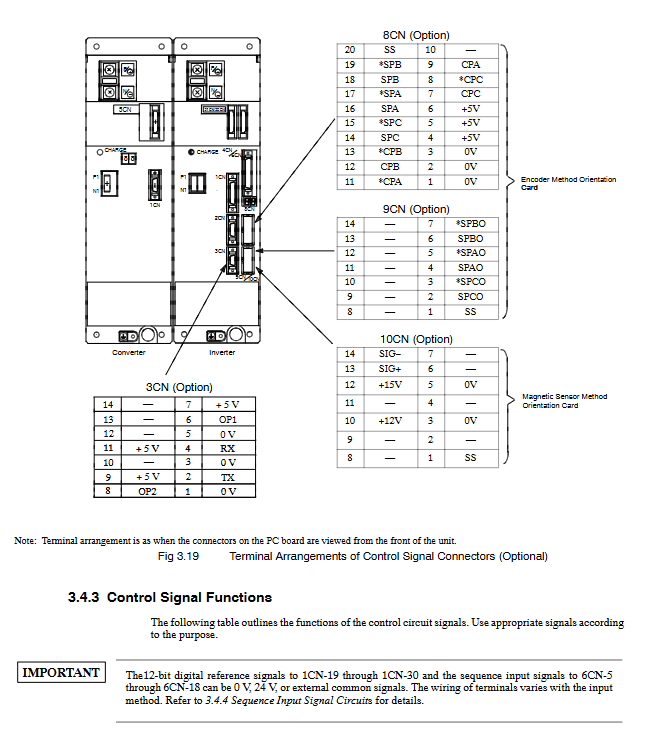
Control circuit wiring: Separate the control signal line from the power line, with a length of ≤ 20m, and use shielded twisted pair to avoid wiring in the same conduit.
Core functions and operations
Digital Operator (JVOP-132):
Function: Display operating status (motor speed U1-01, torque reference U1-04), set control constants, fault reset, single machine trial run.
Operation mode: Set from positions 1 to 37, with 11 being the digital operator operation mode, which can achieve jog (5% rated speed) and forward/reverse control.
Trial operation process:
Check the power supply voltage (200V level 3-phase 200-230V, 400V level 3-phase 400-460V).
(NC system) Set YENET1200 node address (rotary switch SW1).
Connect the control power supply and confirm that the frequency converter displays “-” and the inverter displays “- U”.
Connect the main circuit power supply, the inverter display changes to “- b”, and the CHARGE light is on.
Check the direction of the motor cooling fan (standard intake from the load side).
Send RUN signal to confirm the motor direction (counterclockwise when viewed from the load end during forward rotation) and no abnormal vibration/noise.
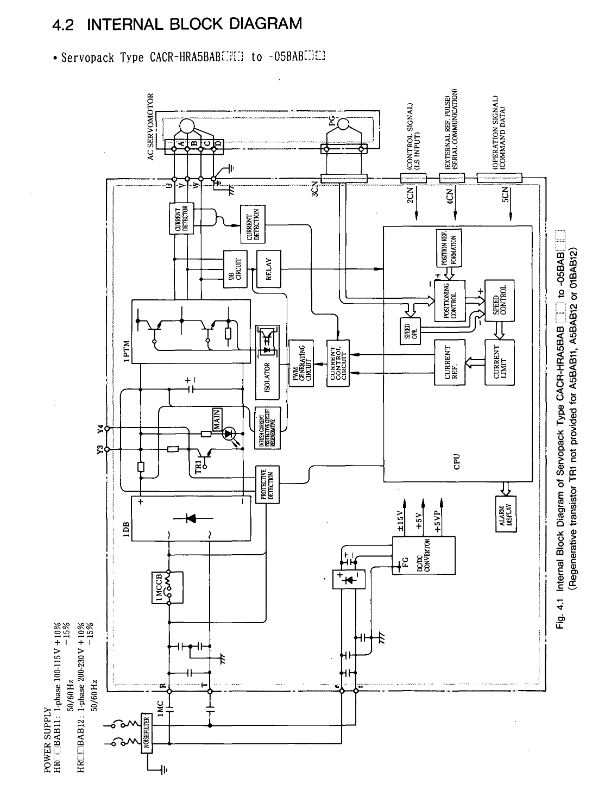
This document is a multifunctional/positioning control manual for the Yaskawa AC servo drive HR series (model CACR-HR, including rack mounted CACR-HR □□ BAB and base mounted CACR-HR □□□ BB), covering in detail the model identification, rated specifications (such as motor output power 0.07-8.2HP, drive input voltage 100-230VAC), mechanical characteristics (allowing radial/axial loads, anti vibration and anti impact performance), wiring connections (typical connections and terminal definitions for main circuit/control circuit/encoder/brake power supply, etc.) of the servo motor (M/F/G/D/S/R/P series) and servo drive I/O signal operation (2CN/5CN input/output signal timing and function), serial communication (RS422 protocol, supporting baud rates such as 9600/4800), parameter setting (100 parameters, including core parameters such as position loop gain Kp and speed loop gain Kv), display/monitoring function (LED indicator light and 7-segment digital tube status display), installation and wiring specifications, trial operation and maintenance (battery replacement, troubleshooting), while emphasizing safety precautions (such as opening the cover after 5 minutes of power outage, anti electric shock/anti scald measures), providing comprehensive guidance for the selection, installation, debugging and maintenance of servo systems.
Product Model and Configuration
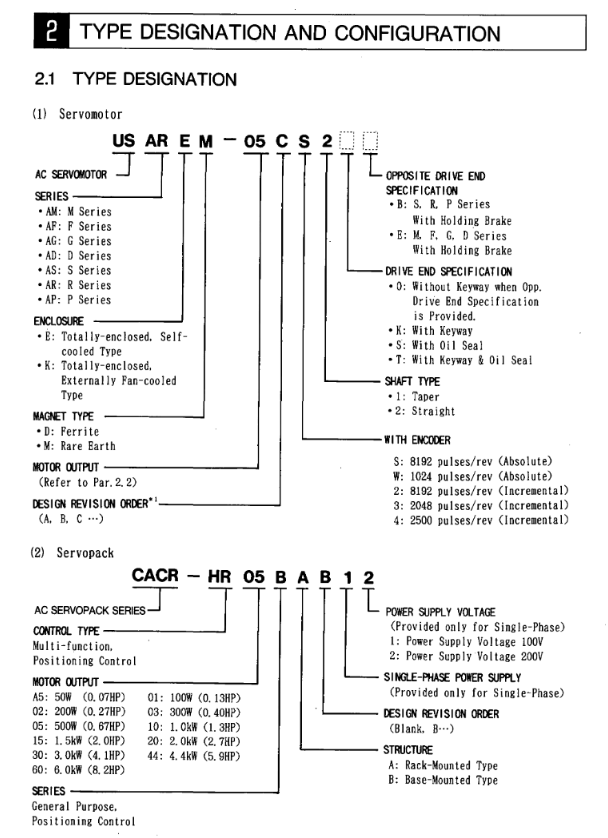
1. Analysis of servo motor models (taking USAGED-13A2 as an example)
Explanation of the meaning of model segmentation
USA product prefix Yaskawa servo motor identification
G series (fully enclosed self cooling type, IP65 protection)
ED structural characteristics with encoder
13 output specification 1.3kW (corresponding to 1.7HP)
A-axis end specification with keyway
2 encoder types incremental 8192P/R
2. Analysis of servo drive models (taking CACR-HR03BAB12 as an example)
Explanation of the meaning of model segmentation
CACR-HR Product Series Yaskawa HR Series Servo Drivers
03 Output capacity 300W (0.4HP)
BAB installation and power supply B=rack mounted, A=single-phase, B=200VAC
12th Design Version 12th Design
3. Matching principle between motor and driver
Power matching: The output capacity of the driver needs to cover the rated power of the motor (such as a 300W motor matched with HR03 series driver).
Voltage matching: 100V motor (R series DS model) matches HR □□ BAB11 driver, 200V motor matches HR □□ BAB12/BB driver.
Encoder matching: The absolute encoder motor requires the driver to support battery backup (the HR series panel comes with a 3.6V battery).
Rated specifications and mechanical characteristics
1. Core specifications of servo motors (examples by series)
Motor series model example Rated output Rated speed Rated torque Peak torque Encoder type
M-series USAMED-03B2 0.3kW (0.4HP) 1000r/min 2.84N · m 8.92N · m incremental 8192P/R
S-series USASEM-15A2 1.5kW (2.1HP) 3000r/min 4.90N · m 13.7N · m incremental 2048P/R
R series (200V) USAREM-05CS 500W (0.67HP) 3000r/min 1.59N · m 4.76N · m absolute formula 8192P/R
P Series USAPEM-07CW 750W (1.0HP) 3000r/min 2.39N · m 7.06N · m Absolute 1024P/R
2. Core specifications of servo drive
Driver model input power output current (continuous/peak) control mode protection function
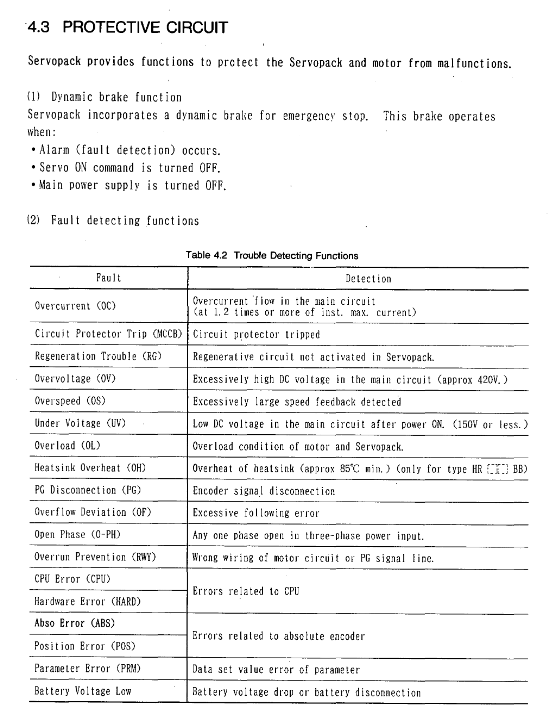
CACR-HR03BAB12 single-phase 200-230VAC 2.7A/7.8A full wave rectification+PWM sine wave drive OC, OV, OL, PG disconnection, etc
CACR-HR15BB three-phase 200-230VAC 11.7A/33.0A full wave rectification+PWM sine wave drive OC, OV, OL, phase loss (O-PH), etc
CACR-HR05BAB11 single-phase 100-115VAC 5.5A/16.3A full wave rectification+PWM sine wave drive OC, OV, OL, battery low voltage (BATALM), etc
3. Mechanical characteristics (motor)
Allowable load: Radial load 78.4-1764N (such as S series 02A model 78.4N, M series 60B model 1764N), axial load 39.2-588N.
Environmental tolerance:
Temperature: 0-40 ℃ for operation, 20-60 ℃ for storage;
Input signal timing: SVON, AST and other signals need to maintain a stable level of ≥ 5ms to avoid false triggering;
Output signal status:
POS1 (positioning completed): ON when the deviation between the current position and the target position is ≤ P6 (positioning completed width, 1-250 units);
NEAR (positioning proximity): ON when the deviation is ≤ P45 (positioning proximity width, 0-3000 units).
The entire process of starting the communication module
Step 1: Prepare using the machine
Essential equipment: MP2000 series controller, communication module, communication partner device, dedicated cable, computer with MPE720 installed
Controller compatibility: MP2200 (JEPMC-BU2200/BU2210, maximum of 8 modules), MP2300 (JEPMC-MP2300, maximum of 3 modules), MP210M (JAPMC-MC2140, expansion board required, maximum of 8 modules), MP2500MD (JEPMC-MP2540-D , expansion board required, maximum of 8 modules)
Step 2: Module installation and disassembly
Installation steps: Power off → Remove the machine controller battery cover → Remove the optional module cover → Align the guide rail and insert the module → Install the cover → Power on
Disassembly steps: Power off → Backup program → Remove cable → Remove battery cover → Remove cover → Use battery cover protrusion to pry module → Pull out module
Step 3: Communication Manager Settings
Supported port types: Serial (RS-232C), Ethernet, Ethernet (LP), CP-215
Key setting example (Ethernet): Set the computer IP to 192.168.1.2 and subnet mask to 255.255.255.0; Set the Logical PT to Ethernet and fill in the computer IP address for the Communication Manager
Step 4: Automatic Configuration Execution
Trigger method: Set “CNFG” to ON and restart MP2200/MP2300; MP210M/MP2500MD operated through the MPE720 menu
Result difference:
CNFG Initiate Results
The ON module has been updated, and all communication modules are configured according to default settings
The ON/OFF module has been updated, with existing modules retaining their configuration and new modules using default settings
Step 5: MPE720 Startup and Transfer Definition
Ver.6: Online → Communications Setting → Select Logical Port → Set Parameters
Ver.5.xx: Start MPE720 → Open PLC folder → Properties → Network → Check OnLine → Select logical port
Transfer definition: Open the module composition definition screen → double-click the corresponding module → set parameters → save to flash memory
Detailed explanation of transmission mode and protocol
Classification of transmission modes
Mode applicable communication mode (module) core characteristics
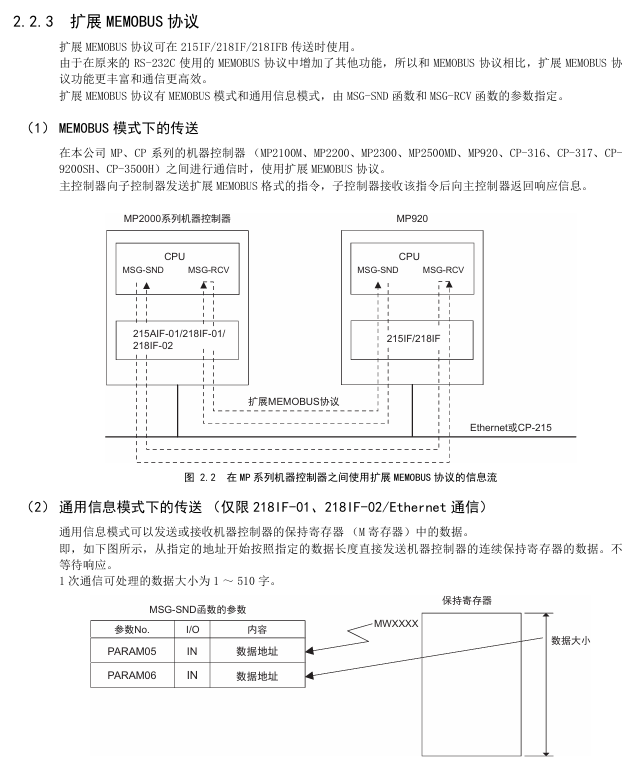
Information transmission RS-232C (all), Ethernet (218IF-01/02), MPLINK (215AIF-01) event triggered, using MSG-SND/MSG-RCV functions
Engineering transmission RS-232C (all), Ethernet (218IF-01/02), MPLINK (215AIF-01) panel commands+MPE720 for program transmission
Link Transport MPLINK (215AIF-01) regularly sends and receives, only supported by 215AIF-01
Core Communication Protocol
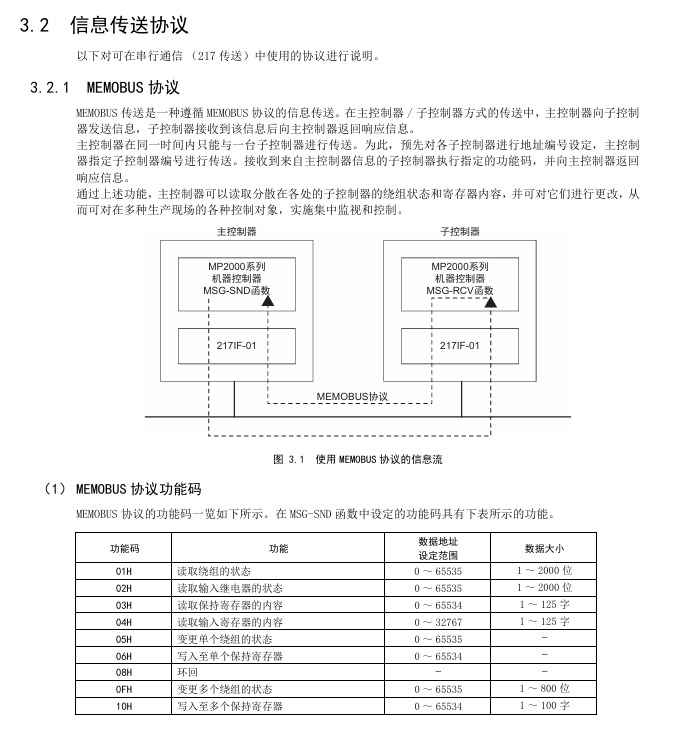
MEMOBU: Yaskawa standard, main controller specifies sub controller address communication, function codes include 01H (read winding), 03H (read hold register), etc., supporting 1-2000 bits (bit data), 1-125 words (word data)
Extended MEMOBU: MEMOBU extension, adding function codes such as 09H (extended read hold register), transmitting 1-508 words at once, supporting MEMOBU/general information mode
MELSEC: Compatible with Mitsubishi A-series, supports communication between CPUs and fixed buffer communication, with function codes corresponding to ACPU universal commands (such as WR → 01H/02H)
Connected to MELSEC: RS-232C (pin 2=TXD, 3=RXD) of 217IF-01 connected to Mitsubishi AJ71UC24 (pin 2=RXD, 3=TXD), MELSEC set station number 01, baud rate 19200bps
Connected to frequency converter: RS-485 (pin 3=RX+, 4=RX -, 8=TX+, 9=TX -) of 217IF-01 is connected to VS-616G5, and frequency converter H5-01=1 (address) H5-02=9600bps
Advantages: Supports Ethernet (LP) ports, higher engineering communication speed, maximum transmission of 100m (100Base TX)
260IF-01 module
Communication: DeviceNet, supports Explicit protocol, main controller settings
Specification: Maximum number of nodes 64, transmission speed 125/250/500kbps
Key issues
Question 1: There are two triggering methods for the automatic configuration of MP2000 series communication modules. Which controllers are they applicable to? What are the differences in configuration results?
Answer:
Applicable controllers:
Dial switch trigger: suitable for MP2200 and MP2300, triggered by turning on the “CNFG” toggle switch of the machine controller and restarting the power supply;
MPE720 operation trigger: applicable to MP210M and MP2500MD. After starting MPE720, select Order → Self Configure All Modules/Module Self Configuration on the Module Configuration screen to trigger.
Differences in configuration results:
Specific operation results of triggering method
The dip switch (MP2200/MP2300) CNFG=ON, Initiate=ON module composition definition is updated, and all detected communication modules are configured according to default values
The dip switch (MP2200/MP2300) CNFG=ON and Initialize=OFF modules constitute a definition update. Modules that already have transmission definitions retain their current definitions, while newly detected modules use default values
MPE720 (MP210M/MP2500MD) automatically configures all module composition definitions and updates them. Existing defined modules retain their current definitions, while newly detected modules use default values
MPE720 (MP210M/MP2500MD) automatically configures a single module with only selected module configurations and transmission definitions. Existing definitions are reserved, and newly detected ones use default values
Question 2: What are the core differences in functionality and usage between the IF-01 module, which supports two protocols: Stepless and Stepless FD?
Answer: The core differences between the two are reflected in communication methods, number of channels, data processing capabilities, etc., as follows:
Comparing dimensions without steps or steps FD
Communication method: Half duplex (cannot transmit/receive simultaneously), Full duplex (can transmit/receive simultaneously)
1 information channel (MSG-SND/MSG-RCV dual-use) 2 channels (1 dedicated for sending and 1 dedicated for receiving)
The maximum data size for both sending and receiving is 254 words. Sending 254 words and receiving a maximum of 5080 words (20 buffers, each buffer containing 508 words)
Data exception handling: If one byte in one message is abnormal, all data will be discarded. Only the abnormal byte will be discarded, and normal data will be retained. The exception will be reported to the MSG-RCV function
Wiring requirements: Half duplex wiring (such as RS-485 2-wire system), full duplex wiring (such as RS-485 4-wire system, separate transmission/reception lines)
Suitable for simple one-way communication scenarios that require high-speed simultaneous transmission and reception, such as real-time data acquisition and control
Channel number setting: MSG-SND/MSG-RCV are both set to 1. MSG-SND is set to 1, and MSG-RCV is set to 2
Question 3: The Ethernet communication of the IF-01 module supports two connection types, TCP and UDP. How to choose? What are the precautions for using these two types under a step-by-step protocol?
Answer:
Selection criteria for connection type:
TCP: a connection type protocol that requires the establishment of a connection, supports data confirmation, error retransmission, flow control, and has high communication quality. It is suitable for scenarios that require high data reliability, such as control instruction transmission;
UDP: A connectionless protocol that does not require establishing a connection, has simple processing, fast communication speed, and is suitable for scenarios that require high real-time performance and can tolerate a small amount of data loss (such as real-time status monitoring).
Notes under the Stepless Protocol:
Attention to TCP usage:
TCP is a byte stream protocol, and continuous transmission of data may result in the synthesis of data packets. The receiving side cannot recognize the data boundary and measures need to be taken (such as setting a transmission interval of more than 1 second, establishing command response protocols, and avoiding packet segmentation);
Each connection only has one receive buffer, and before receiving data, the MSG-RCV function is used to read out old data to avoid new data overwriting old data.
UDP usage precautions:
No connection confirmation, sending to a non-existent socket will result in an error. It is necessary to ensure that the other party’s device is online and the port is correct;
The receiving interval should be greater than twice the execution period of the MSG-RCV function (if the function period is less than 5ms, the sending interval should be set to 12ms or more) to avoid data coverage.
This document is the “Operation Guide” for Yokogawa’s AQ1100A/AQ1100B/AQ1100D Optical Loss Test Suite (OLTS) multi field tester (manual number IM AQ1100-02EN, 11th edition, November 2024), which covers equipment packaging inspection, safety specifications, component functions, measurement preparation, basic operation, and detailed specifications. It clarifies the wavelength differences of the three models (AQ1100A supports 2 single-mode wavelengths, AQ1100B supports 3 single-mode wavelengths, AQ1100D supports 2 multi-mode+2 single-mode wavelengths), emphasizes laser safety (Class 1/3R), battery (739882 lithium battery) and AC adapter usage specifications, and provides user registration and firmware. Update and provide global contact information to assist users in completing core operations such as optical power measurement, light source output, and automatic loss testing.
Product model and packaging content
(1) Model difference
The core difference between the three models lies in the supported wavelength range, and the suffix code determines the language, power meter type, and functional options:
Model Core Wavelength Applicable Scenarios
AQ1100A Single Mode (SM) 1310nm/1550nm Conventional Single Mode Fiber Loss Test
AQ1100D multi-mode (GI) 850nm/1300nm+single-mode (SM) 1310nm/1550nm supports both multi-mode and single-mode fiber testing simultaneously
Suffix code description: Language category (- HE English/- HC bilingual, etc.), power meter category (- SPM standard/- HPM high input/- PPN PON specific), functional category (/VLS visible light source/- LAN Ethernet, etc.).
(2) Accessories List
Standard accessories: 739874 AC adapter, 739882 lithium battery, hand strap (B8070CX), shoulder strap (B8070CY1,/SB option model), corresponding standard power cord, instruction manual, etc;
Optional accessories: Soft pack (SU2006A), connector adapter (SC/FC/LC models), spare battery (739882), etc., need to be purchased separately.
Safety operation standards
(1) Laser safety
Laser grade: Class 1 (measuring light source, high safety level), Class 3R (visible light source/VLS option, 650nm, output power 5mW);
Prohibited behaviors: staring directly at laser/reflected light without wearing protective equipment, disconnecting optical fibers when the light source is working, and not covering unused optical interfaces with protective covers.
(2) Power safety
Battery (739882 lithium battery): only used for AQ1100 series, only charged through the host, charging time ≤ 5 hours (timeout stop charging); Before replacement, the host needs to be turned off and the AC adapter disconnected. If it is not used for a long time (≥ 1 week), it is necessary to remove the storage (in an environment of 10-30 ℃, 40% -50% battery is optimal).
AC adapter: special model 739874, input voltage 90~264VAC (50/60Hz), confirm that the host is powered off before connection, and remove the battery for long-term AC power supply.
(3) Other safety requirements
Prohibited from use in flammable environments and disassembly of the host (only authorized personnel from Yokogawa can repair it);
The optical interface needs to use connectors that meet the specifications (such as SC/FC/LC), and should be slowly aligned when inserted to avoid mechanical impact.
Core operating procedures
(1) Preliminary preparation
Power connection: The AC adapter needs to be connected to the power cord first, then to the host DC interface, and finally plugged into a power outlet; Battery installation requires unlocking the battery cover, aligning with the electrode, inserting and locking it;
Fiber optic connection: Clean the connector end face before connection (it is recommended to use NTT-AT special cleaning agent), and select the corresponding optical port according to the wavelength (port 2 for single-mode wavelength and port 3 for multi-mode wavelength);
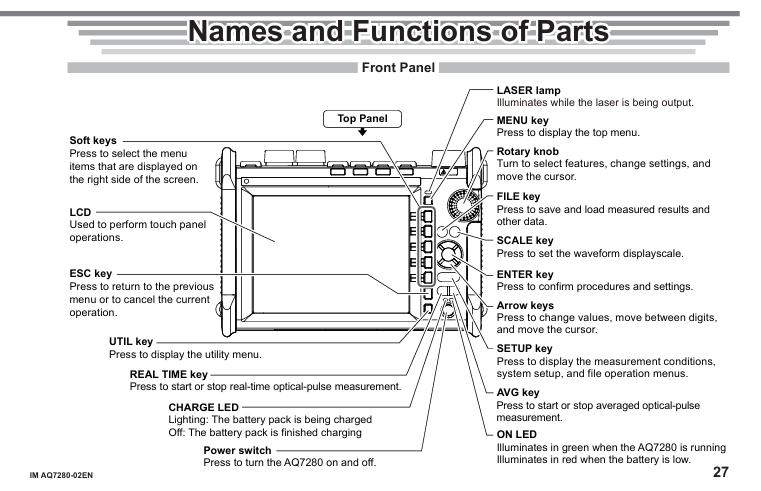
Power on: Press the power button, preheat for ≥ 5 minutes after turning on, the ON LED green indicates running, and the red indicates low power.
(2) Basic Function Operations
Optical power meter (OPM): After turning on, enter the menu through MENU → OPM LS, perform zero calibration (ZERO SET), set wavelength, modulation mode (CW/270Hz, etc.), unit (dBm/W, etc.), and record and store data (CSV format).
Light source output: Set the wavelength and modulation mode through MENU → OPM LS, press the LS key or soft key to turn on/off the light source, and the screen will display the laser on indicator.
Automatic loss test: The host serves as both the light source and the optical power meter. The steps are: zero point calibration → connect the light source port and the power meter port with a short fiber for optical power calibration → connect the tested fiber → press the Loss Test START button to start the test, and the results can be saved in CSV format.
(3) Data and peripheral management
Storage: Supports internal storage (110MB user available space), USB storage, file formats including CSV (data), screenshots, etc;
Peripheral Connection: USB interface supports printer/USB flash drive/PC (Mini-B port for PC control),/LAN option models support Ethernet remote control and IP testing.
Key specification parameters
Project specifications
Display screen 5.7-inch color TFT LCD (640 × 480 pixels)
The size and weight are approximately 217.5mm (W) × 157mm (H) × 74mm (D), with a weight of approximately 1kg (including battery)
Optical power meter range – SPM: -70~+10dBm (CW); -HPM:-50~+27dBm(CW); -PPN:1310/1490nm(-70~+10dBm)、1550nm(-50~+27dBm)
Single mode output power of light source: -3ddB ± 1dBm; Multimode (AQ1100D): -20dBm ± 1dBm
Working environment temperature 0~45 ℃ (AC power supply 0~40 ℃, charging 0~35 ℃), humidity 20%~85% (no condensation)
The core components of the equipment include the host, OTDR unit, and optional modules. The model suffix determines the language, function, and interface type
AQ7280 host suffix:
Example of suffix type explanation
Language suffix differentiation operation interface language – HE (English), – HM (Chinese), – HC (bilingual in Chinese and English)
Function suffix additional function options/MNT (monitoring function),/SMP (intelligent mapping function),/LAN (Ethernet)
OTDR unit model: Supports 2-4 wavelengths, covering different application scenarios, with the following key parameters (some models):
OTDR Unit Model Wavelength (nm) Dynamic Range (dB) Laser Level Remarks
AQ7282A 1310/1550 38/36 Class 1 2 wavelength, suitable for short distance testing
AQ7283A 1310/1550 42/40 Class 1 2 wavelength, dynamic range higher than AQ7282A
AQ7283E 1310/1550/1625 42/40/40 Class 1 3 wavelength, 1625nm port with built-in filter
AQ7283J 1310/1383/1550/1625 42/39/40/40 Class 1M/3R 4 wavelength, 1310nm is a 3R class laser
AQ7282M 850/1300 (multimode) 25/27 Class 1/3R 2-wavelength multimode, 850nm is a 3R class laser
Optional modules:
OPM module (optical power meter): AQ2780 (power range -70~+10dBm), AQ2781 (high power -50~+27dBm);
VLS module (visible light source): AQ4780 (wavelength 650 ± 20nm, output power ≥ 5mW, Class 3R).
Accessories List
Standard accessories: 739883 lithium battery pack, B8070CX hand strap, B8107DE2 bracket cover (to prevent foreign objects when the module is not installed), M4 × 5 screws, relevant manuals;
Optional accessories (purchased separately): 739860 soft carry bag, 739874 AC adapter, SU2005A series connector adapter (SC/FC/LC), 735050 series functional license (such as 735050-FST fiber surface testing).
Safety operation standards
Laser safety (core risk point)
The equipment uses a laser light source, and the laser level is divided into Class 1 (most OTDR units, high safety level) and Class 3R (some wavelengths, such as 850nm of AQ7282M, should be avoided from direct view);
Prohibited behaviors: staring directly at the laser or its mirror reflection light without wearing protective equipment, disconnecting the optical fiber when the laser output is turned off, and not covering the protective cover of unused optical interfaces;
Special requirement: When cleaning the equipment, the power must be turned off to avoid accidental laser output.
Power Safety
Battery (739883 lithium battery):
Exclusive use: Only for AQ7280 host, cannot supply power to other devices, only use the host for charging;
Charging specifications: The charging time is about 6 hours (when turned off), and it may take more than 15 hours to charge when turned on (after 15 hours, the protection circuit will stop charging). If it is not fully charged within the time limit, stop using it and contact the dealer;
Replacement and Storage: Before replacement, the host needs to be turned off and the AC adapter disconnected. If it is not used for a long time (≥ 1 week), it should be fully charged and removed. The storage environment should be at 10-30 ℃ (to avoid full/low power storage, 40% -50% battery is optimal).
AC adapter:
Special model: Only use 739874 adapter, input voltage 90~264VAC (50/60Hz);
Connection specification: Before connecting, confirm that the host is powered off. When using AC power for a long time, remove the battery to avoid putting the adapter/power cord under pressure or near heat sources.
Other safety requirements
Prohibit the use of equipment in flammable gas/steam environments;
Do not disassemble the host or remove the casing (only authorized personnel from Yokogawa can repair);
Optical interface protection: Only use connectors that meet specifications (such as SC/FC/LC), and align them slowly when inserting to avoid shaking left and right or forcefully inserting (to prevent damage to the interface).
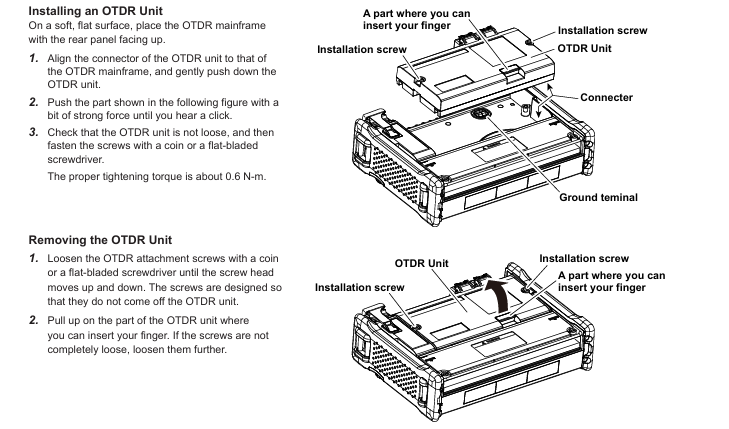
OTDR unit: Align the host connector and press it until it clicks, then use a coin/screwdriver to tighten the screw (with a torque of about 0.6N · m) to fix it;
OPM/VLS module: Remove the slot cover of the host module, insert the module until it clicks, and fix it with screws (torque 0.6N · m);
Battery: Open the host battery cover (loosen the screws and slide to remove), align the terminals and insert the battery, cover the battery cover back and tighten the screws;
SD card: First, remove the battery, open the SD card cover and insert it (press until it clicks), then reinstall the battery.
Connect peripherals:
Fiber optic: Clean the connector end face (using a specialized cleaning agent, such as NTT-AT products), align it with the optical interface and insert it (confirm that the port wavelength matches, such as AQ7283E’s 1625nm output from PORT2);
Other: USB interface for connecting USB flash drive/printer/PC (Mini-B port for PC control/storage access), Ethernet port (optional) for remote control.
Startup and Basic Operations
Power on: Press the power button on the front of the host. After normal startup, the ON LED (green) will light up and the screen will display the main interface. It is recommended to preheat for at least 5 minutes (to ensure measurement accuracy);
Main interface operation:
Function selection: Select OTDR, OPM, VLS and other functions through the knob/directional keys/touch screen, press ENTER or soft key to confirm;
Measurement mode: Taking OTDR as an example, Simple mode (only requires automatic configuration of wavelength, distance range/pulse width, etc.), Average measurement (start by pressing AVG key to improve signal-to-noise ratio, can be manually stopped);
Screen interaction: The touch screen supports clicking (selecting), dragging (adjusting display ratio), and pinching (zooming waveform), with soft keys corresponding to the menu on the right, and the ESC key returning to the previous level.
Data Management and Fault Handling
Data storage: Measurement results can be stored in formats such as SOR (waveform), CSV (data), BMP/JPG (image), etc., supporting internal storage (≥ 1000 waveforms), USB/SD card;
Abnormal startup handling: If the startup is not completed properly, check the AC adapter connection, battery installation, and power button pressing time (≥ 2 seconds). If the issue persists, contact the dealer for repair.
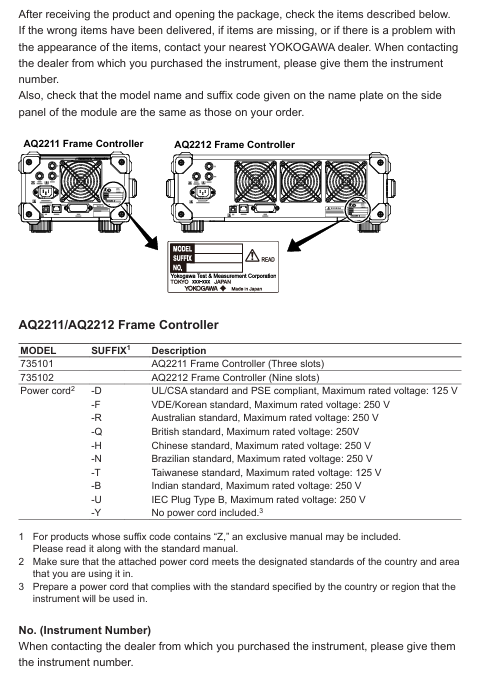
Frame controller: Confirm that the model (AQ2211/AQ2212), side nameplate are consistent with the order, and there are no scratches/damages on the appearance
Power cord: Match regional standards according to suffix codes, with the following key parameters
AQ2211 Rack Kit 735182-03 Installation of 1 AQ2211 to EIA Standard Rack Left
AQ2212 Rack Kit 735182-09 Installation of 1 AQ2212 to EIA Standard Rack
3.2 Installation Environment and Requirements
environmental conditions
Temperature: 5-40 ℃ (working), -20~60 ℃ (storage)
Humidity: 20~80% RH (no condensation, consistent with operation and storage)
Altitude: working ≤ 2000m, storage ≤ 3000m
Prohibited environment: direct sunlight, strong magnetic field, high static electricity, corrosive gases, severe vibration
Space requirements: Ensure ventilation and avoid internal overheating
Left and right sides: each ≥ 5cm
Rear: ≥ 10cm (exhaust hole)
Above/Below: Reserve cable connection space
Rack installation steps (kit required)
Disassemble the handles on both sides of the instrument (AQ2211, remove the left side)
Remove the bottom 4 foot pads
Remove the sealing tape at the mounting hole of the rack
Apply new sealing tape to cover the mounting holes of the foot pad/handle
Install the rack kit and secure the instrument to the rack
Core security standards
4.1 Electrical Safety (Warning Level)
Power requirements
Designated power cords must be used, with voltage matching the rated value of the instrument (100-240VAC). Exceeding the maximum voltage of the power cord (such as UL/CSA 125V, VDE 250V) is prohibited
The power plug must be inserted into a three core socket with protective grounding, and the use of ungrounded extension cords is prohibited
grounding protection
Before starting up, it is necessary to connect the protective ground and it is forbidden to cut off the internal/external grounding wire
Check if the grounding and fuse are intact. Do not operate if they are damaged
Operation taboos
Prohibited for use in explosive gas/vapor environments
It is prohibited to dismantle the casing (including high-voltage components inside) without authorization. Only qualified personnel from Yokogawa can repair it
Before connecting external equipment, it is necessary to ground it first. Before touching the circuit, turn off the power and confirm that there is no voltage
AQ2200-112/131/132 Class 1 IEC 60825-1:2014, 21 CFR 1040.10/11 prohibits direct viewing of laser beams
AQ2200-111/141/142/136 Class 1M IEC 60825-1:2007, 21 CFR 1040.10/11 prohibits the use of optical instruments (magnifying glasses, etc.) for observation at<100mm
Laser unlocking process
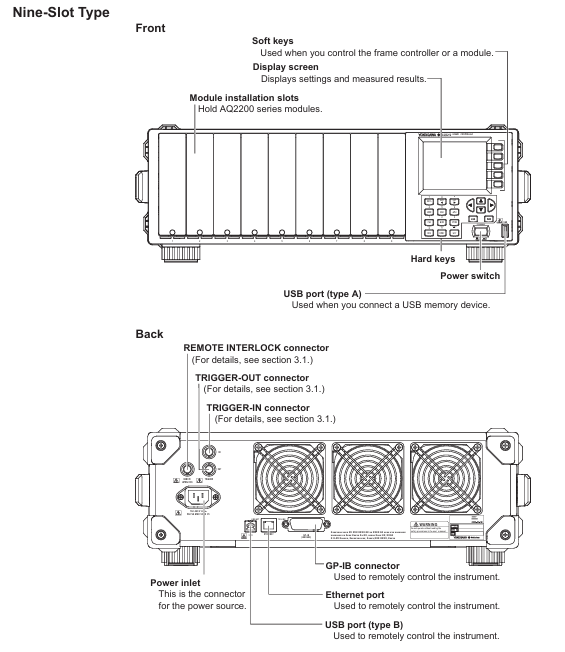
Connect the included interlock plug (A1288JA) to the Remote INTERLOCK interface behind the frame controller
Press the SYSTEM key to enter the system screen, move the cursor to Lock, and press ENTER
Enter the default password ‘1234’ and press ENTER
Set Lock to Off and press OK to confirm (laser output can only be turned on after unlocking)
4.3 Environmental Protection and Compliance
WEEE Directive (EEA and UK): Prohibition of mixing household waste, contact local Yokogawa office for disposal
Battery Directive (EEA and UK): Lithium batteries must be collected separately and replaced. Contact the local Yokogawa office for replacement
RoHS compliance: The instrument itself complies with EU RoHS, but if incompatible modules (such as AQ2200-111, AQ2200-131, etc.) are installed, it becomes invalid. The list of incompatible modules can be found in Section 5.1
Taiwan region: Information inquiry on restricted substances for power cord A1100WD: https://tmi.yokogawa.com/support/service-warranty-quality/product-compliance/
Operation process guide
5.1 Module installation and uninstallation
Installation steps
If there is a blank panel in the slot, loosen the screw → slide down to remove the panel
Press the unlock button on the module panel and lift the locking lever
Align with the slot guide rail and slowly insert the module until it is fully seated
Slowly press the lever until you hear a “click” sound (2/3 slot module needs to tighten the bottom fixing screw)
Uninstalling steps
If it is a 2/3 slot module, first loosen the bottom fixing screw
Press the unlock button and gently lift the lever to unlock
Slowly pull out the module (protrude about 1cm, then pull it out by hand)
Hot swappable instructions: Modules can be installed/uninstalled while the frame controller is turned on. If a non SUMMAY/DETAIL screen is displayed during uninstallation, it will automatically switch to these two screens
5.2 Cable Connection
Fiber optic connection
Cleaning the fiber optic end face: Soak the cleaning paper in isopropanol, press and rotate the end face to wipe, then dry it with dry cleaning paper, and finally blow away residual dust with compressed air
Connection rule: The ANGLED PC ONLY interface is only connected to APC type fiber optic cables and is prohibited from connecting other types (to avoid damaging the plug)
Connector adapter: such as AQ9441 (for FP-LD module), AQ9335C (for sensor module), align the guide pin/hole connection according to the manual steps, and lock the lever
electrical connection
Coaxial cable: used for modules such as BERT and optical modulators. Before connecting, confirm that the signal output is turned off and tighten the connector with a torque of 0.9N-m
Power cord: Confirm that the instrument switch is turned off, connect it to a three pin grounded socket, and ensure that the voltage matches the rated value
Key module connection example (BER test)
BERT module (AQ2200-601) DATA OUT → Optical modulator (AQ2200-621/622) DATA IN
Optical modulator OPT OUT → DUT → Optical receiver (AQ2200-631) OPT IN
Optical receiver DATA OUT → BERT module DATA IN 1 (CDR)
5.3 Startup and Screen Operation
boot process
Confirm that the power connection is correct, press the POWER switch on the front panel of the frame controller
The instrument automatically performs self check, and after passing the test, it displays the SUMMAY screen (global module information) or Detail screen (individual module details)
Preheating requirement: To ensure measurement accuracy, it is recommended to preheat for at least 1 hour after turning on the machine
screen operation
SUMMAY screen: The blue background represents the “current module” (modifiable parameters), the light blue background represents the “current parameters”, and the empty slot displays “NO MODULE”
Detail screen: The top displays the current module slot, allowing you to view/modify all parameters of the module (such as wavelength and attenuation values)
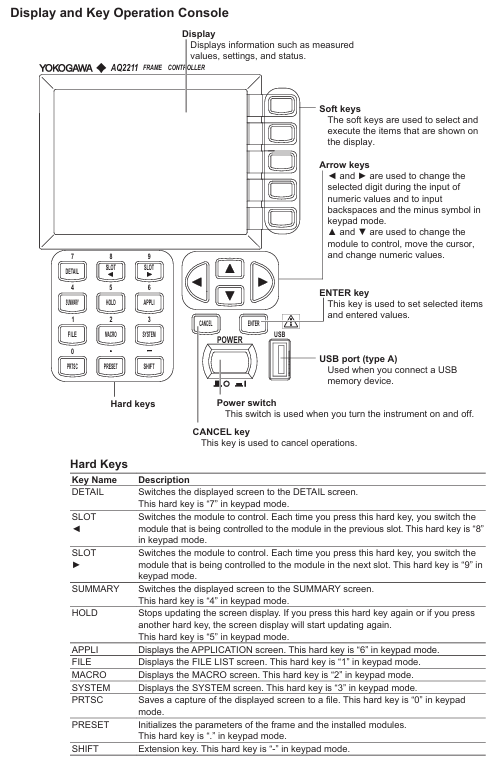
Hard key function (key buttons)
Hard key function keyboard mode corresponds to numbers
Switch to Detail Screen 7
SLOT ◄/► Switch current control module 8/9
Switch to SUMMAY screen 4
HOLD pauses screen updates, press again to resume 5
SYSTEM: Enter the system settings screen (date, password, etc.) 3
Maintenance and troubleshooting
6.1 Daily Maintenance
Cleaning requirements
Body: Wipe with a dry soft cloth after power failure. Do not use chemicals such as benzene or diluents (to avoid discoloration/deformation)
Optical interface: Clean with isopropanol and cleaning paper, and only use compressed air to remove dust from the sensitive surface of the sensor head (wiping is prohibited)
Electrical interface: Use compressed air to blow away dust, without using interface cover protective cap/terminal
Regularly replace parts
Suggested replacement cycle note for part name
Cooling fan for 40000 hours to ensure ventilation and avoid internal overheating
Lithium batteries will also be consumed even when the instrument is powered off for 3 years
ATTN module shutter 150000 times suitable for AQ2200-311/311A/312/331/332
LCD backlight for 30000 hours (default brightness 5) needs to be replaced when the brightness drops to half
Calibration requirements
Conventional module: It is recommended to calibrate once a year
AQ2200-111 (DFB-LD): Calibrate every 6 months due to semiconductor characteristics
Calibration method: Contact the Yokogawa dealer to adjust the parameters simultaneously
6.2 Troubleshooting
Common Problems and Solutions
Possible causes and solutions for the problem phenomenon
The instrument cannot be turned on. The power cord is not properly connected and the voltage does not match. Check the power cord connection and confirm that the voltage is between 90-264VAC
Laser lock without output, interlock plug not connected, unlock according to the process (password 1234)
PPG-ED cannot synchronize. The cable is not properly connected and the PPG and ED parameters do not match. Check the cable and confirm that the pattern and PRBS length of PPG and ED are consistent
OE displays LOS alarm for fiber not connected and low input power. Check the fiber connection and add an optical amplifier to increase power
Key error codes
Error code description and solution measures
1014 frame controller and module firmware version do not match. Update firmware to the latest version (contact dealer for information)
1266 Input power exceeds the maximum limit and reduces input power to the specified range (refer to module parameters)
Fault contact preparation: The instrument model, serial number, firmware version, operating steps at the time of the fault, and screen display need to be provided
Firmware update
7.1 Frame Controller Firmware Update
preparation
Download the latest firmware, rename it to “aq221xlz. bin”, and place it in the USB root directory
Disconnect all external devices and only retain USB (direct connection, not through Hub)
Update steps
Turn off the power of the frame controller and plug in the USB
Press and hold the soft key at the top of the front panel, while pressing the POWER switch to turn on the device
The screen displays the update progress, and after completion, it prompts “Flash Update Complete”, and the instrument automatically restarts
After restarting, remove the USB and confirm the version by pressing SYSTEM → Soft Version View
7.2 Module firmware update
preparation
Download the latest firmware of the module and place it in the “module” folder on the USB (without renaming)
Insert the USB into the USB Type A port on the front panel of the frame controller
Update steps
Press the SYSTEM key → move the cursor to “Module Update” → press ENTER
Use the arrow keys to select the module that needs to be updated (the checkbox turns black) → Press the ‘Update Execut’ soft key
Display update status (Executing/Complete/Failed), prompt “Please Restart System” after completion
Restart the frame controller and confirm that the module version update is successful