Call us 24/7uaedcs@163.com
Welcome to the official website of CNIACS Automation Technology Co., Ltd!
Call us 24/7uaedcs@163.com

YASKAWA A1000 series AC frequency converter

Product Overview

(1) Brand and positioning

The Yaskawa A1000 series AC frequency converter is the next generation high-performance vector control flagship product launched by Yaskawa Electric (YASKAWA), inheriting the brand’s deep accumulation in the field of drive technology. It aims to meet the high-precision, high reliability, and high economic requirements of motor drive in the industrial field through top-notch vector control technology, comprehensive functional configuration, and efficient energy-saving design. It is a versatile drive solution for general industrial scenarios and special application scenarios.

(2) Product specification matrix

Voltage and power coverage

200V level: power range 0.4kW-110kW, compatible with three-phase 200-240Vac power supply, core model prefix CIMR-AA2A.

400V level: power range 0.4kW-630kW, compatible with three-phase 380-480Vac power supply, core model prefix CIMR-AA4A.

Core Certification and Compliance

Quality and Environmental Certification: Passed ISO9001 Quality Management System and ISO14001 Environmental Management System certifications.

Environmental and safety compliance: The entire series complies with the EU RoHS directive, and some models have passed CE and UL certification (some model certifications are pending).

Core Technology and Performance Parameters

(1) Control technology system

Motor compatibility

Supporting motor types: induction motor, built-in permanent magnet synchronous motor (IPM), surface permanent magnet synchronous motor (SPM). Motor type switching can be achieved through a single parameter without the need for additional hardware modifications.

Special adaptation: PM motor compatibility support is being developed for models of 450kW and above. Currently, various low and medium power synchronous motors can be adapted through parameter optimization.

Classification and Performance of Control Modes

|Control mode | Applicable motor | Core performance indicators | Typical application scenarios|

|V/f control | Induction motor | 150% torque/3Hz, speed range 1:40 | General fan and pump loads|

|Open loop vector control (induction motor) | Induction motor | 200% torque/0.3Hz, speed range 1:200 | Conveyor, compressor|

|Closed loop vector control (induction motor) | Induction motor (with PG) | 200% torque/0r/min, speed range 1:1500 | Machine tool spindle, high-precision transmission|

|Open loop vector control (PM motor) | IPM/SPM motor | 200% torque/0r/min, speed range 1:100 | Energy saving fan, precision machinery|

|Closed loop vector control (PM motor) | IPM/SPM motor (with PG) | 200% torque/0r/min, speed range 1:1500 | High end CNC machine tool, positioning system|

(2) Key Function Analysis

Encoder free control technology

Core principle: By utilizing the electrical salient pole characteristics of IPM motors, speed, steering, and rotor position can be detected without the need for a motor encoder, achieving high-precision positioning control.

Functional value: Reduce encoder hardware costs and installation complexity, lower failure points, and adapt to applications with limited space or harsh environments.

Supporting tools: Through DriveWorksEZ visual programming, it is easy to create custom position control sequences without the need for additional controllers.

Braking and Parking Technology

Built in braking capability: 30kW and below models come standard with a braking transistor, which can be directly connected to an external braking resistor to achieve strong braking; Models above 30kW can expand the braking unit through the tab.

Braking mode: Supports overexcitation deceleration (achieving quick stop without braking resistance), high slip braking (braking torque of about 40%), and DC injection braking (auxiliary braking during start/stop phases).

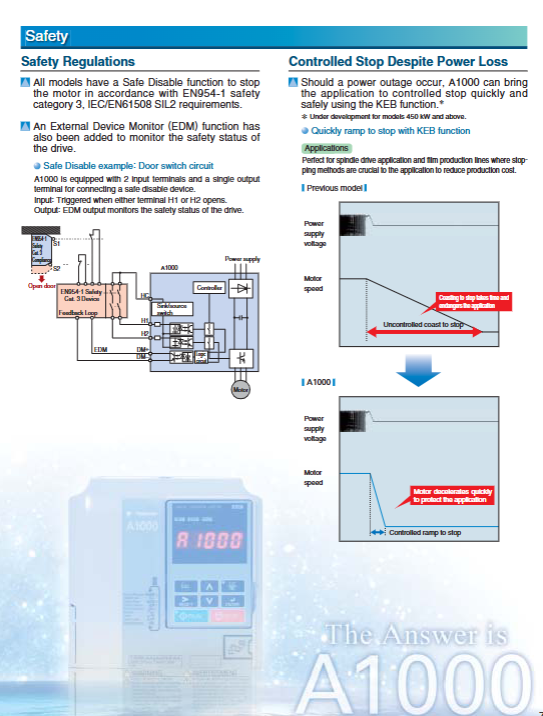
Power failure protection: KEB (Keep Energy Braking) function can use the regenerative energy of the motor to achieve controllable shutdown within 2 seconds after power failure, avoiding safety risks caused by free sliding of the load.

Self tuning and optimization functions

Motor self-tuning: supports rotation self-tuning (high-precision matching of motor parameters), static self-tuning (used when the motor cannot be disconnected from the load), and wire resistance self-tuning (recalibrated after cable length changes).

Load self-tuning: Inertial self-tuning optimizes deceleration performance, ASR gain self-tuning automatically matches frequency reference to ensure stable operation under different loads.

Energy saving self-tuning: Real time optimization of motor voltage and load matching, always maintaining the highest operating efficiency.

Energy saving control technology

Induction motor energy saving: dynamically adjust the output voltage through Energy Saving control, automatically optimize according to speed and load, and reduce no-load losses.

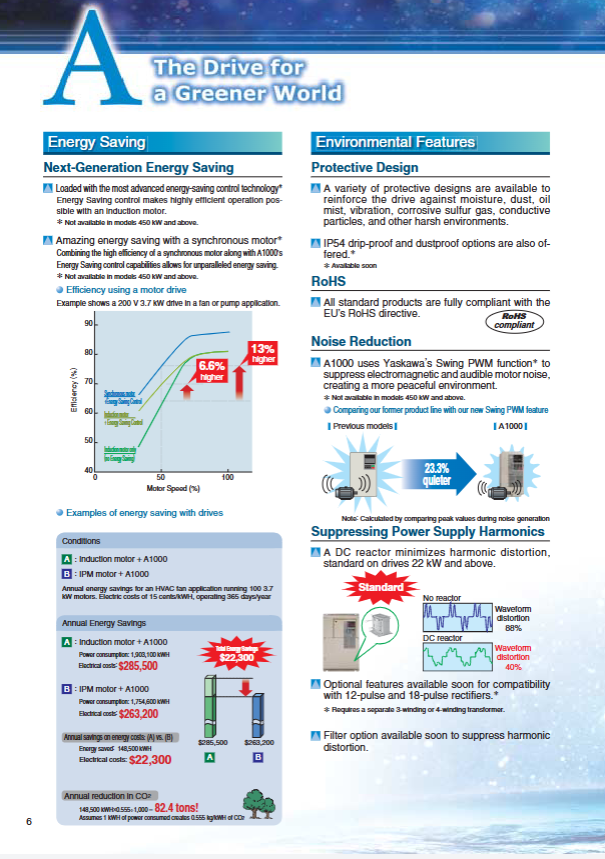
Energy saving synchronous motor: Paired with the EMR1 series ultra efficient synchronous motor, the efficiency is improved by 8.2% -13% compared to traditional induction motors, and the application effect of fans/pumps is particularly significant.

Harmonic suppression: Models of 22kW and above are equipped with built-in DC reactors, reducing the harmonic distortion rate of the power grid from 88% to 40% and minimizing interference with the power grid.

Core advantages of the product

(1) Efficient Energy Saving and Environmental Protection

Quantitative energy-saving effect

Case reference: 100 3.7kW motors are used for HVAC fan systems, operating 365 days a year, with an electricity cost of 0.15 USD/kWh.

Induction motor+ordinary frequency converter: Annual power consumption of 1903100kWh, electricity cost of $285500.

IPM motor+A1000 energy-saving control: Annual power consumption of 1754600kWh, electricity cost of $263200.

Annual electricity savings of $22300, reducing CO2 emissions by 82.4 tons (calculated based on 0.555kg CO2 per 1kWh).
Environmental Design Details

Noise suppression: Swing PWM technology reduces electromagnetic noise and motor operation noise, which is 23.3% lower than previous generation products.

Material compliance: The entire series complies with the RoHS directive, is lead-free and halogen-free, and uses 100% recycled paper and soy ink to print documents.

(2) Safe, reliable, and durable

Security protection system

Functional safety: The Safe Disable function achieves safe shutdown through dual input terminals (H1/H2), complying with EN954-1 Cat.3 and IEC/EN61508 SIL2 standards; EDM (External Device Monitor) function monitors security status in real-time.

Electrical protection: It has comprehensive protection against overcurrent, overvoltage, undervoltage, overload, overheating, grounding faults, etc. When the output current exceeds 200% of the rated overload value, it will immediately shut down.

Environmental adaptation: Provides IP54 dust-proof and drip proof options, supports moisture-proof, dust-proof, oil mist proof, and corrosion-resistant gas design, and is suitable for harsh industrial environments.

Long lifespan and low maintenance

Design lifespan: Key components such as cooling fans, capacitors, relays, IGBTs, etc. have undergone rigorous screening and are designed to have a lifespan of 10 years in an environment of 24 hours, 80% load, and 40 ℃.

Maintenance warning: Built in performance life monitoring function, real-time tracking of cooling fan (LT-1), capacitor (LT-2), surge suppression relay (LT-3), IGBT (LT-4) status, and early output of maintenance signals.

Convenient maintenance: The detachable terminal block supports parameter backup, and there is no need to rewire or set up when replacing the frequency converter; The cooling fan, operator, and other components can be quickly disassembled and replaced.

(3) Convenient operation and flexible configuration

Programming and configuration tools

DriveWorksEZ: a visual programming software that supports drag and drop creation of custom control sequences and detection functions, without the need for complex code writing.

Application Presets: Built in 8 types of application presets for fans, pumps, conveyors, cranes, etc., with one click automatic configuration of core parameters, greatly reducing debugging time.

Operator: Standard LED operator, optional LCD operator (JVOP-180), supports parameter copying and remote operation, equipped with 1m/3m extension cable.

Parameter Management and Migration

Local management: The operator supports parameter copying, and the terminal block has a built-in parameter backup function, ensuring that parameters are not lost after power failure.

Remote management: By using the USB copying unit (JVOP-181) or DriveWizard Plus software, multiple frequency converter parameters can be quickly copied and migrated; Supports RS-422/485 (MEMOBU/Modbus) communication with a maximum baud rate of 115.2kbps.

Flexible installation and layout

Compact design: The 400V 75kW model is 55.4% smaller than the previous generation F7 series, and the 200V 3.7kW synchronous motor is 64% smaller than the induction motor.

Installation method: Supports parallel installation (18.5kW and below), models without heat sinks (upcoming), and external heat sink installation, suitable for different control cabinet space requirements.

Applicable scenarios and selection schemes

(1) Main application areas and adaptation strategies

Application scenario core requirements A1000 adaptation advantages recommended configuration

Crane/winch high starting torque, motor switching, safe and reliable 200% starting torque, Motor 2 Switch function Safe Disable、 Maintenance monitoring overload mode (C6-01=0), closed-loop vector control, braking resistor unit

Energy saving control for fans/pumps, low noise, and stable operation Swing PWM、 Variable frequency jump (to avoid resonance), light load mode (C6-01=1), V/f control, PID control

Smooth operation of conveyor, fast braking, long-life overexcitation deceleration, torque ripple suppression, maintenance warning open-loop vector control, application preset (Conveyor), 24V control power option

Metal processing/machine tool power-off controllable, overvoltage suppression, high-precision KEB function, overvoltage suppression, zero servo control closed-loop vector control, pulse sequence input/output, braking unit

HVAC system energy-saving, communication compatibility, multi motor control energy-saving control, LONWorks communication options, multi-step speed control light load mode, PID control (including sleep function), remote monitoring

(2) Key parameters for selection

Rated mode selection

Normal Duty: C6-01=1, overload capacity of 120%/60s, capable of driving motors larger than its rated capacity, suitable for square law loads such as fans and pumps.

Heavy Duty: C6-01=0 (default), overload capacity of 150%/60s, suitable for constant torque loads such as cranes, conveyors, compressors, etc.

Motor capacity matching

Induction motor: The rated output current of the frequency converter is ≥ the rated current of the motor.

Synchronous motor: Motor code (E5-01) needs to be set to ensure parameter matching. PM motor adaptation support is being developed for models of 450kW and above.

Suggestions for peripheral selection

|Peripheral type | Applicable scenario | Recommended model|

|Braking resistor | Quick stop requirement | ERF-150WJ series (3% ED), LKEB series (10% ED)|

|Noise filter | Electromagnetic interference sensitive environment | LF series (output side), LNFD series (input side)|

|Communication Card | Industrial Network Integration | SI-P3 (PROFIBUS-DP), SI-C3 (CC Link), SI-S3 (CANopen)|

|Operator | Remote operation requirements | JVOP-180 (LCD), WV001/WV003 (extension cable)|

|Maintenance Tools | Multi Device Management | JVOP-181 (USB Copy Unit), DriveWizard Plus Software|
HIRSCHMANN MACH1040 Series

Product Overview

(1) Core positioning and design philosophy

A fully gigabit reinforced switch designed specifically for industrial automation scenarios, meeting the high reliability, long-term stability, and flexible configuration requirements in extreme industrial environments. Following the IEEE 802.3 standard, supporting the construction of switched industrial Ethernet networks, fanless design reduces the risk of mechanical failures, and adapts to harsh working conditions such as vibration, wide temperature range, and electromagnetic interference.

(2) Model variants and core differences

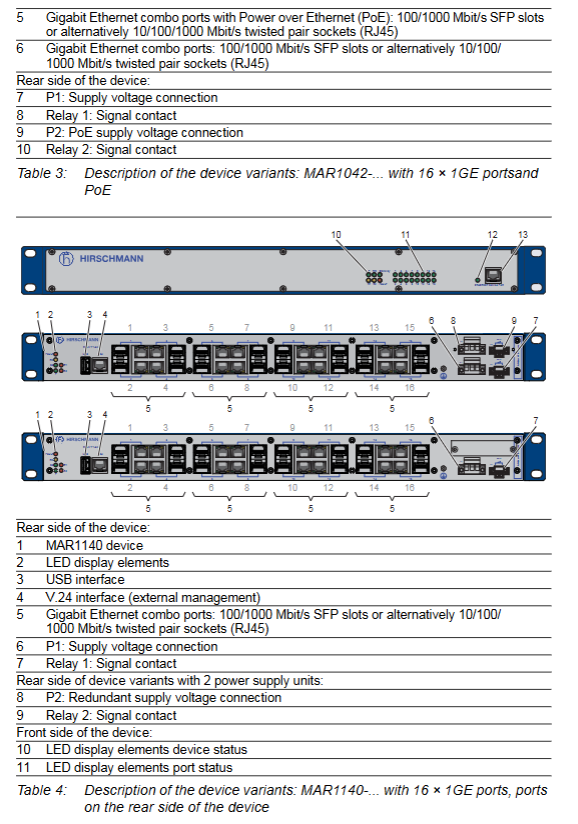
The series includes four basic models, which combine different characteristics (port position, PoE function, temperature range, power supply type, etc.) through product names. The specific differences are as follows:

Model Port Position PoE Support Core Configuration Special Design

MAR1040 front-end does not have 16 gigabit combination ports, optional redundant power supply basic model, suitable for conventional industrial scenarios

The MAR1042 front-end has 16 Gigabit Ethernet ports (4 PoE ports) and dual power supply units (including PoE power supply) that support PoE terminal power supply for IP phones, cameras, and other devices

MAR1140 does not have 16 gigabit combination ports in the backend, but has an additional Fast Ethernet diagnostic port in the frontend. Optional redundant power supply ports can be installed in the rear for easy wiring management, and the diagnostic port simplifies maintenance

MAR1142 has 16 Gigabit Ethernet ports (4 PoE ports) in the backend (IEEE 802.3af), an additional Fast Ethernet diagnostic port in the frontend, and dual power supply units that combine port placement and PoE functionality, making it suitable for complex installation scenarios

(3) Core functional characteristics

Port configuration: 16 Gigabit combo ports, each port can be connected to either twisted pair (RJ45 socket, supporting 10/100/1000 Mbit/s) or optical module (SFP slot, supporting 100/1000 Mbit/s). After inserting the SFP optical module, the corresponding RJ45 port will be automatically disabled.

PoE function: Only supported by MAR1042 and MAR1142, compliant with IEEE 802.3af standard. The four PoE ports are the first four ports of the device (Port 1-4), with a maximum output power of 15.4W per port. It provides phantom power through signal twisted pair cable

Technical parameter details

(1) Physical and weight parameters

Project specifications

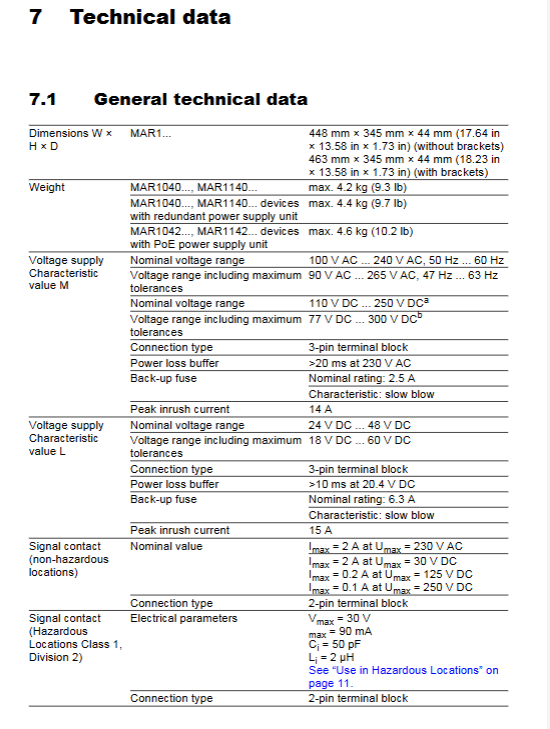
Dimensions (W × H × D) without bracket: 448mm × 345mm × 44mm (17.64in × 13.58in × 1.73in); With bracket: 463mm × 345mm × 44mm (18.23in × 13.58in × 1.73in)

Weight MAR1040/MAR1140: maximum 4.2kg (9.3lb); Equipped with redundant power supply: maximum 4.4kg (9.7lb); MAR1042/MAR1142 (PoE): Maximum 4.6kg (10.2lb)

Protection level IP30

Laser/LED protection Class 1 (compliant with IEC 60825-1:2014)

(2) Power supply and electrical parameters

Power supply type, rated voltage range, tolerance range, backup fuse, peak surge current, power-off holding time

L-type (DC) 24-48VDC 18-60VDC 6.3A, slow melting 15A>10ms (20.4VDC)

M-type (AC) 100-240VAC, 50/60Hz 90-265VAC, 47-63Hz 2.5A, slow melting 14A>20ms (230VAC)

M-type (DC) 110-250VDC 77-300VDC 2.5A, slow melting 14A-

Signal contact (non hazardous environment) Umax 230VAC/30VDC, Imax 2A; Umax 125VDC,Imax 0.2A; Umax 250VDC,Imax 0.1A 

Signal contact (hazardous environment) Vmax 30V, Imax 90mA, Ci 50pF, Li 2 μ H

(3) Network performance parameters

Port type, speed support, transmission standard, maximum transmission distance

Twisted pair port (RJ45) 10/100/1000 Mbit/s IEEE 802.3 10BASE-T/100BASE-TX/1000BASE-T 100m (Cat5e cable)

Optical port (SFP, 100M) 100 Mbit/s IEEE 802.3 100BASE-FX multimode (50/125 μ m): 5km; Single mode: 25km; Long distance (LH): 140km

Optical port (SFP, 1000M) 1000 Mbit/s IEEE 802.3 1000BASE-SX/LX/LH multimode (50/125 μ m): 0.55km (SX)/1.5km (MX); Single mode: 20km (LX)/128km (LH+)

(4) Electromagnetic compatibility (EMC) parameters

Test Project Standard Test Level

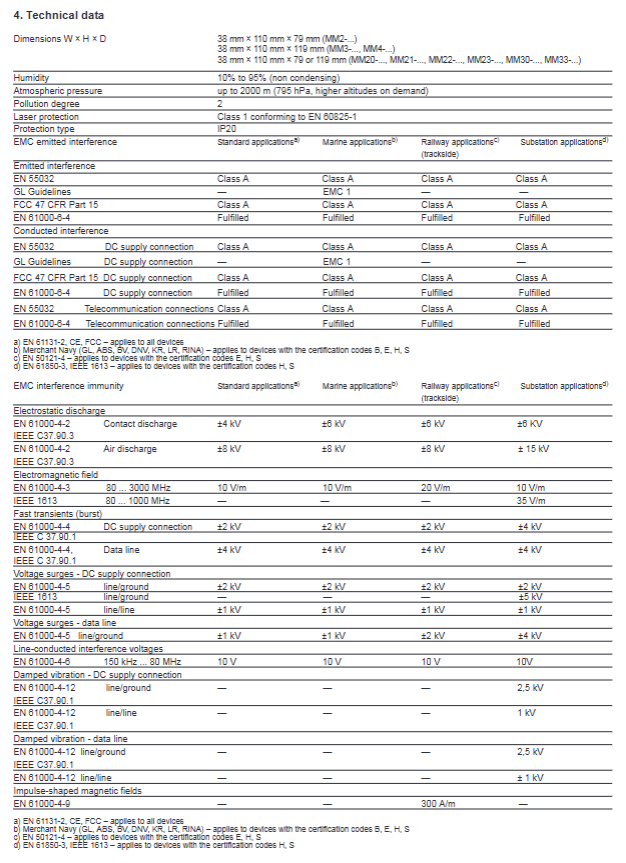
Electrostatic discharge IEC/EN 61000-4-2 Contact discharge ± 8kV, air discharge ± 15kV

Electromagnetic radiation immunity IEC/EN 61000-4-3 80MHz-2700MHz, 20V/m

Fast transient pulse group IEC/EN 61000-4-4 power/data line ± 4kV

Voltage surge IEC/EN 61000-4-5 power line ± 2kV (line to ground)/± 1kV (line to line) (AC); ± 4kV (line to ground)/± 2kV (line to line) (DC)

Conducted interference IEC/EN 61000-4-6 150kHz-80MHz, ± 4kV (line ground), 10V

Radiation emission EN 55032/FCC 47 CFR Part 15 Class A

Maintenance, disassembly, and troubleshooting

(1) Key points of daily maintenance

Regular inspection:

Environmental inspection: Confirm that the installation environment temperature and humidity meet the requirements, and there is no dust accumulation.

Equipment inspection: The ventilation duct is unobstructed, the LED indicator light is normal, and the casing has no damage or signs of overheating.

Cable inspection: The cable connection is firm, without wear or aging, and the stress relief device is effective.

Relay inspection: Regularly check the contact resistance of the relay according to the switching frequency to ensure that the switch function is normal.

Software maintenance: Regularly visit the Hirschmann official website to check for software updates, upgrade in a timely manner to obtain new features and troubleshooting.

Cleaning requirements: Only use a dry soft cloth to clean the equipment casing, and do not use liquid cleaning agents or corrosive substances.

(2) Dismantling process

Equipment disassembly:

Disconnect all data cables (twisted pair, fiber optic).

Turn off the power supply and disconnect the power cable.

Disconnect the grounding cable.

Remove the fixing screws of the equipment (cabinet/wall) and take out the equipment.

SFP optical module disassembly:

Open the locking mechanism of the SFP optical module.

Pull the locking mechanism and remove the optical module from the slot.

Cover the optical module with a protective cap and store it properly.

Precautions: During the disassembly process, avoid colliding or squeezing the equipment to protect the interface and terminals from damage; Dismantling in hazardous environments requires ensuring that the area is free of flammable gases.

(3) Guidelines for Handling Common Malfunctions

Possible causes and solutions for the fault phenomenon

The power supply light (P) does not light up. The power supply voltage does not match, the wiring is incorrect, and the fuse is blown. Check the power supply voltage and wiring for correctness, and replace the blown fuse

The fault light (FAULT) is on. Check the system logs for device faults, IP conflicts, and abnormal port connections to determine if there are any IP conflicts. Check the port cable connections. If there is a device fault, return it for testing

Port not connected (LED not lit), cable failure, opposite device not powered on, port disabled, cable replacement. Confirm that the power supply to the opposite device is normal, and enable the port through the management tool

Abnormal data transmission (LED flashing), failed rate negotiation, electromagnetic interference, incompatible optical module, manually set port rate and duplex mode, check cable shielding and wiring distance, replace compatible SFP optical module

PoE terminal cannot supply power. PoE port is not enabled, terminal power consumption exceeds the standard, and cable fault occurs. Enable PoE port, confirm that terminal power consumption is ≤ 15.4W, and replace with qualified twisted pair cable

Accessories

Recommended accessories and order number

Accessory category, specific model, order number, and purpose

Fast Ethernet SFP optical module M-FAST SFP-MM/LC 943 865-001 multimode fiber connection (100M)

Fast Ethernet SFP optical module M-FAST SFP-SM/LC 943 866-001 single-mode fiber connection (100M)

Gigabit Ethernet SFP optical module M-SFP-SX/LC 943 014-001 multimode fiber connection (1000M, short distance)

Gigabit Ethernet SFP optical module M-SFP-LX/LC 943 049-001 single-mode fiber connection (1000M, long distance)

Automatic configuration adapter ACA22-USB (EEC) 942 124-001 configuration backup/loading, software upgrade

Terminal Cable Terminal Cable 943 301-001 V.24 Interface Connection

Fixed bracket additional fixed bracket 943 943-001 Strong vibration environment reinforcement

Protective cap RJ45 socket protective cap (50 pieces) 943 936-001 unused port protection

Protective cap SFP slot protective cap (25 pieces) 943 942-001 Unused SFP slot protection

Compliance certification and environmental requirements

(1) Compliance certification

EU certification: CE marking, compliant with the 2011/65/EU (RoHS), 2014/30/EU (EMC), 2014/35/EU (Electrical Equipment Safety) directives.

UK certification: UKCA marking, compliant with S.I. 2012 No. 3032 (RoHS) and S.I. 2016 No. 1091 (EMC) regulations.

US certification: FCC Part 15 Class A, UL 508.

Industry certifications: ISA 12.12.01 (Class I Div.2), GL (Lloyd’s Register), IEC 61850, IEEE 1613 (substations), EN 50121-4 (rail transit, trackside), NEMA TS2, EN 50155 (rail transit, on-board).

(2) Environmental Protection and Recycling Requirements

The equipment belongs to electronic waste and must be properly recycled according to the current disposal regulations of the country/state/region after use. It is prohibited to dispose of it indiscriminately to reduce environmental impact.

s and supports remote power supply for PoE terminals such as IP phones, cameras, and sensors.

Redundancy mechanism: Supports ring network redundancy (HIPER Ring), which can quickly reconstruct the network after a failure; Non PoE models can choose redundant power supply, while PoE models come standard with dual power supply units to enhance power supply reliability.

Management interface: Provides multi-dimensional management methods – local management (V.24 interface, RJ11 socket; USB interface, supporting ACA22 automatic configuration adapter), remote management (web browser, Telnet, HiView configuration software, Industrial HiVision network management software).

Display and diagnosis: Real time display of device status (power supply, fault, ring network, standby) and port status (connection, data transmission, disabled) through LED indicator lights; The MAR1140/1142 front-end is equipped with diagnostic ports for easy on-site troubleshooting.

Safety regulations and installation environment requirements

(1) Personnel qualification requirements

Only “qualified personnel” are allowed to operate the equipment. Qualified personnel must meet the following requirements: have received professional training, possess knowledge of safety technical standards related to circuit grounding and identification; Understand potential hazards in the workplace; Master risk prevention measures; Regularly receive retraining.

(2) Mandatory requirements for installation environment

Installation location: It can only be installed in switch cabinets or restricted access areas, and is exclusively accessible to maintenance personnel; Prohibited for use as a desktop device.

Installation method adaptation:

19 inch cabinet installation: sliding/mounting rails are required to support the weight of the equipment and ensure easy cable access; At least one rack space (about 5cm) should be reserved above and below the device for heat dissipation.

Vertical installation on the wall: It must be installed inside a fire-resistant enclosure that complies with IEC/EN 62368-1 standards to avoid the risk of fire.

Environmental parameter threshold:

Temperature: Standard (S) 0 ° C~+60 ° C (+32 ° F~+140 ° F); Expansion type (T/E) -40 ° C~+70 ° C (-40 ° F~+158 ° F), with additional conformal coating for E-type; Storage temperature -40 ° C~+85 ° C.

Humidity: 5%~95% (non condensing state).

Air pressure: up to 2000 meters (795 hPa), higher altitudes require prior consultation.

Pollution level: not exceeding level 2.

Special requirements for hazardous environments (Class 1, Division 2):

Only use models labeled “FOR USE IN CLASS I, DIVISION 2 HAZARDOUS LOCATION”.

When using the USB port, it is necessary to install a tool to lock the casing to prevent accidental operation.

It is prohibited to disassemble or replace equipment when it is in a charged state, unless it is confirmed that there is no concentration of flammable gases in the area.

Do not replace any components as it may affect explosion-proof compatibility.

Signal contacts must comply with electrical parameters (Vmax 30V, Imax 90mA, Ci 50pF, Li 2 μ H), cable length must be calculated based on capacitance/inductance parameters (default 60pF/ft, 0.2uH/ft), and wiring must follow NEC NFPA 70 Article 501 standard.

(3) Electrical safety regulations

Power supply safety:

The power supply voltage must be consistent with the equipment nameplate, L-type (24-48VDC), M-type (100-240VAC/110-250VDC), with a voltage range including maximum tolerance (L-type 18-60VDC, M-type 90-265VAC/77-300VDC).

The power cord needs to use copper wire with a cross-sectional area of not less than 1mm ² (North American AWG16); The cross-sectional area of the protective conductor shall not be less than the power supply wire and shall not be less than 1.0mm ² (AWG16).

The power supply should be equipped with easily accessible disconnect devices (such as switches, plugs) and clearly labeled; The outer conductor of AC power supply or the positive conductor of DC power supply should be equipped with fuses (L-type 6.3A slow melting, M-type 2.5A slow melting), and double fuses are required when the neutral/negative wire is not grounded.

Grounding requirements:

The device is grounded through an independent grounding screw on the back, and the grounding operation must take priority over other cable connections; The grounding cable needs to be operated last when disconnecting.

The shielded grounding wire of the twisted pair cable should be connected to the front panel of the equipment, and the risk of short circuit should be avoided during connection.

Cable and connection safety:

The cable needs to be designed for stress relief to avoid twisting, poor contact, or interruption caused by mechanical stress; Follow the requirements of sections 522.6, 522.7, and 522.13 of DIN VDE 0100-520:2013-06 standard.

At least 10cm of space should be reserved in front of the equipment ventilation duct to ensure heat dissipation; Do not insert sharp objects into equipment or wiring terminals, and do not touch live terminals.

When the device is running or just turned off, the casing may be hot. Do not touch it to avoid burns.

Complete installation process

(1) Preparation before installation

Packaging content inspection: Confirm that it includes 1 device, 2 pre installed brackets and fixing screws, 1-2 3-core power supply terminal blocks (according to model), 1-2 2-core signal contact terminal blocks (according to model), and 1 safety and general information sheet; Check all components for any transportation damage.

Tools and accessories preparation: Prepare suitable screwdrivers, torque wrenches (power terminal 0.51Nm, signal contact terminal 0.34Nm), cables that meet specifications (power line, ground wire, data line), and optional HIRSCHMANN compatible SFP optical modules.

Installation location confirmation: Ensure that the installation location meets environmental parameters, space requirements, and power supply conditions match the equipment.

(2) Core installation steps

1. Optional steps: Install SFP optical module

Remove the SFP optical module from the shipping packaging and remove the protective cap.

Close the optical module latch and insert it into the device SFP slot until the latch locks in place.

Note: Only use compatible SFP optical modules specified by HIRSCHMANN. Please refer to the “Accessories” section for specific models.

2. Power supply and signal contact wiring

Terminal block disassembly: First, remove the power terminal block and signal contact terminal block from the equipment for easy wiring.

Power supply wiring: Connect according to the terminal definition (Pin1: protective conductor, Pin2: DC negative/AC neutral wire, Pin3: DC positive/AC phase wire), ensuring that the wiring is firm and the torque meets the requirements.

Signal contact wiring: Use 0.5-3.0mm ² (AWG20-AWG12) copper wire with a stripped length of 12mm; ensure that the cable is free of voltage, connect and tighten the terminal block with the required torque.

Terminal block installation: Reinstall the connected terminal block back into the device.

3. Equipment fixation and grounding

Cabinet installation: Install sliding/mounting rails in a 19 inch cabinet according to the manufacturer’s requirements, and secure the equipment to the rails with screws through side pre installed brackets; Additional back support brackets (accessories) can be installed in strong vibration environments.

Wall installation: Adjust the pre installed bracket position of the equipment, install additional back brackets (accessories), and fix the bracket to the wall with screws to ensure that the equipment is vertical and stable.

Grounding operation: Connect the grounding screw on the back of the equipment to the protective conductor with a grounding wire. The cross-section of the grounding wire meets the requirements and the connection is firm.

4. Data cable connection

Twisted pair connection: Use Cat5e and above specification cables with a maximum length of 100m; shielded cables (such as SF/UTP, in compliance with ISO/IEC 11801) are required for strong interference environments; Maintain sufficient distance from power cables, avoid parallel laying, and try to form a 90 ° angle when crossing to reduce interference.

Fiber optic connection: Ensure that the SFP optical module model matches the fiber optic type (SX/LX/LH, etc.), and interconnect ports of the same type (such as SX-SX); Pay attention to cleaning the fiber end face during connection to avoid contamination.

5. Equipment power on and status check

After confirming that all wiring is correct, secure, and there is no risk of short circuit, connect the power supply.

Observe the LED indicator light: The device status light shows that the power supply is normal (P light green light is on), and there is no fault (FAULT light is not on); After the port is connected, the corresponding port LED lights up green, and the yellow light flashes during data transmission, confirming that the installation is normal.

(3) Verification after installation

Check if the device’s heat dissipation is normal, without any abnormal heating or noise.

Confirm the port connection status through LED or management tools and test whether data transmission is smooth.

After installation in hazardous environments, it is necessary to confirm that the explosion-proof configuration meets the requirements and there are no safety hazards.

Initial configuration and management operations

(1) Initial login and password modification

Configuration method selection:

Local configuration: Connect to a PC or VT100 terminal through the V.24 interface, with terminal parameters set to 9600 baud rate, 8-bit data bits, 1-bit stop bit, no checksum, and no handshake.

Remote configuration: Connect the device through a web browser, Telnet, or HiView software (default IP address obtained through DHCP).

First login: Use the default account login – administrator account (admin/private, read-write permission), regular user account (user/public, read-only permission).

Password modification: After the first login, the device requires the administrator password to be changed. The new password must include uppercase and lowercase letters, numbers, special characters, and be at least 8 characters long; After modification, log in again for verification.

Password retrieval: If you forget your password, you need to reset it through System Monitor. Please refer to the official website’s knowledge base for specific procedures.

(2) Core default parameters and configuration points

Suggestions for configuring default settings for parameter categories

IP address automatically obtained through DHCP in industrial scenarios. It is recommended to set a static IP address to avoid IP conflicts

Port mode automatic negotiation is enabled, supporting automatic polarity, automatic crossover, and terminal device matching without manual adjustment; In special scenarios, automatic negotiation can be turned off, and the speed and duplex mode can be manually set

The PoE function supports IEEE 802.3af, and the first 4 ports are PoE ports that can be enabled/disabled according to terminal requirements to avoid ineffective power supply

Disabling ring network redundancy requires enabling HIPER Ring functionality, configuring control ports and coupling ports for ring network topology

Signal contacts do not evaluate port link status and configure signal contact triggering conditions as needed (such as power failure, port disconnection, temperature exceeding limits, etc.)

The optical port speed is 100M, and the optical module defaults to full duplex. The gigabit optical module defaults to full duplex and has the same speed as the peer device to avoid negotiation failure

(3) Application scenarios of management functions

Basic configuration: Set IP address, subnet mask, gateway, VLAN, port rate and other basic parameters through web or HiView software.

Batch configuration: Use ACA22 adapter with USB interface to automatically configure adapter, backup/load device configuration, and achieve batch deployment of multiple devices.

Network monitoring: Real time monitoring of device status, port traffic, and ring network status through Industrial HiVision software, setting alarm thresholds.

Troubleshooting: Connect to the terminal through the V.24 interface or diagnostic port, view system logs, and locate power supply, connection, or configuration faults.

Hirschmann MICE series media module and expansion module

Positioning: The official operation guide for Hirschmann MICE series media modules and expansion modules, focusing on the core requirements of “hardware assembly, functional configuration, and security deployment”, suitable for network interface expansion and maintenance in industrial scenarios.

Core features: Industrial grade compatibility, support for hot plugging, wide temperature operation, deployment in hazardous environments, modular design that can flexibly expand interface types such as twisted pair, fiber optic, PoE, etc.

Safety regulations

(1) Power supply safety

Key limitations of module type power supply requirements

The ordinary media module needs to be powered through the MICE basic switch, and the NEC Class 2 power supply needs to be equipotential grounded. Positive grounding is prohibited

PoE media module (MM22-T1T1T1T1) external 48V DC power supply (recommended RPS 60/48V EEC power supply) output power<100W, current limit<2A, power supply line length<3m

(2) Compliance with hazardous environments

Certification type applicable standard environmental parameters

ATEX EN IEC 60079-0/7/15 Temperature Class T4, Operating Temperature -40~+70 ℃ (T/E Type)

IECEx IEC 60079-0/7/15 Explosion proof Class II 3G Ex ec IIC T4 Gc

Class I Division 2 ANSI/ISA 12.12.01 Groups A-D, to be installed in protective enclosures above IP54

(3) General safety requirements

ESD protection: The module contains electrostatic sensitive components and must comply with DIN EN 61340-5-1/2 standard operation.

Laser safety: The fiber optic module is a Class 1 laser product, and direct viewing of the fiber optic port is prohibited.

Shielding grounding: The shielding layer of twisted pair cables needs to be connected to the grounding terminal of the front panel of the equipment to avoid short circuits.

Core hardware and functions

(1) Classification and Functions of Media Modules

Module series, speed specifications, core functions, typical models

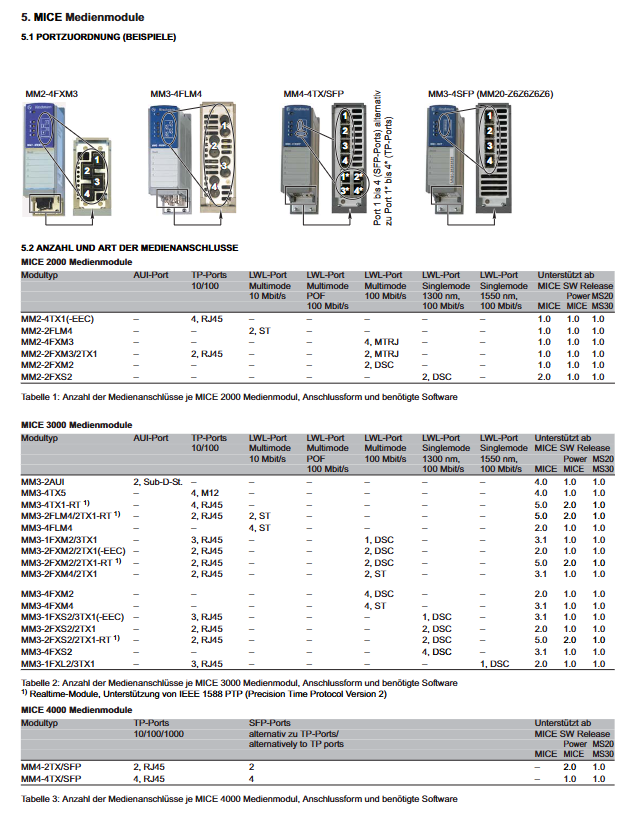
MM2 series 10/100Mbit/s basic 100Mbps interface, supporting twisted pair/fiber MM2-4TX1 (4 RJ45 ports), MM2-2FXM3/2TX1 (2 RJ45+2 MTRJ optical ports)

MM3 series 10/100Mbit/s supports PTP clock synchronization, AUI interface MM3-2AUI (2 AUI ports), MM3-2FXS2/2TX1 (2 RJ45+2 single-mode optical ports)

MM4 series 1000Mbit/s Gigabit interface, supports SFP/twisted pair switching MM4-4TX/SFP (4 RJ45+4 SFP slots)

MM22 series 10/100Mbit/s (PoE) supports IEEE 802.3af, 4 PoE ports MM22-T1T1T1T1T1 (4 RJ45 PoE ports)

Open module (MM20/MM30) 10/100/1000Mbit/s customizable port type (twisted pair/fiber) MM20-Z6Z6Z6Z6 (4 SFP slots, 100Mbit/s)

(2) Expansion module and SFP transceiver

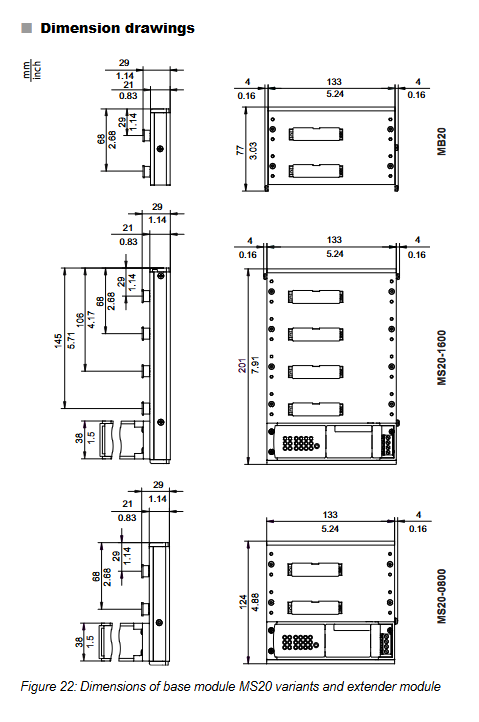
MB20 expansion module: adds 2 media module slots to basic switches such as MS20-1600/MS30-1602, supporting hot swappable installation.

SFP transceiver:

100Mbps SFP: Supports multimode (MM) and single-mode (SM), with a maximum transmission distance of 86km (LH type).

Gigabit SFP: Supports SX (multimode, maximum 550m), LX (single-mode, maximum 20km), LH+(single-mode, maximum 120km).

Bidirectional SFP: Used in Type A/B pairing, with a transmission distance of 20km (LX type) and 80km (LH type).

(3) Special Function Description

PoE function: The MM22-T1T1T1T1 module is powered by idle lines and supports Class 0-3 terminal devices without electrical isolation of ports.

PTP synchronization: Modules such as MM3-2FLM4/2TX1-RT support IEEE 1588 PTP v2 and are suitable for time sensitive industrial scenarios.

AUI interface: MM3-2AUI module supports SQE testing and DTE voltage monitoring, configured through a 3-pin DIP switch.

Assembly and configuration process

(1) Module assembly (hot swappable support)

Media module installation: Remove the protective cap of the basic switch slot, insert the module and tighten the four corner screws, and assemble in the order of “left → right”.

SFP transceiver installation: Remove the SFP protective cap, close the latch and insert it into the slot. If you hear a “click” sound, it will be installed in place (only Hirschmann original SFP is supported).

Installation of MB20 expansion module: Loosen the screws on the right side of the base switch → Remove the side cover → Slide the module along the DIN rail to dock with the base machine → Tighten the screws to fix it.

(2) Wiring specifications

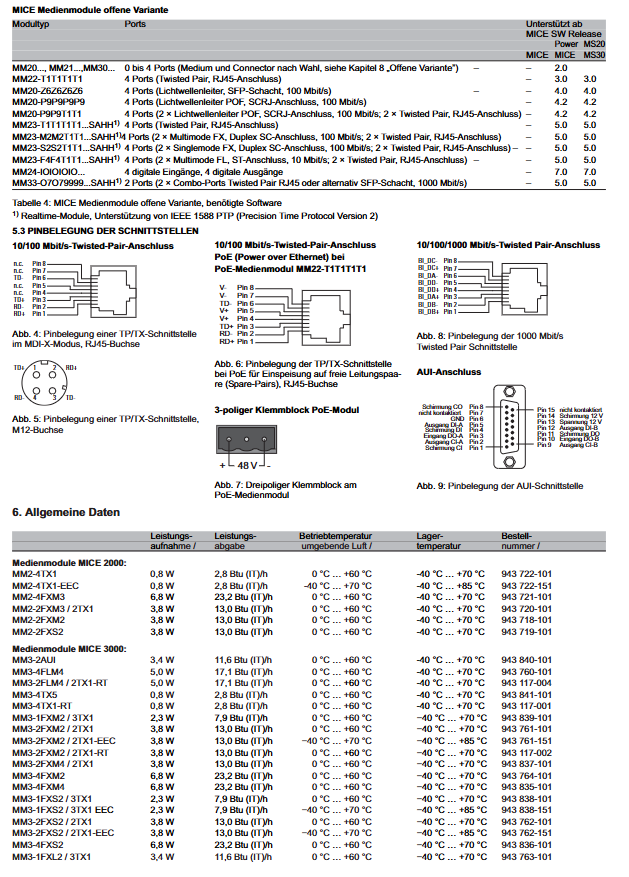
PoE module wiring: 3-pin terminal (1=+48V, 2=GND, 3=-48V), RJ45 port powered through pins 4/5 and 7/8.

Twisted pair wiring: Following the T568B standard, Cat5e and above cables are required for gigabit interfaces, with a maximum transmission distance of 100m.

Fiber optic wiring: Multimode/single-mode fiber optic cables should be matched with SFP type, and inserted after cleaning the end face to avoid end face contamination.

(3) DIP switch configuration (MM3-2AUI module)

Default configuration instructions for switch number function

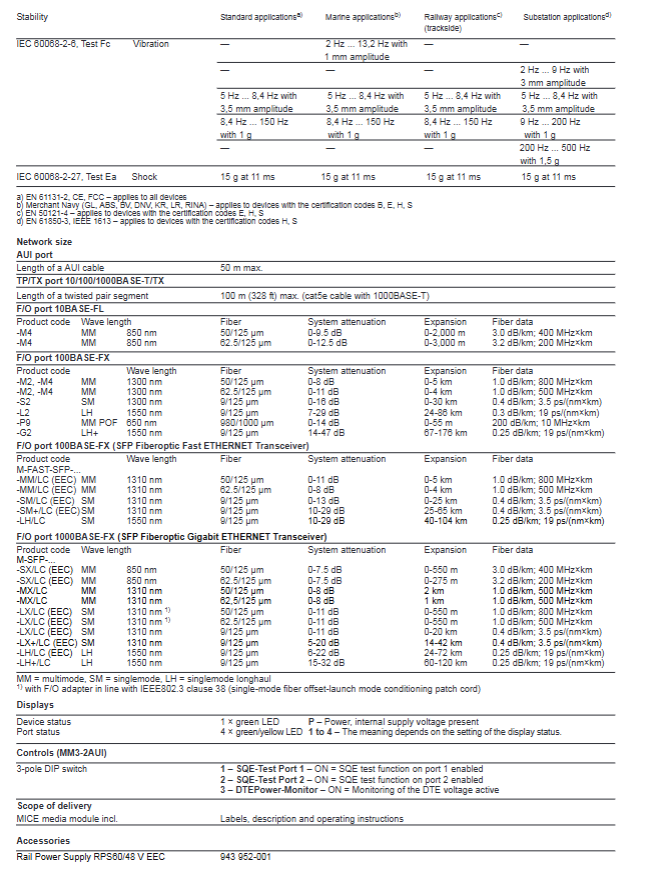
1 SQE Test Port 1 OFF ON=Enable Port 1 SQE Test Function

2 SQE Test Port 2 OFF ON=Enable Port 2 SQE Test Function

3 DTEPower Monitor OFF ON=Enable DTE voltage monitoring (data transmission is prohibited if there is no voltage)

Core technical parameters

(1) Physical and environmental parameters

Specific indicators for parameter categories

Module size (W × H × D) MM2 series: 38 × 110 × 79mm; MM3/MM4 series: 38 × 110 × 119mm

Protection level IP20

Working temperature S-type: 0~+60 ℃; T/E type: -40~+70 ℃ (MM30 series T/E type is -40~+60 ℃)

Storage temperature -40~+85 ℃

Humidity 10%~95% (no condensation)

The maximum air pressure is 2000m (795hPa)

(2) Port transmission parameters

Port type, maximum transmission distance, fiber parameters (example)

100Mbit/s multimode fiber (MM) 5km (50/125 μ m) attenuation 1.0dB/km, bandwidth 800MHz × km

100Mbit/s single-mode fiber (SM) 86km (9/125 μ m) attenuation 0.3dB/km, dispersion 19ps/(nm × km)

1000Mbit/s multimode fiber (SX) 550m (50/125 μ m) attenuation 3.0dB/km, bandwidth 400MHz × km

1000Mbit/s single-mode fiber (LH+) 120km (9/125 μ m) attenuation 0.25dB/km, dispersion 19ps/(nm × km)

(3) Power consumption parameters

Module model, power consumption, power output

MM2-4TX1 0.8W 2.8 Btu(IT)/h

MM3-2FXM2/2TX1 3.8W 13.0 Btu(IT)/h

MM4-4TX/SFP 9.0W 30.8 Btu(IT)/h

MM22-T1T1T1T1 (without PD) 0.8W 2.8 Btu (IT)/h

MB20 expansion module 0W 0 Btu (IT)/h

Product coding rules

(1) Media module code (15 digits)

Example Value Explanation of Location Features

1-4 Product Series MM20 10/100Mbit/s Standard Type

6-7 Port 1 Type T1 Twisted Pair (RJ45)

8-9 Port Type M2 Multimode Fiber (DSC)

10-11 3rd Port Type 99 Empty Port

12-13 4th port type Z6 SFP slot (100Mbit/s)

14 Temperature Range E Extended Type (-40~+70 ℃, with Normal Coating)

Certification level B CE, UL 508, ATEX certification

(2) MB20 expansion module encoding

Example Value Explanation of Location Features

1-4 Product Name MB20 100MB Expansion Module

6-7 slot quantity 25 2 media module slots

8 Temperature Range T Expansion Type (-40~+70 ℃)

Certification level H includes IEC 61850-3 and IEEE 1613 certifications

Hirschmann MS20/MS30 series industrial Ethernet switches

Overview

The installation user manual for Hirschmann MS20/MS30 series industrial Ethernet switches (Release 14 03/2023 version) covers four major modules: equipment overview, safety specifications, installation process, basic configuration, maintenance, and technical parameters. It provides detailed instructions on the hardware composition of the equipment (basic module, media module, SFP transceiver, etc.), installation steps (DIN rail installation, wiring, DIP switch configuration), safety compliance requirements (ATEX, IECEx and other hazardous environment certifications), and technical parameters (power supply range of 18-60V DC, working temperature -40 ℃~+70 ℃, port type supporting 10/100/1000Mbit/s twisted pair/fiber ports). It also offers a global technical support channel to provide comprehensive guidance for equipment deployment and operation in industrial scenarios.

Equipment Overview

(1) Product classification and coding

Example of Port Configuration for Core Differences in Equipment Series

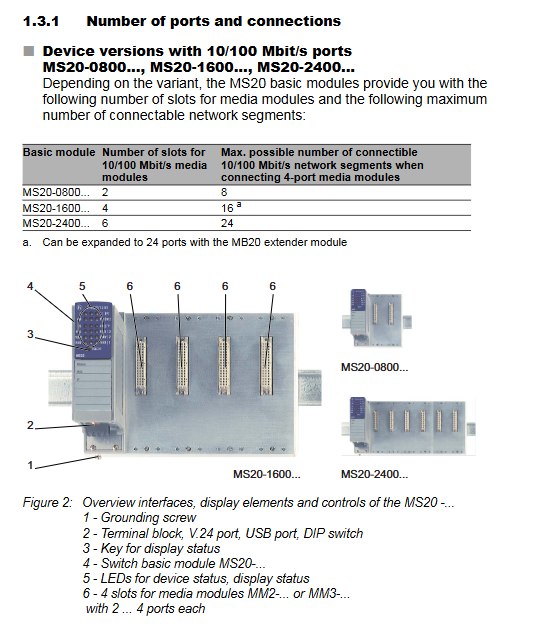
MS20 without Gigabit ports, modular design MS20-0800… 8 10/100Mbit/s ports

MS30 includes 2 Gigabit ports, modular design MS30-0802…: 8 10/100Mbit/s+2 1000Mbit/s ports

Product coding rules (15 digits): The first to fourth digits indicate the series (MS20/MS30), the sixth to seventh digits indicate the number of 10/100Mbit/s ports (08/16/24), the tenth digit indicates the temperature range (S: 0~60 ℃, T/E: -40~70 ℃), and the eleventh digit indicates the power supply range (A: 18-32V DC, C/E: 18-60V DC).

(2) Hardware composition

Basic module: including power terminals, DIP switches, USB/V.24 management interfaces, grounding screws, supporting 2 redundant power inputs (P1/P2).

Media module: Supports MM2 (10/100Mbit/s), MM3 (10/100Mbit/s with PTP), MM4 (1000Mbit/s Gigabit), MM22 (PoE port) and other series, with 2-4 ports, supporting twisted pair (RJ45/M12) and fiber optic (ST/LC/DSC) interfaces.

Expansion module: The MB20 expansion module can add 2 media module slots, suitable for MS20-1600/MS30-1602 models.

SFP transceiver: Supports Fast Ethernet/Gigabit Ethernet, including multimode (MM), single-mode (SM), and long haul (LH) types, with a maximum transmission distance of 176km (LH+type).

(3) Port type and function

Port type, speed, interface specifications, core functions

Twisted pair port 10/100/1000Mbit/s RJ45/M12 automatic negotiation, polarity switching AutoCrossing

Fiber optic port 100/1000Mbit/s ST/LC/DSC/MTRJ link monitoring, full duplex mode

PoE port 10/100Mbit/s RJ45 complies with IEEE 802.3af and supports Class 0-3 terminal power supply

AUI port 10Mbit/s Sub-D 15 pin supports SQE testing and DTE power monitoring

Safety regulations

(1) General safety requirements

Anti electric shock: The equipment casing is grounded, and sharp objects are prohibited from contacting the terminals. Only qualified personnel are allowed to operate.

Anti overheating: Keep the ventilation duct unobstructed, reserve a space of ≥ 10cm around the equipment, and avoid touching the casing during operation.

Fireproof: If the power supply does not meet the requirements of Class 2/LPS, it needs to be installed in a metal/flame-retardant plastic shell (V-1 level).

(2) Compliance with hazardous environments

Certification type applicable standard environmental parameters

ATEX EN IEC 60079-0/7/15 Temperature Class T4, Operating Temperature -40~+45 ℃

IECEx IEC 60079-0/7/15 Explosion proof Class II 3G Ex ec nC IIC T4 Gc

Class I Division 2 ANSI/ISA 12.12.01 Groups A-D, ambient temperature -40~+70 ℃

Special requirements: Only temporary connections to USB/V.24 interfaces are allowed in hazardous environments. The connector must be plugged and unplugged in a power-off state, and the signal contact current is limited to 100mA.

(3) Power supply and wiring safety

Power supply requirements: redundant input (P1/P2), DC power supply needs to be grounded to the negative pole, AC power supply needs to be isolated and grounded; Class 2 power supply is required in North America.

Wire specification: Copper wire (75 ℃), terminal supports up to 2.5mm ² (AWG 12) wire.

Shielding grounding: The shielding layer of twisted pair cables needs to be connected to the grounding terminal of the front panel of the equipment to avoid short circuits.

Installation process

(1) Preliminary preparation

Packaging inspection: Confirm the basic module, terminal block (4-pin/6-pin), label, and installation manual are included.

Label filling: Fill in the device name, MAC address, IP address, and other information and paste them on the surface of the device.

(2) Hardware installation steps

Media module/SFP installation: Remove the protective cap, align with the slot, insert and tighten the screws; The SFP transceiver needs to close the latch until it is securely fastened.

DIN rail installation: snap the sliding device onto the rail, press the bottom lock to fix it, and reserve a space of ≥ 10cm up and down.

Grounding: Grounded through DIN rails or dedicated grounding screws, with grounding wire specifications consistent with the power supply wire.

DIP switch configuration:

4-pin DIP switch (MS20/MS30 basic module): controls redundancy manager (RM), ring port selection, standby mode, and configuration priority.

3-pin DIP switch (MS20/MS30-… E…): The function is the same as a 4-pin switch, without a priority switch configured (all three keys are ON for software configuration).

(3) Wiring process

Power wiring: 4-pin terminals (P1/P2:+24V, 0V), 6-pin terminals (MS30-… E…: integrated power and signal contacts).

Signal contact wiring: Potential free relay contacts, supporting up to 1A/60V DC for remote diagnosis.

Data cable connection: Twisted pair cables should use Cat5e or above, and fiber optic cables should be matched with port types (SX/LX/LH) to avoid mixing.

(4) LED display configuration

Display mode switching: Press the “SELECT” button for ≥ 2 seconds to switch the port LED display meaning (link status, duplex mode, rate, etc.).

Device status LEDs: P1/P2 (power), RM (redundant), RUN (running), RL1/RL2 (signal contacts).

Basic configuration and maintenance

(1) Initial configuration

IP configuration method: Supports DHCP/BOOTP, V.24 interface (CLI), AutoConfiguration Adapter, HiView software.

Default account: admin (read-write permission, password private), user (read-only permission, password public). The password needs to be changed for the first login (≥ 8 characters, including uppercase and lowercase letters/numbers/special characters).

Core default settings: RSTP enabled, ring redundancy disabled, port auto negotiation enabled, V.24 baud rate 9600.

(2) Maintenance and disassembly

Daily maintenance: Regularly check relay contact resistance, software updates (downloaded from the official website), and clean ventilation ducts.

Disassembly steps: Disconnect the data cable → Cut off the power supply → Remove the terminal block → Press the guide rail lock to remove the device; SFP disassembly requires opening the latch and pulling it out.

Core technical parameters

(1) Physical and environmental parameters

Specific indicators for parameter categories

Dimensions (W × H × D) MS20-0800:125 × 133 × 100~140mm

Weight 610g (MS20-0800)~1250g (MS30-2402)

Working temperature S-type: 0~60 ℃; T/E type: -40~70 ℃

Storage temperature -40~85 ℃

Protection level IP20

Pollution level 2

(2) Electrical parameters

Specific indicators for parameter categories

Power supply range A: 18-32V DC; C/E type: 18-60V DC

Power consumption MS20-0800: 5.0~7.4W; MS30-2402:12.6~18.0W

Signal contact maximum 1A (≤ 60 ℃)/100mA (60-70 ℃), 60V DC/30V AC

Insulation voltage 800V DC (power terminal and casing)

(3) Port transmission parameters

Port type maximum transmission distance support standard

1000Mbit/s twisted pair 100m IEEE 802.3ab

100Mbit/s multimode fiber (50/125 μ m) 5km IEEE 802.3u

1000Mbit/s single-mode fiber (9/125 μ m) 176km (LH+) IEEE 802.3z

PoE port 100m IEEE 802.3af

Accessories and Support

(1) Optional accessories

Accessory Type Example Model Usage

SFP transceiver M-SFP-LX/LC gigabit single-mode fiber transmission

Power adapter RPS60/48V EEC PoE module power supply

Terminal block 943 845-004 power/signal contact extension (50 pieces)

Configure adapter ACA22-USB local configuration and software updates

Hirschmann Industrial Ethernet Switch Graphic User Interface (GUI)

Document Overview

Document positioning: Official reference manual for Hirschmann Industrial Ethernet Switch graphical user interface (GUI) and command-line interface (CLI), applicable to RS20/RS30/RS40, MS20/MS30 and other series devices, version L2E Rel.9.0 (released in February 2015).

Core objective: To provide technical personnel with a complete operation guide for equipment configuration, monitoring, and diagnosis, ensuring network reliability, security, and compatibility in industrial scenarios.

Supporting resources: It needs to be used in conjunction with installation manuals, basic configuration manuals, redundant configuration manuals, etc., and supports the integration of HiVision network management software.

GUI core functional modules

(1) Basic Settings

System configuration: device status monitoring, system name/location settings, temperature threshold configuration (supporting working temperatures of 0 ℃~60 ℃).

Module management: Module insertion and removal configuration, slot activation/deactivation for modular devices, supporting MS, PowerMICE and other series of modular devices.

Network configuration: IP parameter acquisition mode (BOOTP/DHCP/local), VLAN ID allocation, HiDiscovery protocol activation.

Software update: Supports TFTP/HTTP/ACA automatic updates, including firmware and boot code updates, requiring cold start to take effect.

Port configuration: Port enable/disable, auto negotiation, rate/duplex mode settings, supporting 10/100/1000Mbit/s rates.

PoE configuration: IEEE 802.3af standard, supports port PoE enable/disable, power threshold setting (default is 15.4W per port).

Configuration loading/saving: Supports local/URL/PC (XML/binary format) storage, supports ACA adapter configuration migration.

(2) Security configuration

Password management: SNMP v3 read-write password setting (5-32 characters), supports encrypted request transmission.

SNMP access: SNMP v1/v2 community configuration, supports IP address range restriction and permission partitioning (read-only/read-write).

Remote access: Telnet/Web server enabled/disabled, supports port level access control.

Port security: MAC/IP based access control, supporting automatic learning (up to 1-50 addresses) and violation actions (traps/port disabling).

Login banner: Supports custom banner for login/CLI interface (up to 255/2048 characters).

(3) Time synchronization

Basic settings: System time (UTC/local offset), time source priority (PTP>SNTP>local).

SNTP configuration: Supports client/server mode, server request interval 1-3600s (default 30s), supports broadcast/multicast reception.

PTP configuration: IEEE 802.1588 standard, supports v1/v2 versions, includes boundary clock (BC) and transparent clock (TC) modes, synchronization threshold 30-5000ns.

(4) Exchange function

Global configuration: MAC address aging time 15-3825s (default 30s), flow control enabled/disabled.

MAC filtering: Supports static/dynamic MAC address filtering, with a maximum of 100 static filtering rules.

Rate limit: Port input/output traffic limit, supporting frame type division (broadcast/multicast/unknown unicast).

IGMP snooping: Supports v1/v2/v3 versions, multicast group aging time 3-3600s (default 260s), supports unknown multicast forwarding control.

VLAN configuration: IEEE 802.1Q standard, VLAN ID range 1-4042, supports static VLAN creation and port tagging configuration.

(5) QoS/Priority

Global configuration: Manage packet VLAN priority (0-7) and IP DSCP value (0-63) settings.

Port priority: Each port has a priority of 0-7, mapped to 4 traffic classes.

Mapping rules: 802.1D/p priority mapping, IP DSCP mapping, supporting trust mode (untrusted/trustDot1p/trustIpDscp).

(6) Redundant configuration

Ring network redundancy:

HIPER Ring: Supports 50 devices, reconstruction time<80ms, supports standard/accelerated recovery mode.

MRP Ring: IEC 62439 standard, reconstruction time 80-500ms, supports VLAN binding.

Ring network/network coupling: supports single switch/dual switch coupling, and supports control line redundancy.

Spanning tree: RSTP protocol, supports bridge priority configuration (0-61440, step size 4096), convergence time<1s.

(7) Diagnostic tools

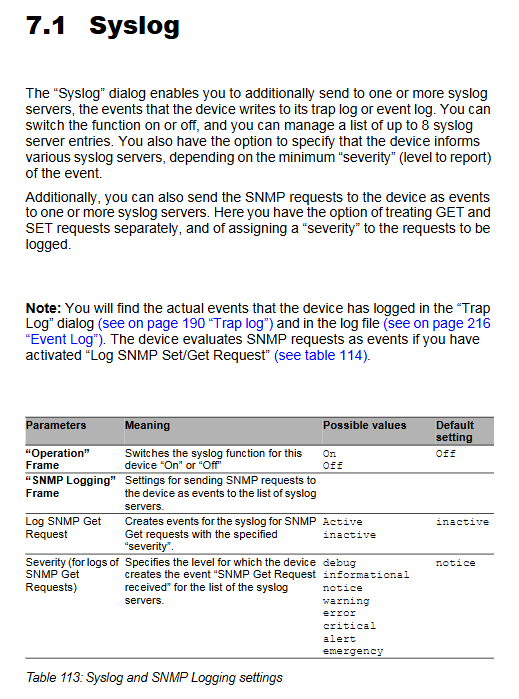
Log monitoring: Syslog/Rap logs, supporting forwarding from 8 Syslog servers, with configurable log levels.

Port diagnosis: Port statistics, network load (30s sampling), SFP module status (temperature/transmit/receive power).

Topology discovery: LLDP protocol supports collecting neighbor device information (MAC/IP/port description).

Port mirroring: Supports mirroring 8 source ports to 1 destination port without affecting source port traffic.

Other tools: device status monitoring, signal contact configuration, IP address conflict detection, self-test (RAM testing/restart control).

(8) Advanced features

DHCP Relay: Supports forwarding DHCP requests to 16 DHCP servers and supports Option 82 field.

Industrial protocols: PROFINET (GSDML file download), EtherNet/IP (EDS file download), IEC61850 MMS protocol configuration.

DIP switch coverage: Supports software coverage and hardware DIP switch settings, suitable for devices such as MICE and PowerMICE.

CLI core functional module

(1) Command Fundamentals

Command structure: Supports mandatory parameters (<>), optional parameters ([]), selection parameters (|), and command completion (Tab/Space).

Special keys: Supports Ctrl series shortcut keys (such as Ctrl-A to jump to the beginning of a line, Ctrl-H to view history commands).

Pattern operation: divided into user execution, privileged execution, global configuration, VLAN configuration and other modes, supporting the “no” command to revoke configuration.

(2) Quick Start

Device login: default username “admin”, password “private”, supports privileged EXEC mode switching (enable command).

System configuration: IP address setting (network parms command), password modification (users passwd command), configuration saving (copy running config startup config command).

(3) Core Command Classification

Command Category Key Command Example Function Description

System information show sysinfo to view device status, software version, CPU utilization, etc

Network configuration network parms<ip><mask>[gw] Configure IP address, subnet mask, gateway

VLAN configuration VLAN<id>, VLAN name<id><name>Create VLAN, modify VLAN name

Redundant configuration of hip er ring, spanning tree configuration of hip er ring, spanning tree protocol

Security Configuration: SNMP Server Community<name>Configure SNMP Community Name

Diagnostic tool show interface utilization to view port utilization

System tools reboot, clear config reboot device, restore factory configuration

​Technical parameters and compliance standards

(1) Key technical parameters

Specific indicators for parameter categories

The maximum number of MAC address tables is 8000 (16000 for PowerMICE/MACH4000)

VLAN supports up to 255 concurrent instances, VLAN ID 1-4042

Port speed 10/100/1000Mbit/s, supports full duplex/half duplex

Redundant reconstruction time HIPER Ring/MRP Ring<80ms

Working temperature: 0 ℃~60 ℃ (standard type), -40 ℃~70 ℃ (extended type)

(2) Compliance standards

IEEE standards: 802.1AB (LLDP), 802.1af (PoE), 802.1D/Q (Spanning Tree/VLAN).

IEC standard: IEC 62439 (Industrial Network Redundancy).

RFC standards: RFC 768 (UDP), RFC 1157 (SNPv1), RFC 2570 (SNPv3), etc.

HIRSCHMANN MICE series

Product basic information

Product positioning and core functions

Product Name: Modular Industrial Communication Equipment (MICE)

Brand affiliation: HIRSCHMANN (a brand under BELDEN)

Core purpose: Designed specifically for industrial environments, building switched industrial Ethernet that complies with the IEEE 802.3 standard

Applicable scenarios: Standard industrial environments (office/commercial/small business), marine (merchant), railway (track area), substations (compliant with EN 61850-3/IEEE 1613)

Certification and Compliance Standards

European standards: 2004/108/EG (Electromagnetic Compatibility), 2011/65/EU (RoHS), ATEX 94/9/EG (Explosion proof)

International standards: FCC Part 15, IEC 60825-1 (Laser Class 1), IEC 60079 (Explosion proof)

Other certifications: CE, UL 508, ISA 12.12.01, etc

Module system and key specifications

Module category represents model, core parameters support, speed key characteristics

The basic modules MS2108-2 (MS2000), MS3124-4 (MS3000), and MS4128-5 (MS4000) support media module expansion, with some supporting Power MICE 10/100/1000 Mbit/s industrial stability, and are compatible with multiple expansion modules

Media module (MS2000) MM2-4TX1, MM2-2FXM3/2TX1 4 RJ45 ports/2 MTRJ+2 RJ45 ports 10/100 Mbit/s basic industrial scene adaptation, power consumption 0.8W~6.8W

Media module (MS3000) MM3-2AUI, MM3-4FXM4 2 AUI interfaces/4 ST interfaces 10/100 Mbit/s support IEEE 1588 PTP protocol (RT model), some with Confocal Coating

Media module (MS4000) MM4-4TX/SFP, MM4-2TX/SFP 4 RJ45+4 SFP slots/2 RJ45+2 SFP slots 1000 Mbit/s SFP module and TP port are mutually exclusive, and inserting SFP automatically disables the corresponding TP port

Expansion module MB20 (formerly MB-2T) expands 2 media module slots – supports live installation, compatible with basic modules such as MS201600, MS3124-4, etc

Functional module PoE module (MM22-T1T1T1T1) with 4 RJ45 ports, supporting IEEE 802.3af 10/100 Mbit/s 48V DC power supply, powered by Twisted Pair cable to the terminal

Functional module digital I/O module (MM24) with 4 digital inputs and 4 digital outputs – connects various actuators in industrial scenarios

SFP optical module M-FAST-SFP (Fast Ethernet), M-SFP (Gigabit Ethernet) multi-mode/single-mode optional, LC interface 100/1000 Mbit/s transmission distance 0~176km (depending on model), laser level 1

image.png

Installation and operation specifications

General Installation Principles

Supports hot swapping: Media modules, MB20 expansion modules, and SFP modules can all be installed/removed during device operation

Tool requirements: It is prohibited to insert sharp objects (such as thin screwdrivers, wires, etc.) into the interior of the equipment to avoid electric shock

Personnel qualifications: Electrical installation related work must be operated by professionally trained personnel

Key module installation steps

Media module: Remove the MICE device interface cover → Insert the module → Tighten the 4 corner screws → Check the switch settings → Connect the signal line

SFP module: Remove slot cover → Close locking device and insert module → Confirm buckle locking (only use HIRSCHMANN original SFP)

MB20 expansion module: Loosen the screws on both sides of the base module → Remove the side cover → Dock the guide rail to the base module → Retighten the screws

Special requirements for PoE modules

Power supply: Use HIRSCHMANN RPS60/48V EEC power supply, output power<100W, current<2A

Wiring: 3-core terminal block, cable length<3m, wire diameter suitable for 1.5A current

Terminal: Only connect IEEE 802.3af compatible devices, using 4 pairs of Twisted Pair cables

​Core technical data

Physical and environmental parameters

Dimensions (width x height x depth): 38mm x 110mm x 79mm (MM2 series), 38mm x 110mm x 119mm (MM3/MM4 series)

Working temperature: Standard type 0~60 ℃, Extended type (T/E) -40~70 ℃

Storage temperature: Standard -40~70 ℃, Extended -40~85 ℃

Humidity: 10%~95% (no condensation), altitude ≤ 2000m (795hPa), pollution level 2

Transmission performance parameters

Port type, transmission medium, maximum distance, system attenuation

1000BASE-T (TP) cat5e cable 100m-

100BASE-FX (multimode LWL) 50/125 µ m 5km 0~8dB

100BASE-FX (Single Mode LWL) 9/125 µ m 30km 0~16dB

Gigabit SFP-LH+(single-mode) 9/125 µ m 120km 15~32dB

Electromagnetic Compatibility (EMC)

Radiation interference: EN 55022 Class A, FCC Part 15 Class A

Anti interference capability: electrostatic discharge ± 6kV (contact)/± 8kV (air), electromagnetic radiation 10-35V/m, surge ± 4kV (power supply)/± 2kV (data)

Safety and environmental requirements

Safety Specifications

Explosion proof warning: Explosion hazardous areas require power-off operation, and replacing components may affect Class I, Division 2 compatibility

ESD protection: The module contains electrostatic sensitive components and must comply with the IEC/TR 61340-5-2 standard

Voltage limitation: Only use NEC Class 2 power supply through MICE switch module

Environmental Protection and Recycling

After the product is scrapped, it needs to be classified and recycled according to local electronic waste regulations

Compliant with RoHS directive, restricting the use of hazardous substances

TOSHIBA TOSBERT VF-AS3 series

Product basic information

Product Name: TOSBERT VF-AS3 Series Industrial Inverter

Core positioning: Designed specifically for industrial scenarios, used to control the speed of 3-phase induction motors, built-in permanent magnet synchronous motors (IPMSM), and surface permanent magnet synchronous motors (SPMSM), and does not support single-phase motors

Scope limitation: Not applicable to high-risk or quality control specific scenarios such as power plants, railways, nuclear power, aviation, life support, etc., only suitable for general industrial use

Core identification rules: The model consists of the series name, voltage level, capacity code, and function code (such as VFAS3-6750PC, where 6 represents 500V-690V and 750 represents the corresponding capacity)

Core specifications and performance parameters

(1) Voltage and power range

Voltage level, power range (HD rated), power range (ND rated), applicable motor capacity labeling

500V class 1.5kW-55kW 2.2kW-75kW in kW

600V (575V) class 2HP-75HP 3HP-100HP in HP units

690V class 2.2kW-75kW 3kW-90kW in kW

(2) Key performance indicators

Control method: sine wave PWM control

Output frequency: set range 0.01-590Hz, default 0.01-60Hz, frequency accuracy ± 0.01% ± 0.022Hz (digital input)

Carrier frequency: A1Y frame 1.0-6.0kHz (default 2.5kHz), A2Y frame 1.0-4.9kHz (default 2.5kHz)

Overload capacity: HD rated 150% -60s, ND rated 120% -60s

Frequency resolution: Input 0.1Hz on the operation panel, communication command 0.01Hz

Core protection functions: overcurrent, overvoltage, undervoltage, overload, short circuit, ground fault, overheating, etc

(3) Environmental and physical parameters

Working environment: Temperature -15 ° C~+60 ° C (capacity reduction required for temperatures above 50 ° C), relative humidity 5% -95% (no condensation), working altitude ≤ 2000m (capacity reduction of 1% for every 100m exceeding 1000m)

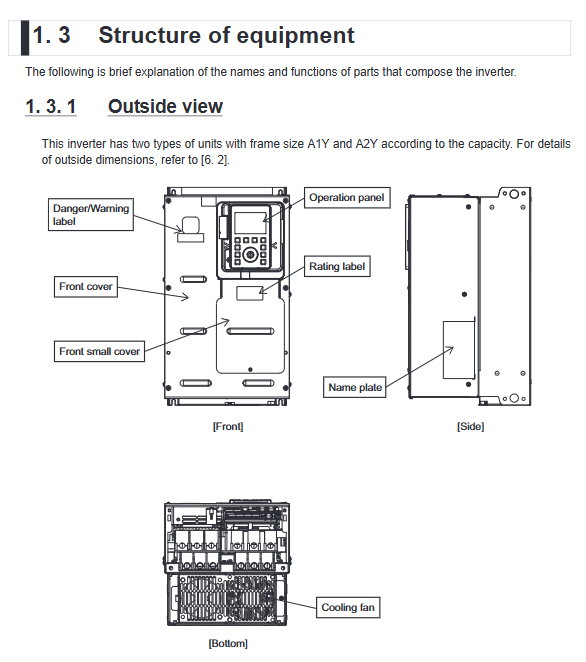
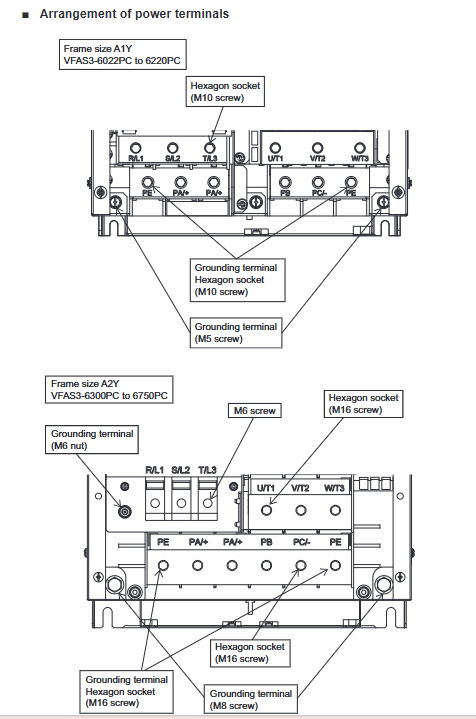
Physical specifications: There are two types of machine bases, A1Y (VFAS3-6022PC~6220PC) and A2Y (VFAS3-6300PC~6750PC), with a weight of 21.6kg~57kg

Cooling method: forced air cooling, cooling fan design life of 8 years

Protection level: IP00 (IEC60529), shell color RAL7016

Core functions and configurations

(1) Control and operation functions

Core control mode: supports multiple V/f characteristics such as constant V/f, variable torque, automatic torque boosting, vector control, etc

Operation functions: forward and reverse operation, jog operation, preset speed operation (up to 31 speeds), PID control, torque control, automatic acceleration and deceleration, etc

Display and Monitoring: Equipped with LCD/LED display screens, it can monitor output frequency, current, voltage, fault records, etc., and support fault trip record retention

Parameter settings: Support user default parameter saving, automatic search for parameters different from default values, multi regional parameter adaptation (Japan/North America/Asia/Europe/China)

(2) Interface and Communication Capability

Digital interface: 14 programmable digital inputs (6 optional), 3 programmable digital outputs (2 optional)

Analog interface: 5 frequency command inputs (2 optional), 2 programmable analog outputs

Communication interface: Built in Ethernet (dual port with switch, supporting EtherNet/IP, Modbus TCP, Webserver), 2-channel RS485 (supporting Modbus RTU); Optional protocols include PROFINET, DeviceNet, PROFIBUS DP, etc

Safe Interface: Supports Safe Torque Off (STO) function and complies with IEC61800-5-2 standard

Installation and wiring specifications

(1) Installation requirements

Installation foundation: It must be installed on a metal plate, and the rear panel should not be installed on flammable materials due to high temperature

Installation space: For single unit installation, a space of 10cm up and down, and 5cm left and right should be reserved; Multiple units installed side by side need to reserve a gap of ≥ 11mm, and capacity reduction is required in environments above 50 ° C or when installed side by side

Handling specifications: Models weighing over 20kg require 2 people to handle, VFAS3-6300PC~6750PC require a crane to handle, and it is forbidden to grip the front cover for handling

Peripheral equipment: Short circuit protection devices (such as MCCB, ELCB) and emergency stop devices must be installed, and thermal relays are required (when multiple motors are shared, each motor is separately configured)

(2) Wiring specifications

Core principle: Power must be disconnected before wiring, wait for at least 15 minutes, confirm that the charging light is off and the DC main circuit voltage is ≤ 45V before operation

Wiring requirements:

Power wiring: Connect a 3-phase power supply to the [R/L1], [S/L2], and [T/L3] terminals, with voltage fluctuations within ± 10% (± 10% during continuous operation at full load)

Motor wiring: Connect to [U/T1], [V/T2], [W/T3] terminals, and it is strictly prohibited to connect the power supply to the output terminal

Grounding requirements: The grounding wire should be firmly connected, with specifications not lower than the input/output wire, and should be grounded separately and not shared with the chassis screws

Braking resistor: can only be connected to [PA/+] and [PB] terminals, and it is strictly prohibited to connect between [PA/+] and [PC/-]

Warranty and Usage Restrictions

(1) Warranty terms

Warranty period: 12 months after purchase or 18 months after the production date on the product nameplate, whichever expires first

Warranty scope: Only covers malfunctions caused by manufacturing defects in the product itself, excluding problems caused by installation, debugging, or external equipment

Warranty Disclaimer: Misuse, modification, accidental fall, natural disasters, improper environment, failure to maintain according to the manual, and other situations are not covered by the warranty

(2) Usage restrictions and precautions

Operating restrictions: Cannot be used for environmental conditions beyond the manual specifications (such as high temperature, high humidity, and high dust scenes)

Maintenance requirements: Regularly check the cooling fan and replace vulnerable parts according to the manual

Troubleshooting: In case of smoke, odor, or abnormal noise, immediately turn off the power and contact a Toshiba dealer for repair. Do not disassemble or modify on your own

TOSHIBA MG08-D SERIES ENTERPRISE CAPACITY HDD

Product basic information

Product Name: TOSHIBA MG08-D Series (Enterprise Capacity Hard Drive, Enterprise Capacity HDD)

Core positioning: Enterprise level storage devices that cater to mid-range/near line critical businesses, balancing capacity and reliability

Physical specifications: 3.5 inches 26.1 mm height standard shape (industrial standard, supports plug and play)

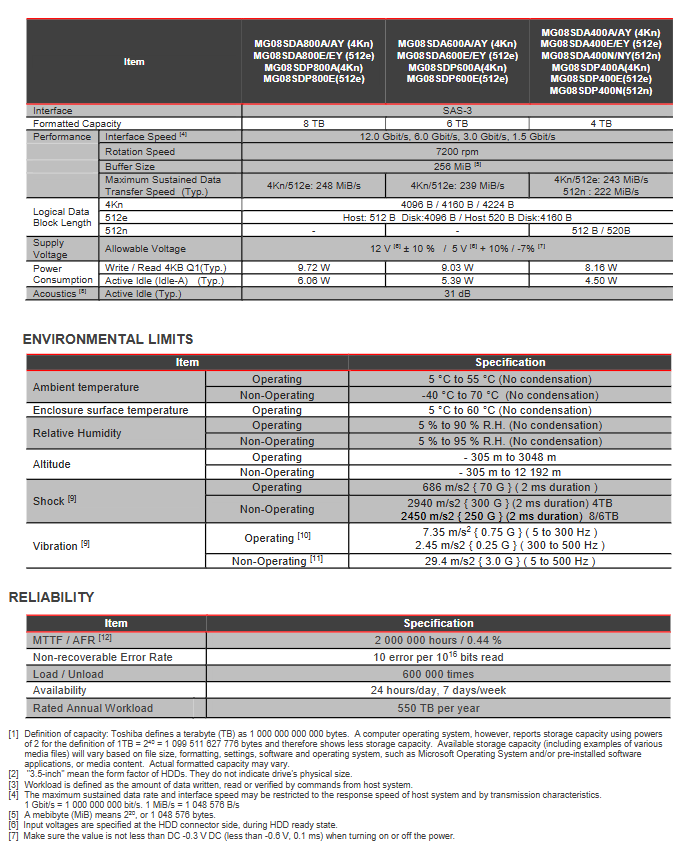
Speed: 7200 rpm (ensuring continuous performance output)

Core configuration and options

Specific options for configuration type: Remarks

SATA-3.3 and SAS-3 SATA interfaces support speeds of 6.0/3.0/1.5 Gbit/s; SAS interface supports 12.0/6.0/3.0/1.5 Gbit/s

The capacities of 4 TB, 6 TB, and 8 TB are divided into different capacity versions by model to meet different storage needs

Sector technology 512n (native 512B), 512e (simulated 512B/actual 4096 B), 4Kn (4096 B) support legacy 512 native sector technology, compatible with older systems

Special features Sanitize Instant Erase (SIE) and Self Encryption Drive (SED) are only supported on some models, providing data security erasure and encryption functions

Key performance parameters

Specific values of performance indicators (by capacity/version differences)

The cache size is uniformly 256 MiB

Maximum continuous data transmission speed 4Kn/512e: up to 248 MiB/s (8 TB SATA/SAS model); 512n: 222 MiB/s (4 TB model)

Power consumption (typical value) Write/Read 4 KB Q1:4 TB(7.76-8.16 W)、6 TB(8.50-9.03 W)、8 TB(9.29-9.72 W); Idle A: 4 TB (4.07-4.50 W), 6 TB (4.90-5.39 W), 8 TB (5.61-6.06 W)

Noise level active idle 31 dB (compliant with ISO 7779 measurement standard)

Environmental and reliability requirements

environmental constraints

Working temperature: 5 ° C to 55 ° C (non condensing); Non operating temperature: -40 ° C to 70 ° C (non condensing)

Working humidity: 5% to 90% R.H. (non condensing); Non working humidity: 5% to 95% R.H. (non condensing)

Working altitude: -305 m to 3048 m; Non working altitude: -305 m to 12192 m

Impact resistance: working state 70 G (686 m/s ², 2 ms); Non working state: 4 TB is 250 G (2450 m/s ²), 6/8 TB is 300 G (2940 m/s ²)

Anti vibration: 0.75 G (7.35 m/s ²) at 5-300 Hz and 0.25 G (2.45 m/s ²) at 300-500 Hz in working condition; Non working state: 5-500 Hz at 3.0 G (29.4 m/s ²)

Reliability indicator

MTTF (Mean Time Between Failures): 2 million hours

AFR (annual failure rate): 0.44%

Unrecoverable error rate: ≤ 10 errors read per 10 ¹⁶ bits

Loading/Unloading Times: 600000 times

Annual rated workload: 550 TB (supporting 7 × 24-hour continuous operation)

Applicable scenarios

Mid line/Nearline Business Critical Workload

Tier 2 Business Critical Servers and Storage Systems

Servers Supporting Higher Capacity per Spindle

Capacity Optimized Data Center Storage Systems

Applications and virtual machine monitoring programs that require compatibility with legacy 512 native sector technology

Triconex Triconex Tricon v9-v11 system

System core positioning and core characteristics

Core positioning: Programmable logic and process controller for industrial safety critical scenarios, capable of emergency shutdown, fire and gas detection, burner management, and other functions.

Core architecture:

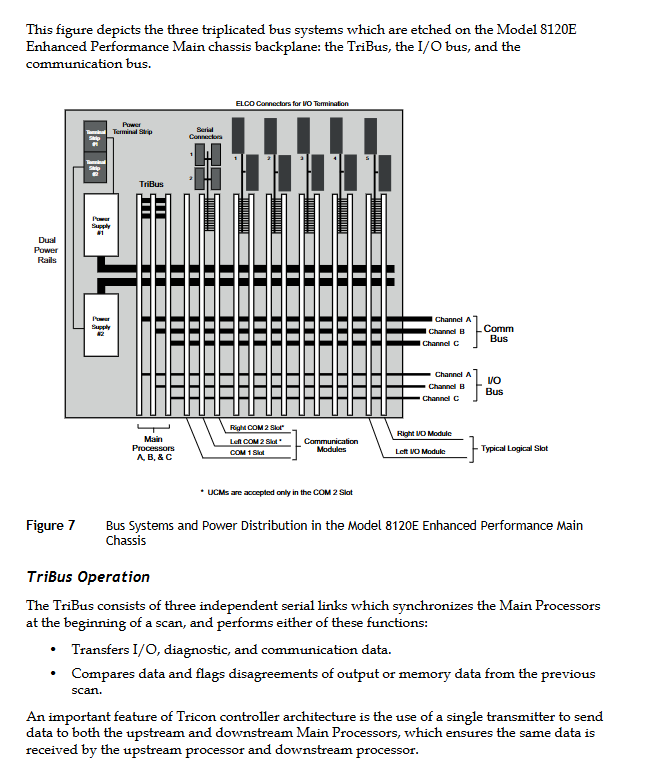
The mainstream adopts a Triple Modular Redundancy (TMR) architecture, where three independent channels execute programs in parallel and input/output data is verified through a voting mechanism.

The power module and some I/O modules adopt a dual redundancy design to ensure the continuous operation of the system under a single fault.

Key advantages:

High availability: supports online module replacement and hot standby function, can be maintained without downtime, reducing production interruptions.

Fault tolerance: Built in online diagnosis and adaptive repair functions, capable of detecting instantaneous and steady-state faults, and automatically isolating fault channels.

Remote Expansion: Through SRXM modules and fiber optic transmission, remote I/O can be extended up to 7.5 miles (12 kilometers) with strong electromagnetic interference resistance.

International certification: Passed CSA, T Ü V Rheinland, NRC, CE and other certifications, compliant with IEC 61508 (SIL 1-3), ATEX, NFPA and other standards, suitable for safety requirements in multiple regions around the world.

Detailed Description of Hardware Components

(1) Chassis Rack: System Installation Carrier

Type, Model, Core Parameters, Adaptation Scenarios

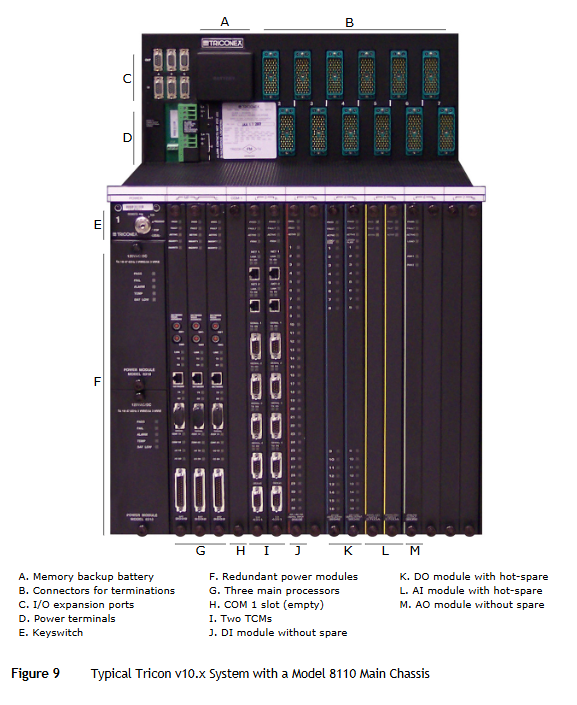
Host rack 8110 supports 6 sets of I/O modules, TriBus speed 25Mbps standard system core installation

Enhanced host rack 8120E supports 5 sets of I/O modules, TriBus speed 1000Mbps v11. x system, requires 3009 MP

Expansion rack 8111 supports 8 sets of I/O modules, with a maximum distance of 30 meters from the host rack for local I/O expansion

Low density expansion rack 8121 supports 5 sets of I/O modules and is compatible with HART interfaces in scenarios where the HART protocol is required

Remote rack 8112 supports 6 sets of I/O modules, paired with RXM module for remote I/O expansion (up to 12 kilometers)

(2) Power module: Stable power supply core

Key characteristics of model input voltage output parameters

8310 120VAC/VDC 6.5VDC ± 1%, 27A supports over temperature and low battery alarm, online replacement

8311 24VDC 6.5VDC ± 1%, 27A reverse protection, suitable for ATEX scenarios

8312 230VAC 6.5VDC ± 1%, 27A does not support ATEX scenarios and requires a dedicated power supply

Commonality: Dual redundant configuration, single module can support the entire machine load, output power of 175W (at 60 ℃), with overvoltage and overcurrent protection.

(3) Main Processor (MP): System Computing Core

Model compatible system version core configuration TriBus speed

3006/3007 v9.0-9.5. x NS32GX32 processor, 2MB/1MB SRAM 4Mbps

3008 v9.6-10. x MPC860 processor, 16MB DRAM, 25Mbps

3009 v11. x P1021 dual core, 256MB DRAM 1000Mbps (8120E rack)

Key features: Supports sequence of events (SOE) recording, with a time drift of ± 2 seconds/day, and has independent I/O processors and communication processors.

(4) Communication module: Cross system interconnection core

Module type, model, core function, adaptation protocol/interface

TCM 4351B/4352B/4353/4354 Ethernet+serial communication Modbus, OPC, TCP/IP

UCM 4610 docking with Foxboro Evo system fiber optic Ethernet Modbus

EICM 4119/4119A connects Modbus devices/printers RS-232/485 at a speed of 19.2Kbps

NCM 4329/4329G Ethernet cross system communication 10Mbps network port, supporting GPS timing

SMM 4409 docking with Honeywell UCN network 5MB/s UCN port

(5) I/O module: signal input/output core

Digital Input Module (DI)

|Model | Voltage Specification | Number of Points | Type | Core Characteristics|

|3501E/T | 115VAC/VDC | 32 | TMR | Optical isolation, non common ground|

|3503E | 24VAC/VDC | 32 | TMR | Self testing function, shared ground at 8 o’clock per group|

|3564 | 24VDC | 64 | Single module | Low cost, supports hot standby|

Digital Output Module (DO)

|Model | Voltage Specification | Number of Points | Type | Core Characteristics|

|3604E | 24VDC | 16 | TMR | Optical isolation, non common ground|

|3624 | 24VDC | 16 | TMR (monitoring type) | Voltage/current loop back detection|

|3664 | 24VDC | 32 | Dual redundancy | 32 point common ground, self-protection|

Analog Input Module (AI)

|Model | Signal Type | Points | Accuracy | Core Characteristics|

|3700A | 0-5VDC | 32 |<0.15% FSR | Differential input, DC coupling|

|3703E | 0-5/0-10VDC | 16 |<0.15% FSR | Isolated input, supports over range detection|

|3708E | Thermocouple (J/K/T/E) | 16 | ± 3.0 ° F | Cold junction compensation, automatic calibration|

Analog Output Module (AO)

|Model | Current Range | Points | Accuracy | Core Features|

|3805E/H | 4-20mA | 8 |<0.25% FSR | Common ground return, supports HART|

|3806E | 4-20mA/20-320mA | 6+2 |<0.25% FSR | High current output, driving servo|

|3807 | ± 60mA | 4 |<0.25% FSR | Bipolar, suitable for motion control|

Pulse/Accumulation Module

|Model | Type | Points | Frequency Range | Core Characteristics|

|3511 | Pulse input | 8 | 20-20000Hz | Differential input, AC coupling|

|3515 | Pulse Accumulation | 32 | 0-1KHz | 31 Bit Counter, Supports Zeroing|

(6) HART interface module

Model type compatible with I/O module core functions

2770H AI interface 3700A, 3721 stacked with HART protocol for 4-20mA signal

2870H AO interface 3805E, 3805H support HART protocol communication, compatible with v10.4+system

Software and Configuration Tools

Configuration software: TriStation 1131 v4. x, supports three IEC 61131-3 standard languages including Function Block Diagram and Ladder Diagram, and can download programs and configure variables.

Diagnostic software: Enhanced Diagnostic Monitor v2. x, used for system fault diagnosis and status monitoring.

Programming support: TriStation MSW supports relay ladder logic and optional CEMPLE (causal matrix) language.

Environmental and Physical Specifications

Environmental parameters:

Working temperature: 0-60 ℃ (32-140 ° F), storage temperature: -40-75 ℃ (-40-167 ° F)

Relative humidity: 5% -95% (no condensation)

Anti vibration: 2G (10-150Hz), anti impact: 15G (6-11ms)

Corrosion level: Complies with ISA S71.04 G3 level (harsh industrial environment)

Physical specifications:

Rack size: 48.3cm (width) x 57.8cm (height) x 45.1cm (depth)

Weight: The main/expansion rack weighs approximately 24.5kg, the power module weighs 3.3kg, and the I/O module weighs 2.1-2.7kg

Key points for installation and maintenance

Installation requirements:

Rack spacing: Vertical spacing ≥ 4.45cm, ventilation gap ≥ 13.3cm to ensure heat dissipation.

Grounding: Triple grounding (protective ground, signal ground, shielding ground) is used to avoid ground loop interference.

Cable: The I/O bus cable is up to 30 meters long and uses optical fiber for remote expansion, complying with ANSI/TIA/EA-568-B.3 standards.

Maintenance features:

Module replacement: supports online hot plugging, and does not affect on-site wiring during replacement.

Battery maintenance: The mainframe has dual redundant lithium batteries with a range of 6 months. It is recommended to replace them after 8-10 years.

Fault diagnosis: The module comes with PASS/AULT/CTIVE indicator lights and supports remote logging and alarm.

Application restrictions:

Dangerous area: It needs to be installed in an IP54 level protective enclosure to avoid operating the module with electricity.

Nuclear level applications: Only specific models (with N suffix) support nuclear 1E level scenarios.

XYCOM XVME-100 memory module

Product Overview and Core Positioning

Product definition: XYCOM XVME-100 is a single height (3U) VMEbus compatible memory expansion module for industrial control systems, designed to provide RAM, EPROM, mask ROM, or EEPROM storage expansion for VMEbus architecture systems, supporting flexible configuration and data backup.

Core values:

High compatibility: fully compliant with the VMEbus C1 standard, seamlessly integrated into the VMEbus system;

Flexible expansion: Dual storage group design, supporting multiple capacities and types of storage chips, adapting to different scene requirements;

Data security: onboard battery backup and undervoltage protection circuit to prevent data loss caused by power failure;

Independent configuration: Independent settings of storage group address, chip speed, backup power, and other parameters are achieved through jumper wires.

Applicable scenarios: VMEbus architecture devices that require reliable memory expansion, such as industrial automation control, military electronic equipment, embedded systems, etc.

Key specification parameters

(1) Core Performance Parameter Table

Specific specifications of the project

Storage capacity RAM/EPROM/Mask ROM: Maximum 1MB; EEPROM: Maximum 256KB

Design 2 storage groups (Bank1/Bank2), each with 4 32 pin JEDEC slots, supporting independent configuration

Compatible chip specifications and capacities: 8K × 8, 16K × 8, 32K × 8, 64K × 8, 128K × 8 (EEPROM limited to 32K × 8 and below);

Speed: 100ns, 150ns, 200ns, 250ns

Power requirements: Working power supply:+5V DC (typical 900mA, maximum 1A);

Backup power supply: onboard battery (1.4Ah, typical lifespan of 6 years) or+5V STDBY

Bus compatible with VMEbus C1 standard, A24 address space, DTB slave device

Physical specification 3U Form Factor (single height), size meets VMEbus standard

(2) Environmental and Reliability Parameter Table

Specific specifications of environmental category

Working temperature: 0 ° C~65 ° C (32 ° F~149 ° F)

Storage temperature -40 ° C~85 ° C (-40 ° F~158 ° F)

Humidity 5%~95% RH, non condensing (anti-static protection is required for extremely low humidity)

Altitude work: 0~3048m (10000ft); Storage: 0~15240m (50000ft)

Vibration (working) 5~2000Hz, peak acceleration 10g, peak to peak displacement 0.025mm (maximum)

Impact (working) 30g peak acceleration, 11ms duration

Core functions and design highlights

(1) Storage and configuration functions

Dual storage group independent configuration: Bank1 and Bank2 can set VME address, chip size, address modifier decoding, chip speed, and backup power type separately through jumper wires, supporting mixed use of chips of different specifications;

Multi type storage support: compatible with RAM, EPROM, mask ROM, EEPROM four storage types, EEPROM needs to support fast write/polling technology and TTL logic level;

Flexible allocation of address space: Set the base address through J14-J24 (Bank1) and J16/J26-J33 (Bank2) jumpers, and the address space occupied by the storage group is 4 times the chip capacity, which needs to be aligned to the 4 times capacity boundary.

(2) Data protection mechanism

Undervoltage protection: Equipped with a built-in power monitor, the storage chip is automatically disabled when the+5V voltage is lower than 4.75V to prevent data writing errors. The SYSRESET * drive signal can be optionally enabled;

Dual options for backup power: supports onboard battery backup (compatible with low-power RAM chips) or VMEbus+5V STDBY backup, switched via J34/J35 jumper;

Data anti write design: automatically cuts off the write path of the storage chip in case of power failure, combined with battery backup to ensure long-term storage of RAM data.

(3) Bus and interface characteristics

VMEbus signal compatibility: supports IACKIN */ACKOUT * daisy chain and BUS GRANT signal direct connection, complying with the address, data, and control signal definitions of VMEbus C1 standard;

P1 connector interface: 3-row pin design, including address bus (A01-A23), data bus (D00-D15), control signals (AS *, DS0 */DS1 *, DTACK *, etc.), and power pins;

Status indication: Each storage group is equipped with a green LED that lights up instantly when accessed, providing visual feedback on the working status.

Installation and configuration process

(1) Key items for jumper configuration

Configure Category Jumper Position Core Function

Address/chip size Bank1: J14/J17-J24/J50-J52;

Bank2: J16/J26-J33/J47-J49 Set VME base address (A15-A23) and chip capacity (8K × 8~128K × 8)

Address modifier decoding Bank1: J10-J13;

Bank2: J9/J12/J15 Configure privileged access (super user only/all users), data/program space access permissions

Chip speed selection Bank1: J6-J7;

Bank 2: J4-J5 matching storage chip speed (100ns/150ns/200ns/250ns)

Definition of memory chip pins Bank1: J40-J46;

Bank2: Pin definitions for adapting J2/J3/J25/J36-J39 to different types of storage chips (such as EPROM/RAM pin differences)

Select J34-J35 for backup power and switch between battery backup/+5V STDBY backup/no backup mode

(2) Installation steps

Chip installation: In the power-off state, configure the corresponding jumper according to the storage type, align the storage chip with the slot gap direction, evenly insert it into the 32 pin slot with force, and ensure that the pins are fully in contact;

Rack deployment: Align the module with the VMEbus rack rail, slowly push it in until the connector is fully engaged, and secure the front panel with screws. Each module occupies one 3U slot;

Optional 6U panel installation: If you need to adapt to a 6U rack, you can replace the XVME-945 6U front panel kit and transfer the handle and identification plate according to the manual steps;

Calibrate power monitor: It has been calibrated at the factory. If recalibration is required, adjust the POT R3 potentiometer with a 4.75V reference power supply to ensure accurate triggering threshold for undervoltage protection.

Safety and usage precautions

Battery safety: Short circuit, charging, reverse connection, welding or heating of batteries are prohibited. Waste should be treated as industrial waste to avoid high temperature and contact with metal surfaces;

Static electricity protection: When operating modules and storage chips, it is necessary to release human static electricity, especially CMOS RAM chips are sensitive to static electricity;

Installation taboos: It is forbidden to plug and unplug modules with power on. When inserting, avoid applying too much force to bend the pins and ensure that the module is aligned with the rack rails;

Special requirements for EEPROM: EEPROM must support fast write/polling technology and must use TTL logic level, otherwise it may cause abnormal operation.

Search for products

Back to Top
Product has been added to your cart