Call us 24/7uaedcs@163.com
Welcome to the official website of CNIACS Automation Technology Co., Ltd!
Call us 24/7uaedcs@163.com

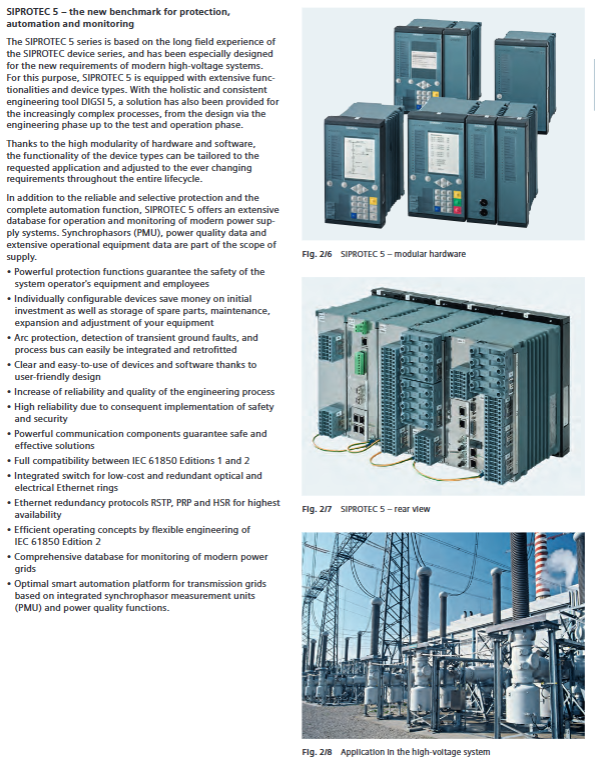
Siemens SIPROTEC 4 series protective relay

The core products of Siemens SIPROTEC 4 series protective relays (including models such as 7SJ61/62/64/66) cover multiple protection functions such as overcurrent, distance, and differential, and support multi protocol communication such as IEC 61850/IEC 60870-5-103. They have flexible protection configuration, synchronous switching, fault recording, and positioning characteristics, and are suitable for multiple scenarios such as medium and high voltage power grids, motors, transformers, and busbars. Combined with DIGSI 4 engineering software and SIGRA fault analysis tools, they can achieve full lifecycle protection, control, and monitoring.

Overview of Product System

1. Product classification and core models

Product Type Core Model Core Function Applicable Scenarios

Overcurrent protection relay 7SJ61 for non directional overcurrent, ground fault, motor protection circuit, motor, and transformer backup protection

7SJ62 direction overcurrent, flexible protection (20 group expansion), voltage/frequency protection for complex circuits, dual power supply

7SJ64 synchronization function, CFC expansion programming, fault location automation substation, multi switch control

7SJ66 Local Control, Multi Interface Communication, Local Protection for Small and Medium sized Substations

Distance protection relay 7SA522/6 series phase to phase/ground distance protection, power oscillation lockout transmission line, long-distance cable

Differential protection relay 7SD52/53/610 line differential, multi terminal differential short line, cable line

7UT612/613 Transformer/Generator Differential, Ratio Braking Transformer, Generator Transformer Unit

7SS52 distributed busbar differential, circuit breaker failure protection busbar protection, complex wiring method

Other specialized relays 7UM62 for comprehensive protection of generator and transformer units, demagnetization/step loss protection for generators and transformer units

7VK61 circuit breaker management, end fault protection circuit breaker control, breaker-a-half wiring

2. Core advantages

Function integration: Single device integration of protection, control, measurement, and diagnostic functions, supporting the principle of “one feeder, one relay”.

Flexible Expansion: 7SJ62/64 supports 20 sets of flexible protection functions, and can customize trigger logic such as current/voltage/power.

Safe and reliable: Complies with standards such as IEC 60255 and ANSI C37.90, and has self-monitoring and trip circuit monitoring functions.

Open compatibility: Supports multi protocol communication and is compatible with Siemens SICAM systems and third-party control platforms.

Detailed introduction of core functions

(1) Protection function

1. Basic protection function

Protection type core parameters/characteristic representative model

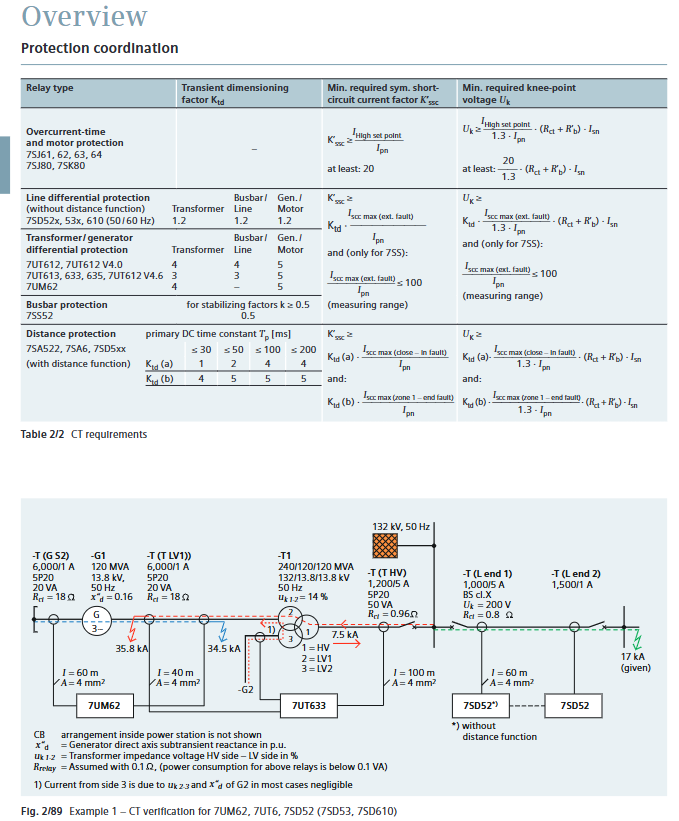
Overcurrent protection with definite/inverse time characteristics (ANSI/IEC standard), supporting cold load pickup for the entire range of 7SJ products

Ground fault protection sensitive type (minimum 0.001A), intermittent, directional, suitable for different grounding methods 7SJ62/64, 7SD series

Overload protection thermal model calculation (IEC 60255-8), supporting environmental temperature compensation 7SJ61/62/64

Automatic reclosing up to 9 times (1 fast+8 delayed), phase separation/three-phase reclosing 7SJ61/62/64

2. Special protection function

Synchronization related: synchronous inspection (voltage/frequency/phase difference monitoring), synchronous/asynchronous switching (considering circuit breaker mechanical delay), supporting 4 sets of parameter storage.

Equipment specialization:

Motor protection: Start time monitoring, locked rotor protection, restart lockout, bearing temperature monitoring (up to 12 sensors).

Transformer protection: excitation surge suppression (second harmonic braking), high impedance limited grounding fault protection.

Generator protection: demagnetization, stepping loss, reverse power, stator grounding (third harmonic) protection.

(2) Control and Automation

1. Control function

Switch control: Supports local (panel/button) and remote (SCADA/DIGSI 4) control of circuit breakers, isolating switches, and grounding switches, and supports single/dual command processing.

Permission management: Switch the priority of permissions to “LOCAL>DIGSI 4>REMOTE”, and support key switch to switch between local/remote modes.

Interlocking function: Implement equipment interlocking (such as checking the position of the isolation switch before closing the circuit breaker) and switching sequence control through CFC programming.

2. Logic Programming (CFC)

No programming experience required, custom functionality can be achieved by dragging and dropping logic components (and/or/triggers/timers).

Support threshold judgment of measurement values, signal logic combination, user-defined alarms, and command output.

(3) Monitoring and Diagnosis

1. Measurement and recording

Measurement parameters: three-phase current/voltage, zero sequence component, active/reactive power, power factor, frequency, electrical energy (± kWh/± kVarh), supporting maximum/minimum value recording.

Fault record: Up to 8 sets of fault waveforms (including analog/switch values), event logs store the last 8 faults, with a timestamp accuracy of 1ms.

2. Status monitoring

Circuit breaker management: supports three wear calculation methods: ∑ I ^ x, ∑ I ² t, and two-point method, and can set wear limit alarms.

Loop monitoring: Trip loop monitoring (ANSI 74TC), which monitors the status of the trip coil through 1-2 binary inputs.

Motor statistics: Record key data such as startup frequency, startup time, running time, and shutdown time.
Supporting tools and communication

1. Core supporting tools

Tool Name Core Function Key Features

DIGSI 4 project configuration, parameter settings, CFC programming support one-time/two-way value switching, routing matrix configuration, 30 day trial version

SIGRA 4 fault waveform analysis supports 6 chart types, multiple waveform synchronization, and COMTRADE format import

The IEC 61850 System Configurator supports cross vendor configuration of IEC 61850 devices, supporting SCL file import and export, and is compatible with Ed1/2.0/2.1 versions

2. Communication capability

Supporting protocols: IEC 61850 (Ethernet) IEC 60870-5-103、PROFIBUS DP、MODBUS RTU、DNP 3.0/DNP3 TCP、PROFINET IO。

Communication topology: RS485 bus (up to 31 devices), fiber ring network (anti-interference), Ethernet redundancy (RSTP/PRP/HSR).

Remote access: Supports modem/Ethernet remote access, web server monitoring (some models).

Installation and Technical Parameters

1. Installation requirements

Installation method: 19 inch rail installation, shell width 1/3~1/2 rack (244mm standard height).

Wiring specifications: The current terminal supports 2.7-4mm ² wire, the voltage terminal supports 0.5-2.5mm ² wire, and supports ring terminal/direct connection.

Environmental adaptation: Working temperature -25 ℃~+70 ℃, humidity 5% -95%, no condensation, altitude up to 6000m (with capacity reduction required).

2. Key technical parameters

Core indicators of parameter categories

Current circuit rated current 1A/5A, overload capacity 20A continuous, 500A/1s

Voltage circuit rated voltage 100V~225V, power consumption<0.3VA/phase

Auxiliary voltage DC 24-250V, AC 115-230V, ripple tolerance ≤ 12%

Binary input 8-11 channels, response time ≈ 3.5ms, voltage threshold switchable

Binary output 4-8 channels, switching capacity 30A/0.5s (current on)

Typical application scenarios

Recommended Application Object Model Core Protection Configuration

Radiation type line 7SJ61/62 overcurrent+ground fault+automatic reclosing

Directional overcurrent+fault location+interlocking control for ring network line 7SJ62/64

Transformer 7UT612/613+7SJ80 differential protection+backup overcurrent+high impedance grounding protection

High voltage motor (>1MW) 7UM62/7SJ64 overload+locked rotor+negative sequence+temperature monitoring

Bus protection 7SS52 distributed differential+circuit breaker failure protection

Generator transformer set 7UM62 demagnetization+out of step+reverse power+stator grounding protection
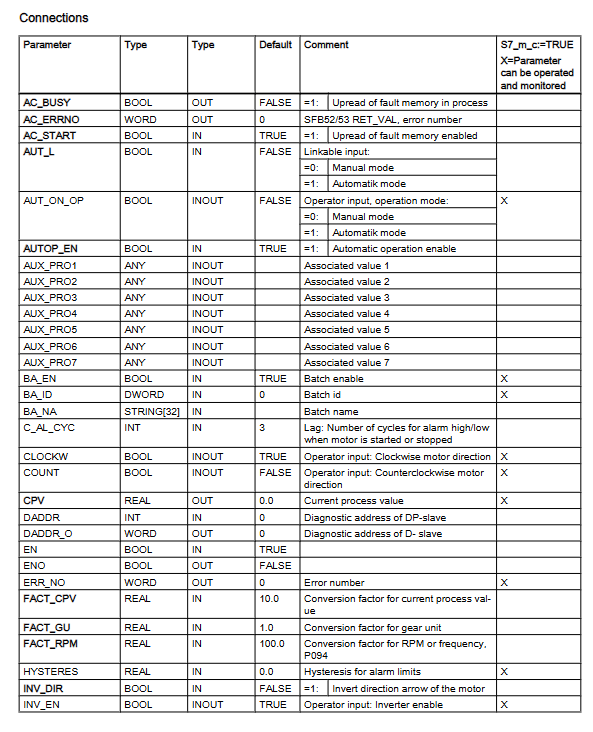
SIEMENS DRVPCS7 SIMO-MM3 block configuration

The SIMO-MM3 function block (FB621) in the Siemens DRVPCS7 software library is used to integrate the third-generation MICROMASTER frequency converter into the SIMATIC PCS 7 process control system. It supports PROFIBUS DP communication and has three operation modes: manual/automatic/local, standardized processing of set values/process values, fault alarm and diagnosis, maintenance management, etc. Visual operation and monitoring can be achieved through a panel (Faceplate). It is compatible with controllers such as S7-400 and needs to be installed and used with the Drive ES PCS7 plugin. It is suitable for frequency converter integration control scenarios in industrial automation.

Basic Information and Installation

1. Applicable scenarios and core specifications

Specific project content

Compatible with third-generation MICROMASTER frequency converter (requires PROFIBUS DP module CB15/CB155)

The control system requires SIMATIC PCS 7 V8.2 and above, supporting controllers such as S7-400

Communication specification PROFIBUS DP, process data: send/receive 6 characters each (4 characters parameters+2 characters process data)

Function block core information name: SIMO-MM3, number FB621, programming language SCL, instance DB working memory 686 bytes

2. Installation process

Software installation: Insert the Drive ES PCS7 CD, run Setup. exe, and the components will be automatically installed to STEP 7 (s7libs directory) and WinCC directory.

Project configuration: Create a project in SIMATIC Manager, insert it into the PC station and configure it. When compiling the OS, check “Generate module drivers” to generate module drivers.

Panel installation: Copy user objects from the template file (@ template_SRVPCS7. pdl) to the process screen, and associate process labels through dynamic guidance.

Core functions and operating modes

1. Detailed explanation of operating modes

Mode type control source key characteristics switching conditions

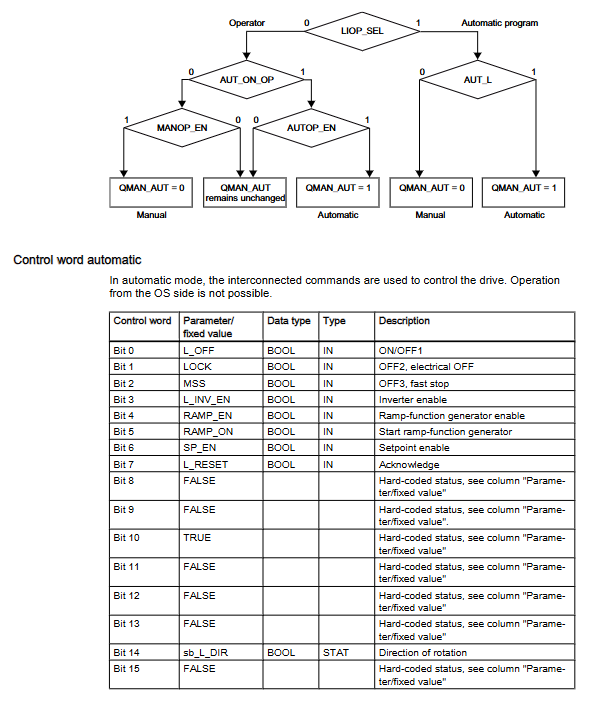
Automatic mode (control room) Automatic program (CFC/SFC) The control word is set by the program and supports external setting values (SP.ET) LIOP_SEL=1, AUTOP_EN=TRUE

Manual mode (control room) operator panel (OS) control words are operated by the panel and only support positive set values LIOP-SEL=0, MANOP-EN=TRUE

The local mode driver does not have control permissions in the local operation control room, and supports control word tracking (TRACK_CW) with REMOTE=0. Driver parameter configuration is required (P51/P52/P53=9)

2. Core Function Description

Standardization of set values/process values:

Standardization factor calculation: Basic factor=16384/ACT_SPM; When equipped with a gearbox=16384/(FACT_SPM × FACT_CU)

Process Value Conversion: Current Process Value (CPV)=Actual Value/FACT_CPV (default 10)

Fault diagnosis function:

Fault reading: Read the fault memory (P947) of the frequency converter through cyclic communication, with AC-START=1 (communication channel idle) required

Diagnostic signals: support module failure (MODF), rack failure (RACKF), I/O access error (PERAF)

Alarm and message functions:

Message category and triggering conditions:

Fault (F): Parameter assignment error (QPARF), data error (QDAT_SRR)

Fault response (S): Drive failure (QGR_ERR), switch timeout (QTIMEOUT)

Alarm (A): High limit alarm (QALARM-H), low limit alarm (QALARM-L)

Warning (W): Drive Warning (QALARM)

Message blocking: All messages are blocked when MSG_LOCK=TRUE

Maintenance and management functions:

Maintenance cycle settings: MAIN_L (low demand, default 100 days), MAIN_M (medium demand, default 200 days)

Reset operation: Reset maintenance timing through RES-MAIN (panel) or L_RES-MA (program)

Faceplate operation

1. Core control fields of the panel

Core Function Operation Content of Control Fields

Automatic field automatic mode monitoring and configuration mode switching, internal and external setting value selection, STOP operation

Manual field, manual mode control, start stop operation, rotation direction selection (clockwise/counterclockwise)

The message field displays all configuration messages, including message timestamps, categories, and statuses

Fault field driver fault details display fault number, fault text, fault reset

Limit field alarm limit and maintenance configuration setting high/low limit, hysteresis, maintenance reset

Trend field parameter trend display View historical curves of PV/SP/CPV and other parameters

2. Multi language support on the panel

Supports 5 languages including German, English, French, Spanish, and Italian, and can switch languages by modifying fields such as CFC block “Designation” and “Unit” or using the WinCC text library.

Auxiliary functions and compatibility

1. Simulation function

Trigger condition: Set the SIM_SON parameter to TRUE and enable simulation mode (QSIM=TRUE)

Simulation parameters: SIMZSW (status word), SIMPV (process value), SimCPV (current process value)

Function feature: Stop communication with the actual driver during simulation, pause maintenance timing

2. Diagnostic auxiliary block DES-DIAG (FB628)

Core function: Evaluate cyclic events (I/O access errors, rack failures, etc.) and transmit diagnostic information to SIMO-MM3

Call requirement: It needs to be integrated into 7 OBs such as OB32 (Loop Interrupt), OB82 (Diagnostic Interrupt), etc

Key outputs: QMODF (module failure), QRACKF (rack failure), QPERAF (access error)

3. APL library compatibility

Compatible with APL blocks: FB1854 (MotSpdCl, speed control), FB1850 (MotL, linear control)

Connection method: Adapt APL block and SIMO-MM3 input/output structure through conversion block

Operation restriction: SIMO-MM3 needs to be set to automatic mode, and maintenance reset and fault confirmation require calling the corresponding functions through the APL panel

Siemens SINAMICS A10 Servo Drive System Operating Instructions

The servo drive system composed of Siemens SINAMICS A10 servo drive and SIMOTICS S-1FK2 servo motor covers core contents such as system composition, safety specifications, installation and wiring, configuration and debugging (supporting network servers/Startdrive), safety functions (Basic/Extended), diagnosis and maintenance, technical data, etc. It supports PROFINET/PROFIsafe communication, has high dynamic performance, compact design, flexible expansion and other characteristics, and is suitable for industrial automation scenarios such as robots, packaging machinery, printing machines, etc.

System Overview

1. System composition and core parameters

Component category, key specifications, core characteristics

Driver (A10) single-phase 230V (0.1~0.75kW), three-phase 400V (0.4~7kW) protection level IP20, supports common DC bus (up to 6 units), integrated braking resistor

Motor (1FK2) torque 0.16~40Nm, maximum speed 7400rpm permanent magnet synchronous motor, self cooling, bearing life 25000 hours

Connecting cable MOTION-CONNECT 500/800PLUS single cable integrated power/encoder/brake, small bending radius

Basic (STO/SS1/SBC) and Extended (11 functions) safety features comply with SIL 2/PL d and support PROFIsafe control

2. Core advantages

High dynamic performance: High dynamic motors have strong acceleration capabilities and are suitable for scenarios with low load inertia; Compact motors have high positioning accuracy and are suitable for variable loads.

Convenient debugging: Supports network servers (default IP: 169.254.11.22) and Startdrive software, providing one click optimization function and simplifying parameter configuration.

Safe and reliable: integrates two types of safety functions, supports fault safe digital input (F-DI) and PROFIsafe communication, and meets industrial safety standards.

Flexible Expansion: Supports common DC bus and input cascading, batch debugging can be achieved through storage cards, and is suitable for multi axis applications.

Safety regulations and installation requirements

1. Basic safety instructions

Operation permission: Only qualified professionals are allowed to operate, and the power-off discharge process must be followed (wait for 5 minutes after power-off).

Risk prevention: Avoid the impact of electromagnetic fields on medical implants (maintain a distance of ≥ 3m), and prevent electrostatic damage (wear anti-static equipment).

Environmental restrictions: Ventilation distance ≥ 100mm (up and down of the driver), prohibited from use in condensation and conductive pollution environments.

2. Installation and wiring

(1) Installation specifications

Motor installation: Use screws of grade 8.8 or above, with a tightening torque of 2.2-60Nm (depending on the motor model), to avoid impacting the shaft extension.

Driver installation: Vertical installation (LED facing up), with a distance of ≥ 10mm (side) and ≥ 100mm (up and down) from other devices.

Cable requirements: The maximum length of motor cable is 250m (with external filter), the maximum length of PROFINET cable is 100m, and both ends of the shielding layer are grounded.

(2) Key points of wiring

Power wiring: single-phase version is connected to L1/N, three-phase version is connected to L1/L2/L3, and a fuse (30A J level) is required.

Motor wiring: Connect U/V/W through OCC cable, and integrate the encoder and brake into the same cable.

Braking resistor: Internal braking resistor is standard, while external braking resistor needs to be matched with resistance value (150-30 Ω) and power (50-3250W).

Communication wiring: PROFINET interface X150 P1/P2, supports RJ45 FastConnect.

Configuration and Debugging

1. Debugging tools and processes

Debugging method is applicable to the core functions of the scenario

Network server local/remote debugging parameter configuration, one click optimization, security function debugging, fault diagnosis

Startdrive complex system integration hardware configuration, firmware updates, batch parameter import

Batch debugging and parameter backup/recovery of storage cards, supporting fast replication of configurations across multiple drives

2. Key debugging steps

Initial setup: Set the Administrator password (≥ 8 characters, including uppercase and lowercase letters/numbers/special characters), and configure the driver name.

One click optimization (OBT): Select dynamic characteristics (conservative/standard/dynamic), set rotation angle (recommended ≥ 360 °), optimize speed controller parameters.

Security function configuration: Select the control mode (PROFINET/onboard terminal), set parameters such as SS1 delay time and SLS speed limit.

Batch debugging: Save the configuration through a storage card or backup the parameter file (Backup. zip) on the network, and import it in batches to other drives.

3. Details of Security Features

(1) Basic Functions (standard)

STO (Safe Torque Off): Compliant with EN 60204-1 stop category 0, cutting off motor torque to prevent accidental restart.

SS1 (Safe Stop 1): Time controlled shutdown, triggering STO after delay, supporting OFF3 slope braking or external stop.

SBC (Safe Brake Control): controls the motor brake to prevent the hanging load from sagging, and needs to be used in conjunction with STO.

(2) Extended Functions (license required)

Includes STO/SS1/SBC enhanced version, with 11 new features including SS2 (Safe Shutdown 2), SOS (Safe Operation Stop), SLS (Safe Speed Limit), etc.

Support speed/acceleration/direction monitoring, controlled through PROFIsafe message 901, with a trial period of 3 segments x 300 hours.

Diagnosis and maintenance

1. Fault diagnosis

Status display: Three digit display+RDY/COMLED (green constant light=ready, red flashing=fault).

Fault response: After eliminating the cause, respond by pressing the OK button, restarting the network server, or turning off the power.

Common faults: DC bus overvoltage (F30002), brake resistor overload, PROFINET communication failure.

2. Maintenance points

Maintenance project cycle/condition operation instructions

Replace the motor bearings directly when the shaft height is ≤ AH50 after 25000 operating hours, and replace the bearings separately when the shaft height is ≥ AH63

Support network server (HTTPS) or storage card upgrade when a version update is required for firmware upgrade of the drive

After parameter backup and debugging are completed, backup the network to a file or storage card, including the Administrator password

Fan replacement is only required for the three-phase version driver after 40000 operating hours. Please refer to the spare parts order number for replacement

3. Restore factory settings

Scenario: Forgetting password, changing motor, parameter confusion.

Operation: Import the updater.inf file from the storage card, power off and restart to restore, and re debug is required.

Technical data and application scenarios

1. Key technical parameters

Environmental temperature: driver -25~70 ℃, motor -40~60 ℃ (beyond 40 ℃, capacity reduction is required).

Protection level: driver IP20, motor IP64 (with shaft sealing ring IP65).

Communication speed: PROFINET supports 10/100Mb/s and IRT synchronization.

2. Typical application scenarios

Robots and robotic arm systems: high dynamic response adapted for fast positioning.

Packaging/Plastic/Textile Machinery: Compact design saves installation space.

Wood/glass/stone processing machinery: precise positioning ensures processing accuracy.

Printing machine: synchronous control meets the requirements of high-speed printing.

SIEMENS SITOP power supplies SITOP UPS1600 / UPS1100

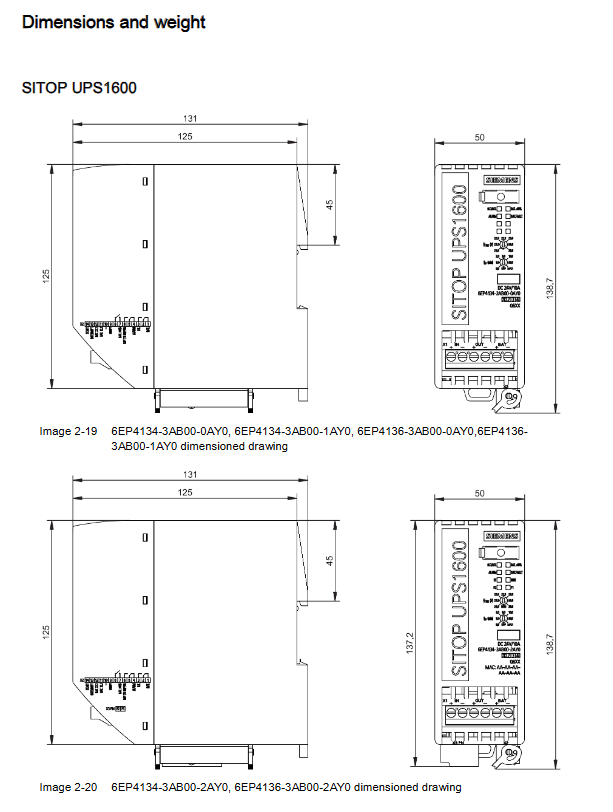
The complete solution for Siemens SITOP UPS1600 (10A/20A/40A) DC uninterruptible power supply module and SITOP UPS1000 (1.2Ah-12Ah) battery module includes product model specifications, installation and debugging, parameter configuration, remote management (supporting SIMATIC STEP 7, SITOP UPS Manager, web server), fault troubleshooting, and environmental adaptation. It has high dynamic overload capacity (3 times rated current 30ms), intelligent battery management (automatic recognition of battery type and temperature control charging), multi interface communication (USB/PROFINET/Ethernet) and other features, suitable for 24V DC uninterruptible power supply needs in industrial control, automation systems and other scenarios.

Product Overview

1. Product combination and model

Product Category Model Series Core Parameters Interface Version

SITOP UPS1600 6EP4134 (10A) Input 21-29V DC, Output 24V DC/10A -0AY0 (no interface), -1AY0 (USB), -2AY0 (PROFINET)

6EP4136 (20A) Input 21-29V DC, output 24V DC/20A as above

6EP4137 (40A) Input 21-29V DC, Output 24V DC/40A as above

SITOP UPS1100 6EP4131 (1.2Ah) maintenance free lead gel battery, 24V support parallel connection (up to 6 of the same model)

6EP4132 (2.5Ah) Same as above

6EP4133 (3.2Ah/5Ah) 5Ah is a LiFePo battery as above

6EP4134 (7Ah) maintenance free lead gel battery, 24V as above

6EP4135 (12Ah) Same as above

2. Core advantages

High dynamic overload: 3 times the rated current for 30ms (up to 30A for 10A models), 1.5 times the rated current for 5 seconds/minute, suitable for high starting current equipment such as industrial PCs.

Intelligent battery management: Automatically detect the type and status of UPS 110 batteries, temperature control charging curve, monitor battery voltage, capacity, and aging degree, and automatically test batteries every 4 hours.

Multidimensional communication: supports USB local connection, PROFINET/Ethernet networking, remote monitoring of web servers (HTTPS encryption), and data exchange with OPC UA servers.

Safe and reliable: equipped with reverse polarity protection, short circuit protection, overload protection, protection level IP20, in compliance with international standards such as UL 508 and CSA 22.2.

Installation and wiring

1. Installation requirements

Installation method: Standard TH35 × 7.5/15 rail installation (EN 60715), UPS1600 needs to be installed vertically (input/output terminals facing downwards).

Installation gap: UPS1600 needs to reserve ≥ 50mm of heat dissipation space above and below, and UPS 1100 needs to reserve opening space above.

Environmental restrictions: Altitude ≤ 6000m (with a capacity reduction of 7.5% or 5K for every 1000m above 2000m), humidity of 5% -95%, no condensation.

2. Wiring specifications

Input wiring: IN+connected to 24V positive pole, IN – connected to 24V negative pole, wire specification 0.2-16mm ² (depending on model).

Output wiring: OUT+connected to the positive pole of the load, OUT – connected to the negative pole of the load, supporting no-load, overload, and short circuit protection.

Battery wiring: BAT+is connected to the positive pole of the battery, BAT – is connected to the negative pole of the battery, and up to 6 UPS 110 modules of the same model can be connected in parallel, with a maximum wire length of 3m.

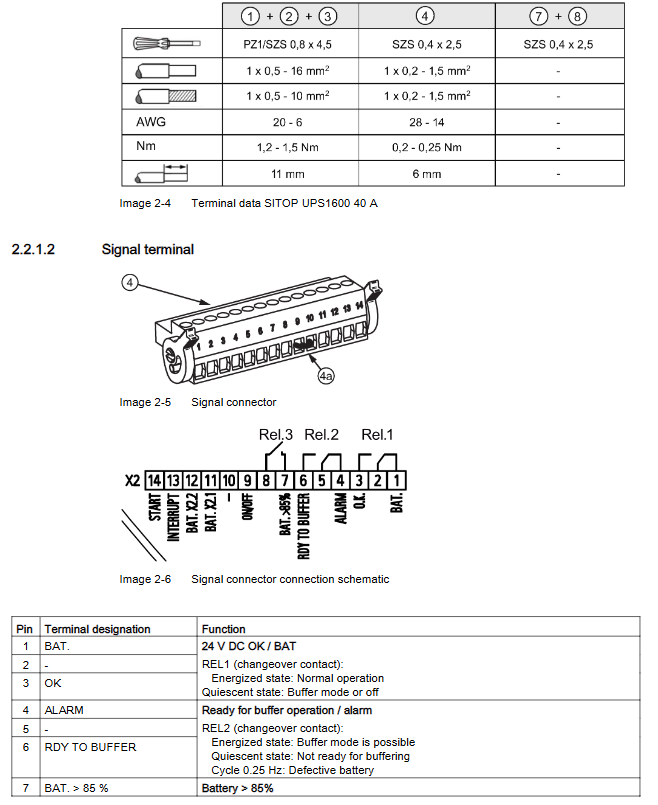
Signal wiring: 14 pin signal connector, supporting functions such as buffer allowance, reset, battery communication, etc.

Configuration and Management

1. Configuration tool

Tool Name Applicable Scenarios Core Functions

SIMATIC STEP 7 (TIA Portal) Automation System Integration Hardware Configuration, Parameter Setting, Firmware Update, Diagnosis

SIMATIC STEP 7 (Classic Edition) Traditional PLC System Importing GSD Files, Parameter Assignment, Communication Configuration

SITOP UPS Manager local/remote management of device configuration, battery monitoring, alarm linkage, batch shutdown

Web server remote monitoring status viewing, alarm query, user management (supporting HTTPS)

2. Key parameter configuration

Buffer parameters: Switching threshold (21-25V, default 22.5V), buffer time (1-32767 seconds, default 60 seconds), stop buffer voltage (18-23V, default 18.5V).

Battery parameters: battery capacity, charging current (0.3A/0.8A/3A optional), faulty battery voltage (1-18V, default 6V).

Communication parameters: IP address, PROFINET device name, web server update interval (5-60 seconds, default 10 seconds).

3. Firmware update

Support updates through SIMATIC STEP 7, SITOP UPS Manager, and web server.

The firmware file needs to match the model (ups10a. upd/ups20a. upd/ups40a. upd), and the output will be turned off during updates. It is necessary to ensure stable power supply.

Maintenance and troubleshooting

1. Battery maintenance

Battery type: The UPS 110 uses maintenance free batteries and the 5Ah model is a LiFePo battery.

Replacement process: Turn off the power → Open the cover → Press the replacement button (≥ 2 seconds) → Remove the fuse → Replace the battery → Reset button → Insert the fuse → Close the cover.

Service life: about 4 years at 20 ℃, about 2 years at 30 ℃, and about 1 year at 40 ℃.

2. Common faults and their solutions

Fault type alarm text processing method

Battery defect: Check the battery voltage, fuse, and replace the faulty battery

Buffer mode not possible Check wiring, settings, battery voltage

Overcurrent reduces load, checks for short circuits, and automatically restarts after 20 seconds

Device temperature critical improves heat dissipation and removes unnecessary loads when the temperature is too high

3. Safety precautions

Only qualified personnel are allowed to operate, and the power supply must be disconnected and anti misoperation measures must be taken before installation.

When wiring, it is necessary to distinguish between positive and negative poles to avoid reverse connection and equipment damage.

During firmware updates, do not turn off the power, otherwise it may cause device failure.

Environment and Certification

1. Environmental parameters

Environmental indicators SITOP UPS1600 SITOP UPS1000

Working temperature -25~70 ℃ (natural convection) -40~60 ℃ (natural convection)

Storage temperature -40~85 ℃ -40~60 ℃

Humidity 5% -95% without condensation (EN 60721-3K3) as above

Anti electromagnetic interference complies with EN 61000-4 series standards as above

2. Product certification

Safety certification: UL 508, CSA 22.2 No. 107.1, IEC 60950-1.

Explosion proof certification: ATEX II 3G Ex nA nC IIC T4 Gc, IECEx EPS 14.0063X.

Classification certification: GL (Germanischer Lloyd).

SIEMENS SICAM Substation Automation

Overview of Product System

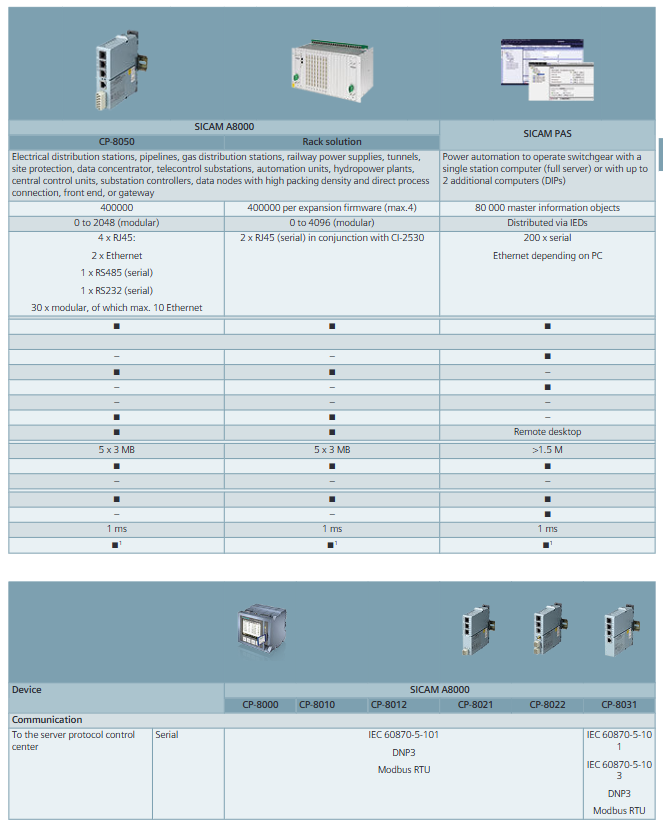
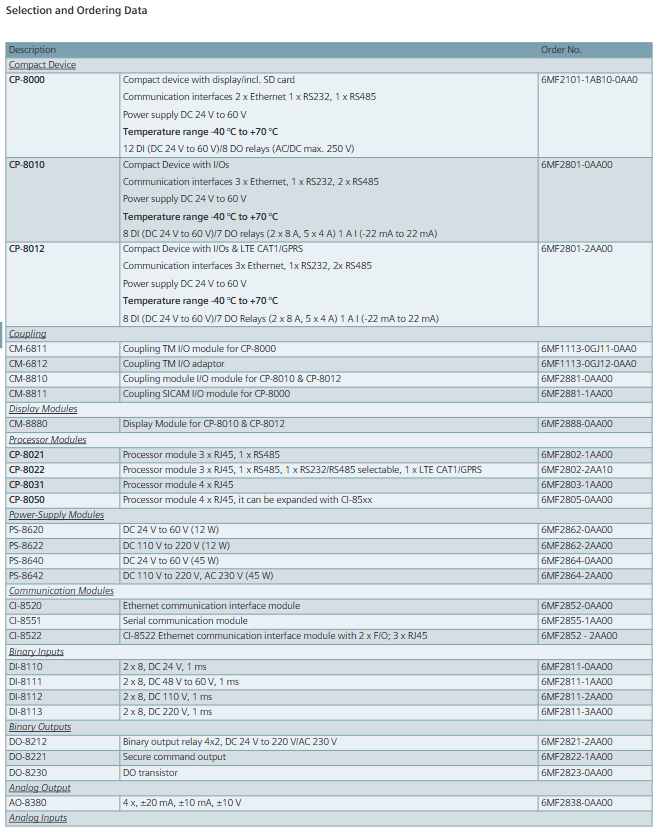
The Siemens SICAM Substation Automation Solution (Edition 8.1) covers the entire lifecycle requirements of substations, from the core control platform to terminal detection equipment, forming a modular and scalable product matrix. The core is built around the IEC 61850 international standard, balancing compatibility and foresight, and adapting to scenarios such as traditional power grid upgrades and new energy grid integration.

Detailed introduction of core products

(1) SICAM 8 Power Automation Platform

As the core architecture, it integrates hardware and software solutions to support multi scenario automation requirements.

Applicable scenarios for key characteristics of core components

SICAM A8000 series modular design, supporting 18V~286V wide voltage power supply; -Operating temperature of 40 ° C~+70 ° C; Up to 2048 I/O points for power transmission and distribution, railway power supply, tunnel monitoring

SICAM S8000 is hardware independent and supports virtualization deployment; Compatible with Linux systems such as Debian/Red Hat; Can integrate 1200 IED devices virtual SCADA front-end, offshore wind power

SICAM HMI supports free authorization of 200 data points; Support HTML5 browser, suitable for local monitoring of small and medium-sized power plants on tablets

SICAM GridPass automated certificate management, supporting X.509 certificates; Compatible with IEC 62351 standard OT network security certification

(2) Control, monitoring, and evaluation tools

Focus on monitoring the operation status of the power grid and analyzing faults to ensure the reliability of power supply.

SICAM PQ Analyzer: Supports EN 50160 standard and can analyze 10+power quality parameters such as voltage sag and harmonics; Provide analysis tools such as Incident Explorer and PQ Inspector, with a minimum hardware requirement of Intel Core 2 Duo 1.6 GHz processor and 2GB of memory.

SIGRA: A graphical fault waveform analysis tool that supports COMTRADE format; Compatible with systems such as Windows 10/Server 2019; Provide a 30 day free trial version.

(3) Engineering, diagnostic, and testing tools

Covering the entire process of project configuration, equipment debugging, and system maintenance.

Tool Name Core Function Key Parameters

SICAM SCC SCADA system, supporting multi client deployment; Compatible with SIMATIC WinCC up to 65536 data points

SICAM PAS power automation system, supporting redundant configuration; Support OPC DA/XML DA protocol for up to 800 interval devices to access

DIGSI 5 SIPROTEC 5 equipment engineering tool, available in Compact/Standard/Premium versions, supports up to unlimited SIPROTEC devices (Premium version)

IEC 61850 System Configurator Cross vendor IEC 61850 device configuration, supports SCL file import and export, supports IEC 61850 Ed1/2.0/2.1 versions

(4) Interval Controller (SIPROTEC 6MD Series)

Specialized control equipment for different voltage levels and scenarios.

6MD84: IO Box design, supporting 19-45 binary I/O points; Adapt to the process bus system and support PRP redundant communication.

6MD85/86: Universal interval controller, supporting 8-75 I/O points; 6MD86 has added circuit breaker failure protection and synchronous phasor measurement (PMU) function.

6MD89: Railway specific, compatible with 16.7Hz frequency; Supports 1-2 phase measurement and is suitable for contact network power supply systems.

(5) Distribution system automation

Optimize the reliability and efficiency of the distribution network, and support the integration of distributed energy sources.

SICAM DCM: Modular fault detection and control solution, supporting 3-phase undervoltage protection and ground fault detection; Response time<20ms.

SIPROTEC 7SC80: Distribution network protection equipment, supporting a wide temperature range of -50 ° C to+85 ° C; Integrated CFC logic programming, supporting 20 custom protection functions.

(6) Short circuit indicator and communication accessories

Short circuit indicator: including SICAM FCM plus/FSI series, supports wireless communication, and is compatible with cables and overhead lines.

Power line communication: Powerlink IP and AKE 200 devices ensure stable communication between power grid equipment.

Core technical characteristics

Compatibility: Fully supports 10+industrial protocols such as IEC 61850, IEC 60870-5-101/104, DNP3, etc., and is compatible with devices from multiple vendors.

Security: Compliant with BDEW white paper, NERC CIP, IEC 62351 and other standards, with TLS encryption, Role Access Control (RBAC), firmware signing and other functions.

Scalability: Modular design supports hardware expansion (such as SICAM A8000, which can expand 16 I/O expansion lines), and software supports function point authorization upgrades.

Environmental adaptation: The working temperature of the core equipment covers -40 ° C~+70 ° C, and some products support IP40 protection level, suitable for harsh industrial environments.

Typical application scenarios

Transmission and distribution substations: interval control, power quality monitoring, rapid fault isolation.

New energy grid connection: monitoring and scheduling of photovoltaic/wind power plants, supporting microgrid control.

Railway power supply: 16.7Hz frequency adaptation, contact network power supply monitoring and protection.

Industrial power distribution: dynamic load management, peak reduction, ensuring stable industrial power supply.

SIEMENS SENTRON Circuit Protection Equipment with Communication and Measurement Functions

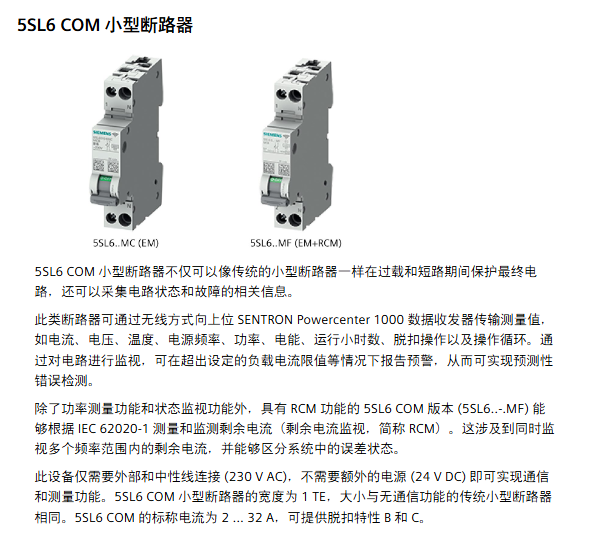
SENTRON’s circuit protection equipment with communication and measurement functions is the core product of Siemens’ intelligent infrastructure series. With SENTRON Powercenter 1000 as the data transmission and reception core, it is compatible with 7 types of terminal devices (including small circuit breakers, arc fault detection devices, fuses, etc.), supports wireless+Bluetooth+Ethernet multi interface communication, and achieves data transmission through Modbus TCP protocol. It can collect electrical parameters and equipment status such as current, voltage, temperature, etc. It has functions such as alarm threshold setting, trip reason recording, remote control, etc. The protection level reaches IP20-IP68, and the working temperature covers -40 ° C to+60 ° C (some models can withstand 200 ° C cyclic high temperature). It is suitable for scenarios such as main distribution panels and sub distribution panels, and can improve the system. Availability and operational transparency, only qualified professionals are allowed to install and debug.

Core Component Details

2.1 Data transmission and reception core: SENTRON Powercenter 1000

Specific specifications of parameters

Order number 7KN1110-0MC00

Interface type Ethernet (Cat5 F/UTP and above), Bluetooth 5.1, wireless

The connection capability can pair up to 24 terminal devices and support parallel operation of 4 devices

Power supply requirement: 24V DC SELV (19.2~28.8V), maximum power consumption of 100mA

Data storage, measurement trend storage for 1 hour to 30 days, with a maximum of 50 message records

Protection level IP20

Environmental temperature operation: -25~+60 ° C; Storage: -40~+85 ° C

Physical dimensions: width 18mm, height 90mm, depth 70mm, net weight 52g

2.2 Terminal devices (7 core models)

Equipment type, core functions, key parameters, protection level

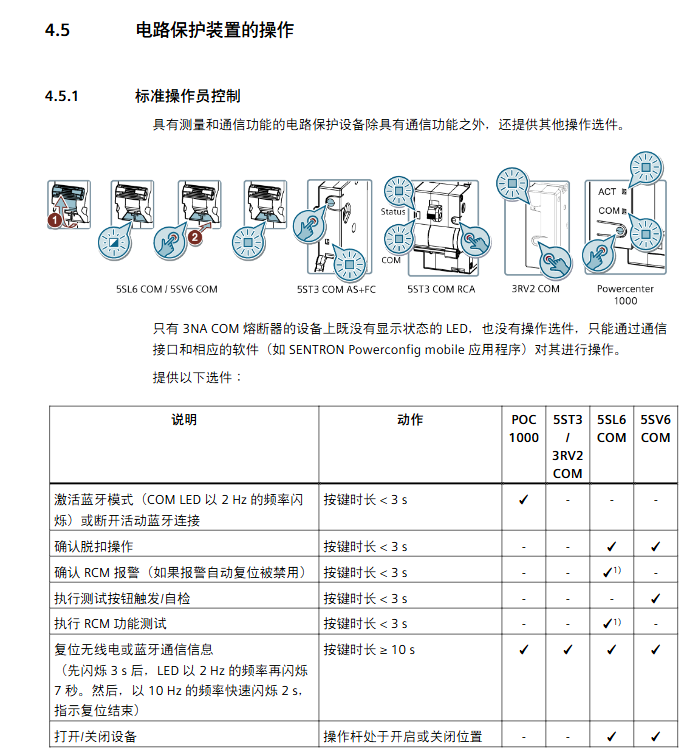
5SL6 COM miniature circuit breaker overload/short circuit protection, power measurement, RCM version supports residual current monitoring rated current 2-32A, trip characteristics B/C, measurement accuracy ± 0.5% IP20 (rear side)/IP40 (front side)

5SV6 COM arc fault detection equipment overload/short circuit/arc fault protection, electrical parameter acquisition rated current 6-32A, breaking capacity 6kA, working temperature -25~+45 ° C IP20 (connection end)/IP40 (front side)

3NA COM fuse short circuit protection, current/temperature monitoring, advance warning rated current 80~315A, size NH2, operation category gG/gFF IP20

5ST3 COM auxiliary switch/fault signal contact status monitoring (switch position/trip), temperature measurement modular width 0.5TE, power supply 24V DC, current consumption 20mA IP20

3RV2 COM wireless auxiliary switch motor starter protector status monitoring, overload/short circuit trip record width 18mm, working temperature -20~+60 ° C IP20

5ST3 COM RCA remote control auxiliary remote switch, automatic reclosing (ARD), RCD/IR test power supply 100~240V AC, supports 3+3 reclosing attempts IP20

2.3 Supporting software

Mobile: SENTRON Powerconfig mobile (iOS/Android)

Function: Device scanning, pairing debugging, parameter setting, data visualization

Connection methods: Bluetooth (5m~10m), WLAN (same network)

PC end: SENTRON Powerconfig

Function: Project import and export, firmware update, batch parameter configuration

Compatibility: Supports Modbus TCP protocol docking with third-party systems

Installation and commissioning specifications

3.1 Installation Preparation

Delivery inspection: Confirm that the packaging is undamaged, the equipment model is consistent with the order, and the original packaging is retained

Identification requirements: including manufacturer identification (order number/serial number/RF code) and user identification (equipment/location ID+installation date)

Environmental conditions:

Pollution level: Level 2 (conventional)/Level 3 (only 3NA COM)

Temperature: -25~+60 ° C for operation (-10~+55 ° C for 3NA COM), -40~+75 ° C for storage

Humidity: ≤ 93% at 40 ° C (no condensation)

Installation spacing:

The maximum distance between the terminal and Powercenter is ≤ 3m (standard transmission power 0dBm)

When multiple Powercenters are running in parallel, channels need to be distinguished (automatic/manual selection) to avoid interference

3.2 Equipment Installation and Wiring

Installation method: DIN rail card mounting (compliant with EN 60715 standard)

Wiring requirements:

Power supply line: 24V DC SELV adopts screw free plug-in terminals, with a conductor cross-section of 0.2~1.5mm ²

Signal line: 5SL6/5SV6 COM needs to be connected with phase+neutral wire (230V AC)

Shielding requirement: Both ends of the cable should be grounded to avoid parallel laying with the power line

Special requirements:

3NA COM needs to be installed vertically, and electronic modules must not be located above fuses

The installation location of Powercenter should be away from metal surfaces to ensure antenna efficiency

3.3 Debugging Process

Device addition: Add Powercenter 1000 through Bluetooth/WLAN search or manually enter IP address

Terminal pairing: Scan the device RF code (including MAC/installation code) and assign device addresses (1-24)

Parameter configuration:

Communication parameters: IP address (static/DHCP), Bluetooth PIN code, radio transmission power

Measurement parameters: alarm threshold, energy flow direction, RCM measurement range

Control parameters: ARD delay time, RCD test cycle

Function verification: Check LED status (green light is always on as normal), measurement value transmission, alarm response

Core functions and technical features

4.1 Data collection function

Collection parameters:

Electrical parameters: current (0.02~2In), voltage (50~400V), power, electrical energy, power frequency (45~65Hz)

Equipment status: temperature (-25~120 ° C), operating hours, switch cycles, number of trips, residual current (RCM version)

Collection accuracy:

Current/Voltage: ± 0.5%

Power/Electric Energy: ± 1%

Temperature: ± 2~2.5 ° C

Transmission frequency: Key parameters (current/temperature) are transmitted every 2 seconds, and electrical energy/voltage is transmitted every 60 seconds

4.2 Monitoring and alarm functions

Alarm type:

Threshold alarm: overcurrent/undercurrent, overvoltage/undervoltage, overtemperature

Status alarm: tripping operation (overload/short circuit/arc fault), service life warning (operating hours/operating cycle)

Diagnostic alarm: communication error, self-test failure, RCM warning

Alarm settings:

Can turn on/off alarms, adjust threshold and lag values (0-10%)

RCM alarm supports automatic reset or manual confirmation

LED indication: green light (normal), yellow/red light (warning/fault), flashing frequency to distinguish status

4.3 Communication and Control Functions

Communication protocol: Modbus TCP, supports 3 concurrent connections, port 502

Control function:

Remote control: Device switching is achieved through software or wired interfaces

Automatic Recloser (ARD): 3+3 attempts, delay time 10-1800 seconds can be set

Testing functions: RCD testing (compliant with IEC 63024), insulation resistance (IR) testing

Data synchronization: Supports SNTP time synchronization to ensure the accuracy of event timestamps

4.4 Data Storage and Visualization

Trend storage:

Short term: average temperature/current (1 hour, interval of 10 seconds)

Long term: Extreme values of electrical energy/temperature (30 days, with an interval of 1 day)

Visualization method:

Mobile: real-time data, trend charts, alarm message lists

PC end: Project data export (. splx format), batch device management

Upper system docking: supports SENTRON Powermanager, Powercenter 3000, and cloud platform (Insights Hub)

Maintenance and troubleshooting

5.1 Daily Maintenance

Firmware update: executed through PC side Powerconfig, updating Powercenter takes 2 minutes, and terminal devices take 5-15 minutes

Disposal: Comply with local environmental regulations and do not dispose of as household waste

Regular inspection: confirm LED status, wiring tightness, and clear alarm messages

5.2 Common troubleshooting

Solution to Fault Phenomena

Bluetooth cannot find Powercenter 1. Activate device Bluetooth mode (short press button<3 seconds); 2. Check the Bluetooth/GPS on the mobile device; 3. Confirm that the PIN code is entered correctly

Pairing timeout 1. Check device power supply; 2. The backend is still pairing, please be patient and wait; 3. Press and hold the device button for ≥ 10 seconds to reset and retry

Modbus connection failure: 1. Confirm that the device address and register address are correct; 2. Check the Ethernet wiring; 3. Verify function code (read 0x03/0x04, write 0x06/0x10)

The device flashes red light. Press the button briefly to confirm the trip operation; 2. Check the cause of circuit overload/short circuit; 3. Reset the device and then close it again

Firmware update failed 1. Ensure continuous power supply to the device; 2. Check that there is no interference in communication; 3. Confirm that the firmware version matches the device type

Summary of Key Technical Parameters

Category Core Indicators

Protection level IP20 (Powercenter/auxiliary switch)~IP68 (some terminal devices)

Rated voltage 230V AC (single-phase), 400V AC (3NA COM)

Rated current 2~32A (miniature circuit breaker/AFDD), 80~315A (fuse)

Breaking capacity 6kA (5SL6/5SV6 COM), 100kA (3NA COM)

Communication interface Ethernet (Modbus TCP), Bluetooth 5.1, wireless (2400~2483.5MHz)

Storage capacity for up to 30 days of trend data and 50 event messages

Response time switch command response ≥ 1 second, interval between two commands ≥ 10 seconds

SIEMENS MOBY I Configuration, Installation and Service

MOBY I is a high-performance radio frequency identification system (order number 6GT2 097-4BA00-0EA2) released by Siemens in 2007. Its core is used for contactless material flow and production process optimization in industrial scenarios. It consists of a mobile data storage (MDS), a read-write device (SLG), an interface module (ASM), and supporting accessories. It supports 8-32 kbytes storage capacity, 0-1000 mm read-write distance, -25 ° C to 200 ° C (cyclic) working temperature, and can be connected to SIMATIC S5/S7, PC and other devices as well as PROFIBUS protocol. The document covers system configuration, installation specifications, component parameters, fault troubleshooting, and other content in detail. Only qualified professionals are allowed to operate it to ensure safety and equipment. Compatibility.

Core Component Details

2.1 Mobile Data Storage (MDS)

Comparison of core parameters

MDS model storage capacity, working temperature protection level, read-write distance (max), special characteristics

MDS 401 8 kbytes (FRAM) -25~+85 ° C IP67 10 mm circular design, suitable for small carriers

MDS 404 8 kbytes (FRAM) -25~+85 ° C IP68 25 mm square design, compatible with metal installation

MDS 507 32 kbytes (RAM) -25~+70 ° C IP65 1000 mm long-distance transmission, battery powered

MDS 514 32 kbytes (FRAM) -25~+85 ° C IP68 90 mm high storage capacity, resistant to harsh environments

MDS 439E 8 kbytes (EEPROM) cyclic 200 ° C IP68 125 mm high temperature resistance, suitable for painting and drying scenarios

Common characteristics

Storage type: Supports RAM (requires battery), FRAM (no battery), EEPROM (high stability)

Data retention: FRAM/EEPROM data is retained for 10 years, RAM relies on battery backup

Chemical resistance: The shell material (polyamide 12, PPS) is resistant to industrial chemicals such as oil, grease, acid and alkali

2.2 Read Write Devices (SLG)

Comparison of core parameters

SLG model read-write distance range, working temperature protection level, transmission window size (L × W), applicable scenarios

SLG 40 2~8 mm -25~+70 ° C IP65 diameter 18 mm short distance precise recognition, small assembly line

SLG 42 0~55 mm -25~+70 ° C IP65 90 × 36 mm medium distance, dynamic transmission of moderate data volume

SLG 43 0~100 mm -25~+70 ° C IP65 140 × 60 mm medium to long distance, large transmission window

SLG 44 100~800 mm -25~+70 ° C IP63 1200 × 300 mm long distance, high-speed moving scene (up to 120 km/h)

SLG 41C 0~15 mm -25~+70 ° C IP67 30 × 8 mm compact, high protection, harsh environment

Common characteristics

Transmission frequency: power transmission 134 kHz, data transmission 1.81 MHz

Interface standard: RS 422, transmission rate 19200 baud

Interference Suppression: Supports sensitivity adjustment for reception and adapts to industrial interference environments

2.3 Interface Module (ASM)

Core types and adaptation scenarios

ASM model docking interface supports SLG quantity protection level adaptation controller core functions

ASM 400/401 SIMATIC S5 bus 4 (parallel) IP00 SIMATIC S5-115U~155U basic control, supporting FB 250/230 function blocks

ASM 450/452 PROFIBUS DP/DPV1 2 (multiplex/pseudo parallel) IP67 various PLC/PC industrial bus docking, supporting file processors

ASM 470/475 SIMATIC S7 bus 2 (multiplex/parallel) IP20 SIMATIC S7-300/ET 200M high-speed data transmission, compatible with S7 system

ASM 424 RS 232/422 4 (parallel) IP40 PC/external controller serial port docking, supporting 3964R protocol

ASM 473 PROFIBUS DPV1 1 IP67 ET 200X distributed I/O scenario, high protection

2.4 Supporting Accessories

Software: MOBY Software (order number 6GT2 080-2AA10), including FB/FC function blocks, drivers, and diagnostic tools

Hardware:

Wide range power supply (6GT2 494-0AA00): 100~230V AC to 24V DC, output 2.2A

STG I handheld terminal (6GT2 003-0CA00): mobile read/write, debugging, supports Chinese and English menus

ES 030-K Collection Station (6AW5 451-3): Multi interface integration, compatible with barcode/MOBY systems

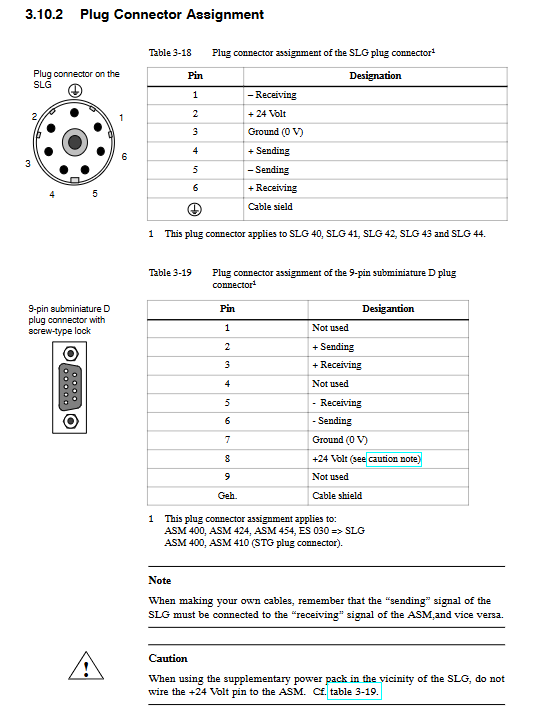
Connecting cable: shielded cable (6-core+shielded), maximum length 1000 m, core wire cross-section 0.07~1.5 mm ²

System configuration and installation specifications

3.1 Core Configuration Principles

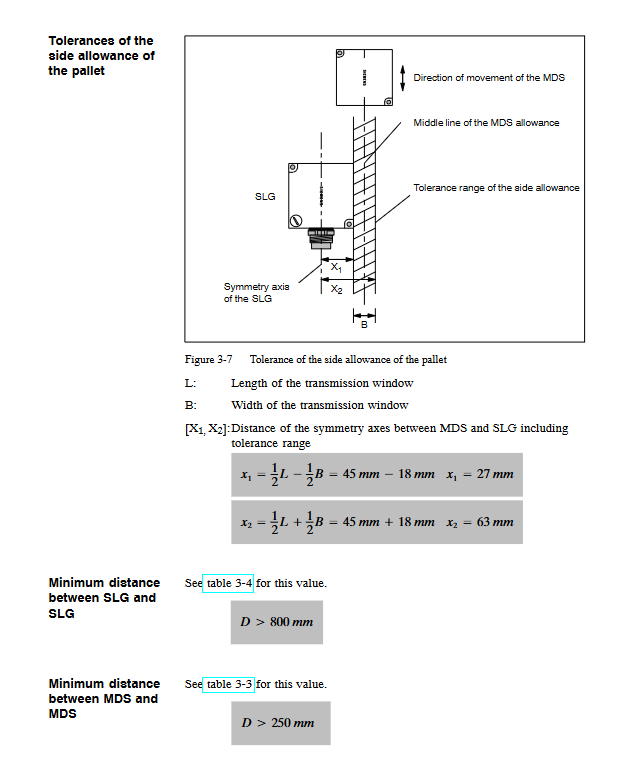
Transmission window: SLG generates induced alternating field, MDS needs to be within the effective field strength range (Sg is the limit distance), and dynamic transmission needs to meet the transmission cycle

T V ≥ t K (t K is the communication time)

Metal influence: Metal will reduce the transmission window, and a metal free area (minimum 10-80 mm from the edge of MDS/SLG to the metal) needs to be reserved, which can be isolated by plastic brackets (spacing 8-20 mm)

Distance requirement:

Minimum distance between SLGs: 50 mm (SLG 40)~6000 mm (SLG 44)

Minimum distance between MDS: 50 mm (SLG 40)~4000 mm (MDS 507)

3.2 Special Configuration Instructions

MDS 507+SLG 44 (long-distance combination):

ABTAST parameter (scan interval) needs to be configured to avoid the battery running out too quickly. It is recommended t ABTAST≤1.2 sec

The transmission window is divided into a startup area (MDS ready) and a processing area (data transmission), with an angle deviation of ≤ 45 °

MDS 439E (high-temperature resistant combination):

The cyclic working temperature is ≤ 200 ° C, and the heating cooling cycle needs to be controlled (such as heating at 200 ° C for 1 hour and then cooling for>2 hours)

When the temperature is greater than 85 ° C, the transmission window parameters need to be multiplied by an offset factor C (0.7~1.05)

3.3 EMC and Grounding Standards

Shielding requirement: Both ends of the cable should be grounded, and the shielding layer should be connected to the cabinet over a large area to avoid shielding interruption

Equipotential connection: equipotential line cross-section ≥ 10 mm ², reducing interference caused by potential difference

Cabinet layout: Power components and control components are separated (spacing ≥ 10 cm), and signal lines and power lines are laid in separate slots

Interference suppression: Coil type equipment requires the addition of a freewheeling diode/RC circuit, and a filter should be installed at the power inlet

Troubleshooting and compatibility

4.1 Common fault codes (core)

Error code (hex) fault type troubleshooting direction

01 There is an error in removing MDS from the transmission window. Check the position of MDS

04 MDS memory error initializing MDS, checking battery status

06 SLG field interference increases SLG spacing, check shielded cables

0E ECC error enabled ECC driver, reinitialize MDS

80 MDS battery low voltage replacement MDS battery

4.2 Compatibility Description

Alternative models: The document provides alternative models for discontinued MDS/SLG/ASM models (as of September 2004), such as MDS 114 replaced by MDS 404 and SLG 44-ZA07 replaced by SLG 44 (6GT2 001-0DA10-0AX0)

Version compatibility: New components (such as ASM 452) are compatible with old systems and require updating the GSD file configuration

Summary of Key Technical Indicators

Category key indicator numerical range

Storage capacity of 8~32 kbytes

Transmission read-write distance 0~1000 mm

Transmission rate ≥ 0.8 millisecond/byte

Environmental working temperature -25 ° C~200 ° C (cyclic)

Protection level IP20~IP68

Communication protocols PROFIBUS DP/DPV1, RS 232/422, 3964R

Transmission frequency 134 kHz (power), 1.81 MHz (data)

SIEMENS SIMATIC NET S7-1413 Industrial Communication Software Package

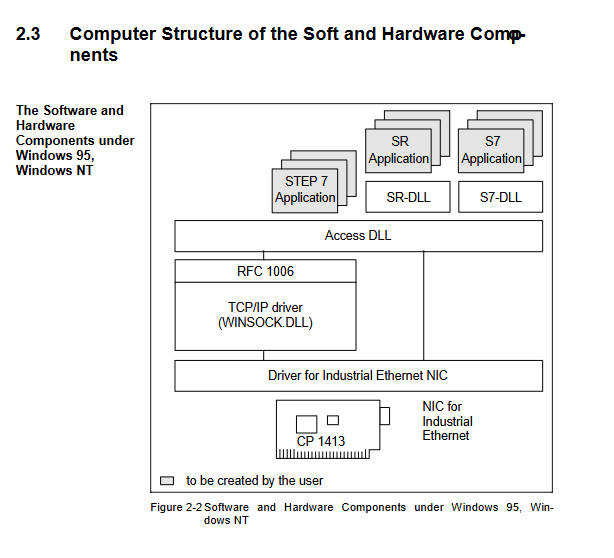
SIMATIC NET S7-1413 is an industrial communication software package launched by Siemens (released in 1996, version 1), which only supports Windows 95/NT 4.0 and above systems and needs to be used with SIMATIC NET CP 1413 network card. Its core function is to connect PC/programmer (PG) to SIMATIC S7 system through industrial Ethernet, providing SAPI-S7 and SEND/RECEIVE programming interfaces in C language (including sample programs and call libraries), supporting ISO 8073 transmission protocol and TCP/IP (RFC 1006) protocol, suitable for industrial scenarios such as equipment status monitoring, production statistics, data archiving, etc. Users need to refer to the three volume document (including configuration and programming interface guide) provided in the package. Technical support can be provided through Siemens official website, telephone or training. Central acquisition.

Core functions and adaptation requirements

2.1 Core Functions

Device connection: Communication between PC/PG and SIMATIC S7 system through industrial Ethernet

Application support: Provide basic communication for industrial applications, including

Detect and modify machine status

Statistical production data

Archiving process data

Visualize industrial processes

2.2 Software and hardware adaptation

Hardware requirements: Must be paired with SIMATIC NET CP 1413 network card, supporting simultaneous operation of multiple network cards (requires appropriate hardware configuration)

Network components: Standard SIMATIC NET components are required (such as transceivers, branch cables, fan out units)

Protocol support: Compatible with both ISO 8073 transport protocol and TCP/IP protocol (including RFC 1006 supplementary standard), the user interface is not affected by protocol switching

Programming interface details

3.1 Comparison of Interface Types

Interface Type Core Features Support Object Advantages Developer Support

SAPI-S7 simple C programming interface, asynchronous operation, automatic processing of sequential services (such as connection establishment), integrated tracking and troubleshooting function. SIMATIC S7 programmable controller is compatible with other SAPI interfaces, supports non-C language programs such as VB/Pascal, and provides friendly functions such as “read and write variables”. 1. C language example program; 2. C language call library (can be directly integrated into user software)

SEND/RECEIVE C programming interface, transport layer (4 layers) interface SIMATIC S5 programmable controller communicates seamlessly with S5’s data processing block 1. C language example program (reusable code segments); 2. C language call library

3.2 Key interface specifications

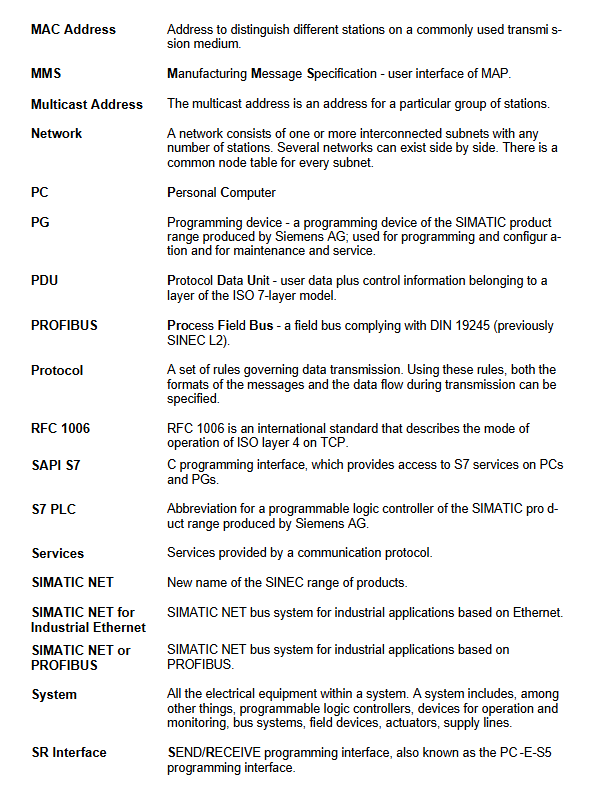
SAPI-S7: Full name “Simple Application Programmers Interface – S7”, corresponding to the 7-layer communication protocol of SIMATIC S7, supports unified access to SIMATIC S7 system, and can also be used for PROFIBUS communication

SEND/RECEIVE: also known as PC-E-S5 programming interface, communicates with S5 controller through function calls. Please refer to the dedicated interface manual to understand data structures such as request blocks

User groups and document guidelines

4.1 User groups and required experience

Experience required by user groups

S7 application users: 1. Familiar with PC operation; 2. Understand the SIMATIC S5/S7 system; 3. No programming experience required

S7/END/RCEIVE application developer 1. Familiar with PC operation; 2. Understand the SIMATIC S5/S7 system; 3. Have programming experience (C language preferred)

4.2 Recommended Must Read Documents

All users: This document (Introduction S7-1413), installation guide, product information 《Configuring the S7 mode with COML S7》

S7 Application Developer: Additional Reading of “S7 Programming Interface”

SEND/RECEIVE Application Developer: Additional Reading of “SEND/RECEIVE Programming Interface”

Related networks and terminology

SIMATIC NET communication network: including industrial Ethernet (management/unit layer, IEEE 802.3), PROFIBUS (unit/field layer, DIN 19245), AS Interface (actuator sensor layer)

Key terms: CSMA/CD (Ethernet Access Technology), CP (Communication Processor), LAN (Local Area Network), TCP/IP (Transmission Control Protocol/Internet Protocol), TSAP (Transport Service Access Point)

Key issue

Question 1: What are the software and hardware adaptation requirements for SIMATIC NET S7-1413, and which operating systems and hardware devices are only supported?

Answer: The requirements for software and hardware adaptation are clear: 1 Operating System: Only supports Microsoft Windows 95 and Windows NT 4.0 and higher versions, not compatible with other systems; 2. Hardware equipment: It must be paired with a dedicated SIMATIC NET CP 1413 network card and cannot be replaced by other network cards; 3. Extended support: Allow multiple network cards to run simultaneously with appropriate hardware configuration; 4. Network components: Industrial Ethernet communication can only be achieved with standard SIMATIC NET components such as transceivers, branch cables, and fan out units.

Question 2: What are the core differences between SAPI-S7 and SEND/RECEIVE programming interfaces, and what scenarios are they applicable to?

Answer: The core differences lie in the supported objects, functional features, and applicable scenarios: 1 Supporting objects: SAPI-S7 is specifically used to connect SIMATIC S7 programmable controllers, while SEND/RECEIVE is mainly used to connect SIMATIC S5 programmable controllers; 2. Functional features: SAPI-S7 supports asynchronous operations, automatic processing of connection establishment, integrated tracking and troubleshooting, compatible with VB/Pascal and other programs, with more user-friendly functions (such as reading and writing variables); SEND/RECEIVE is a transport layer interface that focuses on efficient communication with S5 controllers; 3. Applicable scenarios: SAPI-S7 is suitable for device status monitoring, data archiving, and other scenarios based on the S7 system, while SEND/RECEIVE is suitable for industrial automation scenarios that require integration with the S5 system. Both provide C language sample programs and call libraries for developers to integrate easily.

SINUMERIK System 800 General Interface Planning Guide

The SINUMERIK System 800 Universal Interface Planning Guide (December 1995 edition) is a technical document aimed at machine tool manufacturers, supporting multiple series of control systems such as SINUMERIK 805/810/820/840/850/880. The core content covers the technical specifications of V.24 (RS232C), 20 mA current loop, and RS 422 serial interfaces (signal definition, level polarity, drive receiving module), interface adaptation (pin allocation, transmission format setting), data transmission timing (line control/character control equipment), interface configuration of various models of control systems, as well as practical connection schemes (cable models, parameter settings, wiring diagrams) for more than 30 types of I/O devices such as printers, tape drives, and programmers. It also clarifies different types of I/O devices. The maximum transmission distance of the interface, electromagnetic compatibility requirements, and equipment adaptation principles.

Three core interface technical specifications

2.1 V.24 (RS232C) interface

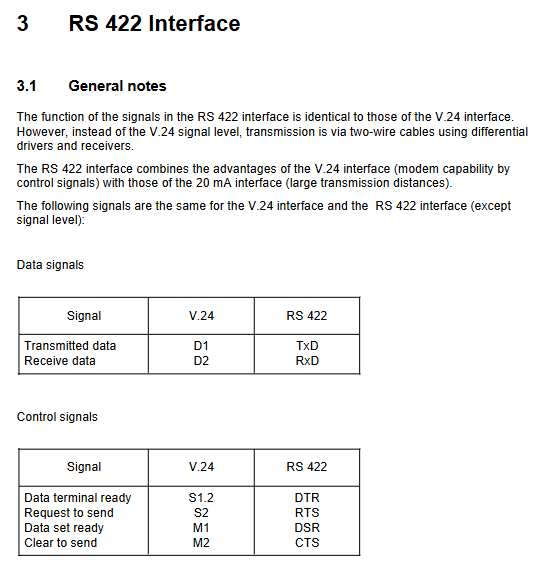
Signal definition: Following DIN 66020/CCITT V.24/V.28 standard, including data line (D1=TxD, D2=RxD), control line (S2=RTS, S1.2=DTR), message line (M1=DSR, M2=CTS), grounding line (E1=protective ground, E2=signal ground).

Level and polarity: The logic L of the data/control signal is+3~+15V, the logic H is -3~-15V, the signal reference ground is E2, and the transition interval (± 3V) state is undefined.

Drive and receive modules: Drive module 75188 (power supply ± 15V, maximum output current 10mA), receive module 75189 (maximum input voltage ± 30V, input resistance 390 Ω).

Transmission restriction: The maximum cable length is 30m and cannot be connected simultaneously with a 20mA interface.

2.2 20 mA current loop interface

Signal characteristics: transmitted as a current signal, with logic L corresponding to 20mA (± 30%), logic H corresponding to 0-2mA, and SINUMERIK providing a 12V current source.

Working mode: Duplex dual line pair, supporting SINUMERIK active (providing current)/passive (external device providing current) mode, switched through cable pin allocation.

Device connection: It is necessary to distinguish between active/passive mode wiring, and verify the 20mA current value when closing the circuit, which is equivalent to the V.24 signal function (TxD=TTY2, RxD=TTY4, etc.).

Transmission limit: Maximum cable length of 1km.

2.3 RS 422 interface

Core advantage: Combining the modulation and demodulation control capability of V.24 with the long-distance transmission advantage of 20mA, adopting dual line differential transmission.

Level specification: Drive output VoL ≤ 0.5V, VoH ≥ 2.5V, differential voltage 2~5V, reference AM26 LS 31/33 module voltage.

Drive and receive: AM26 LS 31 drive module (powered by 5V), AM26 LS 33 receive module (input parallel resistance of 150 Ω).

Extension function: Supports level conversion from V.24 to RS 422 (dedicated cable integrated converter), with a maximum transmission distance of 1km.

Interface adaptation and configuration

3.1 Pin allocation

Interface type, connector specifications, key pin functions

V. 24/20mA universal 25 pin D-Sub socket V.24:2=* TxD, 3=* RxD, 4=RTS, 5=CTS; 20mA:10=TTY2、12=T 20mA、13=TTY4

RS 422 25 pin D-Sub socket 2=* TxD, 3=* RxD, 4=RTS, 5=CTS, 15=TxD, 16=RxD

3.2 Transmission Format Settings

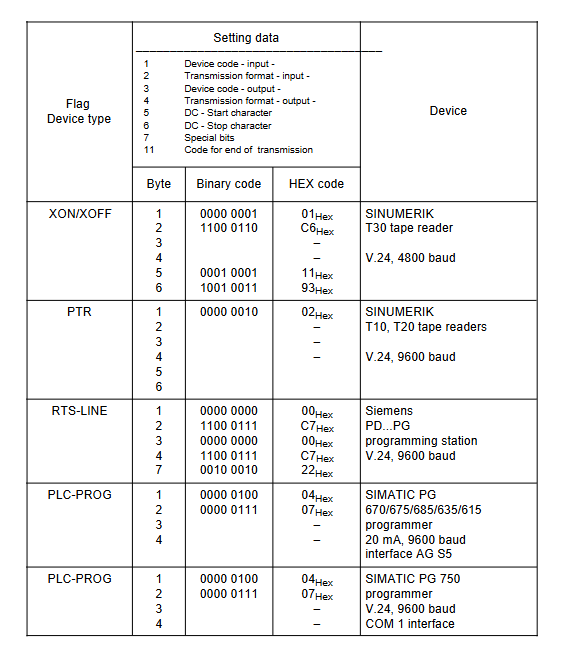
Core parameters: 15 byte set data, including device encoding (line control/character control/dedicated equipment), transmission format (baud rate 110~9600 baud, parity (presence/absence/parity), stop bits (1/1.5/2)).

Special configuration: Xon/Xoff character definition, EIA code special character substitution (@/:/=, etc.), transmission termination character setting.

Adaptation principle: Line control equipment relies on DSR/DTR/CTS/RTS lines, character control equipment relies on Xon/Xoff characters, and uncontrolled equipment adopts asynchronous transmission.

3.3 Data transmission timing sequence

Line control equipment: When inputting, NC confirms equipment readiness through DTR/DSR, and RTS controls data reception; When outputting, NC confirms that the device buffer is idle through CTS, and the transmission terminates at ETX or program end.

Character control device: When inputting, NC sends Xon to allow data transmission, Xoff pauses; When outputting, NC starts transmission after receiving Xon, and supports direct startup without first Xon (set byte 7 bit 7).

Key time limit: timeout monitoring defaults to 60 seconds (can be turned off) to avoid transmission lag.

Interface configuration of each control system

Control system model, interface quantity, interface type, special instructions

SINUMERIK 805 1 standard+1 optional standard V.24/20mA, optional V.24 (supports RS422 conversion) 25 pin D-Sub socket

SINUMERIK 810 GA3/820 GA3 1 standard+1 optional standard V.24/20mA, optional V.24 (supports RS422 conversion) operation panel front and rear interface

SINUMERIK 840 1 standard+1 optional standard V.24/20mA, optional V.24 (supports RS422 conversion) machine control panel front-end interface

SINUMERIK 850 supports up to 4 V.24/20mA/RS422 central controllers+operation panel interfaces

SINUMERIK 880 supports up to 4 V.24/20mA/RS422 slot configurations to distinguish different models

Practical Connection Scheme for I/O Devices

5.1 Equipment Classification and Adaptation List

Covering over 30 types of devices, the core categories include:

Printing equipment: Siemens PT 80/PT 88 printer

Magnetic tape/floppy disk devices: SINUMERIK T30/T40/T50/T60 tape drive, Siemens DSG 3.5/2S floppy disk drive

Programming equipment: SIMATIC PG 670/675/685/750 programmer

Data carrier: GNT 7101 NC data carrier CAN NC Recorder FD/FH

Workstation: SINUMERIK WS 800/WS 800A Programming Workstation

5.2 Connection Core Parameters (Example)

Equipment Name Interface Type Baud Rate Cable Model Key Settings

Siemens PT 80 printer V.24/20mA 300 baud 6FC9 340-8C (V.24) 8 data bits, 2 stop bits

SINUMERIK T60 tape drive V.24 9600 baud 6FC9 344-2C DIP switch 8-position OFF

SIMATIC PG 750 programmer V.24 9600 baud 6FC9 344-4R even parity, 2 stop bits

RS 422 conversion from V.24 to RS422 adaptation device 6FC9 344-2VZ maximum transmission 100m

5.3 Cable and wiring requirements

Cable specification: Shielded cable (such as 8 × 2 × 0.18mm ²), with power and control lines laid separately.

Grounding requirements: The shielding layer is grounded at both ends, and the protective grounding (E1) complies with DIN VDE 0160 standard.

Ordering information: Clearly specify the cable ordering number and maximum length (mainly 30m, some up to 100m) for each type of equipment.

Key specifications and precautions

Electromagnetic compatibility: Follow VDI 2880 guidelines, cable grouping and routing to avoid interference.

Equipment adaptation: The connection between DTE equipment (SINUMERIK) and DTE equipment requires cross wiring (sending → receiving).

Encoding conversion: Missing characters (such as @/:) in EIA codes need to be replaced by setting data definitions.

Transmission restrictions: Strictly adhere to the maximum transmission distance of each interface, and use RS 422 or conversion scheme for exceeding the distance.

SIEMENS SINUMERIK 840C SIMODRIVE 611-D Installation Instructions

SINUMERIK 840C is an installation guide for CNC systems equipped with SIMODRIVE 611-D drivers launched by Siemens (September 2001 edition), suitable for machine tool manufacturers. The core content covers system installation prerequisites and visual inspection, universal reset and standard start, PLC installation, MMC area diagnosis, machine data dialog box (MDD), various machine tool data configurations, drive servo start, axis and spindle installation, data backup and other processes. It supports multiple software versions (1. x-6. x), including standard/export versions, emphasizing the importance of safety regulations, electromagnetic compatibility requirements and data backup, while providing practical guidance such as fault diagnosis and parameter configuration.

Core installation and startup process

2.1 Installation prerequisites and visual inspection

Core prerequisites: completion of mechanical and electrical installation, PLC program pre testing, measurement system wiring, compliance of grounding system, and readiness of designated machine tool data

Visual inspection focus:

Module operation: Anti static (prohibit touching printed circuits), only power off to plug and unplug modules

Grounding system: compliant with DIN VDE 0160 standard, star connected to the central grounding point

Cable and shielding: Power cables and control cables are laid separately, and the shielding layer is grounded at both ends

Key components: compliant installation of position encoder, normal operation panel buttons/display

Voltage and Function Test: Automatically perform self check (interrupt controller, memory, CMOS, etc.) after power on, and perform consistency check on the hard drive once a week

2.2 Universal Reset and Standard Startup

Core process (software version 3 and above):

Enter universal reset mode (CSB module startup switch set to 1)

Set time and date, load machine data (configured in MDD)

Memory configuration (DRAM/SRAM allocation, supports flexible settings between 32kB-4920kB)

Exit the universal reset mode (switch set to 0), trigger power on reset

Differences between software version 2 and below: no MDD, direct input of NC/PLC machine data through soft keys, simplified axis/spindle installation process

2.3 PLC Installation and Startup

PLC CPU model: 135 WB2 (with EPROM submodule), 135 WD (no interface PLC)

Start process:

Connect PG 7xx programmer and load STEP5 program

Perform PLC universal reset and clear user memory

Save the program to an MMC hard drive (ANW-PRG file) to avoid data loss

Diagnostic methods: LED displays hardware faults, ISTACK detailed error codes, PLC status monitoring (I/O/flag/timer, etc.)

Detailed explanation of core functional modules

3.1 MMC regional diagnosis

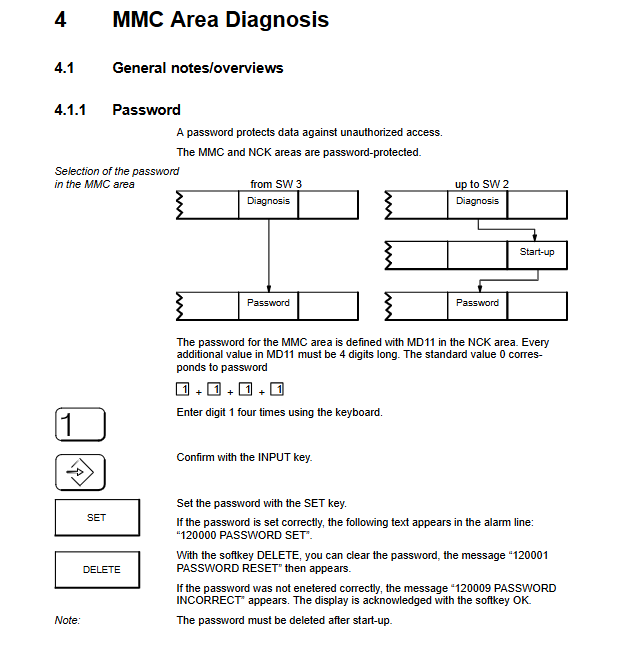
Basic features: password protection (4-digit number, default 1111), multilingual switching (German/English/French, etc.), screen hard copy (TIFF/PCX format)

Core diagnostic function:

NC service: Display service data such as axis/spindle tracking error, actual value/set value, speed set value, etc

Drive service: Monitor MSD (spindle)/FDD (feed axis) status, speed, current, temperature, etc

PC data configuration: Edit CONFIG/FEDCONF files, define language, alarm log format, screen color, etc

Backup function: Backup system/user data through VALITEK tape drive or PC link, supporting software upgrades

3.2 Machine Tool Data Dialogue Box (MDD, Software Version 3 and above)

Core function: Replace traditional list based data input and display machine tool data in actual units

Main modules:

NC configuration: Set the mode group, name, and type (linear/rotational) for channels/axes/spindles

Driver configuration: Select the FDD/MSD module model (such as 6SN112x series), motor type, and activate the module

Machine tool data: including NC/PLC/drive/cycle/IKA data, supporting search, copy, and editing

User display: Customize a list of commonly used machine tool data for easy and quick viewing

3.3 Machine Tool Data Configuration

Key content of data type

NC machine tool data general data (unit, clock), channel data, axis data (resolution, monitoring), spindle data (speed, positioning)

Drive machine tool data FDD (feed axis): motor parameters, speed controller, monitoring limits; MSD (spindle): dual motor support, magnetic flux controller

PLC machine tool data peripheral settings, alarm messages, tool management, computer link configuration

Circular machine tool data measurement/machining of center/channel related parameters of the cycle, supporting repeated calls

3.4 Shaft and spindle installation

Shaft installation:

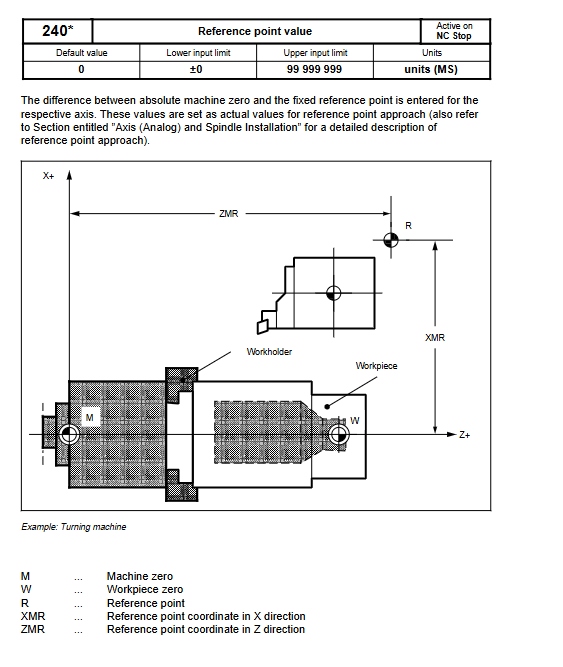
Resolution setting: Input/position control resolution coordination (e.g. 1 unit MS=2 units position control resolution)

Optimization items: Control direction check, speed setting value matching, servo gain (KV factor), drift compensation

Reference point: Supports automatic direction recognition and program controlled reference point approximation

Spindle installation:

Mode support: open-loop control, oscillation mode, positioning mode (M19 command)

Key parameters: speed limit, gear stage, encoder pulse count (e.g. 1024 pulses per revolution)

3.5 Data Backup and CPU Replacement

Backup methods: tape drive backup (system+user data), PC link backup (software version 6 and above support CD-ROM upgrade)

Backup contents: machine tool data, PLC program, user files, configuration files

CPU replacement process: reload system software after replacement, restore backup data, perform universal reset

Safety and compliance requirements

Security Level Reminder:

DANGER: May cause death/serious injury/significant property damage

Warning: May result in death/serious injury/significant property damage

CAUTION: May cause minor injury or property damage

Electromagnetic Compatibility (EMC): Follow the 6FC 3987-7DB guidelines to avoid external interference affecting the control system

Export compliance: The export version restricts specific functions and requires labeling and software version identification

​Fault diagnosis and handling

PLC malfunction: located through LED flashing frequency and USTACK error code, timeout analysis requires disabling buffer access

Drive failure: Monitor DC link status, motor temperature, pulse enable signal, and view detailed data through drive service display

Common issues: Data loss (requiring regular backup), module failure (reconfiguration after replacement), communication errors (checking bus connection)

Search for products

Back to Top
Product has been added to your cart