Call us 24/7uaedcs@163.com
Welcome to the official website of CNIACS Automation Technology Co., Ltd!
Call us 24/7uaedcs@163.com

Rockwell Automation 1757-SRM (B-series) module

Basic Information

The installation instructions for the redundant modules of the Rockwell Automation 1757-SRM series B-type ProcessLogix and ControlLogix systems are designed to guide users in installing the redundant module into the ProcessLogix or ControlLogix redundant chassis, covering the entire process of installation preparation, operation steps, fault handling, technical specifications, and more.

Important User Information and Security Standards

(1) Definition of Core Security Warning

The document specifies the meanings of different security signs to avoid operational risks, as follows:

Meaning of identification

Warning: Operating scenarios in hazardous environments that may cause explosions, resulting in personal injury, property damage, or economic loss

IMPORTANT annotation is crucial for the successful application and understanding of product information

Attention: Identify operational methods that may result in personal injury, property damage, or economic loss, and explain how to identify and avoid hazards and consequences

Labels on or inside SHOCK HAZARD equipment (such as drivers, motors) warning of hazardous voltage

Labels on or inside BURN HAZARD equipment (such as drives, motors) warning that the surface may reach dangerous temperatures

(2) Special environmental usage requirements

North American Hazardous Area Certification: Products marked as “CL I, DIV 2, GP A, B, C, D” are only applicable to Class I, Division 2, Groups A, B, C, D hazardous areas and non hazardous areas; When the system is used in combination, the overall temperature level must be determined by the temperature code with the lowest “T” number, and the equipment combination must be inspected by the local competent department.

European Hazardous Place Certification: Products marked with EEx comply with EU Directive 94/9/EC, are suitable for potentially explosive environments, must be installed in enclosures that meet at least IP54 protection level (Class I, Zone 2 environment), and can only be used in conjunction with ATEX certified backplates; At the same time, the device is not resistant to sunlight and other ultraviolet radiation, and transient interference should be prevented from exceeding the rated voltage by more than 40% in Class I Zone 2 environment.

General environmental requirements: Suitable for industrial environments with pollution level 2, overvoltage category II applications (compliant with IEC 60664-1), with no need for derating at altitudes up to 2000 meters (6561 feet); Belonging to Group A industrial equipment under the IEC/CISPR 11 standard, if appropriate protective measures are not taken, conducted and radiated interference may affect electromagnetic compatibility; The device is of an open design and needs to be installed in an enclosure that meets specific environmental requirements. The enclosure must have flame retardancy (non-metallic enclosures must reach 5VA, V2, V1, V0 or equivalent flame retardant levels), and the interior must be accessible with tools.
Module basic information and installation preparation

(1) Module core functions and appearance

Functional positioning: The 1757-SRM (B series) module is used for redundant control of ProcessLogix and ControlLogix systems, achieving communication and status synchronization between the primary and backup chassis through fiber optic connections, ensuring smooth switching in case of system failures.

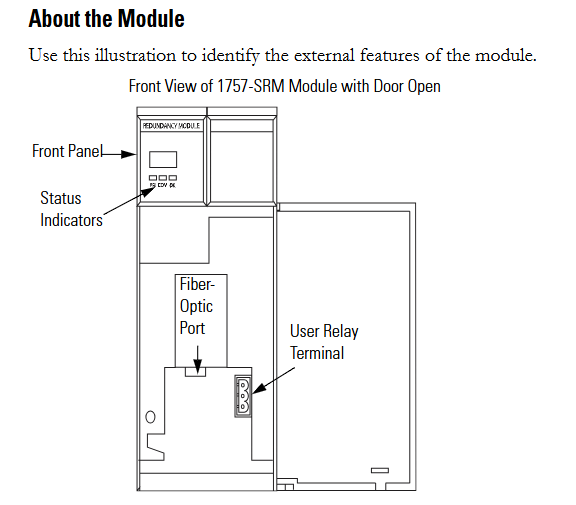
Appearance structure: The front includes status indicator lights, fiber optic ports, and user relay terminals. These components are required to achieve module status monitoring, fiber optic connections, and external device control (such as relay linkage).

(2) Preparation before installation

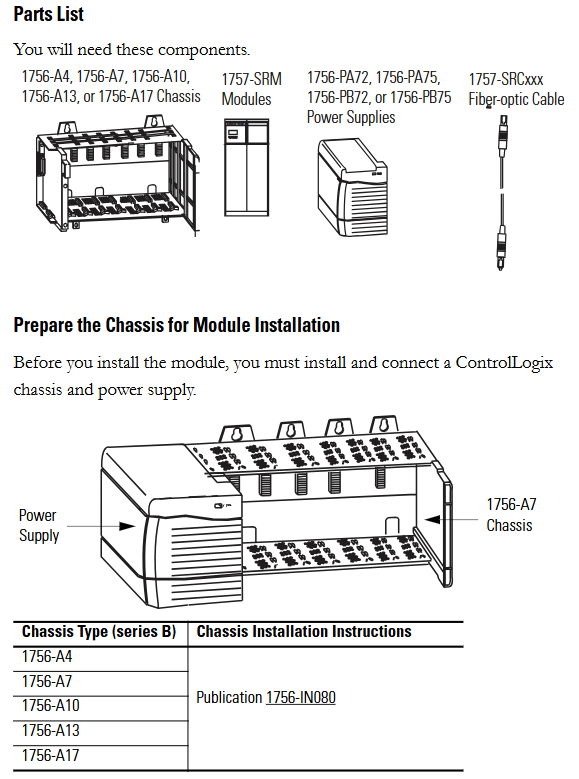
Component List: Prepare 1756-A4/A7/A10/A13/A17 series chassis, 1757-SRM module, 1756-PA72/PA75/PB72/PB75 series power supply, and 1757-SRCxxx series fiber optic cable.

Static electricity protection: The module is sensitive to static electricity. Before operation, it is necessary to touch a grounded object to release static electricity and wear a certified grounding wristband to avoid touching the connectors/pins and internal circuit components of the component board. When idle, it should be stored in anti-static packaging and an anti-static workstation should be used when conditions permit.

Chassis and power pre-processing: The ControlLogix chassis and power supply need to be installed and connected first. Different models of chassis (such as 1756-A4/A7, etc.) and power supplies (such as 1756-PA72/C, 1756-PB72/B, etc.) should refer to the corresponding installation instructions (such as 1756-IN080, 1756-IN078, etc.).

Module slot selection: The recommended slot positions for different models of chassis are different. For example, slot 1 or 2 is recommended for the 1756-A4 chassis, and slot 4 or 5 is recommended for the 1756-A7 chassis. It is necessary to strictly install according to the recommended positions to ensure normal communication and redundancy functions.
Redundant system assembly steps

(1) Core installation process

Fiber optic cable connection: Before installing the module, connect one end of the 1757-SRCxxx series fiber optic cable (available in 1m, 3m, 10m, 50m, 100m specifications) to the fiber optic port of the module; If the distance between the main and backup chassis exceeds 100 meters, customized fiber optic cables must be used. The optical loss at a wavelength of 1300nm should be ≤ 7dB, and the length should be ≤ 4 kilometers (2.49 miles). 62.5/125 micron multimode fiber optic cables and professionally installed SC connectors should be used.

Module installation: Install the 1757-SRM module into the corresponding slots on the main and backup chassis (if the main chassis is plugged into slot 5, the backup chassis also needs to be plugged into slot 5); During installation, align the upper and lower rails of the chassis, slide the module in and ensure that the backplane connector is properly connected. When the module is aligned with other installed modules, it indicates that it is installed in place; When disassembling, press the locking clips on the upper right and lower left corners of the module, and then slide the module out.

Relay terminal wiring: If using a user relay, the wire needs to be threaded through the Steward 28A2029-0A0 model ferrite core (the core should be as close as possible to the end of the wire insulation layer), then connected to a detachable terminal block, and finally inserted into the relay terminal; The relay terminals must obtain external DC power from the same line as the SRM chassis power supply and comply with UL Class 2 (North America) or CE SELV/PELV (Europe) standards.

(2) Key operations of system configuration

Firmware upgrade: Data backup is required before upgrading (upgrading will overwrite old data), from the Rockwell Automation support website( http://support.rockwellautomation.com )Download the latest firmware and ControlFLASH firmware upgrade tool; Only supply power to one redundant chassis, wait for the module to display “FACT BOOT FLSH UPDT REQ”, start the upgrade tool to complete firmware installation, and after success, the module displays “PRIM”; Repeat the operation to upgrade another chassis module. If the upgrade is interrupted, the module will display “FACT BOOT FLSH UPDT REQ” or “USER BOOT FLSH UPDT REQ” after restarting the chassis, and a new upgrade is required.

Main chassis specification and system verification:

Main chassis designation: The chassis that is powered on first automatically becomes the main chassis, the module displays “PRIM” and the PRI indicator light turns green, and the normally open contacts of the relay are closed; If both chassis are powered on simultaneously, the chassis containing the module with the smaller serial number becomes the main chassis; The initial display of the backup chassis is “DISQ” or “SYNC”, the PRI indicator light is not on, and the normally open contact of the relay is disconnected.

System verification: After the main and backup chassis are powered on, automatic verification begins to verify the hardware and firmware compatibility of the main and backup modules. If the backup chassis displays “SYNC”, it indicates compatibility between configuration and firmware; If “DISQ” is displayed, it may be due to mismatched chassis configuration, inconsistent firmware versions, different Keeper parameters of ControlNet module, or MAC address not set to the same node address. The problem needs to be investigated and resolved.

Module status monitoring and fault handling

(1) Status indicator lights and display interpretation

Module status display (four characters):

When starting, displaying “Txxx” (xxx is the hexadecimal test number) indicates self-test;

“Indicates a transitional state;

DISQ “indicates that the backup chassis has not passed validation,” SYNC “indicates that the backup chassis has passed validation, and” PRIM “indicates the main chassis;

BOOT, ERAS, and PROG respectively represent boot mode (waiting for instructions), boot mode (erasing firmware), and boot mode (loading new firmware);

‘Exxx’ (xxx is an error/fault code) indicates a major malfunction and will alternately display fault information and error codes.

Health status indicator light:

Extinguished: The module is not powered on;

Always red: module self checks during startup or serious malfunction occurs;

Flashing red: The module is updating NVS, experiencing non critical faults, or configuring incorrectly;

Evergreen: The module is running normally;

Flashing green: The module is running normally but not communicating with other modules.

Inter module communication indicator light:

Extinguish: The module is not powered on or has no communication activity;

Red flash (<1 second): The module has been started and partner communication has been established;

Frequent red: serious communication failure occurs;

Green flash: There is communication activity (sampled every 250 milliseconds).

Chassis status indicator light:

Extinguish: The module is not powered on or the chassis is in standby/fault state;

Green flash (<1 second): Power on, partner module is determining the main state;

Evergreen: The chassis is in the main engine state.

(2) Fault type and handling

Fault classification:

Minor recoverable faults: do not affect redundant operations, modules may clear on their own;

Minor unrecoverable fault: does not affect redundant operations, but has no recovery mechanism;

Serious recoverable faults: affecting redundant operations (possibly not immediate), such as backup module failures that may affect control in the event of a host failure;

Serious unrecoverable fault: fatal fault, redundant operation stopped, possible switching, module replacement required.

Common faults and solutions:

|Fault code/display | Fault description | Handling measures|

|CFG LOG ERR | Configuration log error | No action required|

|COMM RSRC ERR | Communication resource error | Reset 1757-SRM module|

|COMM ERR PRT2 | Port 2 communication error (inter module link) | Check or replace 1757-SRCxxx fiber optic cable|

|FLSH UPDT REQ | Flash update required | Use corresponding firmware version to upgrade module|

|HDW ERR | Hardware Failure | Replace 1757-SRM Module|

|WDOG FAIL | Watchdog task status check failed | Replace 1757-SRM module|

Recovery instruction: The module displays “RPLC MOD” and needs to be replaced, “RSET MOD” needs to be reset, “REMV MOD” needs to be removed, and “SEAT MOD” needs to be reinserted.

Technical specifications

(1) Module core parameters

Category parameter values

Backplane current 3.3V DC 0.75A

5.1V dc 1.0A

24V dc 0.160A

Dimensions (height x width x depth) Standard ControlLogix chassis (2 slots wide) 14.5 x 7 x 14 centimeters (5.71 x 2.76 x 5.51 inches)

Weight – Approximately 0.452 kilograms (14.53 ounces)

Shell Protection Level – None (Open)

Temperature code IEC T4

North American T4A

Maximum power consumption -11.28W

Maximum heat dissipation -38.49 BTU/hour

Isolation voltage relay terminal to system for a continuous 30V, basic insulation type (853V AC test for 60 seconds)

(2) Redundant cable parameters

Parameter values

Connector SC type (fiber optic)

Cable type 62.5/125 micron multimode fiber

1 channel (sending and receiving fiber optic)

Wavelength 1300nm

(3) User relay terminal parameters

Parameter values

Power requirement: 11-30V DC; Typical current of 270mA at 24V DC (must comply with UL Class 2 or CE SELV/PELV standards)

Guiding load rated 30V DC Class 2/SELV, 100mA

Wiring category (Port 1) 3

Suitable for solid or stranded shielded copper wires of 0.3-2.1 square millimeters (22-14 AWG), rated temperature ≥ 75 ℃ (167 ℉), with a maximum insulation layer of 1.2 millimeters (3/64 inches)

Terminal block torque 0.6-0.8 Nm (5-7 pounds inches)

(4) Environmental specifications

Parameter values

Working temperature 0-60 ℃ (32-140 ℉) (compliant with IEC 60068-2-1, 60068-2-2, 60068-2-14 standards)

Storage temperature -40-85 ℃ (-40-185 ℉) (compliant with IEC 60068-2-1, 60068-2-2, 60068-2-14 standards)

Relative humidity 5% -95% (non condensing) (in accordance with IEC 60068-2-30 standard)

Vibration (working) 2g @ 10-500Hz (compliant with IEC 60068-2-6 standard)

50g impact (non working) (compliant with IEC 60068-2-27 standard)

Impact (working) 30g (compliant with IEC 60068-2-27 standard)

Radiation emission complies with CISPR 11:1 Group A

Electrostatic immunity: 6kV for contact discharge and 8kV for air discharge (in accordance with IEC 61000-4-2 standard)

(5) Certification qualifications

The module is approved by UL (Industrial Control Equipment, document E65584) and CSA (Process Control Equipment, document LR54689C); Multiple certifications such as LR69960C, FM, CE (compliant with the 2004/108/EC EMC Directive), C-Tick (compliant with the Australian Radio Communications Act), EEx (compliant with the 94/9/EC ATEX Directive), T Ü V (functional safety certification, up to SIL 2), etc. are applicable to compliance requirements in different regions and scenarios.
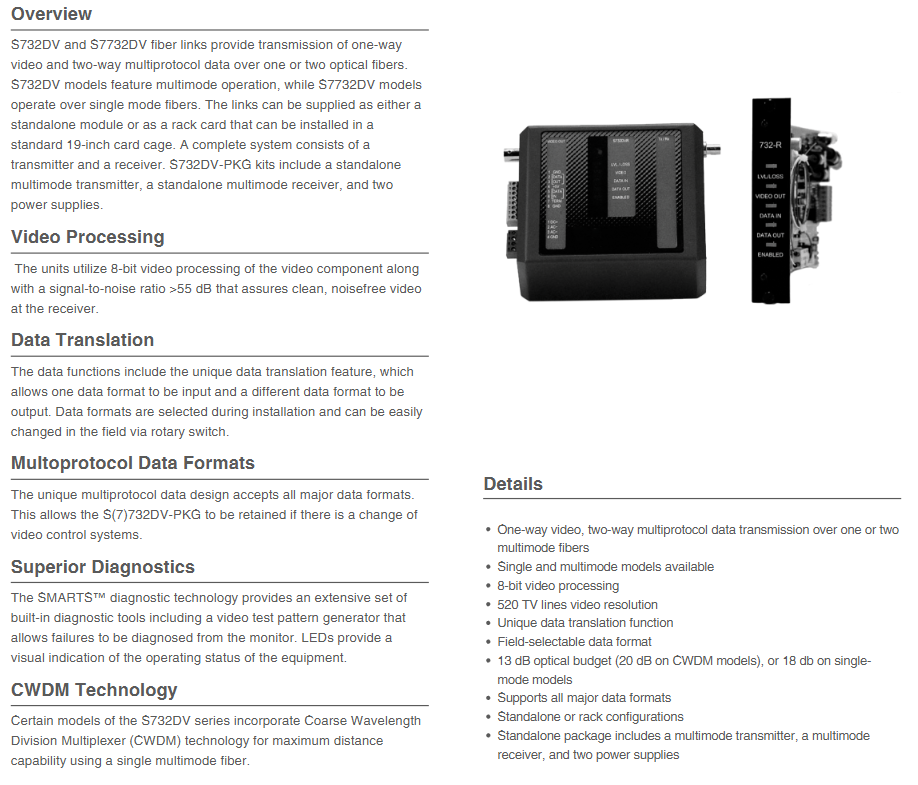
image.png

KIDDE S732DVT-EST1 Digital Video

Product Overview

KIDDE S732DVT-EST1 belongs to the S732DV series products, which together with the S7732DV series form a fiber optic link solution. Its core function is to achieve unidirectional video and bidirectional multi protocol data transmission through one to two optical fibers. Among them, the S732DV series is a multimode fiber model, and the S7732DV series is a single-mode fiber model. The product has a flexible form and can provide independent modules or rack cards suitable for standard 19 inch card cages. The complete system needs to include a transmitter and receiver; The S732DV-PKG kit is additionally equipped with an independent multi-mode transmitter, independent multi-mode receiver, and two power supplies.

Core functions and advantages

(1) Video processing

Adopting 8-bit video processing technology with a signal-to-noise ratio greater than 55dB, it can ensure clear and noise free video signals at the receiver end. At the same time, the video resolution reaches 520 TV lines, with a bandwidth of 6.5MHz, supporting both NTSC and PAL video formats. The input/output signal is a 1.0Vpp composite signal, with an input/output impedance of 75 ohms, differential phase less than 3 °, and differential gain less than 3%.

(2) Data transmission

Data conversion function: With unique data conversion features, it can input one data format and output another. During installation, the data format can be selected, and it can also be easily changed on-site by rotating the switch.

Multi protocol compatibility: The multi protocol data design is compatible with all mainstream data formats, and even if the video control system changes, S (7) 732DV-PKG can still be used.

Data parameters: including one full duplex data channel, supporting RS-232 (3-wire/5-wire), TTL, RS-422, RS-485 (2-wire/4-wire), Manchester encoding, biphase encoding, SensorNet, DTMF control and other formats. The baud rate range is 250kbps to 512kbps (depending on the data format), and the bit error rate is lower than 1.0E-9.

(3) Diagnosis and Monitoring

Equipped with SMARTS ™ Diagnostic technology, with built-in rich diagnostic tools, including a video test pattern generator, can diagnose faults through the display; Equipped with LED indicator lights, it can intuitively display the operating status of the equipment, making it convenient for users to grasp the equipment situation in real time.

(4) Special Technology

Some models of the S732DV series integrate coarse wavelength division multiplexing (CWDM) technology, which can achieve maximum transmission distance using a single multimode fiber, improving transmission efficiency and flexibility.

Technical specifications

(1) Optical parameters

Parameter details

Fiber type multimode (MM)

Number of optical fibers: 1

Fiber optic connector type ST

Mode multimode or single-mode (depending on the model)

Multi mode optical budget 13dB (CWDM model is 20dB); Single mode 18dB

The transmitter is multi-mode LED; Single mode laser

Wavelength multimode 850nm or 1300nm; CWDM models 1310nm and 1330nm; single-mode 1310nm or 1550nm (depending on the model)

The maximum transmission distance for multi-mode is 4.0 miles (6.5 kilometers) (RST1L model exceeds 7.5 miles/12 kilometers); Single mode up to 37 miles (60 kilometers) (depending on model)

Multi mode transmission power/reception sensitivity -15dBm; Single mode -10dBm/-28dBm

Gain Control Optical Automatic Gain Control (OAGC)

(2) Electrical parameters

Parameter details

Input power supply (independent unit) 24V AC or 13.5V DC (regulated)

Input power supply (rack unit) 13.5V DC (stabilized)

Current requirement 450mA

Power consumption 6W

Power factor 4 (rack unit only)

Protection against solid-state short circuits

Power supply model 615P-1/EU (order code: 188-3178/EU) or 615P-1/UK (order code: 188-3178/UK)

(3) Physical and environmental parameters

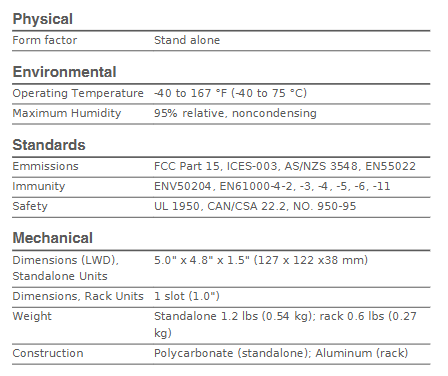
Physical specifications

Form: Independent

Independent unit size (length x width x depth): 5.0 inches x 4.8 inches x 1.5 inches (127 x 122 x 38 millimeters)

Rack unit size: 1 slot (1.0 inch)

Weight: Independent 1.2 pounds (0.54 kilograms); Rack mounted 0.6 pounds (0.27 kilograms)

Material: Independent polycarbonate; Rack mounted aluminum alloy

Environmental Specifications

Working temperature: -40 to 167 degrees Fahrenheit (-40 to 75 degrees Celsius)

Maximum humidity: 95% relative humidity (without condensation)

(4) Standard compliance

Category Compliance Standards

Radiation FCC Part 15, ICES-003, AS/NZS 3548, EN55022

Immunity ENV50204, EN61000-4-2, -3, -4, -5, -6, -11

Safety UL 1950, CAN/CSA 22.2, NO. 950-95

Foxboro Evo ™  FBM217 Discrete Input Module

Product positioning: FBM217 is a highly compatible and reliable 32 channel discrete input module, suitable for the acquisition of various switch signals (such as sensors, contactor contacts) in industrial sites. It supports single module independent operation or dual module redundant configuration, and is widely used in industries such as petrochemicals, power, and manufacturing that require high signal stability.

Product Core Features 

The FBM217 module meets the high requirements of industrial scenarios through hardware design and functional optimization, with the following core features:

Multi channel and wide voltage support:

Provides 32 discrete input channels, with a single channel that can flexibly adapt to multiple signal types: 15-60V DC (low voltage), 120V AC/125V DC (medium voltage), 240V AC (high voltage), compatible with voltage monitoring (requires external power supply) and contact detection (can use module auxiliary power supply) modes.

Support cascading of “main extension” terminal components (TA), which can increase signal access capability by extending TA and adapt to upgrade and replacement scenarios of 100 series FBM modules (such as FBM07A/B, FBM20).

Redundancy and reliability design:

Support single module or dual module redundant configuration: In redundant mode, two FBM217s share a terminal component through a redundant adapter (P0926ZY), doubling the field input current. When the module fails, it automatically switches to the backup module, ensuring uninterrupted signal acquisition.

The redundant logic is implemented by the CINR function block of Foxboro Evo control software, which synchronously reads data from two modules during each execution cycle, selects high-quality signals to participate in control, and enhances the system’s fault tolerance.

Signal processing and protection:

Programmable filtering/debounce time: supports 5 configurations of “no filtering, 4ms, 8ms, 16ms, 32ms”, which can be adjusted according to the on-site interference situation to reduce signal false triggering caused by high-frequency noise.

Terminal assembly (TA) integrated protection function: including high-voltage attenuation circuit, optocoupler isolation, current limiting device, some TAs support channel level or group level isolation (such as P0916PS/PT supporting channel isolation), withstand 600V AC (1 minute) to ground voltage, and avoid signal surge damage to the module.

Convenient maintenance and visualization:

Integrated LED indicator lights on the front panel: display module operating status (such as bus communication, power supply) and discrete status of 32 channels (on/off), intuitively locating faulty channels.

Hot swappable design: Modules can be replaced without disconnecting field wiring, power or communication cables. Under redundant configuration, replacing a single module does not affect field signal input and reduces system downtime.

Functional specification parameters 

(1) Input signal and electrical parameters

Parameter category specific specifications

32 channels, group isolation (some TAs support channel isolation)

On State voltage 15-30V DC (low voltage); 80-132V AC/75-150V DC (medium voltage); 164-264V AC (high voltage)

Off State voltage 0-5V DC (low voltage); 0-20V AC/0-20V DC (medium voltage); 0-40V AC (high voltage)

Typical input current 2.2mA (at 30V DC); 1.6mA (maximum value at high voltage)

When the source resistance limits conduction, it is ≤ 1k Ω (15V DC); When turned off, ≥ 100k Ω (30V DC)

Pulse counting capability up to 250Hz, supporting pulse signal acquisition (such as flow meter pulses)

(2) Communication and Power Supply

Communication interface: Connected to the fieldbus communication module (FCM) or control processor (FCP) through a 2Mbps module fieldbus, supporting A/B dual path redundancy, automatically switching to the backup path in case of single path failure, ensuring data transmission continuity.

Power requirements:

Input voltage: 24V DC (in redundant configuration), allowing ± 5% (upper limit) and -10% (lower limit) fluctuations.

Power consumption: maximum 3W (at 24V DC); Thermal Dissection: Maximum 5W (at 24V DC), no additional calibration required.

(3) Isolation and protective performance

Isolation level: The module and terminal assembly (TA) combination has high isolation capability, and the group isolation TA (such as P0916CA, P0924HA) can withstand 600V AC (1 minute) to ground voltage; High voltage TA (such as P0916PY, P0916QB) meets UL dielectric potential requirements, and channel isolation TA (such as P0916PS, P0916PU) further enhances anti-interference ability.

Electromagnetic compatibility (EMC): Complies with the European EMC Directive 2004/108/EC and multiple international standards, as follows:

Radiation emission: EN 50081-2 (industrial environment) CISPR 11 Class A;

Immunity: ESD (contact 4kV/air 8kV), radiation field (10V/m, 80-1000MHz), electrical fast transient (2kV, I/O/power/communication line), surge (2kV AC/DC power line, 1kV I/O/communication line), etc.

Environmental and Physical Specifications 

(1) Environmental adaptability

The FBM217 module and terminal assembly (TA) meet the requirements of harsh industrial environments, with specific parameters as follows:

Environmental Category Module (FBM217) Terminal Assembly (TA) – PVC Material Terminal Assembly (TA) – PA Material

Working temperature -20~+70 ℃ (-4~+158 ° F) -20~+50 ℃ (-4~+122 ° F) -20~+70 ℃ (-4~+158 ° F)

Storage temperature -40~+70 ℃ (-40~+158 ° F) -40~+70 ℃ (-40~+158 ° F) -40~+70 ℃ (-40~+158 ° F)

Relative humidity 5%~95% (no condensation) 5%~95% (no condensation) 5%~95% (no condensation)

Altitude work: -300~+3000m (-1000~+10000ft); Storage: -300~+12000m (-1000~+40000ft) same module same module

The pollution level complies with ISA S71.04 G3 level (harsh environment) and has passed EIA 364-65 Class III exposure testing for the same module

Vibration tolerance 0.75m/s ² (5-500Hz) same module same module

(2) Physical and installation parameters

Module size and weight:

Dimensions: Height 102mm (4in, excluding mounting ears)/114mm (4.5in, including mounting ears), Width 45mm (1.75in), Depth 104mm (4.11in);

Weight: Approximately 284g (10oz), lightweight design facilitates dense installation.

Installation method:

Module: Installed on a DIN rail base plate (supporting 4 or 8 slots), the base plate can be installed horizontally/vertically on a DIN rail, or adapted to a 19 inch rack through an installation kit; Redundant modules need to be installed in odd even positions adjacent to the base plate (such as slots 1-2 and 3-4).

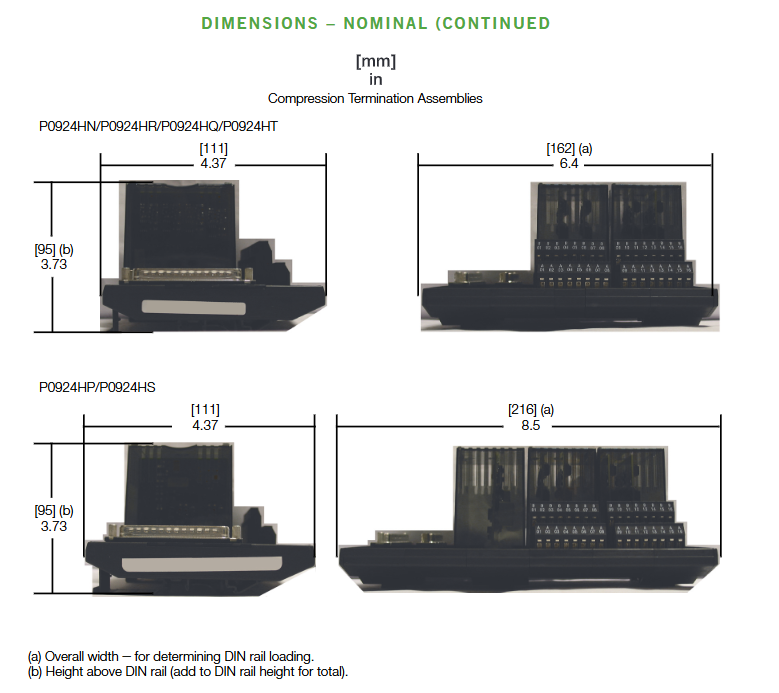
Terminal Assembly (TA): DIN rail mounting, compatible with 32mm (1.26in) and 35mm (1.38in) standard rails, supports compression terminals (24-12 AWG wires) or ring terminal blocks (22-12 AWG wires).

Cable specifications:

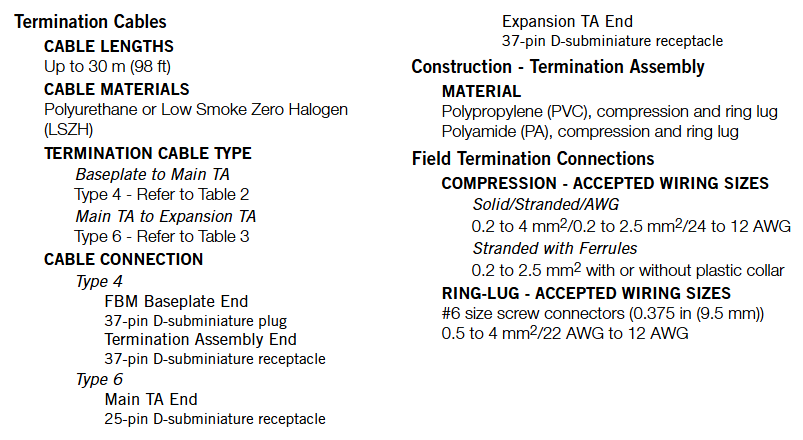
Base board to main TA: Use Type 4 cable (37 pin D-sub interface), with a maximum length of 30m (98ft), optional polyurethane (P/PVC), low smoke halogen-free (LSZH) materials, suitable for temperature resistance and environmental protection requirements in different environments;

Main TA to Extended TA: Use Type 6 cable (25 pins on the main TA end and 37 pins on the extended TA end), with a length of 0.75m (2.5ft), only available in LSZH material.

Terminal Assembly (TA) and Compatibility 

Terminal assembly (TA) is a key interface between FBM217 and on-site equipment, providing signal conditioning, isolation, and power distribution functions. Different TAs are adapted to different signal scenarios, and the core parameters are as follows:

(1) Classification and adaptation of main terminal assembly (TA)

FBM type input signal type TA model (PVC/PA material) terminal type cable type certification level

FBM217 30V DC Voltage Monitoring (Group Isolation) P0916CA/P0916CB Compression/Ring Lug Type 4 1, 2, 4

FBM217 24V DC contact detection (group isolation) P0916PW/P0916PX (PVC); P0916XZ (PA) Compression/Ring Lug Type 4 1, 2, 4

FBM217 120V AC/125V DC voltage monitoring (channel isolation) P0916PS/P0916PT (PVC); P0916YA (PA) Compression Type 4 1, 4

FBM217 120V AC/125V DC contact detection (group isolation) P0916PY/P0916PZ (PVC); P0916YB (PA) Compression/Ring Lug Type 4 1, 4

FBM217 240V AC Voltage Monitoring (Channel Isolation) P0916PU/P0916PV Compression/Ring Lug Type 4 1

FBM217 240V AC Contact Detection (Group Isolation) P0916QA/P0916QB Compression/Ring Lug Type 4 1

FBM217 replaces FBM07A (15-130V DC voltage monitoring) P0924HA compression type 4 1, 2, 4

FBM217 replaces FBM08 (120V AC/125V DC voltage monitoring) P0924HC compression type 4 1, 4

(2) Expansion Terminal Assembly (TA) adaptation

Expanding TA is used to increase the number of channels and needs to be cascaded with the main TA to adapt to the upgrade of the 100 series extended FBM module. The core models are as follows:

Compatible with 100 series extended FBM input signal specifications, extended TA model (PA material), cable type certification level

FBM12A/B (16 contacts/voltage) with main TA P0924HA P0924HB Type 6 1, 2, 4

FBM13 (16 channel voltage monitoring) with main TA P0924HC P0924HD Type 6 1, 4

FBM21 (16 channel voltage monitoring) with main TA P0924HL P0924HM Type 6 1

FBM25B (16 way contact detection) with main TA P0924HP P0924HS Type 6 1, 2, 4

(3) Certification Level Definition (Table 1)

TA certification strictly follows international safety standards, and different levels correspond to different application scenarios:

Type 1: UL/UL-C certification, suitable for Class I A-D Group 2 hazardous environments (temperature code T4); CENELEC (DEMKO) certification for Zone 2 potentially explosive environments (EEx nA IIC T4).

Type 2: In addition to Type 1, it also meets the requirements of “non flammable on-site circuits” and is compatible with Class 2 limited energy circuits (60V DC/30V AC, ≤ 100VA).

Type 4: All on-site circuits meet Class 2 limited energy requirements and require external equipment to comply with Class 2 restrictions.

Compliance Certification and System Integration 

(1) Regulatory Compliance Certification

The FBM217 module and TA have passed multiple international certifications to ensure compliant use in different regions and industries

Electromagnetic compatibility (EMC): Complies with the European EMC Directive 2004/108/EC, meets EN 50081-2 (emission), EN 50082-2 (immunity), EN 61326 (industrial grade) standards, is compatible with CISPR 11 Class A limits, and is resistant to interference such as ESD, radiated fields, and electrical fast transients.

Product safety:

UL/UL-C certification: applicable to Class I A-D Group 2 hazardous environments (T4 temperature code), as an “associated device” supplying power to non flammable circuits;

European Low Voltage Directive (2006/95/EC) and ATEX Directive (94/9/EC): CENELEC (DEMKO) certified, suitable for Zone 2 environments, supplying power to Group IIC non flammable field circuits.

(2) System integration and upgrade

100 series FBM module upgrade: FBM217 can directly replace 100 series discrete input modules (such as FBM07A/B, FBM08, FBM20), and achieve hardware compatibility and functional upgrades by adapting the corresponding TA (such as P0924HA replacing FBM07A), without the need to reconstruct on-site wiring.

Event Sequence (SOE) Integration: Supports SOE functionality for Foxboro Evo v8. x and above software, combined with GPS time synchronization (optional), enabling millisecond level event collection, storage, and reporting across control processors; Versions below v8. x require SOE implementation through ECB6 and EVENT blocks, with a time accuracy of seconds and no cross processor synchronization.

Allen-Bradley SLC 500 ™  1746 series I/O modules

Overall architecture of 1746 I/O system

(1) System composition

The 1746 I/O system is a modular expansion unit of the SLC 500 programmable logic controller, with core components including:

I/O module: Various functional modules of the 1746 series (such as digital IB/OB series, analog NI/NO series, special function modules) provide signal acquisition and control output functions for the system.

I/O rack (Chassis): includes models such as 1746-A1 (1 slot), 1746-A2 (2 slots), 1746-A7 (7 slots), 1746-A10 (10 slots), etc., used for installing modules and providing backplane buses (data and power transmission). Slot 0 is default for processor modules (such as 1747-L511), and the rest are I/O module slots.

Power modules, such as 1746-P2 (24V DC 2.0A) and 1746-P4 (24V DC 4.0A), provide stable DC power to the rack and modules. The appropriate model should be selected based on the total power consumption of the module.

Communication link: Supports industrial buses such as DH-485, ControlNet, DeviceNet, etc., to achieve data exchange between I/O modules, processors, and upper computers.

(2) System characteristics

Modular design: Modules can be combined as needed, supporting mixed installation of digital, analog, and special functional modules, and flexibly adapting to different industrial scenarios (such as manufacturing production lines and process control).

Backplane bus technology: The rack is equipped with a 16 bit data bus with a transmission rate of 1Mbps, ensuring real-time data exchange between modules. Class 1/3 interface modules can flexibly allocate memory addresses.

Environmental adaptability: The entire series of modules comply with industrial standards, with a working temperature range of 0-60 ℃ (some modules can withstand high temperatures of 60 ℃ in the rightmost slot), humidity of 5% -95% (no condensation), and adaptability to complex environments such as workshops and outdoor control cabinets.

Redundancy and Expansion: Supports multi rack expansion (connected through communication modules), and some key modules (such as power and control modules) can be configured redundantly to improve system reliability.

Module Classification and Core Features

The 1746 series I/O modules are divided into four categories according to their functions, and the core models and characteristics of each category are as follows:

(1) Digital input module

Model Channel Number Input Type Core Characteristics Typical Applications

1746-IB16 16 16 channel 24V DC sinking 4 groups isolated (4 points/group), response time ≤ 3ms, with fuse protection (Series A/B/C) button, limit switch signal acquisition

1746-IB32 32 channel 24V DC sinking 4 groups isolated (8 points/group), low-power design, suitable for high-density signal acquisition pipeline workstation status monitoring

1746-IV16 16 16 channel 24V DC sourcing has the same structure as IB16, with opposite input polarity, and is compatible with PNP type sensor photoelectric sensor signal acquisition

1746-IV32 32 channel 24V DC sourcing 32 channel high-density design, inter group isolation, supports long-term operation in harsh environments, multi state monitoring of large equipment

(2) Digital output module

Model Channel Number Output Type Core Characteristics Typical Applications

1746-OB16 16 24V DC sourcing 2 groups isolated (8 points/group), single channel maximum current 0.5A, with fuse protection small relay and indicator light control

1746-OB32 32 channel 24V DC sourcing 32 channel high-density, 2 groups isolated (16 points/group), total continuous current 8A multi actuator synchronous control

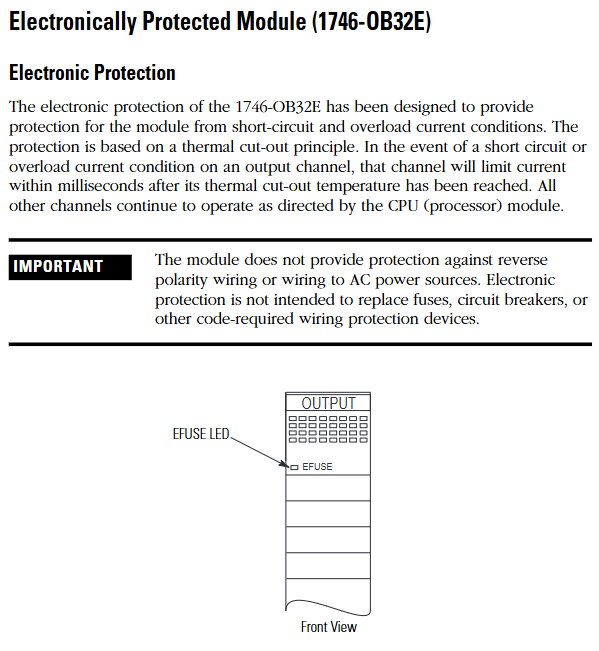
1746-OB32E 32 channel 24V DC sourcing with built-in electronic protection (short circuit, overload thermal cut-off), automatic reset of fault channels, key equipment control (requiring fault self recovery)

1746-OV16 16 channel 24V DC sinking output polarity opposite to OB16, compatible with NPN type actuators, inter group isolation solenoid valves, and small motor control

(3) Analog input module

Model Channel Number Input Signal Core Characteristics Typical Applications

1746-NI4 4-channel voltage (± 10V/0-10V, etc.), current (4-20mA, etc.) successive approximation A/D conversion, accuracy ± 0.1%, automatic temperature compensation pressure, temperature transmitter signal acquisition

1746-NI8 8-channel voltage and current, 8-channel high-density, supports single ended/differential wiring, programmable filtering (8 frequencies), multi parameter process monitoring (such as liquid level, flow rate)

1746-NR4 4-channel RTD (Pt100, Cu100, etc.) dedicated RTD signal conditioning, strong anti-interference ability, accurate ± 0.05% temperature monitoring (such as chemical reaction kettle)

1746-NT4 4-channel thermocouple (J, K, T, etc.) with built-in cold end compensation, supports open circuit detection, and is suitable for temperature acquisition in high-temperature environments such as kilns and heating furnaces

(4) Analog output module

Model Channel Number Output Signal Core Characteristics Typical Applications

1746-NO4I 4-channel current (4-20mA) D/A conversion accuracy ± 0.1%, output short-circuit protection, inter group isolation valve positioner, frequency converter control

1746-NO4V 4-channel voltage (0-10V/± 10V) with the same structure as NO4I, output type is voltage, suitable for voltage control equipment, analog speed control motor, indicator light brightness adjustment

1746-NO8V 8-channel voltage (0-10V) 8-channel high-density, total output load current ≤ 100mA, supports synchronous control of multiple devices and multi-channel analog signal output (as displayed on the dashboard)

System installation and configuration

(1) Rack and power installation

Rack selection: Choose slot positions based on the number of modules. 1746-A7 (7 slots) is suitable for small and medium-sized systems, while 1746-A10 (10 slots) is suitable for large systems; If expansion is required, multiple rack connections can be achieved through the 1747-SN module.

Power calculation: It is necessary to calculate the 5V DC and 24V DC power consumption of all modules to ensure sufficient output capacity of the power module (e.g. 1746-P2 provides 24V DC 2.0A, 1746-P4 provides 4.0A). The calculation formula is: total power consumption=∑ (5V current of each module)+∑ (24V current of each module).

Installation specifications:

The rack should be installed vertically to avoid tilting (tilt angle ≤ 5 °) and ensure good heat dissipation;

The power module should be located near the input end of the rack to reduce wire voltage drop;

The grounding resistance is ≤ 4 Ω, and the rack shell needs to be separately grounded to avoid electromagnetic interference.

(2) Module installation steps

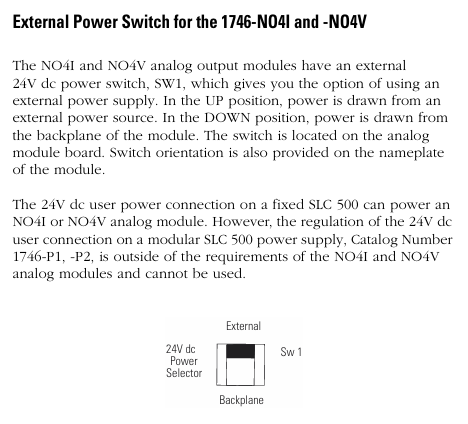
Static protection: Wear a grounding wristband before operation, store the module in an anti-static bag, and avoid touching the back panel pins.

Power off operation: Disconnect the power supply of the power rack before installation to prevent damage to the module or backplane caused by live plugging and unplugging.

Module insertion: Align the rack slot and slowly insert the module into the upper and lower self-locking tabs to secure it, without the need for additional screws; Idle slots require installation of 1746-N2 filling plates to prevent dust from entering.

Slot selection:

The processor module (such as 1747-L511) must be installed in slot 0;

Under high temperature conditions, install the heating module (such as a 32 point I/O module) in the rightmost slot (with a temperature tolerance of 60 ℃);

The analog module needs to be kept away from strong interference sources such as frequency converters and high-power motors to reduce signal fluctuations.

(3) Module address configuration

Address allocation principle:

Digital quantity module: Each 16 channel module occupies 1 input word/output word, and the 32 channel module occupies 2 input words/output words;

Analog module: Class 1 interface module (such as 1746-NI8) occupies 8 input words and 8 output words, while Class 3 interface module adds an additional status word address;

Address range: Input image area I: 0/0-I: 255/15, output image area O: 0/0-O: 255/15, avoid address overlap.

Configuration tool: Set the module ID code (such as 1746-NI8 Class 1 ID 3526) through RSLogix 500 programming software, and assign the corresponding input/output image area address. After configuration is complete, download it to the processor.

Wiring specifications and examples

(1) General Wiring Guidelines

Wire selection:

Digital module: Recommended 22-16 AWG shielded twisted pair (such as Belden 8761) to reduce electromagnetic interference;

Analog module: requires the use of twisted pair shielded wires (such as Belden 9239), with the shielding layer grounded at one end (near the signal source end) to avoid common mode interference;

Power cord: A 24V DC power supply requires the use of 18-14 AWG wires to ensure a voltage drop of ≤ 0.5V (the wire diameter needs to be increased for long-distance wiring).

Isolation and grounding:

The group isolation module needs to ensure that the common terminals (COM) of different groups are not connected together to avoid cross group short circuits;

The grounding of the analog module needs to be independent and separate from the power grounding, with a grounding resistance of ≤ 1 Ω;

The rack shell needs to be connected to the system grounding grid through grounding terminals to prevent static electricity accumulation.

Polarity and short circuit protection:

The DC module needs to strictly distinguish between positive and negative poles, and reverse connection may burn out the module (some modules have reverse connection protection);

The load end of the output module needs to be connected in series with a suitable fuse (such as 0.5A/250V) to prevent short circuit damage to the module caused by the load.

(2) Typical module wiring example

1746-IB32 (32 channel digital input):

4 sets of common terminals (COM1-COM4) correspond to channels 0-7, 8-15, 16-23, 24-31 respectively;

COM1-COM4 is connected to the negative pole of 24V DC, channels 0-31 are connected to the sensor output terminal, and+V1-V4 is connected to the positive pole of 24V DC;

When the current of a single group exceeds 2A, both common terminals of the group need to be connected simultaneously to avoid terminal overload.

1746-OB32E (32 channel digital output):

Two sets of common terminals (+V1,+V2) correspond to channels 0-15, 16-31;

+V1 and+V2 are connected to the positive pole of 24V DC, channels 0-31 are connected to the positive pole of the load, and the negative pole of the load is connected to the negative pole of 24V DC;

When a short circuit occurs, the E-Fuse LED lights up and automatically resets after the fault is removed, without the need to replace the fuse.

1746-NI8 (8-channel analog input):

Support single ended or differential wiring, single ended signals require the negative terminal of the signal to be short circuited to the common terminal (AGND);

Differential signals (such as 4-20mA) require the signal source to be positively connected to CHx (+) and negatively connected to CHx (-), with a common mode voltage of ≤± 10.5V;

The shielding layer is connected to the top shielding terminal of the module to avoid the introduction of interference signals.

Fault diagnosis and maintenance

(1) LED status diagnosis

Each module panel is equipped with status LEDs, which provide feedback on the operating status through light on/off/flashing. The core interpretation is as follows:

Module type LED identification status fault cause solution

The digital input channel light (CH0-CH31) is not on, the channel is not enabled/the wiring is disconnected/the sensor is faulty. 1. Check the configuration word to enable the channel; 2. Check the wiring and sensor power supply

Flashing open circuit/overvoltage/module internal fault 1. Measure input voltage (15-30V DC required); 2. Replace the module for testing

The digital output channel light (CH0-CH31) is not on, the channel is not enabled, the load is short circuited, and the electronic protection is triggered. 1. Check the configuration word and load; 2. Restart after removing the faulty load

OB32E E-Fuse is always on, corresponding to channel short circuit/overload. 1. Disconnect the load to check the short circuit point; 2. Wait for the module to cool down and reset automatically

Analog module status light (STATUS) flashing configuration error/over range/open circuit 1. Check the configuration word (input type/filter); 2. Measure signal range

Channel lights (CH0-CH7) flashing, channel open circuit/signal over range 1. Check wiring integrity; 2. Confirm that the signal source output is normal

(2) Common troubleshooting

Module unresponsive:

Reason: Backplane power supply failure, incorrect module insertion, incorrect address configuration;

Investigation: 1 Measure the 5V/24V voltage of the rack (in accordance with module requirements); 2. Re plug and unplug the module and check the locking of the buckle; 3. Confirm that the ID code and address allocation are correct.

Digital input signal loss:

Reason: Sensor malfunction, loose wiring, electromagnetic interference;

Investigation: 1 Measure the output voltage of the sensor (must be ≥ 15V DC conduction); 2. Re tighten the terminals; 3. Increase shielding or keep away from interference sources.

The analog signal fluctuates greatly:

Reason: Poor shielding grounding, long signal cables, and no filtering configuration;

Investigation: 1 Ensure that the shielding layer is grounded at one end; 2. Shorten cables or use signal amplifiers; 3. Reduce the filtering frequency in the configuration word (e.g. set to 1Hz).

(3) Daily maintenance suggestions

Regular inspection: Clean the module and rack dust every 3 months, check the tightness of the wiring terminals to avoid looseness and poor contact;

Environmental control: Ensure that the temperature inside the control cabinet is ≤ 60 ℃ and the humidity is ≤ 95% (without condensation). Install a cooling fan in high-temperature environments;

Spare parts management: Key modules (such as 1746-NI8, OB32E) require spare parts to be reserved for quick replacement in case of failure, reducing downtime;

Software backup: Regularly backup RSLogix 500 project files (including module configurations) to avoid recovery difficulties caused by configuration loss.

Allen-Bradley SLC 500 ™  32 channel digital I/O module

Product scope of application and requirements for hazardous environments

(1) Applicable scenarios

Environmental classification: Only applicable to Class I, Division 2 hazardous environments (Groups A, B, C, D) or non hazardous environments, prohibited for use in higher-level hazardous areas (such as Class I, Division 1).

Core restriction: Live replacement of components or wiring is prohibited in hazardous environments. Component replacement must use original factory accessories, otherwise it may damage the explosion-proof characteristics.

(2) Multi language support

The document contains bilingual hazardous environment warnings in English and French, with the French version emphasizing component replacement risks and power outage operation requirements, adapting to the compliance needs of the European market.

Module overview and installation process

(1) Module positioning

The 1746 series 32 channel digital I/O module is a dedicated module for SLC 500 chassis, which is divided into input modules (IB32, IV32) and output modules (OB32, OB32E, OV32). Its core function is to achieve bidirectional interaction between industrial field digital signals (such as sensors and actuators) and PLC, supporting 24V DC mainstream industrial voltage. It is designed according to “group isolation” (input 4 groups/8 points, output 2 groups/16 points) to reduce signal interference.

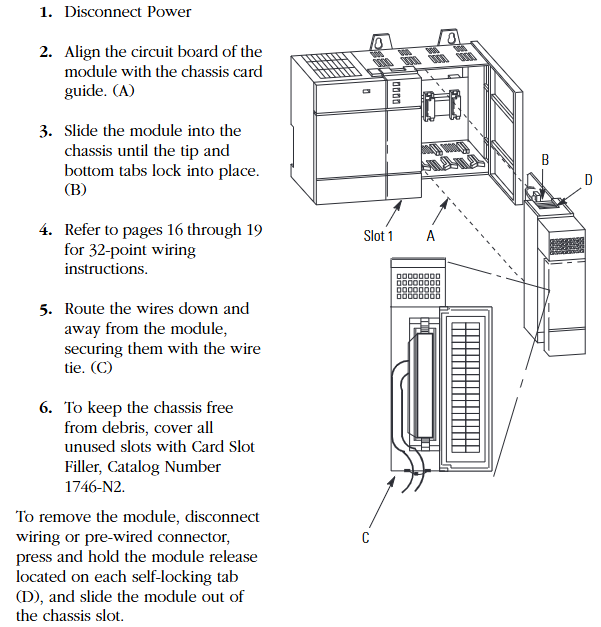
(2) Standard installation steps (power-off operation)

Power off preparation: Disconnect the chassis power supply to ensure no voltage input.

Module alignment: Align the module circuit board with the chassis card slot to avoid touching the backplane pins (to prevent static damage).

Insertion fixation: Slowly push the module into the upper and lower self-locking tabs to tighten, without the need for additional screws.

Wiring arrangement: After wiring, comb down the wires and fix them in the module slot with cable ties to avoid blocking heat dissipation or loosening.

Idle slot handling: Cover the idle slots with 1746-N2 slot filling plates to prevent dust from entering the chassis.

(3) Module disassembly

First, disconnect the external wiring or pre wired connector, press the release tabs up and down on the module, and pull out the module horizontally. Do not forcefully pull or pull it.

Core technical specifications

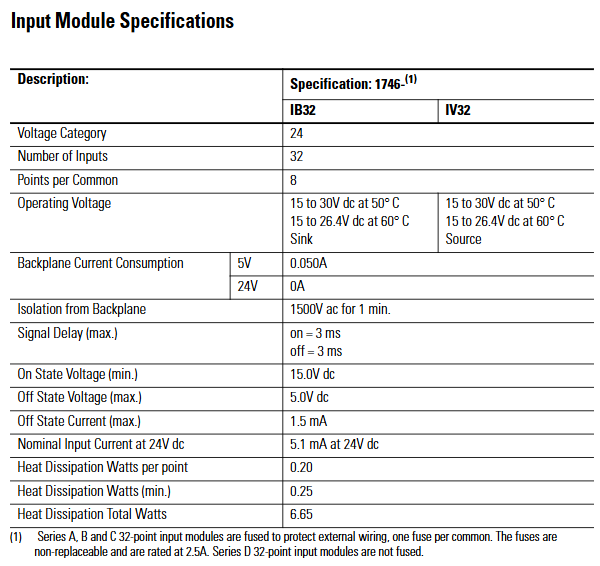
(1) Input module specifications (IB32, IV32)

Specification category 1746-IB32 (24V DC sinking input) 1746-IV32 (24V DC sourcing input)

Number of channels: 32 channels, 32 channels

8 points per group/public end (4 groups in total, isolated between groups) 8 points per public end (4 groups in total, isolated between groups)

Working voltage 15-30V DC (50 ℃), 15-26.4V DC (60 ℃) 15-30V DC (50 ℃), 15-26.4V DC (60 ℃)

Backplane current consumption 5V DC 0.050A, 24V DC 0A, 5V DC 0.050A, 24V DC 0A

Backboard isolation voltage 1500V AC (1 minute) 1500V AC (1 minute)

Signal delay (maximum) 3ms for both on/off and 3ms for both on/off

Conducting voltage (minimum) 15.0V DC 15.0V DC

Turn off voltage (maximum) 5.0V DC 5.0V DC

Turn off current (maximum) 1.5mA 1.5mA

24V DC nominal input current 5.1mA 5.1mA

Total heat dissipation power 6.65W (0.20W per point, minimum 0.25W) Total 6.65W (0.20W per point, minimum 0.25W)

Fuse protection (Series A/B/C) with 1 non replaceable 2.5A fuse per group, Series D without 1 non replaceable 2.5A fuse per group, Series D without

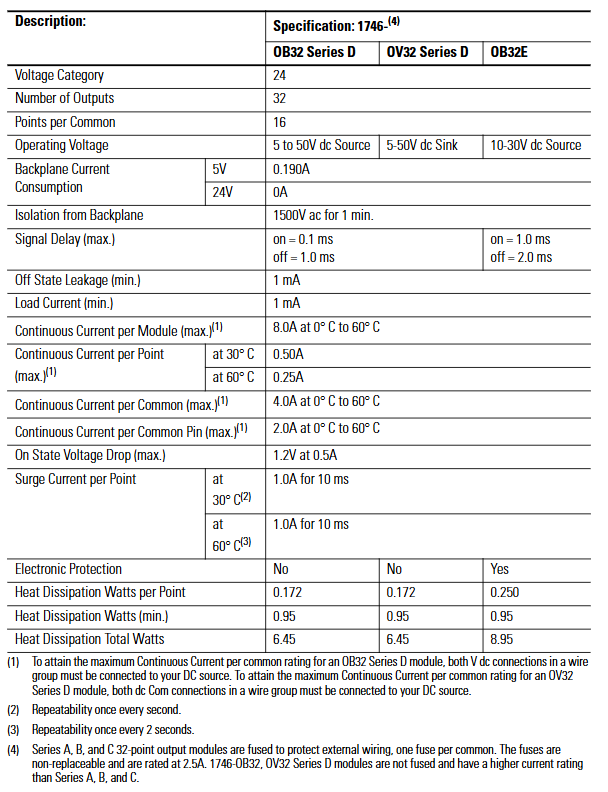
(2) Output module specifications (OB32, OB32E, OV32)

Specification category 1746-OB32 (Series D, 24V DC sourcing output) 1746-OB32E (24V DC sourcing with electronic protection) 1746-OV32 (Series D, 24V DC sinking output)

Number of channels: 32 channels, 32 channels, 32 channels

16 points per group/common end (2 groups in total, isolated between groups) 16 points per common end (2 groups in total, isolated between groups) 16 points per common end (2 groups in total, isolated between groups)

Working voltage 5-50V DC 10-30V DC 5-50V DC

Backplane current consumption 5V DC 0.190A, 24V DC 0A 5V DC 0.190A, 24V DC 0A 5V DC 0.190A, 24V DC 0A

Backboard isolation voltage 1500V AC (1 minute) 1500V AC (1 minute) 1500V AC (1 minute)

Signal delay (maximum) conducts 0.1ms, turns off 1.0ms conducts 0.1ms, turns off 1.0ms conducts 1.0ms, turns off 2.0ms

Turn off leakage current (maximum) 1mA 1mA 1mA 1mA

Minimum load current 1mA 1mA 1mA

Module total continuous current (maximum) 8.0A (0-60 ℃) 8.0A (0-60 ℃) 8.0A (0-60 ℃)

Single channel continuous current (maximum) 0.50A at 30 ℃, 0.25A at 60 ℃, 0.50A at 30 ℃, 0.25A at 60 ℃, 0.50A at 30 ℃, and 0.25A at 60 ℃

Continuous current per group (maximum) 4.0A (0-60 ℃) 4.0A (0-60 ℃) 4.0A (0-60 ℃)

Continuous current per pin (maximum) 2.0A (0-60 ℃) 2.0A (0-60 ℃) 2.0A (0-60 ℃) 2.0A (0-60 ℃)

Voltage drop during conduction (maximum) 1.2V (at 0.5A) 1.2V (at 0.5A) 1.2V (at 0.5A)

Surge current (per point) 1.0A/10ms at 30 ℃ (once per second), 1.0A/10ms at 60 ℃ (once every 2 seconds), 1.0A/10ms at 30 ℃ (once per second), 1.0A/10ms at 60 ℃ (once every 2 seconds), 1.0A/10ms at 30 ℃ (once per second), 1.0A/10ms at 60 ℃ (once every 2 seconds)

Electronic protection None (short circuit, overload thermal cut-off protection) None

The total heat dissipation power is 6.45W (0.172W per point, minimum 0.95W), 8.95W (0.250W per point, minimum 0.95W), and 6.45W (0.172W per point, minimum 0.95W)

Fuse protection (Series A/B/C): 1 non replaceable 2.5A fuse per group, Series D: None (relying on electronic protection): 1 non replaceable 2.5A fuse per group, Series D: None

Key supplement (OB32E electronic protection features)

Protection principle: Based on thermal cut-out technology, in the event of a short circuit or overload, the faulty channel limits current within milliseconds, while other channels operate normally, and the E-Fuse LED lights up to sound an alarm.

Automatic reset: After the fault is removed, the channel cools down below the threshold and automatically recovers; Or power off and restart the module to reset, without the need to manually replace the fuse.

Limitations: It does not protect against reverse polarity wiring or AC power connection, and requires external circuit breakers to meet safety regulations.

Octal Label Kit Installation (PLC Processor Only)

(1) Composition and purpose of the kit

Contains components: octal filter label, octal door label, used to replace the default decimal label of the module and adapt to the octal addressing requirements of the PLC system.

Acquisition method: It is necessary to order separately from Allen Bradley dealers, and the model must match the I/O module catalog number (refer to manual 1747-UM011 or ACIG-PL001 price list).

(2) Installation steps

Filter label: Peel off the label from the carrier paper, align the module color bar horizontally, cover decimal numbers, and press to fix.

Door label: After peeling off, directly cover the decimal label on the inside of the chassis door to ensure consistent addressing identification.

Wiring scheme and operating specifications

(1) Comes with connector wiring (Option 1:1746-N3 connector)

The components include: the module comes standard with a 40 pin female connector with keys (1746-N3) and crimping pins, supporting 22-26 AWG wires.

Pin assembly steps:

Stripping: Strip off the insulation layer of 4mm (5/32 inch) wire to expose the conductor.

Plug in: Insert the wire into the pin to the “wire stop” position.

Crimping: Use DDK 357J-5538 crimping tool (or Amp 90418-1 equivalent tool) for crimping; When there are no tools available, use sharp nose pliers to press the wire barrel and insulation barrel together, and then weld and fix them with 60% tin/40% lead rosin solder.

Fixed: Insert the pin into the connector, gently pull the wire to confirm that the “tang” is locked to prevent detachment.

Connector installation: Align the keyway of the module male connector (MIL-C-83503 standard) and lock it by pressing the upper and lower retaining arms.

(2) 1492 Wiring System (Option 2: Pre wiring Scheme)

1. System composition and advantages

Core components: 1492-CABLExx pre wired cable (with four lengths of 0.5m/1.0m/2.5m/5.0m), 1492-IFM40xx DIN rail terminal block (with/without LED status light), no need for on-site crimping, improving wiring efficiency.

Voltage drop reference (30 ℃/60 ℃):

Cable model: Voltage drop of power/common terminal wire (2A), voltage drop of output channel wire (0.5A), voltage drop of power/common terminal wire (2A), voltage drop of output channel wire (0.5A)

1492-CABLE005H 127mV 34mV 144mV 38mV

1492-CABLE10H 173mV 45mV 196mV 51mV

1492-CABLE25H 334mV 83mV 388mV 95mV

1492-CABLE50H 574mV 147mV 686mV 169mV

2. Terminal block label specifications

Label kit: The 1492 terminal block comes with multiple sets of sticker labels, indicating the module model (such as 1746-IB32) and the position of the “upper/lower” terminal block, distinguishing SLC (decimal) and PLC (octal) addressing.

Paste requirements: Select the corresponding label according to the module model and paste it on the outside of the terminal block. For example, label the “+V3” and “IN16” on the “upper” terminal block of module 1746-IV32 to ensure that the wiring corresponds.

(3) General Wiring Guidelines

Group isolation maintenance: When using the 1492 terminal block, it is necessary to choose a model that supports “group isolation” (such as with grouping partitions) to avoid signal crosstalk between different groups.

Voltage drop control: Calculate the total voltage drop (wire resistance x current x length) to ensure that the output module load terminal voltage is not lower than the minimum conduction voltage (such as 1.2V for OB32).

Public end connection:

Input module (IB32): Each group has 2 interconnected DC Com pins, which can be connected to only 1 pin; When it needs to exceed 2A, 2 should be connected.

Output module (OB32/OV32): Each group has 2+V DC (or DC Com) pins internally connected. When the current exceeds 2A, 2 pins must be connected to avoid pin overload.

Wiring diagrams and addressing instructions

(1) Core identification of diagrams

Double digit labeling: Each wiring diagram is labeled with both decimal (SLC system) and octal (PLC system) addresses, such as “IN 14” for SLC corresponding to “16 (octal)” for PLC.

Grouping division: Use “Wire Group 1-4” (input) or “Wire Group 1-2” (output) to clarify the wiring grouping, and the correspondence between the common terminal (COM1-4) and the signal terminal (IN/OUT 0-31) is clear.

(2) Typical module wiring example

1746-IB32 (sinking input):

The common terminal (DC Com 1-4) is connected to the negative terminal of 24V DC, the signal terminal (IN 0-31) is connected to the sensor output, and the+V DC 1-4 is connected to the positive terminal of 24V DC.

1746-OB32E (sourcing output with protection):

The common terminal (DC Com 1-2) is connected to the negative terminal of the load, the signal terminal (OUT 0-31) is connected to the positive terminal of the load, and the+V DC 1-2 is connected to the positive terminal of 24V DC. The E-Fuse LED corresponds to the fault channel.

Allen Bradley 1746-NI8 Analog Input Module

Product Core Positioning and Characteristics

(1) Basic positioning

1746-NI8 is an 8-channel analog input module of the SLC 500 series, used to collect DC voltage or current signals from industrial sites (such as sensor and transmitter outputs), convert analog signals into digital signals recognizable by PLC through built-in analog-to-digital (A/D) converters, achieve equipment status monitoring and process control, and adapt to fixed and modular SLC 500 processors.

(2) Core functions and hardware features

Category specific description

Hardware design -8 high impedance input channels, supporting single ended or differential wiring;

-Comes with a detachable terminal block (spare part number 1746-RT25G) for easy wiring and maintenance;

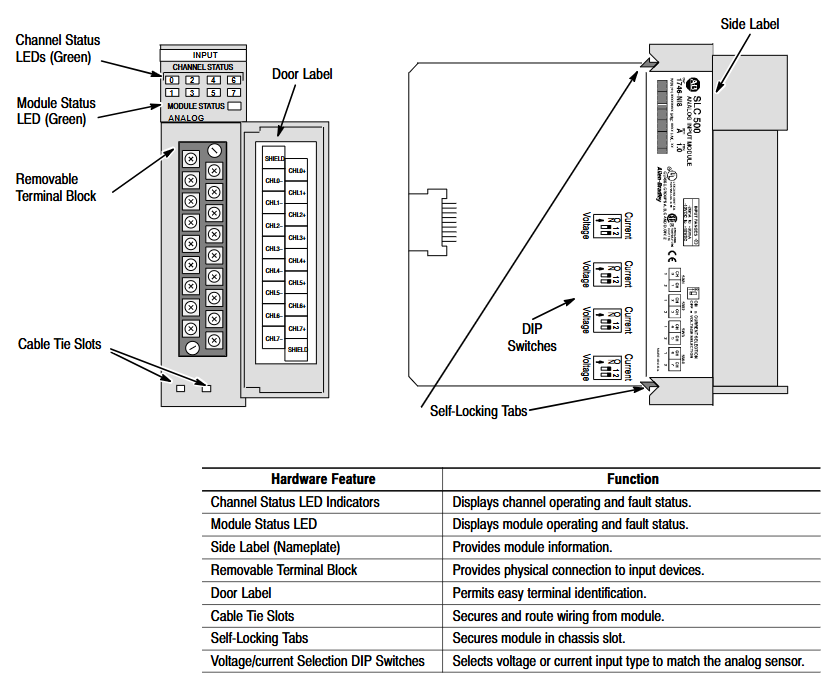
-The panel contains 9 green LED indicator lights: 8 channel status lights (corresponding to 8 input channels), 1 module status light, which intuitively displays the operation and fault status;

-Side mounted DIP switch for selecting channel input type (voltage/current).

System compatibility – supports two interface modes, Class 1 and Class 3:

-Class 1 (default): Suitable for SLC 500 fixed type, SLC 5/01/02/03/04 processors, occupying 8 output configuration words and 8 input data words;

-Class 3 (Advanced): Only compatible with SLC 5/02/03/04 processors, with additional support for user-defined scaling and channel status word monitoring, occupying 12 output configuration words and 16 input words (including 8 data words and 8 status words).

Key feature – Automatic calibration: All enabled channels undergo continuous temperature compensation and automatic calibration without the need for manual triggering;

-Fault diagnosis: supports fault detection such as open circuit, over range, and configuration errors, and provides feedback through LED and status words;

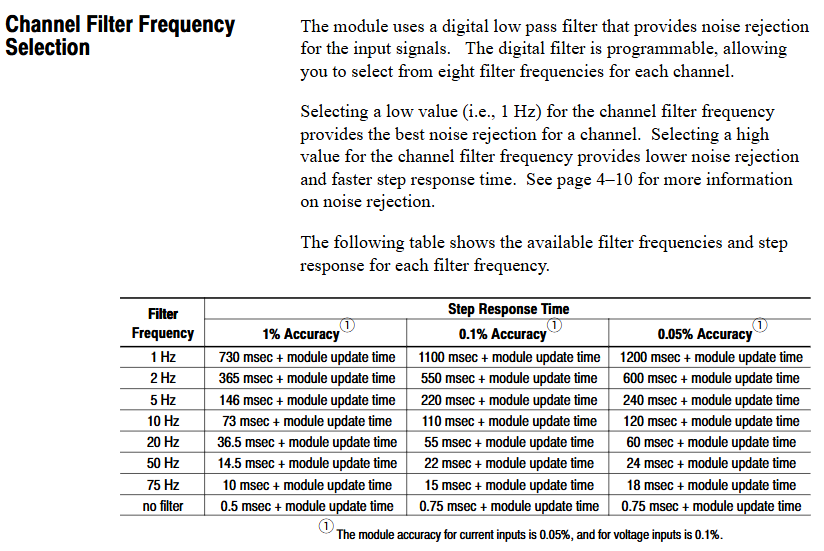
-Filtering function: Programmable digital low-pass filtering (8 frequencies to choose from), balancing noise suppression and response speed.

Quick Start Guide

For users with experience using SLC 500, a simplified deployment process is provided, with the following core steps:

Equipment preparation: Screwdrivers, analog input devices (such as sensors), shielded cables (recommended Belden 8761), SLC processors and power supplies, and programming equipment (such as RSLogix 500) need to be prepared.

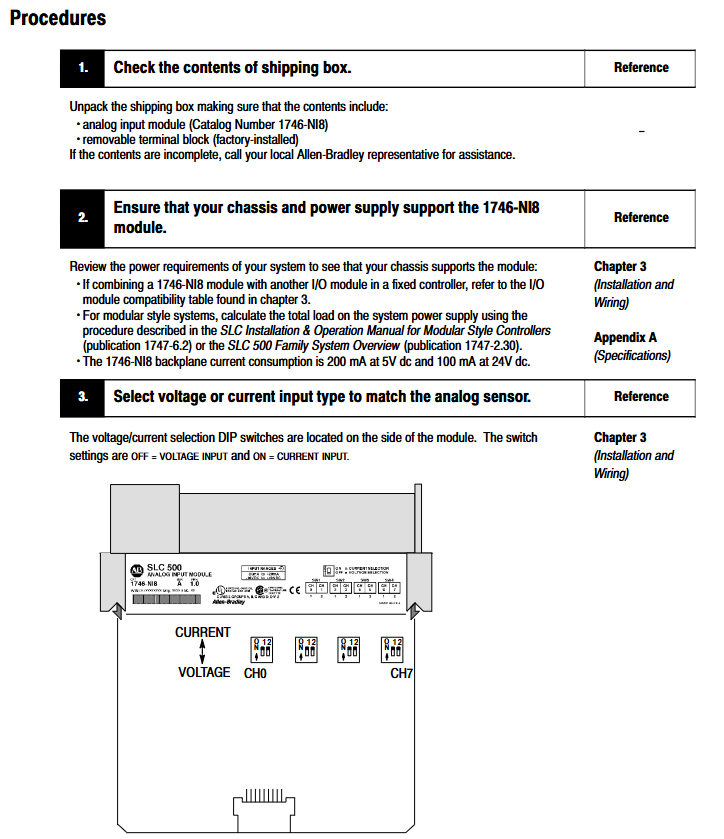
Hardware inspection: Confirm that the packaging contains 1746-NI8 modules and pre installed terminal blocks. If missing, please contact the supplier.

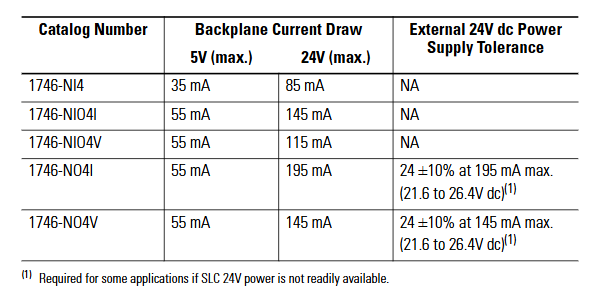
Power compatibility: The module is powered through the backplane and consumes 5V DC 200mA and 24V DC 100mA. It is necessary to ensure that the chassis power load is sufficient (refer to manual 1747-6.2 to calculate the total load).

DIP switch setting: Adjust the side DIP switch (OFF=voltage, ON=current) according to the input type (voltage/current).

Module installation: Insert the chassis into any non processor slot while powered off (it is recommended to install it in the rightmost slot in high-temperature environments for higher temperature tolerance), and tighten the self-locking buckle.

Wiring: Use shielded cables to connect the sensor to the terminal block. Single ended signals can be short circuited to the common terminal, while differential signals should pay attention to the common mode voltage (≤± 10.5V). The shielding layer should be grounded at one end (channels 0-3 should be connected to the top shielding terminal, and channels 4-7 should be connected to the bottom).

System configuration: Set the module ID code (3526 for Class 1 and 12726 for Class 3) through programming software. Class 3 requires an additional configuration of 16 input words and 12 output words.

Channel configuration: Define channel configuration words (such as input type, data format, filtering frequency) in the ladder program, and download them to the module output image area through the COPY instruction.

Startup verification: It is normal for the module status light and the enabled channel light to remain on after power on; If the light flashes or does not light up, refer to Chapter 7 for troubleshooting.

Installation and wiring

(1) Installation specifications

Static protection: Wear a grounding wristband during operation to avoid touching the back panel pins, and store in an anti-static bag when idle.

Slot selection:

Modular chassis: can be installed in any slot except slot 0 (processor slot);

Fixed expansion chassis (1746-A2): Please refer to the compatibility table (if combined with OB16 module, confirm current load), and some combinations require external power supply.

Temperature adaptation: The working temperature of the regular slot is 0-55 ℃, and the rightmost slot is 0-60 ℃. Avoid approaching high heating modules (such as 32 point I/O modules) or strong interference sources (such as frequency converters).

Installation steps: Align the upper and lower guide slots of the chassis, slowly push them into the buckle lock, and install the 1746-N2 filling plate in the idle slot.

(2) Wiring requirements

Specification for Wiring Types

The terminal block has 18 detachable terminals, including 2 shielded terminals, supporting up to 14 AWG wires, and terminal screw torque ≤ 5 lb in (0.565 Nm).

The single ended input signal is connected positively to CHx (+) and negatively to CHx (-), and the multi-channel common terminal can be short circuited to reduce wiring.

The common mode voltage of the differential input signal source should be ≤± 10.5V. It is forbidden to connect the common terminal of the signal source to the module to avoid grounding loops.

The power module does not provide sensor power and needs to be separately matched with a DC power supply of the transmitter specifications (such as 24V DC).

Run basic configuration

(1) Module identification and addressing

ID code setting: The corresponding ID code (Class 1:3526, Class 3:12726) needs to be entered in the programming software. Early versions of RSLogix 500 only supported Class 1 and need to be upgraded to v1.30+to support Class 3.

Memory Mapping:

Class 1: Output image O: e.0-O: e.7 consists of 8 channel configuration words, while input image I: e.0-I: e.7 consists of 8 channel data words;

Class 3: The output image contains an additional O: e.8-O: e.11 (2 sets of scaling upper and lower limits), and the input image I: e.8-I: e.15 consists of 8 channel status words.

(2) Key parameter calculation

Module update time: The total sampling conversion time for all enabled channels is 0.75ms for a single channel and 6.0ms for 8-channel full configuration (independent of filtering frequency).

Channel response time:

Start time (enable until status word update): 101-107ms;

Shutdown time (from disabled to data reset): 1-7ms;

Reconfigure time (modify configuration): 101-107ms (excluding data format modifications).

Filtering and Anti aliasing:

The filtering frequency determines the step response (such as achieving 1% accuracy in 730ms for 1Hz filtering, and only 0.5ms without filtering);

Aliasing frequency=1/(number of enabled channels x 0.00075), channel 1 is 1333Hz, and channel 8 is 167Hz. It is necessary to ensure that the signal frequency is lower than the aliasing frequency.

Channel configuration and data processing

(1) Detailed Explanation of Configuration Words

Each channel configuration word (16 bits) defines the channel working mode, and the key bits have the following meanings:

Description of Range Function Options

The voltage (± 10V/1-5V/0-5V/0-10V) and current (0-20mA/4-20mA/± 20mA/0-1mA) of the 0-2 input type should be consistent with the DIP switch

3-5 data format engineering unit (1mV/1 μ A step) Scaled-for-PID(0-16383)、 Proportional counting (-32768-32767), NI4 compatible format, Class 3 user-defined

6-7 open circuit state is only valid for 4-20mA, with optional zero value, upper limit value, and lower limit value

8-10 filtering frequency 000=no filtering, 001=75Hz, 010=50Hz, 011=20Hz, 100=10Hz, 101=5Hz, 110=2Hz, 111=1Hz

11 channel enable 1=enabled (participating in sampling), 0=disabled (data reset)

12-15 reservation needs to be set to 0

(2) Data scaling

The digital output of the module needs to be converted into actual engineering units (such as temperature and pressure), supporting multiple scaling methods. Examples are as follows:

Engineering unit: directly corresponding to physical quantities (such as 4-20mA corresponding to 100-500 ℃, data word 5500 → 247.5 ℃);

Scaled for PID: adapted to SLC PID instructions, 0 corresponds to lower limit, 16383 corresponds to upper limit (e.g. 4-20mA corresponds to 212-932 ° F, data word 5500 → 453.71 ° F);

User defined (Class 3): Set two sets of zoom ranges through O: e.8-O: e.11 and map them proportionally (e.g. 0-10V corresponds to 0-200psi, data word 16600 → 166psi).

(3) Status word monitoring (Class 3)

The input images I: e.8-I: e.15 are channel status words, and the key bits provide feedback on the operating status

Position 0-2: Current input type;

Position 3-5: Current data format;

Bit 11: Channel enable status (1=enabled);

Bit 12: Open circuit error (1=detected);

Bit 13: Over range error (1=input exceeds upper limit);

Bit 14: Under range error (1=input exceeds lower limit);

Bit 15: Configuration error (1=invalid configuration word).

Example of trapezoidal logic

Provide ladder diagram examples of typical programming scenarios, including:

Initialization configuration: Use the first scan bit (S: 1/15) to copy the preset configuration word (stored in the N10 file) to the module output image area (such as O: 3.0-O:3.7) through the COP instruction, and batch enable 8 channels.

PID interface: Set the channel data to Scaled for PID format and directly use it as a process variable (PV) for PID instructions without intermediate scaling (e.g. I: 3.0 → PID control block N11:23).

Fault alarm: Monitor the open circuit error bit of the Class 3 status word (such as I: 3.8/12), trigger the output point (such as O: 2.0) to drive the alarm light.

Diagnosis and troubleshooting

(1) LED status interpretation

Solution to the cause of module status light channel status light malfunction

Always on, always on. Normal operation without operation required

Constant flashing, open circuit/over range/configuration error 1. Check wiring and sensors; 2. Confirm that the configuration word is valid; 3. Check the status word to locate the error type

Extinguish module fault/not powered on 1. Check the power supply of the backplane; 2. Re plug and unplug the module; 3. Contact technical support

Constant on/off channel not enabled. Set bit 11=1 in the configuration word to enable channel

(2) Common troubleshooting

Open circuit error: Only 4-20mA channel, check for sensor disconnection, loose terminals, response time ≤ 6ms (8-channel full configuration).

Over range error: Input signal exceeds the configured type range (such as 4-20mA channel input<3.5mA or>20.5mA), calibrate sensor or adjust configuration.

Configuration error: The configuration word position setting is invalid (such as setting the data format to 110), and the configuration word needs to be redefined.

Noise interference: If the analog signal fluctuates greatly, check the shielding grounding, stay away from the power line, or reduce the filtering frequency (if set to 1Hz).

(3) Spare parts and support

Replaceable spare parts: terminal block (1746-RT25G), terminal cover (1746-R13), manual (1746-6.8);

Technical support: Module fault symptoms, LED status, image data, processor model and firmware version are required. Contact Allen Bradley customer service (Americas: 1-888-565-4155; Europe:+800-44444-8001; Asia:+86-400-842-8599).

Application examples

Provide two practical cases covering both basic and advanced scenarios:

Basic case: Monitoring single-phase motor current, 4-20mA signal corresponding to 0-100A, channel 0 set as engineering unit+10Hz filtering, program converts data into BCD format to drive LED display screen (TOD command required).

Advanced case: Multi parameter monitoring (three-phase motor current, tank pressure, liquid level), switching the display current phase sequence through a selection switch, triggering high and low level alarms when the liquid level exceeds the limit, and configuring different input types (current/voltage) for each of the 5 channels.

Rockwell 1746-IB32 Digital Input Module

Product basic positioning

Model attribution: 1746-IB32 is a digital input module of Rockwell Automation SLC 500 series programmable logic controller (PLC), mainly used for collecting discrete switch signals (such as on/off signals output by sensors, buttons, limit switches, etc.) in industrial sites, and converting them into digital signals recognizable by PLC to achieve real-time monitoring of equipment status.

Typical application scenarios: Widely used in manufacturing production lines, mechanical equipment control, process automation and other fields, such as assembly line workstation status detection, motor start stop signal acquisition, safety door switch status monitoring, etc.

Core technical specifications

(1) Input characteristics

Specification category reference parameter description

The single module supports 32 independent digital input channels and can simultaneously collect 32 switch signals. The channels are electrically isolated to avoid signal interference

The input signal type is direct current (DC), which usually supports two common industrial DC voltages: 24V DC or 120V DC (please refer to the official document for details), and is compatible with NPN or PNP sensor outputs

Input response time ≤ 1ms (typical value) to quickly respond to on-site signal changes, ensuring real-time control logic, suitable for scenarios with high response speed requirements

Low power design with input current of 7mA~10mA (per channel), reducing overall system energy consumption, and compatible with the output current range of most industrial sensors

(2) Electrical and Protection

Isolation method: Adopt channel to channel optoelectronic isolation or group isolation (such as isolation every 8/16 channels), with isolation voltage usually ≥ 250V AC (1 minute), effectively suppressing electromagnetic interference (EMI) and grounding loop problems in industrial sites.

Overvoltage/Overcurrent Protection: Some models have built-in overvoltage protection circuits (such as transient voltage suppressors TVS) and overcurrent protection (such as self recovery fuses) to prevent module damage from abnormal voltage/current on site.

(3) Physics and Installation

Dimensions: Suitable for SLC 500 series standard racks (such as 1746-A7/A10, etc.), usually designed as a “thin module”, with a width of about 32mm, a height matching the rack (about 100mm), and a depth of about 160mm (subject to official data), saving rack installation space.

Installation method: It is installed using DIN rails or directly fixed on the SLC 500 rack backplane. During installation, it is necessary to ensure that the module is reliably connected to the rack bus to ensure stable data transmission and power supply.

(4) Environmental adaptability

Working temperature: -20 ℃~60 ℃ (industrial standard), can operate stably in high and low temperature industrial environments, such as workshops, warehouses, outdoor control cabinets, and other scenarios.
Humidity range: 5%~95% RH (non condensing), suitable for humid environments, no additional moisture-proof measures required (requires overall protection of the control cabinet).

Protection level: The protection level of the module itself is usually IP20 (for panel installation), and it needs to be installed in a closed control cabinet to avoid direct contact with dust and liquids.

Functional characteristics (based on the commonality of SLC 500 series modules)

Diagnostic function: Supports channel level fault diagnosis, such as open circuit and short circuit detection. Diagnostic information can be read through PLC programming software (such as RSLogix 500) to quickly locate the faulty channel and reduce troubleshooting time.

Compatibility: Fully compatible with all SLC 500 series CPU modules (such as 1747-L511/L532, etc.), can be mixed with digital output modules (such as 1746-OB16) and analog modules (such as 1746-NI8) of the same series for installation, and build a complete control system.

Wiring method: Adopting a detachable terminal block (such as 1746-TB32 terminal board), supporting “front wiring” or “rear wiring”, the wiring operation is convenient, and the terminal block can be directly disassembled for later maintenance without dismantling the entire module.

Precautions for use

Power supply requirements: The module is powered by the SLC 500 rack backplane (usually a 5V DC logic power supply+24V DC input power supply). It is necessary to ensure that the rack power module (such as 1746-P2) outputs stably to avoid voltage fluctuations that may cause module failures.

Signal wiring: Input signal lines should be routed separately from power lines (such as motor cables) to reduce electromagnetic interference; When wiring for long distances (over 100m), shielded twisted pair cables should be selected and properly grounded.

Module address setting: If multiple modules of the same type are installed in the rack, a unique address needs to be set through the address dip switch on the module to ensure that the PLC can correctly identify each module channel.

Software configuration: In RSLogix 500, it is necessary to correctly configure the module type (select “1746-IB32”) and input filtering time (which can be set according to the on-site interference situation, such as 0.1ms~10ms) to avoid false triggering caused by high-frequency interference.

Emerson PACSystems ™  Ethernet Switch SLM082 

Product Core Overview 

(1) Product positioning

SLM082 is a powerful management industrial switch suitable for harsh industrial environments such as wide temperature, high dust, and humidity. It supports web, console (CLI), third-party SNMP software, and exclusive “PACSystems Ethernet Switch Configuration Tool” for management, and can configure multiple switches simultaneously and monitor their status.

(2) Software core functions

Specific description of functional categories

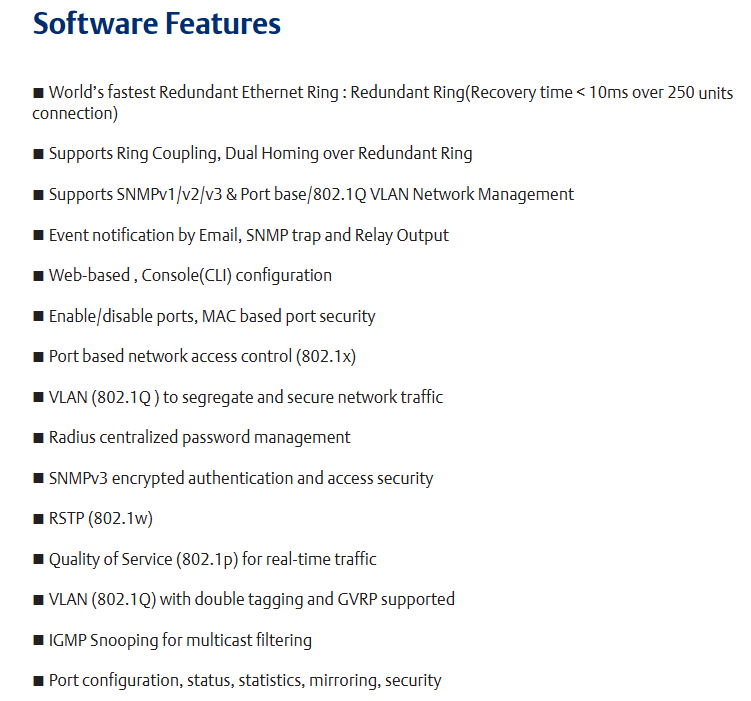
Network redundancy supports the world’s fastest redundant Ethernet ring (with a recovery time of less than 10ms when 250 devices are cascaded), enabling ring coupling and dual home topology; Compatible with RSTP (802.1w) Fast Spanning Tree Protocol

Network management supports the SNMP v1/v2/v3 protocol; Support VLAN partitioning based on port/802.1Q standards; Support LLDP (Link Layer Discovery Protocol) to automatically discover network node information

Event notifications can generate event alerts through email (SMTP), SNMP Trap, and relay output

Traffic control supports 802.1p Quality of Service (QoS) to ensure real-time traffic; Support IGMP Snooping multicast filtering to reduce network bandwidth usage

Security protection supports port enable/disable, MAC address based port security, 802.1x port authentication, and Radius centralized password management; SNPv3 encryption authentication

(3) Hardware core features

Power supply: Three redundant DC inputs.

Environmental adaptability: working temperature -40~70 ℃, storage temperature -40~85 ℃, working humidity 5%~95% (no condensation), protection level IP30.

Port configuration: 8 10/100Base-T (X) Ethernet ports (RJ45 interface), 2 100/1000Base-X SFP optical ports, and 1 Console port.

Physical dimensions: 52mm (width) x 106mm (depth) x 144mm (height).

Hardware Installation

SLM082 supports two installation methods to meet the needs of different industrial scenarios:

(1) DIN rail installation

The switch backplane comes with a DIN rail kit, which can be directly fastened to the standard DIN rail for fixation. The installation steps are simple and do not require additional drilling.

(2) Wall mounted installation

The packaging contains a wall mounted panel, which needs to be punched on the wall according to the dimensions indicated in the manual (such as aperture, hole spacing, etc.). After fixing the wall mounted panel with screws, the switch can be installed.

Hardware interface and indicator lights

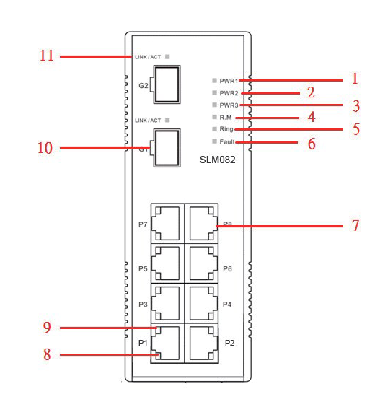
(1) Front panel interface (Table 3.1)

Interface Type Quantity Function Description

10/100Base-T (X) ports with 8 RJ45 interfaces, supporting automatic negotiation (rate/duplex mode), default rate “automatic”, duplex “automatic”, flow control “disabled”

100/1000Base-X SFP ports with 2 optical ports, used to connect fiber optic modules and support high-speed data transmission

Console port with one RJ45 interface, connected to the computer via an RS-232 adapter cable for CLI management

Press the Reset button for 5 seconds to restore the switch to factory settings

(2) Meaning of front panel indicator lights (Table 3.2)

LED identification color status description

The green constant light of PW1/PW2/PW3 corresponds to the activated power supply module (PW1/PW2) or power interface (PW3)

R. The M (Ring Master) green constant light switch is the master node (Ring Master) of the redundant ring

The redundant ring with green constant brightness has been enabled;

Slow flashing: Redundant ring topology abnormality;

Flash: Redundant ring is working normally

Fault: The yellow light is constantly on, indicating a power failure or port interruption/malfunction

10/100Base-T (X) port LNK/ACT green constant light: port link established;

Flashing: The port is transmitting data and the link and activity status of the corresponding Ethernet port

10/100Base-T (X) port Full Duplex yellow constant light port works in full duplex mode

SFP port LNK/ACT green/yellow constant light: optical port link established;

Blinking: The optical port is transmitting data, and the corresponding link and activity status of the optical port are flashing

(3) Top panel component

Terminal block: includes PW1/PW2 (12-48V DC power input) and relay output interfaces( 1A@24VDC ).

Power interface (PW3): 12-45V DC power input socket.

Reset button: Press for 3 seconds to reset the device, press for 5 seconds to restore factory settings.

Console port: RJ45 interface, used for CLI management connection.

Cable Configuration

(1) Ethernet cable

Applicable standards: 10BASE-T supports Category 3/4/5 unshielded twisted pair (UTP), while 100BASE-TX requires Category 5 UTP.

Maximum transmission distance: Both are 100m (328 feet), with RJ45 connectors.

Pin definition: In 100BASE-TX/10BASE-T cables, pins 1/2 are used for sending data and pins 3/6 are used for receiving data; Supports automatic MDI/MDI-X functionality, allowing for direct connection between computers and switches (without the need for crossovers).

(2) SFP optical module and fiber optic

Optical module type: Supports multi-mode (transmission distance 0-550m, wavelength 850nm, fiber specifications 50/125 μ m or 62.5/125 μ m) and single-mode SFP modules, with LC connectors.

Connection rule: The TX port of switch A needs to be connected to the RX port of switch B to ensure the correct transmission of optical signals.

(3) Console cable

Cable specifications: The package contains a DB-9 (female) to RJ45 cable, which is used to connect the computer COM port to the switch Console port.

Pin correspondence: Pin 2 (RD, receive data) of the computer end (DB-9 male head) corresponds to Pin 2 (TD, send data) of the DB-9 female head, Pin 3 (TD, send data) corresponds to Pin 3 (RD, receive data) of the female head, and Pin 5 (GD, ground) corresponds to Pin 5 (GD, ground) of the female head.

Web Management Configuration 

Web management is based on the built-in HTML web pages (Flash storage) of the switch, supporting IE5.0 and above browsers (with Java Applets network port permissions enabled), and compatible with both HTTP and HTTPS modes.

(1) Login preparation and default parameters

Default parameters: IP address 192.168.0.100, subnet mask 255.255.255.0, default gateway 192.168.0.254, username/password “admin”.

Login steps: Open the browser and enter “http:///device IP” or “https://device IP”. Enter the username and password to enter the management interface.

(2) Core configuration function

1. Basic Settings (5.1.5)

Switch information: System name (maximum 64 bytes), physical location, contacts, firmware version (default 1.03), kernel version (default v2.49), device MAC address, etc. can be modified.

Administrator password: Old username/password verification is required, and the new password must be at least 8 characters long, containing 1 uppercase letter, 1 number, and 1 special character (such as @ # $).

IP configuration: You can manually set IP/subnet mask/gateway/DNS, or enable DHCP clients to automatically obtain IP (if there is a DHCP server in the network).

SNTP time synchronization: After enabling the SNTP client, you can set the time zone (such as GMT Greenwich Mean Time), SNTP server IP, and support daylight saving time configuration (setting start and end times and offsets).

2. Backup and Upgrade (5.1.6)

Configure backup/restore: Back up the current configuration file (such as data.bin) through the TFTP server, or restore the configuration from the TFTP server.

Firmware upgrade: Prepare a TFTP server and store firmware files (such as image. bin). Enter the server IP and file name in the interface, click “Upgrade” to complete the upgrade (power off is prohibited during the upgrade, and the physical loop must be removed first).

3. DHCP Server (5.1.7)

Function switch: When enabled, the switch acts as a DHCP server and can assign dynamic IP addresses to LAN devices.

Parameter configuration: Set IP allocation range (such as 192.168.0.2-192.168.0.200), subnet mask, gateway DNS, And the IP lease duration (default 168 hours).

Port IP binding: A fixed IP can be assigned to a specified port to ensure that the device obtains the same IP every time it connects.

4. Port settings (5.1.8)

Port control: Set port enable/disable, rate/duplex mode (such as auto negotiation, 100 full), flow control mode (symmetric/asymmetric), and port security (only allow MAC addresses in the security list to forward data when enabled).

Rate limit: It can limit the inbound/outbound traffic of ports and support classification restrictions based on “broadcast frames”, “broadcast+multicast frames”, and “broadcast+multicast+flood unicast frames”.

Trunk port aggregation: supports static aggregation or 802.3ad LACP dynamic aggregation, merging multiple physical ports into logical links to improve bandwidth; The number of active ports in the aggregation group can be set, and the backup port will be automatically activated in case of failure.

5. Network redundancy (5.1.9)

Redundant Ring: Supports three topologies: ring, ring coupling, and dual homing. It requires specifying the “Ring Master”, “First Ring Port”, and “Second Ring Port”; Ring coupling is used to split a large ring into two small rings, reducing the impact of topological changes; Dual attribution is used to connect redundant rings and backbone switches through RSTP links.

RSTP configuration: After enabling RSTP, the bridge priority (0-61440, a multiple of 4096, with higher priority for smaller values), maximum aging time (6-40 seconds), Hello time (1-10 seconds), and forwarding delay (4-30 seconds) can be set, satisfying the formula “2 × (forwarding delay -1) ≥ maximum aging time ≥ 2 × (Hello time+1)”.

6. VLAN configuration (5.1.10)

802.1Q Tag VLAN: Based on the IEEE 802.1Q standard, cross vendor switch VLAN partitioning is achieved by inserting VLAN tags (VID) into Ethernet frames, supporting GVRP protocol automatic synchronization of VLAN configuration; By default, all ports belong to the default VLAN with VID=1 (which cannot be deleted). Ports can be set to Access (only carrying untagged frames), Trunk (only carrying tagged frames), or Hybrid (simultaneously carrying two types of frames) modes.

Port based VLAN: Logical networks are divided by ports, and only members of the same VLAN can exchange data. Ports that are not selected are automatically assigned to another VLAN; Ignore VLAN tags when enabled.

​7. Traffic priority (5.1.12)

QoS strategy: Supports “strict priority” (high priority queue data is transmitted first until empty) or “8:4:2:1 weighted fair queue” (proportionally transmitting high/medium/low/lowest priority queue data).

Priority classification:

Port based: Assign a priority level of “high/medium/low/lowest” to each port.

Based on COS/802.1p: Map to level 4 queue according to the 802.1p field values (0-7) in the frame.

Based on TOS/DSCP: Map to level 4 queue according to the TOS/DSCP field values (0-63) in the IP header.

8. Security Configuration (5.1.14)

IP Security: Only allow IPs in the ‘Secure IP List’ to manage switches through Web/SNMP.

Port security: After enabling, the port is prohibited from learning new MAC addresses and only forwards MAC frames from the security list.

MAC blacklist: Discard frames with target MAC addresses in the blacklist to prevent specific devices from receiving data.

802.1x authentication: Radius server IP, authentication port (default 1812), billing port (default 1813), shared key, etc. need to be configured, supporting four authorization modes: port “Accept”, “Reject”, “Authorize”, and “Disable”.

9. Alarm and Monitoring (5.1.15-5.1.17)

System alarms: Supports SYSLOG (local/remote server logs), SMTP email alarms, and can be triggered by events such as “system cold start”, “power status”, “SNMP authentication failure”, “redundant ring topology change”, etc; The fault relay is triggered synchronously when an alarm is triggered, and the Fault LED is constantly on.

Status monitoring: View MAC address table (dynamic/static entries, support aging time setting), port statistics (data volume, error frames, etc.), system event logs (can be refreshed/cleared), port mirroring (copy source port TX/RX data to target port monitoring).

GE IC695CRU320 redundant control unit

Product basic information

Product model: IC695CRU320

Product Name: Redundant Control Unit, belonging to GE Fanuc RX3i series programmable logic controllers (PLCs). Its core function is to provide dual machine redundant backup for PLC systems, ensuring seamless switching of backup controllers in case of main controller failure and avoiding system shutdown.

Document source: Product specifications and application manual published by NEX Instrument, focusing on hardware parameters, redundant logic, installation configuration, and compatibility instructions.

Core functions and redundancy principles

(1) Core functions

Dual machine redundant backup

Support two RX3i controllers (such as IC695CPU315/330, etc.) to form a primary and backup architecture, and achieve hardware level redundant control through IC695CPU320.

When the main controller is running normally, the backup controller synchronizes the program, data, and I/O status of the main controller in real time; When the main controller fails (such as power outage or hardware failure), the backup controller switches to the main control mode without disturbance, with a switching time of ≤ 100ms, to ensure continuous production process.

Status monitoring and diagnosis

Built in redundant status indicator lights (such as primary and backup status, synchronization status, fault alarm), visually display the operating status of the redundant system.

Support reading redundant system diagnostic information through RX3i programming software (such as Proficy Machine Edition), including switching reasons, synchronization anomalies, hardware failures, etc., for easy fault location and troubleshooting.

Flexible redundant configuration

Support the “Hot Standby” mode, where both the primary and backup controllers are powered on and running, and the backup devices are in a “ready” state instead of standby mode, improving switching speed.

Can be used with RX3i series I/O modules and communication modules, compatible with redundant I/O architectures (such as IC695RIO remote I/O modules), achieving full system redundancy coverage.

Technical specifications

(1) Hardware parameters

Specification category specific parameters

Power supply requirement input voltage:+5V DC (powered by the RX3i rack backplane, no external independent power supply required); Power consumption: ≤ 5W

Physical dimension width: 40mm (1.57 inches); Height: 100mm (3.94 inches); Depth: 160mm (6.30 inches), compatible with RX3i standard rack (such as IC695CHS012/024)

Working temperature: 0 ° C~60 ° C (operating state); -40 ° C~85 ° C (storage state)

Humidity range 5%~95% RH (non condensing, compliant with IEC 61131-2 environmental standards)

Protection level IP20 (panel installation, to be used in conjunction with control cabinet to prevent dust and liquid intrusion)

(2) Redundancy performance indicators

Performance category indicator requirements

Switching time between primary and backup: ≤ 100ms (from main controller fault detection to backup controller taking over control)

Real time data synchronization in synchronization mode (including program memory, data memory, I/O image area), with a synchronization rate of ≥ 100Mbps

Fault detection range: main controller power failure, CPU hardware failure, memory error, communication link interruption (synchronous link between main and backup)

Redundant links with built-in 2-channel high-speed synchronization interfaces (for data exchange between primary and backup controllers), supporting fiber optic or shielded twisted pair connections

Hardware composition and interfaces

(1) Hardware composition

IC695CRU320 is an independent module structure, with core components including:

Redundant control chip: responsible for determining the primary and backup status, synchronizing logic control, and triggering switching;

Synchronous communication interface: 2 RJ45 or optical ports (depending on configuration), used for data synchronization between the primary and backup controllers;

Status indicator panel: 4 LED indicator lights, meaning as follows:

RUN (green): The redundant unit is running normally;

MASTER (red): The currently connected controller is in main control mode;

STANDBY (yellow): The currently connected controller is in standby mode;

Fault (red): Redundant system failure (such as synchronization failure, module hardware error).

(2) Key interfaces

Interface Type Quantity Function Description

One rack backplane interface is inserted into the RX3i standard rack (such as IC695CHS012) and connected to the rack backplane bus to obtain power and exchange data

Two synchronous communication interfaces are connected to the main and backup controllers to achieve real-time data synchronization (supporting maximum transmission distance: 100m twisted pair cable, 2km fiber optic cable)

One reserved RS232 or Ethernet interface (some versions) for diagnostic equipment to read redundant logs

Installation and configuration requirements

(1) Installation conditions

Rack compatibility

Only compatible with RX3i series standard racks, such as IC695CHS012 (12 slots) and IC695CHS024 (24 slots), which need to be installed in the “redundant control unit dedicated slot” of the rack (usually slots 1-2 on the left side of the rack, refer to the rack manual for details).

Controller compatibility

The primary and backup controllers must be RX3i CPU modules of the same model, supporting models including IC695CPU315, IC695CPU330, IC695CPU340, and the CPU firmware version must be consistent (recommended V3.0 and above).

Environmental Requirements

The installation environment should be kept away from strong electromagnetic interference (such as frequency converters, high-power motors), and avoid sudden temperature changes or dusty/humid environments;

Reserve a heat dissipation space of ≥ 50mm around the module to ensure good heat dissipation (without forced air cooling, the ambient temperature does not exceed 55 ° C).

(2) Configuration steps

Hardware Installation

Insert IC695CRU320 into the dedicated slot of RX3i rack and tighten the panel screws;

Connect the synchronization interface between IC695CRU320 and the main and backup controllers using a synchronous cable (twisted pair or fiber optic);

Connect the power supply, I/O module, and communication module separately for the primary and backup controllers (ensuring consistent configuration of primary and backup I/O).

Software configuration (via Proficy Machine Edition)

Create a new RX3i redundancy project, select the “dual machine redundancy” architecture, specify the primary and backup CPU models and IC695CRU320 as redundant control units;

Configure synchronization parameters (such as synchronization rate, timeout) to enable the “automatic switching” function;

Download the program to the main controller, and the software will automatically trigger the synchronization of primary and backup data. After the synchronization is completed, the redundant system will enter the “normal operation” state.

Compatibility and selection suggestions

(1) List of compatible hardware

Example of compatible device types and models

RX3i Controller IC695CPU315 (Compact), IC695CPU330 (Standard), IC695CPU340 (High Performance)

RX3i rack IC695CHS012 (12 slots), IC695CHS024 (24 slots), IC695CHS008 (8 slots, small system)

Redundant I/O modules IC695RIO001 (remote I/O adapter), IC695RIO002 (redundant I/O interface module)

Communication modules IC695ETM001 (Ethernet module), IC695COM001 (RS485 module)

(2) Selection suggestions

Applicable scenarios

Industrial scenarios that require continuous operation, such as chemical production lines, power dispatch systems, water treatment equipment, etc., require a system availability requirement of ≥ 99.99%.

Selection precautions

The primary and backup controllers need to be completely consistent (model, firmware version, memory configuration) to avoid synchronization failure due to hardware differences;

If the system includes remote I/O, redundant I/O modules (such as IC695RIO002) should be used to ensure that the I/O layer also has redundancy capability;

It is recommended to use shielded twisted pair cables (short distance, ≤ 100m) or multimode optical fibers (long distance, ≤ 2km) for synchronous cables to reduce synchronization anomalies caused by interference.

Troubleshooting and Maintenance

(1) Common faults and solutions

Possible causes and solutions for the fault phenomenon

The redundant status light “FAULT” is always on. 1. The synchronization link between the primary and backup controllers is interrupted; 2. The firmware versions of the primary and backup CPUs are inconsistent; 3. CRU module hardware failure: 1. Check the synchronization cable connection and replace the faulty cable; 2. Upgrade the primary and backup CPUs to the same firmware version; 3. Replace the IC695CRU320 module

Primary/backup switching failure: 1. Backup controller data synchronization is not completed; 2. The switch enable is not turned on; 3. Inconsistent I/O configuration: 1. Wait for synchronization to complete (the synchronization light is always on to indicate completion); 2. Enable “automatic switching” in the software; 3. Verify the primary and backup I/O configurations to ensure consistency

The backup controller cannot synchronize. 1. Poor contact of the synchronization interface; 2. Memory error in the main controller; 3. CRU synchronization logic fault 1. Re plug and unplug the synchronization cable, clean the interface; 2. Restart the main controller and check the memory status; 3. Reset CRU module (via software or power off restart)

(2) Daily maintenance suggestions

Regularly (every 3 months) check the redundancy status indicator lights to confirm that the primary and backup are running normally and the synchronization link is normal;

Export redundant system diagnostic logs through Proficy Machine Edition every 6 months to analyze potential risks such as frequent synchronization failures and switching records;

Avoid plugging and unplugging CRU modules or synchronous cables while they are live to prevent hardware damage; When replacing modules, power off first to ensure that the primary and backup controllers are in a “stop” state.

Bently 3500/15 AC and DC power modules

Product basic information

Product Name: 3500/15 AC and DC Power Supplies

Brand: Bently Nevada, under Baker Hughes, used for mechanical equipment condition monitoring systems

Document Information: Technical Data Sheet for Model 141530 Rev. N

Core functions and installation features of the product

(1) Module positioning and redundancy design

Physical specifications: It is a half height module and must be installed in the designated slot on the left side of the rack.

Redundant configuration: The 3500 rack can install one or two power modules (AC and DC can be combined arbitrarily), and a single power module can supply power to the entire rack; If two are installed, the main power supply in the lower slot and the backup power supply in the upper slot can be seamlessly switched in case of a main power failure.

Hot swappable feature: As long as two power modules are installed in the rack, plugging or unplugging either module will not interrupt the rack operation.

(2) Power type and compatibility

Available power types: The 3500 series mechanical protection system supports three power options, as follows:

Universal AC Power

High Voltage DC Power Supply

Low Voltage DC Power Supply

Compatibility limitations:

Universal AC power supply and power input module (PIM) are not compatible with traditional 3500 AC power supply, high-voltage AC PIM, and low-voltage AC PIM.

High voltage DC and low-voltage DC power supplies and their corresponding PIMs are not compatible with traditional 3500 high-voltage/low-voltage DC power supplies and PIMs.

Technical specifications

(1) Input parameters

There are differences in input voltage, frequency, and other parameters among the three types of power supplies, as shown in the table below:

Power type Input voltage range Input frequency Other instructions

Universal AC power supply rated at 110-220 Vac;

Non hazardous area: 85-264 Vac rms;

Dangerous area: 85-250 Vac rms;

Peak value of 120-373 Vac pk 47-63 Hz needs to be used with universal AC PIM

High voltage DC power supply 88-140 Vdc – needs to be used with high voltage DC PIM

Low voltage DC power supply 20-30 Vdc – needs to be used with low voltage DC PIM

Additional notes

Voltage protection: Among all power options, undervoltage will not damage the power supply or PIM; Overvoltage can cause the fuse on PIM to melt.

Full rack current: Universal AC maximum 2.8 A rms; High voltage DC maximum 2.5 A; low voltage DC maximum 11.0 A.

(2) Output and indicator lights

Output function: Convert the input wide range voltage into a voltage that can be used by other 3500 modules.

Front panel indicator light (Supply OK LED): When the power module is working properly, the indicator light is on.

(3) Physical dimensions and weight

Module type, size (width x height x depth), weight

Power module 120.7 mm × 50.8 mm × 251.5 mm (4.75 in × 2.0 in × 9.9 in) 1.39 kg (3.06 lb)

Power Input Module (PIM) 120.7 mm × 25.4 mm × 114.3 mm (4.75 in × 1.0 in × 4.5 in) 0.34 kg (0.75 lb)

(4) Rack space requirements

Power module: It needs to occupy two half height slots on the left side of the rack, each slot can accommodate one power module, and supports the installation of two at the same time to achieve redundant power supply.

Power input module: It is a special half height module that is directly installed behind the corresponding power module.

Environmental and Compliance Certification

(1) Environmental restrictions

Range of environmental parameters

Working temperature -30 ° C to+65 ° C (-22 ° F to+150 ° F)

Storage temperature -40 ° C to+85 ° C (-40 ° F to+185 ° F)

Humidity 95%, no condensation

(2) Compliance and Certification

FCC certification: Complies with Part 15 of the FCC rules and meets two conditions: does not cause harmful interference; Any received interference (including interference that may cause unexpected operation) must be accepted.

EMC (Electromagnetic Compatibility):

Compliant with the EU EMC Directive 2014/30/EU.

Following standards: EN 61000-6-2 (industrial environment immunity), EN 61000-6-4 (industrial environment emission).

Electrical safety:

Compliant with the EU Low Voltage Directive 2014/35/EU.

Follow standard: EN 61010-1.

RoHS certification: Compliant with the EU RoHS Directive 2011/65/EU.

Maritime certification:

DNV GL: Classification rules for ships, offshore installations, and high-speed light vessels.

American Bureau of Shipping (ABS): Classification Criteria Rules Part 1 (Rules for Steel Ships, Rules for Offshore Installations and Structures).

Hazardous Area Certification:

CNRTLus: Class I Zone 2, AEx/Ex nA nC ic IIC T4 Gc; Class I, Zone 2, AEx/Ex ec nC ic IIC T4 Gc; Class I, Zone 2, Groups A, B, C, and D; The ambient temperature Ta is from -20 ° C to+65 ° C (-4 ° F to+149 ° F), and it needs to be installed according to drawing 149243 or 149244.

ATEX/IECEx:II 3 G,Ex nA nC ic IIC T4 Gc; Ex ec nC ic IIC T4 Gc; The ambient temperature Ta is from -20 ° C to+65 ° C (-4 ° F to+149 ° F), and it needs to be installed according to drawing 149243 or 149244.

Ordering and spare parts information

(1) Order coding rules

The ordering code format for the 3500/15 power module is “3500/15-AA-BB-CC”, and the meanings of each field are as follows:

AA (Top Slot Power Type): Includes traditional high voltage DC (88-140 Vdc), traditional low voltage DC (20-30 Vdc), universal AC (85-264 Vac rms), high voltage DC power supply, low voltage DC power supply, None.

BB (bottom slot power type): The options are the same as AA.

CC (Institutional Certification): 00 (No Certification), 01 (CSA/NRTL/C, Class I, Zone 2).

(2) Main spare parts list

Spare part number, spare part description

04310251, Universal AC Power Input Module; Power input cover screws (2 pieces/set)

129767, traditional high-voltage DC power input module; 3500/15 Power Module User Guide

118M0915-01、 Traditional high-voltage direct current power module; Replace the connector of the universal AC power input module

118M0915-02、 Traditional low-voltage DC power input module; Traditional low-voltage DC power module; Replace the connector of the DC power input module

129M0198、 High voltage direct current PIM; Low voltage DC PIM; High voltage DC power PIM (power input module) fuse replacement

-(unspecified number) Universal replacement of fuses for AC power input module and traditional high-voltage DC power input module; Universal replacement fuse for low-voltage DC power input module and traditional low-voltage DC power module (6.3 × 32 mm, fast melting type, 5A/500 Vac); Blank front panel of power module (including screws, 1 piece/set); Rear input connector cover of power module (1 piece/set, requires separate order of 04310251 screws)

Search for products

Back to Top
Product has been added to your cart