Call us 24/7uaedcs@163.com
Welcome to the official website of CNIACS Automation Technology Co., Ltd!
Call us 24/7uaedcs@163.com

Allen Bradley 1391-DES series digital AC servo drive

Basic information of the driver

Product positioning and functionality

1391-DES is a digital programmable single axis AC servo drive that is compatible with Allen Bradley 1326 series AC servo motors. It is mainly used in closed-loop positioning systems such as machine tools and automation equipment (such as IMC S-class and MAX controllers), and supports speed and torque control modes.

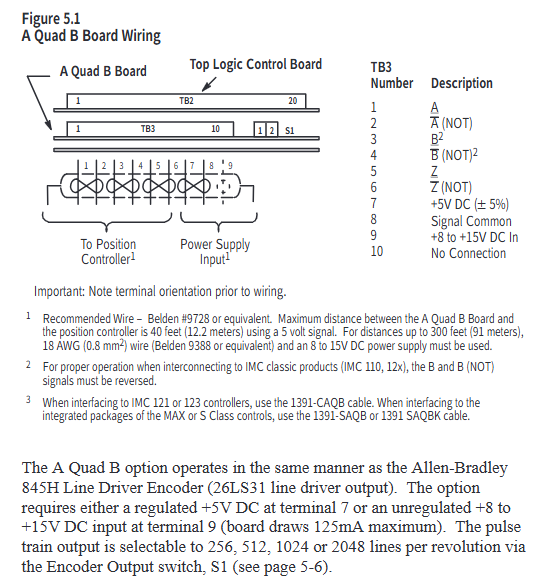
Core advantage: It can enable the 1326 motor to exceed the rated speed by 33% -50%, improving equipment accuracy and production efficiency; Equipped with encoder output (AQB), providing position feedback signals of 256/512/1024/2048 lines per revolution, compatible with positioning controllers.

Model and Key Parameters

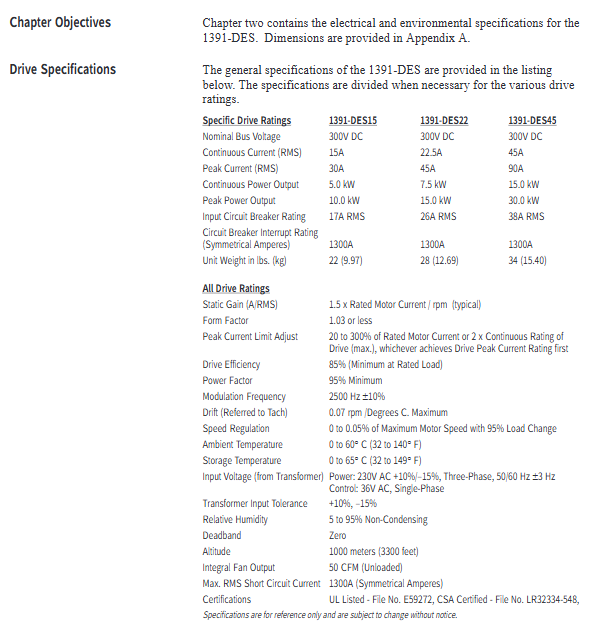
Model classification: Divided by continuous current, it is 1391-DES15 (15A), 1391-DES22 (22.5A), and 1391-DES45 (45A), all of which have the same physical dimensions but different electrical parameters.

Core electrical parameters: rated DC bus voltage of 300V DC, peak current twice the continuous current (such as DES45 peak 90A), modulation frequency of 2500Hz ± 10%, speed regulation accuracy of 0-0.05% (under 95% load variation), operating temperature of 0-60 ° C, no need to reduce capacity at altitude ≤ 1000 meters.

Standard configuration and optional features

Standard functions: Input transient voltage protection, built-in circuit breaker, DC bus shunt regulator (dissipating regenerative energy), 2-row LCD display and programming panel, torque feedforward differential input, microprocessor control board (easy to disassemble and troubleshoot).

Optional functions: Contactor auxiliary switch (for motor braking control or status indication), external shunt resistor (suitable for high regenerative energy scenarios, such as optional 386W external resistor for 22.5A drivers), speed/current monitoring output, anti backlash control, linear acceleration/deceleration module (CR-APG-001, supports 4 preset speeds).
Working principle

Core Circuit and Energy Processing

Power Conversion: Convert 3-phase 50/60Hz AC power into 300V DC bus voltage through a rectifier bridge, and then output variable voltage AC power through a PWM inverter to control motor speed and torque.

Regenerative braking: The regenerative energy generated during motor deceleration will increase the DC bus voltage. When the shunt regulator detects that the voltage exceeds the threshold (386.4V DC), it triggers the chopper transistor to conduct, converting the energy into thermal energy through the braking resistor to avoid bus overvoltage tripping (overvoltage protection threshold 405V DC).

control logic

Closed loop control: By using a motor resolver (rotary transformer) to provide feedback on the rotor position, combined with speed/torque commands, and adjusting through current and speed loops, precise control is achieved; The current loop adopts analog control, and the speed command supports ± 10V DC analog input.

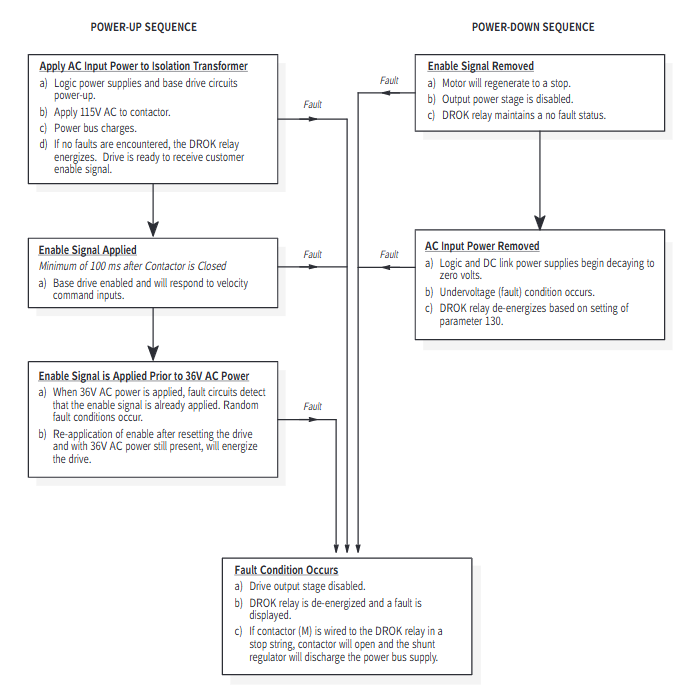
Start stop mode: includes three modes: dynamic braking (bus discharge braking when the contactor is disconnected), regenerative braking (reverse torque braking when the enable signal is disconnected), and free parking (driver disconnection output in case of fault, motor inertia parking).

Installation and wiring

Installation requirements

Environment: It needs to be installed in a closed cabinet, and ventilation should be filtered/cooled to avoid oil mist, dust, and corrosive gases; Vertical installation, distance between single driver and motor ≤ 3m, distance between main driver and frequency converter ≤ 3m when multiple drivers, distance between sub drivers and main drivers ≤ 1.5m, equipment spacing ≥ 304.8mm (to ensure heat dissipation).

Grounding: The driver housing needs to be reliably grounded, and signal grounding (such as resolver, control signal) should use a “star grounding” to avoid introducing noise into the grounding loop.

Wiring specifications

Power wiring: The motor power lines (TB5-1~3) and input power lines (TB5-4~6) need to be twisted pair, separately threaded through pipes, and the wire diameter should refer to the manual (such as 8AWG/6mm ² for DES45); The external shunt resistors (TB5-8~10) need to be matched according to the model (for example, a 45A driver requires an external 5 Ω resistor).

Signal wiring: Control signals such as speed command (TB2-1~2), enable signal (TB2-9~10), reset signal (TB2-11), etc. require 18AWG twisted pair cable with a distance of ≥ 304.8mm from the power line; resolver wiring (TB1-1~10) requires shielded wire with the shielding layer grounded at one end.

Switch and jumper settings

Split regulator duty cycle switch (SW1): adjusts the overheat protection threshold of the braking resistor, and different drivers correspond to different gears (such as setting it to “F” gear when DES22 is equipped with an external resistor).

AQB encoder output switch (S1): Select the number of output lines (256/512/1024/2048), which should match the parameters of the positioning controller (such as halving the number of lines for IMC classic controllers).
Programming and Debugging

Parameter hierarchy and operation

The parameters are divided into three levels: View level (only viewing the operating status, such as speed and current), Modify level (configuring system parameters, such as speed limit and current loop gain), and Maintenance level (advanced parameters, such as inertia compensation and friction compensation), which need to be unlocked through specific key combinations (such as simultaneously pressing the up/down/left arrow+Enter key for Maintenance level).

Core parameters: simulated speed gain (parameter 211, default 500rpm/V, can be calculated based on “maximum motor speed/maximum command voltage”), speed limit (parameters 144/145, default 10% higher than motor rated speed), current limit (parameters 156/157, default 300% motor rated current).

Start debugging process

Preliminary inspection: After confirming that the wiring is correct, power on to verify that the control voltage (± 12V DC,+5V DC) and bus voltage (300V DC) are normal and there are no fault alarms.

Guided start: When powered on for the first time, the driver automatically guides the motor model selection, rotation test (verify motor wiring, rotate clockwise/counterclockwise for 5 seconds each), and zero speed offset calibration (automatically eliminate command offset).

Auto Tune: Starting with parameter 190, the driver automatically measures the system inertia and friction coefficient, calculates the optimal speed loop gain (Kp/Ki), and is suitable for most scenarios; Manual tuning requires adjusting parameters 168 (proportional gain) and 169 (integral gain) to control the speed response overshoot within 20% -30%.

Troubleshooting and Maintenance

fault diagnosis

Fault indication: Front LED light (STATUS light flashing red=fault, green constant light=normal; ENABLE light on=driver enabled), LCD displays specific fault codes (such as “amp overttemp”=driver overheating, “resolver loss”=rotary transformer fault).

Common troubleshooting:

Overvoltage fault: Check whether the input voltage and shunt resistor are open circuited/selected incorrectly, and whether the load inertia is too large;

Rotating transformer fault: Check if the resolver wiring is loose/reversed, and if the cable length exceeds 600 feet;

Overcurrent fault: Check if the motor is short circuited, if the current limit parameter is set too low, and if the load is stuck.

Maintenance points

Regular inspection: clean the cooling fan, confirm that the wiring terminals are not loose, and that the braking resistor has no signs of overheating;

Component replacement: The fuse should be replaced according to the manual model (such as Bussmann KLM10 10A/500V for DES15), avoiding using alternative models; When replacing the control board, pay attention to ESD protection (wear an anti-static wristband).

Supporting equipment and accessories

Adaptation components

Motor: 1326AB series AC servo motor (including Torque Plus series), which needs to be matched with driver current (such as DES22 compatible with 1326AB-B3E motor);

Transformer: 1391 isolation transformer (output 230V AC 3-phase+36V AC 1-phase, such as 1391-T050DT 5kVA model), to ensure UL certification validity;

Cable: 1326 CFUxx (resolver line), 1326 CPABxx (motor power line), 1391-CAQB (AQB encoder line) and other specialized shielded cables.

attachment options

Brake power rectifier (1326-MOD-BPS): provides 115V AC input rectification for 90V DC brake;

Planetary gearbox (1326AB-PG series): compatible with different reduction ratios (3:1-100:1), low backlash option (LB) suitable for high-precision scenarios;

Linear Acceleration and Deceleration Module (CR-APG-001): Manually set trapezoidal speed curve, supporting 4 preset speeds.
Allen Bradley 1336 PLUS II Adjustable Frequency Driver

Product Core Overview

1. Basic positioning and applicable scenarios

Function positioning: Based on microprocessor, PWM AC driver is used to control the speed of three-phase motors. It adapts to various load requirements through adjustable voltage/frequency (V/Hz) or sensorless vector control, especially suitable for industrial scenarios with high requirements for torque and speed accuracy (such as fans, pumps, conveyors, etc.).

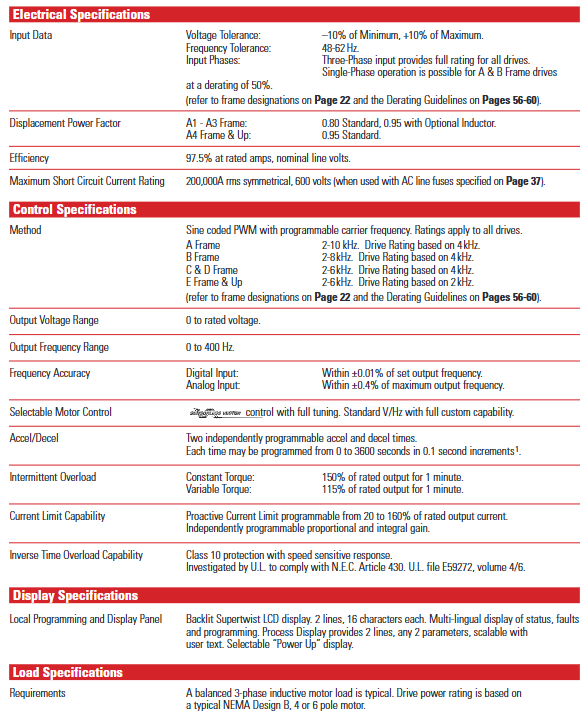
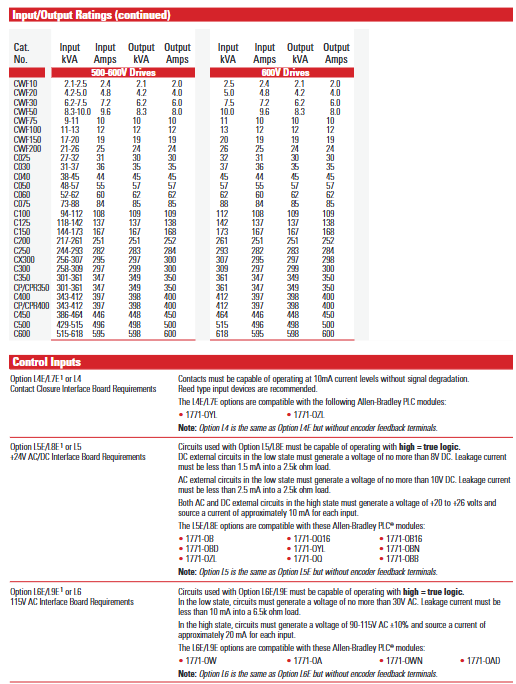
Power and voltage range: The power covers 0.37-448kW (0.5-600 horsepower) and supports three voltage levels -200-240V AC, 380-480V AC, and 500-600V AC, which can meet industrial power supply standards in different regions.

Compatibility advantage: with Allen Bradley SMC ™、 SMP ™ Power products, 1305 drivers, 1336 IMPACT ™ And 1336 FORCE ™ Vector control drivers share control interfaces and communication options to reduce system design, integration, and maintenance costs.

2. Core design highlights

Structural design: Flat construction reduces internal cables and connectors, improving reliability; Laminar busbar design reduces internal inductance, minimizes buffering losses, and optimizes IGBT performance; Removable Human Machine Interface (HIM) simplifies programming and operation.

Heat dissipation and protection: optimize thermal management through infrared testing to reduce hotspots; Supports IP20 (NEMA Type 1, Universal), IP54 (NEMA Type 12, Dustproof), IP65 (NEMA Type 4, Waterproof and Dustproof) protection levels, suitable for different industrial environments.

Global adaptation: Compliant with international standards such as UL, CSA, EN, IEC, VDE, etc., equipped with DC cooling fans, no need for transformers and voltage taps, supporting global use.

image.png

Key specification parameters

1. Electrical protection specifications

The protection threshold of drivers with different voltage levels varies, and the core protection parameters are shown in the following table:

Protection project: 200-240V driver, 380-480V driver, 500-600V driver

AC input overvoltage trip 285V AC 570V AC 690V AC

AC input undervoltage trip 138V AC 280V AC 343V AC

Bus overvoltage tripping 405V DC 810V DC 1013V DC

Bus undervoltage tripping 200V DC 400V DC 498V DC

Driver overcurrent trip (hardware) 180-250% rated current 180-250% rated current 180-250% rated current

Grounding fault tripping output terminal phase to phase grounding detection output terminal phase to phase grounding detection output terminal phase to phase grounding detection

In addition, the drive also has fault detection and trip protection functions such as overheating, encoder loss, load loss, and single-phase operation, and supports 6 types of drive alarm and fault reset inputs.

2. Environment and operating specifications

Environmental conditions: Maximum altitude of 1000m (without capacity reduction), exceeding this limit requires reference to the capacity reduction guidelines; The working temperature IP00 (open type) is 0-50 ℃, and IP20/54/65 is 0-40 ℃; Storage temperature -40-70 ℃; Relative humidity 5-95% (no condensation), shock resistance 15G peak (11ms), vibration resistance 0.006 inches displacement (1G peak).

Output performance: Output frequency range 0-400Hz, frequency accuracy (digital input) ± 0.01% set value, (analog input) ± 0.4% maximum value; Acceleration/deceleration time can be independently programmed (0-3600 seconds, 0.1 second increments); The overload capacity of constant torque load for 1 minute is 150% of the rated output, and the overload capacity of variable torque load for 1 minute is 115% of the rated output.

Core functional characteristics

1. Motor control function

Sensorless vector control: Excellent torque performance at low speeds (as low as 15rpm), with a constant torque speed range of 120:1 and a starting/accelerating torque of up to 250%. It supports motor parameter self-tuning (requires input of motor nameplate values) and is suitable for fast acceleration requirements of low inertia loads.

V/Hz control: fully programmable mode, supporting startup lifting, operation lifting, and slope adjustment for lifting, suitable for multi motor co drive scenarios (such as different power motors sharing one driver).

Slip compensation: Automatically increase the output frequency according to the load, compensate for the rotor slip of the induction motor, with a typical speed adjustment accuracy of 0.5%, to avoid speed drop caused by increased load.

Flying Start function: It can detect the speed and direction of the rotating motor without the need for an encoder, start from the current speed and transition to the commanded speed, and adapt to scenarios such as fans and pumps that require “load start”.

2. Process control and protection

Process PI controller: Through proportional (KP) and integral (KI) gain adjustment, combined with feedback scaling, error reversal, and output clamping, it achieves speed closed-loop control based on feedback signals (such as pressure and flow), supporting “automatic/manual” switching and smooth transition.

Braking function: Supports DC injection braking (programming time 0-90 seconds), dynamic braking (requires an external braking unit), and continuous holding braking (sets the “Ramp to Hold” mode, outputs the set current at zero frequency until the start command or enable is disconnected).

Power outage response: Supports two modes of “line loss fault enable/disable”. When there is a line loss, the operation is maintained through DC bus energy storage. When the bus voltage drops to 85% of the rated value, the output is turned off. After power is restored, it can be restarted through methods such as flying start and detecting motor voltage.

3. Monitoring and Diagnosis

Real time monitoring: Display output current, voltage, frequency, temperature and other parameters through HIM’s backlight ultra twisted LCD (2 lines x 16 characters), supporting multilingual switching; The “Process Display” mode allows customization of display units and parameter combinations (such as “121.6 In/min” and “2.7AmPs”).

Fault recording and diagnosis: Cache the last 4 faults and automatically start the fault diagnosis program upon startup; When there is a malfunction, display a prompt in _plain language_ (such as “Undervolt Fault” or “Overtemp Fault”) and report the status through the HIM or SCANPort communication port.

Installation and Wiring Guide

1. Installation requirements

Size and weight: There are significant differences in the size of drivers with different frames (A1-G). Taking IP20 (NEMA Type 1) as an example, A1 frame size is 215.9 × 290.0 × 160.0mm (width × height × depth), weighing 4.31kg; G frame size is 635.0 × 2324.1 × 508.3mm, weighing 453.6kg (please refer to the specific frame size table).

Installation spacing: At least 152.4mm (6 inches) of ventilation space should be reserved on both sides and the back; The F-frame drive requires additional side/back space, and when the open drive is installed in the user housing, it needs to be equipped with two 725 CFM fans (BPR series requires fans of 450 CFM or above).

2. Wiring specifications

Power wiring (TB1 terminal): input terminals R (L1), S (L2), T (L3), output terminals U (T1), V (T2), W (T3), DC bus terminal+DC/- DC, grounding terminals PE (protective ground), TE (shielding ground); 75 ℃ copper wire is required, with different wire diameters for different frame terminals (maximum 5.3mm ²/10AWG for A1-A4 frame, maximum 303.6mm ²/600MCM for G frame), and torque must comply with specifications (such as 1.81N/m/16lb in for A1-A4 frame).

Control and signal wiring:

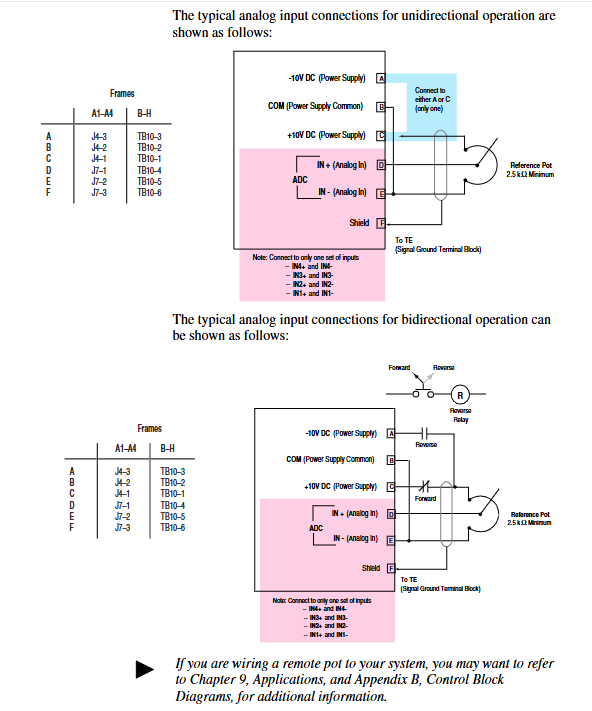
Analog I/O: Standard configuration supports 0-10V/0-20mA input (single ended non isolated), optional LA series isolation card (such as LA2 dual isolated input, LA3 dual isolated output), shielding layer needs to be connected to TE terminal.

The digital I/O: TB3 terminal supports 115V AC/24V AC/DC/TTL level input and can be programmed with functions such as start, stop, reverse, and preset speed selection; The output contacts (CR1-CR4) support 115V AC/30V DC, 5A resistive/2A inductive loads.

Encoder wiring: Supports 5V DC/8-15V DC line driven encoder (orthogonal or pulse signal), maximum input frequency 250kHz, single ended/differential signal can be used, and the shielding layer is connected to the TE terminal.

Selection and Configuration

1. Selection Guide

Model interpretation: The complete model format is “1336F-XXXXXX-XX”, such as “1336F-B020-AA”, where “B” represents the voltage/power code (460V, 20HP), “020” represents the power level, and “AA” represents the protection level (IP20/NEMA Type 1).

Load adaptation: The selection of constant torque (CT) and variable torque (VT) loads needs to be distinguished, for example, the 460V B020 model, CT rated 20HP, VT rated 25HP; the corresponding model needs to be selected according to the actual load type (such as CT for conveyor belt and VT for fan).

Option configuration: Supports factory pre installation or on-site installation options, such as communication cards (GM1 single node RIO, GM5 DeviceNet), control interface cards (L4 contact closed, L5 24V AC/DC), HIM (HA1 analog potentiometer, HJ2 digital potentiometer), braking units, reactors, etc.

2. Capacity reduction guide

When the operating conditions of the drive exceed the rated range, it is necessary to reduce the capacity. The core scenarios for reducing the capacity include:

Altitude: When it exceeds 1000m, the capacity decreases by about 6% for every 1000m increase (refer to Figure AD).

When the ambient temperature exceeds 40 ℃, the capacity will decrease by about 2% for every 1 ℃ increase (refer to Figure A-AC).

Carrier frequency: When it exceeds 4kHz (some models are 2kHz), the amplitude should be increased and the capacitance should be reduced according to the frequency (such as reducing the capacitance by 10% at 6kHz).

Fault handling and maintenance

1. Common faults and troubleshooting

The document lists more than 40 types of fault codes, and the core faults and their handling methods are as follows:

Fault code, fault name, cause analysis, and handling suggestions

04 Under voltage fault: Input voltage too low, bus capacitor fault, power failure. Check input voltage, replace capacitor, and confirm power stability

05 Overvoltage fault: Input voltage too high, brake unit fault, high load regeneration energy. Check input voltage, repair brake unit, and increase regeneration resistance

07 Overload fault: Excessive motor load, motor stalling, improper overload parameter settings. Reduce load, investigate the cause of stalling, and reset the overload current

08 Overheating fault: Cooling fan failure, high ambient temperature, blocked air duct. Replace the fan, improve ventilation, and clean the air duct

13. Grounding fault output terminal short circuit to ground, motor insulation damage. Check the output circuit and test the motor insulation resistance

2. Preventive maintenance

Regular inspection: Check the operation status of the cooling fan and the cleanliness of the air duct every week; Check the tightness of wiring terminals and the insulation layer of cables every month; Quarterly testing of bus voltage and output current balance.

Maintenance records: Use HIM to view parameters such as “Elapsed Run Time” and “Motor OL Count” to predict component lifespan (such as fan lifespan of approximately 20000 hours).

Allen Bradley 1336 IMPACT AC Inverter

Product Overview and Core Features

1. Product positioning and applicable scenarios

1336 IMPACT frequency converter is a microprocessor based field oriented control (FOC) AC frequency converter using Force technologies ™ Technology, focusing on low-cost independent applications, suitable for scenarios such as machine tools, production lines, and material handling that require precise speed regulation, supports speed and torque control of asynchronous motors, and is compatible with multiple feedback devices and communication protocols.

2. Core standard features

Performance and Control:

High precision digital speed loop and current loop, supporting 0-250Hz constant torque output, some configurations can achieve 400% motor current (short-term overload).

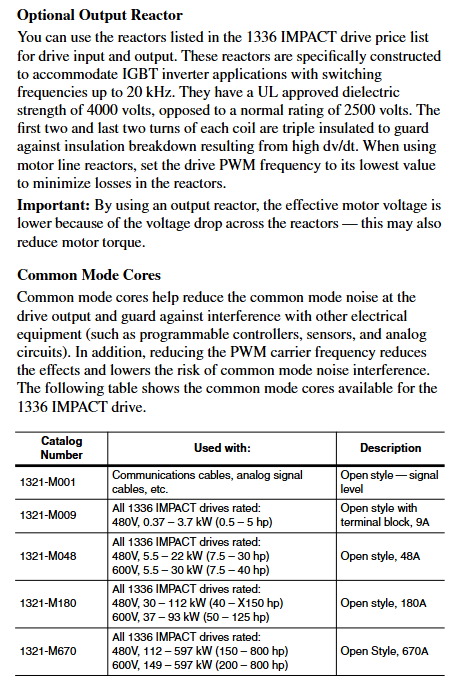
Supports multiple braking methods: dynamic braking, DC braking, magnetic flux braking, and bus voltage regulation, adapting to different load deceleration requirements.

Feedback and Interface:

Standard configuration includes 2 ± 10V analog inputs, 2 ± 10V analog outputs, and 1 4-20mA input/output. The 12 bit resolution ensures signal accuracy.

Support encoder feedback (requires L Option board), compatible with 12V/5V differential output encoder, up to 100kHz pulse input, achieving high-precision speed/position control.

Protection and reliability:

Built in motor overload protection (I ² T), inverter overload protection, overcurrent, overvoltage, undervoltage, ground fault, overheating and other multiple protections.

32 fault queues and 32 warning queues, with timestamps and fault markers for easy problem tracing; Non volatile memory (EE) stores parameters and configurations without loss during power outages.

Communication and Expansion:

Supports SCANPort communication and can connect to HIM (Human Interface Module), GPT (Graphics Programming Terminal), and 1203 series gateway modules (such as DeviceNet, RS-232/485).

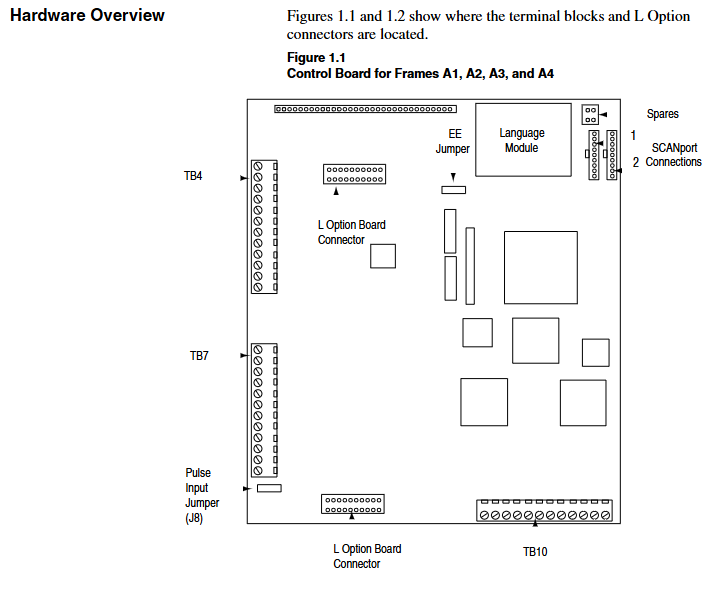
Optional L Option board extension control input, supports TTL/24V AC/DC/115V AC interfaces, and some models come with encoder feedback interfaces.

Model Interpretation and Framework Classification

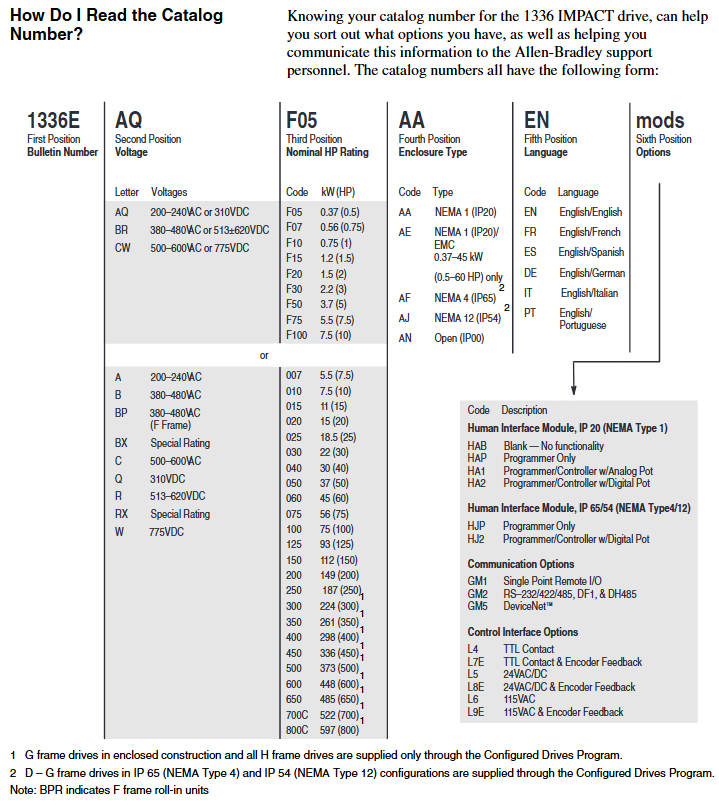
1. Model coding rules (taking 1336E-AQF05-AA-EN as an example)

Explanation of the meaning of digit codes

1-4 Position 1336E Product Series 1336 IMPACT AC Inverter

Position 5-6 AQ voltage level AQ=200-240VAC/310VDC; BR=380-480VAC/513-620VDC; CW=500-600VAC/775VDC

The rated power of F05 in positions 7-9 is 0.37kW (0.5HP); F07=0.56kW (0.75HP); F10=0.75kW (1HP), Repeat this process until 800C=597kW (800HP)

AA protection level AA=NEMA 1 (IP20) for positions 10-11; AE=NEMA 1 (IP20)/EMC (0.37-45kW dedicated); AF=NEMA 4 (IP65); AJ=NEMA 12 (IP54)

The 12th and 13th digits of EN language are English/English; FR=English/French; ES=English/Spanish; DE=English/German, etc

Subsequent mod options include HIM type (such as HA1 with analog potentiometer), communication module (such as GM5=DeviceNet), and L Option board (such as L8E=24V AC/DC+encoder)

2. Frame classification and power correspondence

The framework is divided by size and power, and the installation and wiring requirements for different frameworks are different. The core correspondence is as follows:

Framework Model 200-240V Power Range 380-480V Power Range 500-600V Power Range Key Features

A1 0.37-0.75kW (0.5-1HP) 0.37-1.2kW (0.5-1.5HP) – miniaturization, suitable for light loads

A2 1.2-1.5kW (1.5-2HP) 1.5-2.2kW (2-3HP) – Compact, supporting basic analog control

A3 2.2-3.7kW (3-5HP) 3.7kW (5HP) – Medium load, optional encoder feedback

A4-5.5-7.5kW (7.5-10HP) 0.75-7.5kW (1-10HP) with cooling fan, supporting dynamic braking

B 5.5-11kW (7.5-15HP) 15-22kW (20-30HP) 11-15kW (15-20HP) modular design, supporting multiple communication interfaces

C-H 30-75kW (40-100HP) 45-597kW (60-800HP) high power, requiring external reactors, H frame with independent cooling system

Installation and wiring specifications

1. General safety requirements

Static protection: The module contains ESD sensitive components, and a grounding wristband should be worn during operation. Refer to Rockwell document 8000-4.5.2 “Guidelines for Preventing Static Damage”.

Power off operation: Before installation, all power sources of the frequency converter (including AC input, DC bus, control power) must be disconnected to avoid electric shock or component damage.

Cable requirements: Power cables must comply with NEC/VDE standards, and it is recommended to use shielded twisted pair cables (such as Belden 8760) for control cables to avoid parallel laying with high-power cables and reduce interference.

2. Key points for exclusive installation of the framework

(1) A1-A4 frame (low power)

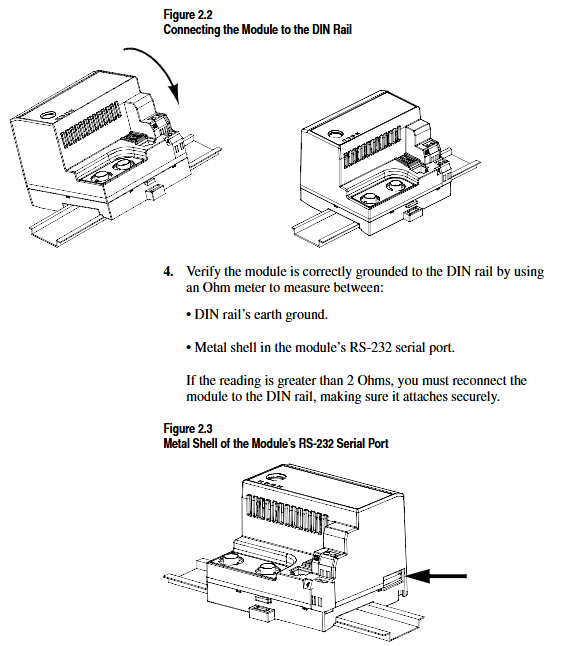
Rail installation: Suitable for 35 × 7.5mm DIN rails, with hooks inserted and locked by rotation. The grounding resistance should be ≤ 2 Ω (detected through the metal shell of the RS-232 port).

Wiring terminal: TB1 is the power terminal (R/L1, S/L2, T/L3 input; U/T1, V/T2, W/T3 outputs), TB4/TB7/TB10 are control terminals, supporting analog I/O, pulse input, and relay output.

Input protection: Users need to provide their own fuses. For example, models with 200-240V/0.37kW require 6A Class CC fuses (North America) or 6A gG fuses (Europe).

(2) B-H framework (high power)

Fixed method: B-C frame can be installed on rails, D-H frame needs to be fixed with bolts, and reserved heat dissipation space (top/sides ≥ 152.4mm, bottom ≥ 101.6mm).

Wiring requirements: The D-H frame adopts bolt type terminals and requires dedicated wiring terminals (such as T&B COLOR KEYED) ®), The maximum wire diameter supported is 600MCM (253mm ²), and the torque must comply with the specifications (such as 23N · m for the H frame).

Cooling system: F-H frame with forced cooling fan, fan voltage needs to be confirmed (200-240V/380-480V), H frame needs independent air duct, air volume ≥ 2600CFM.

3. Key wiring specifications

Power wiring:

AC input: R/L1, S/L2, T/L3, requiring input fuses/circuit breakers (such as 140-MN-0250 circuit breaker for 380-480V/0.37kW).

Motor output: U/T1, V/T2, W/T3, cable length must meet the requirements (e.g. maximum 500m at 125Kbps, 100m at 500Kbps), and output reactors need to be added for long distances.

Control wiring:

Analog input: ± 10V input requires differential wiring, and the shielding layer is grounded at one end (TE terminal); 4-20mA input impedance of 130 Ω, maximum load of 750 Ω.

Encoder wiring (L Option board): A/A non, B/B non signal differential access,+12V power supply (maximum 200mA), shielding layer grounded.

Grounding requirements:

The safety grounding (PE terminal) requires copper wire with a wire diameter of ≥ 1.5mm ² (16AWG) and a grounding impedance of ≤ 4 Ω.

The control signal grounding (TE terminal) is independent of the power grounding to avoid common ground interference.

System startup and parameter configuration

1. Preparation before startup

Hardware inspection: Confirm correct wiring (no AC input/output terminals, no short circuits), clean fan/heat sink, and securely install encoder (if any).

Tool preparation: HIM module (default connection to SCANPort 1), digital multimeter (measuring input voltage, within ± 10% of rated value), insulation resistance meter (measuring motor insulation, ≥ 1M Ω).

Parameter recording: Record the frequency converter model, motor nameplate data (power, voltage, current, speed, number of poles), and encoder PPR value for rapid debugging in the future.

2. Quick start process (via HIM)

(1) Power on and HIM operation

After powering on, the HIM displays the startup interface. Press any key to enter “Choose Mode” and select “Start Up”.

Quick Motor Tune:

Select ‘Enter Nameplate Motor Data’ and enter the motor HP, voltage, current, etc Hz、 Speed and number of poles.

If using an encoder, select “Encoder” and enter the PPR value; Choose the braking method (dynamic braking/magnetic flux braking, etc.).

Press the START button to test the direction of motor rotation. If it is reversed, adjust the motor phase sequence; Run self-tuning (inductance, resistance, flux current, inertia test), and display “Tune Complete” after completion.

Config Digital Section:

Configure relay output (such as setting Relay 1 to “At Speed” and threshold to 95% rated speed).

Configure L Option mode (such as mode 5 supporting MOP manual potentiometer control) and stop type (coasting/ramp/current limit stop).

Configure Analog Section:

Link speed reference (e.g. Analog In1 link Speed Ref 1, Scale set to 2.0 to achieve ± 10V corresponding to ± 100% speed).

Configure analog output (such as Analog Out1 linked to Motor Speed, Scale set to 0.5 to achieve ± 100% speed corresponding to ± 5V output).

3. Core parameter description

Parameter classification, key parameter functions, and default values

Motor nameplate Nameplate HP (2) The rated power of the motor should be consistent with the nameplate

Motor Poles (7) motor pole count, default 4 poles

Speed control Speed Ref 1 (29) Main speed reference, default 0rpm

Accel Time 1 (42) acceleration time, default 5.0 seconds

Decel Time 1 (44) Deceleration time, default 5.0 seconds

Feedback and Protection Fdbk Device Type (64) Feedback Device Type, 0=No Encoder, 2=Encoder

Motor Overload% (26) motor overload threshold, default 115%

Communication and Expansion L Option Mode (116) L Option Working Mode, default 1 (disabled)

SP An In1 Select (133) SCANPort analog input selection, default 1 (HIM)

Functional applications and advanced controls

1. Basic control functions

Start stop and speed regulation:

Local control: Use the START/STOP button on HIM to start and stop, and the Up/Down button to adjust the speed; Remote control: Speed regulation through analog input (such as 4-20mA) or SCANPort signal.

Jog Speed 1 (38) is set to 10% rated speed, triggering Jog input to achieve jog control.

Braking control:

Dynamic braking: An external braking resistor is required, with Bus/Brake Options (13) set to bit10=1 and Regen Power Lim (76) set to 50% (adjusted according to the resistor capacity).

DC Braking: The DC Brake Current (79) is set to 30% of the rated current, and the DC Brake Time (80) is set to 2 seconds, suitable for rapid shutdown.

2. Advanced functional applications

(1) Speed Profiling

Function: Implement multi-stage speed control through 16 programmable steps, supporting switching between time, encoder counting, and digital input trigger steps.

Configuration: L Option mode 31/32 is required, with Step Speed (e.g. Step 1=400rpm), Step Type (1=time triggered, 3=encoder triggered), Step Value (e.g. 10 seconds/1000 counts) set, and End Action set to “loop” or “zero”.

(2) Torque control

Function: Switch to torque mode (Spd/Trq Mode Sel (68)=1), set torque reference (0-100% rated torque) through Torque Ref 1 (69).

Application: Suitable for winding and tension control scenarios, requiring encoder feedback to ensure torque accuracy, Pos/Neg Torque Lim (74/75) limits maximum torque.

(3) Flying Start

Function: Start the frequency converter when the motor rotates to avoid current shock, suitable for restarting fans and pumps after sudden power failure.

Configuration: FStart Select (216)=2, FStart Speed (217) is set to the estimated speed (such as 800rpm), and the frequency converter automatically searches and synchronizes the speed after startup.

3. Communication configuration (SCAnport/DeviceNet)

SCAnport communication:

Supports up to 6 SCAnport devices, with HIM default to SCAnport 1 and gateway modules (such as 1203-GM5) connected to SCAnport 6.

Configure SP Enable Mask (124) to allow device control permissions, such as allowing SCANPort 2 to send start stop signals.

DeviceNet communication:

The 1203-GM5 card needs to be installed, and the node address (SW2-1~6, binary encoding) and baud rate (SW2-7~8, default 125Kbps) need to be set.

Create an EDS file through DeviceNet Manager, map I/O data (such as input=motor status, output=speed reference), and set the polling rate to 50ms.

Allen Bradley 1326AB high-performance AC servo motor

Product Overview and Core Positioning

1. Product type and applicable scenarios

The 1326AB series is a three-phase brushless permanent magnet synchronous servo motor designed for high-precision motion control, compatible with Allen Bradley 1391 AC servo controller. It is widely used in machine tools, automated production lines, material handling and other scenarios that require precise positioning and high-speed response. It supports various mechanical structures such as screw drive, gear rack drive, conveyor belt drive, etc.

2. Core standard features

Performance Design:

Permanent magnet rotor structure improves servo response speed; Sine wave winding stator achieves low-speed smooth operation and efficient heat dissipation.

100% continuous rated locked rotor torque at zero speed, meeting the requirements for maintaining static load.

Feedback system:

Standard brushless rotary transformer, providing position, commutation, and speed feedback, without built-in electronic components, suitable for harsh environments.

Supports 1391 A Quad B encoder output (up to 2048 PPR), achieving high-precision position detection through rotary transformer signal conversion.

Protection and reliability:

TENV (fully enclosed non ventilated) structure, optional shaft seal kit (1326AB-MOD-SSV-xx) can achieve IP65 protection level (dustproof, anti pulsating water flow), but IP65 fails when external encoder/rotary transformer or fan is connected.

The winding is equipped with a normally closed thermal switch (115V AC/1A, 24V DC/1A) to achieve overheating protection, with a trigger temperature of about 150 ° C and a reset temperature of 90-100 ° C.

Installation and compatibility:

Supporting vertical/horizontal axis installation, the rotor dynamic balance accuracy reaches 0.0005 inches (0.0127mm) peak to peak displacement, reducing operational vibration.

Equipped with MIL standard connectors, the power and feedback cables support standard flexibility, high flexibility of drag chains (- T suffix), and ultra long (ES suffix, up to 300 feet/91.4m) versions, adapting to different installation distance requirements.

Model interpretation and optional configurations

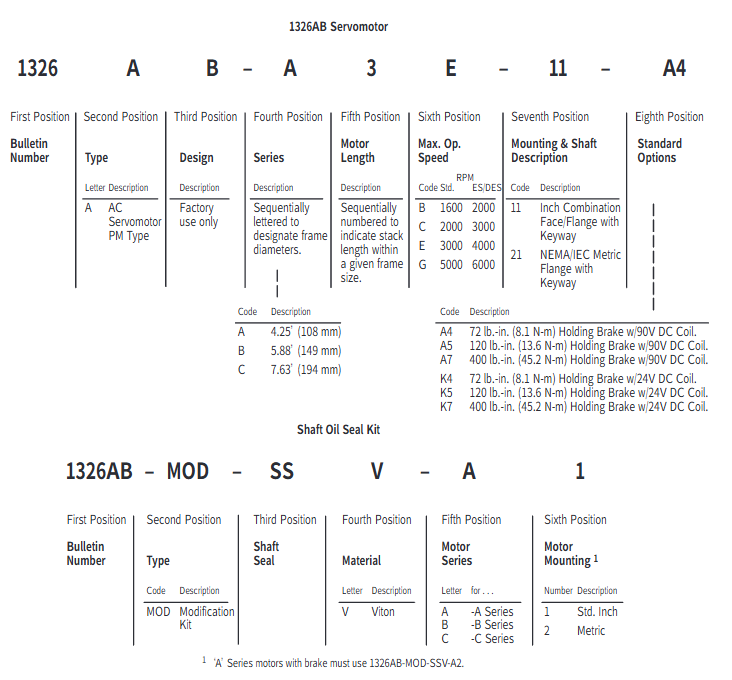
1. Model coding rules (taking 1326AB-A1G-11-A4 as an example)

Explanation of the meaning of digit codes

1-4 Position 1326 Product Series AC Servo Motor

5th motor type A AC permanent magnet synchronous

6th B frame diameter A=4.25 inches (108mm), B=5.88 inches (149mm), C=7.63 inches (194mm)

The 7th position A is distinguished in alphabetical order based on the stacking length within the same framework (A<B<C<D, with increasing length and greater torque)

8th highest speed G=5000rpm, E=3000rpm, C=2000rpm, B=1600rpm

Installation of positions 9-10 and shaft type 11=NEMA British flange+keyway shaft; 21=IEC metric flange+metric shaft

The 11th to 12th positions of A4 can be selected with attachment A series=90V DC brake (A4=72 lb in/8.1N · m, A5=120 lb in/13.6N · m, A7=400 lb in/45.2N · m); K series=24V DC holding brake (K4/K5/K7 correspond to the same torque)

2. Key optional configurations

Configuration Type Model/Option Code Function Description

The 1326-MOD-BPS brake power supply converts 115V AC to 90V DC and is compatible with A-series brakes. A single unit can drive 4 brakes

Shaft seal kit 1326AB-MOD-SSV-xx on-site installation of Viton material shaft seal, no need to disassemble the motor, compatible with A/B/C series

Feedback component 1326AB-MOD-Vxxxx 4.25-inch (108mm) rotary transformer, supports absolute/fine adjustment format, compatible with 8600GP, IMC and other controllers

Junction box 1326AB-MOD-RJxx axial lead out connector (replacing radial default), maintaining IP65 protection, compatible with A/B/C series

Fan cooling 1326AB-MOD-G3/G4 G3=C2E/C4B motor rear fan; G4=C4B motor “saddle shaped” fan, increasing torque output by 35%

Cable 1326 CPxx (power supply), 1326 CFx (commutation) standard length 15-100 feet, ES version up to 300 feet, only compatible with 1391B-ES/DES driver

Performance parameters and characteristic curves

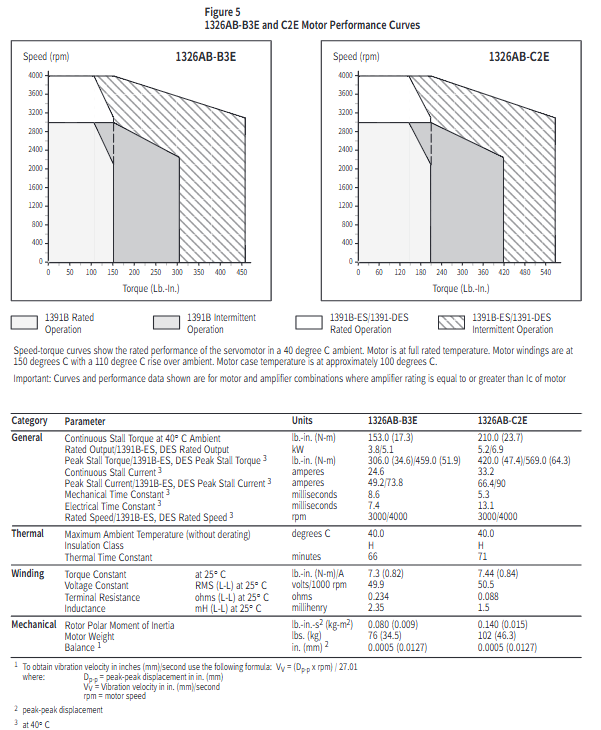
1. Core performance parameters (typical model examples)

Motor model: Continuous locked rotor torque (lb in/N · m), peak locked rotor torque (lb in/N · m), rated speed (rpm), rotor moment of inertia (lb in s ²/kg-m ²), rated power (kW), continuous current (A)

1326AB-A1G 16/1.8 48/5.4 5000(1391B)/6000(ES/DES) 0.004/0.0005 0.9 4.5

1326AB-B2E 102/11.5 204/23.0(1391B)/279/31.5(ES/DES) 3000(1391B)/4000(ES/DES) 0.05/0.006 2.5 16.4

1326AB-C3E 310/35.0 568/64.1 3000(1391B)/4000(ES/DES) 0.22/0.024 7.5 49.1

1326AB-C4B 420/47.5 840/94.8(1391B)/989/111.8(ES/DES) 1600(1391B)/2000(ES/DES) 0.29/0.032 5.6 38.2

2. Interpretation of speed torque curve

Curve type: divided into two curves: 1391B controller (regular mode) and 1391B-ES/DES (enhanced mode). The peak torque of the former is twice the continuous torque, while the latter can reach three times, and the highest speed is increased (such as A1G from 5000rpm to 6000rpm).

Operating area:

Rated operating zone: Both the motor and controller shall not exceed the RMS rated value, meeting the continuous operation requirements. The calculation formula is:

Torque (T pa=peak acceleration torque, T ss=steady-state torque, T pd=peak deceleration torque, T r=static torque)

Intermittent operation zone: suitable for acceleration and deceleration scenarios, with a duty cycle RMS torque ≤ rated torque to avoid overheating.

Installation and Dimensional Specifications

1. Mechanical installation requirements

Rail adaptation: The A/B/C series both support 35 × 7.5mm DIN rails (models 199-DR1, etc.). The top hook of the module is locked by rotation after being hooked in, and the grounding resistance should be ≤ 2 Ω (detected through the metal shell of the RS-232 port).

Axial load limit: Radial and axial loads must meet the bearing life requirements (B10 life of 15000 hours). Taking the C series as an example, the maximum radial load at 500rpm is 900lbs, and the axial load is 600lbs (refer to the load curve in Figure 8 for details).

2. Key dimensions (taking imperial flanges as an example)

Series length AD (inches) flange diameter O (inches) shaft diameter U (inches) keyway size (inches) with brake length increase (inches)

A1x-11 8.69 4.38 0.625 0.19×0.19×1.38 2.25

B2x-11 13.16 5.88 1.125 0.25×0.25×1.50 2.25

C3x-11 17.38 7.63 1.375 0.31×0.31×2.00 2.5

3. Cable installation

Wiring specifications: Power cables (1326-CPABxx) are wired by color (red=PWR, white=CAN_S, blue=CAN_L, black=COM, bare wire=shielded); The feedback cable (1326 CFUxx) needs to distinguish between the switching signal and the encoder signal, and the shielding layer should be grounded separately.

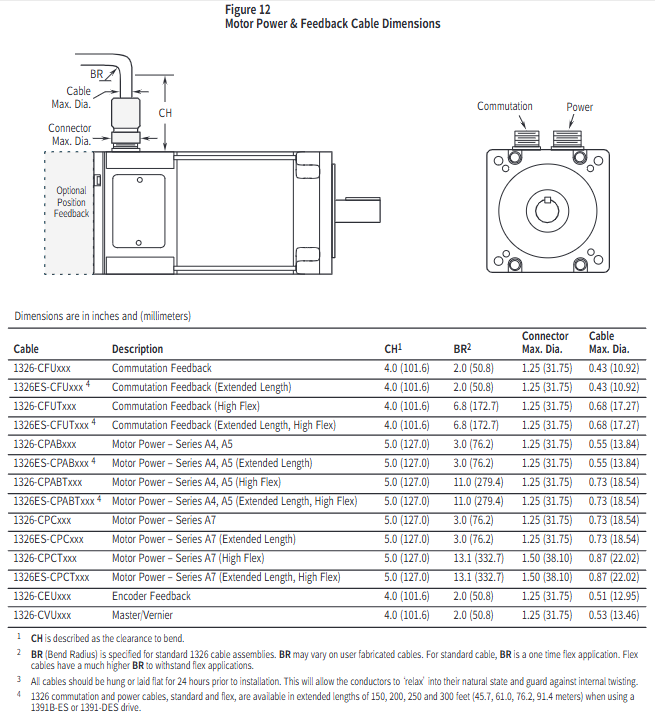
Bending radius: The standard cable has a single bending radius of ≥ 2 inches (50.8mm), and the high flexibility drag chain cable has a bending radius of ≥ 6.8 inches (172.7mm). Before installation, it needs to be laid flat for 24 hours to release internal stress.

Application Selection and Calculation Guide

1. Selection steps

Determine the speed requirement: Calculate the peak speed of the motor based on the mechanical transmission ratio (for example, if the lead screw is 2 inches and the slide table speed is 400ipm, then the motor speed=400/2=200rpm, with a 20% margin to be reserved).

Calculate continuous torque: Taking screw drive as an example based on load type (friction, cutting force, etc.):

T m=6.28 × e 1 × e 2 × G.R. (W 1 × u+Trust) × Lead × 1.1 (W 1=slide weight, u=friction coefficient, Lead=lead screw, e 1/e 2=lead screw/gearbox efficiency, G.R.=transmission ratio, 1.1 is safety factor)

Verify peak torque: Considering acceleration and deceleration requirements, the calculation formula is:

Peak torque (J total=total moment of inertia, Δ rpm=speed change, t accel=acceleration time, T l=load torque)

Match motor parameters: Ensure that the peak speed of the motor is ≥ the calculated value, the continuous torque is ≥ the required value, and the total inertia is ≤ 5 times the motor inertia (to avoid response lag).

2. Typical application calculation example (screw drive)

Known conditions: slide weight of 500lbs, friction coefficient of 0.05, lead screw of 1 inch, transmission ratio of 1:1, efficiency of 0.9, acceleration time of 0.5 seconds, and speed from 0 to 1000rpm.

Continuous torque calculation: T m=6.28 × 0.9 × 1 (500 × 0.05) × 1 × 1.1 ≈ 5.0 lb in, select A1G (16 lb in) to meet the demand.

Peak torque calculation: Total inertia=sliding table inertia (386500 × (6.281) 2 ≈ 0.0033 lb in ²)+motor inertia (0.004)=0.0073, peak torque=9.6 × 0.5 0.0073 × 1000+0 ≈ 1.52 lb in, which is less than the A1G peak value of 48 lb in and meets the requirements.

Maintenance and safety precautions

Thermal protection: The maximum temperature of the motor winding is 150 ° C (H-class insulation). When the ambient temperature exceeds 40 ° C, it needs to be de rated for use (for every 10 ° C increase, the torque is de rated by 10%).

Brake usage: The brake is only used for static load holding (switching ≤ 90 times per hour) and cannot be used for positioning or frequent braking. The 24V DC brake requires the user to provide their own power supply (0.88-1.2A).

Protection level: IP65 is only applicable to situations with shaft seals and no external feedback/fan. Additional protection is required in humid or corrosive environments.

Troubleshooting: When triggering the thermal switch, it is necessary to first investigate issues such as excessive load and poor heat dissipation. Resetting requires waiting for the winding temperature to drop to 90-100 ° C.

Allen Bradley DeviceNet Communication Module (1203-GK5)

Product Overview and Core Positioning

1. Product types and differences

Both devices are DeviceNet communication adapters, with the same core functions but different forms and installation methods. The specific differences are shown in the table below:

Features 1203-GK5 module 1336-GM5 board

Physical form independent module embedded board

Installation method: 35 × 7.5mm DIN rail mounting (compatible with 199-DR1 and other models of rails) directly installed inside specific SCANPort products (such as 1336 series drives)

Connection method: 8-pin mini DIN interface+SCANPort cable (up to 10m), 14 pin internal SCANPort connector (no additional cables required)

Most SCANPort products, such as 1305/1336 PLUS/1394, are only compatible with 1336 series drives (compatibility needs to be confirmed for some low-power models)

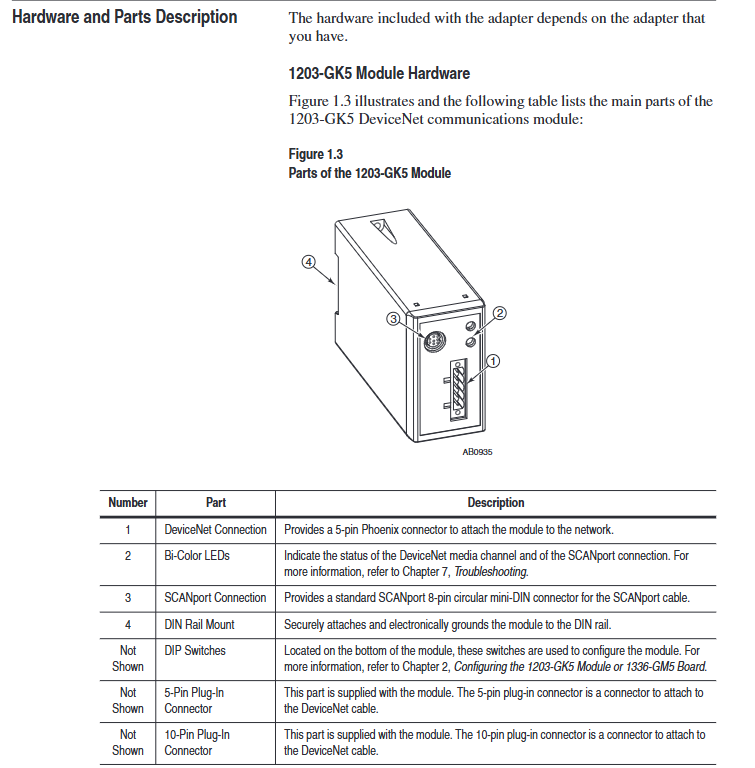
The packaging accessories include 5-pin/10 pin Phoenix connectors, DIN rail buckles with grounding wristbands, installation screws, nylon support columns, and communication housings

2. Core functions and features

Communication conversion: Convert DeviceNet messages to SCAnport protocol, supporting polling I/O (logical instructions/reference values/feedback values) and explicit messages (parameter read/write, fault query), DeviceNet speed supports 125K/250K/500Kbps.

Flexible configuration: Set node addresses (0-63), data rates, Datalink enablement, and fault response strategies through DIP switches; Support fault node recovery (SW2-7/8 needs to be set to ON, and the offline node address needs to be modified with software).

Status monitoring: Dual color LED indicator lights (DeviceNet network status, SCANPort connection status) provide real-time feedback on communication and device health status.

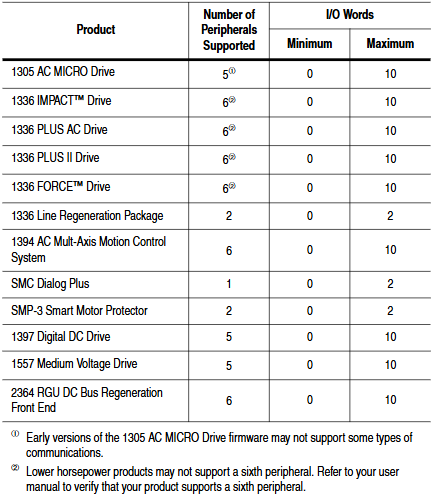
Compatibility: Compatible with various SCANPort products, such as 1305 AC micro drives, 1336 series frequency converters (IMPACT/PLUS/FORCE), 1394 multi axis motion systems, etc. Most products support 1-6 peripheral connections, with an I/O word length range of 2-10 words (please refer to the product manual for details).

DIP switch configuration (core pre steps)

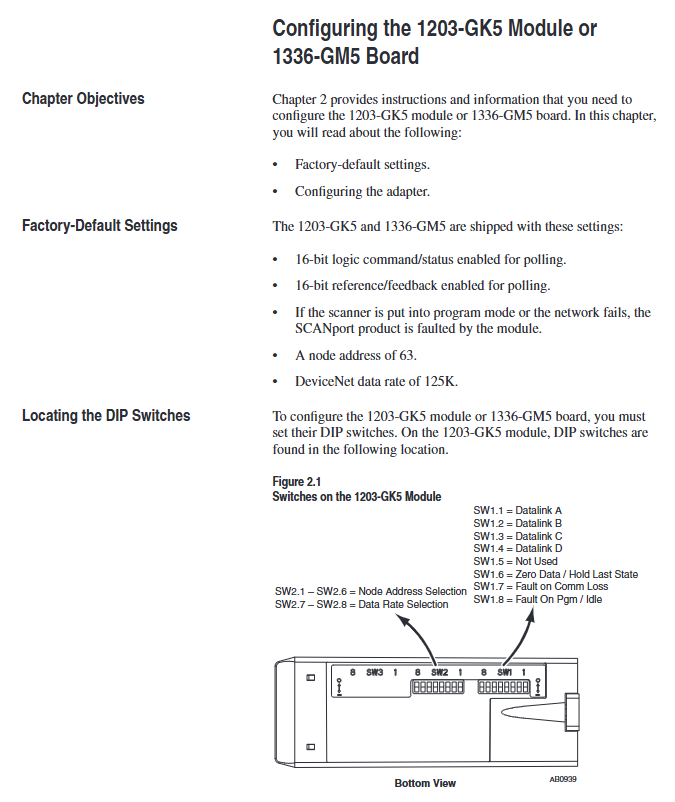
The DIP switches of the two devices are in the same layout (1203-GK5 is at the bottom and 1336-GM5 is at the edge of the board). They need to be adjusted after power off to take effect after power on. The specific configuration items are as follows:

1. Node address (SW2-1~SW2-6)

Function: Set the DeviceNet network node address (0-63), default is 63, and ensure that the address is unique within the network.

Configuration rule: Binary encoding, SW2-1 is the lowest bit (1), SW2-6 is the highest bit (32), for example, address 3 corresponds to “000011” (SW2-1/SW2-2 is set to ON, the rest are set to OFF).

2. Data rate (SW2-7~SW2-8)

Function: Define DeviceNet communication rate, default 125Kbps, configuration rules are as follows:

|SW2-8 (high bit) | SW2-7 (low bit) | Data rate | Description|

|0 | 0 | 125Kbps | Default value|

| 0 | 1 | 250Kbps | – |

| 1 | 0 | 500Kbps | – |

|1 | 1 | Software configuration | Requires setting through DeviceNet Manager (supports fault node recovery)|

3. Data link (SW1-1~SW1-4)

Function: Enable Datalink (2 input+2 output words per channel, up to 4 channels), default fully disabled, configuration rules:

|Switch | Function | 0 (OFF) | 1 (ON)|

|SW1-1 | Datalink A | Disabled | Enabled|

|SW1-2 | Datalink B | Disabled | Enabled|

|SW1-3 | Datalink C | Disabled | Enabled|

|SW1-4 | Datalink D | Disabled | Enabled|

Attention: It is necessary to ensure that the SCANPort product supports Datalink and that the same Datalink is not occupied by other adapters.

4. Fault response (SW1-6~SW1-8)

Function: Configure device behavior in case of network failure (communication interruption) or controller idle (programming mode), triggering SCANPort product failure by default. Configuration rules:

|Switch | Function | 0 (OFF) | 1 (ON)|

|SW1-8 | Programming/Idle Fault | Triggered Fault | Non Triggered Fault|

|SW1-7 | Communication interruption fault | Trigger fault | No trigger fault|

|SW1-6 | Standby behavior | Output zero data | Maintain last state|

Safety Reminder: Modifying fault response requires risk assessment to avoid personal injury or equipment damage caused by continuous operation of the equipment.

Installation process and electrostatic protection

1. General safety requirements

Static protection: Modules/boards contain ESD sensitive components, and grounding wristbands must be worn during operation, refer to Rockwell document 8000-4.5.2 “Anti static Damage Guide”.

Power off operation: Before installing the 1336-GM5 board, all power sources of the SCANPort product must be disconnected to avoid electric shock; The installation of 1203-GK5 requires disconnecting the DeviceNet network power supply.

2. Installation steps for 1203-GK5 module

Rail mounting: Insert the top hook of the module into the DIN rail, rotate and fasten it, and use an ohmmeter to check the grounding (the resistance between the metal shell of the RS-232 port of the module and the rail grounding is ≤ 2 Ω).

Cable connection:

DeviceNet: 5-pin connector (point-to-point) or 10 pin connector (daisy chain), wired by color (red=PWR, white=CAN_S, blue=CAN_L, black=COM, bare wire=shielded).

SCAnport: Insert the 8-pin mini DIN interface into the cable and confirm installation with a snap sound. The cable length should be ≤ 10m and kept away from high-power cables to prevent interference.

Power on verification: The SCANPort LED is constantly green, and the DeviceNet LED is flashing green (no connection established). If there is an abnormality, refer to the troubleshooting section.

3. Installation steps for 1336-GM5 board

Preparation: Disconnect the power supply of the drive, remove the casing, and install 4 nylon support columns on the drive main control board.

Card fixing: Align the 14 pin pin of the card with the SCANPort interface and insert it, then fix it with 4 screws (to avoid damaging the card due to over tightening).

DeviceNet wiring: Connect 5-pin Phoenix connectors by color, insert them into the card interface, and tighten the screws.

Power on verification: Install the communication enclosure, restore the driver power, keep the SCANPort LED on green, and the DeviceNet LED flashing green.

DeviceNet Network Configuration (DeviceNet Manager)

1. Configuration tools and prerequisites

Software: DeviceNet Manager (Windows application) or RSNetWorx for DeviceNet, requires a 1784-PCD card or 1770-KFD adapter to connect the PC to the DeviceNet network.

Prerequisite: DIP switch configuration has been completed, module/board has been connected to the network, and RSLinx (communication interface software) has been installed on the PC.

2. Core configuration steps

(1) Online mode connection

Start DeviceNet Manager, select “Utilities>Set Up Online Connection”, and choose the corresponding driver (such as 1770-KFD).

Configure communication ports (COM1/COM2), baud rate (default 38400bps), PC node address (avoid 63), network data rate (consistent with DIP switch), click “OK” to enter online mode.

(2) Create EDS file (initial configuration)

Select “Who>Network Who” to scan the network, double-click on unrecognized devices (displaying the universal icon), and a prompt “Create EDS file” will pop up. Click “Yes”.

Click on ‘Load from Device’, enter the module/board node address, automatically load the device description, select the device icon (such as 1336. BMP) and SCANPort adapter icon (SCANPORT. BMP).

Enable “Polled Connection”, set the I/O size (default 4 bytes, formula: 4+number of enabled Datalinks x 4), click “OK” to save, and rescan the network to confirm that the device icon is displayed normally.

(3) Configure PLC/SLC scanner

Taking 1771-SDN (PLC scanner) as an example:

Double click the scanner icon to enter “1771-SDN Module Configuration”, click “Edit Scan List”, select “Add Devices From>Who”, and drag the target node into the scan list.

Select the node, click “Edit I/O Parameters”, and set the polling I/O size (same as EDS configuration) and polling rate (Every Scan/Background).

Click on “Auto Map” to configure the storage address for input/output data (such as PLC N90/N100 files), and click “Map” to complete the mapping.

Select “Save To>SDN”, download the configuration to the scanner, prompt “Scanner offline for 5-10 seconds”, confirm and complete the configuration.

(4) Save and Verify

Save configuration file (for PLC) Used for SL7 and SLC SL4), Before exiting, confirm that the DeviceNet LED is always green (indicating connection establishment) and the SCANPort LED is always green (indicating normal communication).

Programming and Communication Implementation

1. Ladder diagram programming (RSLogix)

Implementing SCAnport product control through polling I/O requires N-file mapping (input=SCAnport → DeviceNet, output=DeviceNet → SCAnport). Example functions are as follows:

Start stop control: 1336 PLUS driver logic instruction bit definition (bit 0=stop, bit 1=start, bit 2=jog, bit 3=fault clearing), writes the operation signal to the output N-file (such as N10:1) through MOV instruction.

Reference value transmission: The frequency reference value 0-32767 corresponds to 0-maximum frequency, and N7:0 (operator set value) is written to N10:2 (driver reference value) through MOV command.

Status monitoring: Read the drive status bits (bit 1=running, bit 8=fault) from the input N-file (such as N9:1) and output them to the operator display terminal (such as O: 000).

2. Explicit message communication

Support explicit message reading and writing of parameters and fault queries through DeviceNet, following the 8:16 format (8-bit class field+16 bit instance field). The core rules are as follows:

(1) PLC scanner (1771-SDN)

Write the message to the scanner buffer (10 available buffers) using 64 block transfer write (BTW), and retrieve the response through 64 block transfer read (BTR) after completion.

Message format: including transaction ID (1-255), command (1=execute, 2=query status), port (0=channel A), size (in bytes), service code (e.g. 0x0E=get attribute), node address, class/instance/attribute.

(2) SLC scanner (1747-SDN)

Write the message to the M0 file (e.g. M0: 1.224), the scanner processes it and stores the response in the M1 file. After reading, send a “delete command” (command 4) to release the buffer.

Example: Read the number of fault queues (class 0x97, instance 0, attribute 1), store the response data in N20:53, and return the number of fault queue entries.

(3) Safety Tips

Frequent parameter writing through explicit messages can shorten the lifespan of EEPROM. It is recommended to use Datalink to handle high-frequency parameter modifications (Datalink does not write to EEPROM).

Allen Bradley 1203-CN1 ControlNet Communication Module

Product Overview and Core Positioning

Product Function: As a bridge between the ControlNet network and SCAnport products, the module can convert ControlNet messages into signals recognizable by SCAnport products, supporting the transmission of scheduled I/O data (such as logical instructions, analog reference values) and non scheduled messages (such as parameter read/write, fault query). The ControlNet network speed reaches 5Mbps, ensuring real-time and deterministic performance.

Adaptation scenarios: Compatible with various Allen Bradley SCANPort products, including 1305 AC micro drives, 1336 series inverters (IMPACT/PLUS/FORCE), 1394 multi axis motion control systems, SMC Dialog Plus controllers, etc. Different products support 1-6 peripheral connections, with an I/O word length range of 0-10 words (depending on the product model).

Hardware composition: The core hardware interfaces and components of the module are shown in the table below:

|Component Name | Function Description|

|DIN rail mounting seat | Fixed module and electrically grounded, compatible with 35 × 7.5mm DIN rails (models 199-DR1, etc.)|

|ControlNet coaxial interface (A/B channels) | Connect ControlNet cable taps, supporting redundant/non redundant network configurations|

|Two color LED indicator lights | 4 status lights (ControlNet A/B channels SCANport、 The module itself is used for fault diagnosis|

|SCANPort interface | 8-pin circular mini DIN connector, connected to SCANPort products through a dedicated SCANPort cable|

|ControlNet Node Address Indicator | Press the key to set the node address (0-99), which needs to be powered off and restarted to take effect, ensuring that the address is unique within the network|

|24V DC power interface | Supports multi module Daisy chain power supply, reduces wiring complexity|

|Network Access Port (RJ-45) | To connect ControlNet network devices, a 1786-CP cable and a 1784-KTCX communication card are required|

|RS-232 serial port | Used for parameter configuration and firmware upgrade, requires 1203-SFC serial port cable and terminal simulation software/VT100 terminal|

Installation and electrostatic protection

1. Installation preparation

Tools and equipment: Grounding wristband (included with module), 1/8 inch flathead screwdriver, blunt tool (set node address), ohmmeter, SCANPort cable (such as 1202-C03/C10, up to 10m), ControlNet tap (such as 1786-TPS/TPR, redundant configuration requires 2).

Static protection: The module contains ESD sensitive components, and a grounding wristband must be worn during operation. Refer to Allen Bradley document 8000-4.5.2 “Guidelines for Preventing Static Damage”.

2. Installation steps

Set node address: Use a blunt tool to press the “+/-” keys to set a unique address (0-99). It needs to be powered off and restarted to take effect. Avoid using pencils/pens to prevent damage to the switch.

Rail installation: Insert the top hook of the module into the DIN rail, rotate and fasten it, and use an ohmmeter to check the rail grounding (the resistance between the metal shell of the RS-232 port of the module and the rail grounding is ≤ 2 Ω).

Cable connection: Insert the SCANPort cable alignment interface (hear a snap sound); Screw the ControlNet tap into the corresponding A/B channel; 24V DC power supply connection (supports multi module cascade power supply).

Installation verification: After power on, the SCANPort and ControlNet LEDs remain constantly green, and the module LED flashes green (when network configuration is not completed). If the LED status is abnormal, the wiring needs to be checked.

3. Module removal

After power failure, disconnect all cables (SCANPort cables need to be pressed and pulled out), pry the release buckle with a screwdriver, remove the module, and maintain grounding protection throughout the process.

Basic configuration and operation

1. Serial port connection and parameter configuration

(1) Connection preparation

Hardware: 1203-SFC serial port cable (connecting module RS-232 port to PC/terminal).

Software: PC needs to install terminal simulation software (such as Windows HyperTerminal) or use VT100 compatible terminals.

(2) Serial port configuration steps

Software settings: default baud rate of 9600 (parameter 21 can be modified, supports 2400/4800/19.2K/38.4K), data bit 8, no checksum, stop bit 1, no flow control; Simulate to select VT100 mode.

Access main menu: Press Enter to enter the module main menu, supporting 7 functions:

1: Display/edit parameters; 2: Specify parameter number for query; 3: Display event queue; 4: Display current I/O data; 5: Display DF1 protocol statistics; 6: View serial number; 7: Firmware upgrade.

(3) Key parameter configuration

The default parameters of the module support 16 bit logic instructions/status and 16 bit reference/feedback values. When the SCANPort product triggers a fault in PLC programming mode or network failure, the following parameters can be used to adjust the function:

Parameter Number Name Function Description Default Value

4 CMD/Stat enable/disable logical instructions from ControlNet to SCAnport/simulate reference data transfer 1 (enable)

5-8 DataLnk A-D Config Enable/Disable corresponding data link (each channel occupies 2 inputs+2 output words) 0 (disabled)

9-10 Idle/Comm Flt Action PLC programming mode/action in case of network failure (0=fault, 1=zero data, 2=hold last value, 3=fault configuration value) 0 (fault)

11-20 Fault Cfg Logic/Ref/A1-D2 In: The preset values (logic instructions, reference values, data link values) outputted during a fault are 0

21 Serial Port Rate (0=2400, 1=4800, 2=9600, 3=19.2K, 4=38.4K) 2 (9600)

22 Reset Adapter Reset Module (1=Reset, 2=Reset after restoring default parameters) 0 (Ready)

2. Firmware Upgrade (Flash Upgrade)

Prepare the upgrade file (such as cn1-0_61.bin), connect via serial port to enter the main menu, and select “7>Update Flash Program”.

Confirm that the SCANPort product is in a safe state (the product will malfunction and shut down during the upgrade), and press Y to start the upgrade.

Select “Send File” from the “Transfer” menu in the terminal software, choose Xmodem for the protocol, and select “Upgrade File Send”. The entire process cannot be interrupted, and the module will automatically restart after completion.

ControlNet Network Configuration

1. Configuration tools and prerequisites

Software: RSNetWorx for ControlNet (32-bit Windows application), RSLinx (communication interface).

Hardware: The PC needs to be connected to the ControlNet network through a 1784-KTCX/1784-PCC card or 1770-KFC adapter.

2. Network configuration steps

Enter online mode: Start RSNetWorx, click “Online”, automatically scan the network through RSLinx, and select the target ControlNet network.

Module Mapping:

Click on ‘Edits Enabled’, right-click on the controller (such as PLC-5) and select ‘ControlNet Configuration’.

Select the node (module node address) corresponding to the SCANPort product, insert “Device Connection”, and configure the unique N-file address for diagnostic/status/data input/output files.

Set input/output size (control I/O enable+2 words, each data link+2 words, range 2-10 words), RPI (request packet interval) ≥ network update time (NUT).

Save and Verify: Save the configuration file and download it to the controller. Set NUT ≥ 5ms, Max Scheduled Address ≥ highest I/O node address, and Max Unscheduled Address ≥ highest network node address in the network properties.

Configuration confirmation: The SCANPort product icon in RSNetWorx displays a gray flag, and the ControlNet LED of the controller and module is constantly green, indicating normal communication.

PLC programming and message communication

1. Ladder diagram programming (RSLogix5)

Implement I/O interaction between the controller and SCANPort product through N-file mapping. Example functions include start stop control, fault clearing, and frequency reference value transmission. Please note:

Logical instruction bit definition: For example, in the 1336 PLUS driver, bit 0=stop, bit 1=start, bit 2=jog, and bit 3=fault clearing. Please refer to the SCANPort product manual for details.

Data scaling: For example, the frequency reference value 0-32767 of the 1305 driver corresponds to 0-maximum frequency, which needs to be transmitted through MOV instructions in the program (such as N7:0 → N13:1).

2. Message communication (PCCC and analog block transmission)

(1) PCCC message

Support PLC-5 Typed Read/Write and encapsulate protocol messages, examples include:

Read 10 SCANPort product parameters (starting parameter 1): target address N10:1, PLC data storage N20:0, Size=10.

Read the complete information of a single parameter (such as parameter 1): target address N30:1, size=20 (including parameter name, unit, maximum value, etc.).

(2) Simulated Block Transfer

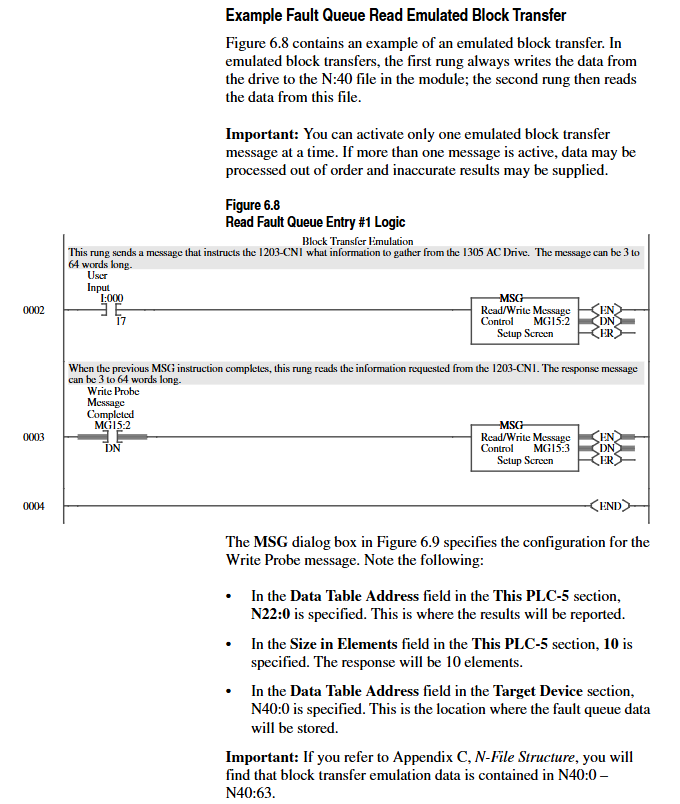
Supports 11 types of commands such as parameter read/write, fault queue query, NVS storage operation, etc., which need to be implemented through 2 MSG instructions (write request first, then read response). Examples include:

Parameter value reading: Request instruction length of 3 words (message length 3, decimal 769, parameter number), respond with parameter value or error code.

Fault queue reading: Request to specify queue number, respond with fault text (displayed in reverse ASCII), fault code, and timestamp (supported by 1336 FORCE).

Troubleshooting and LED diagnosis

1. Interpretation of LED status

The colors and flashing patterns of the four LEDs in the module correspond to different states. The core troubleshooting is as follows:

Solution for LED type status reasons

Check the cable/tap for faults in the red link interface of both ControlNet A/B. Power off and restart, if ineffective, contact after-sales service

SCANPort flashing red SCANPort communication error/data link does not support reconnecting cables, verify module compatibility with product configuration

Module flashing red (3 times) Non volatile storage CRC error check parameters, modify and save at least 1 parameter, then restart

Module flashing green configured I/O but no ControlNet connection confirmed controller network configuration, remap module

2. Event queue and DF1 statistics

Event queue: Select “3>Display event queue” from the main menu to view fault/warning information (graded by severity: I=information, W=warning, S=serious, F=fatal), which can be cleared through “Clr Event Queue”.

DF1 statistics: View the number of sent/received packets, undelivered messages, NAK errors, etc., and reset the statistics through “Clear DF1 Counts”.

Core specifications

Project parameters

Power supply 24V DC (-20%~+30%), maximum current 250mA

Working environment temperature 0~60 ° C, humidity 5%~95%, no condensation, vibration 2.5g (5Hz~2KHz), impact 30g (working)/50g (non working)

Protection level UL 508/CUL, 6KV contact discharge/8KV air discharge, metal shell required to achieve EMC Class A compliance

Rockwell Automation PanelView Standard Series Terminal

Product Overview and Core Features

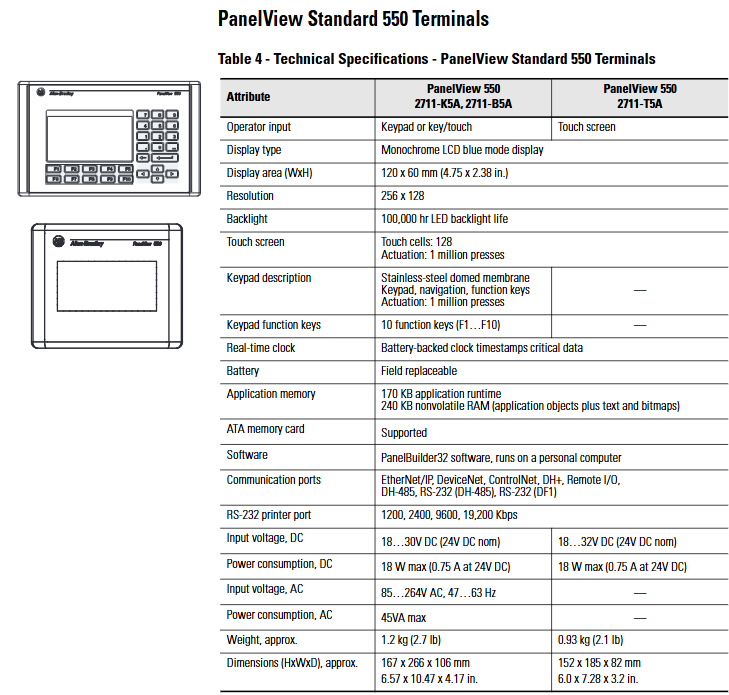
Product positioning: Industrial grade operator interface terminal, providing diversified sizes (3 inches, 5.5 inches, 5 inches, 10 inches) and input methods (keyboard, touch screen, keyboard+touch screen) to meet the operational needs of different scenarios.

Core capability: Support interaction with PLC and SLC controllers through multi protocol communication (EtherNet/IP, DeviceNet, ControlNet, DH-485, DH+, remote I/O, and serial port); Equipped with advanced alarm processing, screen security, analog instrument display, ATA storage card expansion, multilingual support, online printing, and other functions, it enhances operational intuitiveness and efficiency.

Development software: PanelBuilder32 software is uniformly used throughout the series (supporting Windows 2000/ME/XP/Vista systems), which can reuse existing applications, simplify programming processes, support simultaneous opening of multiple applications, and import/export of tags.

Environmental specifications

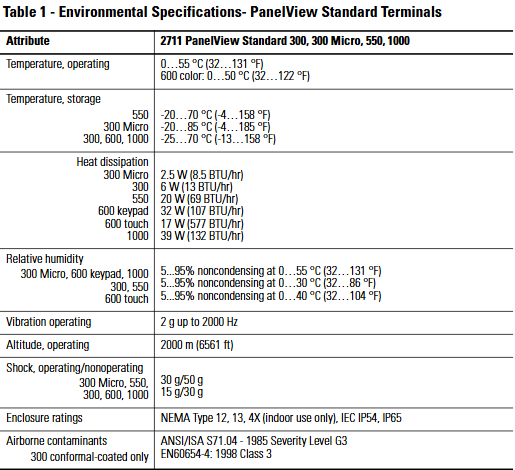
The adaptability of different models of terminal environments is unified, and the key parameters are as follows:

Specific requirements for environmental attributes

The standard operating temperature range is 0-55 ° C (32-131 ° F); 600 color model 0-50 ° C (32-122 ° F)

Storage temperature 300 Micro: -20-85 ° C (-4-185 ° F); 550:-20-70°C(-4-158°F); 300/600/1000:-25-70°C(-13-158°F)

Cooling power: 300 Micro 2.5W (8.5 BTU/hr), 300 6W (13 BTU/hr), 550 20W (69 BTU/hr), 600 keyboard version 32W (107 BTU/hr), 600 touch version 17W (577 BTU/hr), 1000 39W (132 BTU/hr)

Relative humidity of 300 Micro/600 keyboard/1000: 5% -95% without condensation at 0-55 ° C; 300/550: 5% -95% non condensing at 0-30 ° C; 600 touch version: 5% -95% non condensing at 0-40 ° C

Anti vibration (working) 2g, maximum 2000Hz

Working altitude 2000m (6561ft)

Impact resistance (working/non working) 300 Micro/550/300/600/1000: 30g/50g; Partial models 15g/30g

Protection level NEMA 12/13/4X (for indoor use only) IEC IP54/IP65

Anti pollution (only 300 coated version) complies with ANSI/ISA S71.04-1985 G3 level, EN60654-4:1998 level 3

Core technical specifications by model

1. 300 Micro and 300 model

Parameter 300 Micro (2711-M3A18L1/19L1) 300 (2711-K3A series)

Input method: keyboard only (8 function keys F1-F8), keyboard only (4 function keys F1-F4)

Display specifications: monochrome reflective LCD (LED backlight, lifespan of 100000 hours), resolution of 128 × 64, display area of 73 × 42mm, same as 300 Micro display specifications

Communication port RS-232 (DF1/DH-485, 8-pin mini DIN), no printer port DH-485, RS-232 (DH-485/DF1), some models include RS-232 printer port (speed 1200-19200 Kbps)

Power supply DC 18-32V (rated 24V), power consumption 10W max DC 11-30V (rated 24V), power consumption 25W max

Storage 240KB non-volatile memory, supports ATA card (300 Micro only) 240KB non-volatile memory (including application objects/text/bitmap), 170KB application running memory, does not support ATA card

Dimensions (H x W x D) 133 x 111 x 48mm (5.23 x 4.38 x 1.87 inches) 197 x 140 x 82mm (7.76 x 5.53 x 3.21 inches)

Weight 673g (1.48 pounds) 284g (10 ounces)

2. 550 model (2711-K5A/B5A/T5A)

Input methods: keyboard version (10 function keys F1-F10), touch version (128 touch units, press life of 1 million times), keyboard+touch version

Display specifications: monochrome LCD (blue mode), resolution 256 × 128, display area 120 × 60mm (4.75 × 2.38 inches), LED backlight life of 100000 hours

Communication ports: Supports EtherNet/IP, DeviceNet, ControlNet, DH+, remote I/O, DH-485, RS-232 (DH-485/DF1), including RS-232 printer port

Power supply: DC 18-30V (rated 24V, power consumption 18W max) or AC 85-264V (47-63Hz, power consumption 45VA max)

Storage: 240KB non-volatile RAM, 170KB application running memory, supports ATA cards; Equipped with on-site replaceable battery backup real-time clock

Size and Weight: Keyboard/Keyboard+Touchpad 167 × 266 × 106mm (6.57 × 10.47 × 4.17 inches), Weight 1.2kg (2.7 pounds); Touchscreen version 152 × 185 × 82mm (6.0 × 7.28 × 3.2 inches), weighing 0.93kg (2.1 pounds)

3. Model 600 (2711-K6C/B6C/T6C)

Input methods: keyboard version (10 function keys, press life of 2 million times), touch version (128 touch units, life of 1 million times), keyboard+touch version

Display specifications: Color active matrix TFT, resolution 320 × 234 (keyboard version)/320 × 240 (touch version), display area 115 × 86mm (4.54 × 3.4 inches)/115 × 87mm (4.54 × 3.43 inches), backlight can be replaced on site (half-life 50000 hours at 25 ° C)

Communication port: Same as 550 model, supports multiple protocols and printer ports

Power supply: DC 18-32V (rated 24V, keyboard version 34W max/touch version 24W max) or AC 85-264V (60VA max)

Storage: 240KB non-volatile memory, 190KB application running memory, some models support ATA cards; Clock with replaceable battery

Size and Weight: Keyboard/Keyboard+Touchpad 192 × 290 × 116mm (7.55 × 11.40 × 4.57 inches), Weight 2.0kg (4.4 pounds); Touchscreen version 152 × 185 × 96mm (6.0 × 7.28 × 3.80 inches), weighing 1.0kg (2.3 pounds)

4. Model 1000 (2711-K10G/T10C series)

Input methods: keyboard version (16 function keys, lifespan of 1 million times), touch version (384 touch units, lifespan of 1 million times), keyboard+touch version

Display specifications: grayscale version (black and white monochrome), color version (active matrix TFT), resolution of 640 × 480, display area of 211 × 158mm (8.3 × 6.2 inches), replaceable backlight (half-life of 50000 hours at 25 ° C)

Communication port: Same as 550/600 model, supports full protocol and printer port

Power supply: DC 18-32V (rated 24V, 24W max) or AC 85-264V (55VA max)

Storage: 1008KB non-volatile memory (including application/text/bitmap), 310KB application running memory, supporting ATA cards; Clock with replaceable battery

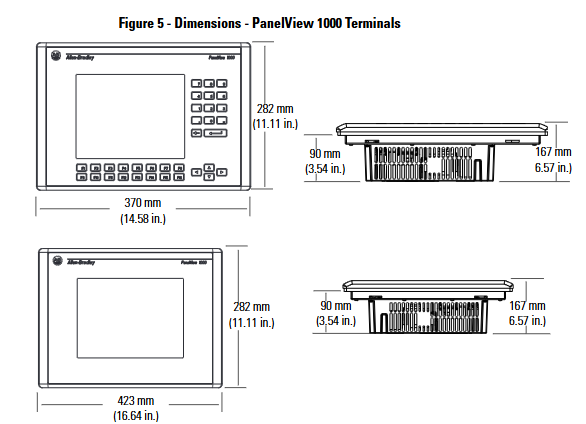
Size and weight: Keyboard version 282 × 423 × 112mm (11.11 × 16.64 × 4.40 inches), weighing 3.7kg (8.2 pounds); Touchscreen version 282 × 370 × 112mm (11.11 × 14.58 × 4.40 inches), weighing 3.6kg (7.9 pounds)

Certification qualifications

The entire series of terminals have passed multiple international certifications to ensure compliance and security. The key certifications are as follows:

Electromagnetic compatibility: EN50081-2:1993 (industrial A-level radiation), EN61000-6-2:1999 (industrial immunity), EN50082-212:1995 (immunity, products produced before April 2002)

Safety standards: EN61131-2:1995 (requirements for programmable controllers), EN61131-1 (safety section for low voltage commands) UL508、CSA 22.2 No.142

Dangerous places: UL1604 Class 1 Zone 2 (Group A/B/C/D, T4), CSA 22.2 No.213 Class 1 Zone 2 (Group A/B/C/D, T4), UL2279 (IEC79-15) Class 1 Zone 2 (Group IIC), T4)

Other: EU Battery Directive 2006/66/EC, Maritime Certification (ABS, NK Japan Maritime Association, CCS China Classification Society), IECEx Certification

Accessories and software

1. Core accessories (including model and purpose)

Example of accessory type and model usage

ATA storage cards 2711-NM13 (2MB), 2711-NM14 (4MB) and other extended terminal storage, supporting application backup and transmission

Fixed storage card holder 2711-NMCC (550/600/1000 keyboard version), 2711-NMCD (550 touch version) and other fixed storage cards, suitable for different terminal models

Function key legend bars 2711-NF1 (550), 2711-NF4 (600), etc. are used to indicate the purpose of function keys, improving operational convenience

Anti glare protective film 2711-NV4 (550 keyboard version), 2711-NV4T (550/600 touch version), etc. reduce screen reflection and protect display panels (each model includes 3 sheets)

Replace damaged backlight modules such as 2711-NL1 (550 A-G series) and 2711-NL3 (600 A-B series) to extend terminal life

Real time clock replacement parts 2711-NB3 (550 E-F series), 2711-NB4 (550 G and later series) and other repair clock functions to ensure accurate timestamps

Installation accessory 2711-NP2 600/1000 terminal replacement installation clip

Power supply and terminal block 1747-NP1 (AC wall mounted power supply), 2711-TBDC (DC power terminal block) provide stable power supply and terminal connection

Interface modules 1747-PIC (RS-232 to DH-485) and 1747-AIC (DH-485 isolation coupler) extend communication protocols to achieve different signal conversions

2. PanelBuilder32 software

Model and Language: 2711-ND3 (English), 2711-ND3DE (German), 2711-ND3CN (Chinese), etc., supporting multilingual development

Core functions: Provide tools such as buttons/selection switches, screen selectors, data input, information display (analog instruments/bar charts, etc.), alarm diagnosis, graphic drawing (ISA symbols/custom graphics), etc; Support applications to upload/download via network, ATA card, or direct connection.

Cable and communication configuration

1. Cable type and purpose

Terminal cables are divided into application transmission cables and operational communication cables according to their functions, with the following key models:

Examples of Cable Function Models, Specifications, and Applications

Application upload/download 1761-CBL-PM02 (2m), 2711-NC13 (5m), etc. 300 Micro uses 8-pin mini DIN to 9-pin D-type head, 300-1000 uses 9-pin D-type head, supports application file transfer

RS-232 communication connects terminals such as 1747-C10 (1.8m) and 2711-NC21 (5m) to controllers (such as SLC/MicroLogix), supporting DF1/DH-485 protocol

Ethernet communication 1585J-M, 2711P-CBL-EX04 (4m) 1000 model EtherNet/IP port connection, direct connection requires cross line connection

Remote serial port 2711-NC17 (3m) provides remote RS-232 port access for terminals

2. Controller communication adaptation

The terminal can communicate with SLC, MicroLogix, PLC-5, and Logix (ControlLogix/CompactLogix) series controllers, with the following protocol and cable combinations:

SLC controller: DH-485 uses 1747-C10/C11/C20, EtherNet/IP uses 1585J-M, DeviceNet uses 1747-SDN module+DeviceNet cable

MicroLogix controller: DF1 uses 1761-CBL-AM00/HM02, EtherNet/IP uses 1761-NET-ENI module+Ethernet cable

PLC-5 controller: DH+uses 1770-CD shielded twisted pair cable, ControlNet uses ControlNet cable+1771-SDN module

Logix controller: EtherNet/IP uses 2711P-CBL-EX04 crossover cable, Remote I/O uses 1756-DHRIO module+1770-CD cable

Siemens SIMATIC S7-300 6ES7322-1BH01-0AA0 Module

Power supply and power consumption parameters

Load voltage (L+): rated value is 24V DC, allowable range is 20.4V DC (lower limit) -28.8V DC (upper limit), suitable for industrial common DC power supply.

Input current: maximum 80mA when powered from load voltage L+(without load), maximum 80mA when powered from 5V DC backplane bus, with moderate load requirements for the power supply circuit.

Power loss: The typical value is 4.9W, which belongs to the conventional power consumption level in industrial modules and is conducive to system heat dissipation management.

Digital output performance

Basic configuration and protection: There are a total of 16 digital outputs with electronic short-circuit protection function. The typical threshold value for short-circuit protection response is 1A. The inductive turn off voltage can be limited to L+(-53V) to avoid damage to the module caused by voltage spikes. It also supports control of digital inputs.

Load and resistance adaptation: In terms of switch capacity, the maximum lamp load is 5W; the lower limit of load resistance range is 48 Ω, and the upper limit is 4k Ω, suitable for various common load types.

Voltage and current: The minimum output voltage for signal “1” is L+(-0.8V), with a rated output current of 0.5A. In environments of 0-40 ° C and 40-60 ° C, the allowable output current range for signal “1” is 5mA (minimum) -0.6A (maximum), with a minimum load current of 5mA. The maximum residual current for signal “0” is 0.5A, and the leakage current control is excellent.

Delay and Switching: When carrying a resistive load, the maximum output delay from “0” to “1” is 100 μ s, and from “1” to “0” is 500 μ s, with a fast response speed; It does not support parallel connection of two outputs to increase current, but supports parallel connection of two outputs to achieve redundant control of the load.

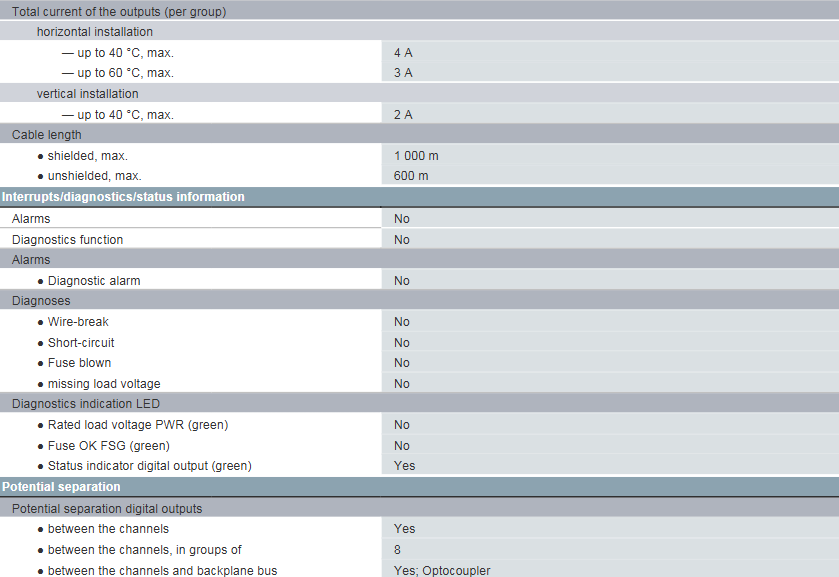
Switching frequency and total current: The maximum switching frequency under resistive load is 100Hz, the maximum switching frequency under inductive load is 0.5Hz, and the maximum switching frequency for inductive load in accordance with IEC 60947-5-1 DC13 standard is 10Hz. The total output current is divided by group, with a maximum of 4A below 40 ° C for horizontal installation, 3A below 60 ° C, and 2A below 40 ° C for vertical installation.

Cable support: Shielded cables can support up to 1000m, while unshielded cables can support up to 600m, meeting the industrial requirements for long-distance cabling.

Interruption and diagnostic function

The module has no alarm function or diagnostic function, specifically manifested as:

No diagnostic alarm, disconnection diagnosis, short circuit diagnosis, fuse melting diagnosis, and load voltage loss diagnosis.

In terms of indicator lights, there is no rated load voltage PWR (green) indicator light and fuse normal FSG (green) indicator light, only a digital output status (green) indicator light, which can observe the output signal status.

Isolation and Connection Design

Potential isolation: Digital output channels have potential isolation function, with every 8 channels forming a group; The isolation between the channel and the backplane bus is achieved through optocouplers, effectively improving anti-interference ability and ensuring the safety of the module and bus.

Insulation test: 500V DC is used for insulation testing, which meets the insulation performance standards of industrial equipment.

Connection method: It needs to be equipped with a 20 pin front connector, with uniform interface specifications for easy installation, replacement, and maintenance.

Physical specifications

Size: Width 40mm, height 125mm, depth 120mm, compact size, can be densely installed in the control cabinet, saving space.

Weight: Approximately 190g, relatively light in weight, with low load-bearing requirements for installation brackets.

Classification and Certification

Classification codes: covering multiple versions of eClass, ETIM, IDEA, and UNSPSC classification codes. For example, eClass 14 to eClass 6 are all coded as 27-24-22-04, ETIM 10 to ETIM 7 are all coded as EC001419, IDEA 4 is coded as 3566, and UNSPSC 15 is coded as 32-15-17-05, facilitating product classification management and procurement identification.

Product certification: With multiple certifications such as CE, EMV, IECEx, FM, ABS, BUREAU, NK (Japan Maritime Association), CCS (China Classification Society), etc., it can be used in hazardous areas and maritime applications, adapting to the industrial and special scene requirements of different countries and regions.

Siemens SIMATIC S7-300 Digital Input Module

Power supply and power consumption parameters

Load voltage (L+): The rated value is 24V DC, with an allowable range of 20.4V DC (lower limit) to 28.8V DC (upper limit), meeting the common DC power supply requirements in industrial scenarios.

Backplane bus current: Powered from the 5V DC backplane bus, with a maximum current of 10mA, it has little impact on the bus power supply load.

Power loss: Typical value of 3.5W, low power consumption, conducive to overall heat dissipation and energy consumption control of the system.

Digital input performance

Basic configuration: There are a total of 16 digital inputs, and the input characteristics comply with Type 1 of IEC 61131 standard. It supports 2-wire sensor connection (maximum static current of the sensor is 1.5mA).

Input voltage and current: rated input voltage 24V DC, signal “0” corresponds to a voltage range of -30V to+5V, signal “1” corresponds to 13V to 30V; signal “1” has a typical input current of 7mA to ensure signal recognition stability.

Simultaneously controllable input quantity: Whether installed horizontally (temperature ≤ 40 ° C or ≤ 60 ° C) or vertically (temperature ≤ 40 ° C), the maximum number of simultaneously controllable inputs is 16, with no performance degradation under scene limitations.

Input delay: Non parametric delay, the delay range from “0” to “1” (signal on) and “1” to “0” (signal off) is consistent, with a minimum of 1.2ms and a maximum of 4.8ms, suitable for industrial control scenarios that do not require extreme response speed.

Cable support: Shielded cables can support up to 1000m, unshielded cables can support up to 600m, suitable for long-distance signal transmission needs and reducing wiring restrictions.

Interruption and diagnostic function

The module does not have additional alarm and diagnostic functions, specifically manifested as:

No diagnostic alarm or hardware interrupt function, unable to actively report faults or trigger emergency interrupts.

Only equipped with a green digital input status indicator light, which can visually observe whether the input signal is normal, without other diagnostic indicator components.

Isolation and Connection Design

Potential isolation: 16 inputs are divided into one group, and there is no isolation between channels within the group. However, all channels are isolated from the backplane bus through optocouplers to enhance anti-interference ability and protect the safety of the backplane bus.

Insulation test: 500V DC is used for insulation testing, which complies with industrial equipment insulation standards.

Connection method: It needs to be equipped with a 20 pin front connector, with uniform interface specifications for easy installation and replacement.

Physical specifications

Dimensions: Width 40mm, height 125mm, depth 120mm, compact size, suitable for dense layout inside control cabinets.

Weight: Approximately 200g, relatively light in weight, with low load-bearing requirements for the installation structure.

Rockwell Automation 836T Series Differential Pressure Controller

Product Core Description

1. Basic specifications and applicable scenarios

Model classification: Bulletin 836T, including three types: Type 1, 4, and 13, all designed to be oil tight.

Protection ability: It can resist oil/water flow erosion, prevent cotton wool and dust from entering the shell, and is suitable for scenarios that require environmental sealing.

Connection specifications: The pressure interface is 1/4 “-18 N.P.T.F (American dry sealed cone pipe thread), and the electrical interface includes 1/2” -14 N.P.T (optional Pg 13.5 BS20 specification).

Bellows material: provides two options, each suitable for different media——

Copper alloy corrugated pipe: suitable for water, air, and non corrosive liquids/gases;

316 stainless steel corrugated pipe: suitable for liquids/gases with stronger corrosiveness.

2. Core Structure and Function

Core components: including Top Bellows, Bottom Bellows (mechanical linkage), Contact Block, Adjustment Differential Screw “B”, Pressure Adjustment Difference Bushing “A”, Operation Indicator, optional Pilot Light, etc.

Pressure sensing principle: The action is triggered by the pressure difference between two corrugated tubes, regardless of the actual gauge pressure of the system; Adjustable “trip pressure” and “reset pressure”, with the difference between the two being the “differential control pressure”.

Contact module configuration: provides two specifications to meet different circuit requirements——

Contact module type Contact configuration Circuit function

2-circuit: 1 set of normally open (NO)+1 set of normally closed (NC) supports single pole double throw (SPDT) or independent circuit operation with the same polarity

4-circuit with 2 sets of normally open (NO) and 2 sets of normally closed (NC) supports double pole double throw (DPDT) or two sets of electrically isolated single pole double throw circuits, including isolated terminal 9, which can be connected to external power supply

Working principle

The controller responds to pressure difference changes through a “trigger reset” cycle, with the following specific logic:

1. Trigger (Trip) action (contact switching)

When any of the following conditions are met, the contact module switches states:

The pressure of the bottom corrugated pipe is higher than the preset trigger pressure difference of the top corrugated pipe;

The pressure of the bottom corrugated tube is constant, and the pressure of the top corrugated tube decreases by the preset trigger pressure difference.

2-channel circuit: normally closed circuit (1-2) is open, normally open circuit (3-4) is closed;

4-channel circuit: Two sets of normally closed circuits (1-2, 5-6) are disconnected, and two sets of normally open circuits (3-4, 7-8) are closed.

2. Reset action (contact recovery)

When any of the following conditions are met, the contact returns to its initial state:

The pressure of the bottom corrugated pipe is lower than that of the top corrugated pipe;

The pressure of the bottom corrugated pipe remains constant, while the pressure of the top corrugated pipe increases.

2-channel circuit: normally closed circuit (1-2) is closed, normally open circuit (3-4) is open;

4-channel circuit: Two sets of normally closed circuits (1-2, 5-6) are closed, and two sets of normally open circuits (3-4, 7-8) are disconnected.

3. Key definitions

Trip Pressure: The minimum pressure difference required to trigger contact switching;

Reset Pressure: The maximum pressure difference that triggers contact recovery;

Differential control: The difference between the trigger pressure and the reset pressure can be independently adjusted.

Installation requirements

1. Mechanical installation

Fixing method: It needs to be fixed on a stable base with two screws, and the installation hole specification is “2-17/64” diameter (6.75mm)+2-23/32 “countersunk hole (69mm)”, which can be operated without disassembling the front cover;

Prohibited operation: Do not support the controller solely through electrical or pressure interfaces; When tightening the electrical and pressure interfaces, a support wrench should be used to avoid damaging the components.

2. Precautions for Pre Installation

Before installation, it is necessary to complete the parameter settings (“Setting Control” steps) according to the instructions, otherwise the system cannot be connected;

The pressure interface distinguishes between the “Lower Pressure Bellows Connection” and the “Higher Pressure Bellows Connection”, which need to be connected to the corresponding system.

Parameter setting steps

The factory default setting is “maximum trigger pressure difference+minimum control pressure difference” (adjusting the sleeve “A” about 1 inch from the bottom of the housing), which requires the assistance of a pressure gauge for calibration. It is divided into two steps:

1. Trigger the Difference Pressure Setting

The top corrugated pipe is vented to the atmosphere (without pressure), and a constant pressure is applied to the bottom corrugated pipe to trigger the target pressure difference;

Insert a 1/8 “diameter rod into the hole of the adjusting sleeve” A “, rotate the sleeve to the left until the controller” triggers “(circuit 1-2 is disconnected, circuit 1-2 and 5-6 are disconnected);

At this point, the pressure of the bottom corrugated tube is the set trigger pressure difference.

2. Differential Adjustment Control

Adjustment logic: Adjusting screw “B” only changes the reset pressure difference (does not affect the triggering pressure difference) – turn screw “B” clockwise → increase the control pressure difference (reset pressure difference decreases); Turn counterclockwise → reduce the control pressure difference (reset pressure difference increases); When screw “B” is tightened against the bottom of the front cover, control the pressure difference to be minimized.

Specific steps:

Rotate screw “B” clockwise for about 12 turns;

Apply pressure according to the “trigger pressure difference setting” steps to trigger the controller, then reduce the pressure to the target control pressure difference and maintain it;

Rotate screw “B” counterclockwise until the controller is “reset” (2 circuits 1-2 are closed, 4 circuits 1-2, 5-6 are closed);

Repeat the “trigger reset” cycle several times to ensure stable settings;

Screw “B” should not protrude from the bottom of the housing, and adjusting sleeve “A” should not exceed the control range marked on the dial.

3. Complete the setup

After parameter calibration, connect the top corrugated pipe (low pressure end) to the system, install the front cover and tighten 4 screws (torque 6-8 inch pounds) to ensure sealing. It is recommended to regularly check the system pressure and recalibrate as needed.

Optional accessories and maintenance

1. Pilot Light Options

Specification: High brightness neon lamp, suitable for 120V, 60Hz scenes, can be pre installed in the factory or installed on site;

Ordering method: Add “N9” (such as 836T-XXX-N9) after the existing controller model, special specifications require customization;

Wiring rules:

2-channel circuit: Connect the light wire to the load terminal, connect 1-2 for “on when pressure rises” and 3-4 for “on when pressure drops”;

4-channel circuit: Connect the light wire to the load terminal (1-2/5-6 or 3-4/7-8), or connect it to an external power source through isolation terminal 9 (ensuring the same polarity of the circuit);

Safety reminder: Disconnect the power supply before installation/maintenance to prevent electric shock.

2. Component replacement and maintenance

Contact module replacement: 2-channel module replacement kit model 836T-N1, 4-channel module kit model 836T-N2;

Overall maintenance: As the controller is an integrated structure, it is recommended to return all faults except for the contact module to the factory for repair (the factory will calibrate to the best performance and test according to specifications);

Nameplate protection: The standard controller nameplate comes with a removable protective film, which needs to be removed during final installation.

Safety and Compliance

CE certification: The product complies with CE standards;

Operation warning: Adjust the components within the marked range to avoid mechanical damage; Corrosive media should use 316 stainless steel corrugated pipes to prevent material failure;

WEEE and Environmental Protection: The document does not mention specific environmental compliance information, please refer to Rockwell Automation’s General Environmental Policy.

Search for products

Back to Top
Product has been added to your cart