Call us 24/7uaedcs@163.com
Welcome to the official website of CNIACS Automation Technology Co., Ltd!
Call us 24/7uaedcs@163.com

SIEMENS SIMATIC S5 S5-115U Programmable Controller

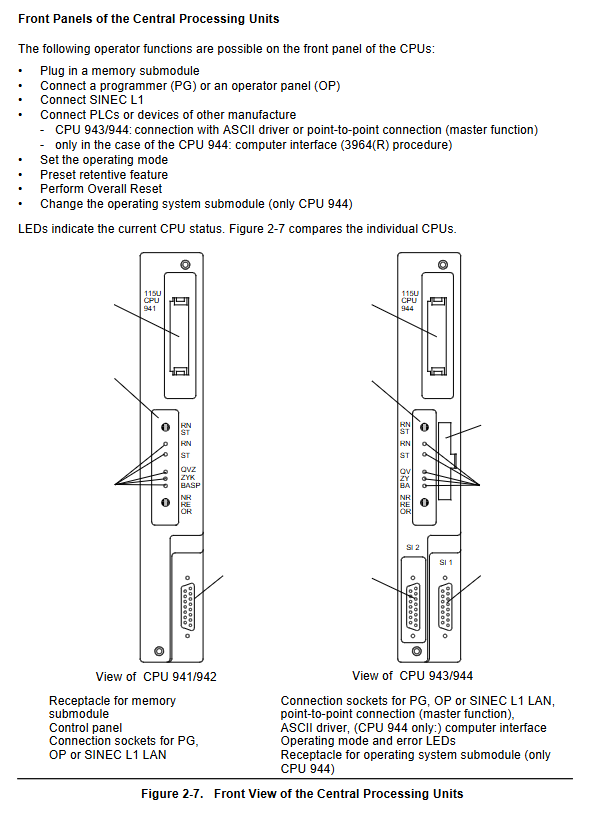
SIMATIC S5-115U is a programmable controller suitable for the mid to low end performance range. It adopts a modular design, with core components including power module, CPU (941/942/943/944 models), I/O module, etc. It supports both centralized and distributed configurations, and can expand up to 3 expansion units. In terms of communication, it is compatible with various systems such as SINEC L1. Programming relies on STEP 5 language and has functions such as interrupt handling and analog processing. It is suitable for multiple industries such as automotive, chemical, and food. Installation needs to follow mechanical fixation, standardized wiring, and electromagnetic compatibility requirements. Startup and testing need to complete steps such as overall reset, program transmission, parameter setting, and fault diagnosis.

Core hardware components

2.1 Power module (PS 951)

Input voltage: 120V AC, 230V AC, or 24V DC

Output current: 3A, 7A, 15A (7A and below do not require a fan)

Backup function: Lithium battery backup program memory and retention flag/timer/counter, battery life of about 2 years

Key features: Equipped with battery failure LED indicator, reset switch, voltage selection switch

2.2 CPU module

CPU model, memory capacity, execution time (in thousands of instructions), core features

CPU 941 internal 2Kbytes, maximum 18Kbytes, approximately 10ms basic type, supports PID control

CPU 942 internal 10Kbytes, maximum 42Kbytes, approximately 10ms enhanced, supports PID control

CPU 943 internal 48Kbytes approximately 5ms dual serial ports, including real-time clock and ASCII driver

CPU 944 internal 96Kbytes, approximately 1.5ms dual serial port, supports 3964/3964R protocol, PID control

Common features: Supports 1024 flag bits, 128 timers/counters, time range 0.01-9990s, counting range 0-999

2.3 I/O modules

Digital module: adapted to machine voltage/current levels, supports screw or crimping connections

Simulation module: handles closed-loop control tasks, up to 4 measurement ranges per module, supports range card replacement

Intelligent I/O module: independent processor, parallel processing time critical tasks (counting, positioning, etc.)

2.4 Communication components

Communication system: Supports SINEC L1 LAN PROFIBUS、 Industrial Ethernet, point-to-point connection

Communication Processor (CP): divided into LAN type and link/signal/log type, adapted for human-machine and machine machine communication

System configuration

3.1 Centralized Configuration

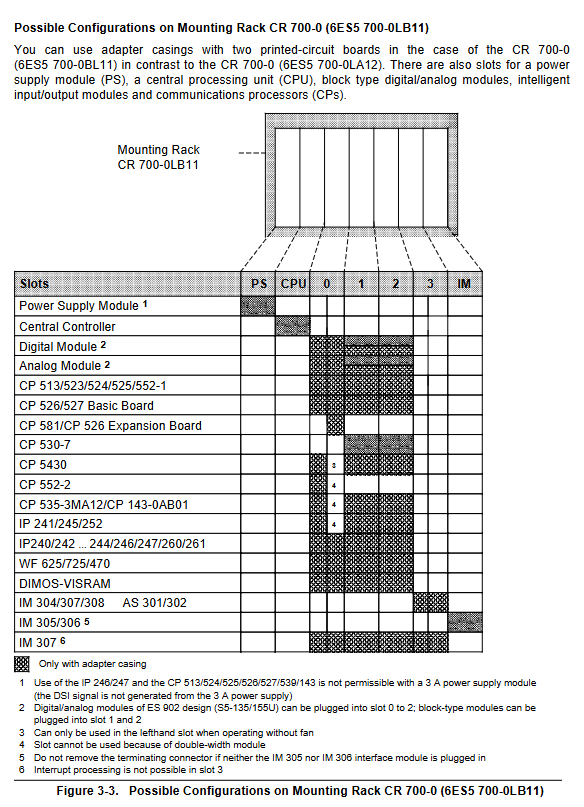
Structure: 1 central controller (CC)+up to 3 expansion units (EU)

Interface modules: IM 305 (supporting 1 EU, cable ≤ 1.5m), IM 306 (supporting 3 EU, cable ≤ 2.5m)

Power supply: EU takes power from CC through interface module, with a maximum power supply current of 2A (IM 306)

3.2 Distributed Configuration

Maximum distance: Depending on the interface module, it can reach up to 3000m

Interface modules: AS 301/302, IM 304/314, etc., supporting multiple EU extensions

Advantages: Reduce sensor/actuator wiring costs and install closer to the site
Programming and Functionality

4.1 Programming Fundamentals

Programming language: STEP 5, supports 4 representation methods, structured/linear programming

Program block types: Program block (PB), Function block (FB), Sequential block (SB), Data block (DB), Organization block (OB)

Execution method: Loop execution (OB1), interrupt driven, time controlled

4.2 Core Functions

Interrupt handling: Supports process interrupts, time interrupts, and response time can be calculated

Analog processing: compatible with multiple sensors, supports wire breakage detection and sampling, including FB250/251 matching blocks

PID control: up to 8 control loops, sampling time ≥ 100ms

Real time clock: Built in CPU 943/944, supports time related program execution

Installation and Startup

5.1 Installation Requirements

Mechanical installation: The module is fixed on the mounting bracket (CR/ER series), allowing for a 15 ° tilt installation. High power modules require a fan

Wiring specifications: Distinguish between control circuits (5V/5.2V/24V) and load circuits, with different wiring for floating/non floating modules

Electromagnetic compatibility: Cable grouping and wiring, shielded cable double ended grounding, potential bonding conductor cross-section ≥ 16mm ² (≤ 200m)

5.2 Startup steps

Overall reset: Clear program memory, data, and error IDs, restore system data to default values

Program transfer: Directly transferred through memory submodules or programmers, automatically loaded into internal RAM by CPU 943/944

Parameter settings: Determine timer/counter/flag retention, set scan monitoring time (default 500ms, maximum 2.55s)

Program testing: Use functions such as STATUS/VAR, FORCE, etc. to check I/O signals and program logic

Fault diagnosis

Diagnostic tools: ISTACK (Interrupt Stack) analysis, LED indicator lights, BSTACK (Block Stack) program tracking

Common faults: battery failure (BAU signal), scan time timeout (ZYK), I/O not ready (PEU), memory error

Solution: Replace the faulty module, retransmit the program, check the wiring and terminal resistance
SIEMENS SIMATIC RF120C Communication Module Operation Guide

The SIMATIC RF120C Communication Module Operation Guide introduces the application scenarios, installation and connection, configuration parameter allocation, service maintenance, and technical data of the module. It is suitable for SIMATIC S7-1200 controllers (firmware ≥ 3.0) and can be connected to one RFID or optical reader through RS422 interface. It supports a maximum transmission speed of 115.2 kbps and a maximum cable length of 1000m, with a protection level of IP20. It needs to be configured with TIA Portal (STEP 7 V13 and above) and can achieve functions such as reading, writing, and addressing of the responder. Only qualified professionals are allowed to operate it.

1. Product Overview

(1) Application Fields and Core Features

Category key information

Applicable scenarios with SIMATIC S7-1200 controller to achieve data exchange between RFID/optical readers

Compatible with RF200/RF300/RF600 (RF620R/RF630R), MV400/MV500, MOBY D/U series readers

Core feature: 1 RS422 interface, supporting 1 reader connection; Protection level IP20; A single S7-1200 can accommodate up to 3 RF120Cs; Support standard addressing (linear address access)

Software requirements include TIA Portal (STEP 7 Basic/Professional V13 and above), integrated with Ident library and function blocks

(2) Installation and configuration requirements

Installation position: Adjacent to the left side of S7-1200, with a ventilation gap of 25mm above and below

Installation method: 35mm DIN rail installation, width 30mm, weight 0.15kg

Temperature range: Horizontal installation 0 ° C~55 ° C, vertical installation 0 ° C~45 ° C

2. Installation and Connection

(1) Safety Notice

Power requirements: Safety ultra-low voltage (SELV/LPS), compliant with IEC 60950-1/EN 60950-1/VDE 0805-1

Operation specifications: Power off installation/disassembly, prohibit opening the equipment when powered on; 24V power supply needs to be protected against electromagnetic pulses (such as lightning protection)

Grounding requirement: The module needs to be grounded through the shielding layer

(2) Installation and connection steps

Remove the left bus cover of the S7-1200 CPU, align the RF120C bus connector, and snap it in

Install the CPU and RF120C onto the DIN rail and secure them in place

Connect an external 24V power supply to the top 3-pin socket of RF120C

Connect the reader to the RF120C 9-pin D-type female connector via a D-type cable

Connect the power, close the module front cover, download STEP 7 project data to complete debugging

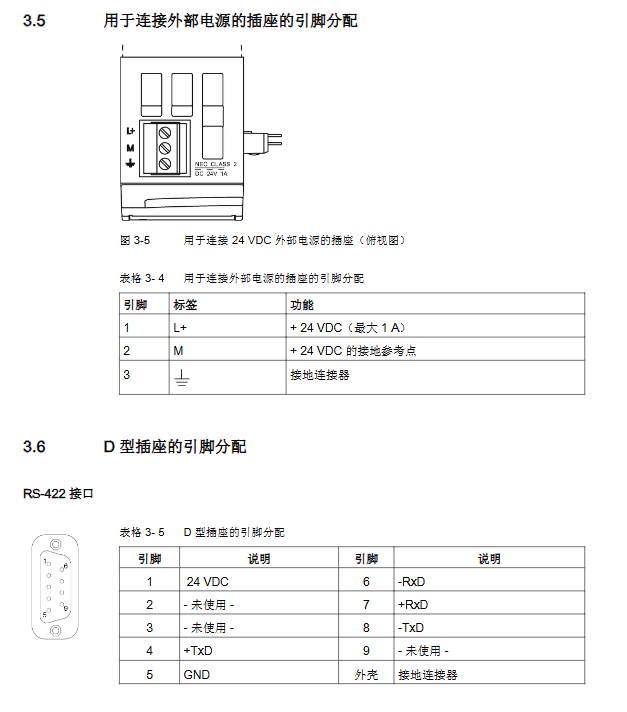
(3) Power supply and pin allocation

Interface Type Pin Configuration Function Description

External power socket (3-pin) 1-pin (L+):+24VDC (maximum 1A); 2-pin (M): Grounding reference; 3-pin: The grounding connector supplies power to the reader, automatically shuts off and notifies the CPU when overloaded

D-type socket (9-pin, RS422) pin 1: 24VDC; 4 legs:+TxD; 5 pins: GND; 7-foot: – RxD; 8 legs:+RxD; 9-pin: – TxD realizes data transmission with the reader, supports hot swapping

3. Configuration and parameter allocation

(1) Hardware configuration

Configuration path: TIA Portal → Project View → Add S7-1200 → Hardware Catalog → SIMATIC S7-1200 → Communication Module → Identification System → RF120C

Core limitation: Each S7-1200 can be configured with up to 3 RF120C modules

(2) Key parameter group

Explanation of default values for parameter group core settings

Reader parameter group diagnostic message, Ident device/system selection hard error, Ident configuration file selection of connected reader type, triggering hardware diagnostic alarm

Ident device/system parameter group transmission speed, presence check, RF power, transmitter responder type 115.2 kBd, on, 1.00W transmission speed support 19.2/57.6/115.2 kBd; RF power of 0.50~5.00W (depending on the reader)

Reader type parameter group (RF600 only) includes wireless configuration file, multi tag mode, intelligent single tag mode ETSI, UID=EPC-ID, and support for ETSI/FCC/CMIT wireless standards; Multi label mode with optional EPC-ID (8 bytes) or Handle-ID (4 bytes)

(3) Programming and Addressing

Programming method: Program through the Ident instruction of the S7 controller, using function block libraries (Read/Write/Read_SPC-ID, etc.)

Addressing rule: Linear addressing, from the starting address (such as 0x0000) to the ending address, automatically identifying the storage size of the sending responder

Typical address space: RF200 (ISO 15693) starting address 0x0000, ending address 0x002B (44 bytes); RF300 (20 byte EEPROM) starting address 0xFF00, ending address 0xFF13

​4. Service and Maintenance

(1) LED status display

Meaning of LED type status

DIAG (red/green) green constant light configuration successful, no errors

DIAG (red/green) flashing green startup/not configured/firmware update

DIAG (red/green) module with constant red light is faulty and needs to be replaced

The LED inside the shell is green (DC 24V), and the external 24V power supply is normal

The yellow LED (Rx) inside the casing is communicating with the reader

There is an error in the red flashing (ERROR) of the LED inside the casing, and the number of flashes corresponds to the type of error

(2) Diagnosis and Error Handling

Diagnostic methods: LED status viewing, TIA Portal online diagnosis, GET-DIAG instruction evaluation, ERROR/STATUS parameter analysis

Error message structure: Status parameter 4 bytes (byte 0: function number; byte 1: error number; byte 2: error code; byte 3: warning)

Common errors: Reader unresponsive (ERROR flashes 3 times), voltage interruption/short circuit (flashes 17 times), parameter allocation error (flashes 21 times)

(3) Module replacement

Configuration storage: RF120C configuration data is stored in S7-1200 CPU

Replacement process: Power off → Disassemble old module → Install new module → Power on → CPU automatically issues configuration data without reloading the project

5. Technical data and appendices

(1) Core technical parameters

Category specifications

Electrical parameters: Power supply voltage of 20~30VDC (rated 24VDC); Backplane bus current consumption 110~250mA; maximum external power supply 1A

The maximum transmission speed of communication parameters is 115.2 kbps; The maximum cable length is 1000m (depending on the reader); Maximum block length of 240 bytes (non cyclic)

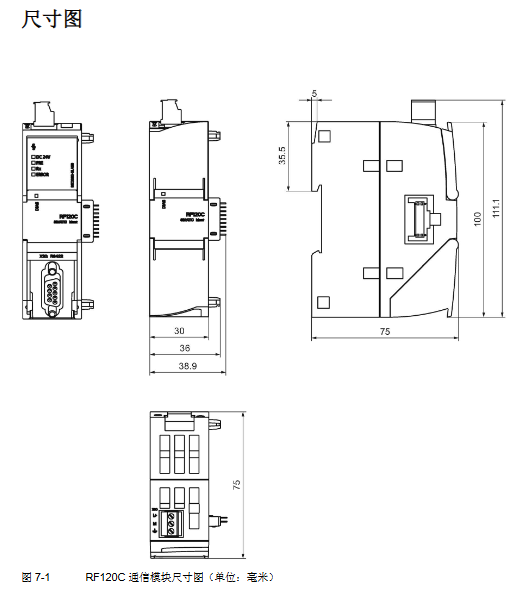
Mechanical parameter size 30 × 100 × 75mm; Material Xantar MX 1094 (Ti Grey 24L01); MTBF (40 ° C) 196 years

Environmental parameter storage temperature -40 ° C~70 ° C; anti static discharge 8kV (air)/4kV (contact)

(2) Compliance and ordering data

Certification standards: CE, FCC, cULus, KCC, RoHS (2011/65/EU), ATEX/IECEx explosion-proof certification

Core order number: RF120C module (6GT2002-0LA00); 2m connecting cable (6GT2091-4LH20); Terminal block (6GK5980-1CB00-0DA5)

SIEMENS SIMADYN D Hardware Usage Guide

The SIMADYN D hardware usage guide covers general technical data, various hardware modules (10 major categories including subracks, CPUs, coupled storage, input/output, communication support, etc.), plug-in cables, operation panel OP2, and other key content. It clarifies the installation specifications (such as EMC, ESD protection), technical parameters (such as voltage range, current capacity), connection configuration, and safety guidelines (including DANGER, Warning, and other level 5 risk warnings) of the hardware, and is suitable for programmers and debugging engineers. It should be used in conjunction with basic knowledge of automation technology.

General Technical Data

(1) Installation and EMC Key Requirements

Grounding and equipotential connection: All components need to be connected through equipotential cables, and cabinets need to be equipped with grounding bars. The cross-sectional area of the grounding cable for sub racks is ≥ 6mm ², and the cross-sectional area of the connecting cable for multiple cabinets is ≥ 16mm ².

Cable requirements: All signal cables must be shielded, and the distance between analog signal cables and power cables must meet the following requirements: when AC<500V>10cm, when AC>1kV>30cm.

Installation gap: When installing the sub rack, the minimum gap should be ≥ 50mm, and the cabinet should ensure air circulation.

Power protection: Line filters need to be installed, and 24V power supplies need to be equipped with noise suppression capacitors.

(2) ESD protection

Definition: Electrostatic discharge (ESD) may damage highly integrated components, and discharge is required before human contact with the components (touching conductive grounded objects).

Operation requirements: ESD wristbands or anti-static shoes should be worn, and the module should be placed on a conductive surface to avoid contact with insulating materials.

(3) Environmental conditions

Scope of project requirements

Working intake temperature: 0 ° C~+55 ° C

Storage temperature -25 ° C~+70 ° C

Operating machinery level 12 (compliant with SN 29050)

Transport machinery level 22 (compliant with SN 29050)

Details of core hardware modules

(1) Subracks

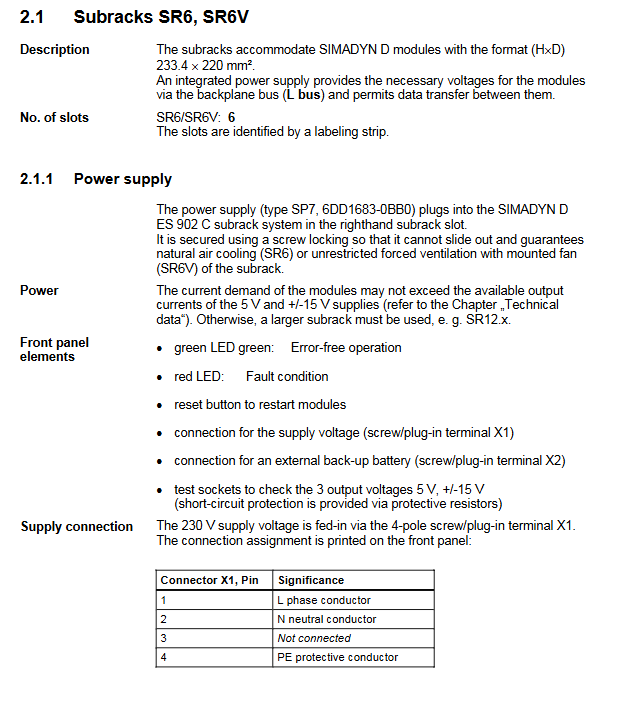
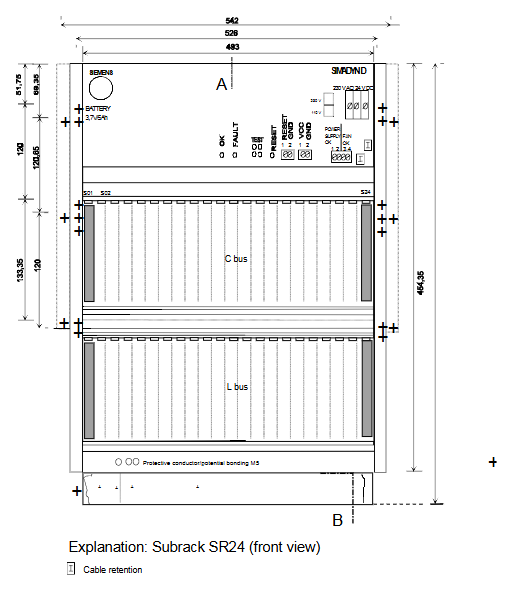
Main types: SR6 (6 slots), SR12 (12 slots), SR24 (24 slots), SRT400 (compact).

Key parameters: Input voltage 230V AC (± 10%/-15%), output voltage 5V, ± 15V, SR12 maximum output current 26A (5V), SRT400 naturally cooled.

Core function: Provides backplane bus (L bus/C bus), supports module data exchange and power supply, and partially supports battery backup.

(2) CPU module

Model: PM5 (32MHz, 4MB DRAM), PM6 (64/128MHz, 8MB DRAM), EP3 (Signal Processor Module).

Interface: Supports RS232 service interface, PM5 can connect 2 absolute value encoders and 2 incremental encoders, PM6 supports 8 binary inputs.

Display: 7-segment display, displaying module number or error code (such as “H” indicating fatal error).

(3) Input/output module

Representative modules:

EA12: 8-channel analog output, output voltage ± 10V, current ± 10mA, resolution 13 bits+symbol.

EB11: 32 binary input/output, output with thermal overload protection, supporting 24V DC signal.

IT41: 4 analog inputs/outputs, 16 binary inputs/outputs, 4 incremental encoder interfaces.

Commonality: It needs to be connected through interface modules (such as SB10, SU11), supporting signal conversion and electrical isolation.

(4) Communication support module

Main types: CS7 (supporting SS4/SS5 communication modules), CSH11 (SINEC H1 network connection), ITSL (SIMULINK fiber optic interface).

Communication protocol: Supports DUST, USS, PROFIBUS, RS232/485, etc., maximum cable length: RS485 up to 1000m, fiber point-to-point 200m.

(5) Operation panel OP2

Function: Supports 24 channel process data processing, 32 channel binary value processing, 30 message storage, dual line 40 character display.

Parameters: Power supply 24V DC, support USS bus (baud rate 9.6~187.5kbaud), protection level IP65 for front-end.

Plug in cables

Type: Includes ribbon cables (such as SC7, SC12) and circular cables (such as SC49, SC57), compatible with different module interfaces.

Key parameters: Insulation level in accordance with VDE 0110, maximum operating voltage of 300V, maximum current per core of 1A, length mostly 2m or 10m.

Connection requirements: The shielding layer should be grounded, and the plug should be securely fastened to avoid signal interference.

SIEMENS SIMATIC HMI Touch Panel TP 170A, TP 170B Operator Panel OP 170B

The SIMATIC HMI TP 170A, TP 170B Touch Screen, and OP 170B Operation Panel User Manual (Order Number 6AV6591-1DC11-2AB0) is a full process guide for three low-level industrial human-machine interface devices. The core covers four modules: installation configuration, functional operation, system settings, and maintenance upgrades. It supports ProTool CS configuration software (V5.2 and above versions), adapts to multiple brands of PLCs such as SIMATIC S5/S7, has 320-768 kByte configuration memory, a 320 × 240 resolution display screen, supports ASCII/RTU transmission, password protection, formula management, trend view, and other core functions. The protection level reaches IP65 (front), and is suitable for machine monitoring and operation in industrial sites.

Comparison of core characteristics of equipment

Equipment model core parameter differentiation function

TP 170A (touch screen) with 320 kByte of memory, 4-color display (320 × 240 resolution), single RS232/RS422 interface basic functions: input/output, status button, bar graph, no recipe/trend function

TP 170B (touch screen) with 768 kByte of memory, 4/16 color display, dual communication interfaces and CF card expansion enhancement features: recipe management, trend view, print output, and multiple languages (5 types)

OP 170B (operation panel) configuration memory 768 kByte, 4-color display, integrated membrane keyboard (35 keys)+CF card expansion enhancement functions: soft key customization, batch message confirmation, keyboard shortcut operation

Key hardware specifications

Category specific parameter notes

Display feature resolution 320 × 240, effective display area 116 × 87 mm, CCFL backlight (lifespan 50000 hours) TP 170B/OP 170B supports 16 color display

Communication interface RS232 (9-pin), RS422/RS485 (MPI/PROFIBUS-DP) TP 170A only has a single interface, TP 170B/OP 170B supports dual interface redundancy

Storage expansion TP 170B/OP 170B supports CF card (Compact Flash) for recipe backup and configuration storage

Protection level: IP65 on the front and IP20 on the back, in compliance with NEMA 4 standard (with protective cover)

The power requirement is 24 V DC (18.0-30.0 V DC), with a typical power consumption of 0.24-0.29 A and reverse polarity protection

Environmental adaptation working temperature 0-60 ℃, humidity 5% -95% (no condensation), anti vibration/electrostatic interference in accordance with EN 61000 electromagnetic compatibility standard

​Core operating procedures

1. Installation and connection

Mechanical installation

Panel opening size: TP 170A/TP 170B is 198 × 142 mm, OP 170B is 229 × 241 mm

Installation requirements: Panel thickness ≤ 6mm, reserved heat dissipation space (up and down 50mm, left and right 15-70mm)

Fixing method: TP 170A/TP 170B is fastened with side screws, OP 170B supports replacement of function key label strips

Electrical connection:

Power connection: 2-core terminal (+24 V DC/GND), wire cross-section ≤ 2.5 mm ²

PLC connection: Supports RS232 (point-to-point), MPI/PROFIBUS-DP (bus), requires shielded cable

Peripheral Connection: TP 170B/OP 170B can be connected to a serial printer (RS232 9600-57600 bps)

2. Configuration and Debugging

Project configuration:

Software requirements: ProTool CS (V5.2+SP2 and above, TP 170B/OP 170B requires V6.0+)

Configuration process: Create project → Design screen object → Set communication parameters → Download to device

Support functions: multilingual (up to 5 types), password protection (levels 0-9), message alarm (up to 2000 messages)

Download and Upload:

Download methods: manual trigger (startup phase), automatic trigger (runtime phase), supports RS232/SPI interface

Upload restriction: Only TP 170B/OP 170B supports project upload, “Upload option” needs to be enabled

Test modes: offline testing (without PLC connection), online testing (PLC communication verification)

3. Core Function Operations

Key points for operating functional modules and equipment support status

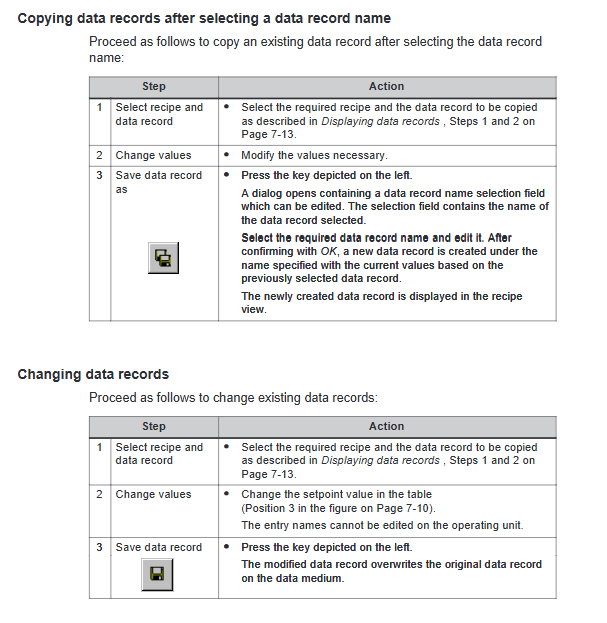
Formula Management (TP 170B/OP 170B) supports 200 formulas/200 data records, can import/export CSV files. TP 170A does not support this

Trend View (TP 170B/OP 170B) can display up to 50 trend curves simultaneously, supporting reading lines and limit value markers. TP 170A does not support this feature

Message alarm supports event messages/alarm messages, 16 confirmation groups, and message buffer storage. All three devices support this feature

Password protection for up to 50 passwords, 0-9 level permissions, automatic logout upon timeout supported by all three devices

Print output (TP 170B/OP 170B) supports screen hard copy and message log printing, but is compatible with EPSON/HP printers. TP 170A does not support it

4. System setup and maintenance

System parameter settings:

Display settings: contrast adjustment, screen calibration (TP series), screen saver (5-minute – permanently turned off)

Language settings: Supports German/English/French/Italian/Spanish, etc., with up to 5 language switches available

Date and Time: Supports synchronization with PLC (S7_CATE-AND_TIME format)

Maintenance and Upgrade:

Daily maintenance: screen cleaning (wet cloth+neutral cleaner), scratch protection (optional protective film)

Backup and recovery: ProSave tool supports Flash memory/CF card backup and batch recovery of configurations

System upgrade: Use PTUpdate tool to update the operating system through RS232 interface (resolve compatibility conflicts)

Fault handling and technical specifications

1. Common faults and solutions

Core causes of fault phenomena and solutions

Project download failed due to communication parameter mismatch and compatibility conflict. Check baud rate/interface settings and upgrade operating system (Chapter 13)

Touch screen unresponsive, uncalibrated, electrostatic interference, screen calibration (Windows CE control panel), grounding treatment

PLC communication interruption cable fault, interface configuration error check shielded cable connection, reconfigure MPI/PROFIBUS-DP parameters

The formula cannot be saved when the storage medium is full. Write protection is required to clear the CF card space and turn off the write protection switch

System message error: Illegal parameters and insufficient memory. Refer to Appendix C System Message Table (error codes 10000-320014) for troubleshooting

2. Key technical specifications

Configuration restrictions:

Number of tags: TP 170A up to 500, TP 170B/OP 170B up to 1000

Number of messages: Up to 2000 event and alarm messages, message buffering supports 64 events

Formula capacity: Up to 200 data records per formula, with a maximum of 60 entries per record

Communication parameters:

Transmission rate: 19200-57600 bps (printer), 1.5-12 MBaud (MPI/PROFIBUS-DP)

Data format: 8-bit data bit, 1-bit stop bit, no checksum (default)

Safety regulations:

Only qualified personnel are allowed to operate, and the power supply must comply with SELV safety ultra-low voltage standards

When used in hazardous areas, turn off the power and then plug and unplug the connector

SIEMENS SIMATIC TI505/TI500 MODNIM User Manual

The SIMATIC TI505/TI500 MODNIM User Manual (order number PPX: 505-8122-1) is a full process guide for the PPX: 505-5184 (TI505 series) and PPX: 500-5184 (TI500 series) Modbus network interface modules. The core covers four modules: installation configuration, Modbus protocol parsing, functional instruction description, and troubleshooting. It supports two ASCII/RTU transmission modes, 15 core Modbus function codes, and adapts to 50-19200 bps transmission rates. The network address (1-247) and communication parameters need to be configured through dip switches, and module debugging can be achieved with MODASST diagnostic software. It is suitable for Modbus master-slave network communication between PLCs and hosts in industrial environments. 

Module core features

Category specific parameters/characteristics remarks

The TI505 series (1 I/O slot) and TI500 series (2 adjacent I/O slots) require dedicated slot keys to prevent accidental insertion

Communication interface dual RS-232-C/423 ports (A/B ports, redundant design) support DTE configuration, optional RTS/CTS handshake

Transmission mode ASCII mode and RTU mode are required to be unified throughout the network, which can be selected through the dial switch

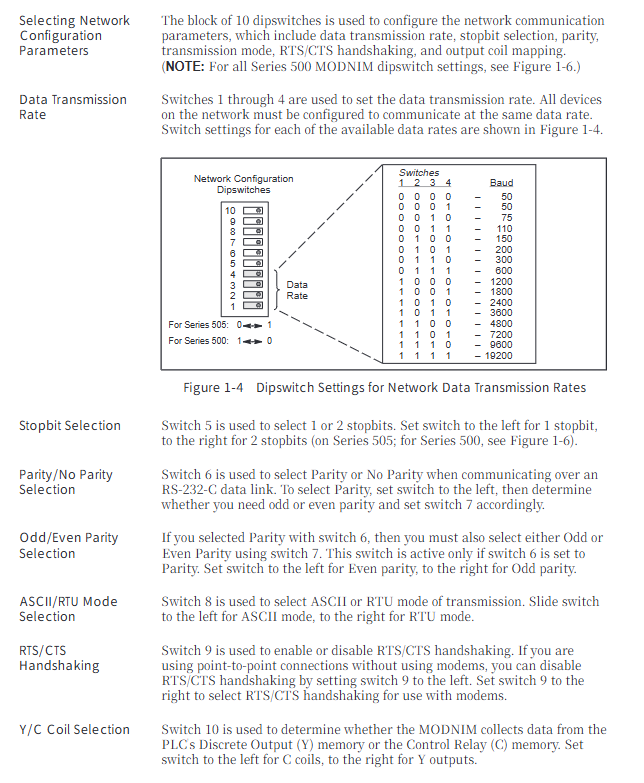
transmission rate  50、75、110、150、200、300、600、1200、1800、2400、3600、4800、7200、9600、19200 bps  There are 15 options available, and the overall network speed must be consistent

Network addresses 1-247 (binary dialing setting) 0 and 248-255 are invalid addresses and will trigger test mode

Environmental adaptation: Operating temperature range of 0-60 ℃, storage temperature range of -40-70 ℃, humidity range of 5% -95% (non condensing), in compliance with industrial certifications such as UL508 and CSA142

Power consumption is taken from the base, with a maximum of 8W (+5VDC). The installation screw torque is 0.3-0.6 N-m

Core operating procedures

1. Installation and configuration

Preliminary preparation:

Module processing: Anti static packaging is required for transportation, conductive pads and grounding wristbands are needed in the work area, and the module should be checked for physical damage

Dial switch configuration (core steps):

Address dip code (8 digits): Set the unique network address from 1-247 in binary format (e.g. address 25 corresponds to 00011001)

Communication parameter dialing (10 bits): including rate (1-4 bits), stop bit (5th bit), parity check (6-7 bits), transmission mode (8th bit), handshake switch (9th bit), coil type (10th bit, Y output/C coil)

Module installation:

TI505 series: Insert into a single I/O slot, tighten the upper and lower screws to ground

TI500 series: Insert two adjacent slots and lock them with a dedicated key to prevent accidental insertion

Cable connection:

Recommended cable: Siemens standard 9-pin/25 pin null modem cable (order number 2601094-8001/VPU200-3605)

Self made requirements: 26 AWG tinned stranded wire+shielding layer, 25 pin D-type connector (gold-plated contacts)

Connection method: Supports two scenarios: module host (with/without handshake) and module commercial modem (with handshake)

2. Modbus protocol and functional instructions

Transmission frame structure:

ASCII mode: starting with “:” and ending with CR/LF, containing address (2 characters), function code (2 characters), data (n × 2 characters), LRC checksum (2 characters) fields, 7 data bits

RTU mode: Divided by 3.5 character mute frames, including address (1 byte), function code (1 byte), data (n bytes), CRC check (2 bytes) fields, and 8-bit data bits

Core function codes (15 types):

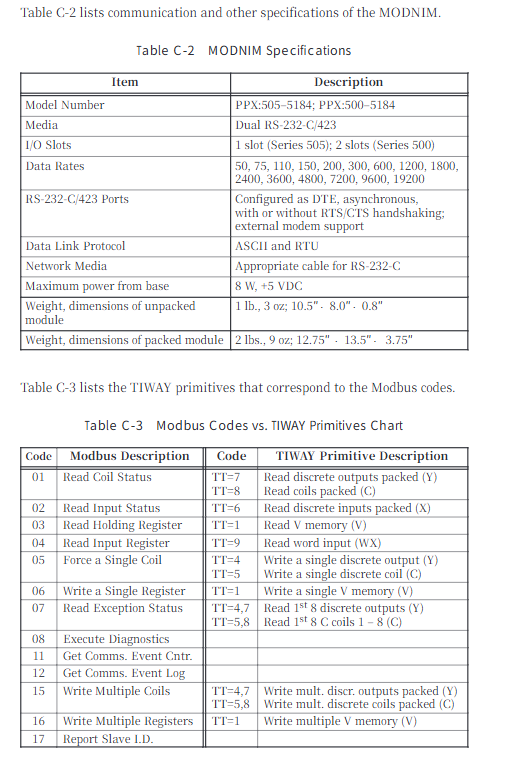
Function Code Function Description Key Limitations

01 Read the status of up to 2000 coils

02 Read input status with a maximum of 2000 discrete inputs

03 Read and hold registers with a maximum of 125 registers

04 Read input registers up to 125 registers

05 Writing a single coil supports broadcast mode (no response)

06 Writing to a single register supports broadcast mode (no response)

07 reads abnormal status and only returns the status of the first 8 coils

08 diagnostic execution includes 14 diagnostic codes (such as circuit testing, counter reset)

11. Obtain the communication event counter return status word+event count

Retrieve communication event log and return status word+count+64 event bytes

Write multiple coils with a maximum of 800 coils and support broadcasting

Write to multiple registers with a maximum of 100 registers and support broadcasting

Report 17 returns information such as PLC model and operating status from the station ID

Address mapping rules:

Modbus address starts from 0, SIMATIC TI PLC address starts from 1, attention should be paid to address offset adaptation in the program

Coil mapping: Y discrete output of PLC or C control relay can be selected (by dialing the 10th digit)

3. Diagnosis and maintenance

Self checking function:

Power on self-test: After the module is powered on or reset, it automatically tests the ROM, RAM, and processor, and indicates the status through NIM GOOD/PC GOOD LED

Run time self-test: monitor ROM integrity, PLC communication, watchdog timer in the background, and enter offline mode in case of failure

User initiated self check: Disconnect the network cable, connect the circuit connector, press and hold the RESET+TEST button for 5 seconds, and determine hardware/port faults through LED status

Status indication (LED function):

LED name status meaning

NIM GOOD is always on: the module hardware is normal; Extinguish: Hardware malfunction

PC GOOD is always on: communication with PLC is normal; Extinguish: Communication failure

ONLINE always on: remote mode; Flashing: Local mode (only supports read function)

REC/XMT constantly on: receiving/sending data

TEST constantly on: self-test failed; Blinking: Test completed

MODASST software assistance:

Function: Configure communication parameters, generate dialing diagrams, cable pin diagrams, run diagnostics, send test instructions

Operating environment: IBM compatible with PC and DOS systems, requiring RS-232-C null modem cable connection module

​Troubleshooting and Exception Handling

Common faults and solutions:

Core causes of fault phenomena and solutions

The module cannot log in to the PLC. The I/O address is not registered and the module is not securely plugged in. Use a programming device to read the I/O mapping, re plug and unplug the module, and tighten it

Communication failure rate/mode/verification mismatch. Check the communication parameters of all network devices and reconfigure dialing

Self check TEST light is constantly on due to hardware malfunction (ROM/RAM/port). Perform user initiated self check and contact after-sales service after confirming the fault

The write function failure module is in local mode. Switch the Local/Remote switch to Remote mode

Exception response code (core):

Reason corresponding to the meaning of the exception code

01 Illegal function request function code not supported

02 Illegal data address request address exceeds PLC memory range

03 Illegal data value written data exceeds the allowed range

04 Failed to associate device. PLC did not respond or instruction was aborted

06 Memory Parity Error Detected parity error while reading memory

SIEMENS SIMATIC S7-1500 S7-PLCSIM Advanced

Overview of document basic information

Document Name Version/Year Core Adaptation Product Core Objectives Key Features

S7-PLCSIM Advanced Function Manual, 11th edition 2023, provides PLC virtual simulation for S7-1500, ET 200SP, SIMATIC Drive Controller, etc. It supports program testing, virtual debugging, supports 16 instances, API joint simulation, and virtual time adjustment

1FK6 Series Servo Motor Manual 2001 11th Edition 1FK6 03. -10. Series Three Phase Servo Motor Guide Product Transportation, Installation, Operation, Maintenance Full Process Multilingual Support, IP64 Protection, Self Cooling Design

S7-PLCSIM Advanced V6.0 Core Content

1. Basic characteristics of the product

Positioning: Virtual simulation software for SIMATIC S7-1500 series PLC, capable of testing STEP 7 programs without the need for a physical controller

Support CPU:

Mainstream series: S7-1500 (standard/fail safe/technical type), S7-1500R/H redundant system ET 200SP/ET 200pro CPU

Special models: SIMATIC Drive Controller (1504D TF/1507D TF), S7-1500 software/open controller

Core functions:

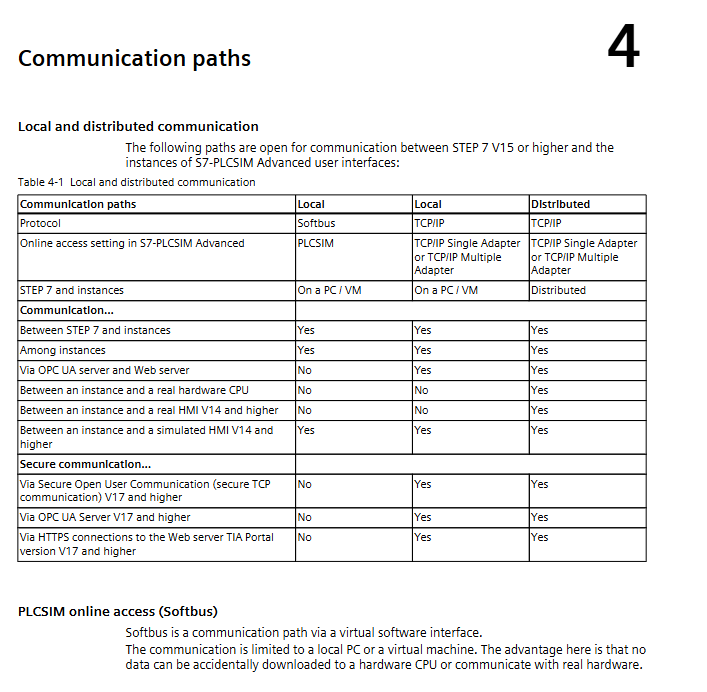
Communication modes: local communication (Softbus), distributed communication (TCP/IP single adapter/multi adapter mode)

Scalability: API interface supports C++/C # joint simulation, supports OPC UA server and web server functions

Special simulation: ODK function simulation, motion control simulation, redundant system simulation (RUN Solo mode)

System requirements:

Minimum Hardware/Software Configuration Remarks

Processor Intel Core i7 6th generation or above, single instance 1 core+system 1 core+application 1 core virtual machine requires corresponding physical CPU allocation

1GB memory per instance, minimum 4GB system. When installing TIA Portal, the virtual machine needs to be ≥ 8GB

5GB of free space on the hard drive-

Operating system Windows (non Home version), supports VMware/Hyper-V/AWS Cloud and needs to be compatible with the corresponding TIA Portal version

2. Key operational procedures

Installation and License:

Installation process: Run the installation package → Select product components → Configure firewall exceptions (port 4410) → Restart the computer

License type: Floating license (single license supports 2 instances), 21 day trial license

Antivirus exception: The installation directory (such as C: \ Program Files \ Common Files \ Siemens \ PLCSIMADV) needs to be added to the antivirus software exception list

Communication configuration:

Local communication (Softbus): default mode, restricts communication within the local PC/virtual machine to avoid accidental downloading to the physical CPU

TCP/IP communication:

Single adapter mode (hybrid mode): supports distributed communication across PCs/virtual machines, requires activation of virtual switches

Multi adapter mode (non hybrid mode): Communication is achieved through MAC address mapping, suitable for cloud environments/enterprise networks

Enable distributed communication: Activate “S7-PLCSIM Advanced Virtual Switch” in the Windows network adapter properties

Simulation operation:

Instance creation: Enter the instance name (3-29 characters) through the control panel, select the CPU family, and configure the IP address

Project Download: Select PG/PC interface (PLCSIM/Virtual Ethernet Adapter) in TIA Portal, download hardware configuration and program

Operation monitoring: Switch the instance to RUN mode, support virtual time adjustment (scaling factor 0.01-100), and simulate acceleration/deceleration

Joint simulation: Connect third-party software (such as SIMIT) through API interfaces, supporting hardware interrupt simulation and synchronous control

Data management:

Virtual storage card: stores user programs, configuration data, supports backup/restore (only applicable to simulation environment)

Offline project provision: Create a “user-defined card reader” in STEP 7 and export project data to the virtual storage card directory

3. Common limitations and troubleshooting

Core limitations:

Does not support S7-1200 CPU, PROFINET/PROFIBUS fieldbus simulation

When communicating on a soft bus, multiple instances default to the same IP address and need to be started and downloaded one by one

Motion control simulation does not support isochronous mode or technical module logic

Typical faults and solutions:

Core causes of fault phenomena and solutions

Instance cannot start antivirus software interception, Npcap service is not running, add antivirus software exception, run ‘net start npcap’ in administrator mode

TCP/IP communication failure, virtual switch not activated, IP address conflict, activate virtual switch, ensure instance IP is unique and matches subnet

Project download failed due to incompatible CPU firmware version. Upgrade TIA Portal project firmware version and recreate simulation instance

Simulation lag/overflow scaling factor too high, insufficient system resources reduce virtual time scaling factor, close redundant background programs

Core content of 1FK6 series servo motor

1. Basic characteristics of the product

Type: Permanent magnet excitation three-phase synchronous servo motor, compatible with motor controlled AC converter, following the principle of sinusoidal current

Application scenarios: Drive and positioning of machine tools, production equipment, robots, and handling devices

Key parameters:

Category specific parameter notes

Protection level IP64 (basic model), optional IP65/IP67 driver end flange optional IP67

Working environment temperature -15 ℃~+40 ℃ Power coefficient 0.92 at 50 ℃, 0.82 at 60 ℃

Altitude adaptation ≤ 1000m (2000m coefficient 0.94, 2500m coefficient 0.9) requires load adjustment according to altitude

Structural parameters IM B5/V1/V3 installation form, self cooling bearings with permanent grease lubrication, maintenance free

Acoustic characteristics below 3000rpm: 55-70dB (A) 1FK6 03./04. Approximately 55dB (A), 1FK6 10. Approximately 70dB (A)

Electrical parameters: When the rotor rotates, the terminal voltage can reach 300V, and the brake is powered by 24V DC ± 10%. The brake is only used for emergency stop

2. Key operational procedures

Transportation and Storage:

Transportation requirements: The weight can reach 50kg, and lifting equipment that complies with Directive 98/37/EU must be used to avoid hitting the shaft end

Storage conditions: dry, low dust, low vibration (effective vibration<0.2mm/s), away from pacemaker wearers and electronic data media

Installation requirements:

Surface treatment: Use commercial solvents to remove the anti-corrosion agent from the shaft end, leaving a heat dissipation gap of ≥ 100mm

Fixed specification: Use hexagon socket screws with a strength grade of ≥ 8.8, and motors with integrated brakes are prohibited from bearing axial forces

Environmental taboos: Prohibited from use in explosive hazardous areas, vertical installation must prevent liquid from seeping into the upper bearing

Electrical connection:

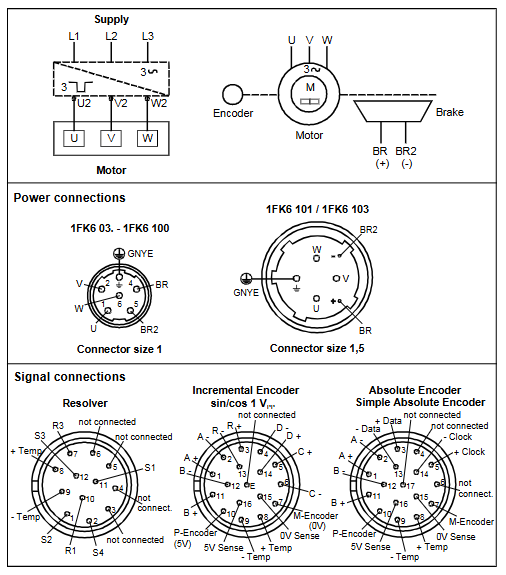
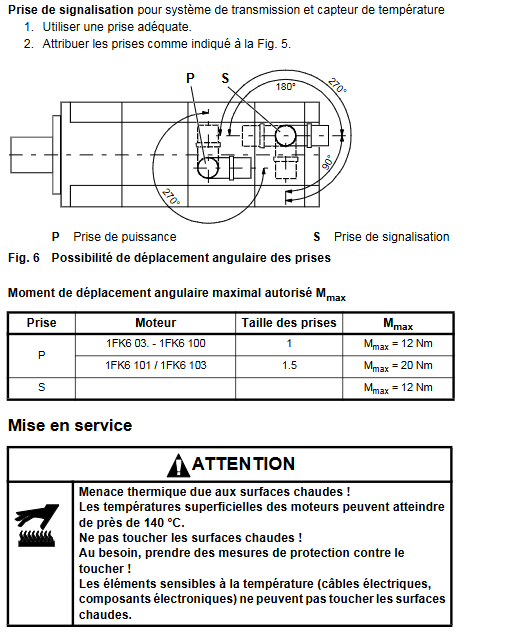
Wiring specification: Use shielded power and signal wires, plug torque ≤ 12Nm (signal plug)/20Nm (1FK6 101/103 power plug)

Safe operation: Electrical work requires power-off inspection, following EN 50110-1 standard, and only professional personnel are allowed to operate

Start up and maintenance:

Pre start inspection: wiring fastening, activation of protective devices, brake testing (rotor rotates freely under 24V power supply)

Operating restrictions: maximum speed not exceeding the nameplate marking, surface temperature ≤ 140 ℃

Maintenance cycle: The bearing life is 20000 hours, and the radial shaft seal (oil lubrication) is about 5000 hours. After disassembly, the encoder needs to be recalibrated

3. Troubleshooting

Core causes of fault phenomena and solutions

Check for insufficient shielding of irregular motor/encoder cables and high controller gain, and adjust converter parameters for shielding and grounding

Abnormal vibration, unbalanced transmission components, poor alignment of the drive chain, loose screws. Rebalance the transmission components, correct alignment, and tighten screws

Motor overheating, overload, heat dissipation obstruction, load verification (refer to nameplate), clean surface to ensure ventilation

Contact the manufacturer for professional repair if there is abnormal noise during operation, foreign objects inside, or damaged bearings. Disassembly by oneself is prohibited

SIEMENS 1FK6 series three-phase servo motor

The full process guide for technical specifications, installation operation, safety specifications, etc. of Siemens 1FK6 series three-phase servo motors (2001 edition, multilingual manual), with IP64 protection level, -15 ℃~+40 ℃ working temperature range, and 20000 hours of bearing life as key parameters, is suitable for driving and positioning equipment such as machine tools and machinery personnel; Siemens SIMATIC S7-300 PLC Beginner’s Guide (2007 edition), taking conveyor motor control as an example, explains in detail the complete process from STEP 7 Lite software installation, CPU 312C hardware wiring to program configuration download. The entire process must comply with electrical safety regulations, and the operation takes about 1 hour.

​Core content of 1FK6 series servo motor

1. Basic characteristics of the product

Type: Permanent magnet excitation three-phase synchronous servo motor, compatible with motor controlled AC converter, following the principle of sinusoidal current

Application scenarios: Drive and positioning of machine tools, production equipment, robots, and handling devices

Key parameters:

Protection level: IP64 (basic version), optional IP65/IP67

Working environment: Temperature -15 ℃~+40 ℃ (power coefficient 0.92 at 50 ℃, 0.82 at 60 ℃), altitude ≤ 1000m (coefficient 0.94 at 2000m)

Structural parameters: IM B5/V1/V3 installation form, self cooling, bearing life of 20000 hours

Acoustic characteristics: below 3000rpm, 1FK6 03./04. about 55dB (A), 1FK6 10. about 70dB (A)

2. Key operational procedures

Transportation and Storage:

The weight can reach 50kg and requires suitable lifting equipment to avoid impact

Storage environment: dry, low dust, low vibration (effective vibration<0.2mm/s)

Installation requirements:

Remove the anti-corrosion agent from the shaft end and reserve at least 100mm heat dissipation gap on three sides

Prohibited for use in explosion hazardous areas, motors with integrated brakes are not allowed to withstand axial forces

Bolt strength grade ≥ 8.8, prevent liquid from seeping into the upper bearing when installed vertically

Electrical connection:

Power supply voltage: The terminal voltage can reach 300V when the rotor rotates, and professional personnel are required to operate it

Wiring specifications: Use shielded power and signal wires, comply with EMC requirements, and have a maximum torque of 12Nm (power plug)/20Nm (1FK6 101/103) for the plug

Brake power supply: 24V DC ± 10%, only used for emergency stop, cannot be used as a working brake

Startup and Debugging:

Pre start inspection: Wiring is securely fastened, protective devices are activated, and there is no mechanical jamming

Operating restrictions: The maximum speed must comply with the nameplate markings to avoid overheating (surface temperature ≤ 140 ℃)

3. Safety and Maintenance

Safety regulations:

Anti electric shock: Operate the electrical part after power failure, following EN 50110-1 standard

Thermal injury prevention: Avoid touching high-temperature surfaces and keep temperature sensitive components away from heat sources

Anti magnetic interference: Pacemaker wearers should stay away from disassembled rotors, and electronic data media should be kept away from them

Maintenance and disposal:

Routine maintenance: Clean according to the degree of pollution to ensure smooth heat dissipation

Troubleshooting: Identify issues through vibration, noise, and temperature anomalies (such as vibration requiring rebalancing and overheating requiring load inspection)

Scrap disposal: Follow local regulations and dispose of encoder electronic components as electronic waste

SIMATIC S7-300 PLC Beginner’s Guide Core Content

1. Pre preparation

Skill requirements: Proficient in operating Microsoft Windows and mastering basic knowledge of electronics and electrical engineering

Material List (Core):

Hardware: CPU 312C, power module (6ES7307-1EA00-0AA0), installation track, 4 24V momentary contact switches PC Adapter USB

Software: STEP 7 Lite V3.0+SP2 (free download), PC Adapter USB driver

Tools: M6 screw, wire stripping pliers, crimping tool, 3.5mm/4.5mm blade screwdriver

2. Core operating procedures

Step 1: PC Preparation

Install STEP 7 Lite software and PC Adapter USB driver

Configure PG/PC interface: Select “PC Adapter (MPI)” and establish a communication connection between USB and CPU

Step 2: Hardware installation and wiring

Installation track: fixed and grounded (cross-sectional area of grounding cable ≥ 10mm ²), with a gap of ≥ 40mm reserved above and below

Module installation: Install the power supply in sequence CPU 312C, Insert the front connector (for easy wiring)

Wiring rules:

Signal transmitter (momentary contact switch) connected to CPU digital input terminal (DI)

Signal receiver (motor) connected to CPU digital output terminal (DO)

Cut off the power before wiring to avoid voltage hazards

Hardware debugging: After powering on, press the switch to test whether the CPU input LED lights up normally

Step 3: Software Configuration and Programming

Project operation: Open the “conver. k7p” instance project, create S7-300 station, configure power supply and CPU module

CPU parameter setting: Set the reserved bit storage quantity to “0” to avoid motor loss of control after power failure

Online connection: Establish MPI communication between PC and CPU, download configuration and verify consistency

Program view: Open the OB1 organization block, and the program is presented in ladder logic (LAD), including 4 control networks (start stop/reverse)

Step 4: Test Run

Project Download: Download the hardware configuration and program together to CPU 312C

Operation: Turn the CPU mode switch to “RUN”, start with the green switch, stop with the red switch, and control the direction change with the switches on both sides

Status verification: Observe whether the CPU output LED is consistent with the motor action

3. Auxiliary information

Error diagnosis:

PLC malfunction: troubleshooting through CPU SF (error) LED and PC Adapter LED

Reference documents: “S7-300, CPU 31xC and CPU 31x: Installation” and “PC Adapter USB” electronic manual

SIEMENS SIMATIC S7-300 Beginner’s Guide

The Siemens SIMATIC S7-300 Beginner’s Guide (version 04/2007) takes conveyor belt motor control as an example and provides a detailed introduction to the entry-level operation of adapting CPU 312C (order number 6ES7312-5BE03-0AB0). The core process includes preparing a PC (installing STEP 7 Lite V3.0+SP2 and PC Adapter USB driver), installing wiring hardware components, configuring control in STEP 7 Lite, downloading programs, and executing test runs. The entire process must comply with electrical safety regulations and support motor start, direction switching, and stop functions. The overall operation time is about 1 hour, suitable for users with Windows operation and electrical basic knowledge.

Basic information of the document

Core positioning: A beginner’s guide to S7-300 for beginners, explaining the complete process of PLC from hardware installation to program operation through an example of conveyor motor control

Key adaptation: Only applicable to CPU 312C (order number 6ES7312-5BE03-0AB0), requires SIMATIC Micro Memory Card (MMC), starting firmware version V2.6

Safety reminder: Clearly distinguish the four levels of “danger/warning/caution/attention” safety, emphasize that only qualified professionals are allowed to operate, and comply with safety standards such as IEC 204

Preparation in advance

Skill Requirements

Proficient in operating Microsoft Windows operating system

Master the basic knowledge of electronic and electrical engineering

List of Materials and Tools (Core Components)

|Category | Project | Order Number (Siemens) | Quantity | Remarks|

|Core module | CPU 312C | 6ES7312-5BE03-0AB0 | 1 | Integrated DI10/DO6, requires MMC card|

|Power Supply | Power Module | 6ES7307-1EA00-0AA0 | 1 | Provides DC 24V power supply|

|Installation accessories | Installation track | 6ES7390-1AB60-0AA0 | 1 | M6 screw is required to fix the grounding|

|Connection accessories | PC Adapter USB | 6ES7972-0CB20-0XA0 | 1 | MPI interface with driver program for connecting PC and CPU|

|Front connector | Screw type multi terminal front connector | 6ES7392-1AM00-0AA0 | 1 | Compatible with CPU wiring|

|Control element | Instantaneous contact switch | – | 4 | 24V/2A, used for motor start stop and commutation|

|Software | STEP 7 Lite | – | 1 | V3.0+SP2, available for free download|

|Tools | Screwdrivers, wire strippers, crimping tools, etc. | – | Several | Market procurement, including 3.5mm/4.5mm blade screwdrivers|

|Cable | Grounding cable (10mm ²), flexible cable (1mm ²), etc. | – | As needed | Grounding cable needs to be compatible with M6 screws|

Core operational process (step-by-step)

1. Prepare PC (software and interface settings)

Install STEP 7 Lite: from the official website( http://support.automation.siemens.com )Download and follow the wizard to complete the installation

Install PC Adapter USB driver: Insert the driver CD and follow the prompts to install

Set PG/PC interface: Select “PC Adapter (MPI)”, configure USB connection, enable MPI communication between PC and CPU

2. Hardware installation and wiring

Installation track: fixed with 2 M6 screws, grounding cable cross-sectional area ≥ 10mm ², leaving a gap of ≥ 40mm above and below the track (for heat dissipation and operation)

Installation module: First install the power module (fixed by hand), then install the CPU 312C, and insert the front connector (not locked temporarily, convenient for wiring)

Wiring operation:

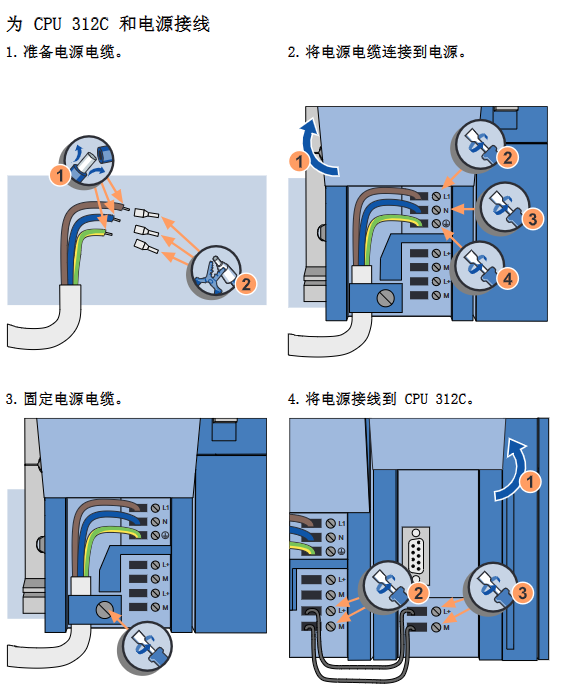
Prepare the cable: Cut it to the desired length, strip off the insulation layer, and put on a 6mm insulation ring

Wiring sequence: power supply → CPU 312C → momentary contact switch (connected to DI terminal) → motor (connected to DO terminal, optional)

Key requirement: Cut off the power before wiring, and set the line voltage selector correctly

Hardware debugging:

Connecting PC and CPU: Connect PC Adapter and PC with USB cable

Power on test: Insert the MMC card, set the CPU to STOP mode, and turn on the power (power DC24V LED lights up, CPU DC5V and STOP LED lights up)

Test wiring: Press the momentary contact switch and observe whether the corresponding CPU input LED lights up (such as the input 0.0 terminal LED corresponding to the start switch)

3. Software Configuration (STEP 7 Lite)

Open project: Start STEP 7 Lite and open the instance project “converyor.k7p”

Create module configuration:

New S7-300 station, automatically generate 4 installation tracks

Insert the power module (such as 6ES7307-1BA00-0AA0) and CPU 312C, and it will automatically display in the hardware view and configuration table

Set CPU parameters: Set the reserved bit storage quantity to “0” to avoid motor runaway startup after power failure

Establish online connection: When STEP 7 Lite starts, it automatically attempts to connect and the status bar displays “STOP” (connection successful) or “Disconnected” (manual connection required)

Download configuration: First, perform a CPU memory reset (delete old programs/configurations), then download a new configuration and check the consistency of offline/online configurations

4. Program operation and test run

Open program: The program in the project is stored in OB1 (Organizational Block 1), written using ladder logic (LAD), and includes 4 network segments (clockwise/counterclockwise/start/stop)

Download project: Download hardware configuration and OB1 program to CPU 312C, confirm to overwrite existing configuration/program

Test Run:

Switch CPU mode: Set the mode switch to “RUN”, and the RUN LED will change from flashing to constantly on

Functional testing:

Start: Press the green momentary contact switch, input 0.0 LED briefly on, output 0.3 LED constantly on (motor ready)

Clockwise rotation: Press and hold the corresponding switch, input 0.2 LED lights up, output 0.0 LED lights up

Counter clockwise rotation: Press and hold the corresponding switch, input 0.3 LED lights up, output 0.5 LED lights up

Stop: Press the red momentary contact switch, input 0.1 LED briefly on, output 0.3 LED off

SIEMENS 3AH3 series vacuum circuit breaker

The Siemens 3AH3 series vacuum circuit breaker is a medium voltage equipment with a rated voltage of 7.2kV-40.5kV. Its core advantage is maintenance free throughout its entire life cycle (supporting 10000 operating cycles), with a rated current of up to 12000A and a maximum short-circuit breaking current of 90kA. It is divided into universal type (compliant with IEC 62271-100) and generator specific type (additionally compliant with IEC/IEEE 62271-37-013), using vacuum arc extinguishing technology and energy storage operating mechanism, supporting electrical/manual operation and electrical/mechanical interlocking, suitable for industrial, generator and other scenarios, providing flexible secondary equipment configuration and rich accessories to meet the switching and protection needs of diversified medium voltage power supply systems.

Product basic information

Product positioning and certification:

Equipment type: Medium voltage vacuum circuit breaker, suitable for 7.2kV-40.5kV medium voltage power supply system

Core features: Maintenance free throughout the entire lifecycle, no need for re lubrication or adjustment, supporting 10000 operating cycles

Management System Certification: Compliant with ISO 9001 (Quality), ISO 14001 (Environment), OHSAS 18001 (Occupational Health and Safety) standards

Product standards: The universal type complies with IEC 62271-100, and the generator specific type additionally complies with IEC/IEEE 62271-37-013 (for high requirements of generator switches)

Product Categories:

Classification Applicable Scenarios Key Standards Special Requirements

General purpose (high current circuit breaker) industrial distribution, medium voltage line switch IEC 62271-100 supports conventional load current and short-circuit breaking

Generator specific generator connection and protection IEC 62271-100+IEC/IEEE 62271-37-013 withstand high DC components, high TRV rise rate, and higher test voltage

The phase separation design of the large generator phase separation switch equipment corresponds to one circuit breaker for the above dual standard single-phase, supporting parallel operation, with a maximum short-circuit breaking current of 90kA

Core structure and working principle

Structural composition:

Main structure: composed of pole components and operating mechanism box, fixed by pillar insulators, and the operating rod and lever transmit switch actions

Pole component: includes a vacuum arc extinguishing chamber (air insulated, freely accessible, easy to clean), with upper and lower arc extinguishing chamber brackets fixed, and the lower part can move axially

Operating mechanism box: integrated energy storage operating mechanism, release device, auxiliary switch, indicator, etc., secondary equipment configuration can be selected as needed

Core mechanism:

Arc extinguishing technology: Vacuum arc extinguishing, based on more than 40 years of mature technology, stable arc extinguishing effect

Operating mechanism: Energy storage type, closing spring can store energy electrically or manually, lock after energy storage, unlock and close through electrical remote control or local button

Free release mechanism: After the closing action is initiated, if a disconnection command is received, the moving contact will immediately return to the disconnection position and maintain it to prevent the “pump effect” (continuous opening and closing)

Action process: When closing, the closing spring releases energy and stores energy for the opening spring/contact pressure spring, completing the “opening closing opening” operation sequence storage

Key performance parameters

Electrical parameters:

Key Explanation of Parameter Category Range

Rated voltage (Ur) 7.2kV, 12kV, 17.5kV, 24kV, 36kV, 40.5kV covering mainstream medium voltage levels

Rated current (Ir) 1250A-12000A, conventional 1250A-6300A, phase separated design can reach 12000A

Short circuit breaking current (Isc) 31.5kA-90kA, universal type up to 63kA, phase separated generator type up to 90kA

Rated lightning impulse withstand voltage (Up) 60kV-195kV needs to be calibrated according to the coefficient Ka as the altitude increases (altitude>1000m)

Rated short-time power frequency withstand voltage (Ud) 20kV-95kV same altitude calibration requirements

Action time: Closing<75ms, opening<60ms, arcing<15ms. Shorter action time can be customized as needed

Environment and adaptation parameters:

Environmental climate level: Climate category 3K4 (low temperature -5 ℃), Biological category 3B1, Chemical category 3C2, Mechanical category 3M2, Mechanical active substance category 3S2

Altitude adaptation: The reference altitude is 1000m, and if exceeded, the insulation level needs to be increased (correction formula: U ≥ U ₀ × Ka)

Current carrying capacity: operate at rated current in an environment of 40 ℃, and can carry higher current below 40 ℃

Configuration and selection

Basic configuration options:

Key Explanation of Optional Solutions for Configuration Categories

Electric operating mechanism, manual operating mechanism (including handle), and electric motor mechanism require specified control voltage

Closing method: Solenoid+manual mechanical closing, manual electrical closing. Manual electrical closing supports interlocking of switch equipment to prevent accidental closing

When there is no external auxiliary power supply, a maximum of 3 release combinations (shunt/undervoltage/current transformer operation) can be selected for current transformer operation release

The number of contacts for auxiliary switches 6NO+6NC and 12NO+12NC can be selected as needed, and they support gold plating treatment (in special environments)

Low voltage interface 24 pole terminal block, 24 pole plug, 64 pole plug DC ≥ 60V recommended plug

Additional configuration (optional):

Overvoltage suppression: Varistor protection circuit (limiting overvoltage of inductive load switch)

Protection function: Condensed water protection heating device (110V/230V AC, 50W), silicon free design, -25 ℃ low temperature operation adaptation

Connection accessories: wire harnesses of different lengths (500mm-3500mm), 30 pole terminal blocks, dual 24 pole terminal blocks/plugs

Special functions: Spring release device (releases energy storage when the plug is disconnected), priority tripping (prevents closing during opening operation)

Ordering coding rules:

Order number structure: 16 bit code, the first 8 bits define the main circuit parameters (voltage, current, breaking current, pole spacing, etc.), and the last 8 bits define the secondary equipment (operating mechanism, release, voltage, etc.)

Special version: suffix “- Z” plus 3-digit encoding, supports customized requirements (such as special insulation level, environmental adaptation)

Application scenarios and accessories

Typical applications:

Industrial scenarios: High voltage load current (up to 6300A) and high short-circuit current (up to 72kA) scenarios in refineries, large industrial plants, etc

Power generation scenario: Generator outlet switch, phase separated design suitable for large generators (rated current 4000A-12500A)

Transformation scenario: Replace compressed air generator circuit breakers and adapt to retrofit projects

Accessories and spare parts:

Operating accessories: manual energy storage handle (short/standard/long design), battery screwdriver bit, crimping pliers, disassembly tool

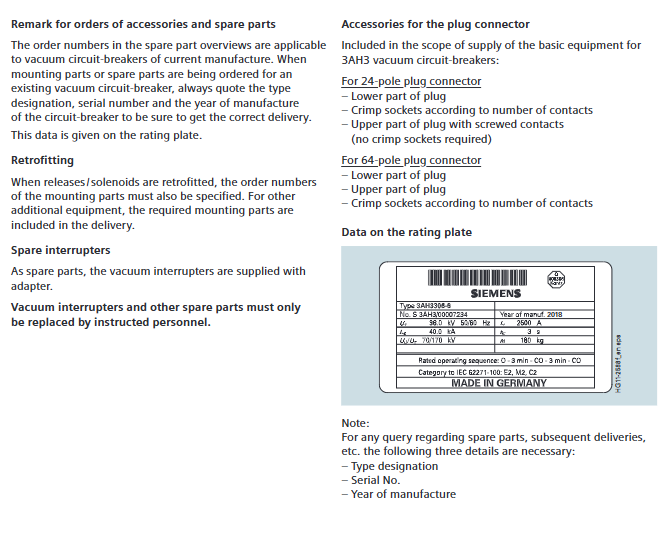
Electrical spare parts: vacuum arc extinguishing chamber (with adapter), release, closing soleoid, auxiliary switch, plug connector (24 pole/64 pole)

Consumables: lubricating oil (Kl ü ber Isoflex Topas L32N), special oil (Shell Tellus 32), wiring harness (compatible with auxiliary switches and plugs)

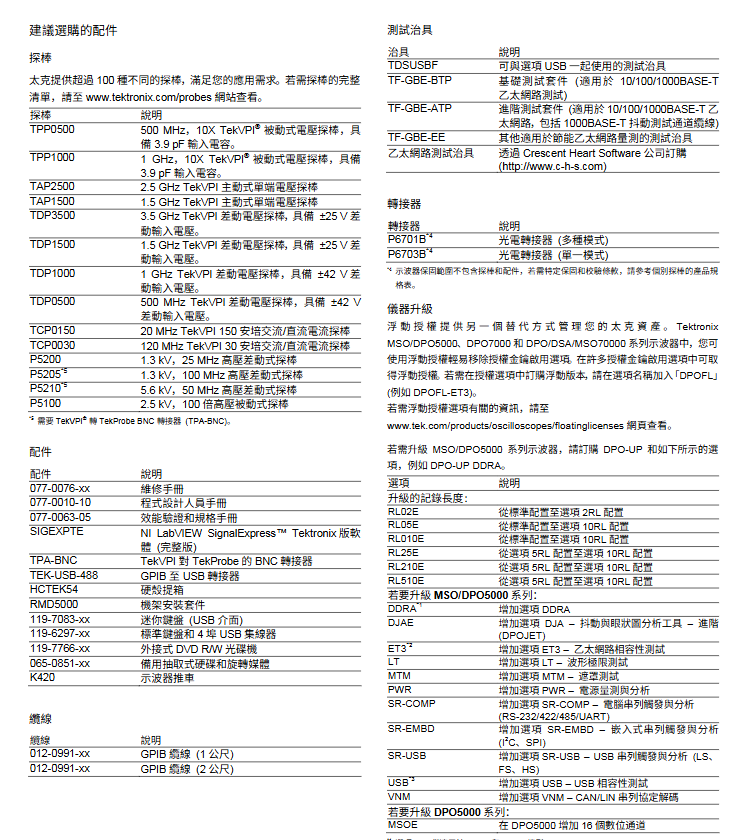
TEKTRONIX MSO5000 and DPO5000 series mixed signal oscilloscope

The Tektronix MSO5000 and DPO5000 series mixed signal oscilloscopes are high-performance testing instruments that cover a bandwidth of 350MHz-2GHz, with a maximum real-time sampling rate of 10GS/s for single/dual channels and 5GS/s for four channels. They come standard with a 12.5M sampling point recording length (optional extension to 250M), and the MSO series provides an additional 16 digital channels. The core advantages include a waveform capture rate of>250000 wfms/s Wave Inspector ®  Waveform inspection, 53 automatic measurements, FFT analysis and other functions, support I ² C/SPI/USB serial trigger decoding (optional), equipped with a 10.4-inch touch screen and rich interfaces (USB, LAN, GPIB), lightweight body (≤ 6.7kg), suitable for complex circuit design verification, mixed signal error correction, serial bus analysis and other professional scenarios.

1、 Product basic information

Product series: divided into two sub series, with the core difference being channel configuration

DPO5000 series: 4 analog channels, digital fluorescence oscilloscope

MSO5000 series: 4 analog channels+16 digital channels, mixed signal oscilloscope

Model specifications: Divided into 4 core models according to bandwidth, with unified parameters as shown in the table below

Model Bandwidth Single/Dual Pass Sampling Rate Four Channel Sampling Rate Standard Record Length

MSO5034/DPO5034 350MHz 10GS/s 5GS/s 12.5M

MSO5054/DPO5054 500MHz 10GS/s 5GS/s 12.5M

MSO5104/DPO5104 1GHz 10GS/s 5GS/s 12.5M

MSO5204/DPO5204 2GHz 10GS/s 5GS/s 12.5M

Standard configuration: Each unit includes passive voltage probes (4 DPO series, additional P6616 16 channel logic probes for MSO series), touch screen, mouse, calibration certificate, power cord, 1-year warranty, and pre installed NI LabVIEW SignalExpress Tektronix software

2、 Core performance parameters

Sampling and recording capability

Real time sampling rate: up to 10GS/s for single or dual channels, up to 5GS/s for four channel synchronization

Isochronous sampling rate: up to 400GS/s

Record length: Standard 12.5M sampling points, optional extensions (2RL=25M, 5RL=50M, 10RL=125M/250M, depending on the model)

Capture rate:>250000 wfms/s in FastAcq mode,>310000 frames/s in FastFrame mode

Trigger and capture characteristics

Trigger types: covering 16 trigger modes such as edge, burst, short wave, pulse width, timeout, transition, code type, serial packet, etc

Trigger jitter: Edge trigger ≤ 10psRMS, non edge trigger ≤ 100psRMS

Capture mode: supports sampling, peak detection (100ps/200ps narrow pulse), averaging, encapsulation, high resolution, FastAcq, etc

Channel performance

Analog channel: Input coupled AC/DC, input impedance 1M Ω± 1% or 50 Ω± 1%, maximum input voltage 300VRMS (1M Ω)/5VRMS (50 Ω)

Digital channel (MSO series): 16 sets of inputs, critical values support TTL/ECL/custom (± 40V), input impedance 100k Ω, probe load 3pF, MagniVu mode sampling rate 16.5GS/s (60.6ps resolution)

3、 Core functions and software tools

Basic analysis function

Automatic measurement: 53 built-in measurements, including cycle, frequency, rise/fall time, peak to peak, average value, etc., supporting simultaneous display of 8 items

Waveform processing: supports addition/subtraction/multiplication/division, integration/differentiation, FFT analysis (including multiple window functions), waveform histogram, Boolean logic comparison

Inspection tool: Wave Inspector ®  Function, including double-layer knob zoom/framing, automatic search (supporting 8 events), user tagging, allowing for quick browsing of long recorded waveforms

Optional software suite (core category)

Software Options Function Description Applicable Scenarios

SR-EMBD I ² C/SPI/RS-232/422/485/UART serial triggering and decoding embedded system debugging

SR-USB USB 2.0 (low-speed/full speed/high-speed) triggering, decoding, and compatibility testing USB device verification

VNM CAN/LIN serial protocol decoding and timing measurement in vehicle network testing

PWR power quality, switching loss, harmonics, safe working area (SOA) analysis, power supply design verification

DDRA DDR1/DDR2/LP-DDR1/LP-DDR2 memory bus analysis memory debugging

DJA jitter and eye image analysis, including Rj/DJ separation and mask testing for high-speed signal quality verification

LT/MTM extreme testing (compared with standard waveforms), mask testing (compliant with industry standards), production line testing/specification verification

4、 Hardware and interface configuration

Display and operation: 10.4-inch XGA touch screen (1024 × 768 pixels), supporting waveform styles such as vector/dot/cumulative, multi-color color palette

interface type

USB interface: 2 USB 2.0 ports on the front panel, 4 USB 2.0 ports on the back panel (supporting storage/printing), and 1 USB 1.1 device port (GPIB adapter)

Network interface: 10/100/1000BASE-T Ethernet port (LXI Class C compatible)

Other interfaces: video output (DB-15), PS/2 keyboard/mouse port, auxiliary input/output, external reference input (10MHz)

Body specifications: Thickness 8.12 inches (20.6cm), net weight 14.9 pounds (≤ 6.7kg), supports rack installation (5U height)

Power and Environment: Input voltage 100-240V ± 10%, frequency 45-440Hz, maximum power consumption of 275W; operating temperature 5 ° C-50 ° C, relative humidity 8% -90% (no condensation)

5、 Ordering and Service Options

Core optional configuration

Record length extension: 2RL (25M), 5RL (50M), 10RL (125M/250M)

Power plug: compatible with 12 regional standards including North America, EU, China, UK, etc

User Manual: Supports 9 languages including English, Simplified Chinese, Traditional Chinese, Japanese, etc

Service options: Optional 3/5-year verification service, 3/5-year maintenance service, verification data report

Recommended accessories: TekVPI series probe (passive/active/differential/current type), GPIB to USB adapter, rack mounting kit, oscilloscope cart, test fixture (USB/Ethernet)

Search for products

Back to Top
Product has been added to your cart