Call us 24/7uaedcs@163.com
Welcome to the official website of CNIACS Automation Technology Co., Ltd!
Call us 24/7uaedcs@163.com

Yokogawa AQ6377E Optical Spectrum Analyzer Remote Control

Function positioning

Focus on the remote control function of AQ6377E, provide detailed instructions on the configuration methods of GP-IB interface and Ethernet interface, as well as the use of communication instructions, and support the setting of measurement parameters, data acquisition, and automated analysis of equipment through external controllers (such as PCs).

Remote control core functions and interface configuration

(1) Remote control basic functions

Control mode switching:

Local → Remote: The controller sends a listening address containing REN (Remote Enable) and ATN set to “True”. The device enters remote mode, the REMOTE indicator light is on, and only the LOCAL key is available; If receiving LLO (local lock) messages, the LOCAL key is also disabled, and the controller needs to set REN to “False” to unlock.

Remote → Local: Press the device LOCAL button (non local lock state), or the controller sends a GTL (return to local) message, the device returns to local mode, the REMOTE indicator light goes out, and all buttons are restored to available.

Command sending and receiving mechanism:

Buffer: Input buffer (4 MB, discard excess data), output buffer (4 MB, overwrite old data with new data), error buffer (only stores the latest error information).

Message terminator: Program messages support EOI signals, LF characters LF+EOI; The response message is fixed as LF+EOI; Binary waveform transmission only supports EOI.

Timeout setting: It is recommended to set the controller timeout to 30 seconds or more, as the device automatically adjusts the offset every 10 minutes (taking about 30 seconds) to avoid communication interruption; If you need to shorten the timeout, you can manually turn off the automatic offset (instruction: CALibration: ZERO off) and manually execute the offset during the measurement gap (instruction: CALibration: ZERO once).

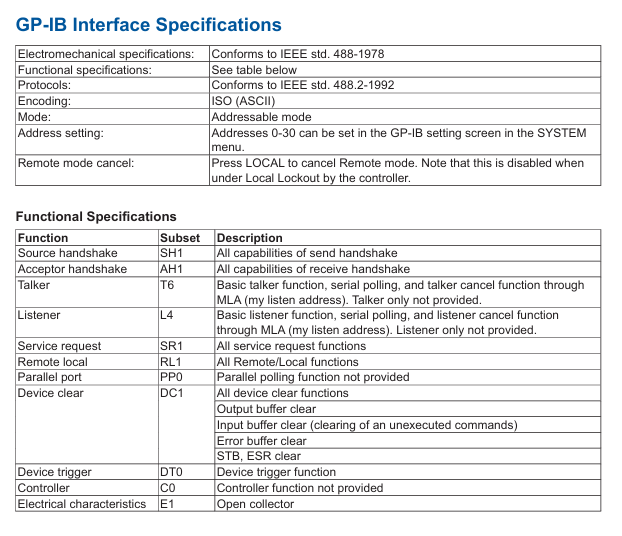
(2) GP-IB interface configuration and specifications

Hardware connection:

Use a 24 pin GP-IB cable that complies with the IEEE 488-1978 standard. Before connecting, turn off the power to the device and controller to avoid circuit damage;

The screws of the cable connector need to be tightened. A single bus can connect up to 15 devices (including controllers), with a total length of no more than 20 meters. It supports Daisy chain or star topology and circular connections are prohibited.

Function and specifications:

Function: Supports listening (receiving controller commands) and dialogue (outputting data to the controller), but does not support listening only, dialogue only, or controller functions;

Electrical specifications: comply with IEEE 488-1978 (electromechanical) and IEEE 488.2-1992 (protocol), address range 0-30, encoded as ASCII;

Interface message response: Supports IFC (interface clearing), REN (remote enable), GTL (return to local), SDC (selected device clearing), etc., does not support IDY (recognition), PPC (parallel polling configuration).

Address and instruction format settings:

Enter SYSTEM → More 2/4 → Remote Interface → GP-IB, and in GP-IB Setting → My Address, use the knob or directional keys to set the address (0-30), ensuring that the device address in the bus is unique;

The instruction format supports AQ6377E native mode (default) or AQ6317 compatible mode, which can be set through Command Format. The compatibility mode should refer to the AQ6317 instruction mapping table in the appendix.

(3) Ethernet interface configuration and specifications

Hardware connection:

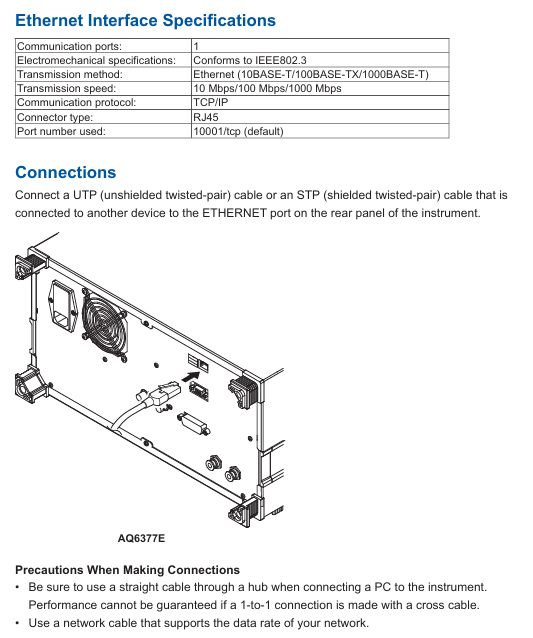
Use UTP (unshielded twisted pair) or STP (shielded twisted pair) cables to connect to the local area network through the RJ45 interface of the device’s rear panel;

Connecting to a PC requires the use of a hub with a direct cable, and the performance of cross cable direct connection cannot be guaranteed; The cable needs to match the network speed (10/100/1000 Mbps).

Function and specifications:

|Parameters | Specifications|

|Communication port | 1|

|Standard compatibility | IEEE 802.3|

|Transmission method | Ethernet (10BASE-T/100BASE-TX/1000BASE-T)|

|Transmission rate | 10/100/1000 Mbps (adaptive)|

|Communication Protocol | TCP/IP|

|Default port number | 10001/tcp (Socket communication)|

|Remote monitoring port | 20001/tcp (fixed, requires dedicated software)|

Network configuration steps:

Go to SYSTEM → More 2/4 → Remote Interface, select WORK (SOCKET) or WORK (VXI-11) as the communication interface;

Go to Network Setting → TCP/IP Setting, configure IPv4/IPv6:

IPv4: Select AUTO (DHCP) to automatically obtain the address, or manually set the IP address, subnet mask, and default gateway using MANUAL;

IPv6: Select AUTO for automatic configuration, or manually set IP address, subnet prefix length, and default gateway using MANUAL;

(Socket communication specific) Set remote port number (default 10001), user account (default anonymous, password optional), timeout period (0-21600 seconds, 0 is infinite timeout);

(Optional) Enable remote monitoring (Remote Monitor → Monitor Port=On), supports PC remote viewing of device screens, requires dedicated software.

Authentication and Instruction Format:

Socket communication requires authentication through the OPEN command, for example: OPEN “username”, supports plaintext or MD5 encryption authentication. After successful authentication, the device returns “READY” and lights up the REMOTE light;

The instruction format is consistent with GP-IB and supports AQ6377E native mode or AQ6317 compatible mode. To disconnect, the CLOSE instruction must be sent.
Programming specifications and instruction explanations

(1) Basic rules of programming

Instruction syntax:

Long Short Format: Supports both short format (uppercase part) and long format, such as: Initiatiate, which can be abbreviated as: Initiate;

Case insensitive: The device does not distinguish between uppercase and lowercase when receiving instructions, and the return value is uniformly capitalized;

Parameter Separation: Instructions and parameters should be separated by spaces, and multiple parameters should be separated by commas (spaces can be added before and after commas to improve readability);

Numerical representation: Supports multiple unit suffixes (such as nm, μ m, GHz), automatically converted to basic units during transmission (such as+1.550000E-006 m for 1550 nm transmission), and automatically rounded off when accuracy exceeds the device’s processing range.

Instruction type:

Sequential instruction: The next instruction can only be executed after completion, such as CALCulate: DATA? (Query and analysis results);

Overlapable instructions: During execution, other instructions can be executed in parallel, such as Initiatate;

Overlapping instructions: can only run during the execution of overlapping instructions, such as ABORt (stop measurement), * STB? (Read status byte).

Multi instruction transmission: Multiple instructions can be separated by semicolons in a single output statement and executed in order, such as SENSe: WAVelengath: STARt 1500NM; :STOP 1600NM。

(2) Detailed explanation of core instruction grouping

The manual divides instructions into 16 core groups, covering scenarios such as measurement control, data processing, system configuration, etc. The key groups are as follows:

ABORt Group:

Core instruction: ABORt: Stop measurement, calibration and other operations (such as scanning initiated by Initiatate and calibration initiated by CALibration), which belongs to overlapping instructions.

CALCulate Group:

Function: Implement spectral analysis (such as THREE/ENVELOPE/RMS spectral width analysis), peak/valley search, marker control, trace calculation (such as mathematical operations of Trace C/F/G);

Example of Key Instructions:

CALCulate: CATegg SWTHresh: Choose the THRESH method for spectrum width analysis;

CALCulate: MARKer: MAXimum: Search for peaks on the activity trace and place moving markers;

:CALCulate:DATA? Query the latest analysis results (requires first executing CALCulate [: IMMediate] to start the analysis).

SENSe Group:

Function: Configure measurement parameters such as wavelength range, resolution bandwidth, sensitivity, scanning speed;

Example of Key Instructions:

SENSe: WAVelocity: CENTer 1550NM: Set the measurement center wavelength to 1550 nm;

SENSe: BANDWidth: RESolution 0.1NM: Set the resolution bandwidth to 0.1 nm;

SENSe MID: Set the measurement sensitivity to MID mode.

MMEMory Group:

Function: Manage file operations, such as saving/loading trace data, setting files, and graphic files;

Example of Key Instructions:

MMEMory: STORe: TRACe TRA, CSV, “test. csv”, INTernal: Save Trace A data in CSV format to an internally stored test. csv file;

MMEMory: LOAD: SETTing “setting. stc”, EXTernal: Load the setting file “setting. stc” from external storage (such as USB).

Common Commands Group:

Compliant with IEEE 488.2 standard, the key instructions are as follows:

|Instructions | Functions | Examples|

|*CLS | Clear all event status registers | * CLS|

|*IDN? |Query device identification (manufacturer, model, serial number, firmware version) | * IDN?  → YOKOGAWA,AQ6377E,123456789,1.00|

|*OPC | OPC bit of standard event status register after operation completion | * OPC|

|*RST | Device reset, restore default state (except GP-IB address and calibration data) | * RST|

|*TRG | Perform a single scan (ignore current scan mode) | * TRG|

|*WAI | Wait for the current instruction to complete before executing the next one |: Initialize; *WAI; :CALCulate:DATA? |

(3) Status Register

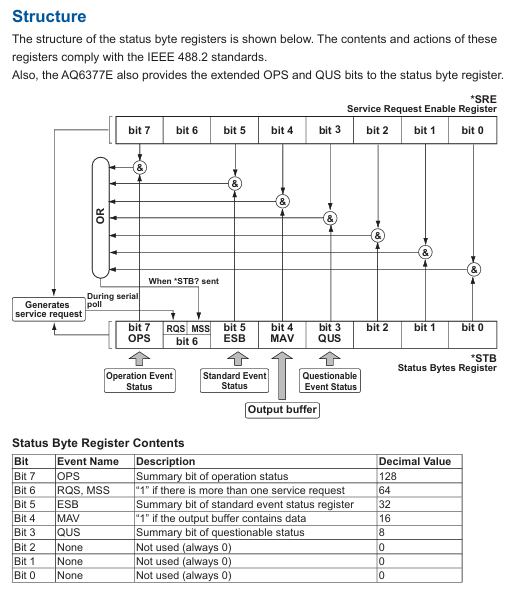
The device complies with IEEE 488.2 and SCPI standards, and includes four types of status registers for monitoring the device’s operating status:

Status Byte Register (STB):

An 8-bit register that contains a summary of the overall device status, such as OPS (Operational Status Summary, bit7), ESB (Standard Event Summary, bit5), MAV (Output Buffer with Data), bit4);

Reading method: * STB? (Query current value, do not clear) or serial polling (clear RQS bit after reading).

Standard Event Status Register (ESR):

8-bit register, records device events such as PON (power on, bit7), CME (instruction error, bit5), OPC (operation completed, bit0);

Reading method: * ESR? (Clear the register after querying);

Enable control: By setting the enable register through * ESE, only the event corresponding to the enable bit will trigger the ESB digest.

Operation status register:

Contains operation condition registers (real-time status, such as scanning and calibration), operation event registers (latch events, such as scan completion), and operation enable registers (controlling which events trigger OPS digest);

Reading method: STATus: OPERation: CONDition? (Conditional register),: STATus: OPERation: EVENT? (Event register, cleared after querying).

Suspicious Status Register:

The function has not been allocated yet, all bits are fixed to 0, and the reading method is similar to the operation status register.
Program functionality and automated measurement

(1) Program Editing and Execution

Program registration and editing:

Go to APP → Program → Execute, select the program number (such as 01-99), and set the program name (up to 56 characters);

Supports inserting/deleting/copying rows, editing parameters, and can select functional commands (such as scanning, analyzing) or special commands (such as looping, conditional judgment) through Command Select.

Program execution:

Select the target program, click Execute to start, and during execution, the output data can be viewed through the Output Window;

Supports pause (PAUSE instruction), data input (DATA INPUT instruction, receiving user input values), and data output (DATA OUTPUT instruction, outputting variables or strings to the window).

Program saving and loading:

Save: The program can be saved as PGC format file (approximately 13 KB), stored in internal memory or USB, supports automatic naming (by serial number or date);

Loading: Loading programs from storage media, supporting overwriting or merging existing programs.

(2) Program Control Instructions and Variables

Variable type:

General variables: such as E, G-K, O-V, X-Z (numerical), A-D (string)

Tag variables: such as WM (moving marker wavelength), L1 (fixed marker 1 level), W2-W1 (marker 1-2 wavelength difference);

Analyze variables such as SPWD (spectral width), MEANWL (center wavelength), WDMCHN (number of channels detected by WDM analysis).

Program control instructions:

Loop control: such as N=10; N=N-1; IF N<>0 GOTO 10 (10 cycles);

Conditional judgment: If IF F1<=SPWD<=F2 GOTO 20 (if the spectral width is within the range of F1-F2, skip to line 20);

External control: such as SEND LAN A $, 10001, “* IDN?” (sending instructions to external devices specified by variable A through LAN)

, 10001, “*IDN?”; B (Receive external device responses and store them).

(3) Example Program

The manual provides two typical examples, covering remote measurement and data storage scenarios:

Example 1: Parameter Setting and Spectral Analysis:

Function: Set measurement parameters (center wavelength 1550 nm, span 10 nm, sensitivity MID), perform a single scan, perform frequency spectrum width analysis using the THREE method, and output the results to the PC;

Key steps: Connect the device through the PyVISA library (supporting GP-IB/Socket/VXI-11), send the SENSe command to configure parameters, initiate scanning, perform analysis using CALCulate, and wait for WAI to complete before reading the results.

Example 2: Screenshot saving:

Function: Save the device screen as a PNG format file and load it to the PC via file transfer command (path C: \ test. png);

Key steps: Send: MMEMory: STORe: GRAPhics Save screenshot to internal storage,: MMEMory: DATA? Read binary data from the file and write it to a local file on the PC.

Appendix and Compatibility

(1) Key Appendix Content

Correspondence table between soft keys and remote commands:

List the remote commands corresponding to all panel soft keys of the device, such as the Peak Search soft key corresponding to CALCulate: MARK: MAX imum.

AQ6317 compatible instruction table:

Provide instruction mapping between AQ6377E and the old model AQ6317, such as the CWL of AQ6317 corresponding to the SENSe: WAVelocity: CENTer of AQ6377E.

Output format of analysis results:

Provide a detailed explanation of the output structure of various analyses (such as WDM, EDFA-NF), including data order, units, and accuracy.

(2) Compatibility and Precautions

Model compatibility:

Support compatibility with commands and programs of old models such as AQ6317 and AQ6370D, with some commands requiring parameter format adjustment (refer to Appendix 6-7).

Operation taboos:

Prohibit disconnecting communication connections during program execution to avoid data loss;

During remote control, it is prohibited to use both GP-IB and Ethernet interfaces simultaneously;

When saving/loading files, ensure that the storage medium (such as USB) is properly mounted to avoid file damage.
Yokogawa AQ6361 Optical Spectrum Analyzer

Functional positioning

The AQ6361 optical spectrum analyzer can achieve high-speed measurement of optical characteristics of devices such as laser diodes (LDs), light emitting diodes (LEDs), and optical amplifiers. The manual focuses on the “entry-level” operation of the equipment, covering handling precautions, installation steps, basic operations, and core specifications.

Open box verification and device model

(1) Open box inspection content

After opening the box, the following items need to be checked. If there are any discrepancies in model, missing parts, or damaged appearance, please contact the Yokogawa distributor:

Host and identification: Confirm that the model and suffix on the back nameplate of the AQ6361 host are consistent with the order, and record the instrument number (to be provided when contacting the distributor).

Standard attachments:

|Item Name | Model/Part Number | Quantity | Description|

|Power cord | Determine based on suffix code (such as – D corresponding to UL/CSA standards) | 1 | Whether it is included depends on the suffix code and must comply with the standards of the region of use|

|Rubber pad | A9088ZM | 1 | Used to fix equipment and prevent sliding|

|NA Conversion Adapter | 735385-001 | 1 | Only available with/NAC option, matching manual is IM735385-01Z2|

|Printed manual | IM AQ6361-02EN, etc. | 1 each | Includes introductory guide, download instructions, region specific documents, etc|

|Global Contact Information Table | PIM 113-01Z2 | 1 | Yokogawa Global Office Contact Information|

Optional attachments (to be purchased separately):

|Attachment Name | Model | Specification|

|AQ9447 connector adapter | AQ9447-FC/AQ9447-SC | FC/SC interface, used for optical input|

|AQ9441 connector adapter | AQ9441-FC/AQ9441-SC | FC/SC interface, used for calibrating light source output|

|NA conversion adapter | 735385-001 | FC interface, suitable for GI 50/GI 62.5 fiber optic|

(2) Interpretation of Model and Suffix Codes

The model suffix code of AQ6361 determines the equipment specifications, and the core code meaning is as follows:

Category suffix code description

Performance Specifications -10 Standard Models -20 High Performance Models

Wavelength Range SW Standard Wavelength Range EW Extended Wavelength Range

Built in light source – L1 with wavelength reference light source – L0 without built-in light source

GP-IB interface – N01 without GP-IB interface – C01 with GP-IB interface

Power cord standard – D UL/CSA standard (125V) – F VDE/Korean standard (250V), etc

Optional accessories/FC with AQ9447 (FC) connector adapter/SC with AQ9447 (SC) connector adapter, etc

image.png

Safety regulations and installation requirements

(1) Core Security Warning

Electrical safety:

The equipment is an IEC Class I safety device and must be connected to a protective grounding. The power cord must use a grounded three core wire and the voltage must match the rated value of the equipment (90-264VAC, 50/60Hz);

Do not plug or unplug connectors when the power is turned on, and do not cut off internal/external grounding wires to avoid electric shock or equipment damage.

Laser safety (including L1 built-in light source model):

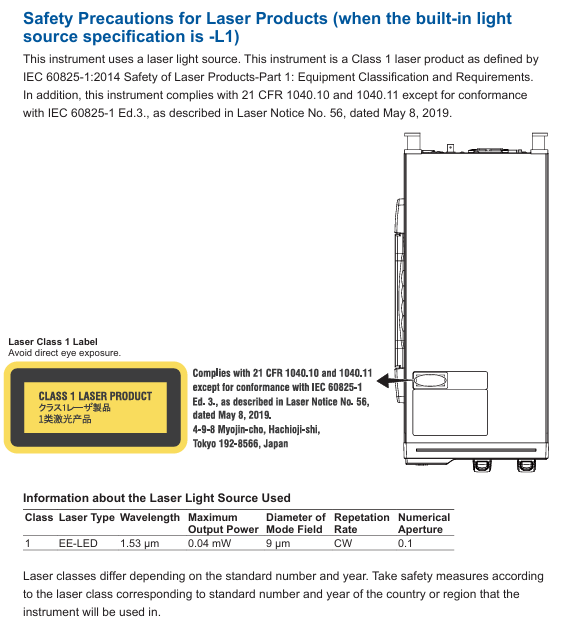
The equipment is an IEC 60825-1:2014 Class 1 laser product with a built-in reference light source (wavelength 1.53 μ m, output power 0.04mW). Infrared light is continuously emitted from the optical output connector, and direct viewing is strictly prohibited as it may cause visual impairment;

Avoid direct laser irradiation on the human body, especially the eyes, during measurement.

Environmental safety:

Prohibited from use in flammable and explosive environments, rainy or humid places;

The equipment is a Class A device used in industrial environments and may cause radio interference when used in residential areas. Users need to solve the interference problem themselves.

(2) Installation conditions

Physical environment:

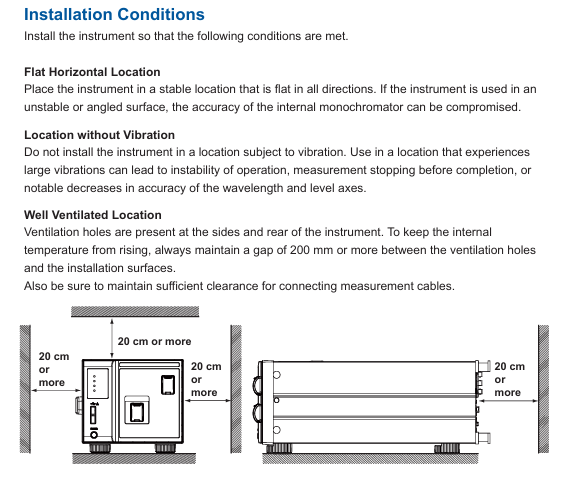
The installation position should be horizontally stable to avoid vibration (vibration may cause a decrease in monochromator accuracy and measurement interruption);

There are ventilation holes on the side and back of the equipment, and the distance between the ventilation holes and surrounding objects should be kept at least 200mm to prevent internal overheating;

Environmental temperature: 5-35 ℃, humidity: 20% -80% RH (non condensing), avoid direct sunlight, near heat sources, and dust/corrosive gas environments.

Rack installation (requires separate purchase of rack kit):

|Kit Name | Model | Specification|

|EIA Single Installation Rack Kit | 751533-E4 | Suitable for EIA Standard Rack|

|JIS Single Installation Rack Kit | 751533-J4 | Suitable for JIS standard racks, etc|

During installation, it is necessary to remove the handles on both sides of the device and the bottom support feet to ensure that there is a reserved space of ≥ 10cm around the rack for heat dissipation, and the bottom support does not block the ventilation holes.

Equipment operation: from configuration to measurement

(1) Hardware connection and software configuration

Core hardware connection:

Optical interface connection: Optical input and calibration output need to be connected to optical fibers through corresponding connector adapters (such as AQ9447, AQ9441), and only FC/SC type optical connectors are supported;

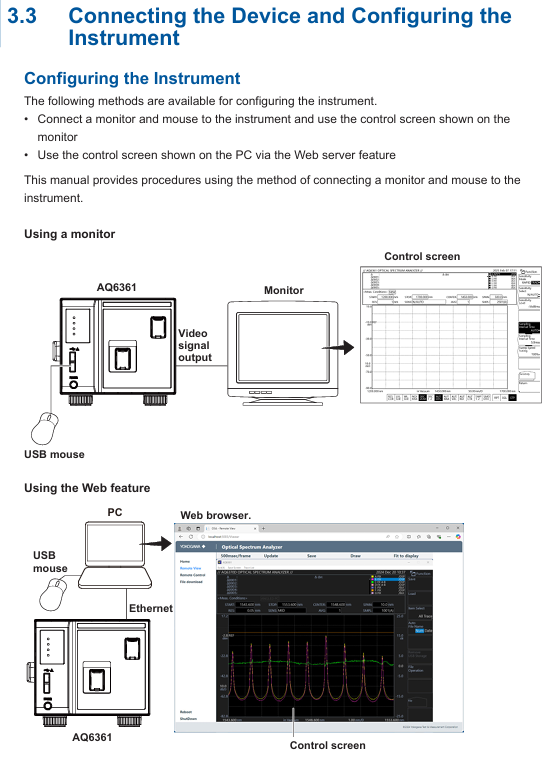
External device connection: PC connects devices through Ethernet/USB, monitor connects devices through Video OUT (XGA), mouse/keyboard connects through USB interface (supports USB HID Class 1.1 standard devices).

Software device registration and connection:

|Step | Operation Content|

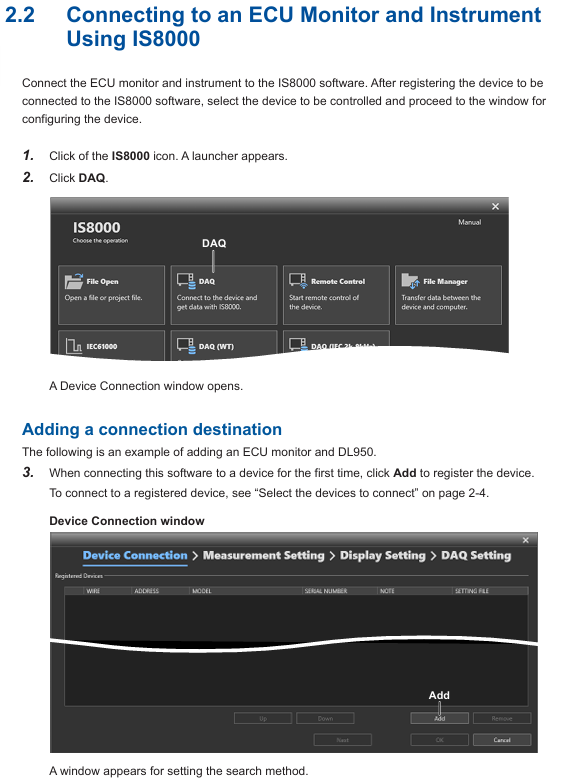
|1 | Start AQ6361, enter the device connection window, click “Add” for the first connection, and select the communication method (Ethernet/USB)|

|2 | Click “Search” to search for devices, check the measuring instrument (such as AQ6361) and external devices, and click “Register” to complete the registration|

|3 | Check the target device in the registration list and click “Next” to enter the measurement and display settings window|

Key parameter configuration:

RAM data channel settings: Import symbol definition files (. a2l format) in the “Measurement Setting” window, or manually enter symbols, addresses, and data types to add RAM data channels;

Time reference synchronization: Check “Relative time” in “DAQ Setting”, synchronize external devices based on the measuring instrument clock, and configure the data saving path (default: C: \ Users \ Username \ Documents \ YOKOGAWA \ IS8000).

(2) Startup and calibration process

Startup steps:

|Step | Operation Content|

|1. Connect the power cord, turn on the “MAIN POWER” switch on the back, and the front POWER light will turn orange|

|After waiting for a few seconds, press the “POWER” switch on the front, the light turns green, the device starts and initializes (displaying STEP 1/9 to STEP 9/9)|

|After initialization, enter the measurement interface and preheat for 1 hour before performing wavelength calibration|

Wavelength calibration (key step to ensure measurement accuracy):

Built in light source calibration (- L1 model): Connect the optical input and calibration output with 9.5/125 μ m single-mode fiber, enter “SYSTEM>Wavelength Calibration>Built in Source”, click “Execute”, and the calibration takes about a few minutes;

External light source calibration: Supports laser type (such as DFB-LD) or gas chamber absorption line type external light sources. After connection, set the wavelength in “External Laser/External Gas Cell” and perform calibration;

Attention: If the wavelength error exceeds ± 5nm, it is necessary to contact the Yokogawa dealer for re adjustment, as it cannot be calibrated through the built-in light source.

Resolution calibration: Use a stable single-mode laser source (output power ≥ -20dBm, linewidth ≤ 5MHz), connect it, enter “SYSTEM>Res BW Calibration”, click “Execute” to complete the calibration, and the device will automatically correct the equivalent noise bandwidth after calibration.

(3) Measurement Execution and Data Management

Measurement condition setting:

Select the device in the “Device Control” panel, configure parameters such as sampling rate, trigger mode, sensitivity, and ensure that the measurement cycle of external devices (such as optical amplifiers) matches the pulse frequency of the device;

Supports three modes: “Single Sweep”, “Repeat Sweep”, and “Auto Sweep”. Auto mode can automatically optimize measurement conditions.

Measurement operation:

|Operation | Function Description|

|Monitor Start | Start measurement (only monitors, does not record data)|

|Record Start | Start Record (Synchronize measurement and recording when monitoring is not started)|

|Record Stop | Stop recording (measurement continues)|

|Monitor Stop | Stop measurement (when recording has not stopped, synchronously stop measurement and recording)|

Data saving and loading:

The data is automatically saved in. mf4 format (including waveform and RAM data), and the default path can be modified in “DAQ Setting”;

When loading data, the software opens the. mf4 file or loads the. wdf (waveform) and. mdf (RAM data) files offline, and the software automatically aligns the timeline.

Maintenance and troubleshooting

(1) Daily maintenance

Cleaning requirements:

Equipment casing: Wipe with a clean dry cloth after power failure, and prohibit the use of volatile chemicals (to prevent fading and deformation);

Optical interface: Clean the end face of the optical connector with a cotton swab dipped in pure alcohol to ensure that there is no dust (dust may affect optical performance and even damage the monochromator).

Regular inspection:

|Check project | cycle | operation content|

|Wavelength accuracy check | Regular | Use a light source with known wavelength accuracy (such as a gas laser) to measure the spectrum and confirm that the center wavelength error of THRESH 3dB is within the specified range|

|Level accuracy inspection | Regular | Using a 1310nm/1550nm light source, compare the peak level measured by the equipment with the reading of the optical power meter, and ensure that the error meets the specifications|

|Firmware Update | On Demand | Download the latest firmware from Yokogawa’s official website and update via USB or Ethernet (power off is prohibited during update to avoid device failure to start)|

(2) Fault handling and warning information

Common faults and countermeasures:

|Fault phenomenon | Possible causes | Response measures|

|No response upon startup | Power cord not connected properly, power voltage mismatch | Check power cord connection, confirm voltage is within the range of 90-264VAC|

|Abnormal measurement data | Optical interface contamination, wavelength calibration not performed | Clean optical interface, wavelength calibration performed|

|Communication failure | Loose USB/Ethernet connection, incorrect IP address | Reconnect the cable and check the IP address (default 192.168.1.100)|

Warning message interpretation: Chapter 5.7 of the manual provides a detailed list of 380+warning messages, with the core categories as follows:

|Warning type | Scope | Example and reason|

|Warning after function execution | 1-49 | ‘Unsuitable resolution’ (resolution setting does not match span/sample size, which may result in incomplete data extraction)|

|Function unable to execute warning | 50-199 | “USB storage not found” (USB storage device not inserted)|

|Hardware malfunction warning | 200-299 | “Fan motor stopped” (the fan stops running and automatically shuts down after 10 seconds, please contact maintenance)|

Core technical parameters

The key specifications of AQ6361 vary depending on the model (Standard Type -10/High Performance Type -20) and wavelength range (- SW/- EW), with the following core parameters:

Parameter Category Standard Type (-10) High Performance Type (-20)

Wavelength range SW: 1200-1700nm; -EW: 700-1700nm same standard type

Wavelength accuracy – SW: ± 0.02nm (1520-1580nm), ± 0.04nm (1580-1620nm) – SW: ± 0.02nm (1450-1620nm)

Wavelength resolution of 0.05, 0.1, 0.2, 0.5, 1, 2nm 0.03, 0.05, 0.1, 0.2, 0.5, 1, 2nm

Level sensitivity TRAD mode: -80dBm (1300-1620nm, HIGH2); RAPID mode: -73dBm (1300-1620nm, RAPID6) same standard type

Maximum input power+20dBm (single channel),+25dBm (total input power) same as standard type

Scanning time TRAD mode (NORM-AUTO): 0.2s (span ≤ 100nm, sample size 1001) Same as standard type

Suitable for single-mode (SM: 9.5/125 μ m) and multi-mode (GI: 50/62.5 μ m) equivalent standard types of optical fibers

Yokogawa IS8000 Integrated Software ECU Monitoring

Functional positioning

The ECU monitoring synchronization option (/EM1 or – EM1) is an extended function of the IS8000 integrated software, which can synchronize the waveform measured by waveform measuring instruments (such as DL950, SL2000) with the RAM data obtained by the ECU monitor (such as RAMScope) based on the sampling clock for display, supporting joint data analysis.

image.png

Core functions and system configuration

(1) Functional principles and core characteristics

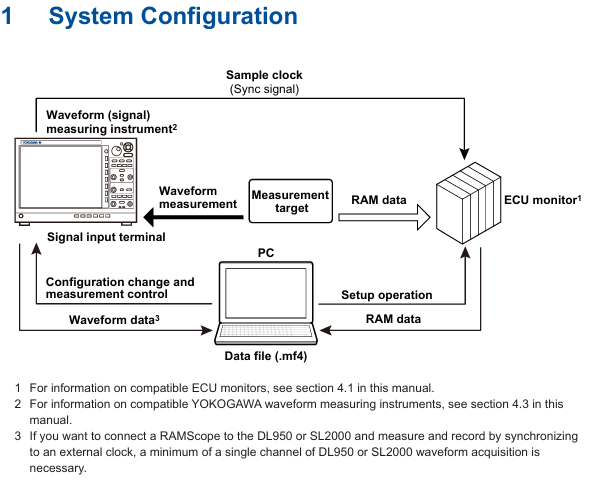
Synchronization principle: The sampling clock generated by the waveform measuring instrument is used as a synchronization signal to be transmitted to the ECU monitor, and the measurement data of both parties is loaded through IS8000 software to achieve synchronous display of waveform and RAM data on the PC side.

Core functions:

|Functional Category | Specific Description|

|Synchronized display | ECU monitor RAM data and waveform measurement instrument waveform data are aligned and displayed based on sampling clock|

|Measurement Control | Supports measurement start/stop and recording of start/stop operations for ECU monitors and measuring instruments|

|Data Storage | Automatically merge RAM data with waveform data and save them as. mf4 format files; Support saving symbol definitions as XML files|

|Offline synchronization | Supports offline loading of saved waveform data (. wdf format) and RAM data (. mdf format), achieving timeline synchronization by aligning the “FirstData” points|

(2) System configuration requirements

Hardware compatibility:

ECU monitor: Supports RAMScope GT122, GT170EXG (RAM measurement module only), the latest compatible models need to refer to Yokogawa official website;

Waveform measuring instruments: Yokogawa DL950, SL2000 (require installation of input modules that match the measurement target);

PC communication interface: It needs to support USB (USBTMC, VISA protocol) or Ethernet (VXI-11, HiSLIP protocol), and a dedicated USB driver needs to be installed (which can be downloaded from) https://tmi.yokogawa.com/library/ Download).

PC system requirements: According to the usage scenario, it can be divided into two types of configurations, as follows:

|Usage scenario | CPU requirements | Memory requirements | SSD requirements | Operating system|

|10G Ethernet communication/trigger DAQ (up to 24 hours continuous recording) | Intel Core i7-10700K and above (4 cores, 8 threads, 4.7 GHz+) | 16 GB and above | 512 GB and above (NVMe SSD recommended, read/write speed 3 GB/s+) | Windows 10 64 bit Windows 11|

|1G Ethernet/USB communication/offline analysis | Intel Core i5-10210U and above (4 cores, 8 threads, 4.2 GHz+) | 8 GB and above | 256 GB and above (read/write speed of 400 MB/s+) | Windows 10 64 bit Windows 11|

Additional requirements: Screen resolution of 1366 × 768 or higher (100% zoom), mouse and printer (optional) are required.

Operation process: from configuration to data management

(1) Hardware connection and software configuration

Hardware connection steps:

Connect the measuring instrument to the ECU monitor: Connect the sampling clock output terminal (CLKO, with GND) of DL950/SL2000 to the synchronization signal input terminal of the ECU monitor;

Connect PC: The measuring instrument is connected to the PC via Ethernet or USB, and the ECU monitor is connected to the PC via USB;

Special note: If the ECU monitor is RAMScope, it is necessary to first configure RAM measurement related settings through RAMScope V/VP and verify the data acquisition function. Close the software before connecting to IS8000.

Software device registration and connection:

|Step | Operation Content|

|1 | Start the IS8000 software, click on “DAQ” to enter the device connection window|

|When connecting for the first time, click “Add”, select the communication method (Ethernet/USB), and then click “Search” to search for the device|

|3 | Check the measurement instrument (such as DL950) and ECU monitor (such as RAMScope) in the search results, and click “Register” to complete the registration|

|4. Check the target device in the registered device list and click “Next” to enter the measurement and display settings window|

RAM data measurement channel settings:

Click “Add Channel” in the “Measurement Setting” window and import the symbol definition file (in. a2l format, generated by RAMScope VP) through “Edit>Import File”, or manually enter the symbol, address, and data type;

After importing, click “Add” to add the RAM data channel to the channel list. After confirmation, click “Next” to enter DAQ settings.

Time reference synchronization setting:

Check ‘Relative time’ in the ‘Time Base’ section of the ‘DAQ Setting’ window (based on measuring instrument clock synchronization ECU monitor);

Configure the record saving path (default path: C: \ Users \ Username \ Documents \ YOKOGAWA \ IS8000), file name rules, etc. Click “OK” to complete the configuration and enter the DAQ control interface.

(2) Measurement Execution and Data Management

Measurement condition setting:

In the “Device Control” panel of the DAQ control interface, select the measuring instrument and ECU monitor respectively, and configure parameters (such as DL950 sampling rate, trigger mode, and RAMScope measurement cycle);

Key synchronization requirements: The measurement cycle of the ECU monitor should match the pulse frequency of the measuring instrument (such as DL950 pulse rate of 1 kHz corresponding to RAMScope cycle of 1 ms), and the “External Clock” should be turned on to synchronize the external clock.

Measurement and recording operations:

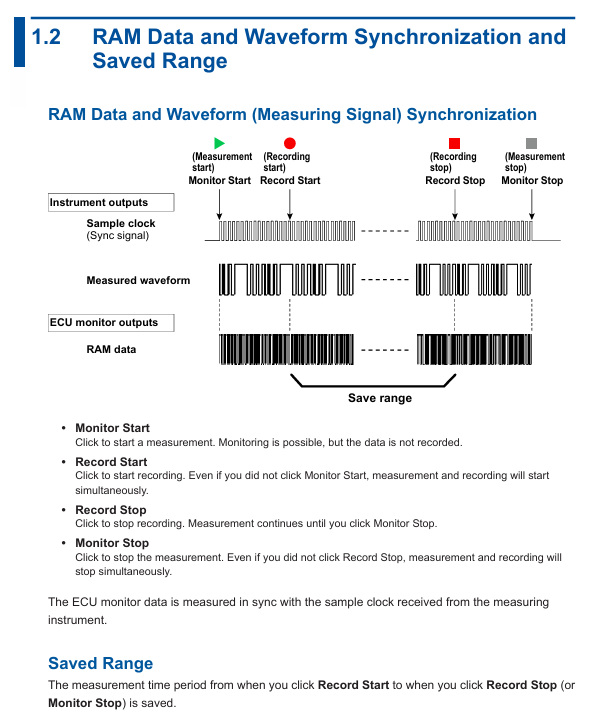
|Operation steps | Function description|

|1 | Click on “Monitor Start”: Start measurement (only monitoring, no data recording)|

|2 | Click on “Record Start”: Start recording (if monitoring is not started, measurement and recording will be synchronized)|

|3 | Click “Record Stop”: Stop recording (measurement continues, monitoring can continue)|

|4 | Click “Monitor Stop”: Stop the measurement (if the recording is not stopped, the measurement and recording will be stopped synchronously)|

Caution: Do not operate the measuring instrument panel during the recording period; PC needs to disable standby/sleep mode to avoid software interruption; When there is a connection error, the measuring instrument needs to be restarted.

Data saving and loading:

Data saving: After stopping recording/measurement, the data is automatically saved as a. mf4 format file. If “Automatically open the last saved file” is checked, the file will be automatically opened after saving;

Data loading: Refer to the IS8000 user manual (IM IS8000-01EN), open the saved. mf4 file (or. wdf and. mdf files in offline scenarios) in the software, and the software will automatically align the timeline to display the data.

(3) Offline synchronization operation (Appendix supplement)

For scenarios without real-time connectivity requirements, the offline synchronization process is as follows:

Connect the measuring instrument and ECU monitor according to the hardware connection requirements, and disconnect from the PC;

Configure measuring instruments separately (set external sampling clock, pulse rate, trigger mode) and ECU monitors (synchronize external clock, monitoring time needs to be longer than measuring instruments);

Start the ECU monitor (enter clock standby) → Press the “START” button on the measuring instrument (output sampling clock, ECU starts to acquire RAM data) → Press the “STOP” button on the measuring instrument (stop clock and RAM data acquisition) → Stop the ECU monitor;

Save the measurement instrument data (in. wdf format) and ECU data (in. mdf format) separately, load the two files in IS8000, and synchronize the software display by aligning the “FirstData” points.

Usage restrictions and precautions

License restriction: A single license supports the use of this option on two PCs simultaneously; It is prohibited to connect multiple PCs to the same measuring instrument at the same time.

Communication limitation: When controlling measuring instruments, only one communication interface (Ethernet/USB) is supported at a time; Prohibit the simultaneous use of multiple interfaces.

Operation taboos: It is prohibited to operate the measuring instrument panel during data recording; The PC needs to disable standby/sleep mode, otherwise it may cause software interruption.

Fault handling: If there is a connection error, prioritize restarting the measuring instrument; If synchronization is abnormal, check the matching between the sampling clock connection and parameters (such as pulse rate and measurement period).

Yokogawa ROTAMASS TI Coriolis Mass Flow Meter

Basic Information

Focusing on the application scenarios of SIS equipment, clarifying the responsibilities of users in installation, operation, maintenance and other aspects, covering key contents such as verification testing, maintenance and replacement, reliability data, etc., to ensure that the equipment maintains the design safety level.

SIS application core requirements

(1) Safety functions and signal transmission

Function positioning: Supports HART communication and can be used as a mass flow rate, fluid density, and fluid temperature measurement component in SIS, equipped with 1-2 4-20mA analog outputs and other I/O interfaces.

Signal connection: The signal needs to be transmitted to the logic solver of SIS (such as safety PLC/DCS) through 4-20mA output; The fault alarm mechanism is “simulated current out of range”, which needs to be connected to enable the automatic diagnostic function of the device.

(2) Key technical parameters

Specific requirements for parameter categories

The safety accuracy is set at 2%, which means that internal component failures that result in measurement errors ≥ 2% will be included in the equipment failure rate

Diagnostic response time amplitude error: Report within 3 minutes after the fault occurs; Other errors (such as frequency errors, signal failures): reported within 7 seconds

Generate a valid signal within 20 seconds after powering on the startup time

The expected service life is 10 years, and only reliability data within this period is valid; After more than 10 years, the equipment failure rate may increase, and the safety integrity level (SIL) calculation results based on the original data may become invalid

(3) Set up and validate testing

Device Settings

During installation, it is necessary to configure the engineering unit parameters through a field communicator or display, and verify the correctness of the parameters (which can be read from the local display or checked for actual calibration of the equipment).

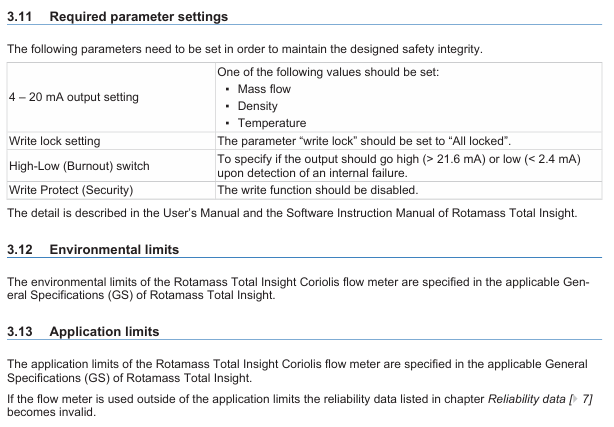
Key parameters need to be set according to the following requirements to maintain safety integrity:

|Parameter Category | Setting Requirements|

|4-20mA output | Select one of “Mass Flow”, “Density”, or “Temperature”|

|Write lock | Set to “All locked”|

|High Low (Burnout) switch | Specify the output current state in case of internal fault (High:>21.6mA; Low:<2.4mA)|

|Write Protect | Disable write function|

Proof Testing

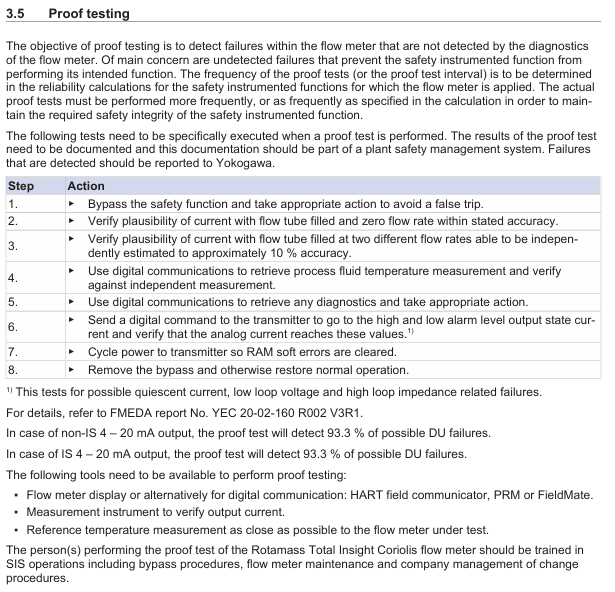
Purpose: To detect faults that have not been detected by the equipment’s self diagnosis (especially undetected faults that may cause safety instrument function (SIF) failure), the testing frequency should be determined based on the reliability calculation results of SIF, and the actual execution frequency should not be lower than the calculation requirements.

Test steps:

|Step | Operation Content|

|1 | Bypass safety function, take measures to avoid accidental tripping|

|2 | Verify the rationality of the output current (in compliance with the specified accuracy) when the flow tube is full and in a zero flow state|

|3 | Verify the rationality of the output current when the flow tube is filled with two different flow rates (which can be independently estimated with an accuracy of about 10%)|

|4 | Read the temperature measurement value of the process fluid through digital communication and compare it with the independent measurement value for verification|

|5 | Read diagnostic information through digital communication and take corresponding measures|

|6 | Send digital commands to the transmitter to enter the high and low alarm level output state, verify whether the analog current reaches the corresponding value (test static current, low loop voltage, high loop impedance related faults)|

|7 | Restart the transmitter power supply and clear the RAM soft error|

|8 | Release bypass and restore normal operation|

Detection effect: Both non intrinsic safety (non IS) and intrinsic safety (IS) 4-20mA outputs can detect 93.3% of potential hazard undetected (DU) faults.

Required tools: device display (or digital communication tools such as HART field communicator, PRM, FieldMate, etc.), output current verification instrument, reference temperature measurement tool close to the tested device.

Personnel requirements: Testers must receive SIS operation training, master bypass processes, equipment maintenance, and company change management processes.

(4) Repair, replacement, and firmware update

Repair and replacement: If online repair is required, bypass the equipment first and establish a compliant bypass process; Maintenance/replacement personnel need to have sufficient skills. If maintenance is required, please contact the Yokogawa sales office.

Firmware update: Only executed by the factory, users do not need to operate on their own, and after the update, they need to fulfill relevant responsibilities according to the replacement process.

(5) Reliability, Environment, and Application Limitations

Reliability data

Detailed Failure Mode, Effects, and Diagnostic Analysis (FMEDA) report (No. YEC 20-02-160 R002 V3R1) can be obtained from Yokogawa, including all failure rates and failure modes.

The device is suitable for “Low Demand Mode” (long average interval between hazardous conditions).

SIL certification: The highest certification under a single (1oo1) configuration is SIL2 (calculated based on the average failure probability (PFDavg) of the entire SIF); The highest certification for device development process is SIL3. When configuring redundancy (hardware fault tolerance level 1), the PFDavg calculation results of the entire SIF can be used for SIL3 scenarios. It is recommended to use a 2% common factor coefficient (β – factor) for redundant configuration.

Environmental and application limitations: The environmental and application limitations of the device must comply with the General Specification (GS) of ROTAMASS Total Insight; If the application limit is exceeded, the reliability data will be invalidated.

Definition and Abbreviations

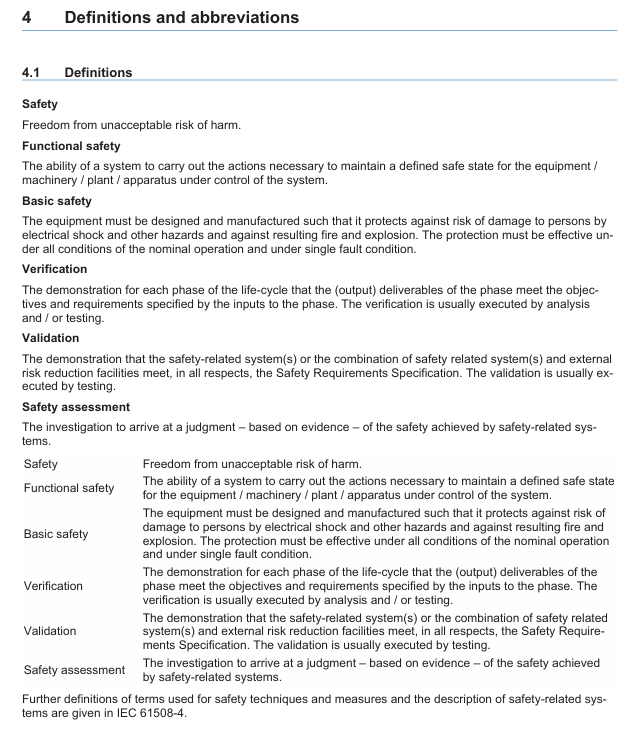
Core definition: Clearly define terms such as “Safety”, “Functional safety”, “Basic safety”, “Verification”, “Validation”, “Safety assessment”, etc., in accordance with the relevant interpretations of IEC 61508-4 standard.

Key abbreviations:

|Abbreviation | Full name and description|

|DU | Dangerous Undetected|

|FMEDA | Failure Mode, Effects and Diagnostic Analysis|

|IS | Intrinsically safe explosion proof|

|PFDavg | Average Probability of Failure on Demand|

|PLC/DCS | Programmable Logic Controller/Distributed Control System|

|PRM | Plant Resource Manager|

|SIF | Safety Instrumented Function|

|SIL | Safety Integrity Level|

|SIS | Safety Instrumented System|

Yokogawa ROTOMETER RAMC Metal Variable Area Flow Meter

Positioning and core use

The dedicated user manual for Yokogawa ROTOMETER RAMC series metal variable area flow meters is suitable for volumetric/mass flow measurement of liquids and gases, especially for turbulent, opaque or corrosive fluid scenarios. The core uses float magnetic transmission to achieve flow indication and supports extended functions such as electronic transmitters and limit switches.

Core principles and structure of the product

1. Measurement principle

RAMC is a variable area flowmeter that operates based on the principle of “float force balance”

The fluid flows through the conical measuring tube from bottom to top, generating upward lift on the float;

The float rises to the equilibrium position of “lift=gravity+buoyancy”, and its height is proportional to the flow rate;

The float is equipped with a built-in magnet, which drives the indicator pointer through magnetic transmission or triggers the electronic transmitter to output a 4-20mA signal/limit switch action.

Key feature: Within the “viscosity independent range” (fluid viscosity below a specific value), flow rate is only related to float height; When exceeding this range, the influence of viscosity on measurement needs to be considered, and the calibration scale and EEPROM need to be recalculated by the manufacturer.

2. Product structure and core components

Component Name Function Description

The conical measuring tube provides a float rising channel, and the material is selected according to the corrosiveness of the fluid (such as stainless steel 1.4404/316L, PTFE)

Float core sensing element, built-in magnet, material adapted to fluid characteristics (such as corrosion-resistant alloy)

Indicator mechanical pointer indicates flow rate, optional LCD digital display (displaying flow rate, cumulative value, percentage, etc.)

The electronic transmitter (- E/- J type) converts the float position into a 4-20mA analog signal, while the – J type supports HART 7 communication

Limit switch (/K1-/K10 options) realizes flow upper and lower limit alarm, supporting standard type (/K1-/K3) and fail safe type (/K6-/K10)

Calibration EEPROM stores customized calibration data (such as fluid density, temperature, viscosity parameters), corresponding one-to-one with the measuring tube

Installation and wiring specifications

1. Preparation before installation and environmental requirements

Environmental restrictions:

Temperature: -40 ° C~+70 ° C (standard), -20 ° C~+60 ° C (explosion-proof type);

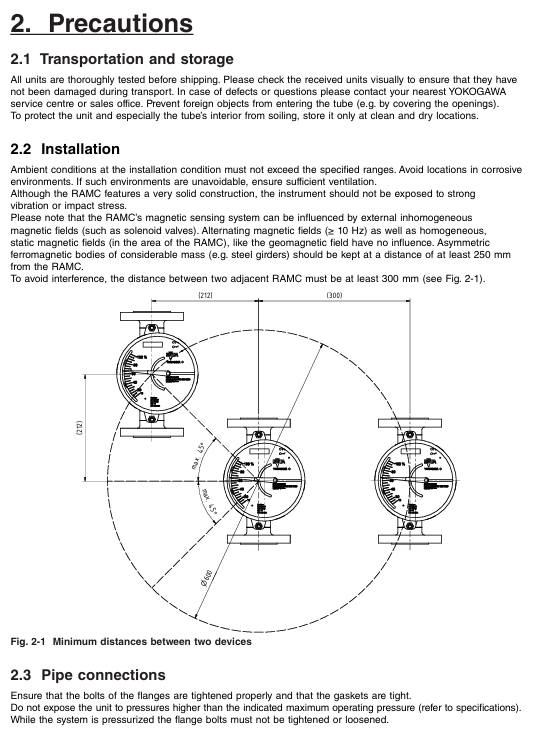
Avoid strong vibrations, corrosive environments (if necessary, choose high anti-corrosion coating shells), and strong magnetic field interference (keep a distance from solenoid valves, etc. Ferromagnetic objects should be kept away from ≥ 250mm);

The distance between adjacent RAMCs should be ≥ 300mm to prevent mutual interference of magnetic fields.

Pipeline requirements:

It must be installed vertically, with the fluid flow direction being “downward and upward”, and the flanges should be aligned parallel to avoid pipeline stress;

For models with a nominal diameter greater than RAMC08, it is necessary to reserve a straight pipe section for the first 5 times the nominal diameter and a straight pipe section for the last 3 times the nominal diameter;

If the fluid may contaminate the measuring tube, it is recommended to install a bypass pipeline for easy disassembly and cleaning of the equipment.

2. Pipeline connection and wiring operation

Flange connection: Supports EN, ASME and other standard flanges, and bolt torque must strictly follow the specifications, such as DN15 PN40 flange (EN 1092-1) torque of 9.8 Nm, DN50 PN40 flange torque of 57 Nm; PTFE lined flanges require additional attention to sealing performance to avoid fluid leakage.

Wiring specifications:

Cable sealing sleeve: Suitable for cables with a diameter of 6-9mm. If not in use, M16 × 1.5 (shell 90 type) or M20 × 1.5 (shell 91 type) blind plug sealing is required for the entrance;

Signal and power separation: Analog signals (4-20mA), digital communication (HART), and power cables need to be wired separately to avoid interference;

Grounding requirements: The protective grounding (PE terminal) must be firmly connected, with a grounding resistance of ≤ 100 Ω, and an additional external grounding clamp is required for the 91 type shell.

Core functions and parameter configuration

1. Operation of electronic transmitter (- E/- J type)

(1) Basic functions and parameter settings

The electronic transmitter supports functions such as flow display, cumulative value statistics, 4-20mA output calibration, etc. It can be configured through two operation keys (up key “exit”, down key “switch menu”, combination key “confirm”). The core parameters are as follows:

Function Description of Key Setting Items for Parameter Categories

Display function (F11) default display of flow/cumulative value/percentage/temperature cumulative value, switchable units (such as m ³/h, L/min, kg/s)

Unit setting (F12/F13): Volume/mass unit+time unit. The European version supports m ³, Nm ³, kg, etc., while the American version (/A12 option) supports gal, scf, etc

Damping setting (F21): Smooth output signal for 0/1/5/10 seconds to reduce the impact of flow fluctuations, with a default of 1 second

Current output (F3-) 4-20mA/0-20mA switch 2-wire system default 4-20mA, adjustable zero point (F32) and range (F33), 20 μ A per step

Fault detection (F4-) error code displayed as “08” indicates that the float is stuck and needs to be cleaned or automatically zeroed (F74)

Float stuck detection (F7-) on/off, monitoring lower limit (5%/15%/30% Qmax), monitoring time 5/15 minutes optional. If there is no signal fluctuation beyond the deadline, a fault alarm will be triggered

(2) HART 7 communication (- J type exclusive)

Communication features: Supports 2-wire 4-20mA overlay with HART signal, enables remote parameter configuration and data reading (such as real-time flow, cumulative value, diagnostic information), supports multi slave mode (up to 63 devices), and can set polling address 1-63.

Core functions:

Process variable monitoring: real-time reading of flow rate, temperature, current output, etc;

Fault diagnosis: detect RAM errors, ADC faults, EEPROM anomalies, etc;

Burst mode: Continuously sending specified data (such as traffic+cumulative value) to reduce communication latency;

Trend configuration: Record 12 sets of historical data, with adjustable sampling intervals of 1-2 hours.

2. Limit switch (/K1-/K10 options)

Type and Function:

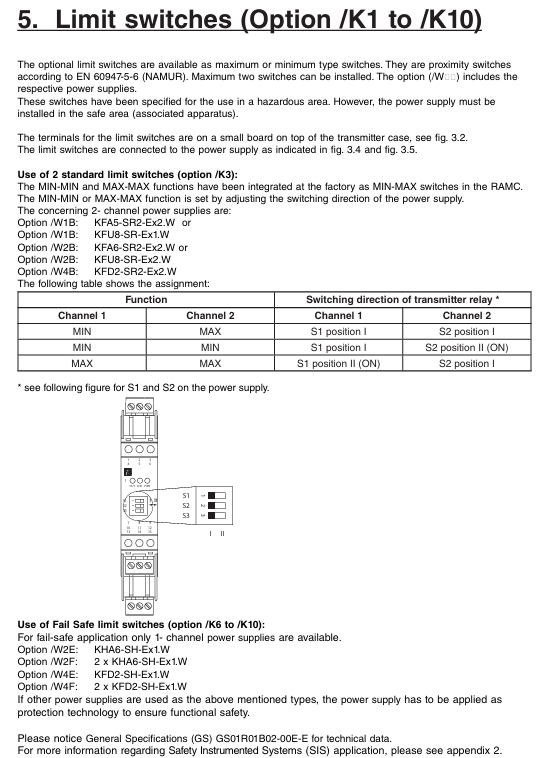
Standard type (/K1-/K3): Supports MAX/MIN dual contacts and complies with EN 60947-5-6 (NAMUR) standard;

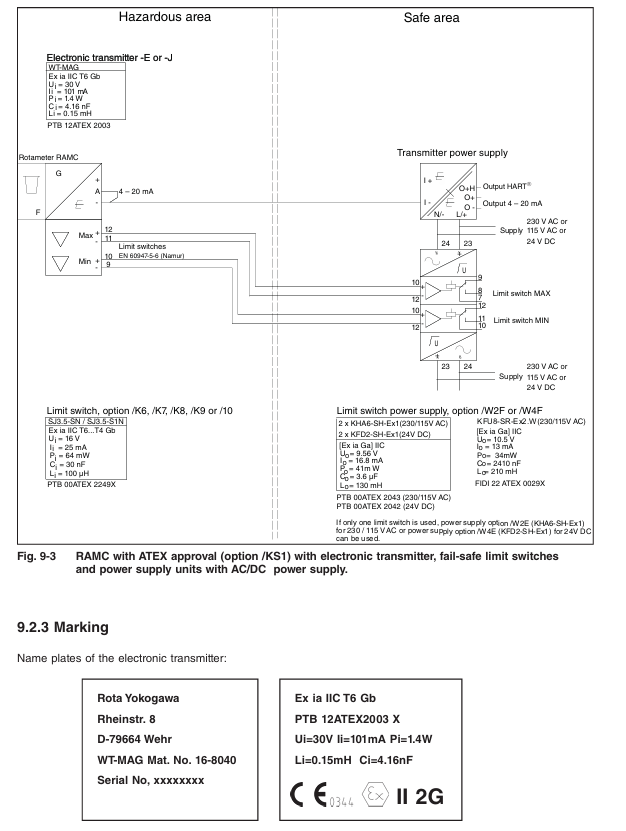
Fault safe type (/K6-/K10): When power is cut off, the contacts automatically switch to a safe state and require a dedicated power supply (such as/K2E,/W4F).

Parameter configuration: Set the MIN-MAX/MIN-MIN/MAX-MAX function by switching the direction of the power supply. For example, when the K3 option is paired with the W2B power supply, the S1/S2 relay position determines the contact logic.

Explosion proof certification and safety regulations

1. Explosion proof type and applicable scenarios

RAMC provides two types of explosion-proof designs: intrinsic safety (Ex ia) and explosion-proof (Ex db), covering major certification systems worldwide. The core parameters are as follows:

Certification Type Model Options Explosion proof Mark Applicable Area Key Parameters (Electronic Transmitter)

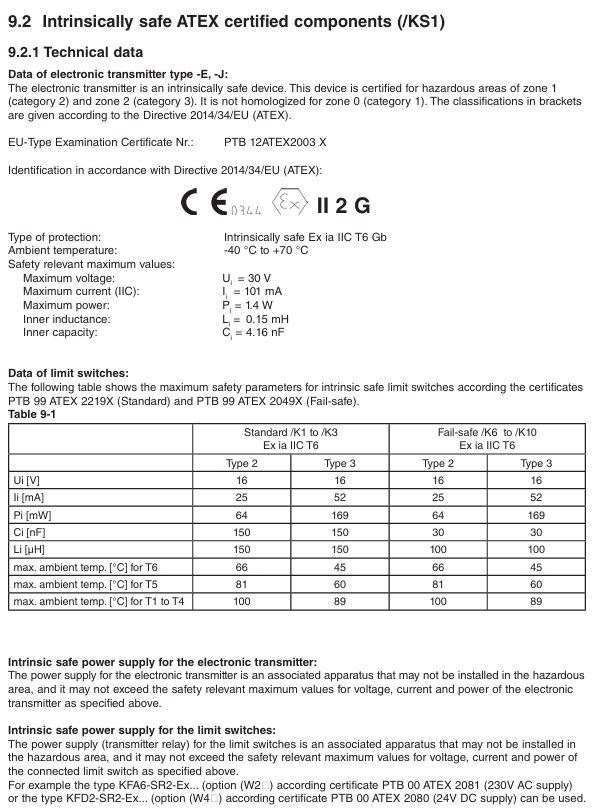
ATEX/KS1 (intrinsic safety) Ex ia IIC T6 Gb Zone 1/2 (gas), Zone 21/22 (dust) Ui=30V, Ii=101mA, Pi=1.4W

IECEx/ES1 (Intrinsic Safety) Ex ia IIC T6 Gb Global Explosion proof Zone Li=0.15mH, Ci=4.16nF

NEPSI (China)/NS1 (Intrinsic Safety) Ex ia IIC T6 Gb Explosion proof Area Environmental Temperature in China -40 ° C~+70 ° C

FM/UL (US Canada)/FS1 (Intrinsic Safety) Class I Div1 GP A-D T6 US Canada Zone 1/Zone 2 Vi=30V, Ii=100mA, Pi=1.4W

EAC (Eurasian Economic Union)/GS1 (Explosion proof+Dust) Ex db IIC T6 Gb/Ex tb IIIC T80 ° C Db Eurasian Union Explosion proof Area Surface Temperature ≤ 80 ° C (T6)

2. Explosion proof installation and operation taboos

Intrinsic safety requirements:

The power supply must be a certified associated device (such as KFA6-SR2-Ex2. W) installed in a safe area;

The cable capacitance/inductance should be ≤ Ci/Li (e.g. Ci=4.16nF, Li=0.15mH) to avoid safety risks caused by exceeding the limit.

Explosion proof type requirements:

Power off and wait for 15 minutes before opening the lid to ensure the safety of the internal gas;

The cable sealing sleeve must comply with the IEC 60079-1 standard and be sealed with certified blind plugs for entry purposes;

When the shell is damaged (such as the observation window breaking), it should be immediately stopped to avoid the failure of explosion-proof performance.

Maintenance and troubleshooting

1. Daily maintenance and regular inspections

Routine inspection (weekly):

Pointer/display screen: Confirm that the flow indication matches the actual working conditions without any jamming or jumping;

Sealing state: The flange and cable sealing sleeve have no leakage, and the shell has no corrosion;

Explosion proof mark: The label is clear, without wear or detachment.

Regular maintenance (every 6 months):

Cleaning: The measuring tube and float need to be disassembled and cleaned (avoiding the use of corrosive solvents), and the magnetic properties of the float should be checked for normal operation;

Calibration: The electronic transmitter needs to be verified for 4-20mA output accuracy through a HART communicator, and the limit switch needs to be tested for contact action reliability;

Grounding inspection: The grounding resistance is ≤ 100 Ω, and the grounding terminal is not loose.

2. Common faults and troubleshooting

Possible causes and solutions for the fault phenomenon

The pointer is unresponsive/stuck, the float is stuck by impurities, and the inner wall of the measuring tube is scaled. Disassemble and clean the float and measuring tube, and replace the float if necessary

Electronic transmitter has no output power supply fault, calibration EEPROM is missing, wiring is loose. Check power supply (24VDC ± 10%), reinsert EEPROM, and tighten wiring terminals

HART communication failure, load resistance not between 250-600 Ω, pole address conflict, adjust load resistance, reset unique pole address (1-63)

The flow indication deviation is large, and the viscosity/density of the fluid does not match the calibration value. The wear of the float provides new fluid parameters, and the manufacturer recalculates the scale; Replace the worn float

Improper threshold setting for triggering limit switch misoperation, recalibration of switch threshold due to magnetic field interference (such as 5% Qmax), and staying away from strong magnetic field sources

Application of Safety Instrumented System (SIS)

1. Applicable models and safety functions

RAMC only comes with fail safe limit switches (V1) and standard limit switches (V2), which can be used for SIS as flow monitoring components connected to safety instrument functions (SIF). The core realizes “flow over limit alarm” or “emergency cut-off trigger”, and supports SIL1-SIL2 levels (depending on configuration and verification cycle).

2. Key SIS requirements

Verification cycle: It should be set according to safety integrity requirements, with a recommended duration of 1-5 years. The verification coverage rate should be ≥ 99%, and the verification results should be recorded (such as forcing the float to trigger the MAX/MIN threshold and verifying the switch action);

Reliability data: V1 type (fail safe switch) SFF=61%, MTBF=530 years, V2 type (standard switch) SFF=42%, MTBF=401 years. Detailed FMEDA reports can be obtained from the manufacturer;

Lifecycle: Designed for a lifespan of 10 years, if exceeded, reliability needs to be reassessed or core components such as measuring tubes and floats need to be replaced.

Compliance and Disposal Standards

1. Compliance with PED Pressure Equipment Directive

RAMC complies with 2014/68/EU (PED), the measuring tube is classified as “pipeline”, the heating element (/T1-/T6 options) is classified as “container”, fluid group 1-2, module H, and some models (such as RAMC03-15) belong to Class III pressure equipment and need to comply with pressure temperature ratings (such as stainless steel material -196 ° C~370 ° C, PTFE material -80 ° C~130 ° C).

2. Requirements for abandonment and return to factory

Decontamination treatment: After coming into contact with harmful fluids, the equipment should be thoroughly cleaned to avoid residual corrosion or toxicity. A “Decontamination Declaration” should be submitted when returning to the factory;

Environmental disposal: It belongs to WEEE equipment (2012/19/EC) and is prohibited from being mixed with municipal waste. It must be collected by professional institutions or returned to designated outlets in Yokogawa for disposal.

Summary and selection suggestions

1. Core advantages

Wide applicability scenarios: Supports corrosive, opaque, turbulent fluids, temperature range -196 ° C~370 ° C, pressure range PN16~PN100;

Flexible function expansion: optional electronic transmitter (HART communication), limit switch (fail safe), explosion-proof certification (global major system);

Low maintenance cost: The measuring tube and float are made of durable materials (such as 316L stainless steel), with no vulnerable parts. Calibration only requires replacing the EEPROM and scale.

2. Key parameters for selection

Fluid characteristics: Select the material of the measuring tube/float based on density, viscosity, and corrosiveness (such as PTFE for strong corrosion and stainless steel for conventional fluids);

Explosion proof requirements: Hazardous areas require matching certification types (such as China Select/NS1, US Canada Select/FS1);

Signal output: Remote monitoring should select the – J type (HART), only local indication should select the – T type, and alarm control should be equipped with/K series limit switches.

Yokogawa SL1000 high-speed data acquisition unit input module

Positioning and Applicable Scope

Product association: The manual for the dedicated input module of the Yokogawa SL1000 high-speed data acquisition unit provides detailed specifications, measurement principles, and operating points for 15 core input modules. It needs to be used in conjunction with other manuals of the SL1000 system.

Supporting document system: The SL1000 series documents include categories such as system operation, collection software, module security, and auxiliary software installation. The functions of each document are clearly divided, and “E” is the language code. The latest version can be obtained through the Yokogawa official website.

Classification and specification summary of core input modules

The SL1000 input module can be divided into six categories based on measurement functions: voltage/high-speed voltage, high voltage, temperature/universal, strain, acceleration/frequency, and high-speed/high-frequency. Each module is designed for different application scenarios, with significant differences in key parameters. The following are the highlights of the core module specifications:

1. High speed voltage module (core used for high-frequency signal acquisition)

Module model, core parameters, applicable scenarios

701250 (10 MS/s, 12 bits, isolated) 2-channel, DC-3 MHz bandwidth, ± 50 mV~200 V range, 2300 Vrms withstand voltage industrial high-frequency voltage signals (such as motor drive signals)

720210/721211 (100 MS/s, 12 bits, isolated) 2-channel, DC-20 MHz bandwidth, maximum 1000 V (DC+ACpeak) input, 5400 Vrms withstand ultra-high frequency signals (such as RF and pulse signals), supports simultaneous installation of 4 modules (top slot)

701251 (1 MS/s, 16 bits, isolated) 2-channel, DC-300 kHz bandwidth, ± 1 mV~20 V high-precision range, residual noise ± 100 μ V high-precision low-frequency voltage measurement (such as sensor weak signal)

2. High voltage modules (designed for high voltage environments)

Module model, core parameters, and functional highlights

701267 (100 kS/s, 16 bits, isolated, with RMS) 2-channel, ± 200 mV~2 kV range, RMS measurement mode (40 Hz-10 kHz), 3510 Vrms high-voltage effective value measurement (such as grid voltage monitoring), supports waveform/RMS dual-mode switching

720268 (1 MS/s, 16 bits, isolated, with AAF/RMS) 2-channel, DC-300 kHz bandwidth, automatic anti aliasing filtering (AAF), 5400 Vrms high-voltage high-frequency signal acquisition, AAF automatically adjusts the cutoff frequency according to the sampling rate (e.g. AAF=40 kHz at 100 kS/s)

3. Temperature/Universal Module (Multi parameter Comprehensive Measurement)

Module model, core parameter measurement capability

701261/701262 (universal voltage/temperature) 2-channel, supports 8 types of thermocouples such as K/E/J/T, ± 50 mV~200 V voltage, 120 dB common mode rejection ratio voltage and temperature mixed measurement, 701262 with AAF filter, suitable for multi parameter industrial environment

701265 (high-precision voltage temperature, isolation) 2-channel, temperature accuracy ± (0.1% reading+1.5 ℃), voltage accuracy ± (0.08% range+2 μ V), 20 nA input bias current laboratory level high-precision measurement (such as precision equipment temperature monitoring)

720266 (low noise, high-precision voltage and temperature) 2-channel, residual noise ± 4 μ V, DC-15 Hz bandwidth, 0.1 Hz~8 Hz optional digital filtering for ultra-low noise scenarios (such as weak temperature and voltage signals from sensors)

4. Strain type module (specialized for structural stress measurement)

Module Model Core Parameter Interface and Calibration

701270 (NDK interface) 2-channel, 100 kS/s sampling rate, ± 20000 μ STR range, 120-1000 Ω strain gauge resistance in accordance with Japanese NDK standards, equipped with a dedicated NDK connector (PRC03-12A10-7M10.5)

701271 (DSUB interface, with shunt calibration) 2-channel, built-in shunt calibration relay, ± 20000 μ STR range, supports mV/V unit system with 9-pin D-Sub interface, supports shunt calibration (Shun Cal), suitable for structural mechanics testing

5. Frequency/acceleration module (dynamic signal measurement)

Module model core parameter measurement function

701281/720281 (frequency module) 2-channel, 0.01 Hz~500 kHz measurement range, 625 ps resolution, supports 8 modes including frequency/RPM/cycle/duty cycle, etc. 720281 supports 1000 Vrms (CAT II) input, suitable for motor speed and pulse signal monitoring

701275 (Acceleration/Voltage Module, with AAF) 2-channel, DC-40 kHz bandwidth, supports built-in amplifier acceleration sensors such as ICP/ISOTRON, 4 mA sensor power supply for mixed measurement of acceleration and voltage, AAF automatically adapts sampling rate (e.g. AAF=4 kHz at 10 kS/s)

6. Other special modules

701255 (non isolated high-speed voltage module): 2-channel, 10 MS/s sampling rate, non isolated design, suitable for low-cost high-frequency measurement without isolation requirements (such as circuit board signal testing).

701280 (Appendix Frequency Module): Measurement range of 0.01 Hz~200 kHz, 50 ns resolution, supports pulse integration and velocity calculation, suitable for low-end dynamic signal monitoring.

Key measurement principles and operational points

1. Core technology of strain measurement

Basic formula: Strain value ε=Δ L/L (Δ L is the length change, L is the initial length); The resistance change of strain gauges is proportional to the strain, that is, Δ R/R=K × ε (K is the sensitivity coefficient, usually K=2.0).

Shunt Cal: The 701271 module has a built-in calibration relay that simulates strain by paralleling a known resistor (shunt resistor Rs). The calculation formula is Rs=R × (1-K × ε/2)/(K × ε) (R is the bridge resistance), and it needs to be paired with a bridge that supports shunt calibration (such as 701957/701958). After calibration, the gain error can be controlled within ± 0.5%.

2. Measurement principle of frequency module

Measurement resolution: Based on 625 ps, measurement is achieved by counting the input signal period, such as frequency=1/(counting times x 625 ps), and 16 bit data output (24000 LSB/range).

Filtering and anti-interference: Supports bandwidth limitation from 100 Hz to 100 kHz, with hysteresis function in the range of ± 1% to ± 5%, which can eliminate jitter during contact on/off (adjustable jitter reduction time from 1 to 1000 ms); Low frequency attenuation point ≤ 0.5 Hz during AC coupling, suitable for power frequency (50/60 Hz) signal suppression.

3. Safe operation of high-voltage module

Input restriction: High voltage modules need to be equipped with dedicated probes/cables, such as 701901 (isolated BNC – safety crocodile clip)+701954 (crocodile clip) combination, supporting a maximum of 850 V (DC+ACpeak) input; The limit for direct input is 42 V (DC+ACpeak, CAT II).

Voltage resistance and insulation: High voltage modules generally have a voltage resistance of ≥ 3500 Vrms (2 seconds) and an insulation resistance of ≥ 10 M Ω (500 VDC). During installation, it is necessary to ensure grounding (Class D grounding, ≤ 100 Ω) to avoid safety risks caused by insufficient creepage distance.

Module selection and compatible accessories

1. Key parameters for selection

Sampling rate and bandwidth: Select 100 MS/s (720210) for high-frequency signals (such as RF), and 1 MS/s for low-frequency high-precision signals (such as sensors) using a 16 bit module (701251);

Isolation requirements: Isolation modules (such as 701250/720268) are preferred for industrial strong interference environments, while non isolation modules (such as 701255) are optional for laboratory low interference environments;

Measurement types: strain testing select 701270/701271, high voltage monitoring select 701267/720268, temperature voltage mixed measurement select 701261/701265.

2. Recommended compatible accessories

Example of accessory type and model, applicable module functions

Voltage probe 700929 (10:1, 20-45 pF) for high-speed/high-voltage module safety measurement of 600 V (DC+ACpeak) signal

Current probe 701930 (150 A, 100 A: 1 V) full series voltage module non-invasive current measurement, SL1000 can be powered

Strain bridge 701957 (D-Sub, 120 Ω) 701271 with shunt calibration, 5-meter shielded cable

Connect cable 701901 (isolated BNC crocodile clip) to the high-voltage module for isolated high-voltage signal connection, paired with 701954 crocodile clip

Safety and maintenance precautions

1. Core security standards

Voltage limit: Strictly adhere to the maximum input voltage of the module, such as the maximum 1000 V (DC+ACpeak) when the 720210 module is paired with a 10:1 probe, and only 42 V when directly input. Overvoltage may damage the module or cause safety accidents;

Static protection: The module contains static sensitive components, and an anti-static wristband should be worn during operation. Maintenance should be carried out at a grounding workstation;

Explosion proof and compliance: Some modules (such as 701250/701267) do not meet the EU RoHS directive, and alternative models need to be confirmed for export to the EU; The use in hazardous areas should refer to the explosion-proof level requirements in the Module Safety Precautions Manual (IM 701250-04E).

2. Key points of daily maintenance

Calibration cycle: It is recommended to calibrate once a year, and high-precision modules (such as 701265) should be calibrated every 6 months to ensure measurement accuracy;

Cleaning and storage: Wipe the surface of the module with a soft cloth and prohibit the use of organic solvents; Long term storage environment temperature -30~70 ℃, humidity 20~80% RH (non condensing);

Troubleshooting: If there are measurement abnormalities, priority should be given to checking the wiring (such as shielding layer grounding) and probe compatibility (such as attenuation ratio setting). The high-frequency module needs to confirm whether the bandwidth limit matches the signal frequency.

​Yokogawa FLXA402T turbidity and chlorine liquid analyzer

Product positioning

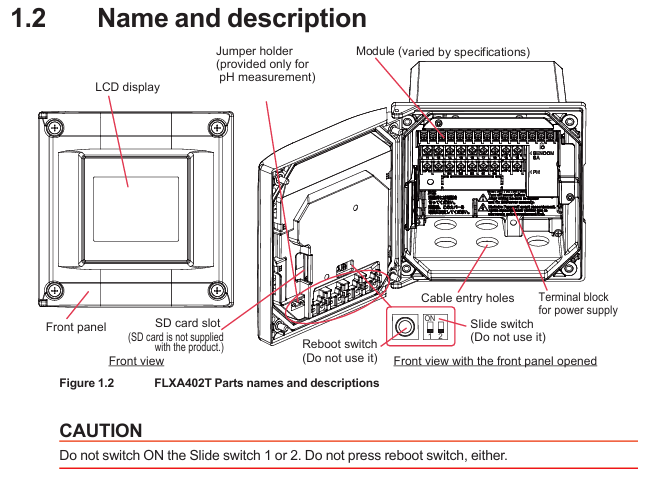
Product type: FLXA402T is a modular design liquid analyzer converter that supports measurement of various parameters such as turbidity (TB820D/TB830D), residual chlorine (FC800D/RC800D), pH value, conductivity (SC), etc. It needs to be used in conjunction with corresponding sensors; Equipped with analog signal output (4-20mA), relay contact output, and digital communication (Modbus RTU/IP) functions, it can upload data to the host system and display locally.

Applicable scenarios: Suitable for industrial process liquid monitoring, supporting indoor and outdoor installation (in accordance with rainproof design), the corresponding sensor module needs to be selected according to the measurement parameters. For example, turbidity measurement needs to be matched with TB series sensors, and residual chlorine measurement needs to be matched with FC/RC series sensors.

Product specifications and model description

1. Core specification parameters

Working environment temperature: -20~+55 ℃ (operation), -30~+70 ℃ (storage); Humidity: 10~90% RH (40 ℃ without condensation)

Waterproof design with protective performance, suitable for both indoor and outdoor use; Outdoor exposure requires a sunshade (/H6/H7 options)

Power supply requirements: AC version (suffix code – A), external 5A or above switch/circuit breaker (compliant with IEC60947-1/3), built-in 250V/2.5A delay fuse (IEC60127 standard)

Communication function supports Modbus RTU (RS-485, suffix – R), Modbus TCP/IP (Ethernet, suffix – E)

Analog IO can choose 2 4-20mA outputs+1 contact input (- N2) or 4 4-20mA outputs+2 contact inputs+1 4-20mA input (- N4), with a maximum load of 600 Ω

Relay outputs 4 sets of SPDT contacts (suffix – WR), including fault safety contacts (S4), configurable for alarm and fault signal output

Grounding requirements: Class D grounding (≤ 100 Ω), protective grounding wire cross-sectional area ≥ 0.75mm ² (CSA certified models 0.75~2.1mm ²)

2. Model and suffix code rules

Model structure: FLXA402T – [Power Supply/Housing] – [First Input] – [Second Input] – [Analog IO] – [Relay Output] – [Digital Communication] – [Other]+[Option Code]. The key code meanings are as follows:

|Code Category | Code Example | Meaning|

|Power supply/enclosure | – A | AC power supply|

|| – B/- D | Aluminum alloy shell (- B: polyurethane coating; -D: High anti-corrosion coating|

|| – AB/- AD | Universal type (- AB: CE/RCM/Chinese standard; -AD: CSA certification)|

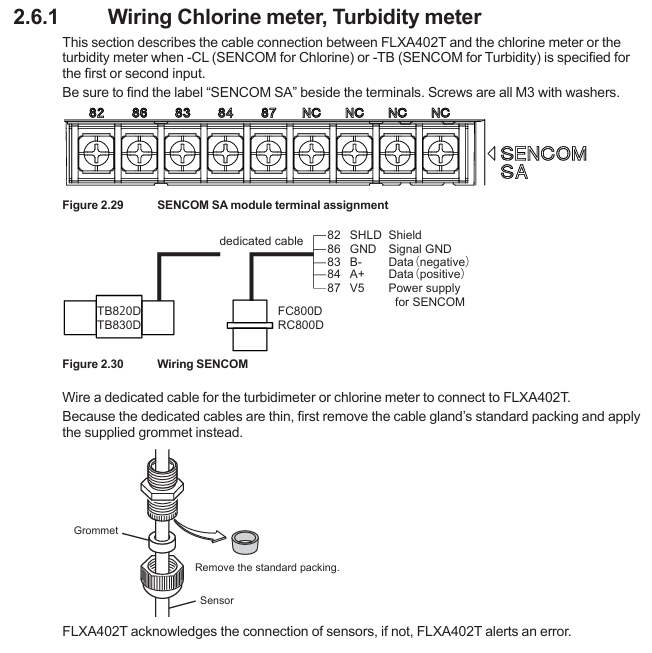
|First Input | – CL | SENCOM Protocol Chlorine Sensor (FC800D/RC800D)|

|| – TB | SENCOM Protocol Turbidity Sensor (TB820D/TB830D)|

|Second input | – NN | No second input|

|| – P1/- C1 | pH Sensor/Conductivity (SC) Sensor|

|Analog IO | – N2/- N4 | 2-channel output+1-channel input/4-channel output+2-channel input+1-channel input|

|Relay output | – WR/- NR | with contact output (cleaning/range/fault)/no contact output|

|Digital Communication | – N/- E/- R | No Communication/Ethernet (Modbus TCP/IP)/RS-485 (Modbus RTU)|

|Option code |/U//PM | Universal installation kit (including pipeline/wall installation)/panel installation hardware|

||/H6/H7 | Stainless steel sunshade/Stainless steel+polyurethane coated sunshade|

||/CB4//CD4//CF4 | Catheter adapter (G1/2 x 4/1/2NPT x 4/M20 x 1.5 x 4)|

3. Standard and optional accessories

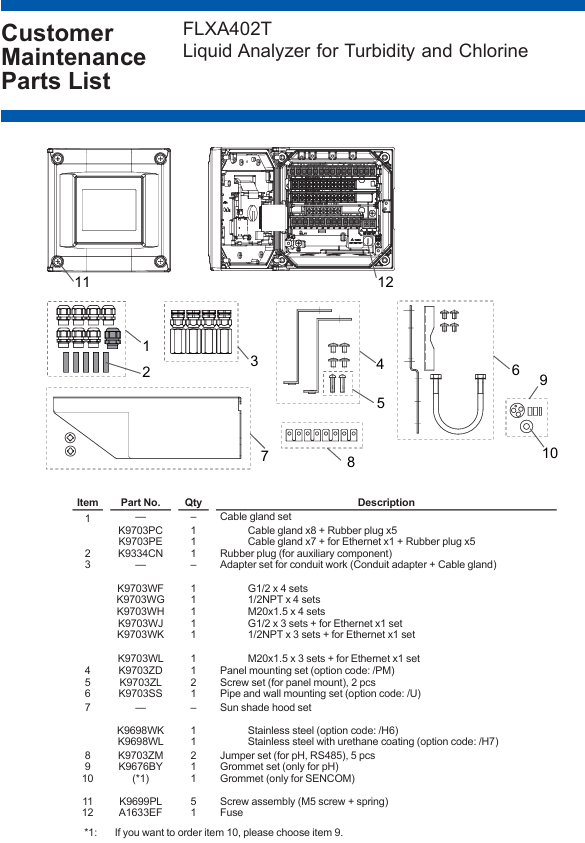
Standard accessories: Cable gland (M20 × 1.5, 8 pieces, Ethernet version includes 1 black Ethernet gland), rubber plug (5 pieces), pH module gasket set, SENCOM module sealing ring, jumper (for pH/RS-485), starter manual (IM 12A01G01-01EN).

Optional accessories: Pipe/wall/panel mounting bracket (/U//PM), sunshade (/H6//H7), conduit adapter (/CB □//CD □/CF □), stainless steel label (/SCT), spare fuse (A1633EF), industrial SD card (A1019NL, 2GB and above).

Installation process and requirements

1. Preparation before installation

Environmental requirements:

Avoid severe vibrations and strong electromagnetic interference (keep away from relays/power switches), and reserve space for cable connections;

Outdoor installation should avoid direct sunlight (when there is no sunshade), and high anti-corrosion coating shell (- D) should be selected for corrosive environments;

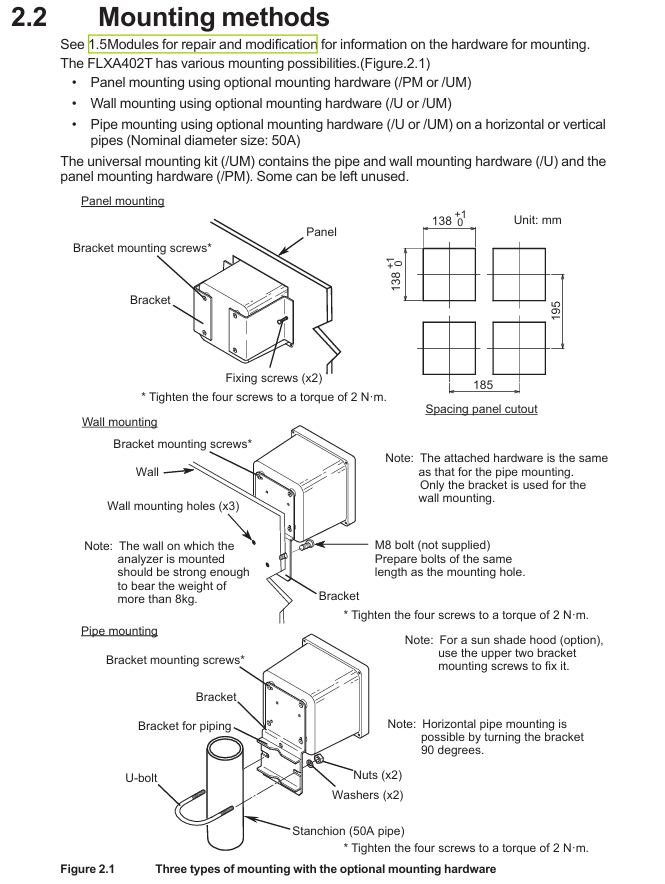
The installation surface should be able to withstand a weight of ≥ 8kg (wall installation), and the pipeline installation should be compatible with a nominal 50A pipeline (outer diameter 60.5mm).

Tools and accessories: Prepare torque wrenches (for tightening seals/panel screws), wire strippers, M3/M4 screwdrivers, as well as standard cable seals, jumpers, gaskets, etc.

2. Detailed explanation of installation method

(1) Panel installation (required/PM option)

Drill holes on the panel according to the size (138 × 195mm, tolerance 0+1mm);

Insert the analyzer into the opening and use the matching panel mounting hardware (K9703ZD) to fix it from the inside of the panel. The torque of the four mounting screws is 2N · m.

(2) Wall installation (required/U option)

Drill 3 M8 screw holes on the wall (positioned according to the bracket holes);

Fix the wall bracket (K9703SS) to the wall with M8 bolts, and then use 4 screws to secure the analyzer to the bracket with a torque of 2N · m.

(3) Pipeline installation (required/U option)

Fix the pipeline bracket (including U-bolts) onto the nominal 50A pipeline, ensuring that the bracket is horizontal/vertical;

Fix the analyzer on the bracket with 4 screws, with a torque of 2N · m. If equipped with a sunshade, use the 2 screws above the bracket to fix the sunshade.

3. Disassembly of shielding cover (before wiring)

The high-voltage power terminal and relay module of the analyzer are covered by a shielding cover. Before wiring, the power must be cut off. Loosen the two screws on the shielding cover (marked with a triangle), pinch the circular mark, and pull out the shielding cover (be careful to save the screws to avoid loss); After wiring is completed, the shielding cover needs to be reinstalled to ensure safety and anti-interference.

image.png

Wiring operation specifications

1. Installation of cable sealing sleeve

All cable entrances need to be equipped with sealing sleeves (standard M20 × 1.5, compatible with cable outer diameters of 6-12mm), and unused entrances need to be sealed with rubber plugs:

Ordinary cable: Assemble in the order of “sealing sleeve body → sealing ring → nut”, torque 2N · m;

Ethernet cable: Use a black dedicated sealing sleeve (suffix – standard for E models);

Catheter protection: When selecting a catheter adapter (/CB □//CD □//CF □), replace the standard sealing sleeve with a dedicated adapter sealing sleeve (white). The adapter needs to be connected to a flexible catheter to avoid stress damage to the housing.

2. Key wiring process

(1) Power wiring

Confirm power outage, strip off the insulation layer of the power cable (cross-sectional area ≤ 2.5mm ², AWG14), and crimp the solderless terminal;

Connect the AC power supply to terminals “L” (live wire) and “N” (neutral wire), and connect the protective grounding wire to the internal grounding terminal (M4 screw);

After checking the wiring is correct, reinstall the shielding cover. The external power switch/circuit breaker should be labeled as a “power-off device” and installed in an easy to operate position.

(2) Relay output wiring (suffix WR)

The four sets of SPDT contact terminals are defined as follows, connected to the controller/PLC using multi-core cables, with terminal screws of M3 (torque 0.6N · m):

|Terminal number | Contact type | Function|

| — | — | — |

|31/32/33 | S1 (C/NC/NO) | Universal Contact 1 (normally closed/common/normally open)|

|41/42/43 | S2 (C/NC/NO) | Universal Contact 2|

|51/52/53 | S3 (C/NC/NO) | Universal Contact 3|

|71/72/73 | S4 (C/NO/NC) | Fault safety contact (NO → NC when power is off)|

(3) Digital communication cabling

Modbus RTU (RS-485, suffix – R):

Use shielded twisted pair cables (multi-core) to connect terminals 91 (A+, data positive), 92 (B -, data negative), 93 (GND, signal ground), and 94 (SHIELD, shielding layer);

When terminal matching is required at both ends of the bus, use the standard jumper to connect terminals 91 and 95 (with a built-in 110 Ω resistor). Unused jumpers need to be stored in the jumper bracket on the inside of the panel.

Modbus TCP/IP (Ethernet, suffix – E):

Use CAT5 and above shielded twisted pair (STP) cables to make RJ45 connectors (supporting direct/cross connections);

Insert the network cable into the Ethernet interface of the analyzer, fix the cable with a black dedicated sealing sleeve, and ground the shielding layer.

(4) Simulate IO wiring

4-20mA output: Use shielded cables, connect terminals 61 (mA1+)/62 (mA1-), 65 (mA2+)/66 (mA2-), etc., and connect the shielding layer to terminal 63 (or 89, – N4 model);

4-20mA input (- N4 model): Connect terminals 87 (AI+) and 88 (AI -), and connect the shielding layer to terminal 89;

Contact input: Connect terminals 21 (DI1)/24 (DI2, – N4 model) and 22 (COM), used to initiate cleaning cycles or switch ranges, with shielding layer connected to terminal 63.

3. Sensor wiring

(1) SENCOM sensor (- CL/- TB)

Use sensor specific cables, remove the cable sealing sleeve and standard sealing ring, and replace with standard grommet (suitable for thin cables);

Connect according to the terminal markings “SHLD (shielding), GND (signal ground), B – (data negative), A+(data positive), V5 (power supply)”, with terminal screw M3 (torque 0.6N · m);

The sensor adopts single ended grounding to avoid interference caused by grounding at both ends.

(2) PH sensor (- P1)

Conventional pH sensor connection terminals 13 (REF, reference electrode), 15 (Glass, measuring electrode), 11/12 (Temp, temperature compensation), 14 (Solution ground), shielding layer connected to 16/17;

Low impedance reference electrodes require the installation of jumpers (2 standard), and unused jumpers should be stored in the jumper bracket; Special double glass electrodes do not require jumper wires.

(3) Conductivity (SC) sensor (- C1)

The 4-electrode sensor is directly connected to terminals 11 (Temp+), 12 (V -), 13 (I -), 15 (V+), and 16 (I+);

Two electrode sensors require one jumper wire (standard) to be connected between terminals 13-14 and 15-16 to ensure normal signal transmission.

Inspection and maintenance

1. Check after wiring

Before powering on: Confirm that all wiring is correct, the shielding cover has been reinstalled, and the panel screws are evenly tightened (torque 1.5~1.6N · m, electric screwdriver speed ≤ 400rpm);

After power on: Check that the LCD display screen starts normally, there are no fault alarms (such as sensors not connected or wiring errors), and communication and analog output signals are normal.

2. Regular maintenance

Daily inspection: Check the panel sealing and cable sealing sleeve for integrity and no moisture intrusion every week;

Regular maintenance: Check the grounding resistance (≤ 100 Ω), fuse status, and clean the casing every 6 months (using a soft cloth and prohibiting the use of corrosive solvents);

Accessory replacement: Fragile parts such as fuses (A1633EF) and rubber seals (K9334CN) require Yokogawa certified accessories, and power off operation is required during replacement.

3. Fault handling prompts

If there is a communication failure, check whether the RS-485/Ethernet wiring and terminal resistance are correct;

When simulating abnormal output, check the load resistance (≤ 600 Ω), whether the wiring is loose, or calibrate the output through the converter menu;

When the sensor is unresponsive, confirm that the sensor cable shield is grounded and the terminal wiring corresponds, and refer to the sensor manual to troubleshoot the sensor itself.

Key precautions

Safety regulations: All wiring must be powered off, power cables must comply with UL 2556 VW-1 or equivalent flame retardant rating, and protective grounding wires cannot be omitted;

Anti interference: Analog signals, digital communication, and power cables need to be wired separately, shielded cables should be grounded at one end (analyzer side), and avoid parallel laying with strong electrical cables;

Modular maintenance: Only authorized personnel from Yokogawa can perform module repairs/replacements (such as pH module K9704EB, SC module K9704FB). Unauthorized operations will result in loss of warranty eligibility;

Environmental protection: For outdoor installation, it is necessary to confirm that the sunshade/conduit is properly adapted to prevent rainwater and corrosive gases from entering and extend the service life of the equipment.

Yokogawa WTB10-DO Series Dissolved Oxygen

Product basic information and positioning

1. Core functions and application scenarios

Product positioning: The WTB10-DO series terminal box is a supporting equipment for dissolved oxygen measurement systems, used for signal conversion when dissolved oxygen sensors and converters (such as FLXA402, FLXA202, FLXA21) are installed separately. It supports outdoor installation (in accordance with JIS C0920 rainproof structure standard).

System association: It needs to be used in conjunction with specific models of dissolved oxygen sensors (such as DO30G), converters, and installation brackets (such as PH8HG, PB350G, DOX8HS) from Yokogawa. Different models of terminal boxes correspond to different converters. The specific association manual is shown in the table below:

Associated device model, device name, corresponding manual number

FLXA402 4-wire converter IM 12A01F05-01eN

FLXA202, FLXA21 2-wire liquid analyzer IM 12A01A02-01E

DO30G dissolved oxygen sensor IM 12J5B3-01E

PH8HG guide bracket IM 12B7M2-01E

PB350G floating bracket IM 19H1E1-01E

DOX8HS diving bracket IM 19H1D2-01E

image.png

Product specifications and model description

1. Core specification parameters

Structural type: Outdoor type, JIS C0920 rainproof structure

Shell material: Glass fiber reinforced polycarbonate resin

Shell color gray green (Munsell color card 2.5 GY 5.0/1.0 or equivalent color)

Installation methods: bracket installation (no additional bracket required), pipeline installation (requires/P option bracket), wall installation (requires/W option bracket)

Weight: Terminal box body 0.5kg; Pipe installation bracket about 0.7kg; Wall installation bracket about 0.3kg

Working temperature -10~50 ℃

Cable entrance sensor cable: diameter 13mm, equipped with JIS A8 grade cable sealing sleeve (suitable for cable outer diameter 5.5-7mm); Special extension cable: diameter 21mm, equipped with JIS A15 grade cable sealing sleeve (suitable for cable outer diameter 9-12mm)

The length of the dedicated extension cable can be selected from 5m, 10m, 20m, 30m, and 40m, and the end has been pre treated; When installing/AWTB (G1/2 internal thread) or/ANSI (1/2 NPT) conduit adapters, a sealing sleeve and adapter will be included

2. Model and suffix code rules

Model structure: WTB10- [Applicable system code] – [Fixed suffix] – [Cable length code]+[Option code], the meanings of each part are as follows:

Meaning of Component Code Examples

Applicable System – DO3 compatible with FLXA402, FLXA202, FLXA21 (pin terminal, cable with pin terminal)

-DO4 compatible with FLXA202, FLXA21 (M4 threaded terminal, with M4 ring terminal cable)

-DO5 compatible with FLXA402 (M3 threaded terminal, with M3 ring terminal cable)

Fixed suffix – NN is used for all models

Cable length -00 without extension cable

-05/-10/-20/-30/-40 Extension cable length 5m/10m/20m/30m/40m

Option code/P includes pipeline installation bracket

/W includes wall installation bracket

/AWTB includes G1/2 internal thread conduit adapter

/ANSI includes 1/2 NPT conduit adapter

Accessories List: Different models of terminal boxes come with different standard accessories. Taking WTB10-DO3 as an example, the standard accessories include sensor cable sealing sleeve (B1001JZ), extension cable sealing sleeve (B1002JZ), and corresponding length extension cable (K9316S □ series). Corresponding brackets are included when installing/P or/W, and conduit adapters are included when installing/AWTB or/ANSI.

Installation process and requirements

1. Preparation before installation

Installation environment:

Outdoor rainproof, sensors should be installed as close as possible to the terminal box;

Avoid high humidity and corrosive gas environments (to prevent contact failures caused by cable breakage, poor insulation, or corrosion);

The terminal box cover is equipped with a silicone desiccant (about 30g), and its moisture absorption status needs to be checked regularly.

Installation tools and accessories: Prepare M5 screws (bracket installation, length=bracket thickness+5mm), M8 screws (wall installation, 3 pieces), U-bolts (pipeline installation, suitable for pipes with an outer diameter of 60.5mm), as well as standard accessories such as cable glands and extension cables according to the installation method.

2. Detailed explanation of installation method

(1) Bracket installation

Drill holes on the bracket according to the installation hole size of the terminal box (4 holes with a diameter of 5.5mm, hole spacing of 75 ± 0.2mm × 70 ± 0.2mm);

Fix the terminal box on the bracket with 4 M5 screws, and the screw depth should cover the thickness of the bracket before penetrating 5mm to ensure firmness.

(2) Pipeline installation (requires/P option support)

Fix the pipeline installation bracket (K9141SA) onto a sturdy pipeline with an outer diameter of 60.5mm (nominal 50A) using U-bolts, washers, and nuts;

Fix the terminal box on the bracket with 4 M5 screws, which can be installed vertically or horizontally.

(3) Wall installation (requires/W option bracket)

Drill holes on the wall according to the size (3 M8 screw holes, with a hole spacing that meets the positioning requirements of the terminal box center);

Fix the wall mounting bracket (K9141SC) to the wall with 3 M8 screws, and then secure the terminal box to the bracket with 4 M5 screws.

3. Cable entrance opening

The cable entrance at the bottom of the terminal box is a pre designed groove (not opened), which needs to be opened with a tool before wiring: align the tip of a cross screwdriver or other tool with the center of the groove, lightly tap the tool head with a hammer, and break the entrance hole along the groove (the sensor cable entrance and the extension cable entrance need to be opened separately).

Wiring operation specifications

1. Sensor cable connection

Dismantling the terminal box cover: Loosen the 2 screws on the front panel and remove the cover;

Installation of cable sealing sleeve: Remove the nut of JIS A8 grade cable sealing sleeve (B1001JZ) and assemble it to the sensor cable inlet in the order of “nut → gasket → main body → cap”, ensuring that the sealing sleeve is in contact with the box body;

Cable insertion: Remove the cap, clamping claw, and rubber gasket from the sealing sleeve, place it on the sensor cable, and insert the front end of the cable into the terminal box;

Wiring: Connect the sensor cable core wires according to the terminal numbers (refer to the correspondence between “core wire color terminal number”: brown -16, white -12, black -11, green -14, yellow -15, red -13), ensuring correct and secure wiring;

Sealing fixation: Install the rubber gasket and clamping claw back into the sealing sleeve, tighten the cap to prevent water ingress, and be careful not to overtighten and damage the cable.

2. Extend cable connection (terminal box converter)

Preparation work: The two ends of the extension cable have been pre treated (with no directional difference). If conduit protection is required, the DIN Pg13.5 sealing sleeve at the inlet of the converter sensor cable needs to be replaced with a JIS A15 level sealing sleeve (standard);

Install sealing sleeve/adapter:

No conduit: Install the JIS A15 grade sealing sleeve (B1002JZ) onto the extension cable in the order of “cap → clamping claw → rubber gasket → main body → gasket → nut”, and fix the nut after the cable enters the terminal box;

With conduit: Replace the cap of the sealing sleeve with the optional/AWTB (G1/2) or/ANSI (1/2 NPT) adapter, tighten the adapter, and connect the conduit union;

Wiring: Connect the extension cable core wires according to the terminal numbers to ensure consistency with the terminal correspondence of the sensor cable;

Cover the box: After checking the wiring is correct, install the front panel cover back into the terminal box and tighten the screws to ensure sealing.

3. Wiring diagram

WTB10-DO3/- DO4 terminal box: The sensor cable and extension cable are connected to terminals 11 (T1, black), 12 (T2, white), 13 (IE, red), 14 (S, green), 15 (RE, yellow), 16 (SE, brown). The converter (FLXA402/FLXA202/FLXA21) receives signals through the extension cable;

WTB10-DO5 terminal box: only compatible with FLXA402 converter, wiring logic is consistent with – DO3/- DO4, please note that the terminal thread specification is M3 (- DO3 is pin type, – DO4 is M4).

Inspection and maintenance

1. Regular inspection (recommended once a year or every two years, with early inspection in case of abnormalities)

**Moisture inspection * *: Remove the terminal box cover and check if the interior is damp. If it is damp, use a hair dryer to dry it; Several desiccants (silica gel) are saturated with moisture, replace with spare desiccants (30g/part, part number K9020XR);

Corrosion inspection: Check whether the terminals and wires have corroded due to the invasion of corrosive gases. If there is a risk of poor contact or wire breakage, the corroded parts need to be replaced; When replacing the core wire crimping terminal, it is necessary to keep the wiring number label (ribbon) to avoid wiring errors.

2. Maintain parts list

The commonly used maintenance parts for terminal boxes include seals, fasteners, desiccants, etc. Different models correspond to slightly different part numbers. Taking WTB10-DO3 as an example:

Part name, part number, quantity, and purpose

O-ring G9303NB 2 sealing box gap

Desiccant (30g) K9020XR 1 absorbs moisture inside the box

Panel screws (M3 × 4) Y9304LB 2 fix the front panel

Install screws (M5 × 8) Y9508JU 4 to fix the terminal box and bracket

Cable sealing sleeve (JIS A8) B1001JZ 1 sensor cable sealing

Cable sealing sleeve (JIS A15) B1002JZ 1 extension cable sealing

Key precautions

Installation sealing: All cable entrances and box covers must be sealed to prevent rainwater and moisture from entering; When adapting the conduit, the flexible joint should be tightened to avoid cable protection failure;

Wiring specifications: strictly follow the corresponding wiring of “core wire color terminal number”, incorrect wiring may cause measurement abnormalities or equipment damage; The length of the extended cable must be consistent with the selection and cannot be cut or spliced arbitrarily;

Environmental protection: Although it is an outdoor type, it is still necessary to avoid long-term exposure to strong corrosion and high humidity environments, and regularly check the condition of desiccants and seals;

Parts replacement: Only spare parts certified by Yokogawa (such as sealing sleeves, brackets, desiccants) can be used. Non certified parts may affect equipment performance and safety.

Yokogawa Model 702928 PBD0200 Differential Probe

Product positioning

Product type: Differential input active probe, model 702928 (PBD0200), needs to be used in conjunction with an oscilloscope for observing and measuring electrical signals, and cannot be used for other purposes.

Core advantages: Bandwidth coverage from DC to 200MHz, excellent common mode rejection capability, and support for direct observation of differential signals; Equipped with a Yokogawa dedicated probe interface, it can automatically detect and supply power through the interface when connected to a compatible oscilloscope.

Applicable scenario: It needs to be used with an oscilloscope with a Yokogawa probe interface (specific compatible oscilloscope models can be consulted with Yokogawa distributors), suitable for signal measurement in industrial environments, and belongs to Class A products (may cause radio interference when used in residential areas, users need to solve it themselves)

Packaging content and accessories

1. Standard Packaging List

Core equipment: differential probe unit (702928), portable case, supporting manual (see the “Supporting Manual” table above).

Standard accessories: The quantity and type of accessories are fixed, and standard accessories are not covered by the warranty of this instrument.

Number, accessory name, quantity

1 10cm wire pair (red/black) 2 sets

2 sets of crocodile clip wires (red/black)

3 micro clips (red,+) 1 piece

4 micro clips (black, -) 2 pieces

5 spring type straight needles, 4 pieces

6 spring type bent needles, 4 pieces

7 grounding extension wires, 2 pieces

2. Optional accessories (sold separately)

Additional accessories such as wires, pins, and fixed covers can be purchased. Some popular accessory information is as follows:

Number, accessory name, part number, quantity (single purchase specification)

1 10cm wire pair (red/black) B8099KU 5 sets

8 5cm wire pair (red/black) B8099KV 5 sets

9 straight needles B8099DL, 10 pieces

13 fixed covers B8099KY 2 pieces

image.png

Safety operation standards

1. Core Warning

Usage restrictions: Can only be used with oscilloscopes with Yokogawa probe interfaces, and it is necessary to confirm that the oscilloscope is labeled as “can connect to this probe”; Only use standard or official separately sold accessories.

Voltage limit: The maximum voltage between input and ground is ± 60V DC, ± 42V ACpeak; When the signal frequency increases, it needs to be derated for use (such as ACpeak maximum 30V at 200MHz, see “Product Specifications – Input Voltage derating” for details); The upper limit of non-destructive voltage for short-term (<5s) is ± 100V (DC+ACpeak), and normal use must comply with safety standard restrictions.

Connection sequence: When using, connect the oscilloscope first, and then connect the device under test; After use, disconnect the device under test first, then disconnect the oscilloscope, and ensure that the device under test is powered off when disconnecting.

Anti electric shock measures: Do not operate with wet hands or use the probe when it is damp; Avoid contact with exposed circuits and remove metal jewelry such as watches and rings before operation; Prohibited for use in flammable/explosive gas environments.

Troubleshooting: Stop using the probe immediately if suspected of damage (such as damaged signal lines or exposed metal), and contact the Yokogawa dealer; Disassembling or modifying the probe is prohibited, otherwise Yokogawa will not be held responsible.

2. Precautions (CAUTION)

Product features: Non dustproof and waterproof design, not suitable for use in dusty or near water environments; Not designed for long-term high reliability scenarios and not suitable for fields with extremely high stability requirements.

Environmental requirements: The operating/storage environment must comply with specifications (operating: 5-40 ℃, 20%~80% RH non condensing, altitude ≤ 2000m; storage: -30~60 ℃, 20%~80% RH non condensing, altitude ≤ 3000m), avoid direct sunlight, high temperature and humidity, or condensation to prevent deformation and insulation degradation.

Operation details: Wipe with a soft cloth during cleaning. Do not immerse the probe in liquids, and do not use abrasives or volatile solvents such as benzene; Avoid vibration, impact, and static electricity during operation, and do not excessively bend/pull cables.

Grounding requirements: The oscilloscope protection grounding terminal must be grounded; When measuring floating circuits, grounding terminals should not be used, only common grounding should be used, otherwise it may damage the measurement system or the tested equipment.

Usage method

1. Operation process

Prepare the probe and compatible oscilloscope, match accessories (such as wires and pins) according to the tested device and environment, and connect them to the probe head signal input terminal.

Insert the probe output connector into the oscilloscope input terminal and install it in place upon hearing the locking sound; The oscilloscope will automatically detect the probe and set the input coupling. If it is not set automatically, it will be manually adjusted.

Connect the probe head to the device under test, preheat for at least 30 minutes after powering on (the probe’s own heating can cause offset voltage drift, which stabilizes after preheating), and adjust the offset voltage if necessary.

2. Key points for using accessories

Wire selection: A 10cm wire pair (including a 150 Ω damping resistor) is suitable for low-frequency signals, while a 5cm wire pair (including a 100 Ω damping resistor, sold separately) is more suitable for high-frequency signals; The crocodile clamp wire pair can directly clamp the measured point.

Pin selection: Spring type straight/bent pin (standard accessory), straight/bent pin (sold separately) suitable for high-frequency signals, need to be selected according to the pin position and status of the tested device.

Grounding extension cable: Only when measuring low-frequency signals, connect the probe grounding terminal to the common grounding of the tested equipment to reduce noise. It can be directly connected to a 0.64mm square or a Φ 0.65mm round pin.

3. Offset voltage adjustment

Adjustment timing: Adjust when there is still residual offset voltage after preheating, using an appropriate screwdriver (thickness 0.2-0.35mm, width 1.3-1.5mm, flat or cross).

Operation precautions: Do not apply excessive force to avoid damaging the internal variable resistor; Only used to adjust residual offset voltage, cannot be deliberately changed for other purposes, otherwise it may cause the probe to not meet specifications; Environmental temperature changes can affect offset voltage, and temperature should be taken into account during continuous measurements.

4. Custom extension cord production

Material preparation: Contact points, heat shrink tubing, flanged pins, fixed covers, and user provided wires (recommended AWG 24-26, maximum diameter 2.0mm) and damping resistors (optional) need to be purchased separately.

Production steps:

Thread the wire into the contact heat shrink tube, crimp/weld the wire core to the contact (connect in series when inserting the resistor), and heat the heat shrink tube to fix it.

The other end of the wire is threaded into the user’s own heat shrink tubing and welded to the flanged pin. The heat shrink tubing is fixed (note that the tip of the pin cannot be welded within 4mm, and the diameter after heat shrink is ≤ 2.0mm).

Thread the flanges of the two input pins through the center hole of the fixed cover, align the probe head with the “+/-” mark, and install the fixed cover to ensure that the buckle is locked; Do not use the probe grounding terminal when using a fixed cover.

Product specifications

1. Electrical specifications (for use with a 50 Ω input resistance oscilloscope)

Project specifications

Frequency bandwidth (-3dB) DC to 200MHz

Attenuation ratio 10:1

DC gain accuracy (23 ± 5 ℃, preheating for 30 minutes+) ± 1% (when single ended input is 0V); Dual ended input without specifications due to CMRR characteristics

Differential input voltage range (+/- between terminals) ± 20V (DC+ACpeak)

Common mode rejection ratio (CMRR) DC: -80dB; <60Hz:-80dB; <100kHz:-70dB; <10MHz:-50dB; <100MHz: -20dB (typical value)

Input equivalent noise ≤ 4mVrms (typical value)

Input capacitance (to ground) 2pF (typical value)

Input resistance (to ground) 500k Ω (typical value)

Output resistance 50 Ω (typical value)

Rise/fall time 1.75ns (typical value)

Delay time 8.4ns

Preheating time ≥ 30 minutes

2. Input voltage derating (by frequency)

When the signal frequency increases, the maximum input voltage needs to be reduced, and the derating requirements of DC+ACpeak and ACpeak need to be met simultaneously:

Frequency maximum input voltage (DC+ACpeak) maximum input voltage (ACpeak)

DC~10MHz 60V 42V

10~151.6MHz decreases from 60V to 30V with increasing frequency, from 42V to 30V with increasing frequency

151.6~200MHz 30V 30V

3. General specifications and compliance

General specifications:

Project specifications

Power supply voltage ± (12.0 ± 0.6) V (powered by compatible oscilloscope interface pins)

Power consumption ≤ 200mA

Recommended calibration cycle of 1 year

Output connector type Yokogawa dedicated probe interface

Dimensions of the head unit: 26 (H) × 89.5 (W) × 12.6 (D) mm; Interface unit: 29 (H) × 108.1 (W) × 24 (D) mm

Weight approximately 90g

Compliance standards:

EMC standard: emission complies with EN 61326-1 Class A Group 1; The anti-interference degree complies with Table 2 of EN 61326-1 (note: strong electromagnetic field environments such as transformers, high current circuits, and near wireless devices may affect measurement accuracy).

Environmental standards: compliant with the EU RoHS directive; Environmental regulations in other regions require consultation with the local Yokogawa office.

Disposal: It is necessary to comply with the laws and regulations of the country/region where the product is disposed of; EU/UK must handle according to the WEEE directive and cannot mix with household waste. Contact the local Yokogawa office.

image.png

YOKOGAWA ADMAG TI Series AXW Electromagnetic Flow Meter

Basic Information and Security Standards

1. Document scope and supporting materials

Applicable equipment: AXW series electromagnetic flowmeter (integrated+remote sensor), paired with AXW4A/AXG1A/AXFA11G remote transmitters, supporting multiple communication protocols such as BRAN, HART, Modbus, FOUNDATION Fieldbus, PROFIBUS PA, EtherNet/IP, etc.

2. Core security principles

The document clearly identifies risks through four levels of Warning, Caution, Important Notice, and NOTE, and the key safety requirements are as follows:

Personnel qualifications: Installation, wiring, and maintenance must be carried out by professional engineers or skilled personnel, and ordinary operators are prohibited from participating.

Electrical safety: Power off and wait for at least 20 minutes before wiring; The power supply voltage needs to match the rated value of the equipment (AC 100-240V/24V, DC 100-120V/24V); Unused cable entrances need to be sealed with dedicated plugs to avoid failure of protection level.

Explosion proof requirements: Explosion proof equipment requires additional reading of the corresponding explosion-proof manual (such as ATEX/IECEx/NEPSI certified version), and grounding must comply with the requirements of the explosion-proof system to avoid the generation of mechanical sparks.

Static electricity protection: Equipment components are susceptible to static electricity damage, and anti-static wristbands should be used during operation. Direct contact with circuit components is prohibited.

Environmental restrictions: ambient temperature -10~60 ℃ (refer to special manual for explosion-proof type), humidity 0~100% (avoid long-term high humidity of 95% or more); Avoid corrosive gases (such as H ₂ S, SO ₓ), strong vibrations, and direct sunlight.

image.png

Reception and Storage

1. Arrival inspection

Appearance and accessory verification: Upon arrival, visual inspection of transportation damage is required to confirm the standard accessories according to the model (as shown in the table below). If missing, please contact Yokogawa in a timely manner.

|Equipment type | Standard accessories (example) | Quantity|

|Integrated flowmeter | centering device, plug, cable sealing sleeve | 1 set/0-2 pieces/0-3 pieces|

|Remote Sensor | Centering Device, Cable Sealing Sleeve, Special Double Headed Bolt (Specific Model) | 1 set/0-2 pieces/2 pieces|

|Remote transmitter (such as AXW4A) | Installation bracket, plug, cable sealing sleeve | 1 set/0-2 pieces/0-5 pieces|

Model and specification confirmation: Verify the model, serial number, instrument coefficient, fluid specifications, etc. through the equipment nameplate (as shown in Figure 2.1-2.5) to ensure consistency with the order; The nameplate information can also be viewed through the parameter menu (refer to the corresponding communication type manual).

2. Storage requirements

Packaging: The original packaging should be retained for long-term storage, and the PTFE lining model should retain the accompanying particle board until it is removed before installation.

Environment: Storage temperature -10~70 ℃, humidity 5~80% RH (non condensing), preferably 25 ℃, 65% RH environment; Avoid exposure to rain, vibration, and impact, and install as soon as possible after transportation to the installation site to prevent rainwater infiltration.

Installation process and requirements

1. Preparation before installation: pipeline design principles

Requirements for straight pipe section: It must meet JIS B 7554 standard. The length of the upstream straight pipe section should be 5D~10D (D is the sensor diameter) depending on the upstream pipe fittings, and 2D~3D (as shown in Figure 3.1.1) downstream to avoid uneven flow distribution affecting measurement.

Fluid conditions: The pipeline should always be filled with liquid (when installed vertically, the fluid flows from bottom to top) to avoid bubbles (valves should be installed downstream first to prevent negative pressure from generating bubbles); The injection point of chemical agents should be downstream of the flow meter. If it is necessary to reserve a straight pipe section of more than 50D upstream to ensure uniform mixing.

Anti interference: Keep away from power equipment such as motors and transformers; The distance between multiple electromagnetic flow meters should be ≥ 5D (taking the larger diameter D); To avoid pipeline misalignment and tilting (as shown in Figure 3.2.2), new pipelines need to be flushed to remove foreign objects such as welding slag and sawdust.

2. Installation of sensors and transmitters

(1) Integrated/remote sensor installation

Classification installation:

**Wafer type (25-200mm) * *: It is necessary to use a centering device to ensure concentricity, and the bolt torque should be based on the flange grade (such as JIS 10K, ASME Class 150) according to Table 3.3.2; 50mm/2-inch submersible JIS 20K wafer requires special double headed bolts.

Flange type (25-450mm): The gasket needs to be provided by the user (except in special circumstances), and the use of wrapped gaskets is prohibited; Attention should be paid to avoiding negative pressure for PTFE lining models, and uneven force on the lining should be prevented during installation (refer to Table 3.3.6-3.3.7 for torque values).

Grounding requirements: The protective grounding resistance should be ≤ 100 Ω (Class D), and the lightning protection requirement should be ≤ 10 Ω (Class C); Metal pipelines should be connected to sensor flanges through grounding rings or grounding wires first, while plastic pipelines must use grounding rings.

(2) Remote transmitter installation

Installation location: Avoid direct sunlight and ensure that the environment meets temperature/humidity requirements; AXW4A can be installed vertically/horizontally on 2-inch pipes, while AXG1A/AXFA11G supports surface mounting, 2-inch pipe mounting, and panel mounting (must meet load-bearing requirements: AXG1A 3.5kg, AXFA11G 3.4kg, and the bracket needs to withstand 4 times the weight).

Direction adjustment: The cable entry direction (non submersible/DHC type) can be rotated by -90 °/+90 °/+180 °, and the display screen direction can be rotated clockwise by 90 ° (the cover plate needs to be removed, pay attention to protecting the threads and O-ring).

3. Gasket selection and size

Core requirement: The inner and outer diameters of the gasket must not extend into the pipeline to avoid fluid leakage or affect measurement; Different linings (such as natural hard rubber, PTFE, polyurethane rubber) need to be matched with corresponding hardness gaskets (such as non asbestos gaskets, PTFE coated gaskets), with thickness reference to Tables 3.3.1/3.3.4.

Size inquiry: The user’s pipeline gasket size should refer to Table 3.3.8, specifying the effective sealing inner diameter (ø A) and recommended gasket inner diameter (ø C/ø D) corresponding to different linings and connection types (wafer/flange).

Wiring specifications

1. Preparation before wiring

Cable requirements:

Excitation/power/IO cables: JIS C 3401 control cables and JIS C 3312 power cables are recommended, with a wire diameter of 0.5~2.5mm ² (single strand)/0.5~1.5mm ² (multiple strands), and the outer diameter needs to match the cable sealing sleeve (such as waterproof sealing sleeve compatible with 7.5~12mm).

Special signal cable (AX01C): Double shielded structure, with a maximum length of 200m when paired with AXG1A/AXFA11 and 100m when paired with AXW4A. Cutting or splicing is prohibited, and excess length must be cut off.

Protective measures: When the ambient temperature is above 50 ℃, cables with a temperature resistance of 70 ℃ or above are required; Power and signal cables need to be separately threaded through steel conduits (excluding 24V power supply and 4-core cables); Explosion proof wiring must comply with the corresponding explosion-proof standards.

2. Wiring operation

Power wiring: DC power supply should pay attention to the positive and negative poles (L/+connected to the positive pole, N/- connected to the negative pole), and 24V models should not be connected to 100-240V power supply; 15A external switch/circuit breaker needs to be installed and labeled as “power-off equipment”.

Grounding Wiring: The protective grounding wire requires a 600V ethylene insulated cable, and the terminals require circular crimping terminals (M4 screws) with insulation covers to ensure reliable connection; Remote type requires separate grounding sensors and transmitters.

Cable entrance sealing: Unused entrances need to be sealed with dedicated plugs, waterproof sealing sleeves need to be evenly tightened (to avoid damaging the cable due to over tightening), and vertical conduits need to be equipped with drainage valves at the low end and regularly drained.

3. Communication and IO wiring

Communication protocol wiring: Modbus requires 3-core shielded wire (AWG24 or above), FOUNDATION Fieldbus/PROFIBUS PA requires Type A cable, EtherNet/IP requires CAT5e or above shielded twisted pair (without protective cover).

IO signal wiring: current output (4-20mA), pulse output (maximum 10000 pulses/second), status input (no voltage contacts), etc. need to be wired according to the terminal configuration table (such as 4.4.4/4.5.2) to ensure galvanic isolation (input/output/power circuits are isolated from each other).

Basic operations and parameter settings

1. Operation method

Display screen operation: Operated through three infrared (IR) buttons ([SET], [SHIFT], [▼]), supporting parameter viewing/modification, zero point adjustment, etc; The default display language is English, which can be switched through “Device setup ► Language” (supports multiple languages such as Chinese, French, German, etc., depending on the display code).

Operation level: divided into three levels: Operator (no password required, only basic display settings), Maintenance (maintenance personnel, password required, including zero adjustment), Specialist (expert, password required, full parameter settings), default password “0000”.

2. Key operational procedures

(1) Mode switching: Display mode → Set mode

Long press [SET] for a few seconds, touch [FFT]+[INC];

Select “Yes” with [INC], double-click [SET] to confirm;

Select the operation level, enter the corresponding password (Maintenance/Specialist requires password), and enter the “Device setup” menu.

(2) Example of Parameter Setting

Flow unit setting (optional parameter): Path “Device setup ► Detailed setup ► Pro var ► Volume ► Unit/Time Unit”. If setting “l/min”, select “l (lite)” (physical unit) and “/min” (time unit) respectively.

Flow range setting (numerical parameter): Path “Device setup ► Detailed setup ► Pro var ► Volume ► Span”, the unit needs to be set first, and the range value will be automatically converted with the unit.

Tag number setting (alphanumeric parameter): Path “Device setup ► Detailed setup ► Device info ► Order info ► Tag No.”, maximum input of 8 ASCII characters.

(3) Pre operation Zero Adjustment

Prerequisite: The sensor is filled with fluid and the flow rate is 0 (with the valve closed). For the FILDVUE/PROFIBUS PA type, all sensor blocks must first be set to “O/S” mode.

Operation path: “Device setup ► Diag/Service ► Autozero ► Execute”. Double click [SET] to start, taking about 30 seconds. After completion, check the “Result ► Zero value” to confirm the result (exceeding 10cm/s will trigger a warning “092: AZ warning”).

3. Use of configuration tools

BRAN/HART: Connected through BT200 or FieldMate, it needs to be parallel in a 4-20mA circuit, with load resistance ≥ 250 Ω/230 Ω respectively.

Modbus/FOUNDATION Fieldbus/PROFIBUS PA: Corresponding DTM (such as AXW4A Modbus DTM 1.1.4.0 or above) is required, and FieldMate needs to be upgraded to the corresponding version.

EtherNet/IP: Supports web configuration (requires IE8+/Chrome/Edge browser), requires installation of corresponding EDS file (supplier ID 250, product code 206).

Operation and maintenance

1. Hardware switch settings

Burnout switch: When the CPU fails, the current output direction defaults to a high value (>21.6mA), and when C1/C2 is installed, a low value (<2.4mA) is set.

Write Protect: To prevent parameter tampering, rewriting is prohibited when the hardware switch is set to “ON” (in conjunction with software write protection).

Address switch: Modbus (1-127), PROFIBUS PA (0-126), EtherNet/IP (set IP segment 4) need to be set through 8-bit dialing, and priority is controlled by the SW3-1 switch.

Terminal resistor switch (SW2): A 150 Ω terminal resistor (SW2-1/SW2-2 both “ON”) is required at both ends of the Modbus bus.

2. Correction factor setting (for specific flanges)

Applicable scenarios: When using 40-125mm wafer type and specific linings (such as polyurethane rubber U, natural hard rubber H) with carbon steel flanges, a correction factor (CFL/CFH: double-sided carbon steel) needs to be set; CF1L/CF1H: single-sided carbon steel), the coefficient is marked on the nameplate or on the Yokogawa official website for reference.

Set path: such as the display screen “Device setup ► Detailed setup ► Sensors ► Low MF/High MF”, Modbus address 40321 (Low MF)/40323 (High MF).

3. Fault handling

Chapter 7 of the document provides a detailed list of four types of faults: system alarms (equipment failures, such as “010: Main CPU FAIL” requiring contact with the service center), process alarms (process issues, such as “051: Empty detect” requiring fluid filling), set alarms (parameter errors, such as “060: Span cfg ERR” requiring range adjustment), and warnings (such as “087: Adhesion lv 3” requiring electrode cleaning). Each fault includes NE107 status (F/C/S/M/N), description, and countermeasures. Examples are as follows:

NE107 status error code/information reason countermeasures

F 010: Main CPU FAIL Mainboard CPU failure Contact Yokogawa Service Center

S 051: Empty detect sensor fills the pipeline with liquid through the empty tube

C 060: Span cfg ERR flow range setting error (requires 0.05<Span<16m/s) Check and correct range parameters

M 087: Adhesion lv 3 electrode adhesion insulation (resistance exceeding level 3). It is recommended to clean the electrode

Search for products

Back to Top
Product has been added to your cart